
Summarize this article with AI
In Brief
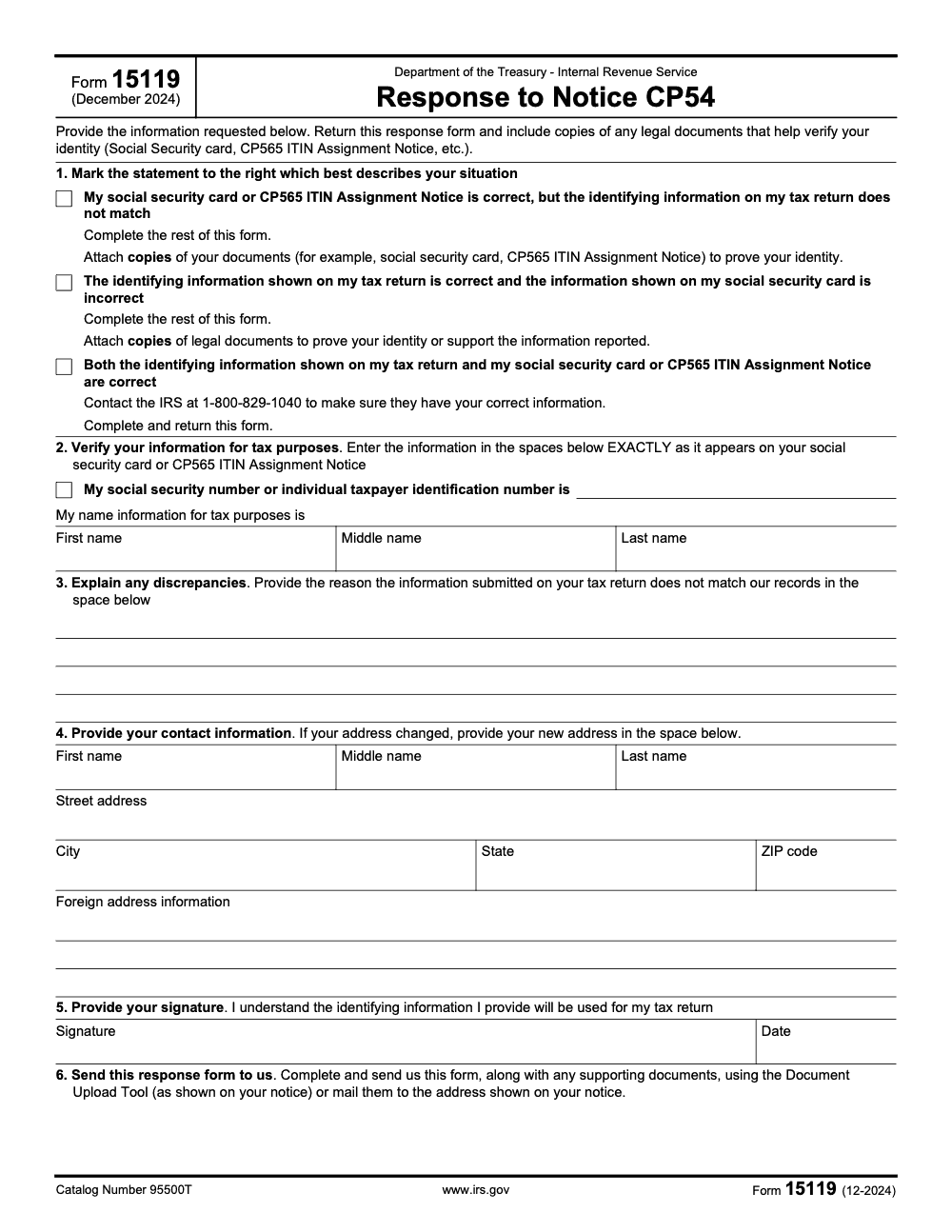
Form 15119, Response to Notice CP54 (Rev. December 2024, Catalog Number 95500T), is the one-page form you complete after the IRS sends you Notice CP54 because the name and Social Security number or ITIN on your return did not match IRS or SSA records. Per the official IRS form, you mark one of three situations in Section 1, verify your details in Sections 2 through 5, then submit it with copies of your identity documents through the Document Upload Tool or to the address on your notice.
The call that follows a CP54 notice usually opens with panic. A client sees the IRS is holding their refund and assumes the return was rejected. It almost never is. Notice CP54 means the name and Social Security number or ITIN on the return did not match IRS or Social Security Administration records, so the return sits until the taxpayer verifies their identity.
Form 15119, Response to Notice CP54 (Rev. December 2024, Catalog Number 95500T), is the one-page form that clears it. Section 1 has three checkbox scenarios; you mark the one that fits, verify your details in Sections 2 through 5, and attach copies, never originals, of identity documents such as a Social Security card or CP565 ITIN Assignment Notice. Submit it through the Document Upload Tool shown on the notice or by mail to the address printed on the CP54.
Key Takeaways
- Form 15119 is the Response to Notice CP54 (Rev. December 2024, Catalog Number 95500T). It is a one-page form you complete only after the IRS sends you Notice CP54.
- CP54 means the name and Social Security number or ITIN on your return did not match IRS or Social Security Administration records, so the IRS is holding the return until you verify your identity.
- Section 1 has three checkbox options. You mark the one that describes your situation, then complete the rest of the form.
- Attach copies, never originals, of identity documents such as your Social Security card or CP565 ITIN Assignment Notice.
- Submit the form and documents together using the Document Upload Tool shown on your notice, or by mail to the address printed on your CP54 notice. There are two submission methods, not a generic IRS address.
What Form 15119 Actually Is
Form 15119 is a single page issued by the Department of the Treasury, Internal Revenue Service, and titled Response to Notice CP54. The current revision is December 2024, printed in the footer as 12-2024 with Catalog Number 95500T. It is not a tax return and not a stand-alone filing. It exists for one purpose: to answer Notice CP54.
Per the official IRS form, Form 15119 reads, "Provide the information requested below. Return this response form and include copies of any legal documents that help verify your identity (Social Security card, CP565 ITIN Assignment Notice, etc.)." That single instruction tells you almost everything: you verify who you are, and you back it up with copies.
The form is organized into six numbered sections. Section 1 asks you to mark the statement that best describes your situation. Sections 2 through 5 collect your identifying information, your explanation, your contact information, and your signature. Section 6 tells you how to send it back. We walk through each one below.
Why Notice CP54 Lands in Your Mailbox
The IRS issues CP54 when the name and identifying-number combination on a filed return does not match what the IRS or the Social Security Administration has on record. The most common triggers I see are a name change after marriage or divorce that never reached SSA, a transposed Social Security number, or an ITIN that does not line up with the name on the return.
Here is the part that trips people up. CP54 does not mean your return was rejected, and it is not junk mail. It means the IRS is holding the return, and often the refund, until you confirm your identity. Form 15119 is the prescribed response that releases the hold.
So the urgency is real but the fix is routine. Mark the right scenario, verify your details exactly as your documents read, attach copies, and send it back through one of the two approved channels.
The Three Scenarios in Section 1
Section 1 gives you three mutually exclusive checkboxes. You pick the single statement that describes your situation, and your choice determines what you attach. Get this wrong and the IRS cannot tell which record is right.
Scenario 1: Your card is correct, the return is wrong
The first option says your Social Security card or CP565 ITIN Assignment Notice is correct, but the identifying information on your tax return does not match. When this applies, you complete the rest of the form and attach copies of your documents, such as the Social Security card or CP565 notice, to prove your identity.
Scenario 2: Your return is correct, the card is wrong
The second option says the identifying information on your tax return is correct and the information on your Social Security card is incorrect. Here you complete the rest of the form and attach copies of legal documents to prove your identity or support the information you reported. Note that fixing the SSA record itself is a separate step, covered further down.
Scenario 3: Both records are correct
The third option says both the identifying information on your tax return and your Social Security card or CP565 notice are correct. This one surprises people: you must still act. Contact the IRS at 1-800-829-1040 to make sure they have your correct information, and complete and return the form. Doing nothing leaves the return on hold.
Section by Section Walkthrough
Once Section 1 is marked, the rest of the one-page form is short. Take it in order and you will not miss a field.
Section 2: Verify your information for tax purposes
Enter your Social Security number or Individual Taxpayer Identification Number, then your name in three fields: first, middle, and last. The form is emphatic here. Enter the information EXACTLY as it appears on your Social Security card or CP565 ITIN Assignment Notice. Do not enter a preferred or newly married name that SSA has not yet recorded, because that recreates the very mismatch that triggered CP54.
Section 3: Explain any discrepancies
Provide, in the space given, the reason the information submitted on your return does not match IRS records. A short, plain explanation is enough, for example, "Last name changed after marriage; SSA update pending." Leaving this blank is a frequent stall point, because IRS staff cannot tell how to update your record without it.
Section 4: Provide your contact information
Give your name again in three fields and your address. The U.S. address block has four fields: street address, city, state, and ZIP code. A separate foreign address area is available if you do not live at a U.S. address. If your address changed since you filed the return, put the new address here.
Section 5: Provide your signature
Sign and date the form. By signing, you acknowledge that the identifying information you provide will be used for your tax return. An unsigned form is incomplete and will not resolve the case.
Attach Copies, Never Originals
The form is explicit: attach copies of your documents, for example a Social Security card or CP565 ITIN Assignment Notice, to prove your identity. The word that matters is copies. I have had clients mail an original Social Security card more than once, and recovering an original government document is a headache you do not need.
Scenarios 1 and 2 in Section 1 both require attached copies, and Section 6 instructs you to send the form along with any supporting documents. In practice, treat the documents as part of the form, not an optional add-on. Sending Form 15119 with no supporting copies will not clear the CP54 hold.
How To Submit Form 15119
Section 6 gives you two submission methods, and only two. Send the completed form, along with any supporting documents, using the Document Upload Tool shown on your notice, or mail them to the address shown on your notice. Both go to the IRS, not to SSA.
- Document Upload Tool. This is the online route referenced on your CP54 notice. It is the fastest path and gives you a digital trail of what you submitted and when.
- Mail. Send the form and copies to the address printed on your CP54 notice. Do not pick a generic IRS service center address the way you would mail a 1040, because CP54 cases route to a specific unit. Use a trackable mailing method and keep the receipt.
Whichever method you choose, keep the form and its supporting copies together in a single submission. Splitting them across two mailings or two uploads is a common reason a case sits longer than it should.
CP54 Is Not CP565
These two notice numbers look similar and get confused constantly, so let me draw a clean line. CP54 is the mismatch notice. It is the reason you are filling out Form 15119 in the first place, because the name and identifying number on your return did not match records.
CP565 is something else entirely. It is the ITIN Assignment Notice, the document the IRS sends when it assigns you an Individual Taxpayer Identification Number. On Form 15119, the CP565 notice is one of the identity documents you can copy and attach. So CP54 prompts the response; CP565 is proof you attach to it. They are not interchangeable.
SSN and ITIN Holders Both Receive CP54
A common assumption is that CP54 only goes to people with a Social Security number. It does not. Form 15119 accepts either an SSN or an ITIN as the verifying identifier, and Section 2 literally asks for "social security number or individual taxpayer identification number."
ITIN holders receive CP54 when the CP565-assigned ITIN does not line up with the name on the return. If you file with an ITIN, attach a copy of your CP565 ITIN Assignment Notice and enter the number exactly as it reads on that notice. The process is the same as for an SSN holder; only the identifier and the supporting document differ.
When the SSA Record Itself Is Wrong
Scenario 2 deserves a closer look, because it is where people assume one filing fixes everything. It does not. Form 15119 is filed with the IRS only. It resolves the IRS-side mismatch that is holding your return. It does not update your record at the Social Security Administration.
If your Social Security card information is actually wrong, for example a name that never got changed after marriage or a corrected date of birth, you have two separate tasks. First, use Form 15119 to tell the IRS which set of facts is correct and to attach supporting legal documents. Second, contact SSA separately to correct the underlying SSA record. Skipping the SSA step means the same mismatch can resurface on a future return.
A Clean Response Flow You Can Copy Today
Here is the exact sequence I walk a client through the day a CP54 notice arrives.
- Read the notice fully and confirm it is CP54. Note the address and the Document Upload Tool reference printed on it.
- Compare three things side by side: the name and number on the return, the Social Security card or CP565 notice, and what you believe the IRS has. Decide which of the three Section 1 scenarios fits.
- If Scenario 3 applies, call 1-800-829-1040 before you submit, then complete the form anyway.
- Complete Sections 2 through 5, entering name and identifier exactly as the card or CP565 notice reads, and write a one-line discrepancy explanation in Section 3.
- Make copies, not originals, of your identity documents and pair them with the form.
- Submit through the Document Upload Tool or mail to the address on the notice, then save a dated record of what you sent.
It is a short list, and it is boring on purpose. A boring process is one that closes the case on the first try.
Where Accountably Helps, Only When It Matters
For most individuals, a CP54 is a one-and-done response. Where it gets heavy is on the preparer side, when a firm is fielding a stack of identity-mismatch notices during filing season while also closing returns. That is the routine, not the rule, and routine is where misses happen.
Our team places trained offshore staff with structured review for the production work behind notices like CP54, including documented SOPs, a multi-layer review of identity verification, and continuity plans so a held return does not sit while someone is out. We work inside your tools and keep the process visible, so notices get answered correctly the first time and your senior people stay focused on advisory work.
Compliance Note and Final Check
Rules change and facts differ, so confirm the current instructions for your situation before you submit. Treat the points below as your last-mile check against the December 2024 revision of Form 15119.
- Trigger, you received Notice CP54. Do not file Form 15119 without it.
- Section 1, mark exactly one of the three scenarios.
- Section 2, enter your SSN or ITIN and name exactly as the Social Security card or CP565 notice reads.
- Section 3, write a short explanation of the discrepancy.
- Documents, attach copies of identity documents, never originals.
- Section 5, sign and date.
- Section 6, submit via the Document Upload Tool or mail to the address on your notice, with documents in the same submission.
Common Mistakes We See Every Season
The same handful of errors stall CP54 cases over and over, and almost all of them stem from treating Form 15119 like a routine filing instead of a precise identity-verification response. Here are the ones my team catches most often.
Reusable Checklists
These are copy-paste ready for a firm SOP or a personal to-do list. Each step is interactive, so you can check items off as you work a CP54 case.
CP54 intake and triage
- Confirm the notice is CP54 and note the response address and Document Upload Tool reference printed on it.
- Pull the filed return and identify the exact name and Social Security number or ITIN that was reported.
- Locate the current Social Security card or CP565 ITIN Assignment Notice for the taxpayer.
- Compare the return, the card or CP565 notice, and your understanding of IRS records to spot the mismatch.
- Decide which of the three Section 1 scenarios applies before touching the rest of the form.
- If Scenario 3 applies, schedule the call to the IRS at 1-800-829-1040.
Completing Form 15119
- Mark exactly one box in Section 1.
- In Section 2, enter the SSN or ITIN and the first, middle, and last name exactly as the card or CP565 notice reads.
- In Section 3, write a one-line explanation of why the return did not match records.
- In Section 4, enter current contact details and a new address if it changed since filing.
- In Section 5, sign and date the form.
- Re-read Section 2 against the source document one more time to confirm a character-for-character match.
Document package and submission
- Make copies, not originals, of the Social Security card, CP565 notice, or other legal identity documents.
- Pair the document copies with the completed form in a single package.
- Choose one submission method: the Document Upload Tool on the notice, or mail to the address on the notice.
- If mailing, use a trackable method and retain the receipt.
- Save a dated record of exactly what was submitted and how.
- Diary a follow-up date to confirm the hold on the return has lifted.
Keep 15119 Season From Stalling
Form 15119 has no fixed deadline, which is exactly why it stalls. Unlike a quarterly or annual filing, the December 2024 Response to Notice CP54 only shows up when a return triggers an identity mismatch, and those land in clusters during filing season when refunds are on hold and a team is already at capacity. A CP54 that sits in an inbox for three weeks is a refund that sits with it.
The fix is to treat every CP54 as a tracked workflow item from the moment it arrives, not as a piece of correspondence someone will get to. The form itself is only one page with six sections, so the bottleneck is rarely the form. It is the document gathering, the scenario decision, and the submission discipline around it.
- Log every CP54 with a case owner the day it arrives, and capture the response address and Document Upload Tool reference from the notice.
- Standardize the Section 1 scenario decision so the right copies, Social Security card or CP565 notice, get pulled the first time.
- Build a two-set review on Section 2, where one person enters the SSN or ITIN and name and a second confirms it matches the source document character for character.
- Require a one-line Section 3 explanation and a signed Section 5 before anything is queued for submission.
- Submit form and document copies together in a single transmission, then diary the follow-up that confirms the hold lifted.
That is the kind of structured, documented execution our team installs every day. If notice response is eating into your senior reviewers' time during peak weeks, our tax preparation and support services add trained capacity with built-in review so held returns clear quickly and your people stay on higher-value work.
FAQs
Form 15119, Response to Notice CP54 (Rev. December 2024), is the written response you send the IRS after you receive Notice CP54. It provides your identifying information and supporting documents so the IRS can resolve the name or identifying-number mismatch that is holding your return.
Yes. Form 15119 is a response-only form. Section 6 routes it to the address shown on your CP54 notice, so without that notice there is no place to send it. Do not attach Form 15119 to an original return or file it to head off a future mismatch.
No. The form instructs you to attach copies of legal documents that verify your identity, such as your Social Security card or CP565 ITIN Assignment Notice. Never mail originals, which are irreplaceable if lost.
No. If both records are correct, Section 1 directs you to contact the IRS at 1-800-829-1040 to confirm they have your correct information and to complete and return Form 15119. The IRS will not release the held return until you act.
Enter your SSN or ITIN and name in Section 2 exactly as they appear on your Social Security card or CP565 ITIN Assignment Notice. Entering a preferred or updated name that SSA does not yet recognize perpetuates the mismatch that triggered CP54.
There are two submission methods in Section 6. Send the form and your copied supporting documents together through the Document Upload Tool referenced on your notice, or mail them to the address shown on your CP54 notice. Do not send it to a generic IRS service center.
Other forms this guide names
- Form 1040: Filing Guide for 2025 Returns (AGI, Deductions, Deadlines)
About this guide
Accountably helps US CPA, EA, and accounting firms hire trained accountants and tax preparers in India.
About us Reviewed byJugal Thacker, CPAFounder and CEO at Accountably
A Washington-licensed CPA with 7+ years inside US firms – PwC, a real-estate tax practice, then a full-service firm, rising from reviewer to manager to advisory. This article was reviewed against current IRS guidance for the 2025 tax year and updated for filers preparing late returns, amendments, and 2026 estimates.
View profile →How we research, review, and update this guide
Every Accountably guide is researched against primary IRS sources, reviewed by a U.S. CPA, and refreshed as guidance evolves. Read our Editorial Guidelines to see how we source, fact-check, and update our content.




