
Summarize this article with AI
In Brief
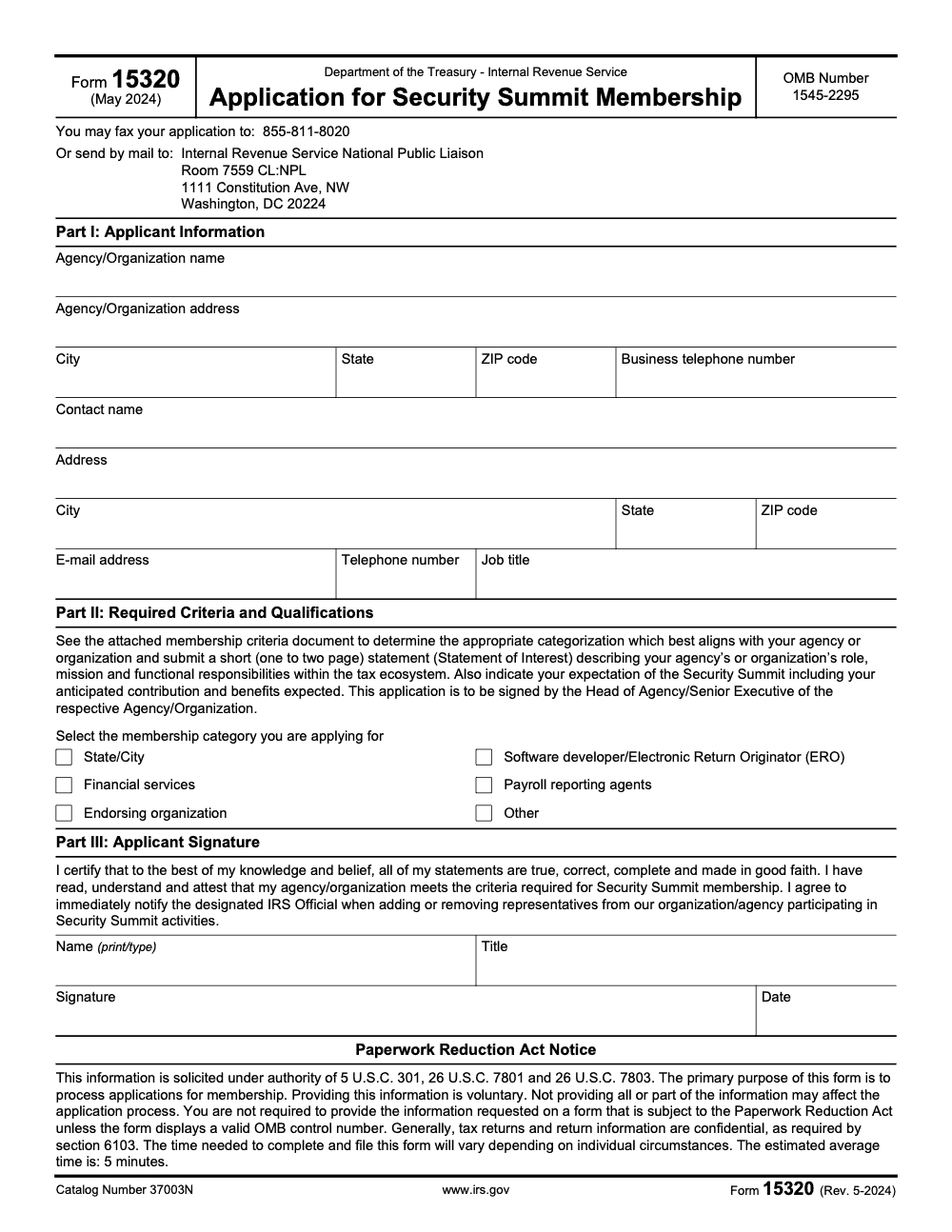
Form 15320 is the IRS Application for Security Summit Membership – an administrative form that agencies and organizations file to join the public-private Security Summit partnership focused on tax-related identity theft prevention. Per the form footer, the current revision is Rev. May 2024 with OMB No. 1545-2295. Submit by fax to 855-811-8020 or by mail to the IRS National Public Liaison office in Washington, DC. There is no e-file channel and no annual deadline; see other IRS forms for comparison.
Form 15320 looks like a five-minute job, and the IRS does estimate roughly five minutes to fill in the three short parts. The catch is everything that has to happen around it. The Statement of Interest runs one to two pages, the security narrative has to line up with Publication 4557 language, and Part III needs a Head of Agency or Senior Executive signature before anything moves. The form is quick; getting the packet approved is not.
This is the IRS Application for Security Summit Membership, the way agencies, software developers, EROs, financial firms, and payroll reporting agents join the public-private partnership built to fight tax-related identity theft. The current PDF is Rev. May 2024 with OMB No. 1545-2295. When the packet is ready, it goes by fax to 855-811-8020 or by mail to the IRS National Public Liaison office.
Key Takeaways
- Form 15320 is the IRS Application for Security Summit Membership, and the current PDF is Rev. May 2024 with OMB Control No. 1545‑2295 printed in the header. Always download a fresh copy from IRS.gov before you apply.
- Eligible organizations include state or city agencies, software developers or Electronic Return Originators (EROs), financial services firms, payroll reporting agents, endorsing organizations, or organizations applying under the Other category that operate within the tax ecosystem. You apply as an organization, not as an individual.
- You submit the form by fax to 855‑811‑8020 or by mail to IRS National Public Liaison, 1111 Constitution Ave NW, Room 7559 CL:NPL, Washington, DC 20224. Keep a complete copy.
- The IRS Security Summit page explains the program and links the application plus a one‑page example for your Statement of Interest. That page was last reviewed on July 1, 2025.
- Publication 5648‑A provides the Statement of Interest example. Use it to keep your narrative clear, specific, and aligned to Summit criteria.
What Form 15320 is and why it matters
Form 15320 is a short application that gets your organization vetted to participate in the IRS Security Summit, a public‑private partnership that protects the tax system against identity‑theft refund fraud. Membership places you in structured working groups and information‑sharing channels with the IRS, state tax agencies, and industry peers, so you can act on shared signals instead of guessing in isolation.
The Security Summit brings IRS, states, and industry together to share actionable threat intel, align on controls, and coordinate responses during filing season.
From a practical angle, Security Summit participation helps you tighten safeguards customers expect, reduce incident time, and demonstrate that you follow accepted practices like multi‑factor authentication, role‑based access, and documented incident response. For tax pros, Publication 4557 is a helpful companion as you formalize controls.
Who should apply with Form 15320
If you touch return preparation, transmission, payroll reporting, refund‑related products, or tax administration, you are in scope. The form’s category list includes State or City agencies, Software developer or ERO, Financial services, Payroll reporting agents, Endorsing organizations, and Other. Pick the category that truly matches the role you play in the ecosystem (the 'Other' category exists for organizations that operate within the tax ecosystem but fall outside the five named industry groups, not as a catch‑all for ineligible applicants).
Quick eligibility notes
- Organizations apply, not individuals, and a senior executive signs.
- You attach a one to two page Statement of Interest that explains your role, responsibilities, and how you will contribute. The IRS provides a one‑page example to follow.
- If you are an e‑file provider, align your security language with the expectations in Publications 1345 and 3112 where relevant. It shows reviewers you speak the same standards.
What to prepare before you start
You will only fill one page, but the quality of your attachments determines the speed of review. Build a small “evidence pack” before you type.
Evidence pack checklist
- Your exact legal name, EIN, address, and a responsive primary contact
- A one to two page Statement of Interest using the IRS example as your outline
- A brief description of safeguards you actually use, for example MFA, least‑privilege access, logging, vendor reviews, incident playbook, and escalation paths
- References to practitioner security guidance you already follow, for example Pub. 4557, Pub. 1345 if applicable
- Any prior coordination with states or the IRS that shows you can contribute to joint defenses
- Signature routing, so your executive signer can approve without delays
Keep the IRS Security Summit page and the Statement of Interest example open while drafting. Those two items answer most formatting questions up front.
Step‑by‑step, how to complete Form 15320
Open the current PDF from IRS.gov. Confirm the header shows Form 15320, Rev. May 2024, and OMB Control No. 1545‑2295. Work through the parts in order and keep your Statement of Interest nearby.
Part I, Applicant information
- Enter your exact legal name, address, and business phone.
- List a real person as primary contact, with direct email and phone.
- If the contact is different from HQ, use the separate address lines.
Why this matters, reviewers need a reachable person to answer quick clarifications. The fastest approvals I have seen always had a responsive, informed contact in Part I.
Part II, Required criteria and qualifications
Select your category, then attach a one to two page Statement of Interest (the form expressly directs this attachment – it is not an optional add‑on). The IRS example outlines what to cover, your role, mission, responsibilities, expected contribution, and benefits you anticipate from membership. Keep it specific, not marketing language.
Helpful angles to include
- Where you sit in return, payroll, or refund workflows, including any APIs or data exchanges
- Concrete safeguards you use today, for example MFA for all staff, access reviews, centralized logging, vendor due diligence, and your incident playbook with on‑call roles
- Links to the standards you already follow, for example Pub. 1345 sections on security and fraud prevention for e‑file providers
Part III, Signature
A Head of Agency or Senior Executive signs and dates the form (a department head, project lead, or the primary contact listed in Part I does not satisfy this requirement unless they are also the actual head or senior executive), certifying your statements are true and that you will notify the IRS immediately whenever Summit representatives are added or removed (a continuing obligation after approval, not a one‑time disclosure made only at application time). Plan signature routing in advance, since unsigned applications stall.
Where and how to submit
Use the methods printed on the current PDF. You can fax or mail your application (there is no e‑file channel or online portal for Form 15320 – fax or mail only):
- Fax, 855‑811‑8020
- Mail, Internal Revenue Service, National Public Liaison, Room 7559 CL:NPL, 1111 Constitution Ave NW, Washington, DC 20224
Fax is usually faster for intake. If you mail, use a trackable service and keep your full packet, including your Statement of Interest.
Use the Security Summit page as your hub
The Security Summit page explains the partnership and points to the membership application and the one‑page Statement of Interest example. It also lists a contact email for questions, publicliaison@irs.gov. Bookmark this page, the IRS updates it as program materials change.
What happens after you apply
After intake, the IRS coordinates review with state and industry partners. If something needs clarification, they will email or call the Part I contact you listed. A simple flow looks like this:
- Completeness check and acknowledgment
- Multi‑partner review
- Clarifications, if needed
- Decision and onboarding steps
Response time depends on volume and clarity. Specific statements that map to your real controls tend to move faster than generic promises. The Security Summit hub remains the best public explainer of how membership works.
Pre‑submission checklist you can copy
| Step | What to include | Owner | Status |
| Legal identity | Exact legal name, EIN, address | Legal | |
| Primary contact | Name, title, direct email and phone | Compliance | |
| Category selection | State or City, Software developer or ERO, Financial services, Payroll reporting agent, Endorsing org, Other | App owner | |
| Statement of Interest | 1–2 pages using the IRS example | Program lead | |
| Security summary | MFA, access controls, logging, vendor checks, incident playbook | Security | |
| Signature plan | Executive signer and date | EA | |
| Submission | Fax, then track mailed copy if used | App owner |
Use Publication 5648‑A as your outline for the Statement of Interest, then translate that outline into your actual operations, tools, and roles.
OMB Control No. 1545‑2295, what it means for you
You will see OMB Control No. 1545‑2295 in the top right of the current Form 15320. That number confirms you are responding to an approved information collection under the Paperwork Reduction Act. The Rev. May 2024 PDF displays this number and lists an estimated average completion time of five minutes in the PRA notice.
If your internal reviewers like a paper trail, keep two checks on file. First, save the exact PDF you submitted that shows the OMB number. Second, keep a screenshot or note from the IRS forms index that lists Form 15320 with the posted date, so you can show you used the current file as of the day you submitted. The IRS index still lists Form 15320 with a May 1, 2024 posting and shows a last‑reviewed date of August 6, 2025 on the index page that includes it.
For completeness, OMB’s public catalog associates Control No. 1545‑2295 with “Form 15320, Application for Security Summit Membership,” which is useful when an auditor wants to see the mapping between the IRS form and the OMB record.
Build a crisp Statement of Interest, two short examples
Here are two simple patterns you can adapt without fluff. Keep it specific and operational.
Example A, software developer and ERO
- Role, we provide tax preparation software used by preparers and direct filers, and we operate an e‑file transmission platform.
- Security, MFA for all staff and partners, SSO with conditional access, quarterly access reviews, centralized logging, vendor risk reviews, and an incident playbook with on‑call rotation.
- Contribution, we share early indicators observed across our network and nominate a technical lead for Summit working groups.
- Standards, we align our security and fraud‑prevention controls with Publication 1345 and keep e‑file participation current per Publication 3112.
Example B, payroll reporting agent
- Role, we process payroll and submit federal and state returns for small employers.
- Security, minimum password length with MFA, segmented network, SOC reports available on request, phishing simulations, and tested incident procedures.
- Contribution, we supply weekly signal summaries on anomalous wage filings and coordinate with state partners during filing peaks.
- Awareness, we train staff using Publication 4557 and publish a short WISP that maps to those controls.
Security expectations and helpful IRS materials
Security Summit members handle sensitive taxpayer data, so reasonable safeguards are table stakes, not a nice‑to‑have. If you are still maturing documentation, Publication 4557 gives step‑by‑step basics on passwords, MFA, encryption, backups, access controls, and incident response. Many teams pair Pub. 4557 with a short written information security plan as their baseline.
The Security Summit page is your hub for membership language, program updates, and links to related resources. Use it to confirm you have the latest application and the one‑page Statement of Interest example before you submit. If a detail is unclear, email the address on that page for guidance.
Tip, show reviewers what you do, not what you hope to do. One line on real MFA beats a paragraph of promises. Anchor claims to standards where they apply, for example Publication 1345 sections on safeguarding e‑file.
Common mistakes that slow approvals
When Form 15320 applications stall, the recurring pattern is rarely the form itself. It is the supporting documentation, the wrong signer, or a misread of the submission channel. The mistakes below come up across categories from State or City agencies to Software developers and EROs.
Step‑by‑step filing walkthrough
- Download the current Form 15320 PDF from IRS.gov. Confirm the header shows OMB No. 1545‑2295 and Rev. May 2024.
- Draft a one to two page Statement of Interest using the IRS example as your template. Keep it specific and aligned to your selected category.
- Complete Part I with exact legal information and a responsive primary contact.
- In Part II, select your category and reference your attached Statement of Interest.
- Route for executive signature and sign Part III.
- Submit by fax to 855‑811‑8020, or mail to IRS National Public Liaison at 1111 Constitution Ave NW, Room 7559 CL:NPL, Washington, DC 20224. Keep a copy.
- Monitor your inbox for acknowledgment or follow‑ups. Use the Security Summit page as your reference if you need to confirm any program detail.
Simple internal review flow that works
- Draft owner completes Part I and drafts the Statement of Interest
- Security lead edits the security section for accuracy
- Executive reviews and signs Part III
- Application owner faxes and logs the submission
- Primary contact responds to inquiries within one business day
If you operate multiple entities, run this loop for each application, then keep a shared evidence folder for audits.
Quick tables, so your team can move fast
Evidence table for the Statement of Interest
| Section | What reviewers look for | Good example |
| Role in the ecosystem | Clear position in return, payroll, or refund flows | “We operate e‑file transmission and validate EFINs for 6,000 preparers.” |
| Security controls | Specific safeguards in production today | “MFA for all staff, least‑privilege access, centralized logs with daily review.” |
| Contribution | How you will add value to Summit efforts | “Weekly signal summaries Jan–May, monthly Jun–Dec if applicable.” |
| Standards | References to relevant IRS pubs | “Mapped to Pub. 1345 sections on security and fraud prevention.” |
Submission table
| Step | Evidence or action |
| Prepare | Current Form 15320 PDF, Rev. May 2024, OMB 1545‑2295 |
| Verify | Authorized representative and contact details match your records |
| Submit | Fax 855‑811‑8020 or mail to IRS National Public Liaison |
| Track | Save confirmation, monitor inbox for follow‑ups |
All submission details come straight from the current PDF.
FAQ, quick answers in 2–4 sentences
Is Form 15320 current for the 2025 season?
Yes. The IRS forms index still lists Form 15320 with a May 1, 2024 posting, and the Security Summit program page was reviewed in 2025. Download a fresh PDF from IRS.gov on the day you submit.
Where do I send the application?
Fax it to 855‑811‑8020, or mail it to IRS National Public Liaison, Room 7559 CL:NPL, 1111 Constitution Ave NW, Washington, DC 20224. Keep a full copy of everything you send.
What should my Statement of Interest include?
Follow the IRS example. Explain your role, mission, and responsibilities, outline the controls you already use, and describe how you will contribute to shared defenses. Keep it one to two pages and tie it to your selected category.
Who can answer program questions?
The Security Summit page lists an email for questions to IRS National Public Liaison. Use that channel for membership specifics that are unique to your organization.
When in doubt, trust the form and program page you download from IRS.gov. They are the sources of truth for the current process and contacts.
Micro‑templates you can paste into your Statement of Interest
Security summary paragraph
“We enforce multi‑factor authentication for all staff and trusted partners, restrict privileged roles to named accounts, and log administrative actions. We review access quarterly, complete vendor risk checks annually, and test our incident plan before filing season. We use encryption for stored data and require a VPN for remote access. We monitor alerts daily and escalate to on‑call responders within defined timeframes.” (Align with Publication 4557 and, if applicable, Publication 1345.)
Contribution paragraph
“As a member, we will share early indicators of suspicious activity observed across our systems, collaborate in Security Summit working groups, and nominate a technical lead for pre‑filing authentication pilots. From January through May we will provide weekly signal summaries, and from June through December we will provide monthly summaries, or more often if requested.”
Category declaration sentence
“We are applying as a [State or City agency / Software developer or ERO / Financial services provider / Payroll reporting agent / Endorsing organization / Other] and our operations map to that category as follows.”
How Accountably fits, only where it helps
If your team is already stretched during peak months, drafting the Statement of Interest and corralling signatures can feel like one task too many. Our team at Accountably helps CPA and EA firms tighten SOPs, standardize workpapers, and add a simple review cadence, which makes Security Summit documentation easier to assemble and keep current. We work in your systems, your templates, and your workflow, so nothing breaks while you file. Use us if you need structure during busy season, skip us if you already have it dialed in.
Compliance notes and sources to bookmark
- Form 15320 PDF, Rev. May 2024, displays OMB No. 1545‑2295, submission methods, and signature requirements.
- Security Summit program page, includes the membership application language and links, and shows a July 1, 2025 review date.
- Publication 5648‑A, one‑page Statement of Interest example.
- Publication 4557 for practitioner security basics, plus Publications 1345 and 3112 when e‑file roles apply.
- OMB catalog mapping 1545‑2295 to Form 15320, useful for your records log.
About this guide, brief disclosure
This article was drafted by our editorial team with AI‑assisted link checks to confirm the latest IRS PDFs and pages for November 28, 2025, then a human reviewed every section for clarity and accuracy. Primary references are the current Form 15320 PDF, the Security Summit program page, and the Statement of Interest example.
Final nudge
If you meet the criteria and can contribute to shared defenses, apply now. The form is short, the impact is real, and your clients will never see the fraud you helped prevent. Download the current PDF, write a concrete Statement of Interest, get the signature, and send it with confidence.
Reusable Checklists
Three checklists you can paste into your firm's SOP library or run through during your next executive review. Each one is built around the actual sections and requirements on Form 15320, Rev. May 2024, per the form footer.
Pre-submission packet
- Download the current Form 15320 PDF from IRS.gov and confirm the header reads Rev. May 2024 with OMB No. 1545-2295.
- Decide on the Part II membership category using the separate IRS membership criteria document.
- Draft the Statement of Interest, one to two pages, covering role, mission, responsibilities, Summit expectations, contribution, and expected benefits.
- Complete Part I with the exact legal organization name, business address, primary contact, and contact email and phone.
- Confirm the Part III signer is the Head of Agency or a Senior Executive named in your authority schedule.
- Map at least three security controls to Publication 4557 sections, with one concrete example for each.
- Reconfirm the fax number 855-811-8020 and the mailing address Room 7559 CL:NPL, 1111 Constitution Ave NW, Washington, DC 20224.
Statement of Interest review
- Role and mission paragraph reads as organizational identity in the tax ecosystem, not a job description.
- Functional responsibilities listed as concrete operations, for example e-file transmission or EFIN validation.
- Summit expectations stated in one paragraph, what your organization expects to gain and contribute.
- Anticipated contribution describes cadence and channels, for example weekly signal summaries from January through May.
- Expected benefits reference shared defenses, intelligence access, and working group participation.
- Security controls cite specific sections of Publication 4557 or, where applicable, Publication 1345.
- Page count confirmed at one to two pages, no longer.
- Selected Part II category matches the Statement language and the named functional role.
Post-submission tracking
- Save the fax confirmation page or the certified mail receipt in the Summit folder with the signed application copy.
- Log the submission date and reference identifier in your IRS correspondence tracker.
- Calendar a 60-day check-in to follow up if no acknowledgment is received from IRS National Public Liaison.
- Designate a primary contact for follow-up inquiries with a one business day response SLA.
- Build representative change notification into HR onboarding and offboarding workflows so the continuing obligation is covered automatically.
- Schedule an annual file review against the latest Form 15320 revision and the current Security Summit program page.
Keep 15320 Season From Stalling
Form 15320 looks short on paper. The IRS estimates roughly five minutes to complete the three parts, per the form footer, and the application itself is one form. The real time sink lives in the supporting work, drafting the one to two page Statement of Interest, mapping your security controls to Publication 4557 language, and routing Part III to the Head of Agency or a Senior Executive for signature. For teams running production during peak filing months, those three steps tend to slide until they collide with quarter-end.
The application is not the bottleneck. The calendar and the chain of custody are. Treat the 15320 like a small project with a fixed checklist, named owners for each part, and a target ship date that sits well before your busiest weeks.
- Lock in the Part II membership category first. The six options on the form are State or City, Financial services, Endorsing organization, Software developer or ERO, Payroll reporting agents, and Other. Picking the wrong category forces a rewrite of the Statement of Interest.
- Draft the Statement of Interest in five labeled sections matching the IRS prompts: role and mission, functional responsibilities, expectations of the Summit, anticipated contribution, and expected benefits. Cap it at two pages.
- Cite specific controls from Publication 4557 or Publication 1345 by section, not by promise. MFA enforcement, least-privilege access, encryption at rest, and logged administrative actions read as real safeguards.
- Route Part III for Head of Agency or Senior Executive signature on a 48-hour SLA. Delegated signatures get rejected per the Part III instructions.
- Keep a submission packet on file: signed Form 15320, attached Statement of Interest, and the fax confirmation page for 855-811-8020 or the certified mail receipt for the Room 7559 CL:NPL mailing address.
If your team is already stretched, we help organizations build the documentation discipline that makes administrative filings like Form 15320 routine rather than a quarter-end fire drill. See how our tax outsourcing services integrate into existing workflows and review cycles.
FAQs
Yes. The IRS forms index still lists Form 15320 with a May 1, 2024 posting, and the Security Summit program page was reviewed in 2025. Download a fresh PDF from IRS.gov on the day you submit.
Fax it to 855‑811‑8020, or mail it to IRS National Public Liaison, Room 7559 CL:NPL, 1111 Constitution Ave NW, Washington, DC 20224. Keep a full copy of everything you send.
Follow the IRS example. Explain your role, mission, and responsibilities, outline the controls you already use, and describe how you will contribute to shared defenses. Keep it one to two pages and tie it to your selected category.
The Security Summit page lists an email for questions to IRS National Public Liaison. Use that channel for membership specifics that are unique to your organization.
When in doubt, trust the form and program page you download from IRS.gov. They are the sources of truth for the current process and contacts.
About this guide
Accountably helps US CPA, EA, and accounting firms hire trained accountants and tax preparers in India.
About us Reviewed byJugal Thacker, CPAFounder and CEO at Accountably
A Washington-licensed CPA with 7+ years inside US firms – PwC, a real-estate tax practice, then a full-service firm, rising from reviewer to manager to advisory. This article was reviewed against current IRS guidance for the 2025 season and updated for organizations preparing a Security Summit membership application on Form 15320.
View profile →How we research, review, and update this guide
Every Accountably guide is researched against primary IRS sources, reviewed by a U.S. CPA, and refreshed as guidance evolves. Read our Editorial Guidelines to see how we source, fact-check, and update our content.




