
Summarize this article with AI
In Brief
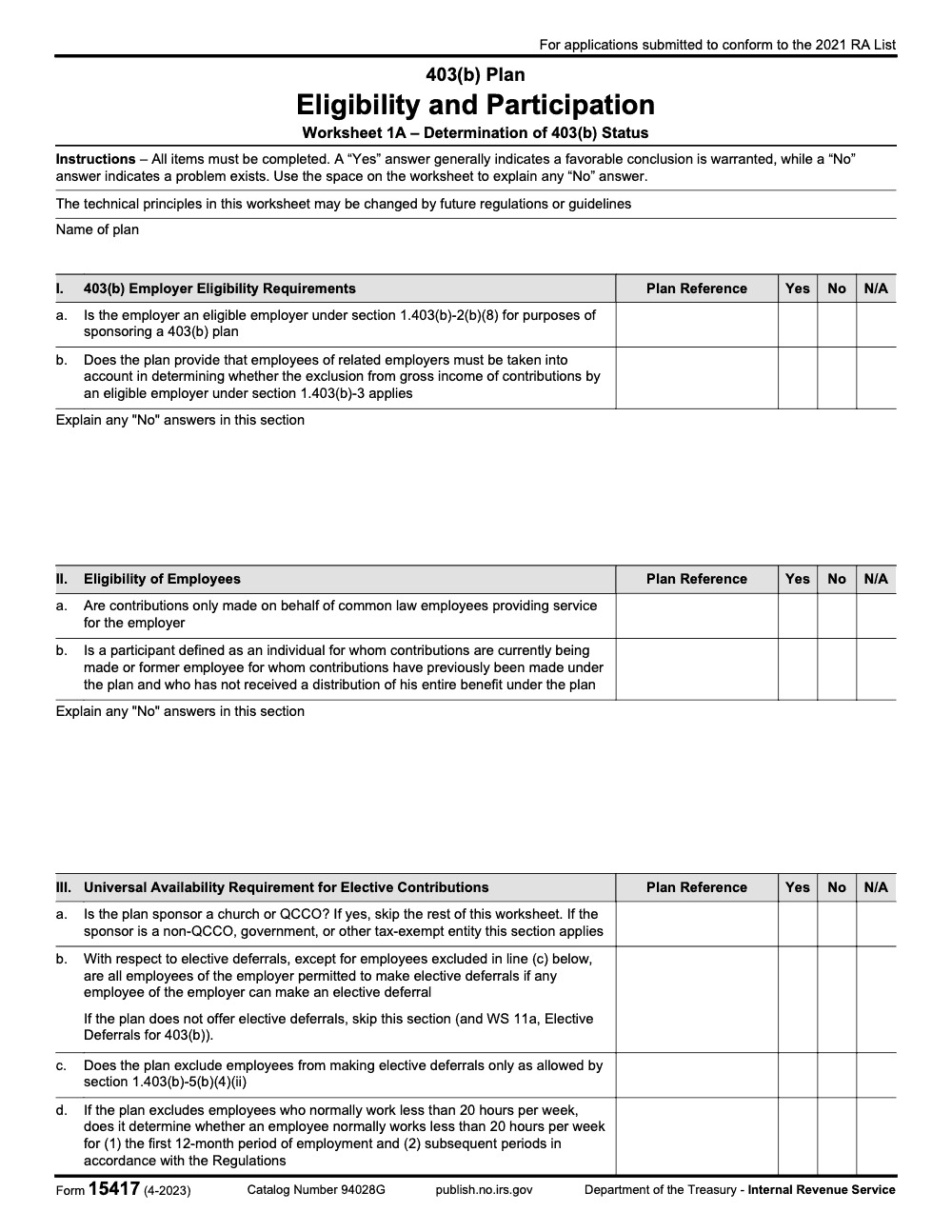
Form 15417 is the IRS 403(b) Plan Eligibility and Participation, Worksheet 1A – the determination-letter worksheet a plan sponsor completes so an IRS Employee Plans specialist can confirm the plan meets the eligibility and participation rules (Form 15417, Rev. 4-2023, Cat. No. 94028G). It is not a taxpayer return: it runs four sections (I through IV), conforms to the 2021 Required Amendments List, and every item gets a Yes, No, or N/A with the supporting plan provision noted in the Plan Reference column. For help preparing the underlying plan and supporting workpapers, see our tax services.
On a 403(b) determination file, the single column that decides whether the worksheet holds up is Plan Reference. Form 15417, the 403(b) Plan Eligibility and Participation Worksheet 1A (Rev. 4-2023, Cat. No. 94028G), is what a plan sponsor completes so an IRS Employee Plans specialist can confirm the plan meets the eligibility and participation rules.
It is not a taxpayer return and never lands on an individual income tax return. The worksheet runs four sections, I through IV, covering employer eligibility, employee eligibility, universal availability for elective contributions, and non-elective contributions. Every item gets a Yes, No, or N/A, never a blank, and every Yes should point to the exact plan article behind it. The form conforms to the 2021 Required Amendments List and remains current for 2025 determination-letter submissions.
Key Takeaways
- Form 15417 is the IRS 403(b) determination-letter worksheet (Worksheet 1A), not a taxpayer return or a payment voucher. An IRS Employee Plans specialist uses it to confirm the plan satisfies the eligibility and participation rules.
- The worksheet has four sections: I (employer eligibility), II (eligibility of employees), III (universal availability for elective contributions), and IV (participation requirements for non-elective contributions). The current revision is Form 15417 (Rev. 4-2023, Cat. No. 94028G).
- Every item must be completed across Sections I through IV. Mark each row Yes, No, or N/A, never leave a blank, and explain any No answer in the section's narrative field.
- The worksheet uses four answer columns: Plan Reference, Yes, No, and N/A. Every Yes should point to the exact plan article and section that supports it in the Plan Reference column.
- Section III universal availability is all-or-nothing: if any employee may defer, every employee must be allowed to, except the categories permitted under Treas. Reg. §1.403(b)-5(b)(4)(ii).
- The form conforms to the 2021 Required Amendments List (Notice 2021-64) and remains the current version for 2025 determination-letter submissions.
What Form 15417 Covers In Practice
At its core, Form 15417 is the IRS 403(b) Plan Eligibility and Participation Worksheet 1A used in the determination-letter program. You answer each worksheet item Yes, No, or N/A across Sections I through IV, and you record the supporting plan article and section in the Plan Reference column behind every Yes. A Yes answer generally indicates a favorable conclusion is warranted, while a No answer indicates a problem exists that you must explain in the space provided.
The worksheet is the bridge between the plan document and the IRS reviewer. Each line maps a regulatory requirement to a specific provision in the plan, so the reviewer can confirm the document says what the law requires. When the cross-referencing is done well, the review moves quickly; when Plan Reference cells are blank, it stalls.
A Quick Definition
- What it is: the IRS Employee Plans determination-letter worksheet (Worksheet 1A) a sponsor completes to confirm a 403(b) plan meets the eligibility and participation rules.
- What it is not: a taxpayer return, a contribution form, or a payment voucher. It never appears on an individual return; it is reviewed by IRS Employee Plans specialists during the 403(b) determination-letter process.
How The Worksheet Is Structured
Form 15417 organizes the eligibility and participation review into four numbered sections, each with its own answer rows and a narrative field for explaining any No answer.
- Section I, 403(b) Employer Eligibility Requirements
- Section II, Eligibility of Employees
- Section III, Universal Availability Requirement for Elective Contributions
- Section IV, Participation Requirements for Non-Elective Contributions
Each row carries four answer columns: Plan Reference, Yes, No, and N/A. The Plan Reference column is where you record the exact plan article and section that supports the answer. The instructions are explicit that all items must be completed, so every row needs a response even when the right answer is N/A.
One technical caution worth keeping in mind: the worksheet itself notes that the technical principles it reflects may be changed by future regulations or guidelines, so treat it as the current snapshot rather than a permanent statement of the law.
Section I, Employer Eligibility
Section I asks two things. First, is the employer an eligible employer under Treas. Reg. §1.403(b)-2(b)(8) for purposes of sponsoring a 403(b) plan? That category covers public schools, §501(c)(3) organizations, churches and QCCOs, and certain ministers. For-profit employers and most government employers other than public schools simply do not qualify, no matter how the entity is taxed.
Second, does the plan provide that employees of related employers must be taken into account when determining whether the §1.403(b)-3 exclusion from gross income applies? A plan that treats each related entity as standalone for that testing fails this requirement, even when each entity is independently eligible.
Why The Eligible-Employer Test Comes First
A failure at Section I(a) unwinds the rest of the worksheet, so document the eligible-employer basis before you work any later section. From my side of the desk, this is the cheapest place to catch a problem and the most expensive to miss.
The Related-Employer Aggregation Point
The aggregation rule is easy to overlook in multi-entity systems. Confirm the plan language pulls related-employer employees into the §1.403(b)-3 analysis, then cite the controlling plan section in the Plan Reference column so the reviewer can see it in seconds.
Section II, Eligibility Of Employees
Section II confirms two definitional points. First, are contributions made only on behalf of common law employees providing service for the employer? Independent contractors and 1099 workers are not eligible, and treating them as eligible disqualifies the contributions.
Second, is a participant defined as an individual for whom contributions are currently being made, or a former employee for whom contributions have previously been made who has not received a distribution of the entire benefit? A definition that drops former employees with undistributed balances is wrong; they remain participants until the full benefit is distributed.
- Common law employees only, never independent contractors or volunteers.
- The participant definition must reach former employees until the entire benefit is distributed.
Section III, Universal Availability
Section III starts with a gating question: is the plan sponsor a church or QCCO? If yes, you skip the rest of the section. Note the narrow carve-out, only true churches and Qualified Church-Controlled Organizations qualify; non-QCCO church-affiliated organizations remain subject to universal availability. If the plan does not offer elective deferrals at all, the section is also skipped (along with Worksheet 11a).
The core rule is all-or-nothing. If any employee of the employer is permitted to make an elective deferral, then all employees must be permitted to, except those statutorily excluded under Treas. Reg. §1.403(b)-5(b)(4)(ii). This is not a §401(a)(4)-style nondiscrimination balancing test; partial coverage violates the rule.
The Four Permitted Exclusions
The only categories a plan may exclude from elective deferrals are the four allowed by §1.403(b)-5(b)(4)(ii):
- Nonresident aliens without U.S.-source income
- Certain students performing services described in §3121(b)(10)
- Employees who normally work fewer than 20 hours per week
- Employees eligible to defer under another 401(k), 403(b), or governmental 457(b) of the same employer
You cannot exclude by job classification, location, division, or leased status. Those exclusions break universal availability.
Effective Opportunity And Notice
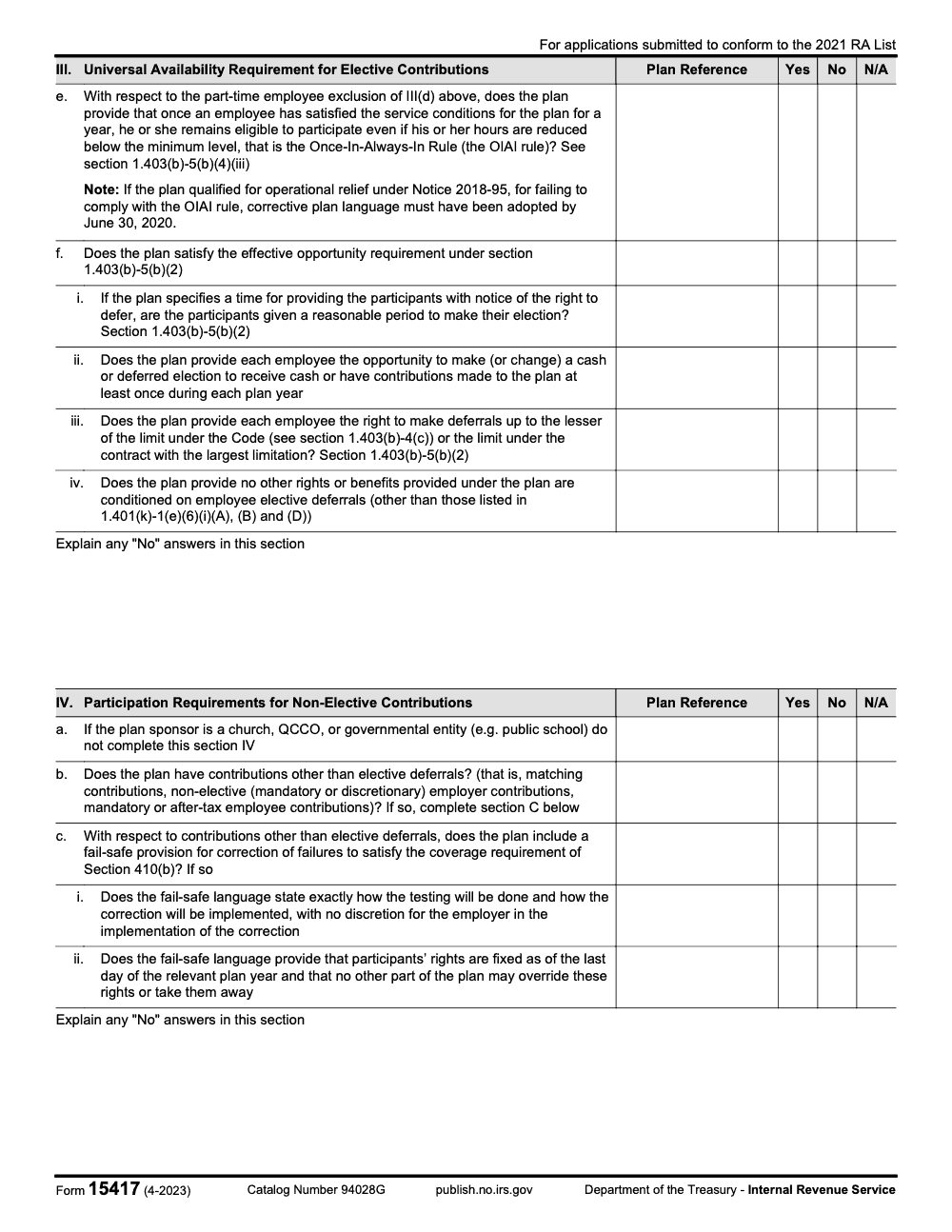
The plan must satisfy the effective-opportunity requirement of §1.403(b)-5(b)(2): a meaningful chance for each employee to elect to defer (or not to). If the plan specifies a time for providing notice of the right to defer, participants must get a reasonable period to make their election.
The 20-Hour Exclusion And OIAI Rule
If the plan uses the part-time exclusion, it must determine whether an employee normally works fewer than 20 hours per week for two windows: the first 12-month period of employment, and each subsequent measurement period in accordance with the Regulations. A blanket exclusion of all part-timers without a per-period hours test is invalid.
Once an employee has satisfied the service conditions and earned eligibility for a year, the Once-In-Always-In rule under §1.403(b)-5(b)(4)(iii) keeps them eligible even if their hours later drop below the 20-hour level. You cannot re-test a participant back out of the plan.
The Notice 2018-95 Corrective Deadline
Plans that took the operational relief under Notice 2018-95 for failing to comply with the OIAI rule had to adopt corrective plan language by June 30, 2020. That relief was time-limited, not permanent. A plan that operated under the relief but never amended by that date has a document failure to correct under EPCRS.
Why This Matters For Scale
When you standardize how each row ties back to a plan provision, you eliminate friction in the determination-letter review and reduce back-and-forth with the reviewer. Partners stop firefighting, staff stop re-tracing the same regulation, and the worksheet ships complete the first time. At Accountably, we set this up as a simple SOP for firms and it consistently lowers rework, especially during peak prep cycles, without adding headcount.
Effective Opportunity Requirements
Section III(f) drills into what an effective opportunity actually looks like. Even when a plan offers deferrals to everyone, it can still fail universal availability if the opportunity is hollow on paper.
The Four Effective-Opportunity Subitems
Under Section III(f), the worksheet asks four things (subitems i through iv):
- If the plan specifies a time for notice of the right to defer, participants get a reasonable period to make their election (§1.403(b)-5(b)(2)).
- The plan gives each employee the opportunity to make or change a cash-or-deferred election at least once during each plan year.
- The plan gives each employee the right to defer up to the lesser of the limit under the Code (see §1.403(b)-4(c)) or the limit under the contract with the largest limitation.
- No other rights or benefits under the plan are conditioned on elective deferrals, other than those listed in §1.401(k)-1(e)(6)(i)(A), (B), and (D).
The Intentional Omission Of Subparagraph (C)
Notice the carve-out lists (A), (B), and (D) but not (C). That omission is deliberate. Subparagraph (C) permits a 401(k) benefit that does not extend to 403(b) plans, so conditioning any right or benefit on deferrals outside (A), (B), and (D) violates universal availability.
An Annual Window, Not Just A Hire-Date Window
A common drafting error is offering an election only at hire with no later annual window. That fails the effective-opportunity prong. Confirm the plan gives every employee an annual chance to start, stop, or change a deferral election.
Mapping Each Answer To The Plan
| Worksheet Item | What It Tests | Plan Reference To Cite |
| III(f)(i) | Reasonable notice period | Notice/enrollment provision |
| III(f)(ii) | Annual election opportunity | Cash-or-deferred election article |
| III(f)(iii) | Deferral up to the §1.403(b)-4(c) or contract limit | Contribution-limit provision |
| III(f)(iv) | No improperly conditioned benefits | Benefit-conditioning provision |
Section IV, Non-Elective Contributions
Section IV covers participation requirements for contributions other than elective deferrals. Start with the gating question: if the plan sponsor is a church, QCCO, or governmental entity (such as a public school), you do not complete Section IV. Note the carve-out is narrower than "all tax-exempts," a non-QCCO §501(c)(3) employer is subject to Section IV.
Then ask whether the plan has contributions other than elective deferrals. That includes matching contributions, non-elective (mandatory or discretionary) employer contributions, and mandatory or after-tax employee contributions. Matching counts here even though it is triggered by deferrals. If the plan has any of these, complete Section IV(c).
- Church, QCCO, or governmental sponsor, skip Section IV.
- Matching, non-elective, or mandatory/after-tax employee contributions present, complete Section IV(c).
The §410(b) Fail-Safe Provision
For non-elective contributions, the plan may include a fail-safe provision to correct failures to satisfy the §410(b) minimum coverage requirement. Section IV(c) then tests whether that fail-safe is properly drafted across two subitems (i and ii).
No Employer Discretion (IV(c)(i))
The fail-safe language must state exactly how the §410(b) coverage testing will be done and how the correction will be implemented, with no discretion left to the employer. A clause that lets the employer choose later which employees come into coverage does not qualify; the correction must be mechanical.
Fixed Rights (IV(c)(ii))
The fail-safe must lock participants' rights as of the last day of the relevant plan year, with no other plan provision allowed to override or take those rights away. Confirm both subitems before you answer Yes, and cite the controlling plan section in the Plan Reference column.
A Working Sequence For Section IV
- Confirm whether the sponsor is a church, QCCO, or governmental entity; if so, Section IV does not apply.
- Identify whether the plan has matching, non-elective, or mandatory/after-tax employee contributions.
- If so, locate the §410(b) fail-safe language and test it against both subitems.
- Verify the fail-safe is mechanical (no discretion) and fixes rights as of the last day of the plan year.
- Record the supporting plan article and section in the Plan Reference column.
Common Deficiencies And How To Prevent Them
Most determination-letter delays come from small, predictable gaps. Fixing them before you submit saves weeks of back-and-forth.
- Blank Plan Reference cells, where a Yes is not tied to a plan article and section. Build the cross-reference before you answer a single row.
- Blank rows, where an item that "does not apply" is skipped instead of marked N/A. All items must be completed.
- Eligibility errors, where a for-profit or non-school government employer is treated as eligible. Confirm §1.403(b)-2(b)(8) status at Section I(a) first.
- Universal-availability errors, where the plan excludes by job class, division, or location instead of the four permitted categories.
- Missing No explanations, where a No answer has no narrative in the section's explanation field. Every No requires a written explanation.
A Simple Prevention Table
| Deficiency | Prevention Step |
| Blank Plan Reference | Pre-map each item to a plan article and section |
| Skipped item | Mark N/A, never leave a row blank |
| Wrong eligible-employer call | Document §1.403(b)-2(b)(8) basis at Section I(a) |
| Improper exclusion | Exclude only by the four §1.403(b)-5(b)(4)(ii) categories |
| Unexplained No answer | Write the explanation in the section's narrative field |
Why This System Helps Partners And Managers
When your team follows one workpaper standard, partner review time drops. No one re-derives the same regulation, no one ships a worksheet with a blank citation, and the plan language and the worksheet answers line up. You reduce edge cases, you cut review cycles, and you protect margins during peak work. If you need extra hands to run this playbook across dozens of plans, a disciplined offshore team can help without touching your client trust or your internal controls. That is the only place a partner like Accountably belongs in this article, behind the scenes where delivery discipline matters and only when you want a stable extension of your in-house process.
Documentation And Work Integrity
You should keep plan records organized and still move fast. That balance lives in a short list of habits.
| Habit | What You Do | Outcome |
| Plan-to-worksheet cross-walk | Map every row to a plan article and section | Faster review, fewer follow-ups |
| Complete every row | Answer Yes, No, or N/A on each item | No "incomplete worksheet" deficiency |
| Explain every No | Write the narrative when the No is marked | Reviewer sees the rationale at once |
| Standing memos | Keep universal-availability and fail-safe memos | Consistent answers across plans |
| Version control | Keep amendment history with effective dates | Clean audit trail year over year |
Keep a single plan file that holds the plan document, amendments, the completed worksheet, and the supporting memos. If a reviewer asks a question next cycle, you can produce a clean story in minutes.
Version Control For Plan Amendments
When you amend the plan, do not overwrite the prior document. Keep the amendment history with effective dates so you can show how the plan conformed to the 2021 Required Amendments List and any later corrective amendments, including any Notice 2018-95 OIAI correction. The reviewer needs to see what changed and when.
When A No Answer Appears
A No answer signals a problem, but it is not the end of the process. The worksheet gives each section an "Explain any No answers in this section" field, and the explanation is required, not optional.
- Write the explanation in the section's narrative field at the moment you mark the No, not after a reviewer asks.
- Tie the explanation to the controlling regulation and the relevant plan provision so the reviewer can follow your reasoning.
- If the No reflects a real document gap, plan the corrective amendment before submitting, and note its effective date.
- If an OIAI document failure surfaces, confirm whether it can be corrected under EPCRS rather than ignored.
A Quick Reasoning Pattern
- State the worksheet item and the answer (No).
- Name the governing regulation, for example §1.403(b)-5(b)(4)(ii).
- Describe the plan language as written and where it falls short.
- State the fix, whether a corrective amendment or an EPCRS correction.
What Happens After You Submit
Once the worksheet and the determination-letter application are with the IRS, an Employee Plans specialist reviews each section against the plan document. A clean worksheet, with every Yes tied to a plan citation and every No explained, moves faster. Gaps, blank Plan Reference cells, or unexplained No answers usually generate follow-up questions and a longer timeline.
Post-Submission Hygiene
- Keep the completed worksheet, the plan document, and all amendments in one plan file.
- Track any reviewer questions and your responses so the record stays complete.
- Note any corrective amendments adopted during review, with their effective dates.
- Carry forward your cross-walk so the next determination cycle starts from a finished map, not a blank page.
A Reusable Workpaper Checklist
Copy, personalize, and keep this in your SOP so new team members can prepare the worksheet with confidence.
Section I and II: confirm the eligible-employer basis under §1.403(b)-2(b)(8), confirm related-employer aggregation for the §1.403(b)-3 exclusion, confirm contributions run only to common law employees, and confirm the participant definition reaches former employees with undistributed balances.
Section III: check the church/QCCO gate, confirm universal availability with only the four §1.403(b)-5(b)(4)(ii) exclusions, re-test the 20-hour rule each measurement period, confirm OIAI language, and confirm effective opportunity under §1.403(b)-5(b)(2).
Section IV: check the church/QCCO/governmental gate, identify non-elective contributions, and test any §410(b) fail-safe for mechanical correction and fixed rights.
Pre-Submission Checklist
- Every row across Sections I through IV is answered Yes, No, or N/A, never blank.
- Every Yes points to a plan article and section in the Plan Reference column.
- Every No has a written explanation in the section's narrative field.
- The plan language conforms to the 2021 Required Amendments List.
- Any corrective amendments are documented with effective dates.
Putting It All Together, A Simple Game Plan
- Build a small SOP with the section-by-section question map and the plan-reference cross-walk.
- Conform the plan language to the 2021 Required Amendments List before opening the worksheet.
- Keep one plan file for the document, amendments, the worksheet, and supporting memos.
- Write every No explanation at the moment it is marked, with the controlling regulation cited.
- Review outcomes after each determination cycle and refine the cross-walk for next time.
If you are running this across many plans, consider a disciplined offshore delivery lane. The right partner works inside your systems, follows your SOP, and protects review time with structured workpapers and predictable turnaround. That is exactly how Accountably supports firms that want capacity without chaos.
Conclusion
You now have a clean, repeatable system for Form 15417, one section map, one plan-reference cross-walk, one checklist, and a clear way to handle every No. Validate each item, tie each Yes to a plan provision, and explain each No against the controlling regulation. Keep the plan document, amendments, and worksheet in one file, and make the cross-walk part of your routine. If a reviewer asked tomorrow how the plan satisfies each requirement, you could show every answer without breaking a sweat. That is the real win, fewer surprises, faster determination, and a team that finishes on time without burnout.
Common Mistakes We See Every Season
From my side of the desk, the determination-letter delays on Form 15417 rarely come from hard questions. They come from a short list of avoidable habits we see every review cycle.
Reusable Checklists
These checklists are copy-paste ready for your firm's 403(b) determination-letter SOP. Drop them into your workpaper template and check items off as you move through the worksheet.
Sections I and II: eligibility prep
- Confirm the sponsor is an eligible employer under Treas. Reg. §1.403(b)-2(b)(8) and document the basis at Section I(a).
- Verify the plan takes related-employer employees into account for the §1.403(b)-3 gross-income exclusion.
- Confirm contributions run only to common law employees, not independent contractors.
- Confirm the participant definition includes former employees who still hold undistributed balances.
- Map every Section I and Section II answer to its supporting plan article and section for the Plan Reference column.
Section III: universal availability review
- Determine whether the sponsor is a church or QCCO; if so, skip Section III and Worksheet 11a.
- Confirm every employee may defer except the four exclusions in §1.403(b)-5(b)(4)(ii).
- Re-test the 20-hour part-time exclusion for the first 12-month period and each later measurement period.
- Confirm OIAI language keeps any once-eligible employee in, regardless of later hours.
- Confirm effective opportunity under §1.403(b)-5(b)(2): an annual election window and deferrals up to the §1.403(b)-4(c) or largest contract limit.
- Confirm no benefit is conditioned on deferrals except those allowed under §1.401(k)-1(e)(6)(i)(A), (B), and (D).
Section IV and submission
- Confirm whether the sponsor is a church, QCCO, or governmental entity; if so, Section IV does not apply.
- If the plan has matching, non-elective, or mandatory or after-tax employee contributions, complete Section IV.
- Confirm any §410(b) fail-safe language is mechanical, leaves the employer no discretion, and fixes participant rights as of the last day of the plan year.
- Provide a written explanation for every No answer in each section's narrative field.
- Verify every line carries a Yes, No, or N/A with no blanks before you submit.
Keep 15417 Season From Stalling
Form 15417 does not run on a tax-season clock, but it stalls teams in its own way. The worksheet packs four sections and dozens of yes-or-no items into two pages (Form 15417, Rev. 4-2023), and each Yes has to tie back to a specific plan provision in the Plan Reference column. When a determination-letter request lands without that cross-referencing done, the review slows to a crawl.
The fix is not more hours, it is a repeatable workpaper that answers every row the same way each time. Conform the plan language to the 2021 Required Amendments List (Notice 2021-64) first, then let the worksheet confirm what the document already says rather than discovering gaps mid-review.
- Pre-map Section I employer-eligibility and Section II employee-eligibility answers to plan articles before opening the worksheet.
- Keep a standing Section III universal-availability memo covering the four permitted exclusions, the 20-hour re-test schedule, and OIAI tracking.
- Maintain a §410(b) fail-safe library so Section IV answers always cite mechanical, no-discretion language.
- Require a written explanation for every No answer at the moment it is marked, not after the reviewer asks.
- Lock a Plan Reference cross-walk so no row ships with a blank citation.
That is the kind of structured, documented execution we build into every engagement. If your team is carrying determination-letter prep on top of everything else, our tax services team can run the workpaper discipline so nothing ships with a blank cell or an unexplained No.
FAQs
No. Form 15417 is the IRS 403(b) Plan Eligibility and Participation, Worksheet 1A. It is a determination-letter worksheet that a 403(b) plan sponsor completes so an IRS Employee Plans specialist can confirm the plan meets the eligibility and participation rules. It never appears on an individual return.
Section I tests whether the employer is an eligible employer under Treas. Reg. §1.403(b)-2(b)(8), which covers public schools, §501(c)(3) organizations, and churches or QCCOs. For-profit employers and most government employers other than public schools do not qualify, no matter how the entity is taxed.
If any employee may make an elective deferral, then every employee must be allowed to, except the categories permitted under Treas. Reg. §1.403(b)-5(b)(4)(ii): nonresident aliens without U.S.-source income, certain students, employees normally working fewer than 20 hours per week, and employees who can defer under another 401(k), 403(b), or governmental 457(b). It is not a nondiscrimination balancing test.
The plan tests whether an employee normally works fewer than 20 hours per week for the first 12-month period and each later measurement period. Once an employee earns eligibility, the Once-In-Always-In rule keeps them eligible even if hours later drop. Plans that relied on the Notice 2018-95 operational relief had to adopt corrective plan language by June 30, 2020.
All items must be completed across Sections I through IV. Mark each row Yes, No, or N/A, never leave a blank, and record the supporting plan article and section in the Plan Reference column behind every Yes. Explain any No answer in the section's narrative field. A Yes generally signals a favorable conclusion, while a No flags a problem.
About this guide
Accountably helps US CPA, EA, and accounting firms hire trained accountants and tax preparers in India.
About us Reviewed byJugal Thacker, CPAFounder and CEO at Accountably
A Washington-licensed CPA with 7+ years inside US firms – PwC, a real-estate tax practice, then a full-service firm, rising from reviewer to manager to advisory. This article was reviewed against current IRS guidance for the 2025 plan year and updated for plan sponsors preparing 403(b) determination-letter submissions conformed to the 2021 Required Amendments List.
View profile →How we research, review, and update this guide
Every Accountably guide is researched against primary IRS sources, reviewed by a U.S. CPA, and refreshed as guidance evolves. Read our Editorial Guidelines to see how we source, fact-check, and update our content.




