Summarize this article with AI
In Brief
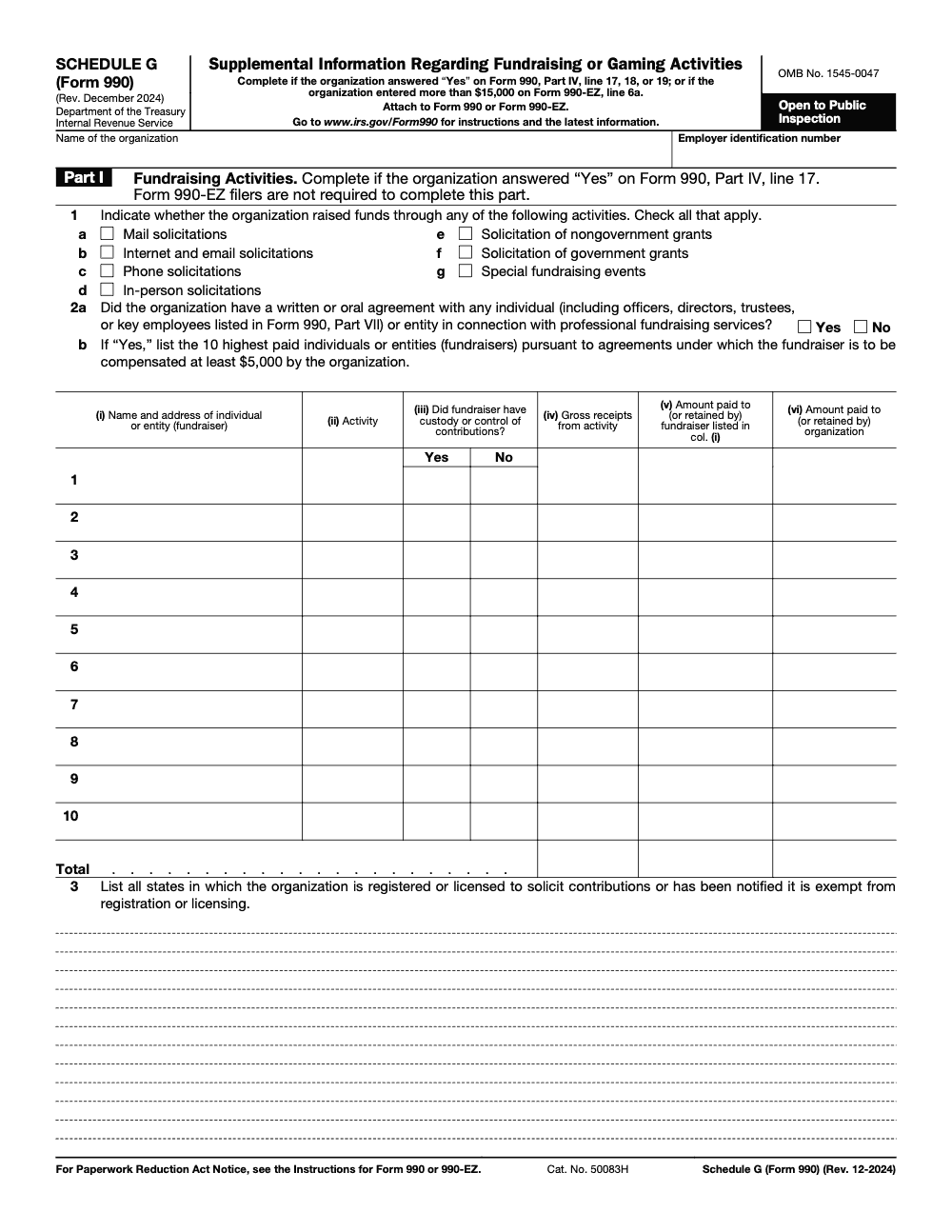
Form 990 Schedule G reports a nonprofit’s professional fundraising services, fundraising events, and gaming as an attachment to Form 990 or 990-EZ. You file it when you answer “Yes” on Form 990 Part IV lines 17, 18, or 19, or when professional fundraising expenses, fundraising event totals, or gaming gross income exceed $15,000 (per the IRS Instructions for Schedule G, revised December 2024), and you itemize the two largest events with gross receipts over $5,000.
A gala clears six figures in ticket sales and everyone moves on, until the return is being prepped and the bookkeeper's posting surfaces: the full ticket price went in as contributions, with no benefit split. The bank ties, the donor letters do not, and Part II gets rebuilt line by line in the week before the deadline.
Schedule G attaches to Form 990 or 990-EZ to report professional fundraising services, fundraising events, and gaming. It is required when you answer Yes on Form 990 Part IV lines 17, 18, or 19, or when professional fundraising expenses, event totals, or gaming gross income exceed $15,000, and you itemize the two largest events with gross receipts over $5,000. Confirm those triggers early and split each ticket cleanly, and the deadline-week rebuild never happens.
Key Takeaways
- Schedule G attaches to Form 990 or 990‑EZ and reports professional fundraising services, fundraising events, and gaming, including revenue, direct expenses, and net results.
- You must file it if you answered “Yes” on Form 990, Part IV lines 17, 18, or 19, or when the $15,000 thresholds apply for professional fundraising expenses, event totals, or gaming gross income.
- Part I lists paid fundraisers, Part II lists fundraising events, and Part III covers gaming. For events, itemize your two largest events with gross receipts over $5,000, aggregate the rest.
- For 990‑EZ filers, Schedule G triggers when fundraising event totals or gaming gross income exceed $15,000.
- Always reconcile Schedule G to the core return and use Part IV for short explanations and overflow details.
What is Schedule G?
Schedule G, Supplemental Information Regarding Fundraising or Gaming Activities, is where you show how you raised money and what it cost. It separates gross receipts from contributions for events, lists direct expenses, and presents net results so reviewers can see both the dollars and the discipline behind them. The schedule has three parts, paid fundraisers, fundraising events, and gaming, plus a Part IV page for brief explanations.
Think of Schedule G as your fundraiser scorecard. It shows the money in, the money out, and that you followed the rules along the way.
Who must file Schedule G?
You attach Schedule G if you file Form 990 and answered “Yes” on Part IV, lines 17, 18, or 19. That usually means either you paid for professional fundraising services, held qualifying fundraising events, or conducted gaming above the filing thresholds. You also complete it if your Form 990 shows more than $15,000 of professional fundraising expenses on Part IX, lines 6 and 11e. For 990‑EZ filers, Schedule G is required when fundraising event totals or gaming gross income exceed $15,000.
Why this matters
Schedule G is more than compliance. Donors, boards, media, and state regulators review it for transparency and control. Clean bifurcation of ticket price, accurate listing of fundraisers, and clear gaming disclosures show you run a tight ship.
How this connects to delivery in the real world
Most nonprofit finance teams and the firms that support them do not struggle to collect data, they struggle to deliver it consistently during peak season. Review bottlenecks, unstructured workpapers, and naming chaos turn an easy attachment into a last minute fire drill. Set up standard operating procedures, use consistent file names, and run a short review checklist before e‑file, and Schedule G becomes a predictable part of the close, not a scramble.
Filing triggers and thresholds you can test early
Use the core return to test Schedule G. If you answered “Yes” on Form 990 Part IV lines 17 through 19, Schedule G is required. Then apply the dollar tests.
- Part I applies when expenses for professional fundraising services exceed $15,000 on Part IX, lines 6 and 11e.
- Part II applies when the sum of Part VIII lines 1c and 8a exceeds $15,000, and you must list the two largest events with gross receipts over $5,000 each.
- Part III applies when Part VIII, line 9a shows more than $15,000 of gross income from gaming.
990‑EZ thresholds at a glance
990‑EZ follows the same bright lines for events and gaming.
- Complete Part II when the sum of fundraising event gross income and related contributions is more than $15,000.
- Complete Part III when gross income from gaming on line 6a is more than $15,000. 990‑EZ filers generally do not complete Part I.
Practical guardrails that prevent surprises
- Track the combined event totals monthly, not just at year end.
- Monitor gaming gross income apart from any contributions connected to raffles. Contributions do not change the gaming threshold.
- Flag professional fundraiser contracts as soon as they are signed so your $15,000 test is not a year end surprise.
How Schedule G fits with Form 990 and 990‑EZ
Schedule G rides under your Statement of Revenue and Statement of Functional Expenses. Test the triggers first. Complete only the parts that apply. Use Part IV for short explanations and overflow details. Then e‑file with the return. Your Schedule G totals must tie to the core form, so build cross‑checks into your workpaper.
The reporting flow that works
- Confirm whether paid fundraisers, events, or gaming meet the trigger tests.
- For events, list the two largest with gross receipts over $5,000 and aggregate remaining qualifying events.
- For gaming, report by game type and disclose states, licensing, prizes, wages, taxes, and net income.
Delivery habits that save review time
From experience, teams stall when workpapers are a patchwork of spreadsheets. You can avoid that with three simple moves.
- Use a standard bifurcation worksheet to split ticket price between contribution and benefit.
- Keep a live log of paid fundraisers with contract status and whether they ever held custody of funds.
- Maintain a single gaming license tracker with state, renewal dates, and the name of your gaming manager.
Clear structure unlocks speed. When your process is simple to follow, reviews move quickly, and you are not chasing support during the week of the deadline.
Part I, paid professional fundraising services
Complete Part I if your Form 990 shows more than $15,000 of expenses for professional fundraising services on Part IX, lines 6 and 11e. 990‑EZ filers typically do not complete this part. The IRS wants the methods you used, the identity of paid fundraisers, whether agreements are written or oral, whether the fundraiser had custody of funds, gross receipts tied to the campaign, and the amounts the fundraiser kept or you paid.
What to gather before you key it in
- Contracts or engagement letters, invoices, payment support, and any reports from the fundraiser.
- A reconciliation from gross receipts shown in the Part I grid to bank deposits, especially when the fundraiser processed gifts before remitting.
- A current list of every state where you are registered, licensed, or exempt from solicitation registration.
How to present custody of funds
If the fundraiser ever had access to checks, online giving credentials, or a lockbox, answer the custody question precisely. If the arrangement needs context, use Part IV. That short note avoids follow up later.
State solicitation registration disclosures
List every state where registration or licensing to solicit is required or where you hold an exemption. Align your disclosures with how you actually raise funds online and in person. If you rely on a professional fundraiser, confirm their registration status in each relevant state and keep documentation with your workpapers. Use Part IV if renewals are in process or if you are relying on a specific statutory exemption.
Where disciplined delivery makes Part I easy
- Keep a dedicated account code for professional fundraising fees so the $15,000 test is simple to monitor.
- Maintain a living list of paid fundraisers with addresses, contract dates, and fee structure.
- Standardize your naming for support files, for example “YYYY‑MM FundraiserName Invoice 001,” so reviewers can trace amounts without friction.
Part II, fundraising events overview
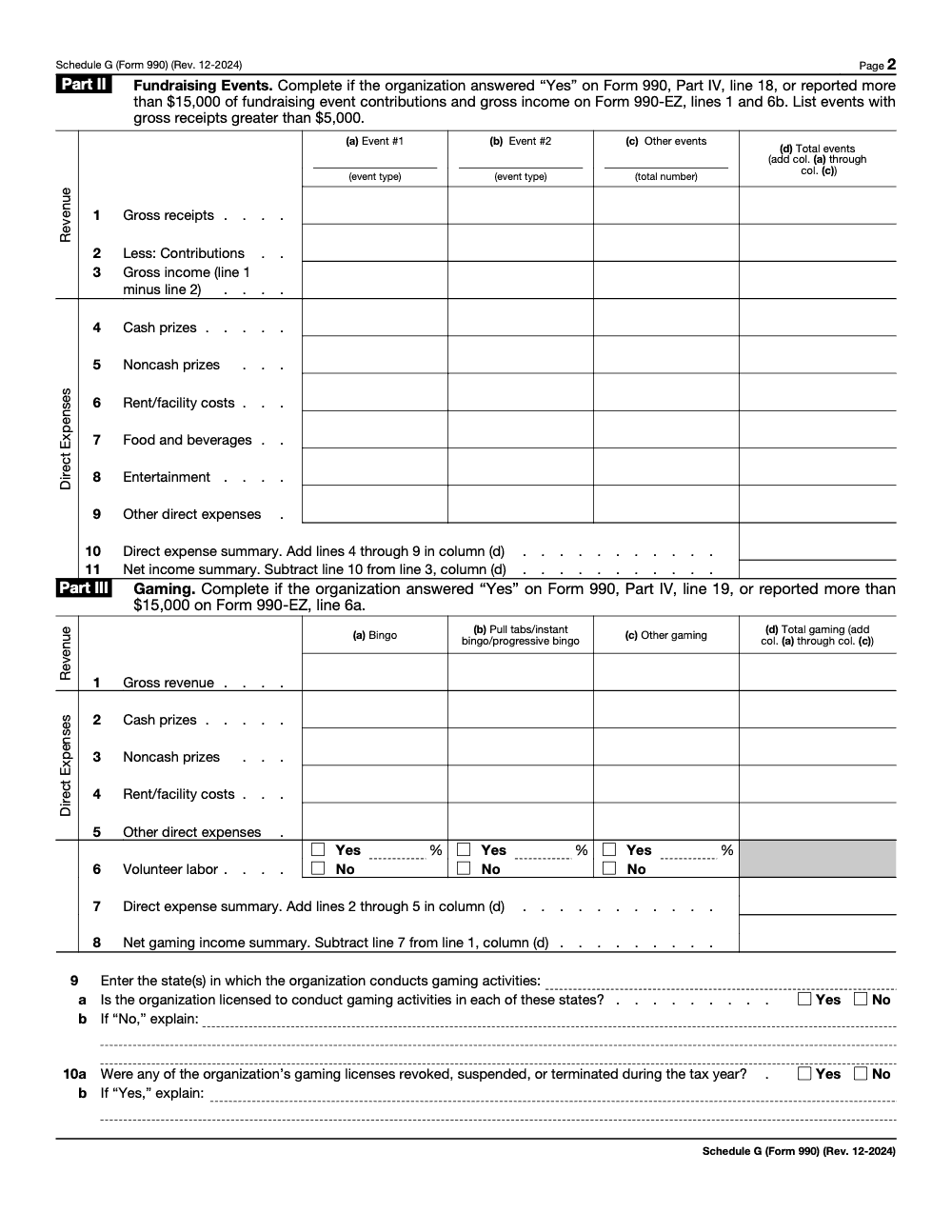
Part II activates when the sum of Form 990 Part VIII lines 1c and 8a exceeds $15,000, or, for 990‑EZ filers, when the combined event gross income and contributions exceed $15,000. List only fundraising events with gross receipts over $5,000. Report the two largest such events separately and aggregate the rest as “Other events.”
The core of Part II is clean ticket bifurcation, you separate the deductible contribution from the value of benefits so both donor letters and your return are correct.
How to split contributions from gross income
Use a simple worksheet. Start with gross receipts, remove the deductible contribution portion to calculate gross income, then list direct event day costs and arrive at net income.
| Concept | Schedule G treatment |
| Gross receipts | Line 1, total collected, for example 100 tickets × 175 equals 17,500 |
| Deductible contribution | Line 2, the part of each ticket that exceeds the fair value of benefits, for example 85 × 100 equals 8,500 |
| Gross income | Line 3, 17,500 minus 8,500 equals 9,000 |
| Direct event expenses | Lines 4–9, event day costs only |
| Net income | Line 3 minus lines 4–9 |
Keep the valuation for benefits, meals, entertainment, green fees, with your workpapers so reviewers can see how you computed the split.
Direct event expenses and net income, what belongs on Part II
Include venue, catering, security, auctioneer fees, credit card processing, and fair value of in‑kind prizes in direct event expenses. Exclude general promotion and broad campaign costs, those belong in functional expenses. Reconcile every amount to invoices and to your ledger. A negative net does not mean an error, it often happens when contributions dominate the ticket price.
Quick example you can mirror
Gala sells 100 tickets at 175 each and the meal plus entertainment are worth 90 per guest.
- Line 1, gross receipts, 17,500.
- Line 2, deductible contribution, 8,500.
- Line 3, gross income, 9,000.
- Lines 4–9, direct event expenses, say 7,800.
- Net income, 1,200. Keep the benefit valuation and invoices with the event file.
Controls that speed review
- Adopt a simple bifurcation worksheet for every event and attach it to donor acknowledgments.
- Use a project code for direct event expenses so they roll up neatly to Part II.
- Cross‑foot Part II to Form 990 Part VIII before you move to e‑file.
Part III, gaming activities overview
Complete Part III if your return shows more than $15,000 of gross income from gaming. Report bingo, pull‑tabs or instant and progressive bingo, raffles, and other gaming in separate columns. Start with gross receipts, then list direct costs, cash and noncash prizes, wages paid to gaming workers or contractors, employer payroll taxes, rent, and any wagering or excise taxes. Compute net gaming income after those direct costs.
Gaming disclosures reach beyond totals. You must list states where gaming occurred, confirm licensing, identify the gaming manager, and explain unusual items in Part IV.
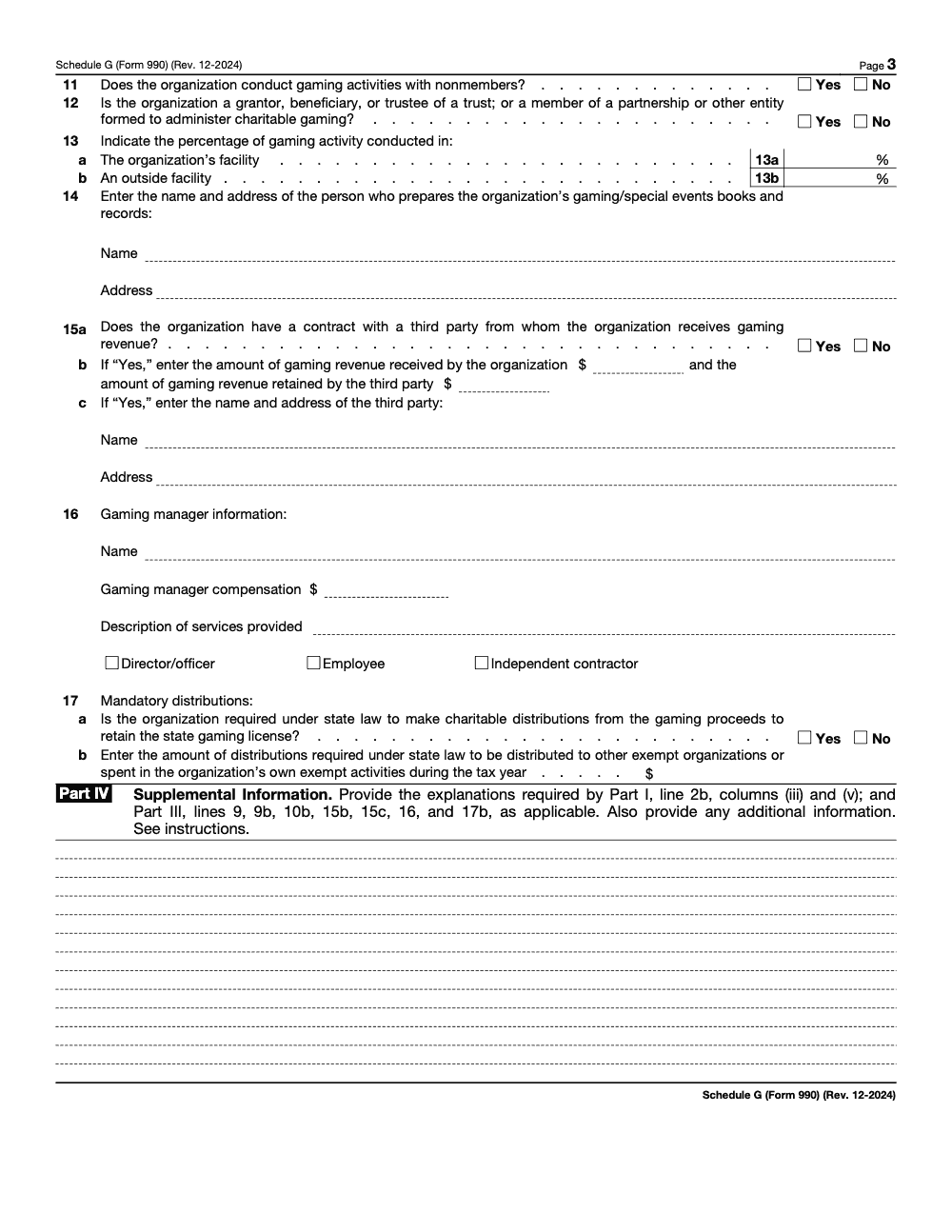
The instructions also ask whether nonmembers participated, the percentage of gaming in owned or non‑owned facilities, whether a third party operated the event, the amounts they kept, and whether any license was suspended or revoked during the year. Keep copies of licenses and renewals with your workpapers.
Mini table, focus points
| Category | Compliance focus |
| Bingo | Prizes, rent, staffing, deposits tie‑out |
| Pull‑tabs and instant | Inventory controls, payout logs, third party operators |
| Raffles | Licensing, prize valuation, advertising rules |
| Other gaming | Allocation method, payroll tax support, wagering taxes |
Licensing and state disclosures
Identify each state where gaming occurred and whether you were licensed or registered in that state. If you were not required to be licensed, explain the basis. If any license was suspended or revoked, disclose it. For states with mandatory distributions of gaming proceeds, report the total amount and provide a state by state breakdown in Part IV.
Part IV, the short notes that prevent long questions
Part IV is your space to add short, line‑referenced explanations. Use it to summarize fundraiser agreements, clarify custody of funds, explain how you split ticket price between contribution and benefits, and list overflow events or gaming details when the grid runs out of space. Keep explanations concise and tie each note to a specific line and column so reviewers can match your words to the numbers.
Common pitfalls and how to avoid them
- Missing the $15,000 triggers on 990‑EZ for event totals or gaming gross income. Build a monthly threshold check and document it.
- Putting gaming revenue on Part II instead of Part III. All gaming goes to Part III and is reported by type.
- Skipping the ticket split. Without a proper split, donor letters are wrong and Line 3 will be off. Keep simple valuation support for meals and perks.
- Omitting custody of funds details for professional fundraisers. Answer precisely and add a short Part IV note when needed.
- Mixing event day direct costs with general promotion. Keep the event day items in Part II, move broader costs to functional expenses.
E‑filing options and error checks
Most filers use IRS authorized e‑file providers. The platforms walk you through Schedule G, apply the threshold logic, and prompt for explanations when something is missing. If you receive a reject, correct the exact line item and retransmit. Keep a clean transmission history with submissions, notices, and resubmissions, it becomes your audit trail.
Error checks and retransmission, quick table
| Focus | Action |
| Data consistency | Reconcile Parts II and III to Form 990 Part VIII totals before you transmit |
| Disclosures | Add concise Part IV narratives with line and column references |
| Fundraisers | Include names and addresses when expenses exceed $15,000 |
| Proof | Save contracts, licenses, donor letters, and e‑file acceptance records |
One page checklists you can use today
These checklists are copy-paste ready for your firm SOP or month-end file. Run them before you e-file so Schedule G ties to the core return on the first pass.
Trigger and threshold scan
- Confirm whether Form 990 Part IV lines 17, 18, or 19 are answered “Yes.”
- Test professional fundraising expenses on Part IX lines 6 and 11e against the $15,000 line for Part I.
- Add Part VIII lines 1c and 8a to test the $15,000 fundraising event threshold for Part II.
- Check Part VIII line 9a for gaming gross income over $15,000 to trigger Part III.
- For 990-EZ, confirm event totals or gaming gross income over $15,000 before completing Part II or Part III.
- Document each test result in the workpaper so the threshold is never a year-end surprise.
Event bifurcation file
- List only fundraising events with gross receipts over $5,000.
- Report the two largest qualifying events separately and aggregate the rest as “Other events.”
- Put gross receipts on Line 1 and the deductible contribution on Line 2.
- Compute gross income on Line 3 as Line 1 minus Line 2.
- Keep fair-value support for meals, entertainment, and green fees with the event file.
- Cross-foot Part II to Form 990 Part VIII before you transmit.
Gaming and Part IV review
- Report gaming by type: bingo, pull-tabs, raffles, and other gaming.
- List every state where gaming occurred and confirm licensing or the basis for an exemption.
- Name the gaming manager and note any license suspended or revoked during the year.
- Use Part IV for custody-of-funds notes, the ticket-split method, and overflow details with line references.
- Reconcile Part III net gaming income to Form 990 Part VIII line 9.
- Save contracts, licenses, renewals, donor letters, and the e-file acceptance record.
Bringing it together, a delivery workflow that holds up in busy season
Teams rarely struggle because they cannot gather numbers, they struggle because review time gets eaten by messy files and unclear ownership. Build SOPs for each activity, keep standardized workpapers, and use a tiered review, preparer, senior, quality, and final sign off. Track state registrations and gaming licenses in one log with renewal dates. These habits reduce rework and keep you ahead of deadlines.
A light note on outside capacity
If you lean on outside teams, insist on structure, not resumes. Standardized workpapers, clear SLAs, and layered review reduce revision cycles and partner review time. That kind of delivery discipline is what turns Schedule G from a stress point into a routine step.
Conclusion
Treat Schedule G like a flight checklist. Confirm your triggers early, split tickets correctly, document custody of funds, and reconcile every line to the core return. E‑file early, fix rejects the same day, and keep a tidy transmission history. Do this, and you will file with confidence, maintain donor trust, and be ready for scrutiny.
Compliance note and sources
This guide reflects IRS continuous‑use Schedule G instructions revised December 2024 and Form 990‑EZ instructions reviewed on November 27, 2025. Check for a newer revision before filing. Primary sources, IRS Instructions for Schedule G and IRS Instructions for Form 990‑EZ.
Disclosure
This article was prepared by U.S. tax professionals. Drafting and editing assistance tools were used for formatting and clarity, and all technical points were checked against the IRS sources cited above.
Common Mistakes We See Every Season
The same handful of Schedule G errors resurface every season, and almost all of them trace back to the ticket split or a missed trigger. Here are the ones my team flags most often.
Keep 990-SG Season From Stalling
For calendar-year exempt organizations, Form 990 and its Schedule G are due May 15, and that single deadline stacks event reconciliations, gaming disclosures, and donor-letter math into the same few weeks (per the IRS Instructions for Form 990). The IRS moved Schedule G to continuous-use instructions in December 2024, so the rules hold steady year to year, yet the volume of fundraising data still spikes right when review capacity is thinnest.
The fix is not more hours, it is a repeatable workflow that tests the triggers early and keeps the ticket split out of deadline week. When the inputs are structured before May, Schedule G becomes a reconciliation step instead of a rebuild.
- Run the $15,000 trigger tests against Part IX lines 6 and 11e, Part VIII lines 1c and 8a, and line 9a in the first review pass, not at sign-off.
- Standardize one bifurcation worksheet so every event reports Line 1 receipts, Line 2 contributions, and Line 3 gross income the same way.
- Keep a single tracker for paid-fundraiser contracts, custody status, and state solicitation registrations.
- Maintain one gaming log with state licenses, renewal dates, and the gaming manager named for Part III.
- Cross-foot Parts II and III to Form 990 Part VIII before e-file so rejects do not surface on May 14.
That structure is what we deliver. Accountably integrates trained, U.S.-led offshore teams into your workflow with documented SOPs, standardized workpapers, and layered review, so fundraising and gaming schedules are handled without burning partner time. See how our tax execution team keeps return season predictable.
FAQs
It is the attachment where you report professional fundraising services, fundraising events, and gaming. You present gross receipts, direct costs, and net results, plus short notes in Part IV when needed.
You file it if you answered “Yes” on Form 990 Part IV lines 17, 18, or 19, or if you are a 990‑EZ filer whose fundraising event totals or gaming gross income exceed $15,000. 990‑EZ filers generally do not complete Part I.
Use the fair value of what donors received, like meals or entertainment, as the benefit. The ticket price minus that value is the deductible contribution. Show that on Line 2 and use it to compute gross income on Line 3. Keep the math with your event file.
Yes, the IRS converted Schedule G to continuous‑use instructions in December 2024. Use those instructions for tax year 2024 and later years until a new revision is issued. Always check for updates before you file.
Other forms this guide names
- Form 990: Nonprofit Tax Return Filing Guide 2025
- Form 990‑EZ: Eligibility, Deadlines, E‑File, Schedules
Summarize this article with AI
About this guide
Accountably helps US CPA, EA, and accounting firms hire trained accountants and tax preparers in India.
About us Reviewed byJugal Thacker, CPAFounder and CEO at Accountably
A Washington-licensed CPA with 7+ years inside US firms – PwC, a real-estate tax practice, then a full-service firm, rising from reviewer to manager to advisory. This article was reviewed against current IRS guidance for the 2025 tax year and updated for filers preparing late returns, amendments, and 2026 estimates.
View profile →How we research, review, and update this guide
Every Accountably guide is researched against primary IRS sources, reviewed by a U.S. CPA, and refreshed as guidance evolves. Read our Editorial Guidelines to see how we source, fact-check, and update our content.