
Summarize this article with AI
In Brief
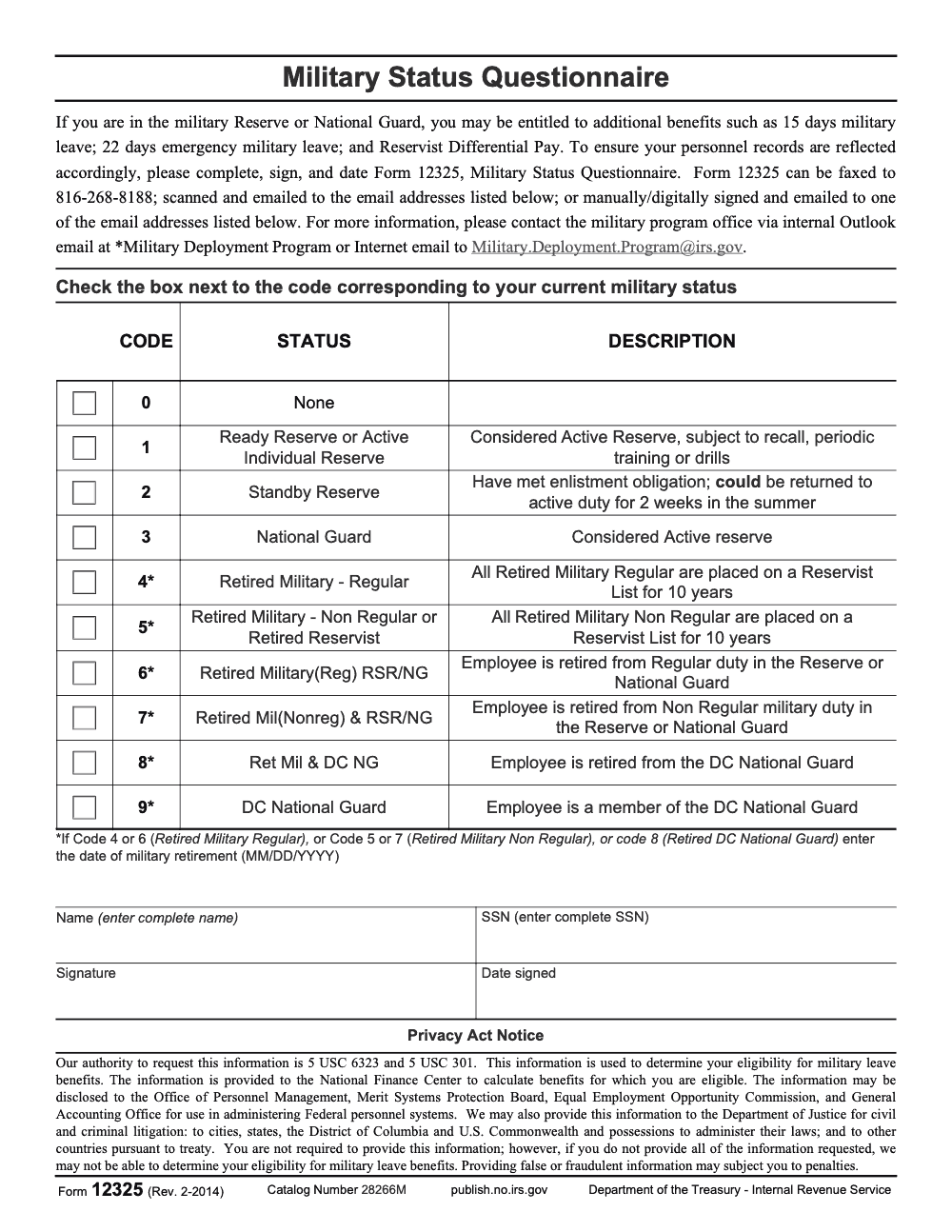
Form 12325 is the IRS Military Status Questionnaire – an internal IRS personnel form (Rev. 2-2014, Catalog Number 28266M) submitted by IRS employees in the Reserve or National Guard to document military status for leave benefits (per the Form 12325 Privacy Act Notice). It is not a tax form; for military tax relief, the right path runs through IRS Publication 3 and combat-zone extension procedures, and a structured U.S.-led tax team can route the file correctly the first time.
A preparer searches for an IRS form to help a military client, lands on Form 12325 because the title reads like it should help, and the file stalls in the wrong queue while the client waits. The form does nothing for a taxpayer's account. It is the IRS Military Status Questionnaire, an internal personnel form the agency uses for its own Reserve and National Guard employees.
Created in February 2014 (Rev. 2-2014, Catalog Number 28266M), it documents military leave eligibility for IRS staff, not combat-zone relief for a return. When a client actually needs military tax relief, the path runs through Publication 3, which as of December 19, 2025 remains the standing reference for combat-zone extensions, exclusions, and special provisions.
Key Takeaways
- Form 12325 is an internal IRS personnel form, titled “Military Status Questionnaire,” created in February 2014. It is used to document an IRS employee’s eligibility for military leave and related HR actions, not to verify a taxpayer’s status for military tax benefits (the form itself does not grant or pay any benefit; the IRS passes the data to the National Finance Center, which performs the actual benefit calculation).
- The form itself allows manual or digital signatures and can be faxed or emailed to the IRS Military Deployment Program (no mail-in instruction or e-file path is provided), which confirms it is meant for internal processing, not public tax filing.
- If you need the IRS to apply military tax relief, do not file Form 12325. Instead, rely on the standard military rules in Publication 3 and the IRS’s Department of Defense data match for combat zones. When needed, notify the IRS through its combat zone notification channel, or respond to a notice with the words “COMBAT ZONE” and your deployment date.
- When the IRS requests proof of military service for deadline relief, orders, a DoD statement, or a signed statement are acceptable documentation. The Internal Revenue Manual explains what substantiation the IRS accepts.
- As of December 19, 2025, Publication 3, Armed Forces’ Tax Guide, remains the go-to reference for combat zone extensions, exclusions, and special provisions.
What Form 12325 actually does
Form 12325 sits in the IRS forms catalog, which is why tax pros sometimes stumble onto it. The PDF spells out its purpose clearly, referencing 5 U.S.C. 6323 and 5 U.S.C. 301 (Title 5 federal civil-service statutes, not Title 26 of the Internal Revenue Code), and directs completed copies to the IRS Military Deployment Program for HR processing. In short, it helps the IRS classify its own employees who are Reservists, Guard, retired military, or on certain statuses, so payroll and leave benefits are applied correctly. It is not a taxpayer-facing form, and it is not used to trigger tax relief for your clients.
Quick reality check: If you are preparing a return or replying to an IRS letter for a military client, filing Form 12325 will not update that client’s tax account. The IRS uses other pathways to recognize combat zone service and apply relief.
What to do instead when you need military tax relief
Here is the fast lane for the situations you actually face in practice.
Combat zone recognition and deadline extensions
- The IRS works with the Department of Defense to identify service members in combat zones, then suspends certain compliance actions and extends deadlines automatically. If the match did not occur, you can email with the member’s name, stateside address, date of birth, deployment date, and a redacted copy of orders. Do not include Social Security numbers in the email.
- Civilians supporting the Armed Forces, such as Red Cross personnel, can also qualify for deadline relief. If they receive an IRS notice, they should return it with “COMBAT ZONE” and the deployment date written in red at the top, including the same marking on the envelope.
Combat zone pay exclusion and W‑2 corrections
- Military pay for months served in a designated combat zone may be excluded from income, subject to officer limits. Pay offices usually handle this at the source. If a W‑2 shows taxable pay that should have been excluded, the member should request a corrected W‑2 from the military pay office.
Acceptable proof when the IRS asks
- When relief is not obvious from the account, the IRS can accept military or civilian orders, a DoD statement, or a signed statement from the taxpayer, spouse, or authorized representative. This is spelled out in the Internal Revenue Manual.
Who this guide is for
- You are a service member or spouse trying to keep filings clean while you juggle deployments and PCS cycles.
- You run a CPA, EA, or CAS practice that supports military families or base-adjacent communities, and you want your team to use the right documentation on the first try, not the wrong form on the wrong desk.
A quick note for firm leaders reading this on Accountably’s blog, our team focuses on process, not shortcuts. When your staff knows exactly which documents the IRS will accept and where to route them, review time drops and client confidence climbs. We will keep the mention brief and get back to the how-to.
Step-by-step, how to get military relief applied correctly
If the taxpayer served in a combat zone
- Check if the account already reflects combat zone status. If the taxpayer received an IRS notice during deployment, that is a hint the status was not recognized yet.
- Email with the member’s name, stateside address, date of birth, deployment date, and a scan of orders or another official document. Omit SSNs in the email. Expect responses to account questions by regular mail for security reasons.
- If a notice arrived, write “COMBAT ZONE” and the deployment date in red at the top of the notice and on the envelope, then return it to the IRS address on the letter. This flags the file for relief.
If the W‑2 is wrong
- Ask the member’s pay office to correct the W‑2 so the combat zone exclusion is reflected properly. This is the cleanest fix and prevents mismatches at filing time.
If the IRS asks for proof
- Provide copies of orders, a DoD statement, or a signed statement from the taxpayer, spouse, or representative if orders are not easily accessible. The IRM confirms these are acceptable for Section 7508 postponement substantiation. Keep copies for your records.
Form 12325 vs the documents you actually need
Here is a quick comparison so your team uses the right document every time.
| Item | Who uses it | Purpose | Where it goes | Signature rules |
| Form 12325, Military Status Questionnaire | IRS employees | HR documentation for military leave and status codes under 5 U.S.C. 6323 | Fax or email to IRS Military Deployment Program | Manual or digital signatures accepted |
| Orders, DoD statement, or signed statement | Service members, spouses, or representatives | Proof for IRS deadline relief under Section 7508 | Reply to the IRS notice, or email when required | Wet ink or electronic, follow notice instructions |
| Corrected W‑2 | Service members via pay office | Ensures combat pay exclusion appears correctly | Issued by the military pay office, then filed with the return | N/A |
Source references for the table details are the IRS Form 12325 PDF, IRS combat zone notification guidance, combat zone Q&A, and the Internal Revenue Manual.
What Publication 3 covers, and why you should keep it handy
Publication 3 remains the field manual for military tax topics. It explains who qualifies for the combat zone exclusion, how deadline extensions work, which pays are taxable or excluded, and how to handle special cases, like hospitalization related to combat zone service. It is updated periodically, and the IRS maintains the current revision and a page with recent developments. Bookmark both, and check revision dates when you prepare 2024 and 2025 returns.
If you provide CAS or tax services near a base, build a simple one-page SOP for your staff with links to Publication 3, the combat zones list, and the notice. Train every preparer to spot a deployment on intake, then route documentation the same day.
Common mistakes we see in firms
The pattern repeats almost every season: a military situation hits an engagement, the wrong form lands in the file, and the team spends days chasing a route that was never going to update the client's account. Here are the misroutes we flag during quality review.
A practical workflow for CPA and EA firms that support military clients
You do not need a big team to treat military cases with care. You need a consistent playbook and a bit of automation.
Intake and verification
- Add two intake questions, “Did you serve in a designated combat zone during the tax year or after, and if yes, which months,” and “Do you or your spouse have deployment orders or a DoD statement we can copy for the file?”
- If the answer is yes, pull Publication 3, confirm the period of exclusion, and check the combat zone list for the theater.
- Create a task in your workflow tool titled “Update IRS of combat zone service if needed.” If a notice exists or the IRS data match has not posted, send the email with the client’s permission.
Documentation matrix you can hand to staff
| Situation | What you collect | Why it matters | Where it goes |
| Member served in a combat zone | Orders or DoD letter, dates served | Confirms deadline relief and pay exclusion periods | Email the IRS combat zone notification channel if not already recognized, and keep on file |
| IRS notice arrived during deployment | Notice, envelope, “COMBAT ZONE” and deployment date in red | Triggers suspension of actions and account update | Mail back to the address on the notice |
| W‑2 includes combat pay as taxable | Copy of W‑2, pay office contact trail | Supports corrected W‑2 request, prevents mismatch | Back to the military pay office first, then file |
Citations for process rules appear in the IRS pages on combat zone notification, Q&A, and combat zone exclusions.
Quality review that protects your time
- Confirm the exclusion months match the deployment record. One day in a month counts as the whole month for exclusion purposes.
- Make sure you did not send Form 12325. It does not update a taxpayer’s account, and it belongs to IRS HR channels.
- If the client is a civilian supporting operations, review the Q&A rules. Deadline extensions are broader than the combat pay exclusion.
Briefly, where Accountably fits for firms at scale
When your firm handles dozens of military returns each season, the bottleneck is rarely expertise, it is delivery. We help firms build SOPs, structured workpapers, and review checkpoints so the right documents reach the right place on the first pass, while partners stay focused on client strategy. That means fewer revision loops and steadier margins during peak months. We keep this short so the guide stays practical.
Key references you should bookmark
- Publication 3, Armed Forces’ Tax Guide, for the rules and examples that come up every year.
- Combat zones page, for current designated areas and support zones.
- Combat zone notification by email, for updating the IRS when needed.
- Q&A on combat zone provisions, for how civilians are treated and mailing instructions for notices.
- The actual Form 12325 PDF, so your team can see that it is an HR form, not a taxpayer filing.
Micro-anecdote, the two-minute fix that saved a week
A senior on our team spotted “Form 12325” in a client’s document list and paused. Instead of mailing it, she sent a one-paragraph email to the IRS combat zone notification channel with the member’s deployment date and a redacted attachment. The IRS updated the account, the notice paused, and the return filed on schedule. The difference was not more staff, it was using the right channel.
Quick-start checklist for military tax cases
- Confirm whether the taxpayer served in a designated combat zone, and which months.
- Verify if the IRS account already reflects combat zone status. If not, send the email to the IRS combat zone notification channel with the approved details and a redacted document.
- If a notice has arrived, write “COMBAT ZONE” and the deployment date in red on the notice and the envelope, then mail it back to the address shown.
- Check the W‑2. If combat pay was taxed in error, request a corrected W‑2 from the pay office before filing.
- Keep Publication 3 at your elbow for rules, examples, and due date calculations.
- Do not send Form 12325 with tax filings. It is for IRS HR, not taxpayer accounts.
Reusable Checklists
These are the SOPs we hand to new staff – copy them into your engagement playbook, your workflow tool, or your intake form, and tag the right person before the file enters the queue.
Military intake triage – is this Form 12325 or something else?
- Confirm whether the client is an IRS employee in the Reserve or National Guard. If yes, Form 12325 may apply through the HR channel. If no, Form 12325 does not apply at all.
- Confirm whether a deployment, combat-zone service, or active-duty period is in scope for the return. If yes, this is a Publication 3 and combat-zone notification matter, not Form 12325.
- Confirm whether the client received an IRS notice during deployment. If yes, prepare a reply with "COMBAT ZONE" and the deployment date in red on the notice and the envelope.
- Confirm whether a filing extension is needed for a civilian supporting the Armed Forces. Route to Form 4868, not Form 12325.
- Tag the engagement with "military" in the workflow tool and assign a designated reviewer before the preparer opens the file.
- Document the triage decision in the workpaper so a reviewer does not retrace the routing.
Form 12325 submission – for IRS-employee Reservists only
- Confirm the employee's status code from the 10 options on the form (0 None, 1 Ready Reserve, 2 Standby Reserve, 3 National Guard, 4-8 retirement categories, 9 DC National Guard).
- If the status code is 4, 5, 6, 7, or 8, enter the date of military retirement in MM/DD/YYYY format. Asterisk codes get returned without it.
- Complete all required fields: Name (complete), SSN (complete), Signature, and Date signed.
- Sign and date the form. Manual or digital signature is acceptable per the Privacy Act Notice.
- Submit by one of three methods: fax to 816-268-8188, scanned email, or manually or digitally signed email to Military.Deployment.Program@irs.gov. There is no mail-in option.
- Save a copy in the employee HR file and the engagement folder so the submission channel is documented.
Military tax relief packet – the documents that actually drive relief
- IRS Publication 3, Armed Forces' Tax Guide, kept current for the relevant tax year.
- Combat-zone deployment orders or DoD letter with start and end dates.
- Copy of any IRS notice received during deployment, with the envelope.
- W-2 review for combat pay treatment. Request a corrected W-2 from the military pay office if combat pay was taxed in error.
- Combat-zone notification email draft with member name, stateside address, date of birth, deployment date, and a redacted copy of orders. SSN excluded.
- Form 4868 for civilian filing extensions in support of military operations.
- Workpaper sign-off confirming Form 12325 was not used. It is an HR document, not a relief form.
Keep 12325 Season From Stalling
The reason "12325 season" stalls for firms isn't volume, it's misrouting. Most inbound questions tagged "Form 12325" are actually military tax relief questions – combat-zone extensions, SCRA matters, IRS Publication 3 territory – and the file sits in the wrong queue while the client waits. The form itself, per its Privacy Act Notice, is an internal IRS HR questionnaire (Rev. 2-2014, Catalog Number 28266M), filed by IRS employees in the Reserve or National Guard, and has nothing to do with the client's return.
The fix is intake discipline, not more research. When the file is tagged correctly at the front door, the practitioner pulls the right authority on the first pass and the deadline calendar holds.
- Add a single intake flag, "client or spouse military or Reserve/National Guard status," so any return that touches the topic routes to a designated reviewer before the preparer opens it.
- Keep a one-page reference that pairs Form 12325 (IRS HR only) against the documents that actually drive relief – IRS Publication 3 for combat-zone rules, Form 4868 for civilian extensions, SCRA filings for installment and interest relief.
- For the rare engagement where an IRS employee genuinely needs to submit Form 12325, lock the asterisk-code rule into your SOP: status codes 4 through 8 require a date of military retirement in MM/DD/YYYY format, and the form will be returned without it.
- Use the three submission channels the form lists – fax to 816-268-8188, scanned email, or digitally signed email to Military.Deployment.Program@irs.gov – and skip any mail-in habit; the Privacy Act Notice does not describe a service-center mail route.
- Track combat-zone and deployment-extension cases on a separate calendar so the deadline math doesn't get pulled into the regular filing cycle and miss qualifying-period extensions.
This is the kind of routing layer Accountably's tax delivery teams install as part of a standard SOP: a flag at intake, a documented decision tree, and a reviewer who actually knows the difference between an HR questionnaire and a relief filing. The result is fewer "Why is this still open?" client emails during deployment season.
FAQs
No. Form 12325 is not a taxpayer form. It is an internal IRS personnel document for IRS employees’ military leave and status updates. It does not trigger tax relief on a taxpayer account.
The IRS and DoD coordinate to identify combat zone service. If the match has not posted and you receive a notice, you can email with your name, stateside address, date of birth, deployment date, and a redacted copy of orders. Do not include your SSN.
Yes, many civilians serving in support roles qualify for deadline extensions, even though they do not get the combat pay exclusion. If you receive a notice, write “COMBAT ZONE” and your deployment date in red at the top of the notice and envelope, then return it to the IRS.
Yes. The IRS accepts a range of substantiation, including copies of orders or a signed statement from you, a spouse, or a representative when orders are not easily accessible, and many submissions now support digital signatures. For Form 12325 specifically, the PDF itself mentions manual or digital signatures for HR routing, another sign it is not a public tax form. Follow the instructions on your IRS notice for acceptable formats.
Ask your military pay office for a corrected W‑2. That is the fastest way to resolve a mismatch with the combat zone exclusion rules so your return files cleanly.
Use the IRS combat zones page. It lists designated combat zones, direct support areas, and qualified hazardous duty areas. Publication 3 also summarizes the rules tied to those areas.
Publication 525 covers taxable and nontaxable income more broadly. For military-specific topics, start with Publication 3. Use Publication 525 as needed for income classification outside the combat zone exclusion.
Return the notice with “COMBAT ZONE” and your deployment date in red at the top, also on the envelope, or notify the IRS via the combat zone email if appropriate. This suspends certain actions and updates your account.
Other forms this guide names
Summarize this article with AI
About this guide
Accountably helps US CPA, EA, and accounting firms hire trained accountants and tax preparers in India.
About us Reviewed byJugal Thacker, CPAFounder and CEO at Accountably
A US-licensed CPA with 7+ years inside US firms – PwC, a real-estate tax practice, then a full-service firm, rising from reviewer to manager to advisory. This article was reviewed against current IRS guidance for the 2025 tax year and updated for filers preparing late returns, amendments, and 2026 estimates.
View profile →How we research, review, and update this guide
Every Accountably guide is researched against primary IRS sources, reviewed by a U.S. CPA, and refreshed as guidance evolves. Read our Editorial Guidelines to see how we source, fact-check, and update our content.




