
Summarize this article with AI
In Brief
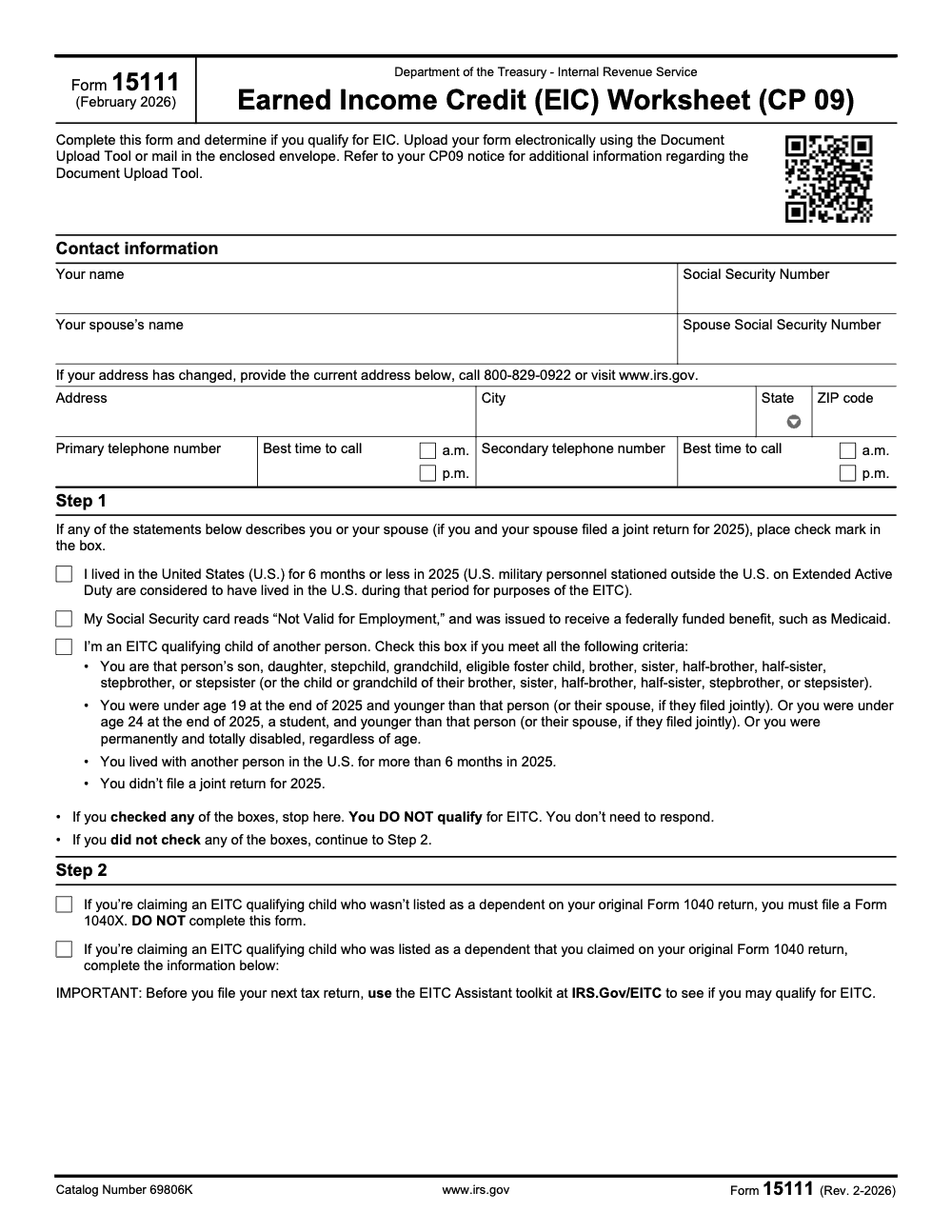
Form 15111 is the IRS Earned Income Credit (EIC) Worksheet sent with Notice CP 09 when the IRS believes a filer may qualify for an Earned Income Credit they did not claim. The current Rev. 2-2026 version applies to tax year 2025 returns, runs three steps across two pages, and is returned to the IRS via the Document Upload Tool referenced on the CP09 notice or by mail in the envelope provided (per the IRS Form 15111 instructions and IRS Publication 596).
The CP09 envelope scares people who probably should not be scared. The IRS is saying it ran the numbers on a filed return, you may have left an Earned Income Credit unclaimed, and here is a two-page worksheet to confirm whether you qualify. Form 15111 is that worksheet, and the instruction most people miss is the simplest one: complete and return it only if you actually qualify.
We work these every season, and the outcome splits about evenly. Half the time the taxpayer qualifies and, once the IRS approves and no offsets apply, the refund usually arrives in about 6 to 8 weeks. The other half, a single Step 1 statement stops the process before Step 2. One number worth watching is the investment income limit, which is $11,600 for tax year 2024 and $11,950 for tax year 2025, so always check the year printed on your notice.
Key Takeaways
- Form 15111 is the quick worksheet that rides along with IRS Notice CP09. You use it to confirm whether you qualify for the Earned Income Credit (EIC) you did not claim.
- Complete and return it only if you qualify. If the worksheet shows you are not eligible, do not send it back.
- You can respond by mail with the CP09 stub, or online with the IRS Document Upload Tool, by the deadline printed on your CP09 notice.
- If the IRS approves, refunds usually arrive in about 6 to 8 weeks, subject to offsets for debts.
- For Tax Year 2024, the investment income limit for EITC is $11,600, and for Tax Year 2025 it is $11,950. Always check the year on your notice.
Understanding your CP09
A CP09 means the IRS thinks you may qualify for the Earned Income Credit, but you did not claim it on your return. The notice asks you to complete the EIC worksheet on Form 15111 to confirm eligibility, then return it if you qualify. This is a good thing. It is the IRS inviting you to claim money you might have missed.
You have two ways to respond. First, sign Form 15111 and mail it with the CP09 stub to the address on the notice. Second, use the IRS Document Upload Tool with your unique access code to send a clear scan or photo of the signed worksheet. Follow the deadline shown on your CP09, usually 30 days from the notice date.
If the IRS agrees you are eligible, they will mail a refund check in about 6 to 8 weeks, unless it is reduced by other balances you owe. If you do not hear back after 8 weeks, call the IRS at the number listed on your notice for a status check.
Quick mindset shift: CP09 is not an audit. It is an invitation to confirm eligibility and possibly receive a refund. Treat it like a short, focused checklist, not a full redo of your return.
What Form 15111 actually does
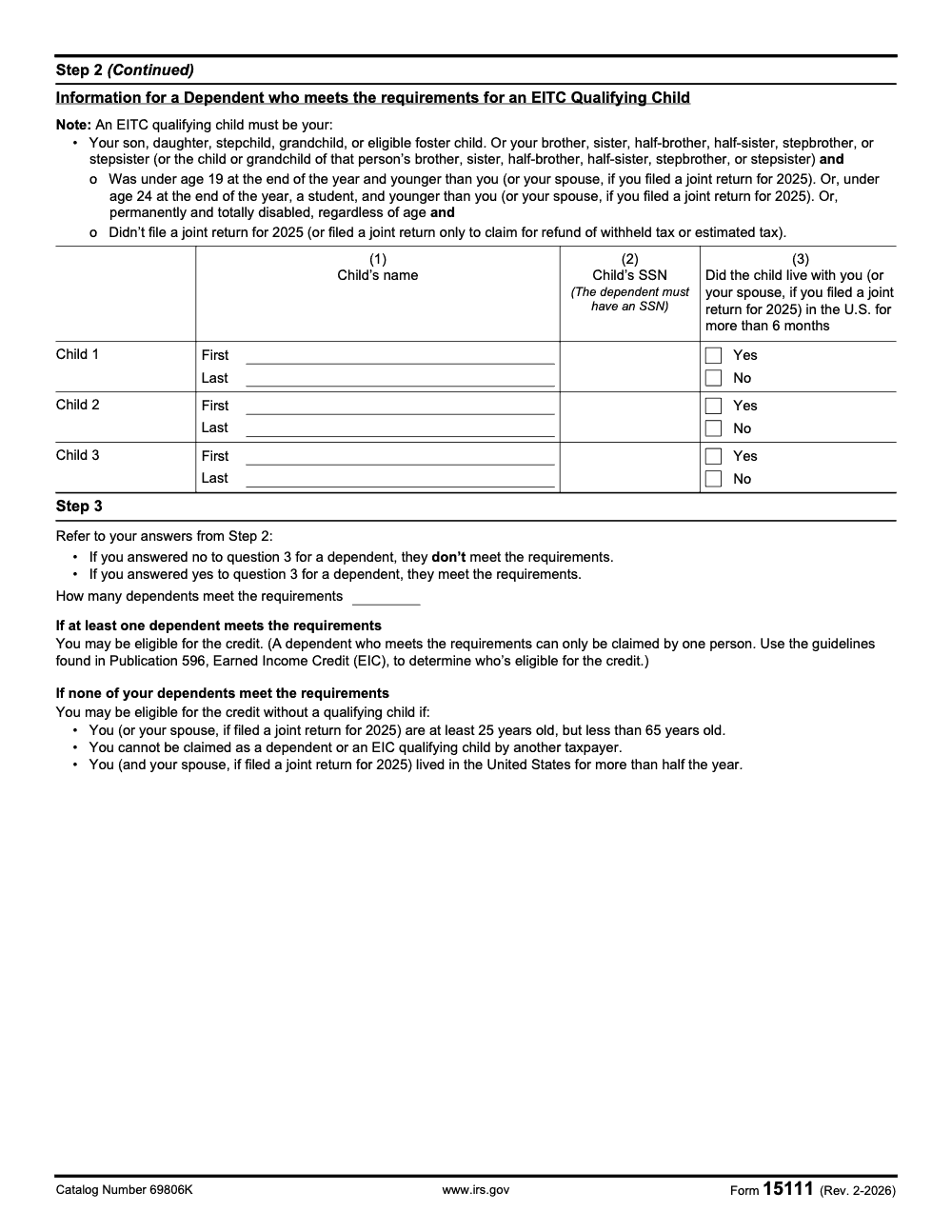
Form 15111 is a short EIC worksheet that asks about residency, earned income, your Social Security number status, and whether anyone can claim you as a dependent. If you have children, you will list up to three, and for each child you will provide their name, Social Security number, and a yes/no answer on whether the child lived with you in the United States for more than six months. The Step 2 table on the worksheet itself has only three columns – child name, child SSN, and a yes/no on whether the child lived with you more than 6 months – with relationship and age handled through the underlying EITC qualifying-child rules rather than as separate columns. These are the same rules used to figure EITC on a tax return, just boiled down for this notice.
When your answers show you qualify, you sign under penalties of perjury and return the worksheet. If the answers show you do not qualify, you do not return it. The IRS uses your worksheet, plus your original return, to finalize the credit and issue any additional refund.
At‑a‑glance, what to have handy
- Your CP09 notice, which includes the access code for online upload.
- Social Security numbers for you, your spouse if filing jointly, and any qualifying children.
- A quick list of where you and your children lived during the tax year and for how many months.
- Your earned income and any investment income. For 2024, the EITC investment income cap is $11,600, and for 2025 it is $11,950.
The numbers you keep hearing about, simplified
The EITC adjusts each year. For Tax Year 2024 returns processed in 2025, the investment income limit is $11,600, and maximum AGI limits vary by filing status and number of children. For example, with three or more qualifying children the income limit is $59,899 if single or head of household, and $66,819 if married filing jointly. Always match your facts to the tax year on your CP09.
If you are looking ahead, the IRS increased the investment income limit to $11,950 for Tax Year 2025. Again, always follow the year on your notice, since CP09 ties to the specific tax year the IRS is adjusting.
Why this matters
If you qualify, EITC is refundable. That means the IRS can send you money even if you owed no tax. Missing it can mean missing rent, groceries, or savings you earned. Form 15111 is your fast lane to fix that for the year on your notice. We have seen families recover meaningful refunds simply by completing this one worksheet and sending it back on time.
Who should complete Form 15111
If you received a CP09, complete Form 15111 when you believe you meet the EITC rules for the year shown on your notice. You must have earned income, meet the AGI and investment income limits for that tax year, and satisfy residency, SSN, and dependent rules. If the worksheet shows a disqualifier applies to you, do not return it.
A quick screening checklist
- You lived in a state or DC for more than half the year, or you qualify for special military exceptions (on a joint return, both spouses must meet this U.S.-residency test).
- You, and your spouse if filing jointly, each have a Social Security number valid for employment (an SSN stamped 'Not Valid for Employment' issued only to receive a federally funded benefit, such as Medicaid, does not qualify).
- No one else can claim you as a dependent.
- You had earned income during the year.
- Your investment income was at or below the limit for the year on your notice, for example $11,600 for 2024 or $11,950 for 2025.
If you have children, you will also confirm the child’s relationship to you, age, months lived with you in the U.S., and valid SSN. These are the same core criteria the IRS uses to test qualifying children for EITC.
Step 1, taxpayer statements and eligibility checks
This part of the worksheet quickly tests the basics. Confirm your main home was in the United States for more than half the year (U.S. military personnel stationed outside the U.S. on Extended Active Duty are treated as having lived in the U.S. during that period for EITC purposes, so their time abroad does not disqualify them). Confirm you had earned income, your AGI fits the table for your filing status and family size, and your investment income did not exceed the cap for that year. If you can be claimed as someone else’s dependent, or your SSN is not valid for employment, stop, you are not eligible.
Tip I give every client, match your facts to the tax year on the notice. EITC amounts and limits change annually, so the 2024 numbers differ from 2025.
2024 EITC reference points, single or head of household
- No children, income under $18,591
- One child, income under $49,084
- Two children, income under $55,768
- Three or more children, income under $59,899
- Investment income cap, $11,600 Use the married filing jointly column if that is your status.
2025 investment income limit
For the 2025 tax year, the investment income cap rises to $11,950. Again, CP09 applies to a specific year, so follow the year printed on your notice.
Step 2, qualifying children, the three pillars plus ID
Every child you list must pass three pillars, relationship, residency, and age, plus the valid SSN requirement. Temporary absences for school, medical care, or military service usually count as time lived with you. A child can be under 19 at year end, under 24 if a student, or any age if permanently and totally disabled, and they must have a valid SSN.
| Pillar | What to confirm | Notes |
| Relationship | The child is your son, daughter, stepchild, foster child placed by an agency or court, sibling, step‑sibling, or their descendant | Include grandchildren, nieces, nephews |
| Residency | The child lived with you in the United States for more than half the year | Temporary absences usually count |
| Age | Under 19, or under 24 if a student, or any age if permanently and totally disabled | Age is measured at year end |
| Identification | Child has a valid SSN issued by the return due date for that tax year (ITINs and ATINs do not qualify) | Names and SSNs must match SSA records |
Common trip‑ups, mismatched names and SSNs, or counting months when the child did not live with you. Slow down, get these right, then sign.
Step 3, count your qualifying children
After testing each child against the pillars, you count how many qualify. That count places you into the correct EITC category. If you forgot to include a qualifying child on your original return, you must file Form 1040‑X to add the dependent for that tax year and not complete Form 15111 for that new dependent. Keep the worksheet focused on the year on your notice.
Sign and certify
When the worksheet shows you qualify, sign and date Form 15111. If you filed jointly, both spouses sign. Add a daytime phone number so the IRS can reach you if they have questions. Keep a copy of the signed worksheet and any supporting records, like proof of residency, school records, medical records, or a lease that shows who lived at your address and when. Then submit by mail or online, following your CP09 instructions.
How long it usually takes
If your submission is approved, the IRS says to expect a refund check in about 6 to 8 weeks, subject to offsets for debts. If 8 weeks pass with no update, call the IRS using the phone number on your notice.
How to submit, mail versus online
Both options work, choose the one that fits your timeline and comfort level. The CP09 envelope is easy, and the online upload is fast and gives you an immediate confirmation.
| Method | What you do | Good for | Notes |
| Sign Form 15111, include CP09 stub, send to the address on your notice | People who prefer paper or do not have easy internet access | Mail before the deadline on your notice | |
| Online | Use the IRS Document Upload Tool with your CP09 access code, upload a clear PDF, JPG, or PNG | Faster delivery and a receipt that your documents were received | You can upload scans or photos and you will get confirmation right away |
The IRS Document Upload Tool page explains what you need to enter, how to upload, and how to verify the link is real. If your notice does not show an access code, you can select the notice number in the tool.
Quick guardrail, only use links that include irs.gov, and never use the upload tool to file a tax return. The tool is only for notice responses like CP09.
Mini playbook, a 10‑minute CP09 workflow
- Read CP09 and circle the response deadline, often 30 days from the notice date.
- Gather Social Security cards and proof of where your kids lived during the year.
- Complete Form 15111, Step 1 through Step 3, then review names and SSNs.
- Sign and date the form, and if filing jointly, get your spouse’s signature.
- Submit by mail with the CP09 stub, or upload online with your access code.
- Set a reminder to check back in 6 to 8 weeks.
Common mistakes and how to avoid them
The mistakes I see on Form 15111 cluster around the same handful of edge cases that the worksheet's plain language deliberately blurs. None are exotic, all are recoverable, and most cost a client their refund or trigger a follow-up notice when missed.
Resources
- IRS, Understanding your CP09 notice, what to do, online response option, and refund timing.
- IRS Document Upload Tool, requirements, file types, and confirmation.
- IRS EITC 2024 tables, AGI thresholds and investment income limit.
- IRS IRM 21.6.3, investment income limits for 2023 through 2025.
- EITC Central, press facts and ranges for 2024.
Final word and gentle next step
You are not alone, and this is doable. Form 15111 is short, focused, and meant to help you get a credit you likely earned. Gather your details, complete the worksheet, and send it by the deadline on your CP09. If you run a firm and you see a wave of CP09s every season, build a simple SOP for intake, review, and submission so your team can move fast without risking quality. Accountably supports firms that want offshore capacity with disciplined workflow, clean workpapers, and predictable turnaround, not resume piles.
Compliance note, figures in this guide were checked against IRS sources as of October 31, 2025. Always use the tax year shown on your notice, since EITC limits and amounts change each year.
Reusable Checklists
These checklists are copy-paste ready for a firm SOP. Drop them into your engagement template, your case-management tool, or a printed packet for whoever handles CP09 responses.
CP09 intake packet
- Capture the CP09 notice date and any unique access code printed on the notice.
- Pull the original Form 1040 for the tax year named on the notice and reconcile the filer's current address.
- Record the taxpayer's and spouse's SSNs exactly as they appear on the SSN card and flag any "Not Valid for Employment" stamp.
- Confirm whether the client lived in the United States more than 6 months during the notice tax year (Extended Active Duty abroad counts as U.S. residency).
- List every potential qualifying child with date of birth, SSN status, student status, and months lived with the taxpayer.
- Flag any potential qualifying child who was not on the original Form 1040 for a Form 1040X engagement instead.
Step 1 disqualifier scan
- Box 1: taxpayer (or spouse) lived in the United States 6 months or less during the notice tax year. Check or clear.
- Box 2: any SSN on the return is marked "Not Valid for Employment" and was issued only to receive a federally funded benefit. Check or clear.
- Box 3: the taxpayer (or spouse) is an EITC qualifying child of another person for the notice tax year. Check or clear.
- If any box is checked, stop the engagement and document the disqualifier reason. No response is required.
- If no box is checked, route the case to Step 2 review.
Submission packet
- Confirm the Step 3 child count matches the number of Step 2 children who answered "yes" to the more-than-6-months residency question.
- Verify both spouses' signatures on a joint return and the preparer signature where required.
- Choose submission method: Document Upload Tool (electronic, faster confirmation) or mail in the envelope enclosed with the CP09 notice.
- Save the IRS upload confirmation or the certified-mail tracking number in the engagement file.
- Set a 6 to 8 week follow-up tickler from the submission date to confirm refund receipt or escalate.
- Update the client's address with the IRS via IRS.gov or 800-829-0922 if it changed after the CP09 was issued.
Keep 15111 Season From Stalling
Form 15111 work does not peak with the spring filing rush. CP09 notices arrive in slow waves after the original Form 1040 is processed, which means a firm sees a steady trickle of two-page worksheets all year, each one demanding the same disciplined three-step review against IRS Publication 596 and the current Form 15111 (Rev. 2-2026) instructions.
The trap is treating each CP09 as a one-off. By the tenth notice you have ten different staff making ten different calls on the same three Step 1 boxes, and the refunds your clients are owed sit longer than they should. A structured intake fixes it.
- Standardize a CP09 intake form that captures the notice date, access code, qualifying child count, and Step 1 disqualifier scan in one place.
- Document a clean branching rule: any Step 1 box checked stops the work, a new dependent triggers Form 1040X instead of Form 15111.
- Build a Step 2 review checklist that confirms each child's SSN validity, age cap (under 19, or under 24 if a student), and the more-than-6-months U.S. residency requirement.
- Track submission method per case (Document Upload Tool versus mailed envelope) so you can match the IRS confirmation back to the engagement file.
- Schedule a 6-to-8-week tickler from the submission date to confirm refund receipt or escalate using the phone number printed on the CP09 notice.
That kind of structured, repeatable workflow is the work our offshore teams take on. If CP09 traffic is eating senior reviewer hours, Accountably's tax delivery teams can run the intake, eligibility scan, and submission packet from prepared SOPs so your reviewers only see the genuinely ambiguous cases.
FAQs
The IRS thinks you might qualify for the Earned Income Credit but you did not claim it. Form 15111 is a short worksheet to confirm eligibility. Return it only if the worksheet shows you qualify.
Yes, follow the deadline on your CP09. The IRS directs you to use the Document Upload Tool by the deadline printed on your notice, or to mail the signed worksheet in the provided envelope.
If approved, the IRS says to expect a check in about 6 to 8 weeks, subject to offsets for debts like federal or state obligations.
For Tax Year 2024, the cap is $11,600. For Tax Year 2025, it is $11,950. Always use the limit for the year on your CP09.
Yes, the IRS tool allows uploads without an access code by choosing your notice number, though CP09 often includes a unique code. The tool gives you a confirmation after upload.
You may need to amend with Form 1040‑X for that tax year. Your qualifying child count on Form 15111 should match the facts for the year on your notice.
Other forms this guide names
- Form 1040: Filing Guide for 2025 Returns (AGI, Deductions, Deadlines)
- Form 1040‑X: How to Amend Your Tax Return in 2025
Summarize this article with AI
About this guide
Accountably helps US CPA, EA, and accounting firms hire trained accountants and tax preparers in India.
About us Reviewed byJugal Thacker, CPAFounder and CEO at Accountably
A US-licensed CPA with 7+ years inside US firms – PwC, a real-estate tax practice, then a full-service firm, rising from reviewer to manager to advisory. This article was reviewed against current IRS guidance for the 2025 tax year and updated for filers preparing late returns, amendments, and 2026 estimates.
View profile →How we research, review, and update this guide
Every Accountably guide is researched against primary IRS sources, reviewed by a U.S. CPA, and refreshed as guidance evolves. Read our Editorial Guidelines to see how we source, fact-check, and update our content.




