
Summarize this article with AI
In Brief
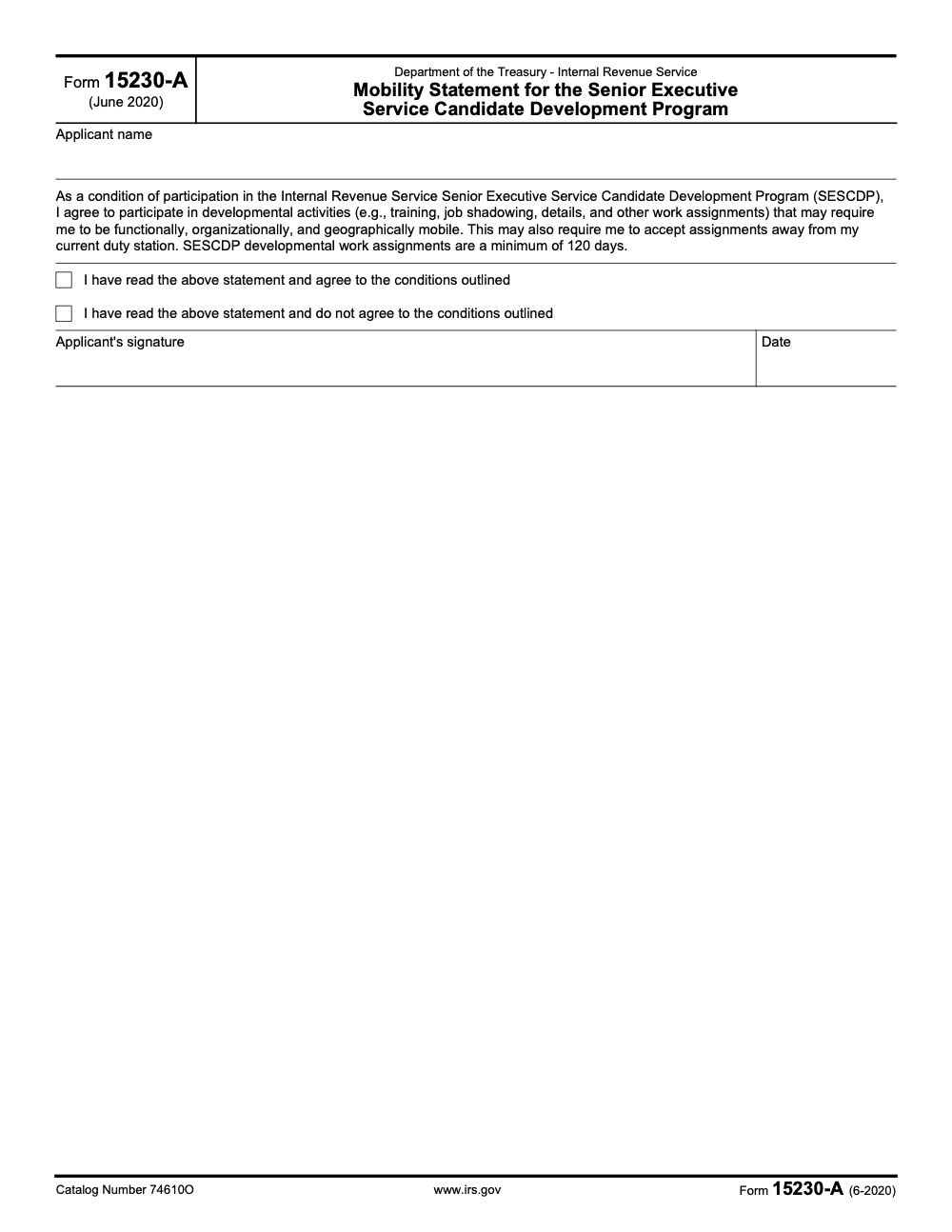
Form 15230-A is the SESCDP mobility statement – an internal IRS HR agreement (catalog 74610O, June 2020 revision) that Senior Executive Service Candidate Development Program applicants sign to accept functional, organizational, and geographic mobility, with developmental work assignments of at least 120 days per the form's own text as published on IRS.gov. Applicants must check one of two boxes (agree or do not agree) and sign and date the form for it to count as complete. Browse the IRS forms library for adjacent paperwork like Form 15230 and Form 15230-B.
An SESCDP candidate sits two days from a selection-package deadline, and HR sends the mobility statement back marked incomplete. The form is one page. The candidate has read it three times. The hold-up is almost always the same short list: an unchecked box, a missing date next to the signature, or a name that does not match the personnel record.
Form 15230-A is the SESCDP Mobility Statement, an internal HR agreement to accept functional, organizational, and geographic mobility, not a tax-filing form. You check one of two boxes, agree or do not agree, and sign and date it for it to count as complete. The stakes behind that box are real: a candidate who marks do not agree, or leaves both boxes blank, cannot participate in the program. The mobility commitment includes developmental assignment time, with assignments of at least 120 days under the form's own text, so e-sign cleanly, match your legal name, and keep evidence like timestamps and version IDs.
Key Takeaways
- Form 15230-A is the IRS SESCDP Mobility Statement, an internal HR participation agreement (not a tax-filing or tax-reporting form). You either agree or do not agree to mobility across functions, organizations, and locations.
- The form’s current revision is June 2020, and the official PDF is available from the IRS.
- SESCDP requires developmental assignment time, at least four months in total, and at least one assignment of 90 consecutive days outside your position of record, based on OPM’s SES Desk Guide.
- Use a secure PDF workflow, match your legal name exactly, e‑sign in the applicant field, add the date, and save evidence like timestamps and version IDs.
- Keep your records aligned, Form 15230-A should match your SESCDP application and related forms, such as Form 15230 and Form 15230‑B.
What Form 15230-A Is and Who Needs It
Form 15230-A records your choice on mobility for the IRS Senior Executive Service Candidate Development Program, and signing it is a condition of program participation rather than optional paperwork. You will check either agree or do not agree, then sign and date. The text on the form states that SESCDP developmental work assignments are a minimum of 120 days, and that mobility can mean leaving your current duty station. This is the official language on the IRS PDF.
Who uses it, applicants to the SESCDP within the IRS. If you are preparing an SESCDP package, you will keep this document consistent with your broader application file and endorsements, for example, Form 15230 for endorsement and Form 15230‑B for the continuing service agreement when applicable.
Why the 120‑day requirement matters
OPM sets SESCDP program expectations. Agencies must give candidates a developmental assignment totaling at least four months of full‑time service outside the position of record, and at least one assignment must be 90 consecutive days. That is how agencies demonstrate breadth, readiness, and executive‑level exposure. Your 15230‑A attests that you are willing to meet that standard.
Plain English version, if you want to be taken seriously as an SES candidate, you say yes to real rotations that stretch you for at least four months, with one block of 90 days in a substantially different role.
What Saying “Agree” or “Do Not Agree” Changes
Use the table to sanity‑check the practical impact of your selection.
| Choice on Form 15230‑A | What it signals | Likely impact on SESCDP fit |
| Agree to mobility | You accept functional, organizational, and geographic assignments, minimum 120 days | You align with OPM and IRS program expectations and assignment planning. |
| Do not agree | You decline the mobility expectation | Program eligibility or placement may be limited, and assignment options shrink significantly. |
Step‑By‑Step, Fill Out Form 15230‑A Correctly
Here is a clean, repeatable process we recommend when supporting leaders through regulated paperwork.
Step 1, Access the correct IRS PDF
- Download the official IRS file, f15230a.pdf. Check the footer for Form 15230‑A, June 2020. Keep a copy of the file name and download timestamp in your notes.
- If you are collecting related SESCDP documents, also grab Form 15230 and Form 15230‑B so everything is in one place.
Step 2, Enter your identifying details
- Type your name exactly as it appears on your SESCDP application and HR record. Minor typos can push your package into manual review.
- If your agency requires additional identifiers, add them only where authorized. Keep formatting consistent across all documents in your packet.
Step 3, Record your mobility selection
- Read the statement carefully. Check the box for agree or do not agree. The form text references developmental work assignments with a minimum duration of 120 days.
- If you agree, ensure your development plan and availability line up with OPM’s requirement for at least four months total, and at least one 90‑day continuous rotation outside your position of record.
Step 4, E‑sign and date with care
- Use a secure PDF editor that preserves signature metadata. Insert your signature in the applicant field and add the date.
- Match the signature name to your typed name. Save the validation or receipt screen, if your editor provides one.
- If your agency has a preferred signature method, follow it. When in doubt, verify with the SES program office before submission.
Step 5, Final review and file hygiene
- Cross‑check that names, dates, and your selection match your SESCDP application.
- Rename the file to a clear convention, for example, Lastname_Firstname_Form15230A_2025‑MM‑DD.pdf.
- Save at least two copies, one in your secure cloud repository and one in an encrypted local folder. Keep simple notes, file version, date, and who submitted.
Mobility, Assignments, and What Counts
Let us make the rules tangible. OPM expects an executive‑level assignment outside your position of record that adds breadth, exposure to new stakeholders, and practice with the ECQs. Many candidates treat this like a short detail. It is not. A qualifying block must be four months in total, with at least one run of 90 straight days where you are doing different, executive‑level work. Plan your calendar with that in mind.
Can a hybrid or interagency assignment qualify
Yes, OPM allows flexibility. The assignment does not have to be in your home component or even in your home agency, and it does not need to be restricted to the Executive Branch, provided ethics and agency rules are met. This gives you room to select an assignment that truly stretches your leadership.
A quick readiness checklist
- You have a draft development plan that names target functions or organizations outside your current lane.
- You can commit to at least 90 consecutive days away from your position of record.
- Your supervisor and HR partner understand the timing and coverage plan.
- You can relocate or telework if a geographic move is needed, consistent with policy.
Electronic Signature and Recordkeeping That Stand Up Later
You probably will not be asked for proof after submission, until you are. Treat this like a record that could be audited for timing and authenticity.
- Work from the official PDF, Form 15230‑A June 2020, downloaded from irs.gov. That keeps the document hash and structure consistent.
- E‑sign in a tool that preserves signer, timestamp, and file integrity. Store the validation evidence with the PDF.
- Keep your files organized next to related SESCDP documents, for example, Form 15230 endorsement and Form 15230‑B when used.
Tip, if your e‑signature tool lets you export an audit report, save it to the same folder as the PDF. Future you will thank you.
Minimal paper trail that still feels clean
| Item | What you keep | Why it helps |
| Source PDF | f15230a.pdf from irs.gov | Confirms you used the official form. |
| Signed PDF | Final version with your selection, signature, date | Primary record for HR and the program office. |
| Metadata | Signature audit, file hash or version ID, completion timestamp | Proves authenticity if anyone asks. |
| Notes | One‑page log with who, what, when, where stored | Saves time during later reviews. |
Common Errors That Slow You Down
- Name mismatch between this form and your SESCDP application.
- Box left unchecked for agree versus do not agree (leaving both boxes blank is not a valid 'pending' or 'undecided' status – the form is designed to capture an explicit selection).
- Missing date next to the signature (an unsigned or undated form is not a binding mobility statement, even if a checkbox is selected).
- Unclear file name or scattered storage.
- Out‑of‑date understanding of assignment expectations, you must plan for at least four months total, with one 90‑day continuous block.
Quick How‑To, From Blank PDF To Done
- Download and open the official Form 15230‑A PDF. Confirm the header shows Form 15230‑A and the footer shows June 2020.
- Type your name exactly as used across your application.
- Read the mobility statement, then choose agree or do not agree. The form text references a minimum of 120 days for developmental assignments.
- E‑sign in the applicant field, then add the date.
- Save the file with a clear name, then store it in two secure locations.
If You Are Planning Assignments Now
Some candidates want to know how agencies interpret the time requirement. The OPM Desk Guide states the developmental assignment must total at least four months of full‑time service outside your position of record, and at least one assignment must be 90 consecutive days. Your agency can add specifics in its SESCDP documentation, but those federal minimums are the baseline. Build your plan to meet them.
If you want an extra cross‑check, look at related agency policies on details. They often reference 120‑day increments for SES work, which can help you think about scheduling and extensions. While that guidance is for details, not SESCDP itself, it gives useful context for planning rotations.
A quick yes or no on tricky scenarios
- Can you agree to mobility now, then ask for an exception later, your program office decides, but exceptions can undercut assignment options.
- Can you use two 60‑day assignments instead of one 120‑day assignment, OPM’s guidance focuses on at least four months total, with one 90‑day continuous block. Plan for that structure.
- Do virtual details count, they can, if they meet the executive‑level and outside position of record criteria, and satisfy agency and ethics rules.
Your best move, align your selection on 15230‑A with a development plan that clearly meets OPM’s time structure and your agency’s documentation.
Relevance for Firm Leaders And HR Teams
If you support leaders through documentation, predictable delivery wins trust. At Accountably, we live inside secure, SOP‑driven workflows for regulated documents every day, so we encourage small habits that prevent rework, consistent naming, signed on time, and stored in the right place. Keep the mention brief here, the form is about your SES journey, and your process should feel calm and controlled.
Quick Checklist, From Start To Stored
- Download the official 15230‑A PDF, confirm June 2020.
- Enter your name exactly as on your application.
- Choose agree or do not agree, based on your real availability.
- E‑sign, add the date, and save a validation receipt if available.
- Store two copies in secure locations and log the submission date.
Sources And Updates
- IRS, Form 15230‑A, Mobility Statement for the SES Candidate Development Program, revision June 2020, official PDF.
- IRS, Static PDF directory listing for Form 15230‑A, confirmation of file location and revision date.
- OPM, SES Desk Guide, Chapter 7, Executive Development, requirements for four months total and one 90‑day continuous assignment outside position of record.
- IRS, Forms and Publications index pages that continue to list Form 15230‑A, Form 15230, and Form 15230‑B.
Closing Thoughts
You are making a simple commitment with real weight. Form 15230‑A is short, and it signals that you are ready to take on executive‑level rotations that stretch your leadership. Give yourself a calm half hour to complete it, confirm your choice, sign with care, and store the file where future you can find it. If you keep your documents tight now, your SESCDP experience will feel focused later.
Common Mistakes We See Every Season
The mistakes we see on Form 15230-A are almost always small, repeatable, and easy to prevent once you know the pattern. Each one stalls a selection package by days, not hours, because HR has to send the file back to the candidate and the candidate has to find a clean window to redo and re-sign.
Reusable Checklists
These checklists are written to be copy-pasted into HR SOPs and candidate intake packets. Each step references a specific field, dimension, or artifact on Form 15230-A so the candidate or reviewer can confirm completion without rereading the form.
Candidate pre-signature checklist
- Download the current revision of Form 15230-A (June 2020, catalog 74610O) from the IRS PDF directory on IRS.gov.
- Confirm the applicant name field matches your personnel record exactly, including suffix and middle initial.
- Read the full mobility statement, not only the headings, before deciding agree or do not agree.
- Confirm your understanding of all three mobility dimensions: functional, organizational, and geographic.
- Note that SESCDP developmental work assignments are a minimum of 120 days and may be away from your current duty station.
- Select exactly one checkbox: agree or do not agree. Do not leave both blank.
- Sign the applicant signature field and complete the adjacent date field on the same day.
- Save the signed PDF with a file name that includes your last name, the form number, and the signature date.
HR intake and review checklist
- Confirm the candidate used the June 2020 revision (catalog 74610O) and not a cached older PDF.
- Verify the applicant name matches the candidate's official personnel record letter for letter.
- Confirm exactly one of the two checkboxes is selected; both blank or both checked is a reject.
- Verify the applicant signature is present and that the date field is populated with a real date.
- Cross-check the signature date against the candidate's SESCDP selection package timeline.
- Log receipt in the SESCDP candidate tracker and link the signed PDF to the candidate record.
- Send a confirmation acknowledgment to the candidate so the file is closed on the candidate's side.
E-signature audit trail checklist
- Use an agency-approved secure editor that preserves signer identity and timestamps.
- Capture the signed PDF, the signature validation receipt, and the download timestamp from IRS.gov.
- Store all three artifacts together in the candidate's HR file, not in personal email.
- Apply role-based access so only authorized HR reviewers can open the signed file.
- Retain the artifacts through the candidate's SESCDP tenure plus the agency's standard HR records retention period.
- Review the storage location annually to confirm the file has not migrated or lost its validation receipt.
Keep 15230-A Season From Stalling
Form 15230-A does not move with the tax calendar, but it has its own pressure cycle: SESCDP candidate cohorts close, agency HR teams collect mobility statements in batches, and one missing signature or an unchecked box can stall a candidate's selection package. The form is short – one page, two checkboxes, catalog 74610O, June 2020 revision per the IRS PDF directory on IRS.gov – which is exactly why the failure mode is predictable: people treat it as a formality and skip the small steps that matter.
The fix is to run the mobility statement as a tracked workflow item, not a casual sign-off. A short intake routine catches most defects before the file leaves the candidate's desk.
- Verify the applicant name field matches the personnel record exactly, since later audit cross-references rely on that string.
- Confirm exactly one of the two checkboxes is selected; per the form's own text, leaving both blank is not a valid pending status.
- Walk candidates through all three mobility dimensions (functional, organizational, geographic) so they understand the commitment goes beyond geographic relocation alone.
- Set the expectation in writing that SESCDP developmental work assignments run a minimum of 120 days, per the form's printed language as published on IRS.gov.
- Capture an e-signature with a timestamp and store the signed PDF plus any validation receipt in the candidate's HR file, not in personal email.
When HR capacity is thin, the same back-office discipline that supports finance and tax paperwork supports executive HR documentation. Accountably's structured delivery teams handle the document review, audit trail, and cohort tracking that keep selection packages clean from intake through final file.
FAQs
Yes. The IRS PDF directory lists Form 15230‑A as f15230a.pdf with a June 2020 revision, and it remains available as of 2025. If a new revision appears, the IRS directory and the Forms and Publications pages will show it. Check those sources before you submit.
The form’s text states that SESCDP developmental work assignments are a minimum of 120 days, and that you may need to accept assignments away from your current duty station.
OPM’s SES Desk Guide requires at least four months of full‑time service outside your position of record, with at least one assignment of 90 consecutive days. Agencies reflect this in their SESCDP design.
You can select do not agree on Form 15230‑A, but that decision can limit eligibility and placement because the program is built around real developmental assignments. Coordinate with your program office before you choose.
Use any secure editor approved by your agency that preserves signer identity and timestamps. Save the signed PDF and any validation receipt. If your program office specifies a method, follow that instruction.
Normally you submit the signed PDF only. Keep your audit artifacts, like the signature report and download timestamp, in your records in case someone requests them later.
Other forms this guide names
- Form 15230: IRS Senior Executive Service Candidate Development Program Endorsement
- Form 15230-B: CDP Continuing Service Agreement Guide
About this guide
Accountably helps US CPA, EA, and accounting firms hire trained accountants and tax preparers in India.
About us Reviewed byJugal Thacker, CPAFounder and CEO at Accountably
A Washington-licensed CPA with 7+ years inside US firms – PwC, a real-estate tax practice, then a full-service firm, rising from reviewer to manager to advisory. This article was reviewed against current IRS guidance for the 2025 tax year and updated for filers preparing late returns, amendments, and 2026 estimates.
View profile →How we research, review, and update this guide
Every Accountably guide is researched against primary IRS sources, reviewed by a U.S. CPA, and refreshed as guidance evolves. Read our Editorial Guidelines to see how we source, fact-check, and update our content.




