Summarize this article with AI
In Brief
Schedule R (Form 1040) is how qualified filers claim the Credit for the Elderly or the Disabled – a 15% nonrefundable credit authorized by IRC §22 (per IRS Publication 524). For tax year 2025, line 15 AGI exclusion thresholds are $7,500 (single, HoH, or QSS), $10,000 (MFJ), and $5,000 (MFS lived apart all year); the final credit on line 22 flows to Schedule 3 (Form 1040), line 6d, and the return is due April 15, 2026 (October 15, 2026 with Form 4868).
Schedule R rests on two income tests, not one, and that is where most filers lose the credit before they ever reach the math. You can be 65 by December 31, 2025, hold a physician's statement for a disability, and still walk away with nothing if your AGI clears the limit for your filing status, or if your nontaxable Social Security and pension income clears its own separate limit. Either test, hit on its own, ends the claim.
It also helps to know what this credit is and is not. The amount on line 22 is nonrefundable, so it lowers tax you owe and stops at zero; it will not turn into a check. If the tests pass, the allowed figure carries to Schedule 3, line 6d, and if you would rather the IRS run the calculation, you write CFE on that line and attach the schedule.
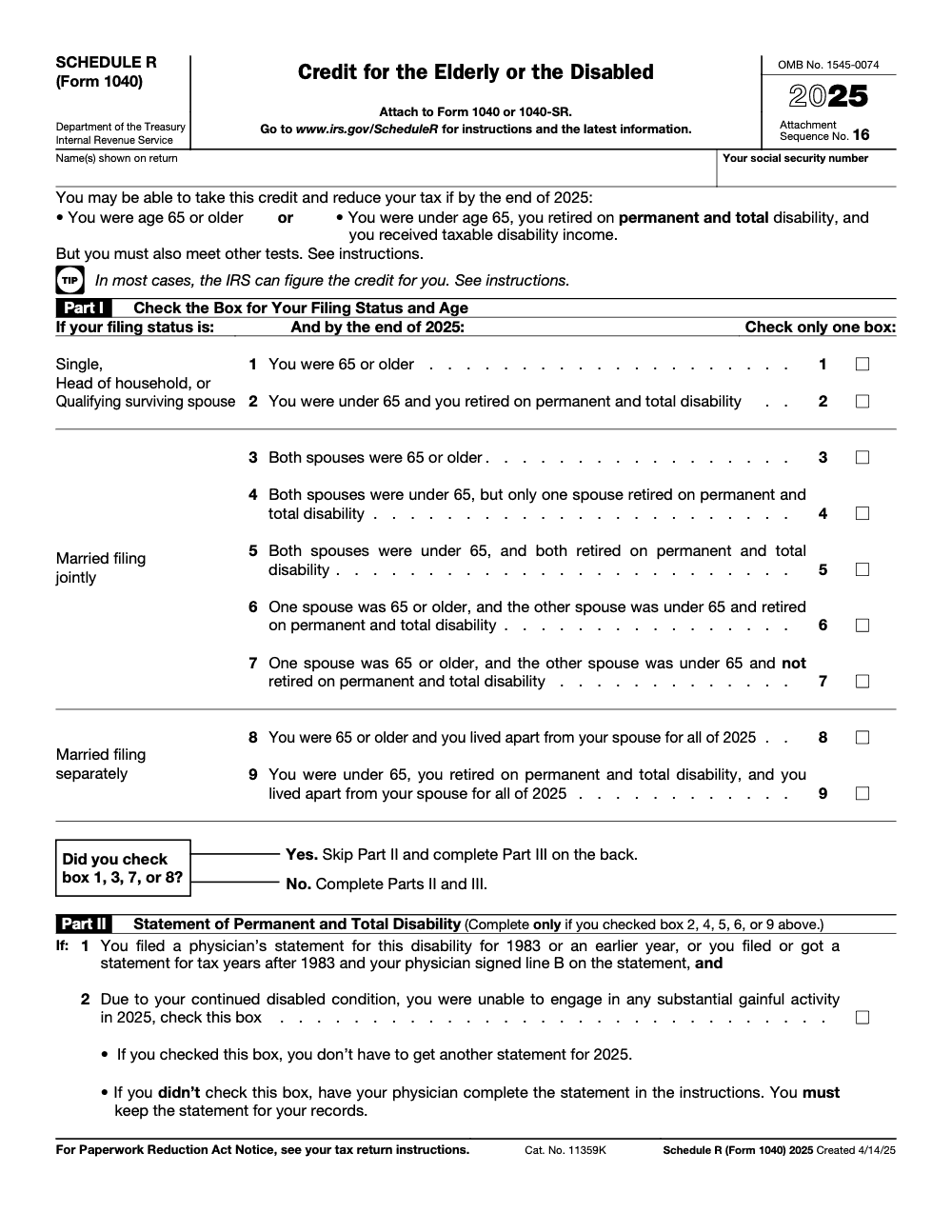
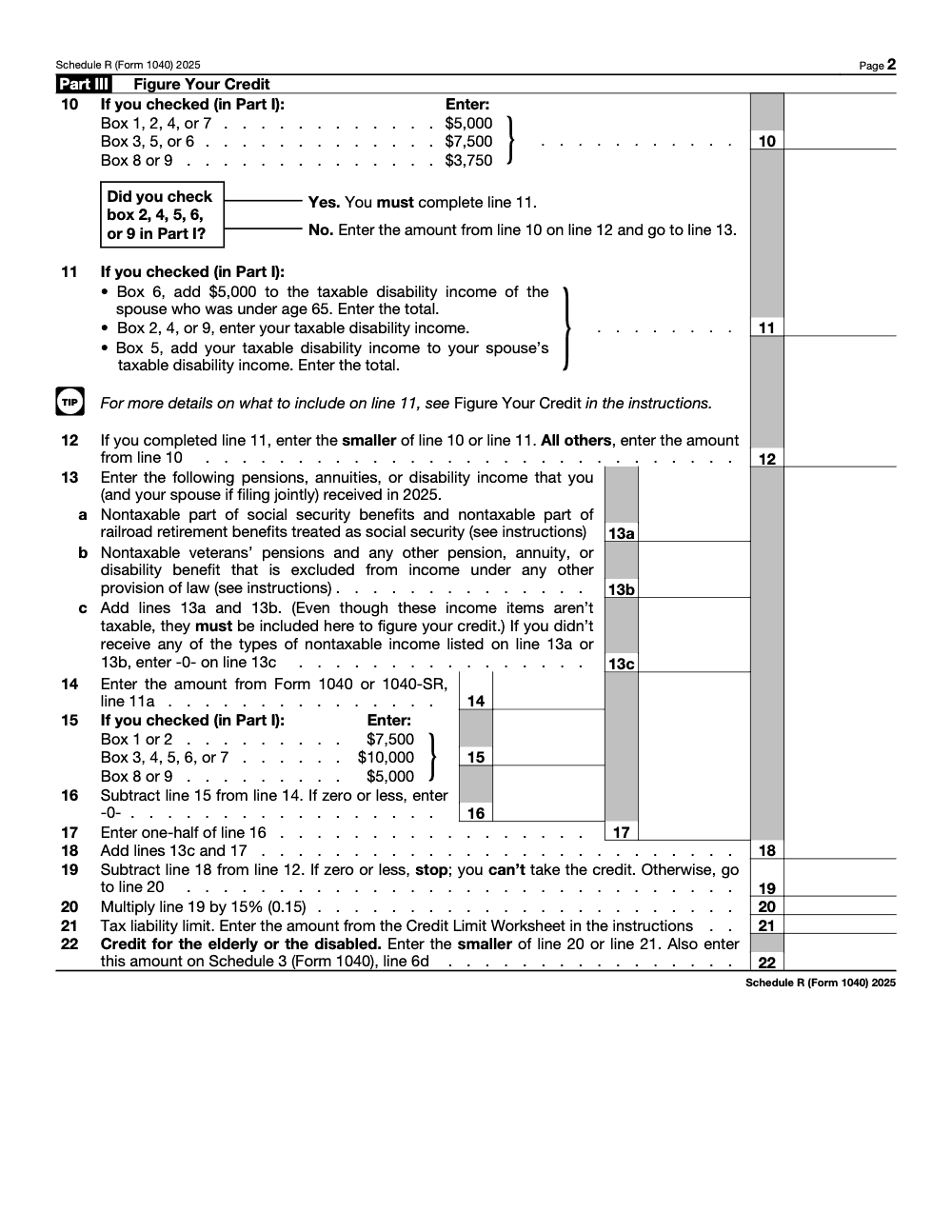
Key Takeaways
- Schedule R is how you claim the Credit for the Elderly or the Disabled, then you carry the allowed amount to Schedule 3, line 6d. If you want the IRS to calculate it, enter “CFE” on Schedule 3, line 6d, and attach Schedule R.
- You qualify if you are 65 or older by December 31, 2025, or if you are under 65 and meet strict permanent and total disability rules with taxable disability income.
- You must pass two income tests, an AGI test and a separate test for the total of your nontaxable Social Security and other nontaxable pensions, annuities, or disability income. If either equals or exceeds the limit, you cannot claim the credit.
- The calculation starts with an initial amount tied to filing status, typically 5,000 or 7,500, or 3,750 for married filing separately who lived apart all year, then the formula reduces that amount and multiplies the remainder by 15%.
- Keep a physician’s statement or accepted VA documentation if you claim disability under age 65. You do not file the statement, you retain it with your records.
What Schedule R Does, and Why It Matters
Schedule R lets you figure the Credit for the Elderly or the Disabled, confirm eligibility, and send the allowed credit to Schedule 3 so it reduces your tax due. Because it is nonrefundable, your final credit cannot exceed your tax after other credits. The 2025 IRS instructions also confirm that if you do not want to compute it, you may ask the IRS to figure it for you by writing “CFE” on Schedule 3, line 6d, and attaching Schedule R.
If either your AGI or your nontaxable benefits hit or exceed the limit for your status, you cannot take the credit, even if you meet the age or disability test.
Who Qualifies in 2025
The age path
You qualify by age if you are 65 or older on December 31, 2025. If you died in 2025, the instructions address timing, but the practical rule for most people is simple, at least age 65 by year end (passing the age test alone does not guarantee the credit, the AGI and nontaxable‑benefit limits described below frequently phase it out to zero for filers with meaningful Social Security).
The disability path
If you are under 65, you may still qualify, but the standard is strict. You must have retired on permanent and total disability, you must have received taxable disability income for the year, and you must not have reached your employer’s mandatory retirement age before the year began. A physician must determine you cannot engage in substantial gainful activity and that the condition is expected to last at least a year or result in death. Keep the physician’s statement or accepted VA certification in your files (if you filed a qualifying physician’s statement for 1983 or earlier, or a post‑1983 statement where your physician signed line B, that statement carries forward and you do not need a new one for 2025 as long as your disability is unchanged, just check the carry‑forward box in Part II).
Filing status rules you cannot ignore
- Married filing jointly, generally required if you are married, unless you lived apart all year or qualify as head of household under special rules.
- Married filing separately and lived with your spouse at any time in 2025, you are ineligible for this credit. If you lived apart all year, special, lower limits apply.
Income Limits for 2025
You must pass two tests, an AGI test and a separate test for the total of your nontaxable Social Security plus other nontaxable pensions, annuities, or disability income. If either equals or exceeds the threshold for your filing status, you cannot take the credit. These are the 2025 limits per the IRS instructions:
| Filing status | You generally cannot take the credit if your AGI is | Or if your nontaxable Social Security plus other nontaxable pensions, annuities, or disability income is |
| Single, Head of Household, or Qualifying Surviving Spouse | 17,500 or more | 5,000 or more |
| Married filing jointly, only one spouse is a qualifying individual | 20,000 or more | 5,000 or more |
| Married filing jointly, both spouses are qualifying individuals | 25,000 or more | 7,500 or more |
| Married filing separately, lived apart all year | 12,500 or more | 3,750 or more |
Note, AGI means the amount on Form 1040 or 1040‑SR, line 11a for 2025, as referenced by the instructions.
Compliance note, this article reflects the IRS’s 2025 Schedule R instructions page last reviewed November 17, 2025. Always compare your return to the current year’s instructions before filing.
How the Credit Works, From Start to Finish
The credit uses a straightforward formula. You start with an initial amount based on your filing status, then you reduce that amount by half of your excess AGI and by certain nontaxable benefits, then you multiply the remainder by 15%. Finally, you apply a credit limit so the credit cannot exceed your tax after other credits.
Initial amounts used on Schedule R, line 10
For 2025, the instructions tell you to enter on line 10:
- 5,000 if you checked boxes 1, 2, 4, or 7 in Part I.
- 7,500 if you checked boxes 3, 5, or 6 in Part I.
- 3,750 if you checked boxes 8 or 9 in Part I.
Those boxes correspond to filing status and whether one or both spouses qualify. In plain English, the initial amounts generally align to 5,000 for single or joint with one qualifying spouse, 7,500 for joint with both spouses qualifying, and 3,750 for married filing separately who lived apart the entire year. If you are under 65, the initial amount cannot exceed your taxable disability income.
The reduction, what lowers your credit
Part III walks you through two key reductions before the 15% factor applies:
- Half of your excess AGI, the instructions define how to compute excess AGI on lines 14 through 17.
- The total of your nontaxable Social Security and other nontaxable pensions, annuities, or disability income, reported on line 13 (even though these items aren’t taxable, the form requires them to be added back here, and this add‑back is the single most common reason the credit zeroes out for seniors with meaningful Social Security).
After subtracting these amounts from your initial amount, if your result is zero or less, you stop, you cannot take the credit (in practice this is the typical outcome for seniors with modest Social Security and AGI, the nontaxable‑benefit add‑back plus half of excess AGI often equals or exceeds the initial amount, zeroing the credit out before the 15% factor ever applies). If it is positive, you multiply by 15% to get a tentative credit on line 20.
The credit limit, why it can be smaller than your tentative number
Your actual credit on line 22 cannot exceed your tax after certain other nonrefundable credits. The 2025 instructions provide a simple worksheet and point you to Form 1040, line 18 and Schedule 3 lines for the limit. You then enter the smaller of your tentative credit or the limit, and that is the number that flows to Schedule 3, line 6d.
A quick example, with numbers that match the IRS method
- Initial amount, 5,000
- Nontaxable Social Security, 700
- Excess AGI, 4,250
- Reduction total, 4,950
- Amount after reduction, 50
- 15% of 50, 8
- Credit limit from worksheet, 26
- Allowed credit, 8, enter on Schedule R, line 22, and on Schedule 3, line 6d.
The IRS examples in the 2025 instructions show both outcomes, one where a small credit survives, and one where the combined reductions eliminate the credit. This is normal, and it is why careful inputs matter.
Step‑by‑Step Filing Flow
Follow the form in order, it is short, but the sequence matters.
- Complete Part I to confirm eligibility, age or disability, and your filing status.
- If you are under 65 and claiming disability, complete Part II and retain your physician’s statement or accepted VA certification in your records. Do not attach the statement.
- Work through Part III, figure your initial amount on line 10, enter taxable disability income on line 11 if applicable, then compute the reductions, and multiply by 15%.
- Use the Credit Limit Worksheet in the instructions to determine your limit, then enter the smaller amount on Schedule R, line 22. Carry that amount to Schedule 3, line 6d, or write “CFE” on Schedule 3, line 6d if you choose to have the IRS figure it. Attach Schedule R.
Where it goes on your return in 2025
- Schedule R, line 22 is your final credit.
- Schedule 3, line 6d is where you report it on your Form 1040.
- If you are asking the IRS to compute it, enter “CFE” on Schedule 3, line 6d and attach Schedule R.
Documentation You Should Keep
- Physician’s statement or VA confirmation of permanent and total disability, keep it, do not file it with the return.
- Forms 1099‑R and any plan statements that show taxable disability income, pensions, and annuities used on Schedule R.
- Your AGI workpapers, the Schedule R worksheet, and a copy of your filed Schedule R. The IRS can verify nontaxable benefit amounts using other agency data, so accuracy is essential.
Common Pitfalls, and How To Avoid Them
The fastest way to lose this credit is to miss a filing status rule or to overstate nontaxable benefits. Slow down, check the limits, then compute.
| Pitfall | Fix it fast |
| Married filing separately but you lived with your spouse during 2025 | You are not eligible. Either file jointly or confirm you lived apart all year and then apply the special lower limits. |
| AGI or nontaxable benefits at or above the threshold | You cannot claim the credit. Confirm both tests, not just AGI. |
| Counting payments after mandatory retirement age as disability income | Exclude amounts that are not considered taxable disability income under the rules. |
| Missing physician’s statement for under‑65 claims | Secure and retain the statement or accepted VA certification. Do not attach it, keep it in your records. |
Using Tax Software Without Headaches
Most software will interview you and produce Schedule R automatically, but only if your profile details are correct. Here is the cleanest path:
- Verify your profile basics, date of birth, filing status, and residency, so the software knows to test Schedule R.
- Enter taxable disability income and pension or annuity amounts precisely as shown on Forms 1099‑R or employer plan statements.
- If you are under 65 and retired on permanent and total disability, complete the disability certification screens and keep your physician’s statement or VA confirmation.
- Review Schedule R for the correct initial amount and reductions, then confirm the flow to Schedule 3, line 6d. If you prefer, elect the IRS computation and have the software place “CFE” on Schedule 3, line 6d.
Quick Reference, 2025 Income Limits and Initial Amounts
2025 income limits, both tests must be under the limit
- Single, HOH, QSS, AGI under 17,500, and nontaxable benefits under 5,000.
- MFJ with one qualifying spouse, AGI under 20,000, and nontaxable benefits under 5,000.
- MFJ with both qualifying, AGI under 25,000, and nontaxable benefits under 7,500.
- MFS, lived apart all year, AGI under 12,500, and nontaxable benefits under 3,750.
Initial amounts used in the formula
- 5,000 applies to most single and some joint situations.
- 7,500 applies when both spouses qualify on a joint return.
- 3,750 applies to married filing separately who lived apart all year.
- If under 65, your initial amount cannot exceed your taxable disability income.
The IRS’s general page also describes the credit range as $3,750 to $7,500, which reflects the initial amounts used in the calculation, not the final credit after reductions and the 15% factor.
Eligibility, Restated Simply
-
- You are 65 or older by December 31, 2025, or you are under 65, permanently and totally disabled, and receiving taxable disability income, and your disability began before you reached your employer’s mandatory retirement age.
- You are a U.S. citizen or resident alien, or you make the election to be treated as a resident if eligible.
- You file jointly if married, unless you qualify for head of household or you lived apart all year and meet the special limits.
- You pass both 2025 income tests, AGI and nontaxable benefits.
Where People Get Confused
Two areas cause the most confusion. First, the income limits are unforgiving. If either AGI or your nontaxable benefits meet or exceed the threshold, the credit is off the table for the year. Second, the line placement changes from time to time. For 2025, the allowed credit from Schedule R, line 22 goes on Schedule 3, line 6d, or “CFE” if you want the IRS to compute it, both confirmed in the 2025 instructions.
Step‑by‑Step Mini‑Checklist You Can Use Today
- Confirm your eligibility path, age 65 or older, or under 65 with permanent and total disability and taxable disability income.
- Check your filing status. If you are married filing separately and lived with your spouse at any time in 2025, you are not eligible.
- Test your 2025 AGI and your nontaxable benefits against the limits in Table 1. You must be under both limits for your filing status.
- Complete Part III and compute the 15% of the amount that remains after the reductions. Use the credit limit worksheet so you do not claim more than your tax. Enter the result on Schedule R, line 22 and move it to Schedule 3, line 6d, or use “CFE.”
Real‑World Tips From the Review Desk
- Enter dates of birth first in your software profile. That single step triggers most programs to ask about Schedule R automatically.
- For under‑65 disability claims, double‑check that the disability began before your employer’s mandatory retirement age, and that you actually received taxable disability income this year.
- Keep a simple binder tab labeled “Schedule R,” include your physician’s statement, plan documents, Forms 1099‑R, and your Schedule R worksheet. If the IRS asks, you will be ready.
Official Sources You Can Trust
- Instructions for Schedule R, 2025, includes eligibility flowchart, Table 1 income limits, Part III calculation, and the credit limit worksheet. Page last reviewed or updated November 17, 2025.
- About Schedule R, current revision and links to the form and instructions.
- IRS Credit for the Elderly or the Disabled page, a concise overview and links to forms.
- IRS tips for seniors page, includes the same 2025 income limits in plain language.
If you like to confirm line placements, the IRS line‑by‑line page for Schedule 3 shows Schedule R flowing to line 6d in current Free File Fillable Forms. Always check the latest instructions if you see a mismatch in your software.
Conclusion
You now have a complete, plain‑English playbook for Schedule R in 2025. Start with eligibility, check both income limits, work through Part III, and send the allowed amount to Schedule 3, line 6d, or write “CFE” and let the IRS figure it. Keep your physician’s statement if you are under 65 and claiming disability, and save your 1099‑R forms and workpapers. When this form is handled with care, it turns into easy, defensible savings for the right taxpayers.
Common Mistakes We See Every Season
Schedule R is short, but the mistakes are repeatable. Every season the same five patterns surface in review – three on eligibility, two on the math.
Reusable Checklists
Three checklists a Schedule R preparer or reviewer can paste straight into a firm SOP. Each one maps to a separate failure mode – eligibility, the Part III math, and the IRS-figures-credit shortcut.
Schedule R eligibility intake
- Confirm the taxpayer was 65 or older by December 31, 2025 (born on or before January 1, 1961), OR is under 65, retired on permanent and total disability, and received taxable disability income in 2025.
- Capture filing status and pre-pick the correct Part I box (boxes 1 through 9, only one allowed).
- For MFS filers (boxes 8 or 9), document in writing that the client lived apart from spouse for ALL of 2025.
- For under-65 disabled filers, confirm whether a qualifying physician's statement is on file or whether a new one is required.
- Pull SSA-1099, RRB-1099, VA pension statements, and 1099-R forms into the workpaper folder before Part III begins.
- Pull the Form 1040 or 1040-SR draft to confirm line 11a AGI before Schedule R math starts.
Schedule R Part III line-by-line
- Line 10: $5,000 for box 1, 2, 4, or 7; $7,500 for box 3, 5, or 6; $3,750 for box 8 or 9.
- Line 11: completed only for box 2, 4, 5, 6, or 9; for box 6 add $5,000 to the under-65 spouse's taxable disability income.
- Line 12: smaller of line 10 or line 11 (or line 10 if line 11 was not completed).
- Line 13a/13b/13c: capture nontaxable Social Security, railroad retirement treated as Social Security, veterans' pensions, and other excluded pension/annuity/disability income; enter -0- on 13c if none.
- Line 14: AGI from Form 1040 or 1040-SR line 11a, not plain line 11.
- Line 15: $7,500 for box 1 or 2; $10,000 for box 3, 4, 5, 6, or 7; $5,000 for box 8 or 9.
- Line 16: line 14 minus line 15, floored at zero.
- Line 17: one-half of line 16.
- Line 18: line 13c plus line 17.
- Line 19: line 12 minus line 18; if zero or less, stop – no credit allowed.
- Line 20: line 19 multiplied by 15% (0.15).
- Line 21: tax liability limit from the Credit Limit Worksheet in the Schedule R instructions.
- Line 22: smaller of line 20 or line 21; carry to Schedule 3 (Form 1040), line 6d.
CFE shortcut – let the IRS figure the credit
- Check the correct Part I filing-status box.
- Complete Part II if box 2, 4, 5, 6, or 9 was checked.
- Complete only the Part III lines the Schedule R instructions require for the CFE shortcut.
- Write "CFE" on Schedule 3 (Form 1040), line 6d.
- Attach Schedule R to the Form 1040 or 1040-SR.
- Keep the physician's statement (if applicable) in the client file; do NOT attach it to the return.
Keep 1040 Schedule R Season From Stalling
Schedule R lands inside the busiest stretch of the personal-tax season, when senior-client returns stack up between mid-March and April 15, 2026. The credit looks small in dollars – a $750 cap for a single 65+ filer ($5,000 base x 15%, per IRC §22) and $1,125 for MFJ when both spouses are 65 or older – but the line 13 nontaxable add-back and the Part II physician-statement test are exactly where junior preparers stall or miss the credit entirely, as the worked examples in IRS Publication 524 confirm.
The fix is procedural, not technical. Schedule R failures are almost always missing facts at intake (no physician statement on record, no SSA-1099 nontaxable portion captured, no written lived-apart-all-year confirmation for MFS) rather than line-math errors. Lock the intake and the 15% math takes care of itself.
- Trace line 14 to Form 1040 or 1040-SR line 11a in every Schedule R workpaper; reviewers reject anything that traces to plain line 11.
- Capture SSA-1099, RRB-1099, and VA pension statements before line 13a is touched so the nontaxable add-back is sourced, not estimated.
- For under-65 disabled clients, decide at intake whether the Part II carry-forward box applies or a current physician's statement is needed, then record the answer in the client file.
- For box-8 or box-9 MFS filers, document the lived-apart-all-of-2025 test in writing before any Schedule R fields are populated.
- Run the Credit Limit Worksheet from the Schedule R instructions before entering line 21 so the smaller-of comparison on line 22 confirms the nonrefundable cap.
Accountably runs Schedule R workpapers as part of our standard tax preparation workflow: structured intake for SSA-1099 and 1099-R sourcing, layered review on Part II disability claims, and documented retention of physician statements. Senior reviewers see the credit on every eligible return instead of catching it on amended ones.
FAQs
Schedule R is the form you use to claim the Credit for the Elderly or the Disabled. You complete Part I to confirm you are a qualified individual, Part II if you are under 65 and claim disability, and Part III to figure the credit. The allowed amount then moves to Schedule 3, line 6d on your Form 1040.
No. It is a nonrefundable credit, so it can reduce your tax, but it cannot exceed your tax after other credits. The instructions include a brief worksheet to compute your limit before you enter the final amount on line 22.
Yes. If you receive disability income, pensions, or annuities reported on Form 1099‑R, enter them exactly as shown so your Schedule R calculation is correct. The form distinguishes taxable disability income from nontaxable amounts that go into the reduction step.
No. You can file Form 1040 or 1040‑SR. Schedule R works with either, and the instructions refer to both forms throughout.
Yes. If you prefer not to compute it, the IRS will figure it for you. Check the appropriate box in Part I, complete Part II if needed, fill out the lines the instructions require, then write “CFE” on Schedule 3, line 6d, and attach Schedule R.
Other forms this guide names
- Form 1040: Filing Guide for 2025 Returns (AGI, Deductions, Deadlines)
- Form 1040-SR: Standard Deduction, Schedules, E-file Tips
- Form 1099‑R: Box 7 Codes, Rollovers, 2025 Filing Guide
Summarize this article with AI
About this guide
Accountably helps US CPA, EA, and accounting firms hire trained accountants and tax preparers in India.
About us Reviewed byJugal Thacker, CPAFounder and CEO at Accountably
A Washington-licensed CPA with 7+ years inside US firms – PwC, a real-estate tax practice, then a full-service firm, rising from reviewer to manager to advisory. This article was reviewed against current IRS guidance for the 2025 tax year and updated for filers preparing late returns, amendments, and 2026 estimates.
View profile →How we research, review, and update this guide
Every Accountably guide is researched against primary IRS sources, reviewed by a U.S. CPA, and refreshed as guidance evolves. Read our Editorial Guidelines to see how we source, fact-check, and update our content.