
Summarize this article with AI
In Brief
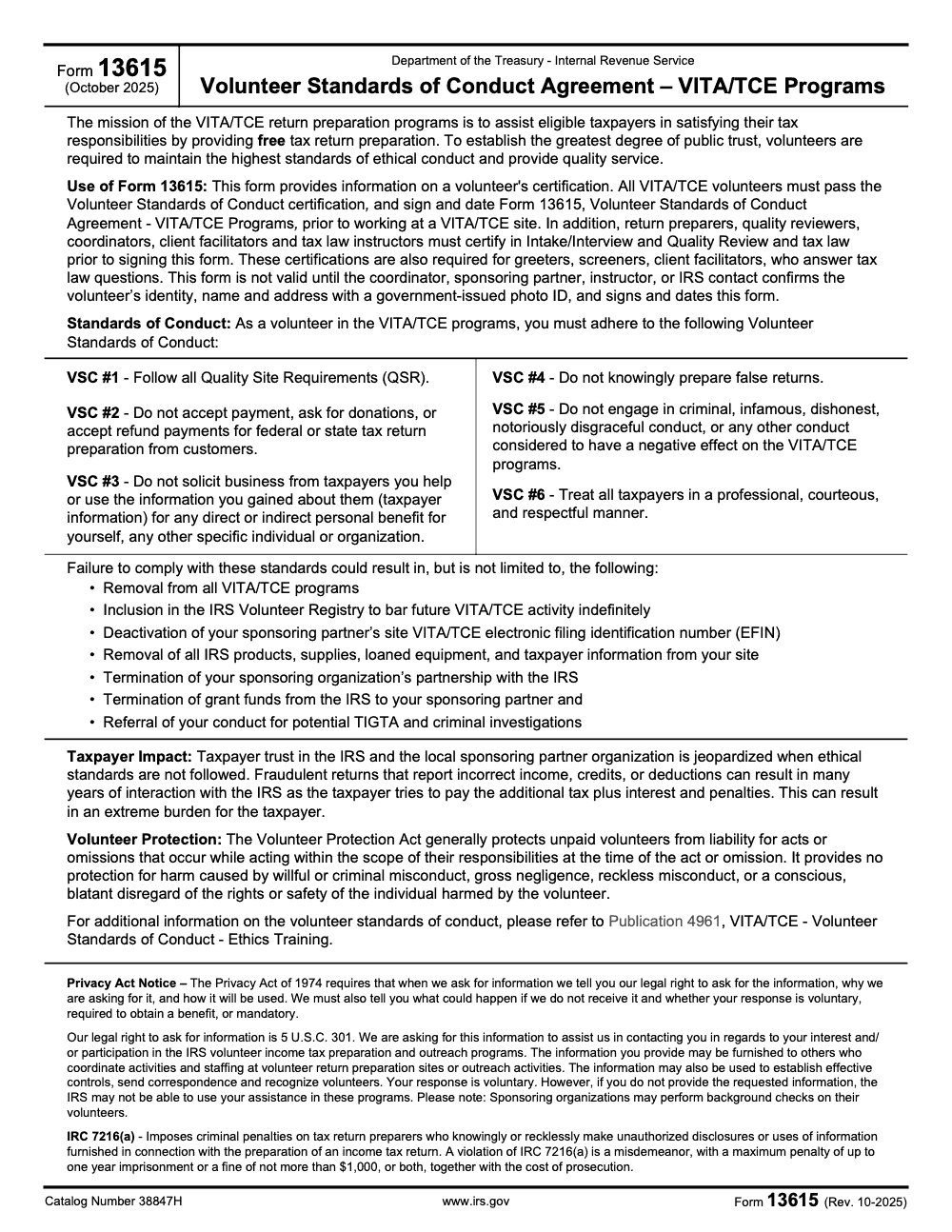
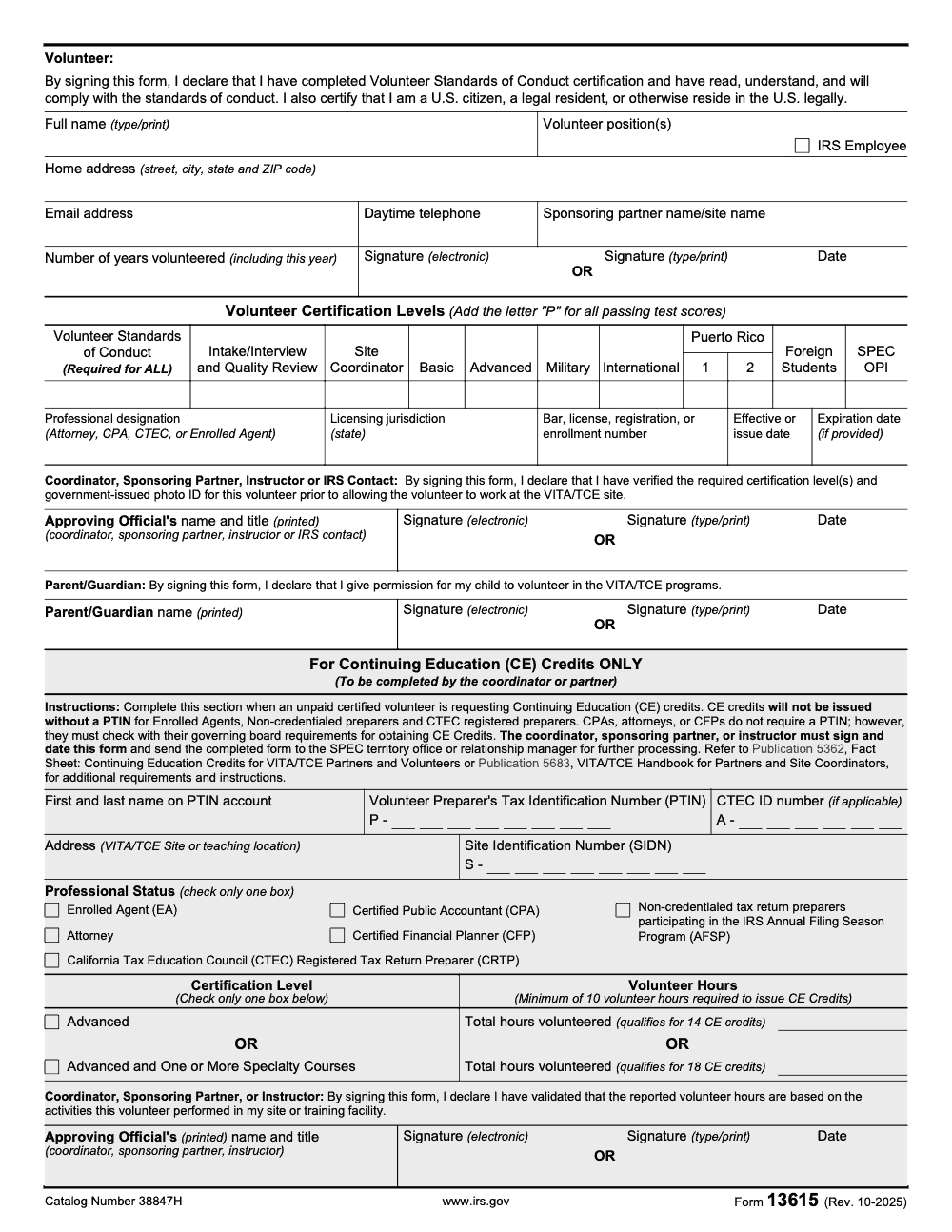
Form 13615 is the IRS VITA/TCE Volunteer Standards of Conduct Agreement (Rev. October 2025, Catalog Number 38847H) – every VITA/TCE volunteer must pass the VSC certification, sign the form, and have an approving official verify identity with a government-issued photo ID before working at a site (per IRS Publication 4961). Volunteers seeking Continuing Education credits need at least 10 volunteer hours plus Advanced certification (14 credits) or Advanced plus one or more specialty courses (18 credits), per IRS Publication 5362.
Rosters get held up every January over a few small markers nobody reviewed: a missing P next to a passed test, no parent signature for a minor, the wrong SPEC routing for CE credits. Form 13615 is where all of that lives. It is the IRS VITA/TCE Volunteer Standards of Conduct Agreement, revised October 2025, and every volunteer must pass the VSC certification, sign it, and have an approving official verify identity with a government-issued photo ID before working a site.
It functions as both an ethics agreement and a season-readiness gate, and it applies to every role, greeters and screeners included, not just tax-law preparers. Volunteers who want Continuing Education credits need at least 10 volunteer hours plus Advanced certification at 14 credits, or Advanced plus one or more specialty courses at 18 credits. Below I walk it the way I walk a new site coordinator through it, from who signs to what counts as a valid ID.
Key Takeaways
- Form 13615 is the IRS Volunteer Standards of Conduct Agreement. You complete it each year, then your approving official signs it before you volunteer.
- All VITA/TCE volunteers must pass the VSC. It is required for every role, including greeters, screeners, and client facilitators – not just for tax-law preparers. Volunteers who prepare, review, or coordinate must also pass the Intake/Interview & Quality Review tests, and they certify in tax law at Basic or Advanced based on site needs. Many sites require Advanced for preparers and reviewers. Minimum passing score is typically 80%.
- The form is not valid until your coordinator or sponsoring partner confirms your identity with a government issued photo ID and signs Form 13615.
- Most partners set January deadlines each filing season. Confirm your local due date, submit early, and keep a copy for your records.
What is Form 13615
Form 13615 is the Volunteer Standards of Conduct Agreement used across VITA and TCE. By signing it each year, you agree to follow program ethics and the Quality Site Requirements, then your site coordinator, sponsoring partner, instructor, or IRS contact validates it after checking your identity and certifications. You must complete required testing before you volunteer, and you must hand the completed form to the coordinator prior to service.
Who must complete Form 13615
If you work with taxpayers or tax data at a VITA or TCE site, you complete Form 13615 annually. That includes return preparers, quality reviewers, site coordinators, client facilitators, greeters who handle tax information, and instructors. Your approving official signs after confirming your identity and that you passed required tests.
Role based testing at a glance
- Preparer, reviewer, site coordinator, instructor, you pass the Volunteer Standards of Conduct and the Intake/Interview & Quality Review tests. Preparers and reviewers also certify in tax law at Basic or Advanced based on site needs, many sites prefer Advanced for return work. Passing score, 80% or higher.
- Non‑preparer roles that never answer tax law questions, such as some reception only roles, complete VSC at minimum, your partner may require more.
Why the form matters
- It protects taxpayer trust by setting a clear ethics baseline.
- It prevents access to tax data until your identity and competency are verified.
- It keeps your site compliant with IRS program rules and QSR.
Quick checklist before you start
- Pass required tests with at least 80%.
- Generate Form 13615 in Link & Learn Taxes.
- Bring a valid government issued photo ID.
- Get the approving official’s signature.
- Keep your own copy in your records.
When to submit, and where it goes
Most partners close certification rosters in January, then ramp up service in late January and February. If you are preparing for an upcoming filing season, treat your local deadline as firm, many sites target the last week of January to finalize volunteer approvals, and turn things in early so you can be scheduled without delays. Always confirm the date with your site coordinator.
If you volunteer through a campus or community partner, your program may also list a specific contact and location for drop offs or questions. As an example, some university programs centralize submissions to a named coordinator during weekday office hours. Your site’s instructions control, follow them exactly.
Pro tip, after you submit, send a short confirmation email and keep your signed PDF in a folder you can reach on your phone.
Typical submission channels
- Email the signed PDF to the address your coordinator provides.
- Upload through a secure portal if your program uses one.
- Hand deliver to the site or partner office during posted hours.
- Fax is still used by some programs, confirm first.
How to fill out Form 13615, step by step
- Gather the essentials, your full legal name, home address, email, daytime phone, volunteer role, and sponsoring partner name. Use the name on your government issued ID.
- Complete your certifications in Link & Learn Taxes, VSC and Intake/Interview & Quality Review are always required for preparers, reviewers, coordinators, and instructors. Most preparers will certify at Advanced for return work, confirm with your site.
- Generate the electronic Form 13615 from Link & Learn, review every field, then sign and date.
- Present your government issued photo ID to your approving official, they verify your identity, confirm your certifications, and then sign and date the form.
- Submit the signed form to your coordinator and keep a copy.
Accepted identification, what your coordinator checks
| ID type your coordinator can accept | Notes that help you breeze through |
| Driver’s license or state ID | Must match the name on your Form 13615 and in Link & Learn. |
| Passport or national ID | Valid and unexpired. |
| Military ID | Valid and legible. |
| In specific programs, school ID | Allowed for approved high school programs, confirm locally. |
Your approving official confirms identity using government issued photo ID. Names across your ID, your Form 13615, and your Link & Learn account should match exactly.
Editing and e‑signing online
You can complete training, then generate and e‑sign Form 13615 directly in Link & Learn Taxes. The application scores your tests, then lets you sign and print or email the electronic form. If your partner prefers a separate PDF editor for signing, that is fine, just make sure the final document is signed by both you and the approving official before you submit.
Save the final, signed PDF immediately, store it in a folder named 2026 VITA, and send a quick confirmation message to your coordinator with the file attached.
Small details that prevent rework
- Use your legal name, no nicknames, across Link & Learn, your form, and the tax software profile.
- Double check your sponsoring partner name and the site identification number if your coordinator asks for it.
- If your role changes mid season, update your certifications and generate an updated Form 13615 right away.
Required tests, passing scores, and retakes
Most sites follow one consistent standard, pass required certifications with a score of at least 80%. For preparers, reviewers, site coordinators, and instructors, that includes the Volunteer Standards of Conduct and Intake/Interview & Quality Review tests. Preparers and reviewers also certify in tax law at the Basic or Advanced level based on site needs, many sites place you at Advanced to handle the full scope of returns they serve.
Two practical notes you will appreciate:
- You can take the tests online in Link & Learn Taxes, which scores immediately and generates your Form 13615.
- Current guidance allows two attempts per certification with the same passing threshold, 80% or above. If you are unsure, confirm locally because partners can add requirements.
Coordinator certification
Coordinators and alternates complete Site Coordinator Training and must pass the Site Coordinator Test with 80% or higher each year before performing coordinator duties.
Specialty paths
If your site serves military members or international filers, you may need additional modules after Advanced. Your coordinator will tell you which specialties to add and when to test.
What counts as “complete” before you volunteer
To be scheduled for taxpayer facing shifts, your coordinator needs to see that:
- Your VSC and Intake/Interview & Quality Review tests are passed with 80% or higher.
- Your tax law certification matches your assignment, Basic or Advanced, and any required specialty modules.
- Your identity has been verified via government issued photo ID.
- Your Form 13615 is signed by you and the approving official, and it is on file before your first shift.
Submission timing and seasonal realities
Filing seasons move fast. Partners hire, train, and schedule in waves, often targeting final volunteer rosters by late January. Start early so you have time to finish your certifications well ahead of the deadline. Plan your study, block time for Link & Learn, and submit your signed Form 13615 as soon as you pass. Your coordinator will appreciate it, and you will get the shift slots you want.
Quick study plan that works
- Book two evenings for VSC and Intake/Interview & Quality Review.
- Reserve a longer block for Advanced if you prepare returns, many volunteers need several hours for the 35 question exam.
- Use Publication 4012 and the Practice Lab for scenarios, keep those open while testing.
What happens if standards are not followed
Violations of the Volunteer Standards of Conduct can lead to removal from VITA/TCE, inclusion on the volunteer registry to bar future VITA/TCE activity indefinitely (not a fixed-term suspension), and even deactivation of a partner’s EFIN. This is rare, and you can avoid issues by following site procedures, protecting taxpayer data, and asking questions when you are unsure.
Identity verification and approving official signatures
Your Form 13615 is not valid until an approving official signs after verifying your identity and confirming required certifications. That approving official can be the coordinator, sponsoring partner, instructor, or IRS contact, as designated by your partner. Coordinators may review IDs electronically when allowed, names on your ID, your Form 13615, and your Link & Learn account should match.
What your partner tracks behind the scenes
- A process to ensure every volunteer’s Form 13615 is signed by the volunteer and the approving official.
- Confirmation that government issued photo IDs were checked.
- Verification that certifications and hours meet any CE requirements for eligible professionals.
Common use cases, updates, and mid season changes
You will use Form 13615 at the start of each filing season, when you change roles, or when you onboard mid season. If you move from greeter to preparer, complete the additional tests and generate a fresh Form 13615 immediately. Keep an eye on IRS tax alerts and training updates each season, partners reference these to keep sites accurate and consistent.
Related forms and training you will actually use
- Form 13614-C, the intake and interview sheet you use with every taxpayer.
- Link & Learn Taxes, where you train, test, and generate Form 13615.
- Publication 4961 for ethics training, Publication 4012 for quick tax law lookups, and your site’s quality review guidance.
Final prep, your ready to serve checklist
- Pass VSC and Intake/Interview & Quality Review, and your assigned tax law level with 80% or higher.
- Generate and sign Form 13615 from Link & Learn.
- Show your government issued photo ID to your approving official, get their signature.
- Submit your signed form early, confirm receipt, and keep a copy.
A note for firm leaders who read this blog
If you manage a CPA or EA firm, you already know delivery discipline is what protects quality and client trust. The same discipline underpins volunteer programs. At Accountably, we build controlled offshore delivery structures that emphasize documentation and review protection, the very habits that keep compliance work consistent at scale. Mentioned once here because it is relevant to how we think about process, and then we get back to helping you serve your community well.
Common Mistakes We See Every Season
I see the same Form 13615 issues every roster lock. Most are paperwork-flow problems, not policy questions, so a small SOP fix prevents them.
Reusable Checklists
These checklists are copy-paste ready for site SOP libraries. Use them at intake, before site opening, and during CE-credit submission.
Pre-roster volunteer packet
- Complete the Volunteer Standards of Conduct ethics training (per IRS Publication 4961)
- Pass the VSC certification test and add the letter 'P' next to VSC on Form 13615
- Pass any required tax-law certifications (Basic, Advanced, Military, International, Puerto Rico 1 or 2, Foreign Students) and mark each passed test with P
- Complete the volunteer block: full name, position, home address, email, daytime telephone, sponsoring partner, years volunteered, signature, date
- IRS employees check the 'IRS Employee' box
- Minor volunteers: parent or guardian signs and dates the form
- Hand the form to the approving official along with a government-issued photo ID
Approving-official intake
- Verify volunteer identity with a government-issued photo ID (state ID, driver's license, passport, or military ID)
- Confirm name and address match the ID and the form
- Confirm tax-law certifications required for the assigned role are checked with 'P'
- Sign and date as Coordinator, Sponsoring Partner, Instructor, or IRS Contact
- File the signed form in the volunteer's site folder before the first day at the site
CE-credit submission packet
- Confirm volunteer holds Advanced or Advanced plus one or more specialty certifications
- Confirm at least 10 volunteer hours are documented
- Confirm a PTIN is provided for EAs, non-credentialed preparers, and CTEC registered preparers (CPAs, attorneys, and CFPs do not need a PTIN, but should verify their own governing board's CE rules)
- Confirm professional designation, licensing jurisdiction, license or registration number, and expiration date are listed for credentialed volunteers
- Coordinator, Sponsoring Partner, or Instructor (not an IRS Contact) signs the CE Credits section
- Send the completed form to your SPEC territory office or relationship manager
Keep 13615 Season From Stalling
The Form 13615 cycle stalls in the same places every year: late VSC certifications, missing approving-official signatures, and CE-credit submissions routed to the wrong signer. IRS Publication 5683, the VITA/TCE Handbook for Partners and Site Coordinators, frames these as roster-readiness failures rather than form errors, which is the right way to see it. The form is downstream of the workflow.
Sites that hit January with clean rosters tend to share a few habits. They treat VSC certification as a universal gate, not a preparer-only step. They build photo-ID verification into the same touchpoint as the volunteer's signature. And they keep CE-credit submission packets separate from the main approving-official folder so the SPEC routing does not slip.
- Lock the VSC plus Form 13615 signing into volunteer onboarding so greeters, screeners, and client facilitators are never missed
- Pair every Form 13615 with the photo-ID check on the same date, then file both in the same folder
- Track the 'P' marker for each certification level on a roster spreadsheet so coordinators can see at a glance who is cleared for which scope
- Route CE-credit submissions only after confirming Advanced or Advanced-plus-Specialty certification, 10 hours minimum, and a Coordinator, Sponsoring Partner, or Instructor signature
- Keep a parallel log of IRS-employee volunteers and minor volunteers (with parent or guardian signature) because those rosters draw extra audit attention
The discipline that keeps VITA/TCE rosters clean – documented intake, photo-ID verification, role-based access, and SOP-driven routing – is the same discipline we build into client engagements at Accountably. If you run a firm or in-house team and you want a delivery model with that intake rigor, see our taxation services page for how we structure offshore tax delivery without sacrificing review depth.
FAQs
Yes, if they interact with taxpayers or handle tax information, they complete the form and pass required training before serving. Local partners can add requirements, so confirm with your coordinator.
Sites decide based on scope and quality controls. Many place preparers and reviewers at Advanced for accuracy and speed, however, some sites assign Basic work to Basic certified volunteers. Ask your coordinator which level your assignment requires.
Plan for 80% or higher on each certification. Current guidance provides two attempts per certification, partners can require more training if you do not pass. Check your site’s policy.
As early as possible for the upcoming season. Many programs aim for late January roster lock, so complete tests and submit in December or early January to avoid scheduling delays. Always follow your site’s stated deadline.
Your approving official verifies your identity using a government issued photo ID, for example a state ID, driver’s license, passport, or military ID. Names must match across your ID, Link & Learn, and Form 13615.
Summarize this article with AI
About this guide
Accountably helps US CPA, EA, and accounting firms hire trained accountants and tax preparers in India.
About us Reviewed byJugal Thacker, CPAFounder and CEO at Accountably
A US-licensed CPA with 7+ years inside US firms – PwC, a real-estate tax practice, then a full-service firm, rising from reviewer to manager to advisory. This article was reviewed against current IRS guidance for the 2025 tax year and updated for filers preparing late returns, amendments, and 2026 estimates.
View profile →How we research, review, and update this guide
Every Accountably guide is researched against primary IRS sources, reviewed by a U.S. CPA, and refreshed as guidance evolves. Read our Editorial Guidelines to see how we source, fact-check, and update our content.




