
Summarize this article with AI
In Brief
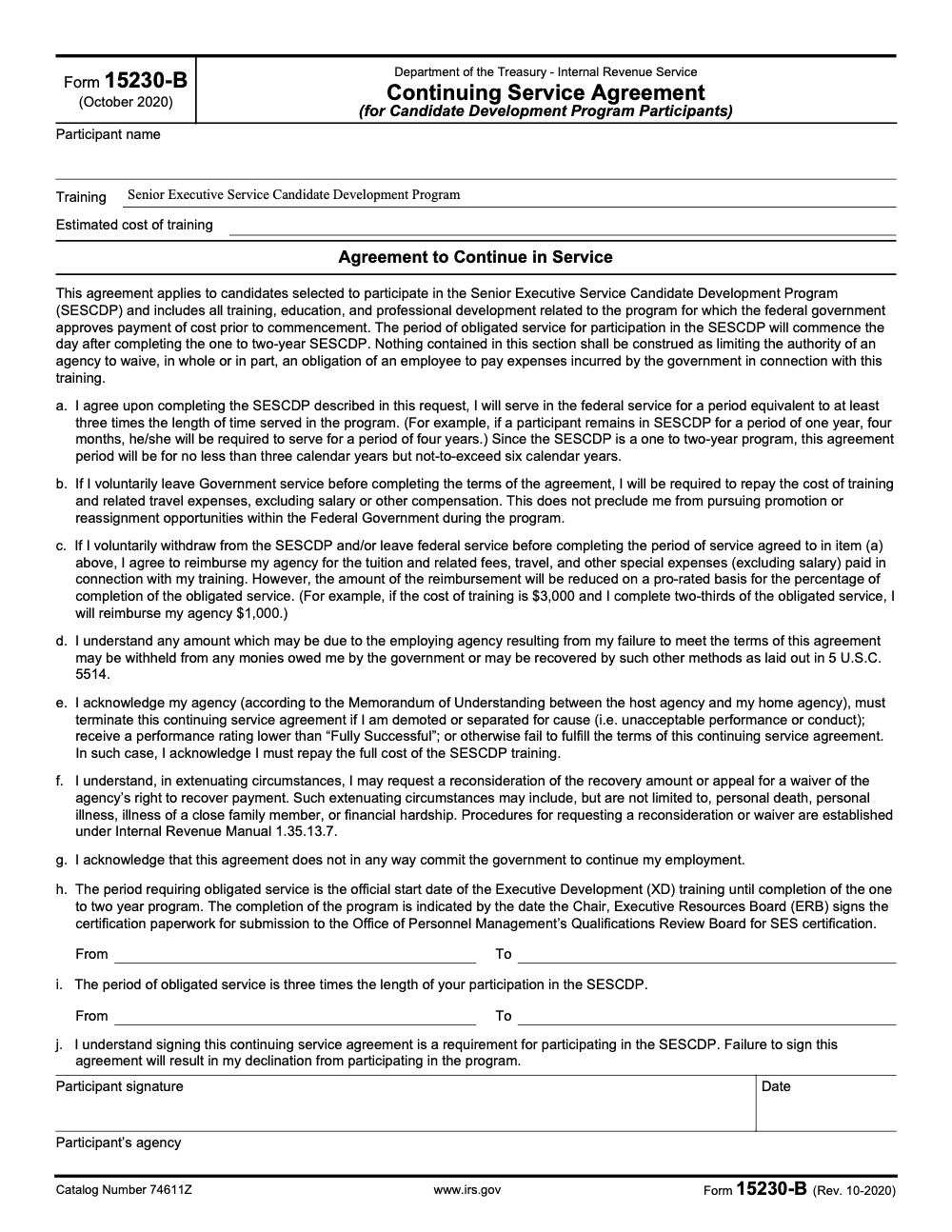
Form 15230-B is the SESCDP Continuing Service Agreement, a Treasury and IRS personnel document (Rev. 10-2020, catalog number 74611Z, as published on IRS.gov), not a tax return. By signing, a Senior Executive Service Candidate Development Program participant commits to federal service equal to three times their time in the program, a floor of three calendar years and a ceiling of six, with training costs recoverable under 5 U.S.C. 5514 if the obligation is broken. Browse related documents in our IRS forms library.
People see the IRS number on Form 15230-B and file it with the tax documents, which is exactly the wrong shelf. It is the Continuing Service Agreement that a Senior Executive Service Candidate Development Program participant signs before the government pays for executive training, and the obligation it creates is a federal-service commitment, not a tax position.
Read the form like the binding document it is. By signing, the participant owes federal service equal to three times their time in the program, with a floor of three calendar years and a ceiling of six, and unrecovered training costs become collectible under 5 U.S.C. 5514 if the obligation breaks. Confirm the obligated-service dates with HR before the signature page, because those fields decide what is owed.
Key Takeaways
- Form 15230-B is the IRS Continuing Service Agreement for Candidate Development Program participants, current revision Rev. 10-2020. As of December 17, 2025, the IRS still lists this revision as the latest available.
- You sign it to document your post program service obligation, repayment terms if you leave early, and acknowledgments. This is a personnel document, not a tax filing.
- Agencies use continued service agreements under federal training rules. Under Form 15230-B the commitment is exactly three times your actual time in the program, a floor of three calendar years and a ceiling of six, with repayment if you separate before finishing the obligation. Waivers can apply in limited cases.
- Submit Form 15230-B through your program administrator or HR, follow local instructions, and keep a signed copy for your records.
- The official IRS file is available on irs.gov as a one page fillable PDF. Always verify the revision date on the form footer and confirm acceptance procedures with HR.
What Form 15230-B Is, In Plain English
Form 15230-B is a one page Continuing Service Agreement for the IRS Candidate Development Program. By signing, you acknowledge the length of your service obligation after training, the conditions that can trigger repayment of training costs, and the documentation HR needs to manage your record. It is mandatory for participants, it is kept with your personnel documents, and it is not submitted with any tax return. The IRS lists the form as “IRS Continuing Service Agreement, for Candidate Development Program Participants,” with the most recent revision dated October 2020 (Rev. 10-2020).
Short version, you are confirming, in writing, that you will serve for a defined period after the program or repay costs if you leave early, subject to IRS policy and any approved waivers.
Who Must Complete It
If you are accepted into the IRS Candidate Development Program, you complete and sign Form 15230-B. HR or your program office will route the form, record the effective date, and file it. If you are not in the program, this form does not apply to you. The IRS maintains related SES Candidate Development Program forms in the same 15230 series, which can appear together on the IRS forms index.
Related IRS CDP Forms
- Form 15230 Senior Executive Service Candidate Development Program Endorsement.
- Form 15230-A Mobility Statement for the SES Candidate Development Program.
These sit alongside Form 15230-B in the IRS forms list, so do not be surprised if your program packet references more than one document.
How the Agreement Works, Service, Repayment, and Waivers
Federal agencies use continued service agreements to protect their training investments and ensure a reasonable period of service after training. OPM’s training guidance explains that agencies may require a commitment and that if an employee leaves before completing the obligation, the employee generally repays all or part of the cost of training, excluding salary. Agencies can approve waivers in defined situations. The IRS implements this through program documents such as Form 15230-B.
- Service obligation. Your obligation begins after training completion, for a period set by the program and policy. OPM and IRS CDP materials tie the obligation to the length of training; under Form 15230-B the obligation is set at three times your actual time in the program, with a floor of three calendar years and a ceiling of six calendar years (because the SESCDP itself runs one to two years). Confirm the exact term on your form and with HR.
- Repayment triggers. If you voluntarily separate before completing the obligation, you may owe repayment of covered training costs under policy, and that recovery is not limited to voluntary repayment; the agency may withhold the amount from any money the government owes you or recover it by other methods authorized under 5 U.S.C. 5514. The agreement also explains how repayment can be prorated, and that proration is calculated on the percentage of your obligated service you have completed, not the percentage of the training program you finished.
- Waivers or reductions. Agencies may reconsider or waive recovery when warranted. Ask HR about the standards used for waivers in your program.
Where to Get the Official Fillable PDF
You can obtain the official one page PDF directly from IRS.gov. The file appears in the IRS public downloads directory as “Form 15230-B, Rev. 10-2020.” If you see third party mirrors, treat them as convenience copies only, and always verify the revision date against the IRS posting. For accuracy and security, use the IRS file and your HR instructions.
| Requirement | Detail |
| Form name | Form 15230-B Continuing Service Agreement, Candidate Development Program |
| Latest listed revision | Rev. 10-2020, listed by IRS as of 2025 |
| File type | One page, fillable PDF |
| Official source | IRS.gov forms index and downloads directory |
| Submission | Program administrator or HR, not with tax returns |
A quick practical tip from experience, always download, save a clean copy, and work on a local duplicate. That way, if HR asks for a change, you have a baseline and do not risk overwriting the original.
Step by Step, How To Complete Form 15230-B
Follow this checklist the first time, then reuse it for cohort renewals or reissues.
- Download and open the official PDF
- Get the file from IRS.gov so you know the revision is current. Confirm the footer shows Rev. 10-2020.
- Verify fields render correctly
- Open in a PDF reader that supports fillable fields. Do a quick save and reopen test to confirm your entries persist.
- Enter identification and program details
- Use your legal name as it appears in HR systems.
- Enter program start or completion dates as your program instructions specify.
- Confirm your business unit and office identifiers with HR if you are unsure.
- State the service obligation
- Enter the length of service required after training, exactly as your CDP instructions direct. If a range is allowed, use the value approved by HR. OPM policy explains why agencies set these terms, but your program’s written instruction controls.
- Acknowledge repayment conditions
- Read the repayment language carefully. If you leave before completing your service obligation, you may need to repay training costs, often prorated (note that a demotion, a separation for cause, or a performance rating below Fully Successful triggers repayment of the full training cost rather than a prorated portion). Note any waiver references and who approves them.
- Sign and date
- Use the signature format your program accepts, wet ink or approved digital signature. Many IRS forms in this category accept digital signatures, however your program office has the final call. Check their instructions.
- Save, submit, and keep a copy
- Save a final PDF with a descriptive filename that includes your last name and the date.
- Submit to the CDP administrator or HR using the specified portal or email workflow.
- Keep a local copy and confirm receipt.
A Simple File Hygiene Routine That Saves Time
- Save the blank original file in a “/Forms/IRS/CDP/Originals” folder.
- Save your working copy in “/Forms/IRS/CDP/In-Progress” with date and initials.
- After approval, move the signed copy to “/Forms/IRS/CDP/Final” and back it up.
- Document the submission date and the person who confirmed receipt.
If you ever need to reissue the agreement or respond to an audit, a clean folder structure and a dated filename avoid unnecessary hunting.
Submission and Recordkeeping
There is no separate tax filing channel for Form 15230-B. You will submit it through your program’s HR workflow, such as an internal portal, secure email, or a case management system. The IRS forms index lists the document and the revision, but routing is local to the program. Keep your copy with your personnel records, and ask HR where it will live in your official file.
What HR Tracks With This Form
- Your obligation start and end dates
- Approved exceptions or waivers
- Version control of the signed agreement
- Any reissued or amended agreements and the reason
Typical Turnaround Times
Turnaround is internal, not an IRS public service timeframe. Ask your CDP administrator for internal SLAs, and plan ahead so the agreement is complete before your training milestones kick in.
Practical Tips To Avoid Rework
- Use the exact dates HR provides. Do not guess.
- Confirm whether the obligation begins at training start or completion. OPM’s default concept begins at completion, but programs may define specifics. Follow the written instruction in your packet.
- If you change offices mid program, ask whether you need an updated agreement.
- If you are considering a transfer, talk to HR before you accept anything that could affect your obligation or trigger repayment.
A quick note for operations minded readers, disciplined documentation like this is what keeps delivery smooth under pressure. At Accountably, we apply the same kind of structure to client workpapers and review flows for accounting firms so teams avoid last minute scrambles. If you run a firm and want that kind of control, you can talk to us. Keep in mind, this IRS form is a personnel agreement, not a client deliverable.
Is the 10-2020 Version Still Current in 2025?
Yes, as of December 17, 2025, the IRS forms index still lists Form 15230-B with a revision date of October 2020, and the downloadable file in the IRS public directory shows “f15230b.pdf” with an IRS timestamp of 10-15-2020. There is no newer public revision posted. Always check your packet in case your program issues internal instructions, but the IRS public listing is unchanged.
Third Party Copies
You might see mirrors that host fillable versions. Treat them as convenience copies only. Use the IRS file as your source of truth, then follow your HR submission steps.
Expected Fields and What They Mean
- Participant information, your legal name and contact as it appears in HR.
- Program identifiers, the Candidate Development Program name and cohort, your business unit, and office.
- Service obligation, the number of months or years required after training.
- Repayment terms, when repayment applies, how prorating works, and points of contact for questions.
- Signature lines, for you and any required HR or program official.
Common Mistakes
- Leaving the service obligation term blank or inconsistent with your offer letter.
- Using the wrong date format or a date outside the program window.
- Submitting a scanned copy that is hard to read.
- Forgetting to confirm HR’s acceptance of a digital signature.
Policy Background You Can Cite
If you need to explain why the agreement exists to a supervisor or mentor, point to OPM’s training guidance on continued service agreements. OPM describes the purpose, when agencies use them, how repayment works, and that the Candidate Development Program sets the required service at exactly three times the length of time served in the program. The IRS implements those concepts for its programs, including the Candidate Development Program, through forms like 15230-B.
Quick Reference Table
| Topic | What to check | Where to confirm |
| Latest revision | Footer shows Rev. 10-2020 | IRS downloads directory or forms index |
| Submission path | HR or CDP administrator | Program packet or onboarding email |
| Start of obligation | After training, unless your packet says otherwise | Program instructions, HR |
| Repayment triggers | Early separation, non completion | Agreement text, HR policy |
| Waivers | Allowed in defined circumstances | HR escalation process |
| Retention | Keep a signed copy | Your personnel file, your local archive |
Examples, How People Handle Common Scenarios
- You accept a temporary detail during your obligation window. Ask HR whether the detail affects your CDP commitment. Some details are fine, others may need documentation.
- You plan graduate coursework unrelated to CDP. If the agency pays, a separate continued service agreement might apply. Keep the agreements straight, and do not overlap obligations without HR’s guidance.
- You consider leaving federal service. Talk to HR early to understand prorated repayment and any waiver standards so you can make an informed decision.
Compliance Note
This article is general information to help you complete your paperwork smoothly. It is not legal or tax advice. Always follow your program’s written instructions and HR policy. For the most current file and dates, rely on IRS.gov and your CDP administrator. As of December 17, 2025, the latest listed revision for Form 15230-B on IRS.gov is October 2020.
If You Run an Accounting Firm, A Final Ops Tip
You might be here because you lead a firm and coach staff through government paperwork during onboarding or client engagements. The same habits that keep Form 15230-B tidy, clear naming, version control, checklists, and defined review steps, are the habits that make delivery scalable. At Accountably, we build disciplined offshore delivery structure for CPA and EA firms that want stable capacity without losing control of workflow or quality. If that is a priority for you, a short conversation can show you what that structure looks like in practice.
Summary, What To Do Next
- Download the official IRS PDF and confirm the Rev. 10-2020 footer.
- Fill it out exactly as your program packet directs.
- Sign, submit to HR, and save a copy with your records.
- If you have edge cases, ask HR to explain how the obligation, repayment, and any waivers work. OPM’s CSA guidance provides helpful background if you need it.
You will be set once your Form 15230-B is signed, logged, and confirmed. That one page gives you clarity, gives HR what they need, and keeps your Candidate Development Program move-in ready.
Common Mistakes We See Every Season
Across the candidate agreements my team reviews, the same misreads surface every cohort. Here are the ones that create real cleanup, with the fix you can drop into your onboarding SOP.
Reusable Checklists
Copy these into your onboarding or HR SOP so every 15230-B moves the same way. Check items off as you confirm them; the list saves your progress in your browser.
Pre-signature review
- Confirm the footer reads Rev. 10-2020 and the catalog number is 74611Z.
- Enter the participant’s legal name exactly as HR systems show it.
- Describe the approved training and enter the estimated cost.
- Set the item (h) From and To dates for the training (XD) window.
- Set the item (i) From and To dates for obligated service, starting the day after program completion.
- Confirm the service term equals three times the time in the program, three to six calendar years.
- Read the repayment language and note that salary is never recoverable.
- Sign and date only after every field is complete.
Repayment and exit scenario check
- Identify whether the departure is voluntary or a mandatory-termination trigger.
- For voluntary exits, prorate on the obligated-service percentage completed, not training completed.
- For a rating below “Fully Successful,” a demotion, or a for-cause separation, plan for full training-cost repayment.
- Limit the recoverable figure to tuition, fees, travel, and special expenses.
- Document any extenuating circumstances for a reconsideration or waiver request under Internal Revenue Manual 1.35.13.7.
- Confirm who in HR approves a waiver before the candidate relies on one.
HR submission and recordkeeping
- Save the final PDF with the participant’s last name and the date in the filename.
- Submit through the CDP administrator or HR workflow, not an IRS tax channel.
- Confirm whether HR accepts a digital signature before submitting.
- Log the obligation start and end dates in the personnel record.
- Keep a signed copy and a submission receipt in your own files.
- Note any reissued or amended agreement and the reason.
Keep 15230-B Season From Stalling
Form 15230-B does not have a tax season, but it has a cohort cycle. Every SESCDP intake produces a stack of agreements that must be complete and internally consistent before the government commits training funds. The dollars are real: the Form 15230-B worked example prorates a $3,000 training cost down to $1,000 owed once two-thirds of obligated service is complete.
The fix is not more review meetings, it is a standard intake routine. When every agreement follows the same field order, date logic, and repayment-language check, the cohort moves as one clean batch. That matters because, under 5 U.S.C. 5514, unmet obligations can be recovered by salary offset, so an ambiguous agreement is not a harmless miss.
- Lock the item (h) training window and item (i) obligated-service window to the dates HR provides, with the obligation starting the day after program completion.
- State the service term as three times program length on every agreement, so no candidate carries a vague number.
- Standardize the repayment note: voluntary exits prorate on obligated service, mandatory terminations owe full cost, and salary is never recoverable.
- Keep one waiver reference point, the Internal Revenue Manual 1.35.13.7 procedure, so extenuating-circumstance requests route the same way every time.
- Version and archive each signed agreement identically, with last name, date, and a confirmed receipt.
That repeatable, field-by-field discipline is exactly what we build into accounting and tax delivery at Accountably. If a predictable intake-to-archive workflow is what your operation is missing, our tax and accounting services show how documented SOPs and layered review keep binding documents moving without a last-minute scramble.
FAQs
No. It is a personnel and program document. You submit it through your CDP administrator or HR, not with the IRS processing centers for tax forms.
The current public revision is Rev. 10-2020. Download the official one page PDF from IRS.gov and verify the footer date on the file.
Under Form 15230-B the obligation is exactly three times your actual time in the program, with a floor of three calendar years and a ceiling of six. Confirm the exact term on your signed agreement and with HR.
You may need to repay covered training costs, often on a prorated basis for a voluntary departure. A demotion, a separation for cause, or a performance rating below “Fully Successful” triggers repayment of the full training cost rather than a prorated portion. Ask HR to explain the calculation and whether any waiver standards could apply.
Many programs accept secure digital signatures, however your CDP administrator sets the rule. Confirm the accepted method before you submit.
HR or your program office keeps the official record. You should keep a signed copy and a submission receipt in your own files.
Other forms this guide names
- Form 15230: IRS Senior Executive Service Candidate Development Program Endorsement
- Form 15230‑A: SESCDP Mobility Statement Guide 2025
About this guide
Accountably helps US CPA, EA, and accounting firms hire trained accountants and tax preparers in India.
About us Reviewed byJugal Thacker, CPAFounder and CEO at Accountably
A Washington-licensed CPA with 7+ years inside US firms – PwC, a real-estate tax practice, then a full-service firm, rising from reviewer to manager to advisory. This article was reviewed against the current revision of Form 15230-B (Rev. 10-2020) and reflects IRS guidance current as of 2026 for SESCDP participants and HR teams completing the Continuing Service Agreement.
View profile →How we research, review, and update this guide
Every Accountably guide is researched against primary IRS sources, reviewed by a U.S. CPA, and refreshed as guidance evolves. Read our Editorial Guidelines to see how we source, fact-check, and update our content.




