
Summarize this article with AI
In Brief
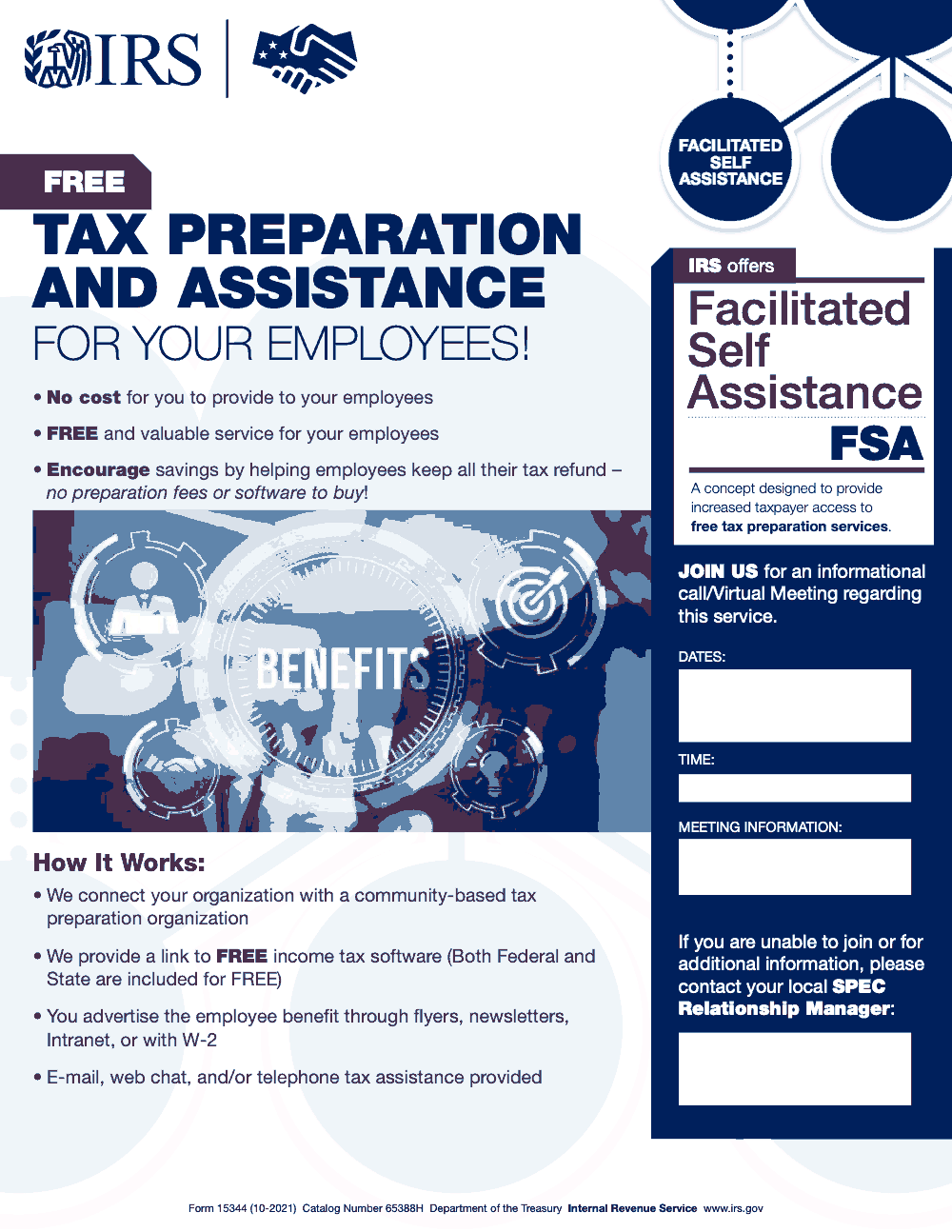
Form 15344 (Rev. 10-2021) is the IRS Facilitated Self Assistance (FSA) outreach flyer (Catalog Number 65388H) that employers and partner organizations distribute to publicize free federal and state tax preparation to their employees, per the official flyer issued by the Department of the Treasury, Internal Revenue Service. It is not filed with the IRS, has no due date, no penalty, and no line items; it includes four employer-fillable fields – dates, time, meeting information, and the local IRS SPEC Relationship Manager contact. For end-to-end U.S. tax execution, see our tax outsourcing services.
A manufacturing client once handed me a one-page IRS flyer their HR lead had picked up and asked whether it was another form they had to file. It was Form 15344, and the answer was no. It is the Facilitated Self Assistance outreach flyer, an employer hands it out to tell employees about free federal and state tax-prep software with remote help by e-mail, web chat, or telephone. Nothing about it gets sent to the IRS.
The whole job for the employer is filling in four blanks before the flyer goes out: dates, time, meeting information, and the local IRS SPEC contact. The current version is Rev. 10-2021, Catalog Number 65388H. There is no due date, no signature, and no penalty for not using it, because it advertises a benefit rather than reporting anything.
Key Takeaways
- Form 15344 (Rev. 10-2021, Catalog Number 65388H) is an IRS Facilitated Self Assistance (FSA) outreach flyer issued by the Department of the Treasury, Internal Revenue Service – not a tax return, schedule, or filing form.
- The flyer publicizes the FSA program to employees: free federal and state income tax software, plus remote facilitator assistance via e-mail, web chat, or telephone.
- FSA is “a concept designed to provide increased taxpayer access to free tax preparation services” (per the source flyer). There is no cost to the employer to offer FSA and no cost to employees to use the software and assistance.
- Under FSA, the IRS connects the employer with a community-based tax preparation organization; the employer’s role is to advertise the benefit through flyers, newsletters, the intranet, or alongside the W-2.
- Form 15344 is not filed with the IRS, has no due date, no signature requirement, no penalty for non-use, and no tax computation.
- The flyer contains four employer-fillable fields: Dates, Time, Meeting Information (conference line or meeting link), and Point of Contact (the local IRS SPEC Relationship Manager’s name, phone, and email).
What Form 15344 Is and When to Use It
Form 15344 is the IRS Facilitated Self Assistance (FSA) outreach flyer (Rev. 10-2021, Catalog Number 65388H), issued by the Department of the Treasury, Internal Revenue Service. The flyer describes FSA as “a concept designed to provide increased taxpayer access to free tax preparation services.” It is a single-page promotional handout, not a tax return, schedule, or filing form.
Under the FSA program, the IRS connects the employer with a community-based tax preparation organization that supports employees as they prepare their own returns using free federal and state income tax software. Assistance is delivered remotely through e-mail, web chat, and/or telephone – not through in-person VITA or TCE site visits.
Form 15344 is used whenever an employer wants to publicize the FSA program to its workforce. The employer’s role is limited: connect with the local IRS SPEC (Stakeholder Partnerships, Education and Communication) Relationship Manager, populate the flyer’s four employer-fillable fields (Dates, Time, Meeting Information, and Point of Contact), and distribute the flyer through internal channels such as the intranet, newsletters, or alongside the W-2 mailer.
From my side of the desk, the most important thing to understand is that Form 15344 is a benefits announcement, not a compliance form. There is no due date, no signature, no line items, no penalty for non-use, and no tax computation embedded in the flyer itself. The actual tax preparation happens inside whatever free software the FSA partner organization provides, governed by the underlying return rules (such as Form 1040 for individual income tax) – not by Form 15344.
How to Complete Form 15344
Form 15344 is a one-page flyer with only four fields the employer is expected to populate. The table below describes each field and how to fill it in cleanly before distributing the flyer to employees.
| Field | What It Captures | Practitioner Tip |
|---|---|---|
| Dates | Date(s) of the FSA informational call or virtual meeting that introduces the program to interested employers and employees. | Coordinate dates with the local IRS SPEC Relationship Manager and stagger sessions ahead of the W-2 mailer window. |
| Time | Start time (and ideally time zone) of the FSA informational session. | Pick a window that aligns with employee shift patterns; consider an evening or weekend slot for hourly staff. |
| Meeting Information | Conference line or meeting link employees use to join the informational call or virtual meeting. | Use a stable, branded meeting link rather than a one-off URL so the flyer remains valid through all distribution channels. |
| Point of Contact | Name, phone number, and email of the local IRS SPEC Relationship Manager for employers who cannot attend or want additional information. | Cache the SPEC contact in the engagement file so any team member can populate this field without a fresh lookup. |
If the four fields are populated and the PDF is locked before distribution, the flyer does its job. Form 15344 itself has no line items, no submission step, and no review cycle – the actual tax preparation happens inside the free software the FSA partner organization provides.
Deadlines, Penalties, and Filing Requirements
Form 15344 has no filing deadline, no signature requirement, no penalty for non-use, and no tax computation. It is an IRS outreach flyer (Rev. 10-2021, Catalog Number 65388H) employers distribute internally to publicize the Facilitated Self Assistance (FSA) program – not a return filed with the IRS.
| Item | Applies to Form 15344? | Notes |
|---|---|---|
| Filing with the IRS | No | Form 15344 is not filed with the IRS. The employer distributes it internally to staff. |
| Due date / deadline | No | There is no IRS-set due date. For practical reach, distribute alongside the W-2 mailer window in late January. |
| Signature requirement | No | No signature is required on Form 15344. |
| Penalty for non-use | No | There is no IRS penalty for not distributing Form 15344. The flyer is voluntary employer outreach. |
| Cost to employer | $0 | No cost to make FSA available to employees (per source flyer). |
| Cost to employee | $0 | Federal and state tax software and remote facilitator assistance are free to the employee. |
If a reader needs filing deadlines or penalties, those live with the underlying return form (such as Form 1040 for individual income tax) – not with Form 15344. Form 15344 only tells employers how to publicize the FSA program to staff.
What Form 15344 Is Not
Because Form 15344 is an IRS-issued numbered form, readers sometimes assume it must sit inside some filing or penalty framework. It does not. Form 15344 is the Facilitated Self Assistance (FSA) outreach flyer (Rev. 10-2021, Catalog Number 65388H) – a one-page promotional handout employers distribute to publicize free federal and state tax preparation to employees. It has no line items, no due date, no signature line, and no penalty. Nothing is filed with the IRS by using it.
It is also not a tax return, schedule, or information return. The actual tax preparation happens inside the free tax software the partner organization provides, governed by Form 1040 and the state equivalents, not by Form 15344. If you came here looking for a filing deadline or instructions for a line on this form, there are none to find – it is marketing material, not a return.
What the Flyer Actually Does
The flyer promotes the Facilitated Self Assistance (FSA) program, which the IRS describes as “a concept designed to provide increased taxpayer access to free tax preparation services.” Under FSA, the IRS connects an employer with a community-based tax preparation organization, and that organization gives employees a link to free income tax software covering both federal and state returns.
There is no cost to either side. The flyer states plainly that there is “no cost for you to provide to your employees” and that it is a “FREE and valuable service for your employees,” with no preparation fees or software to buy. The point is to help employees keep all of their refund.
Assistance is delivered remotely, not through in-person VITA-style site visits. The flyer lists the channels as e-mail, web chat, and/or telephone tax assistance. FSA is the self-prepared, remotely-assisted model: the taxpayer prepares their own return using free software with facilitator support, which is distinct from in-person VITA or TCE site preparation.
The employer’s job is simply to advertise the benefit – through flyers, newsletters, the company intranet, or alongside the W-2 – and to fill in the four employer-fillable fields on the flyer: the date and time of the informational call or virtual meeting, the meeting access information (conference line or link), and the point of contact for the local IRS SPEC (Stakeholder Partnerships, Education and Communication) Relationship Manager.
Common Mistakes That Slow Things Down
Most of what slows a Form 15344 rollout has nothing to do with the flyer itself and everything to do with how it gets treated, distributed, or explained inside the employer. The patterns below repeat across HR teams and the firms that support them.
Practical Checklists You Can Reuse
The checklists below are copy-paste ready for an internal SOP, a client-engagement file, or an HR runbook. Each step is interactive – tick it off in the browser and the page remembers across reloads.
Pre-distribution employer setup
- Confirm employer eligibility and leadership sign-off before any internal communication goes out.
- Identify the local IRS SPEC Relationship Manager covering the employer's region.
- Schedule the FSA informational session (date and time) and capture the meeting access link or conference line.
- Populate the four fillable fields on Form 15344 (Rev. 10-2021): Dates, Time, Meeting Information, Point of Contact.
- Lock the completed PDF so downstream copies cannot strip the fields.
- Save the populated flyer in the engagement file with the revision date noted (Rev. 10-2021, Catalog Number 65388H).
- Identify the internal owner who will field follow-up questions after distribution.
Internal distribution channel matrix
- Late-January W-2 envelope insert, physical or e-delivery accompaniment.
- Payroll portal or HRIS banner with a link to the populated flyer.
- Intranet announcement on the benefits or payroll landing page.
- Company newsletter slot in the January and February editions.
- Break-room or on-site poster for hourly and non-desk staff.
- One all-hands email reminder in early March before the filing crunch.
- Manager talking-points sheet so team leads can answer one-line questions in person.
Employee question prep
- Cost: zero to the employee, federal and state software and remote assistance are free (per the source flyer).
- Channel: remote support via e-mail, web chat, or telephone, no walk-in site.
- FSA versus VITA/TCE: FSA is self-prep with remote facilitator support, VITA and TCE are in-person site programs.
- Scope: FSA is one self-prep option, complex returns still benefit from a paid preparer.
- Privacy: under FSA the employee prepares their own return using the free software with remote facilitator support, and the employer does not see the return.
- Deadline: the employee's regular filing deadline for the underlying return (such as Form 1040) still applies.
- Starting point: the link the FSA partner organization provides through the informational session or the SPEC Relationship Manager listed on the flyer.
Keep 15344 Season From Stalling
The window for a clean Form 15344 rollout is short. Employers who plan to publicize Facilitated Self Assistance to staff typically need the flyer in front of employees alongside W-2 delivery in late January and reinforced through February. Miss that window and FSA stops being a benefit announcement and turns into a mid-season fire drill.
The stall is rarely the flyer itself, which the IRS already designed as a single page (Rev. 10-2021, Catalog Number 65388H, issued by the Department of the Treasury, Internal Revenue Service). The friction sits in the coordination steps around it: locking down the informational session, getting the local SPEC Relationship Manager named on the Point of Contact field, and pushing the flyer into at least three internal channels on a schedule. Without that operational layer the flyer goes out late, blank, or to a single channel that nobody checks.
- Build a January rollout calendar that anchors on the W-2 mailer date and works backward to the SPEC Relationship Manager outreach and the informational session booking.
- Treat the four fillable fields on the flyer (Dates, Time, Meeting Information, Point of Contact) as a release gate – nothing goes out until all four are populated and the PDF is locked.
- Pre-stage the internal channel matrix (W-2 insert, payroll portal banner, intranet post, newsletter slot, all-hands email) with owners and dates assigned before distribution week.
- Mirror the flyer's free-of-cost language in an internal FAQ so frontline managers do not improvise on pricing or VITA/TCE confusion.
- Document the SPEC Relationship Manager contact in the engagement file so next year's rollout starts from a populated record, not a fresh lookup.
Most of this is the kind of structured, repeatable execution that gets squeezed when tax season hits capacity. Our tax outsourcing services absorb the coordination layer so senior reviewers stay on returns, not on internal benefits comms.
FAQs
Form 15344 (Rev. 10-2021, Catalog Number 65388H) is the IRS Facilitated Self Assistance (FSA) outreach flyer. Employers and partner organizations distribute it to publicize free federal and state tax preparation software and remote (e-mail, web chat, or telephone) assistance to their employees. It is not filed with the IRS, has no line items, no due date, no signature requirement, and no penalty for non-use. The employer’s role is to populate four fillable fields (Dates, Time, Meeting Information, and the local IRS SPEC Relationship Manager contact) and distribute the flyer through internal channels such as the intranet, newsletters, or alongside the W-2.
No. Form 15344 is an outreach flyer, not a return. It is not filed with the IRS, has no due date, no signature requirement, and no penalty for non-use. Employers display or distribute it internally to publicize the Facilitated Self Assistance (FSA) program to employees.
Nothing on either side. The flyer states there is “no cost for you to provide to your employees” and that it is a “FREE and valuable service for your employees,” with no preparation fees or software to buy. The free income tax software covers both federal and state returns.
Remotely. The flyer lists e-mail, web chat, and/or telephone tax assistance. FSA is the self-prepared, remotely-assisted model: the employee prepares their own return using free software with facilitator support. It is distinct from in-person VITA or TCE site preparation.
Four fields: the dates and time of the informational call or virtual meeting, the meeting access information (conference line or link), and the local IRS SPEC (Stakeholder Partnerships, Education and Communication) Relationship Manager as the point of contact. The employer then advertises the benefit through flyers, newsletters, the intranet, or alongside the W-2.
Other forms this guide names
About this guide
Accountably helps US CPA, EA, and accounting firms hire trained accountants and tax preparers in India.
About us Reviewed byJugal Thacker, CPAFounder and CEO at Accountably
A Washington-licensed CPA with 7+ years inside US firms – PwC, a real-estate tax practice, then a full-service firm, rising from reviewer to manager to advisory. This article was reviewed against current IRS guidance for the 2025 tax year and updated for filers preparing late returns, amendments, and 2026 estimates.
View profile →How we research, review, and update this guide
Every Accountably guide is researched against primary IRS sources, reviewed by a U.S. CPA, and refreshed as guidance evolves. Read our Editorial Guidelines to see how we source, fact-check, and update our content.




