
Summarize this article with AI
In Brief
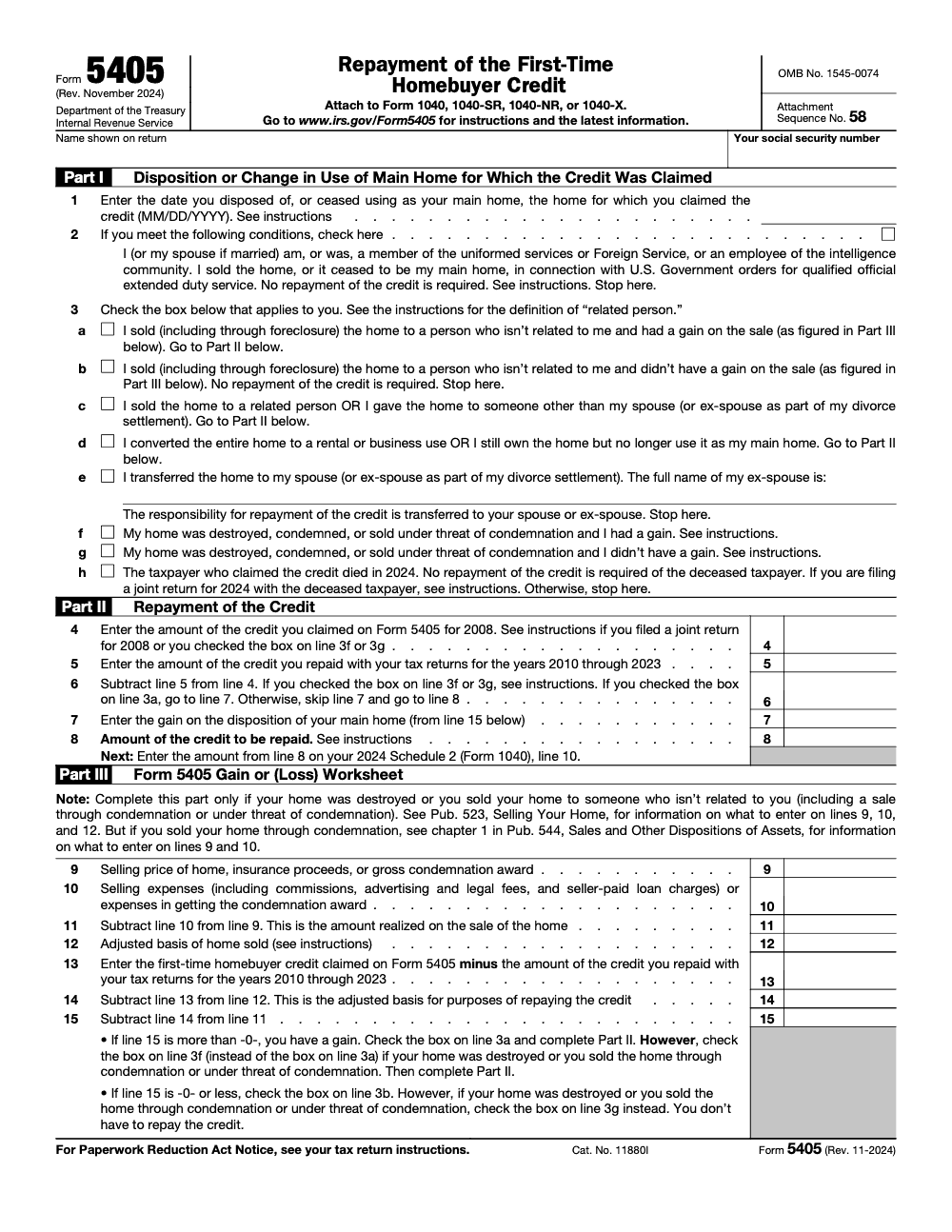
Form 5405 reports a disposition or change-in-use of the home that received the 2008 First-Time Homebuyer Credit, and carries the calculated repayment to Schedule 2 (Form 1040), line 10 (per the November 2024 Form 5405 instructions). The 15-year installment schedule ran tax years 2010 through 2024, so a 2025 filing is needed only when a 2024 or earlier triggering event was missed or a new accelerated repayment event occurred (per IRC §36). Reviewers should verify prior credit and repayments through the IRS First-Time Homebuyer Credit account look-up before any tax preparation work begins.
People assume Form 5405 is a permanent fixture of the 1040 the way it felt for years, but the 2008 First-Time Homebuyer Credit ran on a 15-year payback schedule that covered tax years 2010 through 2024. The final 1/15 installment posted on the 2024 return, generally on Schedule 2, line 10, and for an ordinary situation 2025 carries no further installment and no form at all.
The catch is the home that did not stay put. If the property was sold in 2024 or stopped being the owner's main home that year, Form 5405 still rides with the 2024 return to settle the remaining balance, and a missed earlier triggering event can pull it onto a later filing too. Before reconciling any of this, pull the IRS account look-up to verify the original credit, the amounts already repaid, and the balance.
Key Takeaways
- 2024 was the final installment year for 2008 First‑Time Homebuyer Credit repayments and the last year Form 5405 was filed, except for unusual 2024 events.
- If a 2008 credit home was still your main home through all of 2024, you entered the last 1/15 repayment on Schedule 2, line 10, and you did not attach Form 5405.
- If you sold the home in 2024 or it stopped being your main home in 2024, you attached Form 5405 with that 2024 return and settled any remaining balance, with special rules for gain limits and certain exceptions.
- For post‑2008 purchases, repayment was usually waived, unless an early disqualifying event applied.
- Use the IRS account look‑up to verify original credit, amounts repaid, and balance before you reconcile any 2024 entry or amend.
What Form 5405 Was Used For
Form 5405 reported a triggering event and calculated any required repayment of the First‑Time Homebuyer Credit, primarily for 2008 purchases. If you sold the home in 2024, converted it to rental or business use in 2024, transferred it to a spouse or ex‑spouse (in which case the repayment obligation transfers to the recipient, not the transferor), or it otherwise stopped being your main home in 2024, you attached Form 5405 to your 2024 Form 1040. If there was no 2024 event and you still lived there all year, you skipped the form and simply entered the final 1/15 amount on Schedule 2, line 10.
- Part I documented the disposition or change in use.
- Part II computed the repayment, either the final installment or an accelerated balance if triggered.
- Part III coordinated gain or loss when relevant, with a key rule that limits repayment to gain in certain scenarios, for example destruction or condemnation sales to an unrelated party.
Who Had To File In 2024, And Who Did Not
You had to file Form 5405 with your 2024 return if you bought in 2008 and either disposed of the home in 2024 or it ceased to be your main home in 2024. Each spouse handled their share if the original credit was on a joint return. If you kept the home as your main home for all of 2024, you did not file the form, you only posted the last scheduled installment on Schedule 2, line 10.
Common 2024 filing triggers that required Form 5405:
- Sold the home, including foreclosure (a sale to an unrelated buyer caps repayment at the gain on the sale, and a no-gain disposition ends the obligation entirely).
- Converted the entire home to rental or business use.
- Transferred the home to a spouse or ex‑spouse (the receiving spouse or ex-spouse takes over the remaining repayment obligation, it does not disappear).
- The home was destroyed or condemned, with gain‑limit rules for repayment.
- The taxpayer who claimed the credit died in 2024, with survivor rules on joint returns.
The 2008 Credit And The 15‑Year Clock
If you claimed the 2008 version of the credit, you generally repaid 1/15 per year, beginning with your 2010 return, and ending with the 2024 return. That is why 2024 was the final year for an installment, and the final year Form 5405 showed up for most cases.
Why this matters to you in 2025
- If your client’s software is still posting a repayment in 2025, it is likely wrong, because the schedule ended with 2024, unless you are amending a 2024 event. Validate the figure against the IRS account look‑up before you fix the worksheet.
- If the home was disposed of or stopped being the main home in 2024, the settlement happened on the 2024 return. New 2025 events do not revive a 2008 balance that was already fully repaid by 2024.
Quick Decision Map For 2024 Returns
- Did the taxpayer buy the home in 2008 and claim the credit, and was it still the main home all of 2024?
- Action, enter the final 1/15 installment on Schedule 2, line 10. Do not attach Form 5405.
- Did a 2024 event occur, sale, full conversion to rental or business, transfer to spouse or ex‑spouse, condemnation, destruction, or death?
- Action, attach Form 5405 to the 2024 return, complete Parts I and II, and Part III if you must compute gain or apply the gain limit.
- Are you looking at a 2025 return with an unexpected repayment?
- Action, stop and check the IRS First‑Time Homebuyer Credit account look‑up, then correct the software’s 2025 worksheet if it is dragging a payment that ended with 2024.
Pro tip for busy firm teams, tie the Form 5405 review to your year‑end Schedule 2 review checklist, since the final 1/15 installment hid there for years. A quick look prevents refund surprises and avoids avoidable notices.
Note, this article reflects IRS guidance that was current through November 20, 2025. Always confirm the latest IRS page for Form 5405 and Topic 611 before you file or amend.
Eligibility Rules And Timeframes, What Still Matters For 2025 Reviews
If you are cleaning up past filings, amending 2024 returns, or explaining old eligibility to a client, these rules still matter for documentation quality and audit defense.
Qualifying Purchase Dates
The First‑Time Homebuyer Credit covered different windows. Purchases made in 2008 used the repay‑over‑time version. Purchases after 2008, mainly 2009 and 2010, usually did not require repayment unless the home ceased to be the taxpayer's main home within 36 months of purchase. Keep the closing statement, buyer and seller names, property address, and purchase price with the workpapers, since software logic sometimes depends on those fields to place entries in the right year.
Long‑Time Resident Test
To claim the long‑time resident version back then, you had to both own and use the prior home as your principal residence for five straight years within the eight‑year window that ended on your new closing date. If you are reconciling an old file or explaining why a client received the credit in 2009 or 2010, this is the standard to check against the archived documents. Acceptable evidence includes deeds, mortgage interest statements, property tax bills, and homeowners insurance reflecting principal residence use.
Income And Price Caps, Historical Context
The original program had price and income limits, as well as credit caps. For 2009–2010 purchases, the credit was the lesser of 10 percent of price or a dollar cap, often 8,000 for first‑time buyers and 6,500 for long‑time residents, subject to income phaseouts and the 800,000 purchase price ceiling. If you are explaining an old return to a client or checking a prior‑year import, remember those caps were part of the determination, not the repayment math in 2024. Use the IRS account look‑up to confirm the exact amount allowed and the amount repaid to date.
Credit Amounts At A Glance
| Item | Rule of thumb | Notes |
| 2008 credit | Repay over 15 years, 1/15 each year | Began with 2010 return, ended with 2024 return. |
| 2009–2010 credits | Generally no annual repayment | Full recapture only if the home ceased to be the main home within 36 months of purchase. |
| Placement on return | Schedule 2, line 10 | Final installment for 2008 credit sat here in 2024. |
| Form 5405 status | Only for 2024 events | 2024 was the last year to file the form. |
Documentation You Should Keep Or Attach
If you attached Form 5405 for a 2024 event, or if you are amending 2024 now, gather and retain:
- Closing statement or settlement statement that shows names, address, price, and closing date.
- Proof of ownership and main‑home use, for example mortgage interest 1098s, property tax bills, homeowners insurance.
- For sales, the sales contract, settlement statement, selling expenses, and adjusted basis backup. Publication 523’s worksheets remain your friend for basis and gain computations, and the Form 5405 instructions point you to Worksheet 2 for the gain or loss line references.
- For 2008 credit tracking, IRS account look‑up printout that shows total credit, installments repaid, and any remaining balance as of the 2024 filing.
If the home was destroyed or condemned and sold to an unrelated party, repayment is limited to gain. No gain means no repayment for that event. Document this carefully, use the instructions and Pub 523 worksheet to compute the gain.
Special Cases And Exceptions You Still See
- Death. If the person who claimed the credit died, the remaining balance is generally not required, except that a surviving spouse who claimed on a joint return continues to repay their half based on the prior rules. By 2024, that usually meant the last installment or an accelerated balance if a 2024 event happened.
- Transfers to a spouse or ex‑spouse. The transferee steps into the repayment responsibility. Properly check the box and include the ex‑spouse’s name on the 2024 Form 5405 when applicable.
- Involuntary conversions. If the home was destroyed or condemned, special two‑year replacement rules apply for accelerated repayment. Coordinate with the gain calculation and the replacement timing.
From an operations standpoint, this is where firms lose time. A missing basis worksheet, a forgotten depreciation adjustment for a prior home office, or a skipped survivor rule note can trigger rework in review. On our side, we build checklists that call for the IRS look‑up printout and a Pub 523 worksheet in every 2024 Form 5405 file. That single habit cuts review time and prevents notices.
How To Complete Form 5405 For A 2024 Event
If you had a 2024 sale or the home stopped being your main home in 2024, this is the clean, reviewer‑friendly path through the form.
Part I, Report The Disposition Or Change In Use
- Enter the date the home stopped being your main home in 2024.
- Check the correct reason, sale, full conversion to rental or business, transfer to spouse or ex‑spouse, destruction or condemnation, or death.
- Remember the nuance. Converting only a basement to business use while the rest remains your main home does not require Form 5405, you would still post the final 1/15 on Schedule 2, line 10 for 2024. Full conversion requires the form.
Part II, Compute The Repayment
- If 2024 was just another year of main‑home use, you did not complete the form, you entered the last 1/15 on Schedule 2, line 10.
- If a 2024 event occurred, compute the remaining unpaid balance and repay it in full unless an exception applies (a sale to an unrelated buyer caps repayment at the gain on the sale; sales to a related person, gifts to non-spouses, and full conversion to rental or business use trigger full repayment regardless of gain). Members of the uniformed services, the Foreign Service, and certain intelligence community employees have special relief, so read the instruction note before you finalize.
Part III, Coordinate Gain Or Loss
When a 2024 sale or condemnation is involved, compute gain or loss and apply the gain‑limit rule so you do not overpay. The instructions point you to Publication 523’s Worksheet 2 for line references. Reduce the home’s basis by any unpaid credit amount when you compute the gain.
A common pitfall is forgetting to reduce basis by the unpaid credit. This can make the gain look smaller than it is and can misstate the limit on repayment. Cross‑check against Topic 611 and Pub 523 references.
Where The Repayment Appeared On The 2024 Return
- Annual 2008 installment, Schedule 2, line 10, no Form 5405 attached.
- 2024 triggering event, Form 5405 attached to Form 1040, with the computed amount still flowing to Schedule 2, line 10.
Mini Example
- Original 2008 credit, 7,500.
- Prior installments through 2023, 13 years at 500 each, 6,500 total.
- 2024 final installment, 1/15 equals 500, so Schedule 2, line 10 shows 500 and you do not attach Form 5405 if you used the home all year. If you sold in June 2024, you attach Form 5405 and repay any remaining balance, subject to the gain‑limit rule if selling to an unrelated buyer.
Fixing Erroneous Software Entries
If your 2025 file still shows a repayment, it is probably a stale worksheet import. Open the First‑Time Homebuyer Credit repayment area and clear the auto‑generated 2025 amount. Before you change anything, confirm the numbers in the IRS First‑Time Homebuyer Credit account look‑up, which shows total credit, repayments posted, and the annual installment schedule. Then correct the worksheet and re‑run diagnostics.
Some vendor tips, paths vary by product and year.
- TaxSlayer Pro and ProWeb include a Repayment of First‑Time Homebuyer Credit interview. Use the entry screens for prior installments and 2024 event details, and lean on Pub 523 worksheets for basis and gain.
- Intuit ProConnect provides guidance for limiting current installments and links to the IRS account look‑up when the return rejects for mismatched amounts.
If a prior‑year import keeps repopulating a repayment, double‑check the purchase year field, the original credit, and the “prior year installments” inputs. One incorrect year can force the software to keep calculating a 2025 payment that no longer exists after the 2024 final installment.
Compliance Notes And Trust Signals
- Source of truth. Use the November 2024 Instructions for Form 5405 and IRS Topic 611 when you prepare or amend. These pages explicitly state that 2024 is the last year to file the form and that the final installment appears on the 2024 Schedule 2, line 10.
- Taxpayer help. If a client is stuck, the IRS Interactive Tax Assistant covers repayment determinations, and TAS can assist when normal channels fail.
Practical Checklist For 2024 Filings And 2025 Cleanup
- Pull IRS First‑Time Homebuyer Credit account look‑up and store it in the file.
- If the home was the main home all year in 2024, enter the final 1/15 on Schedule 2, line 10, no Form 5405.
- If a 2024 event occurred, attach Form 5405, complete Parts I and II, and Part III if gain rules apply.
- For sales or condemnations, compute basis and gain using Pub 523 worksheets, reduce basis by any unpaid credit, and apply the gain‑limit rule.
- In 2025, clear any stray software entries that attempt to create a new installment, then rerun diagnostics. Use vendor guides only as workflow pointers, keep IRS pages as your primary authority.
A Note On Delivery And Review Discipline
If you run a firm, you know the issue is rarely demand, it is delivery. Small items like the final 2008 installment, or a missed gain adjustment in a 2024 sale, can jam partner review queues and ripple across busy season. This is exactly where structured workpapers, standardized naming, and a clear escalation path save hours. At Accountably, we plug trained offshore teams into your existing tax stack and templates, then run a documented, SLA‑driven workflow so entries like Form 5405 and Schedule 2 line checks do not become fire drills. Use us when you want capacity boosts without slipping on quality or control.
- SOP‑driven execution, standardized workpapers, and multi‑layer review keep reviewers focused on judgment, not cleanup.
- Live workload tracking with predictable turnaround protects deadlines and client trust.
If you need that kind of stability, we can help your team stay in strategy while production stays on rails.
Final Word And Friendly Disclaimer
You now have the updated picture. The 2008 First‑Time Homebuyer Credit story ended on the 2024 return. In 2025, your job is to confirm the account history, fix any software leftovers, and keep a clean paper trail in case of questions. This article is for general information, not tax advice. Always verify against the current IRS Instructions for Form 5405 and Topic 611 before you file or amend.
Resources
- Instructions for Form 5405, updated November 2024, includes the note that 2024 is the last year to file the form.
- Topic No. 611, Repayment of the First‑Time Homebuyer Credit, reporting and exception rules, and Schedule 2 placement for 2024.
- IRS Interactive Tax Assistant, Do I need to repay the First‑Time Homebuyer Credit, a quick check for edge cases.
Common Mistakes We See Every Season
Form 5405 has long since stopped being a current-year credit form, but the legacy work doesn't behave like a closed file – dispositions, divorces, foreclosures, and joint-return deaths still surface in review queues years after the regular installment window closed. The same five errors show up almost every time.
Reusable Checklists
The checklists below are copy-paste ready for firm SOPs. Each step references the actual line number, schedule, or IRS source so juniors can run the pass without re-reading the instructions.
Pre-filing eligibility screen
- Confirm original credit year (2008, 2009, or 2010) through the IRS First-Time Homebuyer Credit account look-up.
- If the credit is from 2009 or 2010, confirm the 36-month residency window has passed and no Form 5405 is needed.
- For a 2008 credit, identify the triggering event: sale, foreclosure, conversion to rental, gift to a non-spouse, divorce-incident transfer, or death of a joint-credit spouse.
- If there is no triggering event, route the annual installment directly to Schedule 2 (Form 1040), line 10 without attaching Form 5405.
- If uniformed services, Foreign Service, or intelligence community orders triggered the disposition, check Part I, line 2 and stop.
- For joint 2008 credits, split the original credit 50/50 in the workpaper before opening line 4 (per the Form 5405 instructions).
- Save a PDF of the account look-up screen to the engagement folder as the source for line 4 and line 5.
Part III gain worksheet packet
- Open Part III only when Part I shows line 3a, line 3f, or line 3g. Skip it for line 3c, 3d, or 3e.
- Enter selling price, insurance proceeds, or gross condemnation award on line 9 (per Pub. 523 for sales, Pub. 544 chapter 1 for condemnations).
- Document selling expenses on line 10: commissions, advertising, legal fees, seller-paid loan charges, condemnation costs.
- Pull adjusted basis on line 12 from the depreciation schedule or original closing documents.
- Calculate line 13 (credit claimed minus 2010 through 2023 repayments) before line 14. Never let a junior skip this step.
- Reduce basis on line 14 by the unrepaid credit (line 12 minus line 13) before computing line 15.
- Confirm line 15 sign: positive triggers line 7 on Part II, zero or negative ends the obligation.
- Reviewer signs off on the line 14 basis reduction and the line 15 gain calculation before Part II is touched.
Schedule 2 line 10 routing review
- Pull the prior-year Schedule 2 to confirm line 10 history matches the IRS account look-up cumulative repayment column.
- For the 2024 final-installment year with a triggering event that required Form 5405, confirm the repayment amount flowed from Form 5405 line 8 to Schedule 2 line 10, not as a direct entry on Form 1040. For routine 2024 final installments with no triggering event, no Form 5405 was attached and the amount went directly on Schedule 2 line 10.
- For routine installment years 2010 through 2023, confirm no Form 5405 was attached and only the Schedule 2 direct entry exists.
- Verify the software did not double-count by both attaching Form 5405 and direct-entering the installment.
- For 2025 returns with no triggering event, confirm there is no Schedule 2 line 10 FTHBC entry. The scheduled obligation closed with the 2024 return.
- Attach Form 5405 only to Form 1040, 1040-SR, 1040-NR, or 1040-X using Attachment Sequence 58 on paper-filed returns.
Keep 5405 Season From Stalling
The 2008 First-Time Homebuyer Credit covered qualifying purchases between April 9, 2008 and December 31, 2008 (per IRC §36), and the scheduled 15-year repayment ran tax years 2010 through 2024 (per the November 2024 Form 5405 instructions). For most filers the obligation closed with the 2024 return, but the long tail of edge cases – mid-cycle foreclosures, related-party sales, divorce-incident transfers, and joint-return deaths – still lands in review queues without warning, often years after the file was assumed closed.
Those legacy returns stall reviews because the math sits across three moving parts: the credit-reduced basis on line 14, the gain limit pulled to line 7, and which of the eight Part I disposition boxes actually applies. Fixing the stall means front-loading the documentation before a preparer ever opens the worksheet.
- Pull the IRS First-Time Homebuyer Credit account look-up at engagement intake, so line 4 (original credit) and line 5 (cumulative repayments through 2023) reconcile to the IRS record before any worksheet opens.
- Lock the Part I disposition box first: line 2 for uniformed services, Foreign Service, or intelligence community orders, and line 3a through line 3h for everything else, so the gain worksheet only opens when the form requires it.
- Trigger Part III only when the home was destroyed or sold to an unrelated party, including foreclosures and condemnations. Skip it for related-party sales, conversions to rental, and spouse or ex-spouse transfers (per the November 2024 Form 5405 instructions).
- Always reduce adjusted basis by the unrepaid credit on line 14 before computing the gain on line 15. The most common review catch is a preparer pulling regular tax basis off a depreciation schedule and skipping the credit reduction.
- For joint 2008 credits, document the 50/50 allocation in the workpaper before opening any survivor, ex-spouse, or separate-disposition return (per the Form 5405 instructions and Pub. 523).
That review discipline is the production layer our tax outsourcing teams run before a senior reviewer sees the file, so legacy FTHBC events arrive with a clean, documented Part III packet instead of a last-minute rework on April 14.
FAQs
You will not usually file Form 5405 on a 2025 return. The form’s purpose was to report a 2024 disposition or change in use for a 2008 credit home and to calculate the repayment. 2024 was the last scheduled installment year for the 2008 credit, though Form 5405 may still be filed in 2025 or later for late, accelerated, or disposition-driven situations.
The 15‑year schedule ended with the 2024 return, which carried the final installment. If a 2024 triggering event occurred, you settled any remaining balance on that 2024 return using Form 5405. There is no 2025 installment.
On Schedule 2, line 10, where it increased total tax and reduced your refund or increased balance due. For 2024 events, you also attached Form 5405.
Use the IRS First‑Time Homebuyer Credit account look‑up. It shows your total credit, balance, what you have repaid, and the annual installment amount. Save a PDF of that screen in your workpapers.
Repayment may be limited to gain. No gain, no repayment for that event. Check the instructions and compute the gain using Publication 523’s Worksheet 2.
The survivor generally continues with their half, unless another exception applies. For most taxpayers, that still meant the 2024 final installment or a 2024 acceleration if there was a 2024 event.
Other forms this guide names
- Form 1040: Filing Guide for 2025 Returns (AGI, Deductions, Deadlines)
Summarize this article with AI
About this guide
Accountably helps US CPA, EA, and accounting firms hire trained accountants and tax preparers in India.
About us Reviewed byJugal Thacker, CPAFounder and CEO at Accountably
A US-licensed CPA with 7+ years inside US firms – PwC, a real-estate tax practice, then a full-service firm, rising from reviewer to manager to advisory. This article was reviewed against current IRS guidance for the 2025 tax year and updated for filers preparing late returns, amendments, and 2026 estimates.
View profile →How we research, review, and update this guide
Every Accountably guide is researched against primary IRS sources, reviewed by a U.S. CPA, and refreshed as guidance evolves. Read our Editorial Guidelines to see how we source, fact-check, and update our content.




