
Summarize this article with AI
In Brief
Form 5498 is the IRA contribution information return filed by the IRA trustee or issuer, not the participant, per the IRS Instructions for Forms 1099-R and 5498. For tax year 2025 the trustee files Copy A with the IRS by May 31, 2026; the participant FMV and RMD statement is due January 31, 2026; and the 2025 IRA contribution limit is $7,000 with a $1,000 catch-up at age 50 and older. Box 5 reports year-end FMV, Box 10 reports Roth IRA contributions, and Box 11 flags whether an RMD is required for 2026 – an unchecked Box 11 is not a guarantee that no RMD is due. See our individual tax return service for return preparation that uses Form 5498 data correctly.
Form 5498 runs hot at two separate moments. The recipient FMV and RMD statement goes out in January, and the IRS filing plus contribution statement comes later, after the April 15 close of the prior-year contribution window. That compressed calendar, not the form's complexity, is where the errors come from.
The trustee or issuer files it, never the participant, and the boxes that get misposted are usually the same ones: Box 1 traditional contributions, Box 10 Roth contributions, and Box 5 year-end fair market value used for RMD tracking. The 2025 contribution limit is $7,000 with a $1,000 catch-up at age 50 and older. The prior-year contributions need to flow into the right box before the file locks.
Key Takeaways
- Form 5498 is informational, your IRA custodian files it with the IRS and furnishes your copy, usually in May, for activity in the prior tax year. For 2025 activity, custodians must file with the IRS by Monday, June 1, 2026, since May 31 is a Sunday. Keep your copy for records and planning.
- It covers traditional, Roth, SEP, SIMPLE, and inherited IRAs, and it reports contributions, rollovers, Roth conversions, recharacterizations, and December 31 fair market value used for RMD tracking.
- Boxes to know, Box 1 traditional contributions, Box 10 Roth contributions, Box 2 rollovers, Box 3 Roth conversions, Box 4 recharacterizations, Box 5 FMV. Boxes 11–12 can indicate next year’s RMD requirement and show an RMD date and amount if the custodian provides them.
- 2025 contribution limits, $7,000 base limit, $1,000 catch‑up at age 50 and older. For 2026, the IRA limit increases to $7,500 and the catch‑up to $1,100.
- 2025 Roth IRA MAGI phaseouts, singles $150,000–$165,000, married filing jointly $236,000–$246,000. For 2026 they rise to $153,000–$168,000 and $242,000–$252,000.
What Is Form 5498?
Form 5498 is the IRS information return that confirms your IRA activity for the year and shows your December 31 fair market value. Your custodian, not you, prepares and files it with the IRS, then they send you a copy so you can reconcile your contributions, any rollovers or conversions, and plan RMDs. Most filers see it surface in May because prior‑year contributions can be made up to the April filing deadline.
This is your single source of truth for what the custodian reported. If something on your own tracker does not match 5498, fix that gap now, not next March.
Who Files It, and When You Get It
- Your IRA custodian or trustee files Form 5498 with the IRS. You receive one form for each IRA that has reportable activity or that must report FMV.
- Timing, for 2025 activity, custodians must file with the IRS by June 1, 2026 because May 31 falls on a Sunday. You typically see your copy posted or mailed in May. If there were no reportable contributions for the year, custodians still report year‑end FMV to the IRS, and in some cases they may have already furnished an FMV and RMD statement by early February.
Pro tip, if you manage several IRAs, expect separate 5498s. If you cannot find one, check each provider’s document center and confirm e‑delivery settings.
Why This Form Matters More Than People Think
- It is your audit‑ready paper trail, it ties what you say you contributed to what the custodian actually received.
- It drives RMD math because Box 5 captures the December 31 FMV. Box 11 may be checked to indicate an RMD is required for the following year, and some custodians fill in Boxes 12a–12b with an RMD date and amount. Important caveat, an RMD may still be required even if Box 11 is not checked, so do not treat an unchecked box as confirmation that no distribution is due. That helps you avoid penalties and keeps beneficiary IRAs on track.
- It helps you catch errors early, like a recharacterization that was never processed, or a rollover that was coded as a regular contribution.
If you work inside a firm, set a simple May checklist, retrieve 5498s, tie out contributions by box, confirm Box 5 FMV, note Box 11 RMD indicators, then save a clean PDF to the client’s workpapers. It will save you hours later.
The What, How, Wow Framework For Form 5498
- What, the official record of your IRA activity and year‑end value.
- How, use it to reconcile contributions and movements, align with Form 1099‑R, and set next year’s RMD reminders.
- Wow, you can also spot planning opportunities, like confirming a 529 to Roth IRA direct transfer that now reports in Box 10 under the 15‑year rule, or catching a late rollover the custodian coded in Box 13 with an appropriate reason code.
What Appears On Form 5498, Box By Box
Here is a quick map you can skim during reviews.
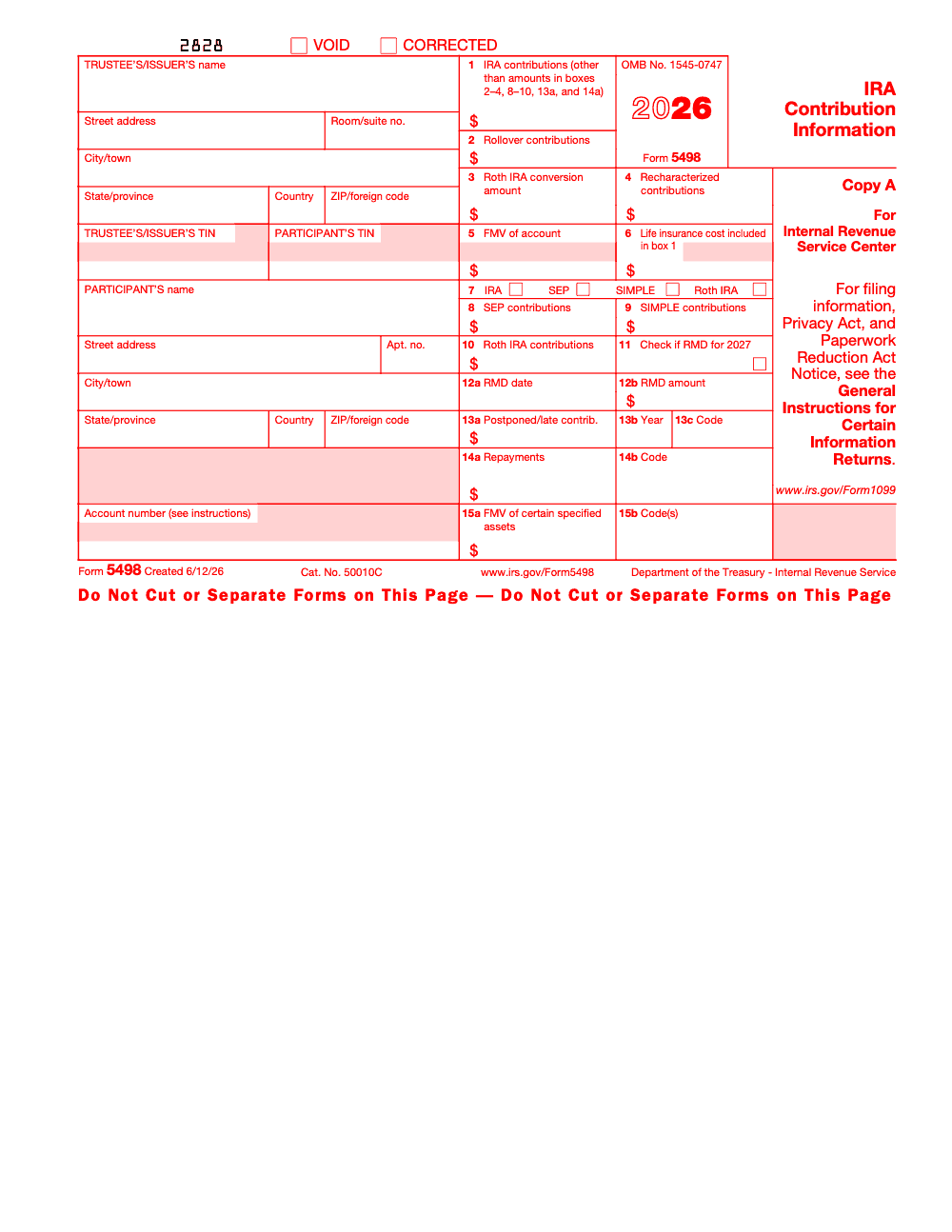
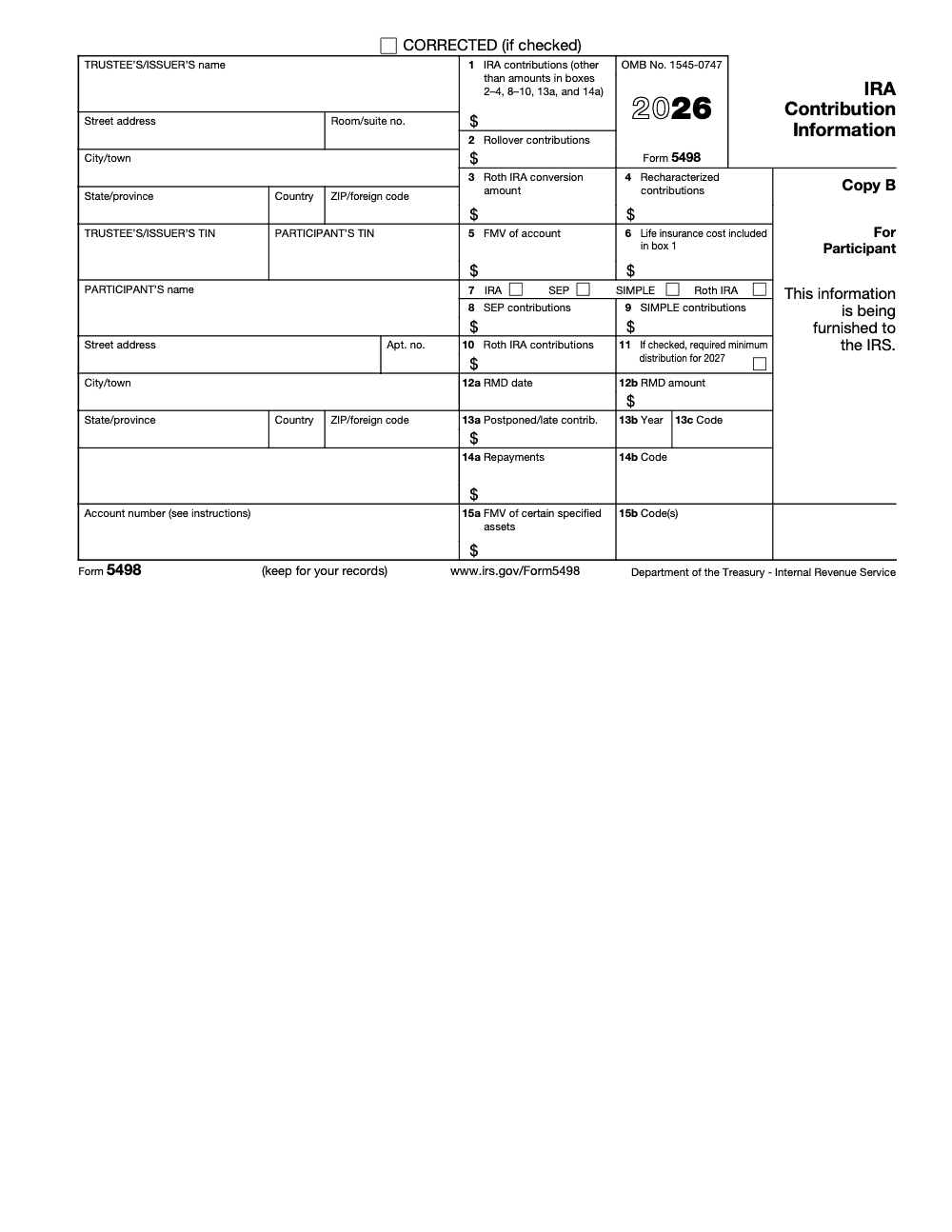
Box‑by‑Box Reference Table
| Box | What it shows | Use it for | Notes |
| 1 | Traditional IRA contributions for the tax year, including amounts made by the April deadline | Tie to your deduction or nondeductible basis tracking | Reported for the year designated by the participant, includes excess unless withdrawn |
| 2 | Rollover contributions received | Confirm that plan‑to‑IRA movement was captured as a rollover, not a regular contribution | Direct rollovers from qualified plans go here |
| 3 | Roth IRA conversion amount | Match to Form 1099‑R and Form 8606 for basis and taxable amount | Conversions are distributions on 1099‑R, then contributions here |
| 4 | Recharacterized contributions plus earnings | Verify that a recharacterization was processed correctly | Keep custodian confirmations with workpapers |
| 5 | FMV of the account on December 31 | RMD calculations for the following year | Custodians must value hard‑to‑value assets annually |
| 7 | Account type checkboxes | Ensures the form maps to the correct IRA type | Four checkboxes – IRA, SEP, SIMPLE, Roth IRA |
| 8 | SEP contributions | Reconcile employer deposits by calendar year | |
| 9 | SIMPLE contributions | Reconcile employer deposits by calendar year | |
| 10 | Roth IRA contributions, including eligible 529 to Roth transfers | Confirm annual Roth funding and 529‑to‑Roth amounts within limits | 529‑to‑Roth must be trustee‑to‑trustee and respect the lifetime cap and 15‑year rule |
| 11 | Check if RMD is required for the next year | Set your RMD reminder | The box is checked in the year the participant attains age 73, then each year after |
| 12a–12b | Optional RMD date and amount furnished by the custodian | Quick RMD planning reference | Some custodians provide this on 5498, others in a separate statement |
| 13a–13c | Postponed contributions or late rollovers with a reason code and year | Support late rollovers, disaster relief, or special service rules | Codes are FD, PO, and SC |
| 14a–14b | Repayments of certain distributions with a repayment code | Track repayments of qualified reservist, qualified disaster, birth or adoption, emergency expense, terminal illness, or domestic abuse distributions | |
| 15a–15b | FMV of certain specified assets and asset codes | Disclose hard‑to‑value assets held inside the IRA | Use Code H if more than two apply, and Code H must stand alone, it cannot be combined with any other character per Pub 1220 |
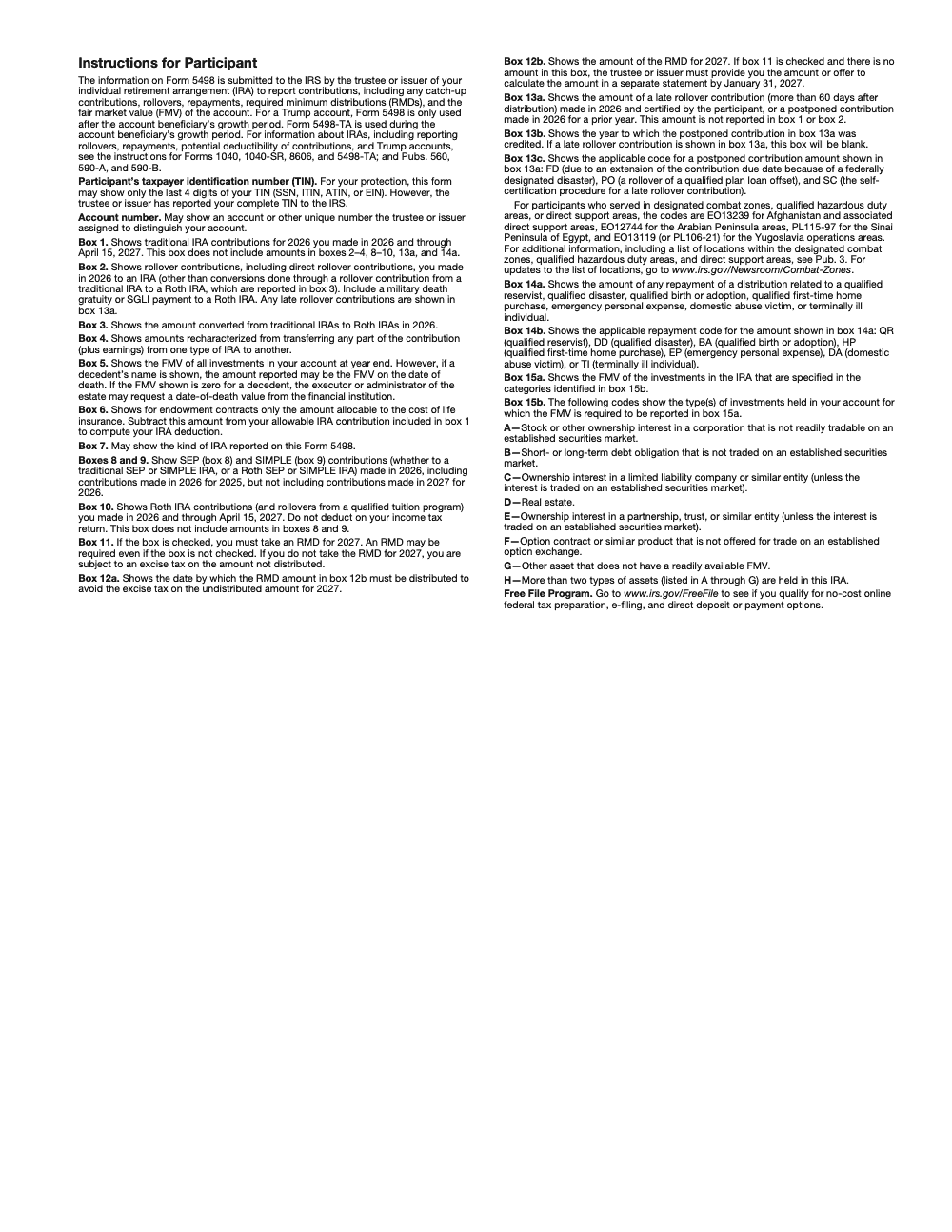
All of the box definitions above come straight from the IRS 2025 Instructions for Forms 1099‑R and 5498. Keep that page bookmarked when reviewing client files.
Rollovers vs Conversions vs Transfers, Clearing Up Confusion
- A rollover shows up in Box 2 after a distribution from another retirement plan or IRA that is deposited to an IRA within allowed timing or via direct trustee‑to‑trustee movement.
- A Roth conversion shows in Box 3, and the related distribution should be on a Form 1099‑R with appropriate coding. You will reconcile both forms and track basis on Form 8606 when required. One caveat to flag for clients, since the Tax Cuts and Jobs Act of 2017 Roth conversions are irrevocable, they cannot be recharacterized back to a traditional IRA.
- A direct transfer between like IRAs, for example traditional IRA to traditional IRA with the same titling, often does not appear as a reportable rollover.
RMD Signals You Should Not Miss
Box 5 gives the December 31 FMV, which is the starting point for your RMD for the following year. If Box 11 is checked, an RMD is required. An unchecked Box 11 is not a guarantee that no RMD is due, the IRS instructions explicitly warn that an RMD may still be required, so confirm independently based on age, beneficiary status, and account type. Custodians may also populate Box 12a with the RMD date and Box 12b with the amount as a convenience. Since SECURE 2.0, the RMD age is 73 for current years, and custodians must check the RMD box accordingly.
If you are reconciling several IRAs for one owner, remember RMDs from traditional IRAs can be aggregated, Roth IRAs have no lifetime RMDs for the owner, and inherited IRAs follow different rules. Always read the beneficiary coding and year‑of‑death facts before you advise.
529 to Roth IRA Reporting Now Lives on 5498 Too
The newer 529 to Roth IRA option requires a direct transfer, it counts toward the Roth annual contribution limit, and it is subject to a lifetime cap and a 15‑year account age rule for the 529. When it happens, you should see it in Box 10 because the IRS treats the eligible transfer as a Roth contribution for reporting. That line is new enough that it is worth double‑checking during reviews.
How To Use Form 5498 In Real Life
A Simple Three‑Step Workflow
- Retrieve and file, grab the PDF from each custodian’s portal in late May, confirm you have one for every IRA that had activity, then save it to your client or personal records. If there were no reportable contributions, the custodian still files FMV with the IRS and may have furnished an FMV and RMD statement earlier, so check for that too.
- Reconcile boxes, tie Box 1, 8, 9, 10 to your contribution records, tie Box 2 to rollovers, tie Box 3 to Roth conversions, and tie Box 4 to any recharacterizations with custodian confirmations. Then verify Box 5 FMV matches your year‑end statement once you account for annuity contract valuations or other specified assets in Boxes 15a–15b.
- Set next‑year tasks, if Box 11 is checked, schedule RMD reminders, and if Boxes 12a–12b appear, use them to set the exact date and amount in your planner.
Match It To 1099‑R And 8606
- Distributions that left an IRA show on Form 1099‑R. Contributions and movements into an IRA show on Form 5498. Matching the two avoids double counting or missing taxable income.
- If you made nondeductible traditional IRA contributions, you must file Form 8606 to track basis. 5498 alone does not establish basis. Skip Form 8606 and the IRS can end up taxing those contributions twice, once in the contribution year and again at distribution.
- For conversions, confirm the 1099‑R coding, then use 8606 to compute the taxable portion.
Two Quick Examples
- Example 1, you contributed 4,000 in March 2026 for tax year 2025. You should see 4,000 in Box 1 or Box 10 of your 2025 Form 5498, depending on whether it was traditional or Roth. The custodian reports 2025 contributions made by April 15, 2026 on the 2025 form.
- Example 2, you converted 30,000 from a traditional IRA to a Roth IRA in July. Expect Box 3 to show 30,000 on 5498 and a matching distribution on 1099‑R. Your tax return handles the taxable income, and your 5498 is the receipt confirming the conversion.
For Firm Owners, Shrink The Review Loop
If you run a CPA or EA firm, you know the real pain is not a lack of clients, it is delivery. Standardizing how your team captures and names 5498s, then tying them to 1099‑Rs and workpapers, cuts review time and protects margins. In our experience building offshore delivery that works inside your systems, the wins come from SOPs, structured workpapers, and a clean escalation path when a box is mis‑coded. That is how we keep partners out of the review weeds and focused on advice.
Light touch, when offshore support is framed as accountable delivery, not resume farming, you get predictable turnaround, fewer revisions, and clean files ready for partner sign‑off. That matters in May and it really matters in October.
Deadlines And Dates To Remember
- Prior‑year IRA contributions are allowed until the April filing deadline, then custodians reflect them on the prior‑year Form 5498.
- For 2025 activity, custodians file 5498 with the IRS by June 1, 2026, you usually see your copy in May. Always check your portal if mail is slow.
Contribution Limits, Eligibility, And Roth MAGI Ranges
Here is what is current as of November 20, 2025.
2025 IRA limits, $7,000 base, $1,000 catch‑up at age 50 or older. 2026 IRA limits, $7,500 base, $1,100 catch‑up.
2025 Roth IRA MAGI Phaseouts
- Single or head of household, $150,000–$165,000.
- Married filing jointly, $236,000–$246,000.
- Married filing separately, $0–$10,000. These are IRS numbers for 2025, and they rise again in 2026.
2026 Roth IRA MAGI Phaseouts, For Planning Ahead
- Single or head of household, $153,000–$168,000.
- Married filing jointly, $242,000–$252,000. The married filing separately range remains $0–$10,000.
Practical Notes On Eligibility
- You need earned income to contribute to an IRA.
- Traditional IRA contributions are allowed at any income, deductions may phase out if you or your spouse is covered by a workplace plan.
- Roth IRA eligibility phases out using the MAGI ranges above.
- The IRS cost‑of‑living updates confirm the unchanged 2025 IRA limit and show the increases for 2026. Keep this section updated each fall.
Overcontributions, How To Spot And Fix
Start by comparing Boxes 1, 8, 9, 10 on 5498 to the annual limit and your eligibility. If any box pushes you above the limit, you likely have an excess contribution. Ask the custodian for a return of excess with earnings by your tax filing deadline with extensions. The fix will be reported on next January’s Form 1099‑R, and your 5498 for the original year usually stays as is. Keep the custodian’s calculations with your workpapers.
If you miss the deadline, you will generally file Form 5329 and pay a 6% excise tax for each year the excess remains. Document every step, including dates and amounts, to close the loop.
Small But Important 5498 Updates You Might Miss
- Box 10 now includes qualified 529 to Roth IRA transfers that meet the new rules, recorded as Roth contributions for the designated year.
- Boxes 14a–14b track repayments of special distributions, for example disaster, birth or adoption, emergency expenses, terminal illness, or eligible domestic abuse distributions, with specific codes. This helps you prove timing and amounts later.
- Boxes 15a–15b require disclosure of certain specified assets and the related codes. This matters for audits and for consistent RMD calculations.
Keep a one‑page checklist next to your monitor, contributions match, conversions match, recharacterizations documented, FMV confirmed, RMD box read, special boxes scanned. If you manage a team, bake that checklist into your SOP.
Access, Corrections, And Related Forms
How To Retrieve Your 5498
- Check your provider’s portal in late May, then your mail. Most institutions post PDFs under Tax Documents or Year‑End Documents.
- If you have multiple IRAs, download one form per account.
- Missing a form, call the custodian with your account number and the tax year.
If Something Looks Off
- Contribution coded to the wrong year, ask the custodian to correct current‑year records. Prior‑year 5498s are rarely amended unless there is a clear custodian error.
- Rollover treated as a regular contribution, escalate fast. You want Box 2 for rollovers, not Box 1 or 10. Keep call notes and confirmations.
- Recharacterization missing, verify the transfer and the earnings calculation, then request the corrected reporting.
Forms That Travel With 5498
- Form 1099‑R, distributions that left the IRA. Reconcile with rollovers and conversions on 5498.
- Form 8606, basis in nondeductible traditional IRA contributions and Roth conversion tracking.
- Form 5329, excise taxes, including the 6% excess contribution penalty if you missed the on‑time fix.
Final Checklist You Can Copy
- Retrieve every 5498, one per IRA.
- Tie Boxes 1, 8, 9, 10 to your contributions and eligibility limits.
- Match Box 2 and Box 3 to 1099‑R and, if needed, Form 8606.
- Confirm Box 5 FMV and read Boxes 11–12 for next year’s RMD.
- Scan Boxes 13–15 for late rollovers, repayments, and asset codes.
- Fix excess contributions on time, then archive everything cleanly.
Where Accountably Fits
If you lead a firm, the fastest wins come from structure. We help firms build disciplined delivery around workpapers and reviews, which includes a simple, repeatable 5498 reconciliation flow inside your systems. That gives you predictable turnaround and fewer review loops, especially during May and October. If you want that kind of stability without sacrificing quality or security, we can help.
Compliance note, this article reflects IRS guidance available as of November 20, 2025. Limits and MAGI ranges change with annual cost‑of‑living adjustments. Always verify current numbers on IRS.gov before filing or advising.
Common Mistakes We See Every Season
The errors we see on 5498 batches are almost always box-mapping or calendar errors, not data-quality errors – the dollar amounts are usually right, they just end up in the wrong box or get reported in the wrong year. The same handful of mistakes show up across trustee files every season.
Reusable Checklists
These checklists are copy-paste ready for firm SOPs – paste each block into your trustee or custodian workpaper template and the page JS will keep state per item via localStorage so reviewers can resume mid-batch.
Pre-file box-mapping audit
- Confirm Box 1 contains only new traditional IRA contributions for tax year 2025 – no rollovers, conversions, recharacterizations, SEP, SIMPLE, Roth, or late or postponed amounts.
- Verify Box 2 includes both direct trustee-to-trustee and 60-day indirect rollovers, but EXCLUDES any conversion to a Roth IRA or Roth SIMPLE IRA (those belong in Box 3).
- Confirm Box 3 captures every Roth conversion from a traditional IRA or traditional SIMPLE IRA during 2025.
- Check that Box 5 (year-end FMV) is populated for every account – and for decedent accounts, confirm whether the value is year-end or date of death.
- Confirm Box 7 has the correct IRA / SEP / SIMPLE / Roth checkbox flagged for the account.
- Confirm any 529-to-Roth rollover sits in Box 10 (not Box 2) and respects the SECURE 2.0 $35,000 lifetime ceiling and the $7,000 (or $8,000 catch-up) annual IRA contribution limit for 2025.
- Run the reconciliation: sum of Boxes 1 + 2 + 3 + 8 + 9 + 10 + 13a + 14a equals total IRA money in for the account.
- Reject any Box 15b string containing H plus another character; route accounts with three or more A-through-G asset categories to a single Code H entry.
January 31 recipient FMV and RMD cycle
- Populate Box 5 (year-end FMV) for every account before the recipient run.
- Apply SECURE 2.0 Act §107 age-73 logic to flag every account where an RMD is required for 2026.
- Check Box 11 on every account flagged for a 2026 RMD.
- Populate Box 12a (RMD date) and Box 12b (RMD amount) for every Box-11-checked account.
- For Box-11-checked accounts where Box 12b is empty, queue a separate written statement offering to calculate the RMD, furnished to the participant by January 31, 2026.
- Confirm Copy B (black ink, printable) is being furnished to participants – never the scannable Copy A.
- Apply TIN truncation (last four digits) on every Copy B; reserve the full TIN for the Copy A submission to the IRS.
- Run a duplicate-suppression check so participants who already received an FMV and RMD notice earlier in the year do not receive a redundant January statement.
May 31 IRS filing close
- Aggregate the information-return count across Forms 1097, 1098, 1099, 3921, 3922, 5498, and W-2G – if the total is 10 or more, e-file is mandatory.
- Re-run Box 13a, 13b, and 13c logic – Box 13b blank for late rollovers, Box 13c populated with FD (federally declared disaster), PO (qualified plan loan offset), or SC (self-certification per Rev. Proc. 2016-47).
- Validate Box 14b repayment codes against the SECURE 2.0 list (QR, DD, BA, EP, DA, TI).
- Confirm every Box 13c "SC" entry has a signed participant self-certification letter in the workpaper.
- For any paper filing, confirm scannable Copy A was ordered from IRS.gov / EmployerForms – the web-PDF Copy A is informational only and may trigger a penalty if mailed in.
- Confirm CORRECTED checkbox usage for any corrections to prior-transmitted forms; use the VOID checkbox only for forms not yet transmitted to the IRS.
- If filing late is unavoidable, submit Form 8809 for the automatic 30-day IRS filing extension; recipient-statement extensions require Form 15397 received by the IRS on or before the recipient due date.
- Confirm SEP (Box 8) and SIMPLE (Box 9) deposits follow the "when paid" rule – any 2026 deposit credited to tax year 2025 falls off the 2025 file and onto the 2026 Form 5498.
Keep 5498 Season From Stalling
Form 5498 sits in an awkward calendar slot. The trustee runs two distinct production cycles separated by four months – the January 31, 2026 recipient FMV and RMD statement and the May 31, 2026 IRS filing of Copy A with the parallel contribution statement to participants (per the IRS Instructions for Forms 1099-R and 5498). Between those bookends sits the April 15, 2026 close of the 2025 contribution window, which still funnels traditional and Roth contributions into Boxes 1 and 10 right before the May lock.
The result is that a trustee, custodian, or back-office team is patching the same file across three different calendar pressures. Most of the box errors we see downstream are not box-mapping errors in isolation – they are the box-mapping errors that survive when those three calendars collide and the SOP does not separate them cleanly. Layered review and a clear cutover between cycles is what keeps the file clean.
- Run the January 31, 2026 FMV and RMD recipient cycle as a closed batch – Box 5 (year-end FMV) and Box 11 / 12a / 12b (SECURE 2.0 age-73 RMDs for 2026) finalized and sealed before any May work starts.
- Hold a separate April 15 to May 31 contribution cycle for Box 1 (new traditional IRA contributions for 2025) and Box 10 (Roth contributions for 2025), keyed off the tax-year designation on the deposit – a January through April 15, 2026 deposit can still be a 2025 contribution.
- Treat Box 8 (SEP) and Box 9 (SIMPLE) on a "when paid" calendar – any 2026 deposit, even one credited to tax year 2025, falls off the 2025 Form 5498 and onto the 2026 file.
- Stand up a 60-day rollover clock against every 1099-R distribution date so any breach lands in Box 13a with Box 13c=SC and a self-certification letter attached to the workpaper, never in Box 2.
- Aggregate the information-return count across Forms 1097, 1098, 1099, 3921, 3922, 5498, and W-2G before the close – the 10-return e-file threshold is cumulative across all info-return types, not per form.
This page is part of the IRS forms library Accountably maintains for the firms and back-office teams that file these returns at scale. If your January and May 5498 cycles keep colliding with the April 15 contribution close, our tax preparation services bring the SOPs, box-mapping audits, and layered review structure that keep both runs predictable.
FAQs
No. Your custodian files it with the IRS and furnishes you a copy. You keep it for records, contribution verification, and RMD planning. Use 1099‑R and 8606 for return reporting where applicable.
Expect it in May for the prior tax year. For 2025 activity, custodians must file with the IRS by June 1, 2026, and they typically furnish your copy in May. If only FMV is reported, you might not receive a new statement if an FMV and RMD notice was already furnished earlier in the year.
It can. Box 11 indicates whether an RMD is required for the next year, but an RMD may still be required even if the box is not checked, so verify independently. Some custodians also fill Boxes 12a–12b with an RMD date and amount. Many still furnish a separate RMD notice.
For 2025, the IRA limit is $7,000 with a $1,000 catch‑up at age 50 or older. For 2026, the limit increases to $7,500 and the catch‑up to $1,100. Roth MAGI ranges rise too, singles $153,000–$168,000 and MFJ $242,000–$252,000 for 2026.
Yes, eligible 529 to Roth transfers are treated as Roth contributions for reporting, so they appear in Box 10 on Form 5498.
Other forms this guide names
- Form 1099‑R: Box 7 Codes, Rollovers, 2025 Filing Guide
- Form 8606: Nondeductible IRA Basis & Pro Rata Rule Guide
- Form W‑2G: Gambling Winnings Reporting Guide
- Form 1098: How to Read It and Claim Mortgage Interest
- Form 3921: 2025 Guide to Filing, Deadlines, AMT & Penalties
- Form 3922: ESPP Basis, Holding Period & 1099‑B Corrections
Summarize this article with AI
About this guide
Accountably helps US CPA, EA, and accounting firms hire trained accountants and tax preparers in India.
About us Reviewed byJugal Thacker, CPAFounder and CEO at Accountably
A Washington-licensed CPA with 7+ years inside US firms – PwC, a real-estate tax practice, then a full-service firm, rising from reviewer to manager to advisory. This article was reviewed against current IRS guidance for the 2025 tax year and updated for filers preparing late returns, amendments, and 2026 estimates.
View profile →How we research, review, and update this guide
Every Accountably guide is researched against primary IRS sources, reviewed by a U.S. CPA, and refreshed as guidance evolves. Read our Editorial Guidelines to see how we source, fact-check, and update our content.




