Summarize this article with AI
In Brief
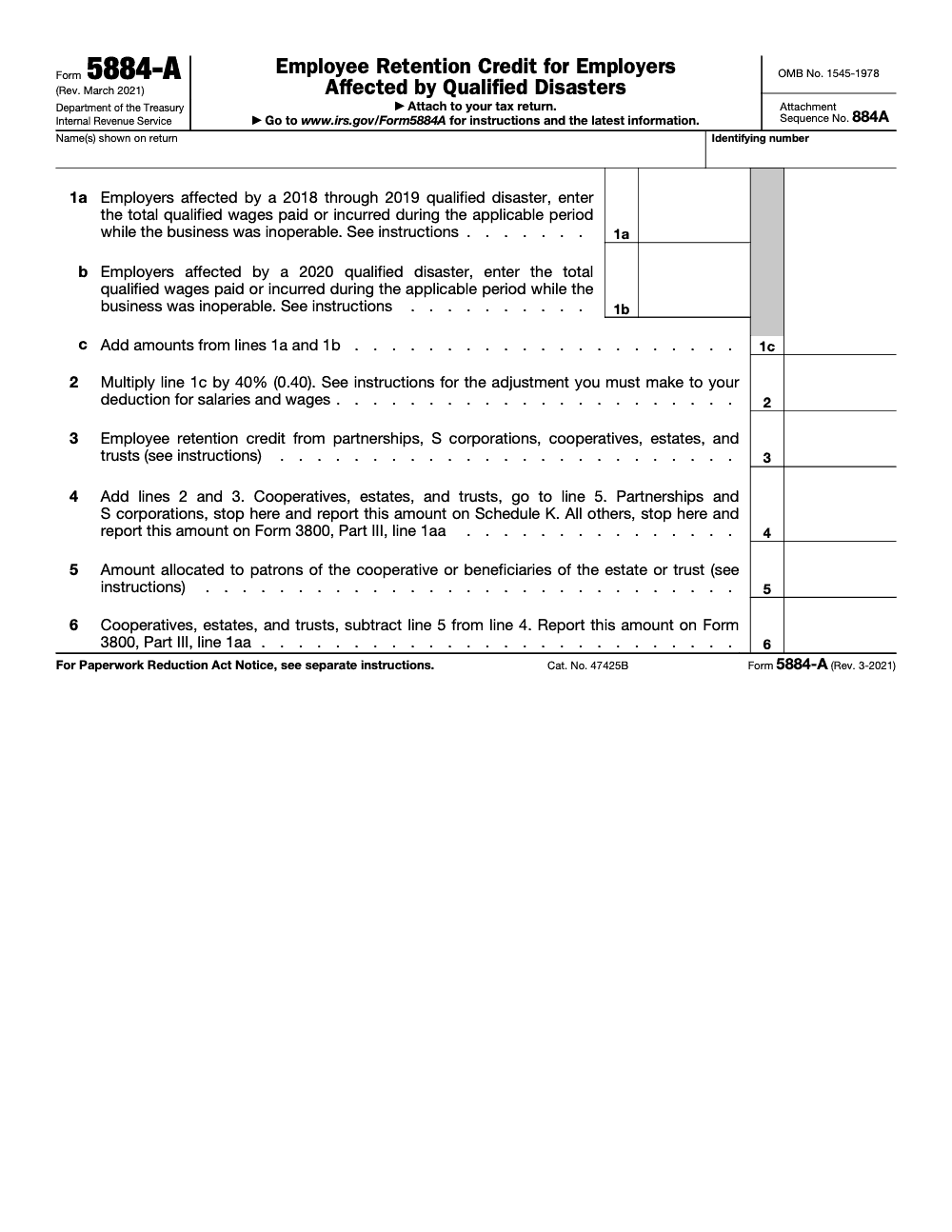
Form 5884-A claims the disaster Employee Retention Credit, a 40% credit on qualified wages paid by employers whose business was inoperable during a 2018-2020 federally declared qualified disaster (per the Form 5884-A instructions, Rev. March 2021). Enter wages on Line 1a (2018-2019 disasters) and Line 1b (2020 disasters), compute the credit on Line 2, and carry the Line 4 result to Form 3800, Part III, line 1aa. The salaries-and-wages deduction must be reduced by the credit amount to avoid a double benefit.
Form 5884-A almost never arrives as a fresh filing. It shows up as an amended return with a credit already on it, tied to a 2018, 2019, or 2020 federally declared disaster, and the workpaper behind it usually piles every qualified wage onto one line with nothing to prove the location was actually inoperable. The 40% credit is the easy part once the dates are clean.
Where the wages sit decides the rest. The 2018 and 2019 disasters go on Line 1a, the 2020 disasters on Line 1b, and the wage window runs from the day operations stopped to the earlier of significant resumption or 150 days after the incident period ends. The credit lands on Line 2, the wage deduction shrinks by the same amount, and the result travels from Line 4 (or Line 6 for cooperatives, estates, and trusts) onto Form 3800.
Key Takeaways
- The disaster employee retention credit under Form 5884‑A is a one time, per employee credit for qualified disasters in 2018, 2019, and 2020, separate from the COVID ERC. It equals 40% of up to 6,000 of qualified wages per employee, a maximum of 2,400 each.
- Your wage window starts the day your business became inoperable at that location, and ends on the earlier of significant resumption or 150 days after the incident period ends.
- All eligible filers complete Form 5884‑A. Partnerships and S corporations stop at Line 4 and route the credit through Schedule K to partners and shareholders; cooperatives, estates, and trusts continue past Line 4 to Lines 5 and 6, allocating any portion to patrons or beneficiaries on Line 5 and carrying Line 6 to Form 3800, Part III, line 1aa; all other filers carry Line 4 to Form 3800, Part III, line 1aa. Wages used for COVID ERC or Form 5884‑D cannot be reused here.
- Use the March 2021 revision of Form 5884‑A for tax years beginning in 2018 or later until the IRS issues a newer version. The IRS “About” page for 5884‑A shows no newer developments and was last reviewed on January 29, 2025.
What Form 5884‑A Is, and How It Differs From COVID ERC
Form 5884‑A lets you compute and claim the disaster employee retention credit for federally declared disasters in 2018, 2019, and 2020 only (it is a separate form from Form 5884, which covers the Work Opportunity Credit for targeted‑group wages under IRC §51 and follows different rules). Disasters declared in 2021 or later are outside this form's scope unless Congress enacts a successor credit. The credit is 40% of up to 6,000 wages per employee, so 2,400 maximum per person, and it applies only to wages in a defined window tied to the disaster’s incident period and your inoperability dates. This is not the pandemic‑era ERC that ran through employment tax returns in 2020 and 2021. That program had a separate moratorium and review cycle, and its wages cannot be counted again on Form 5884‑A.
Where to file depends on your entity, but all eligible filers complete Form 5884‑A. Partnerships and S corporations stop at Line 4 and report the credit on Schedule K, passing it through to partners and shareholders who claim it on their own Form 3800. Cooperatives, estates, and trusts continue to Lines 5 and 6, allocate any portion to patrons or beneficiaries on Line 5, and carry Line 6 to Form 3800, Part III, line 1aa. All other filers carry Line 4 to Form 3800, Part III, line 1aa.
Why This Matters To You
If you operated inside a FEMA‑declared disaster zone and you kept people on payroll while your location was down, you may be entitled to a federal credit that reduces income tax. When you do this right, you not only help clients, you also reduce rework in review, keep documentation clean, and avoid double counting with other credits.
The What‑How‑Wow Summary
- What Form 5884‑A is the calculation page for the disaster employee retention credit. It uses a 40% rate on up to 6,000 per employee during a wage window that starts with inoperability and ends at the earlier of significant resumption or 150 days after the incident period end.
- How Confirm the disaster declaration and incident period, pin your inoperability start and resumption dates, pull per employee wages in that range, cap at 6,000 each, compute 40%, reduce wage deductions by the credit, and file via Form 5884‑A or Form 3800 as applicable.
- Wow The IRS confirms the March 2021 revision remains the current version to use for 2018 and later tax years until replaced, and the IRS “About” page for the form shows no new developments through January 29, 2025. That clarity helps you complete older disaster claims with confidence today.
A Quick Example To Ground The Rules
Say your shop in a 2020 qualified disaster zone lost power and suffered water damage. You became inoperable on September 20, 2020, and resumed significant operations on November 15, 2020. The FEMA incident period ended October 5, 2020. Your wage window runs September 20 through November 15, since that is earlier than 150 days after October 5. If Maria earned 8,400 in that window, you only count 6,000, then take 40% for a 2,400 credit for Maria. Repeat employee by employee, then total.
Before You Start, Lock These Three Dates
- The FEMA incident period for the specific disaster.
- The date your business first became inoperable at that location.
- The date you resumed significant operations, which may be earlier than the 150‑day cutoff.
Small operational note for firm leaders. If your team is buried during peak season or in cleanup sprints, this credit is easy to delay, which risks missing deductions adjustments and confusing wage reuse. Capacity matters here, but discipline matters more. If you need structured help for repeatable workpaper prep and reviews inside your own software, a controlled offshore delivery model, not resume farming, can keep this moving without dragging partners into endless review loops. That is the space Accountably supports, and we only mention it because the work is intensely process dependent.
Eligibility, The Three Tests You Must Pass
1) Location Test
You must have conducted an active trade or business in a federally declared qualified disaster zone during the applicable incident period. The IRS instructions include state by state lists for 2018–2019 disasters and separate listings for 2020 disasters. Confirm your county or parish is on the list for the relevant declaration.
2) Inoperability Test
Your business had to be inoperable on or after the first day of the incident period and, for 2018–2019 cases, on or before December 20, 2019, or for 2020 cases, on or before December 27, 2020, because of damage from the qualified disaster. This hinges on physical impact to the place of employment, not general economic slowdown.
3) Wage Window Test
Qualified wages count only from the date your trade or business first became inoperable at the employee’s principal place of employment until the earlier of the date you resumed significant operations at that place or 150 days after the last day of the incident period. Then stop. Anything paid after that window does not qualify.
2018–2019 Versus 2020 Credits, Know Your Line
- Line 1a on Form 5884‑A covers the 2018–2019 qualified disaster employee retention credit. Your inoperability must have occurred on or before December 20, 2019.
- Line 1b covers the 2020 qualified disaster employee retention credit (not the COVID‑19 ERC, which was claimed on Form 941 or 941‑X, never on Form 5884‑A). Your inoperability must have occurred on or before December 27, 2020.
These date markers come directly from the instructions, which rest on the 2019 and 2020 disaster relief laws. Keep them visible when you scope wage windows.
Snapshot Table, Do You Qualify
| Test | What you must document | Where it shows up |
| Location | Your site was in a listed disaster zone during the incident period | IRS 5884‑A instructions lists for 2018–2019 and 2020 |
| Inoperability | Operations became inoperable due to disaster damage, with a clear start date and a resumption date | Internal memo, maintenance logs, insurance files, client notices |
| Wage window | Wages paid after inoperability and before resumption or 150 days after the incident period | Payroll reports filtered by date range |
| Employee cap | No more than 6,000 per employee used for the credit | Line 1a or 1b workpaper, per employee cap sheet |
| Filing path | All eligible filers complete Form 5884‑A; pass‑throughs route Line 4 through Schedule K, all others carry Line 4 (or Line 6) to Form 3800 Part III, line 1aa | Return assembly checklist |
Reference the 5884‑A instructions for the exact lists and the 150‑day rule. If you need confirmation on whether the 2021 or later forms changed this, the IRS “About” page for Form 5884‑A shows no recent developments and still points you to the March 2021 revision as current for these disaster years.
What Counts As Qualified Wages
Qualified wages follow the FUTA concept. They include wages you paid or incurred while inoperable, and they can include amounts you paid for medical or hospitalization expenses tied to sickness or accident disability. They do not include wages to a dependent or certain related individuals, and they cannot include wages you already used for the COVID ERC or for Form 5884‑D.
Common Eligibility Myths, Quickly Clarified
- “We never fully shut down, we just ran at half speed, so we are out.” Not always. The test is whether the specific place of employment became inoperable because of disaster damage. Partial operations at another location can still allow wages at the damaged site to qualify.
- “We can just reuse the same wages we used for COVID ERC.” No. The instructions bar double counting with coronavirus‑related ERC and with Form 5884‑D.
- “I think there is a new 2025 version of the form we should wait for.” The IRS says to use the March 2021 revision for tax years beginning in 2018 or later until a later revision is issued. The IRS site shows no newer developments as of January 29, 2025.
Calculating The Credit, Step By Step
Step 1, Set Your Window
Mark the first date your business became inoperable at the employee’s principal place of employment. Then mark the earlier of your significant resumption date or the date that is 150 days after the last day of the FEMA incident period. Only wages in this range count.
Step 2, Pull Per Employee Wages
Export payroll by employee for that exact period. For each employee, cap the wage base at 6,000, reduced by any amount of that employee’s wages you already used for this credit in a prior tax year.
Step 3, Multiply By 40%
Multiply the total qualified wage base by 40%. This yields a maximum 2,400 per employee. Enter your totals on Lines 1a or 1b, sum to Line 1c, then compute Line 2 for the credit.
A Worked Example
Assume a 2020 hurricane with an incident period ending October 10, 2020. Your location became inoperable on September 21, 2020, and resumed significant operations on December 1, 2020. The earlier endpoint is December 1, not 150 days after October 10.
- Employee A earned 5,200 in the window. Wage base is 5,200, credit is 2,080.
- Employee B earned 9,300. Wage base is capped at 6,000, credit is 2,400.
- Employee C earned 3,100. Wage base is 3,100, credit is 1,240.
Total credit for these three is 5,720. Remember to reduce your wage deduction by the Line 2 amount, even if Form 3800 limits immediate use this year.
Interactions You Must Handle
- COVID ERC If you used any of these wages on Forms 941 or 941‑X for the COVID ERC, you cannot reuse them on Form 5884‑A. The IRS also issued a moratorium and continued scrutiny on COVID ERC claims, another reason to keep the two programs cleanly separated.
- Form 5884‑D Certain tax‑exempt organizations claim a similar disaster credit on Form 5884‑D against employment taxes. If your organization used wages on 5884‑D, you cannot use them again on 5884‑A.
- Work Opportunity Credit An employee is not an eligible employee for the disaster retention credit for any period you are allowed a Work Opportunity Credit for that same employee.
Documentation Checklist That Survives Review
- FEMA or IRS disaster declaration with the specific incident period that applies to your location.
- Proof of location inside the qualified disaster zone.
- Evidence of inoperability at that location, plus the date significant operations resumed.
- Payroll detail for the wage window, per employee, reconciled to W‑2 totals.
- A per employee cap sheet showing the limit of 6,000 and any prior year usage.
- A tie‑out to Line 1a or 1b, the 40% calculation on Line 2, and the wage deduction reduction entry.
Quick Reference, Lines On The Form
| Form 5884‑A line | What it captures | Notes |
| Line 1a | 2018–2019 qualified disaster wages | Inoperability must have occurred on or before Dec 20, 2019 |
| Line 1b | 2020 qualified disaster wages | Inoperability must have occurred on or before Dec 27, 2020 |
| Line 1c | Total of 1a and 1b | Cap each employee at 6,000 |
| Line 2 | 40% of Line 1c | Reduce wage deduction by this amount |
| Line 3 | Credits flowing in from K‑1s or cooperatives | Then add to Line 4 |
| Line 4 | Total credit | Pass‑throughs send to Schedule K |
| Line 5 | Allocations to patrons or beneficiaries | See specific instructions |
Confirm these placements with the instructions before you finalize the return.
Filing Mechanics Without The Headaches
Who Files Form 5884‑A Versus Form 3800
- All eligible filers complete Form 5884‑A. Partnerships and S corporations stop at Line 4 and route the credit through Schedule K to partners and shareholders; cooperatives, estates, and trusts continue past Line 4 to Lines 5 and 6, allocating any portion to patrons or beneficiaries on Line 5 and carrying Line 6 to Form 3800, Part III, line 1aa.
- All other filers generally report the credit on Form 3800, Part III, line 1aa (the credit cannot be entered as a direct line item on Form 1040 or 1120; it must flow through Form 3800 as a component of the General Business Credit). The 2024 Form 3800 instructions continue to list the employee retention credit for employers affected by qualified disasters among the general business credits.
The Wage Deduction Reduction
You must reduce your salary and wage deduction by the credit amount on Line 2, even if Form 3800 limits your ability to use the entire credit in the current year. If you capitalized any costs included in the wage base, reduce the amount capitalized by the portion of the credit attributable to those costs.
Pass‑Through Reporting
- Partnerships and S corporations report the credit on Schedule K and flow it to partners and shareholders (these entities do not file Form 3800 themselves for this credit; only the partners or shareholders claim it on their own Form 3800).
- Cooperatives must allocate excess credit to patrons after applying the tax liability limit.
- Estates and trusts allocate in proportion to how income is allocated. The instructions detail how to report and allocate these amounts, including passive activity nuances.
A Practical, Repeatable Workflow
- Confirm the disaster and incident period Find your client’s county or parish on the IRS list for that disaster year. Save a PDF of the relevant list with the incident period dates and keep it in the workpapers.
- Pin your window Document the inoperability start and the resumption date. If resumption is unclear, document the operational milestone you used to define “significant operations.”
- Pull wages and cap by employee Export payroll, filter to the window, and cap each employee at 6,000. Note any prior year usage for that employee.
- Compute 40% and book the deduction adjustment Calculate the credit, draft the wage deduction reduction entry, and prepare a memo explaining the adjustment.
- Assemble forms and routes Complete Form 5884‑A regardless of entity type. Pass‑throughs stop at Line 4 and report on Schedule K; all other filers carry the credit to Form 3800, Part III, line 1aa.
Quality Control Pointers From The Review Chair
- Tie the wage window dates to the declaration, then to payroll. Reviewers should be able to match every number to a report.
- Include a one page control sheet that shows headcount, total wages, capped wages, Line 2 credit, and the wage deduction reduction entry.
- Annotate any employees excluded due to related party rules or Work Opportunity Credit interaction, and cite the instruction page.
When Teams Get Stuck
Most stalls happen when the incident period and inoperability dates are fuzzy, or when wages were already used for other credits. Solve that first, then the calculation flows. If your team is facing peak season capacity limits or turnover, consider separating the rote tasks, like workpaper standardization and per employee wage capping, from the judgment calls, like inoperability and resumption. A disciplined offshore delivery team, working in your own systems and templates, can clear the backlog without dragging partners into second reviews. That is the way Accountably engages, only when it directly supports your delivery timeline and review protection.
Common Pitfalls And How To Avoid Them
- Using wages outside the window Always start wages on the inoperability date, and end at resumption or the 150‑day cutoff, whichever is sooner.
- Double counting wages Do not reuse wages claimed for the COVID ERC or Form 5884‑D. If you discover overlap, correct payroll filings or adjust the income tax return before you claim 5884‑A.
- Skipping the wage deduction reduction The deduction reduction applies even if Form 3800 limits your current year use.
- Wrong filing path Pass‑throughs file 5884‑A. Others generally use Form 3800, Part III, line 1aa.
Practical Tips You Can Use Today
- Name your workpapers with a standard, predictable pattern, for example, “5884A Client, DisasterName, County, IncidentDates, InoperabilityToResumption.”
- Keep a one page audit memo that cites the exact instruction paragraphs for your line entries.
- Map all wage reports back to the general ledger and W‑2 totals.
- Train your reviewer to check the dates first, then the 6,000 caps, then the 40% math.
Final Word, And Where Accountably Fits
If you have the dates, the location, and clean payroll extracts, you can finish this credit. The hard part is usually time, not the math. When your firm needs reliable hands to standardize workpapers, enforce wage caps, and prep clean review packages in QuickBooks, Xero, CCH Axcess, UltraTax, ProConnect, Lacerte, Drake, Karbon, Canopy, or TaxDome, you can plug in disciplined offshore capacity without giving up control. That is the model Accountably uses, U.S. led, SOP driven, and built for review protection, so partners can get back to strategy and advisory.
Common Mistakes We See Every Season
Most of the rework on Form 5884-A traces back to a small set of recurring missteps – stale workpapers, mixed disaster year-sets, or a missing wage-deduction reduction. Catching them upstream of the senior review chair is where the time savings live.
Reusable Checklists
These checklists are copy-paste ready for your firm's Form 5884-A SOP. Each one targets a specific stage of the workpaper – upfront eligibility, the line-by-line wage allocation, and the Form 3800 carry-through.
Inoperable window reconstruction packet
- Pull the federal disaster declaration that covers the affected county and the applicable period.
- Confirm the disaster falls within the 2018-2019 set (Line 1a) or the 2020 set (Line 1b) – never both on the same row.
- Document the business's inoperable start date and resume date for each affected location.
- Attach a short narrative tying the inoperable status to the federal declaration (evacuation order, utility outage, mandated closure).
- Confirm the employer retained the affected employees during the inoperable window.
- File source documents in the workpaper folder under a year-set subfolder, not the engagement root.
- Note the source of the disaster declaration so the workpaper survives an IRS notice two or three years after filing.
Line 1a / 1b / 1c wage allocation
- Pull the payroll register for each affected employee, scoped to the inoperable window only.
- Exclude pay-period wages earned after the resume date; prorate the split where the period straddles it.
- Confirm wages were paid while the business was inoperable, per the Form 5884-A instructions.
- Enter 2018-2019 federally declared disaster wages on Line 1a.
- Enter 2020 federally declared disaster wages on Line 1b.
- Tie Line 1c to the sum of Line 1a and Line 1b without rounding at the line level.
- Apply 40% to Line 1c on Line 2 and copy the same amount into the wage-deduction reduction worksheet.
- Add Line 3 if any credit is flowing in from a partnership, S corporation, cooperative, estate, or trust (Schedule K-1 source).
Form 3800 carry-through review
- Confirm filer type. Partnerships and S corporations stop at Line 4 and route the credit through Schedule K to owners.
- Cooperatives, estates, and trusts continue to Lines 5 and 6; complete the patron or beneficiary allocation schedule before drafting Line 5.
- Carry Line 4 (for most filers) or Line 6 (for cooperatives, estates, and trusts) to Form 3800, Part III, line 1aa.
- Verify the Form 3800 General Business Credit calculation reflects the new credit line.
- Confirm the wage-deduction reduction has flowed through the salaries-and-wages line on the income tax return.
- Attach Form 5884-A to the federal income tax return for the year the credit is claimed.
- Save the full workpaper bundle (declaration, payroll extracts, allocation schedules) under the year-set subfolder so the credit is defensible the second a notice arrives.
Keep 5884-A Season From Stalling
Disaster Employee Retention Credit work shows up off the calendar – usually inside an amended return, a partnership K-1 cleanup, or an IRS notice tying back to a 2018, 2019, or 2020 federally declared disaster. Because the form has not been refreshed since the March 2021 revision (per the Form 5884-A instructions), preparers reach for old workpapers, outdated wage windows, and stale disaster lists, which is where the time leak starts.
The fix is treating each open-year claim like its own small engagement: define the inoperable window, isolate qualified wages, and reconcile the Form 5884-A flow into Form 3800 before the return goes out the door. That keeps the credit defensible if the IRS asks for support two or three years after filing.
- Build a per-location inoperable-window log (start date, resume date, source of the federal disaster declaration) before pulling any payroll register – wages paid after the business resumed normal operations do not qualify, per the Form 5884-A instructions.
- Split qualified wages cleanly: Line 1a for 2018-2019 disaster wages, Line 1b for 2020 disaster wages, Line 1c as the sum – never lump them together, since the year-set split is how the IRS reconciles the credit.
- Track the 40% credit on Line 2 and the matching wage-deduction reduction in the same workpaper, so the salaries-and-wages line on the income tax return ties out without a second pass.
- For partnerships and S corporations, stop at Line 4 and push the credit through Schedule K to partners and shareholders – the entity does not file Form 3800 itself for this credit.
- For cooperatives, estates, and trusts, route the patron or beneficiary allocation through Line 5 first, then carry Line 6 to Form 3800, Part III, line 1aa – missing the Line 5 split is the most common review note we catch on these returns.
Open-year claim work eats senior-reviewer hours fast, especially when the underlying disaster documentation is scattered across multiple clients and years. Our U.S. taxation team handles the inoperable-window reconstruction, line-1a/1b split, and Form 3800 carry-through under SOC-2-aligned controls, so the credit is defensible the second the notice arrives.
FAQs
Yes. The IRS says to use the March 2021 revision for tax years beginning in 2018 or later until a later revision is issued. The IRS “About” page for the form shows no recent developments and was last reviewed on January 29, 2025.
All eligible filers complete Form 5884‑A. Partnerships and S corporations stop at Line 4 and route the credit through Schedule K to partners and shareholders; cooperatives, estates, and trusts continue past Line 4 to Lines 5 and 6, allocating any portion to patrons or beneficiaries on Line 5 and carrying Line 6 to Form 3800, Part III, line 1aa; all other filers carry Line 4 to Form 3800, Part III, line 1aa.
Your business became inoperable at the employee’s principal place of employment because of damage from the disaster. The wage window begins on that date and ends at resumption or 150 days after the incident period ends.
No. The instructions prohibit using wages that figured into the COVID ERC on employment tax returns. Keep the programs separate and document your allocations.
Certain tax‑exempt organizations claim a similar credit on Form 5884‑D against employment taxes. The IRS has separate instructions and a listing of eligible disasters for that form.
Other forms this guide names
- Form 3800: How to Claim the General Business Credit in 2025
- Form 5884-D: Nonprofit 2020 Disaster Retention Credit Guide
- Form 941: Employer's Quarterly Tax Return Guide 2025
- Form 941‑X: Correct Payroll Tax Errors and Claim Refunds
- Form W‑2: Deadlines, E‑File Rules, Boxes, and W‑2c Corrections
Summarize this article with AI
About this guide
Accountably helps US CPA, EA, and accounting firms hire trained accountants and tax preparers in India.
About us Reviewed byJugal Thacker, CPAFounder and CEO at Accountably
A Washington-licensed CPA with 7+ years inside US firms – PwC, a real-estate tax practice, then a full-service firm, rising from reviewer to manager to advisory. This article was reviewed against current IRS guidance for the 2025 tax year and updated for filers preparing late returns, amendments, and 2026 estimates.
View profile →How we research, review, and update this guide
Every Accountably guide is researched against primary IRS sources, reviewed by a U.S. CPA, and refreshed as guidance evolves. Read our Editorial Guidelines to see how we source, fact-check, and update our content.