
Key dates
Summarize this article with AI
In Brief
Form 3800 aggregates over 30 component credits into the General Business Credit and applies the section 38 limitation: the cap is net income tax minus the greater of tentative minimum tax or 25% of net regular tax over $25,000 (per IRS Form 3800 (2025) instructions). Unused 2025 credit carries back 1 year and forward 20 years under IRC §39; the 2025 filing deadline is April 15, 2026, with extensions to October 15, 2026 via Form 4868 or Form 7004.
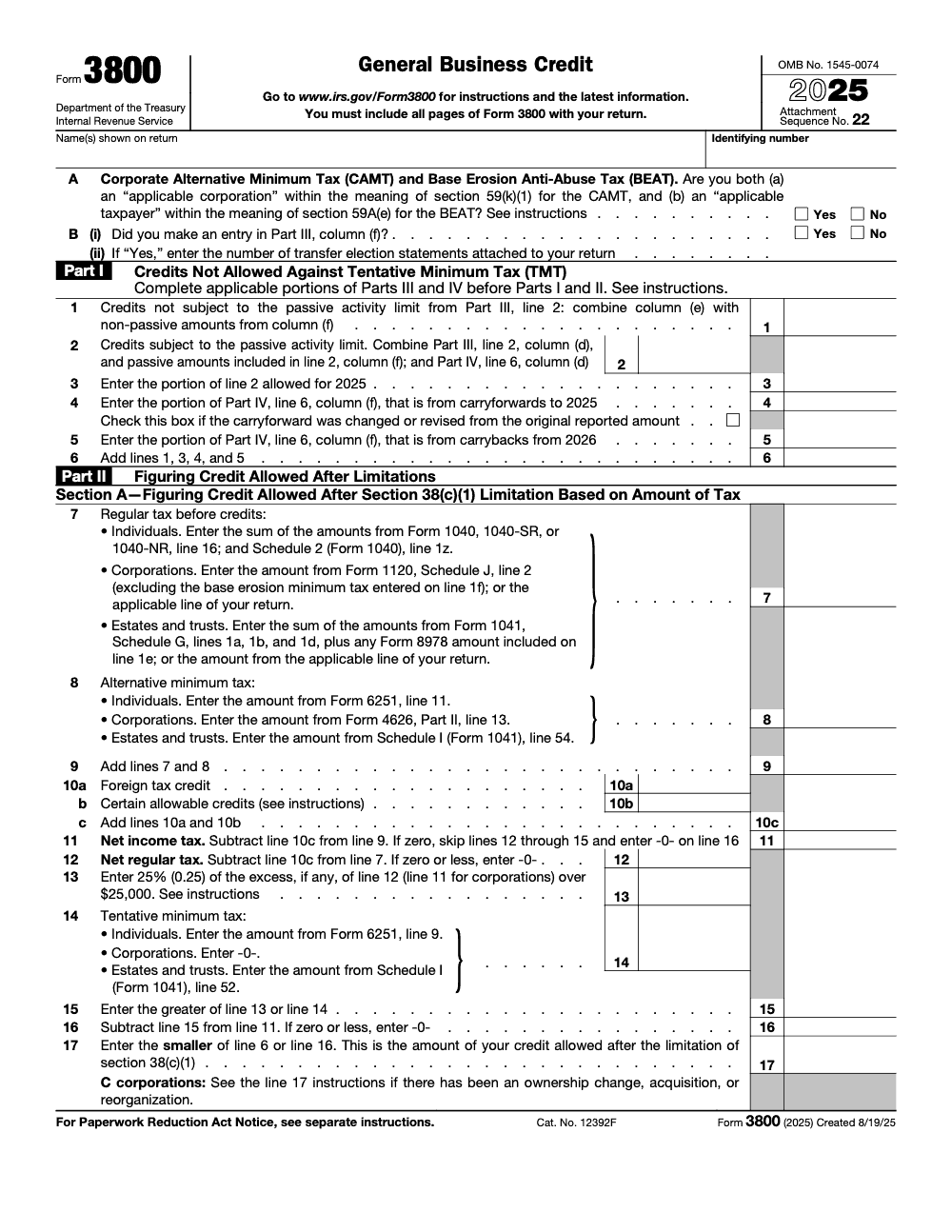
A client arrives in March with several K-1s, a research credit, a work opportunity amount, and a clean energy credit carrying an elective pay registration number. Form 3800 aggregates over 30 component credits like these into the General Business Credit, then applies the section 38 limitation and the ordering rules to show what is used this year and what carries.
The cap is net income tax minus the greater of tentative minimum tax or 25% of net regular tax over $25,000. The credit is nonrefundable, most unused amounts carry back 1 year and forward 20 years, and since 2023 the form has used a six-part layout to track limits, sources, carryovers, and elective pay or transfers, so expect registration numbers and source breakouts.
Key Takeaways
- The General Business Credit is the sum of current year credits plus carryovers and carrybacks, capped by a limit in section 38. You compute the cap on Form 3800.
- The GBC is nonrefundable. Most unused amounts carry back one year and forward 20 years, and certain section 6417 applicable credits have a separate three year carryback framework.
- Since 2023, Form 3800 uses a six part layout to track limits, sources, carryovers, and elective pay or transfers. Expect registration numbers and source breakouts.
- Two 2025 notes, the IRS corrected Form 3800’s fillable field sizes on March 12, 2025, and on April 9, 2025 it published how to revoke certain section 6417 elective pay elections.
- Eligible small business rules and AMT interaction still apply, including the 25 percent test over the $25,000 threshold.
What the General Business Credit is, and why Form 3800 is your control panel
The General Business Credit is not a single credit. It is a stack, the oldest carryforwards first, then current year credits, then any carrybacks, all limited by section 38. Form 3800 is the control panel that brings this together and applies the ceiling for the year.
Because the GBC is nonrefundable, it can bring income tax to zero but not below. If you cannot use everything this year, most unused amounts carry back one year and carry forward up to 20 years. For credits that are applicable credits under section 6417, there is a separate three year carryback framework that you apply independently of the rest of the business credit.
Field note: The fastest path to shorter reviews is a single carryover ledger that mirrors Parts IV and VI by origin year and credit code. When reviewers see the same structure every time, second pass comments drop.
Who should file Form 3800
File Form 3800 when you claim any component business credit, receive a pass through share on a Schedule K 1, or apply carrybacks or carryforwards. C corporations, partnerships, S corporations, sole proprietors, and individuals with pass through credits all land here. Attach each component credit form and include Form 3800 with your return by the due date, including extensions.
If you meet the eligible small business definition, keep your ESB support in the file. ESB status affects how certain credits, like the research credit, appear on the form and how the limitation applies. The instructions outline the entity types and the $50 million three year average receipts test.
Common credits that feed the GBC
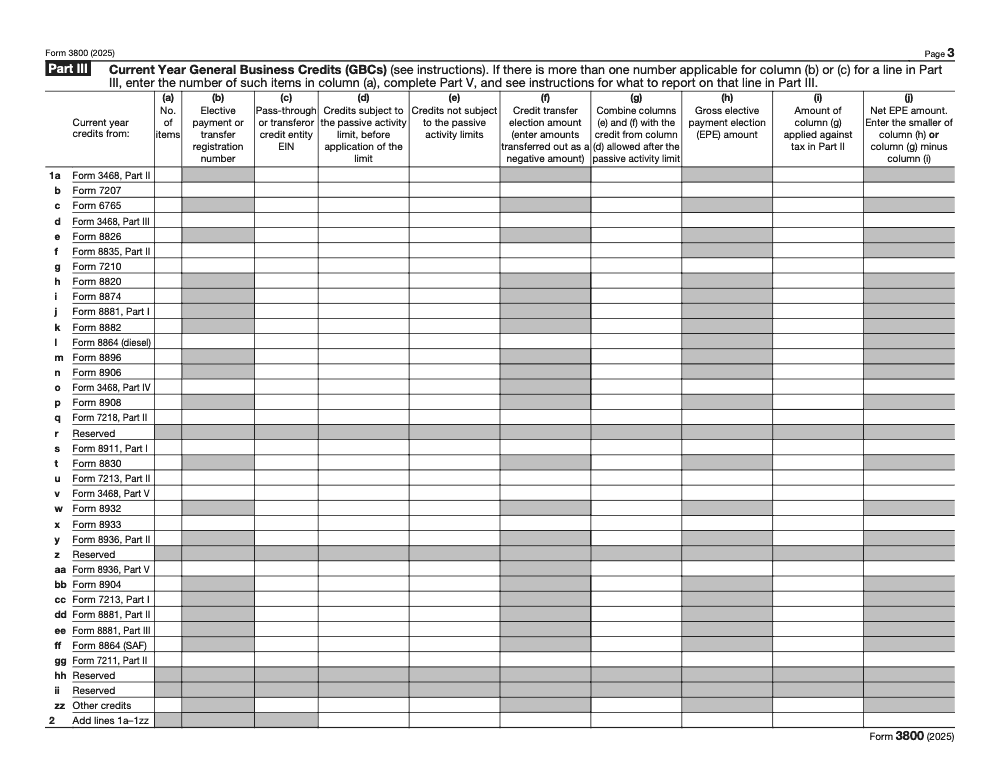
Credits your team sees most often include Research Credit, Work Opportunity Credit, Low Income Housing Credit, Small Employer Health Insurance Credit, Small Employer Pension Startup Credit, Employer Credit for Paid Family and Medical Leave, Tip Social Security and Medicare Credit, and Disabled Access Credit. You prepare each on its native form, then bring totals to Part III of Form 3800, separated into passive and nonpassive as required.
Operations tip for firm owners
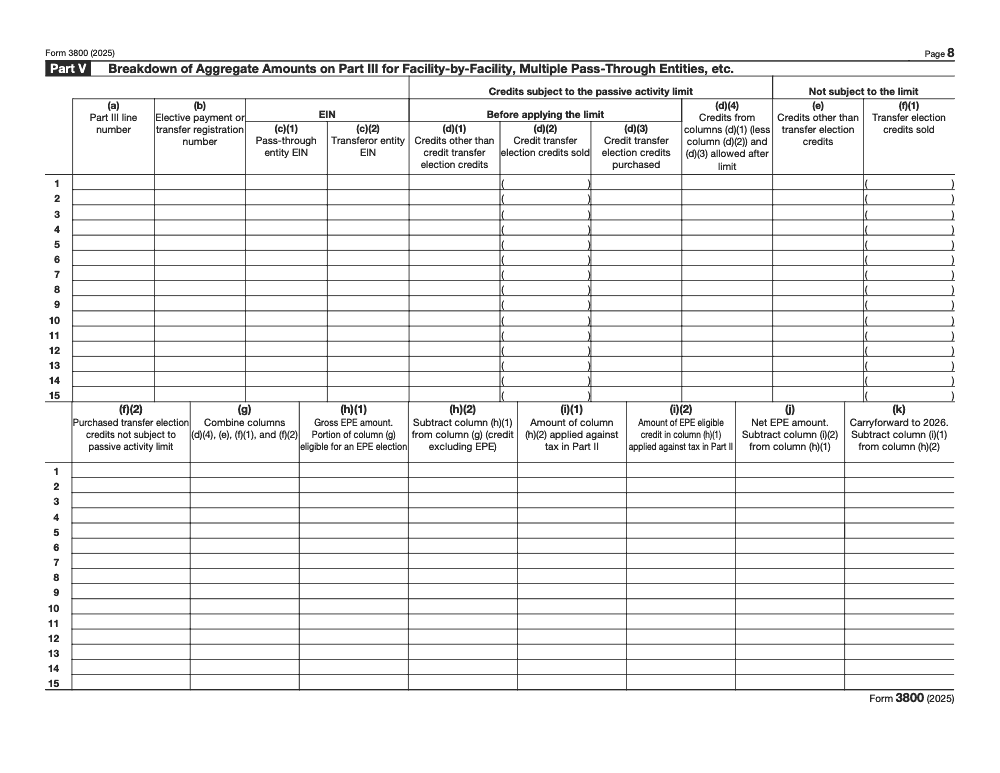
When credits come from multiple facilities or pass through entities, list them in the breakout section before summarizing. Include EINs or registration numbers and keep naming consistent across workpapers and PDFs. Clean inputs make the Part III totals easy to review and match.
Filing workflow and the attachments reviewers expect to see
You file Form 3800 with the same year’s income tax return. Behind it, attach each component credit form, all relevant Schedule K 1s, carryback or carryforward statements by origin year, and any elective pay or transfer documentation with registration numbers. When you use a carryback, keep the amended return package handy with dates and amounts that tie to Parts IV and VI. The IRS instructions outline the six parts and the attachment logic they expect to see.
When to file
- Current year, include Form 3800 and every source form with the original return.
- Using a carryback, amend the prior year and attach component forms plus a clear statement of origin year and amounts.
- For elective pay or transfers, retain registration confirmations and match them to the correct columns on the form.
| Return year | What you do | What you attach |
| Current year | File and compute limit | Component credit forms, Form 3800 |
| Prior year carryback | Amend | Component forms, carryback statement |
| Any year with elections | Retain and attach as needed | Elective pay or transfer registration and statements |
Component forms you will need
Finish each credit on its own form before you touch Form 3800. For pass throughs, pull the amounts from the K 1 and list the entity’s EIN on Part III. If a credit ties to a facility or registration, use the breakout area to list properties or entities, then summarize to Part III. This mirrors how the IRS expects you to build the totals and reduces notices.
Attachments and statements that pass an IRS sniff test
Your support package should match Parts III through VI line for line. Include each source form, every K 1 with EINs, elective pay or transfer proof, and a carryover statement for each credit showing origin year, original amount, amounts allowed by year, and the remaining balance. If an amount moved across columns or years, add one short note explaining why.
Limits, carrybacks, and carryforwards, the rules that set the ceiling
The law caps how much GBC you can use each year. Your allowed GBC equals net income tax minus the larger of tentative minimum tax or 25 percent of net regular tax over $25,000 (for non-corporate filers; corporations apply the 25 percent test to net income tax on Form 3800 line 11 rather than net regular tax on line 12). You compute this in the limitation section and then apply ordering rules to see what sticks this year and what carries.
If you hit the ceiling, you look back one year and forward twenty, subject to component specific rules. Congress also created a separate three year carryback for applicable credits tied to section 6417, and those amounts are applied separately from the rest of the business credit.
Annual limitation, a quick mental model
- Funnel, all component credits pour in, only the allowed amount gets through this year’s limit.
- Queue, use the oldest carryforwards first, then the current year credits, then any carrybacks.
- Ledger, credits that cannot offset tentative minimum tax ride in their own columns to stay compliant.
One year carryback in practice
When you exceed the cap, you may amend the prior year to use what the law allows. Attach the source forms and a simple statement with origin year and amounts. Remember that marginal oil and gas well production credits have different carryback rules, and certain section 6417 applicable credits have a three year carryback window.
Twenty year carryforward that actually gets used
Carryforwards live or die by your tracking. Use a timeline by origin year, apply FIFO, and tie every movement to Parts IV and VI, including pass through shares. If your tax capacity is tight, expect staged usage over multiple years and keep evidence ready for any IRS follow up.
AMT interaction and the 25 percent test, explained simply
Start with net income tax, then subtract the larger of two items, your tentative minimum tax or 25 percent of net regular tax over $25,000. The result is your annual GBC ceiling. Some credits cannot offset tentative minimum tax, so Form 3800 keeps them in separate columns and parts. This is why the order of operations in the form matters so much for accurate results.
When elective pay is involved, you apply credits against tax first, then treat any net elective pay as a payment (for taxable businesses the section 6417 direct-pay election is restricted to section 45Q carbon sequestration, section 45V clean hydrogen, and section 45X advanced manufacturing credits with year-limited elections; tax-exempt applicable entities have broader access). Some elective payments are subject to sequestration adjustments, often paired with a gross up designed to offset part of that reduction. Build that into your modeling so cash expectations match IRS processing.
Tip: I keep two tabs in the workbook, one for AMT allowed pools and one for AMT disallowed pools. Each tab ties to the exact lines in the limitation section and the source lines in Part III. That single step prevents most reconciliation headaches.
Eligible small business criteria, do you qualify
For specific GBC purposes, an eligible small business is generally a corporation whose stock is not publicly traded, a partnership, or a sole proprietorship, with average annual gross receipts at or under $50 million over the prior three tax years. Keep ESB documentation with your workpapers, since it changes where certain credits appear and how limits apply on the form.
Why ESB status matters
ESB status affects the research credit’s treatment against tentative minimum tax and where you report it in Part III (only the ESB research credit variant, generally for eligible small businesses with average gross receipts at or under $5 million averaged over 4 years, qualifies as a specified credit on Part III line 4i and can offset AMT; the standard research credit on Part III line 1c cannot). If you are claiming the research credit as an ESB, follow the specific line references in the instructions and retain your receipts test and entity evidence with the packet.
How pass through entities report credits, and how you pick them up
Partnerships and S corporations compute their credits and pass each owner’s share on Schedule K 1. You report those amounts on Form 3800, list the entity’s EIN in Part III, keep passive and nonpassive pieces in separate columns, and use the breakout area when multiple sources exist. Owners also need origin year and allowed amounts from the entity to populate Parts IV and VI accurately.
| Item you receive | Where it goes on Form 3800 |
| K 1 credit share | Part III, the line for that credit |
| Entity EIN | Part III, EIN column |
| Passive or nonpassive split | Part III columns for passive vs nonpassive |
| Carryforwards by origin year | Part IV, with detail in Part VI when needed |
Reviewer cue: Do not leave EINs or registration numbers blank. The IRS uses them to match sources and cut down on correspondence.
Form 3800’s six parts, how to read them in the right order
- Part I, current year credits not allowed against tentative minimum tax.
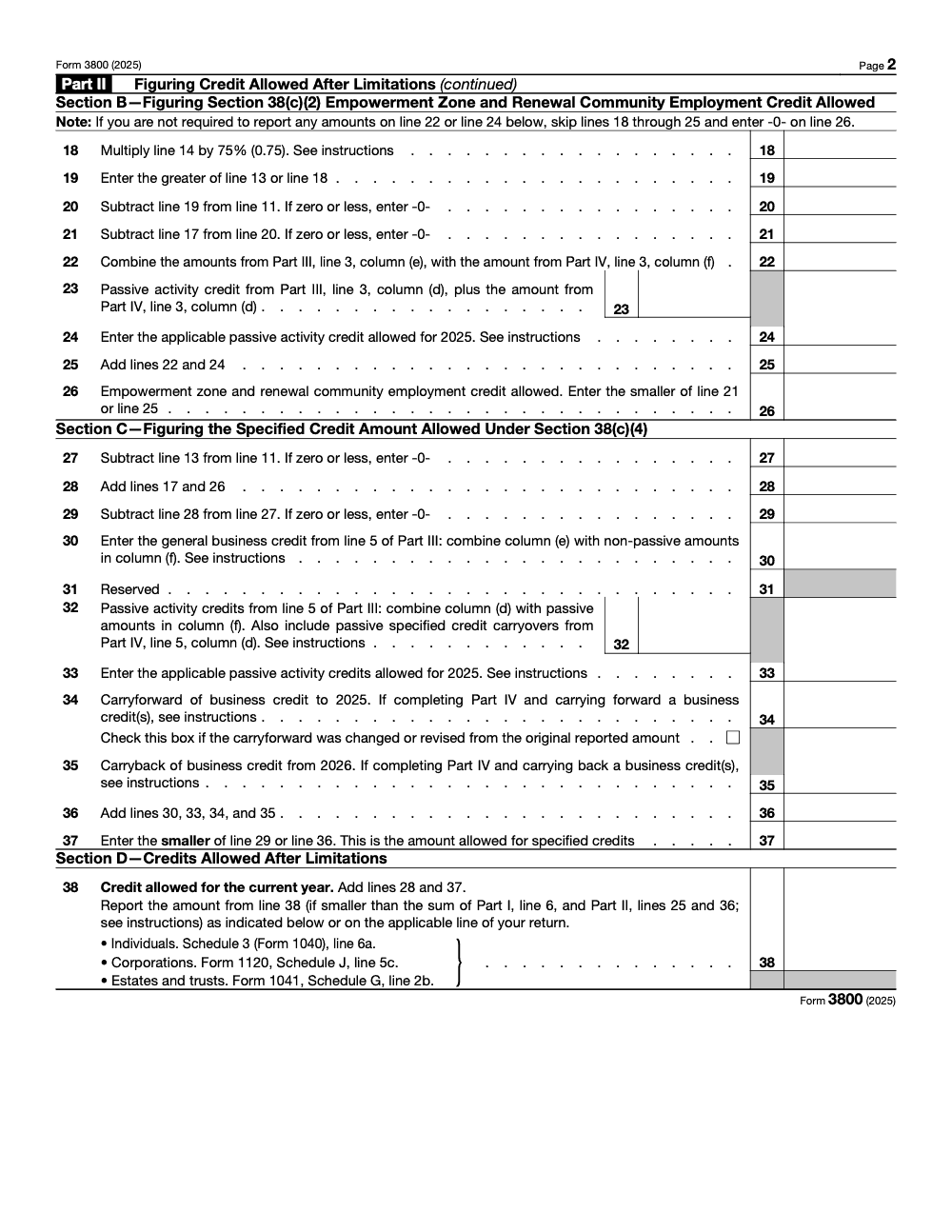
- Part II, the limitation engine under section 38, including the 25 percent test.
- Part III, current year credits with columns for passive status, transfers, amounts applied, and elective pay nets.
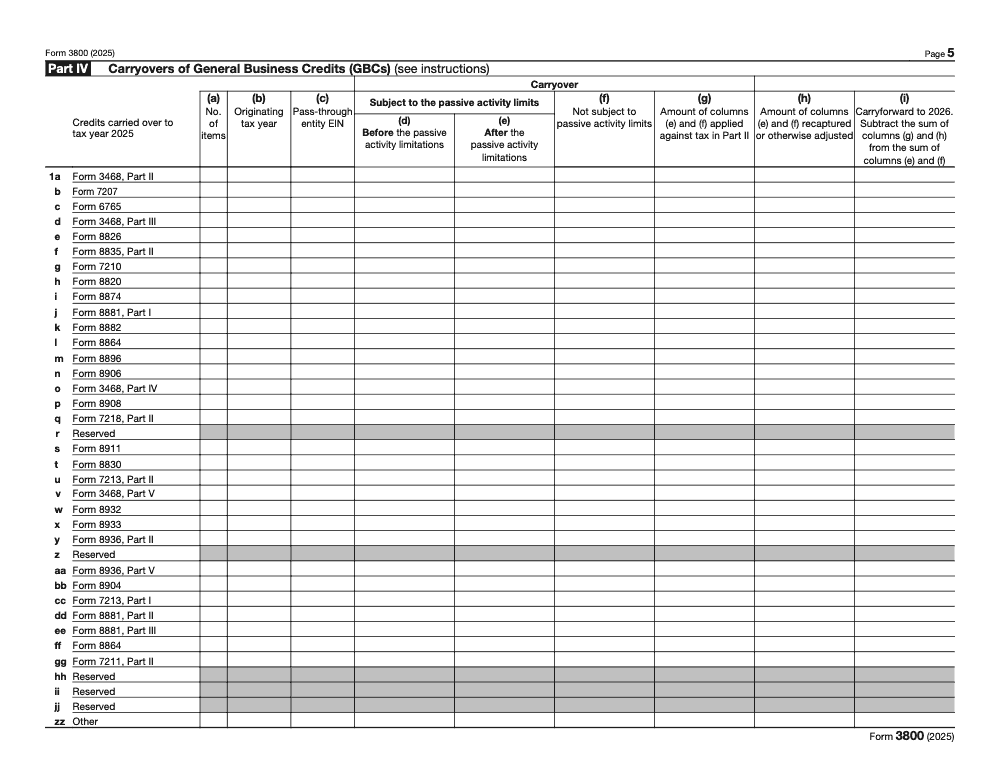
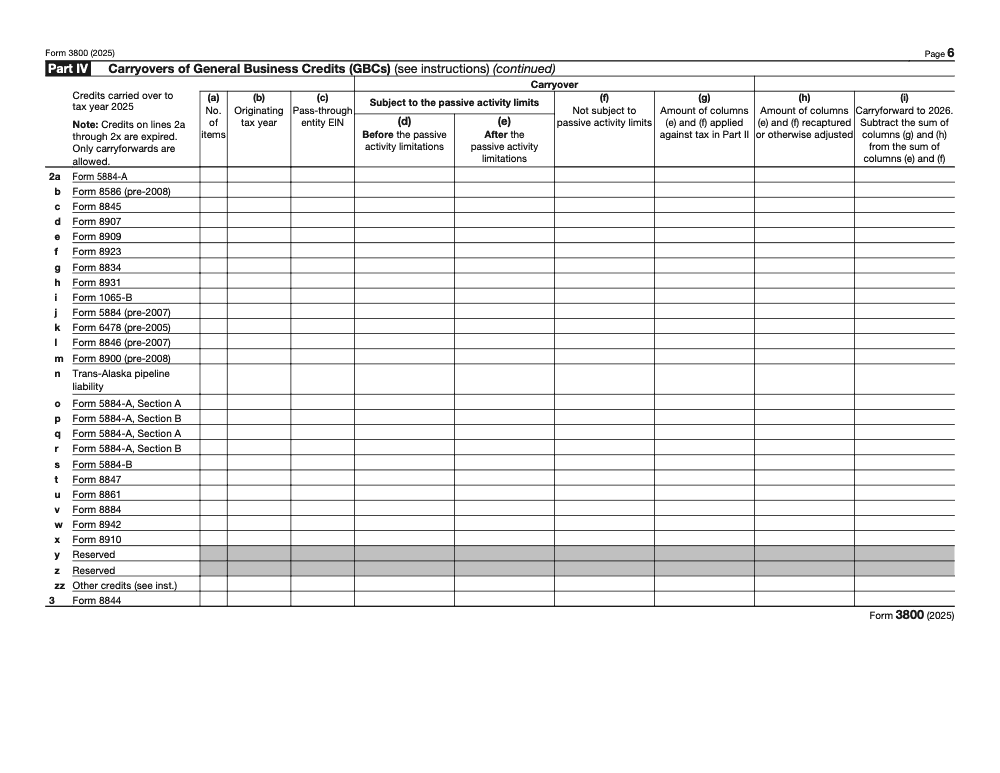
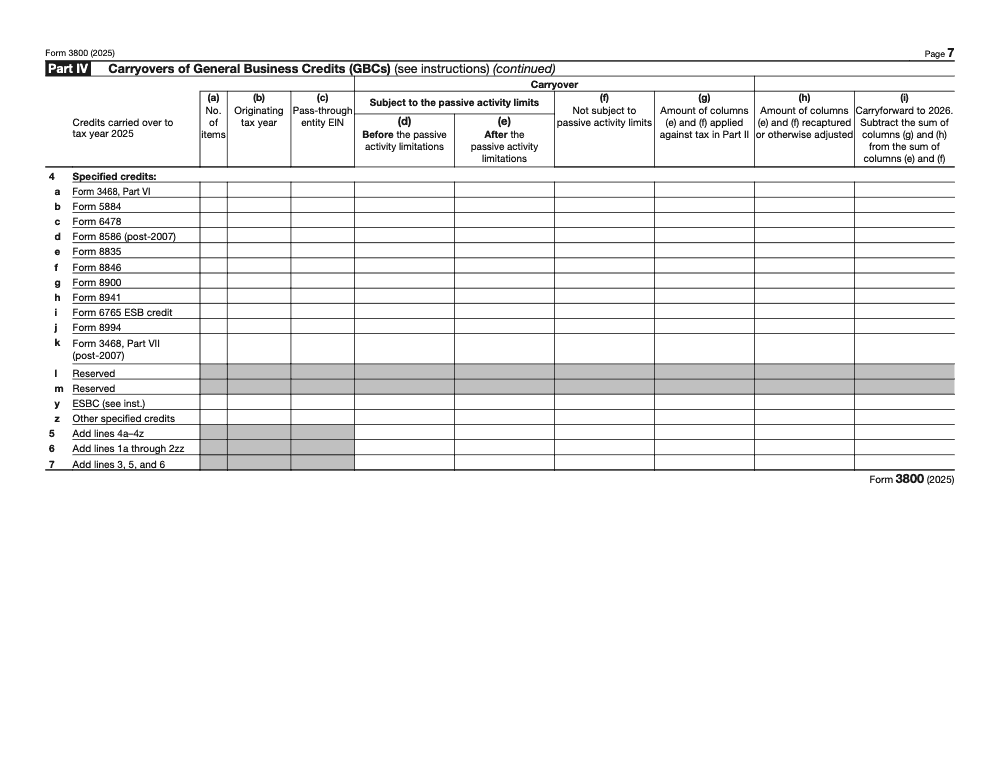
- Part IV, carryovers that survive to the next year.
- Part V, the breakout by facility or multiple pass through sources, with registration IDs.
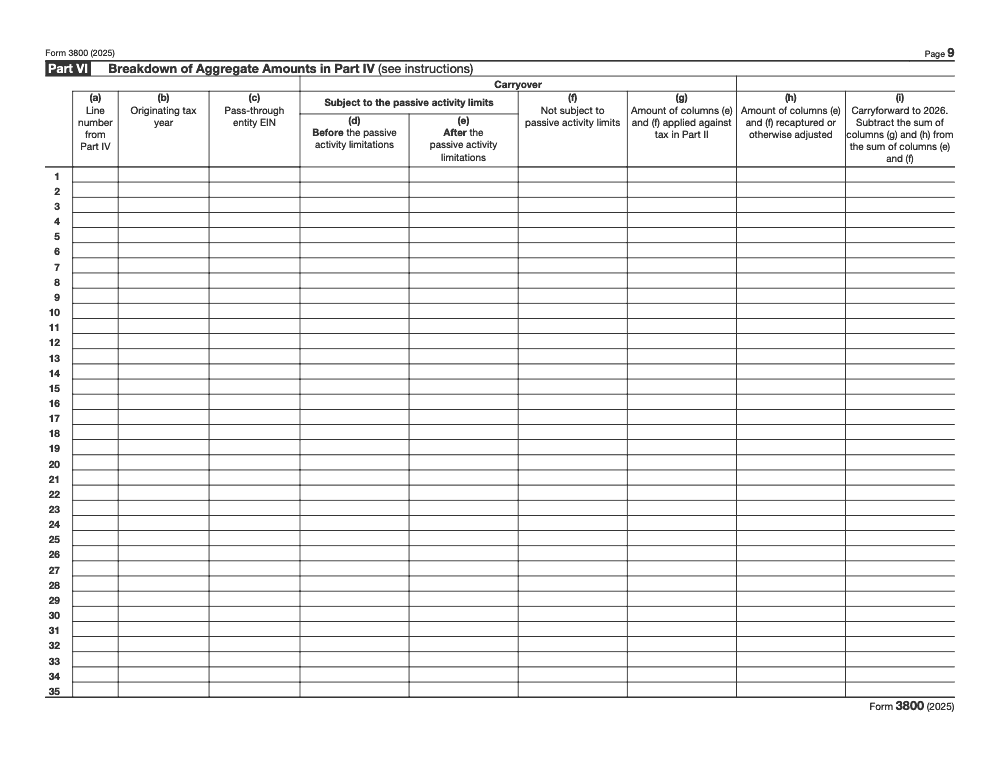
- Part VI, the breakdown of carryovers by origin year that ties back to Part IV. This layout has been in place since the 2023 redesign to align the form with elective pay and transfer reporting.
Ordering rules that prevent wasted credits
Use FIFO. Apply the oldest carryforwards first, then current year amounts, then carrybacks. Keep passive and nonpassive buckets separate – and remember that passive activity credits from partnerships, S corporations, and rental real estate must first be computed on Form 8582-CR under IRC §469 before the allowed amount flows into Form 3800 Part III column (d) – and do not mix credits that cannot offset tentative minimum tax with those that can. Follow the instructions line references so your totals flow from the limitation section back to Part III accurately.
Use carryforwards first
- Drain the oldest carryforwards first.
- Apply current year credits up to the limit.
- After that, consider a one year carryback if the component allows it, or a three year carryback for section 6417 applicable credits.
- Record every movement in Part IV and break out the years in Part VI.
Then apply current year credits
Once you use the carryforwards allowed by the cap, layer in current year credits, keeping passive limits and AMT rules in mind. If you elected elective pay, enter the net elective pay as shown and keep it out of carryover math. Any remainder becomes a carryforward to next year unless a carryback applies.
Micro example you can hand to staff
You have a 2019 research credit carryforward and a 2024 Work Opportunity Credit. Your limit is smaller than the sum. Apply the 2019 research carryforward first, then the 2024 WOTC. Whatever does not fit becomes a carryforward to 2025 and is documented by origin year in Part VI.
2025 developments you should actually act on
- March 12, 2025, the IRS corrected Form 3800’s fillable field sizes that were truncating entries. If you e file using the IRS PDF, download the corrected version so registration numbers and amounts are not cut off.
- April 9, 2025, the IRS published how to revoke a section 6417 elective payment election for certain credits, and explained how revocation can allow a transfer under section 6418 going forward. If your credit strategy changed, follow that process and attach the required statement.
Heads up, the “Recent developments” section on the Form 3800 page is the fastest way to confirm you are using the latest approach during busy season.
California alert, do not confuse state “Form 3800” with the federal GBC form
California does not use a state version of “Form 3800” to aggregate business credits. Corporations compute limits on Schedule P and, when needed, use FTB 3540 to track carryovers of expired credits. California has also used a temporary 5,000,000 annual cap on the use of credits in certain years, with a separate refundable election. If your team has been labeling a California packet as “3800,” update the workflow and naming.
Where California business credits actually live
- Corporations, see Schedule P, Form 100, for AMT and credit limitation mechanics.
- Use FTB 3540 when a carryover schedule is required and Schedule P is not.
- Confirm any current year credit usage cap and related refundable election before you file.
A practical, repeatable filing workflow your reviewers will love
Step 1, gather and standardize
- Pull every source form and the K 1 packages that allocate credits to you.
- For each credit, list form number, entity EIN or registration ID, passive status, origin year, and dollar amounts.
- Use consistent file names and simple version control so reviewers are never guessing.
Step 2, complete source forms and the breakout before Part III
When you have multiple facilities or pass through sources, complete the breakout section first with registration numbers and EINs, then summarize to Part III. This mirrors how the IRS expects you to build totals and prevents mismatches that trigger letters.
Step 3, compute the limit, then finalize amounts applied
Fill Part III, compute the limitation under section 38, and return to Part III to finish the columns for amounts applied against tax, elective pay nets, and what carries to next year. Keep passive and nonpassive in separate columns.
Step 4, document carryovers with evidence
In Part IV and Part VI, list carryovers with origin year, original amount, amounts allowed by year, and current balance. Tie each line back to prior returns or K 1 statements. This closes most audit questions before they start.
The math behind the cap, in one quick table
| Item | What it means | Where you see it |
| Net income tax | Regular tax plus AMT, reduced by certain credits | Limitation section lines |
| Tentative minimum tax | AMT before certain credits | Limitation section lines |
| 25 percent test | 25 percent of net regular tax over $25,000 | Section 38(c) and limitation math |
| GBC ceiling | Net income tax minus the larger of the two items above | Limitation section total allowed |
This framework applies across filers and drives the annual limit you can use on Form 3800.
A quick numerical feel
If net income tax is 48,000, tentative minimum tax is 40,000, and net regular tax is 45,000, the 25 percent test is 25 percent of 20,000, or 5,000. The larger of 40,000 and 5,000 is 40,000. Your GBC ceiling is 48,000 minus 40,000, or 8,000. That is your total allowance for the year. Tie that number back to the amounts you actually apply in Part III and to any carryovers in Part IV.
Quality control that shortens reviews
- Maintain one carryover ledger that mirrors Parts IV and VI exactly.
- Separate passive and nonpassive amounts from the start.
- Put EINs, registration numbers, and origin years on the face of the PDF packet.
- For elective pay or transfers, attach the registration letters and match them to the exact lines in your breakout and Part III.
My rule in the review room, the preparer owns a one page index that proves every number on Part III, Part IV, and Part VI is supported. If I have to hunt, it is not ready.
Resources and where to verify 2025 changes
- The current Form 3800 page for the form, instructions, and recent developments.
- The post release changes page that logs the March 12, 2025 Form 3800 PDF fix.
- Internal Revenue Code section 38 for the annual limitation and the $25,000 threshold.
- Internal Revenue Code section 39 for carryback and carryforward periods, including the separate three year carryback for applicable credits.
- The IRS page on revoking a section 6417 election, published April 9, 2025.
- California corporate booklet and Schedule P references for state credit limits and any current year usage caps.
Ready to use examples and a light note on delivery
Example, turning a messy credit stack into a clean filing
You have two K 1s with research credit, one Work Opportunity Credit, and a clean energy investment credit with an elective pay election. You complete Forms 6765 and 5884, list both K 1 sources with EINs in the breakout, summarize to Part III, enter the elective pay registration number, and compute the limitation. You apply carryforwards first, then current year credits, then record the net elective pay as shown. Part IV shows what carries. Review time, ten minutes, no back and forth.
Example, using the three year carryback window
You cannot use a current year applicable credit under section 6417. The Code allows a three year carryback for those credits. You amend the right prior year, attach the source form and a short statement, and claim the refund instead of waiting years for capacity.
For firms that want production without chaos
If your team is stuck in review loops or chasing missing workpapers, the gap is rarely talent, it is trust in work you have not seen yet. The firms that scale Form 3800 work use SOPs, standardized file names, and layered review that catches issues before partner review. Accountably places trained offshore accountants and tax preparers inside your firm in under 3 weeks, ramped on your software and SOPs, with SOP driven execution, structured workpapers, and multi layer review so you keep control of quality, security, and deadlines. We prove it on real work first, and if a placement is not a fit in 45 days, we replace them free.
Common Mistakes We See Every Season
Form 3800 is unforgiving with sequencing, ownership categorization, and column placement. The same five errors show up in our review queue every year, and each one is a paper trail that prevents the return from clearing reviewer notes on the first pass.
Reusable Checklists
These checklists are copy-paste ready for your engagement SOP and tax-prep templates. Each item maps to a specific Form 3800 line, attachment, or workflow step.
Pre-file packet for Form 3800
- Confirm every component credit form (6765, 5884, 8941, 8835, 8826, and others) is completed and tied to a workpaper number.
- Capture EINs for every pass through entity feeding Part III and verify they match the K-1 PDFs.
- Collect registration numbers for any elective pay (IRC §6417) or transfer (IRC §6418) election and reconcile to Part III columns (f), (h), and (j).
- Tag each K-1 credit as passive or nonpassive at intake; route passive credits through Form 8582-CR first.
- Build the carryover ledger by origin year and credit code so Parts IV and VI tie line for line.
- Confirm the export PDF is 9 pages with Parts I through VI included.
Section 38 limitation calculation review
- For non-corporate filers, confirm line 12 (net regular tax) drives the 25% test over $25,000 on line 13.
- For corporations, confirm line 11 (net income tax) drives the 25% test, line 14 is -0-, and CAMT is on line 8 from Form 4626 Part II line 13.
- If the filer reports empowerment zone or renewal community employment credit on line 22 or 24, complete Section B; otherwise enter -0- on line 26 and skip lines 18 through 25.
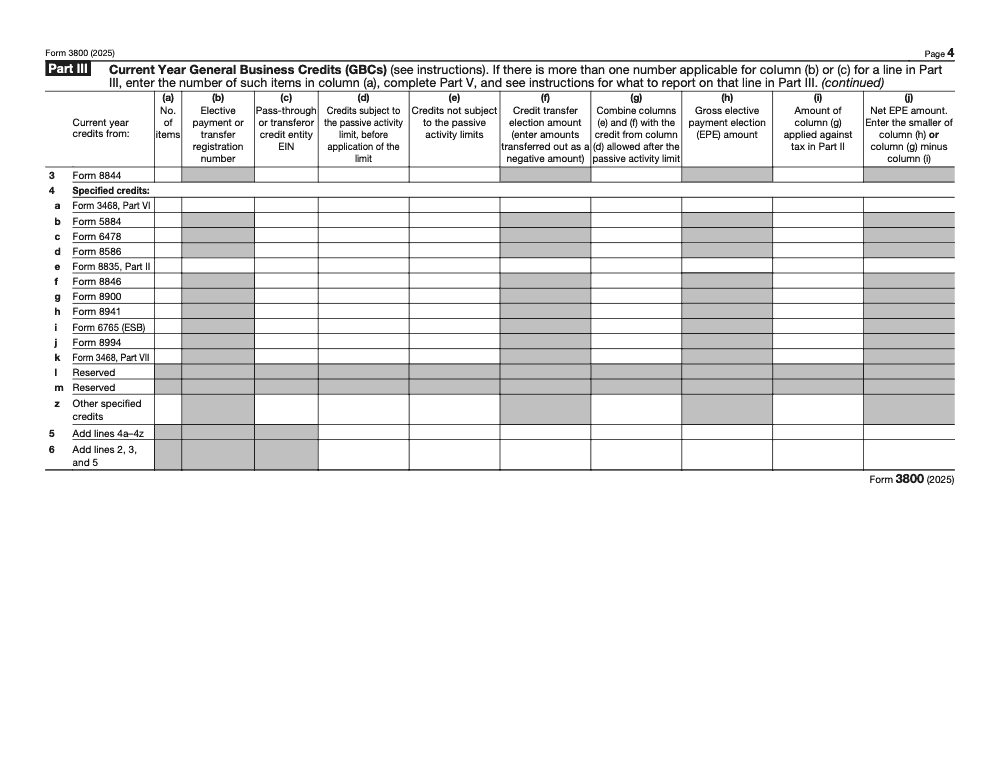
- Verify specified credits (Part III line 4 series) flow through Section C so they can offset tentative minimum tax under IRC §38(c)(4).
- For C corporations with an ownership change or reorganization, walk the IRC §382 limitation before signing line 17.
- Confirm the line 38 amount lands on Schedule 3 (Form 1040) line 6a, Form 1120 Schedule J line 5c, or Form 1041 Schedule G line 2b, depending on filer type.
Carryover ledger handoff (preparer to reviewer)
- Show each carryforward by origin year, original amount, amounts allowed by year, and remaining balance.
- Confirm FIFO ordering: oldest carryforwards consumed first, then current year credits, then any one-year carryback under IRC §39.
- Flag any line 4 or line 34 carryforward that was revised from the original reported amount and check the corresponding disclosure box on the form.
- For applicable credits under IRC §6417, ensure the elective payment routes through Part III columns (h) and (j) with the net EPE treated as a payment of tax, not folded into the carryover math.
- Confirm transferred-out amounts in Part III column (f) are entered as negative and tie to the §6418 transfer election statements attached.
Keep 3800 Season From Stalling
Form 3800 work concentrates between January and April for calendar-year clients, and the friction is rarely the underlying credit math. Per the IRS Form 3800 (2025) instructions, the form runs 9 pages across 6 parts with 37 enumerated credit lines plus 11 specified credits, and every pass through K-1, facility breakout, registration number, and carryover origin year must tie line for line before the return clears reviewer notes. When credits flow from four or five sources at once, that volume turns a 30-minute calculation into a two-day reconciliation.
The fix is structural. Treat Form 3800 as a control panel that the engagement workflow feeds, not as a side calculation done at the end. Standardize intake, lock the line references, and give every preparer the same handoff format so reviewers see the same shape every time.
- Maintain one carryover ledger per client that mirrors Parts IV and VI by origin year and credit code, refreshed every year before tax season starts.
- Hard-code the engagement template so line 14 is zero for every 1120 filer, and CAMT (when applicable) routes through line 8 from Form 4626 Part II line 13.
- Tag every K-1 credit as passive or nonpassive at intake and run passive credits through Form 8582-CR under IRC §469 before they touch Part III column (d).
- Capture elective pay (IRC §6417) and transfer (IRC §6418) registration numbers in a single tracker that ties to Part III columns (f), (h), and (j), with transferred-out amounts entered as negative.
- Walk Part III line 4 separately so specified credits route through Section C and can offset tentative minimum tax under IRC §38(c)(4).
Accountably integrates trained offshore teams into the workflow with documented SOPs, structured workpapers, and multi-layer review built around forms like 3800. If credit work is the choke point between January and April, see how the taxation delivery service handles intake, limitation calculations, carryover ledgers, and elective pay reporting without adding local headcount.
FAQs
You use it to aggregate component credits, apply the annual limitation, and track carryovers and carrybacks. You attach each component form, include pass through allocations, and follow ordering rules that use the oldest carryforwards first.
Any taxpayer that earns or is allocated a qualifying component credit and has tax capacity to offset may claim it. ESB status uses a $50 million three year average receipts test and specific entity rules that influence where items appear on the form.
No. California computes limits on Schedule P and, when needed, uses FTB 3540 for carryovers of expired credits. Confirm any current year credit usage cap and whether a refundable election is available.
Report elective pay and transfers where indicated, include registration numbers, and break out multiple facilities or pass through sources in the detail area. Apply credits against tax first, then treat the net elective pay amount as a payment, and exclude that net from carryover math.
Other forms this guide names
- Form 8582‑CR: Passive Activity Credit Guide
- Form 1120: Corporation Tax Return Guide
- Form 4626: CAMT AFSI Safe Harbor Guide & Filing Steps
- Form 5884: WOTC, Complete 2025 Filing Guide
- Form 6765: R&D Tax Credit Guide for Business Owners 2025
Summarize this article with AI
About this guide
Accountably helps US CPA, EA, and accounting firms hire trained accountants and tax preparers in India.
About us Reviewed byJugal Thacker, CPAFounder and CEO at Accountably
A US-licensed CPA with 7+ years inside US firms – PwC, a real-estate tax practice, then a full-service firm, rising from reviewer to manager to advisory. This article was reviewed against current IRS guidance for the 2025 tax year and updated for filers preparing late returns, amendments, and 2026 estimates.
View profile →How we research, review, and update this guide
Every Accountably guide is researched against primary IRS sources, reviewed by a U.S. CPA, and refreshed as guidance evolves. Read our Editorial Guidelines to see how we source, fact-check, and update our content.




