
Summarize this article with AI
In Brief
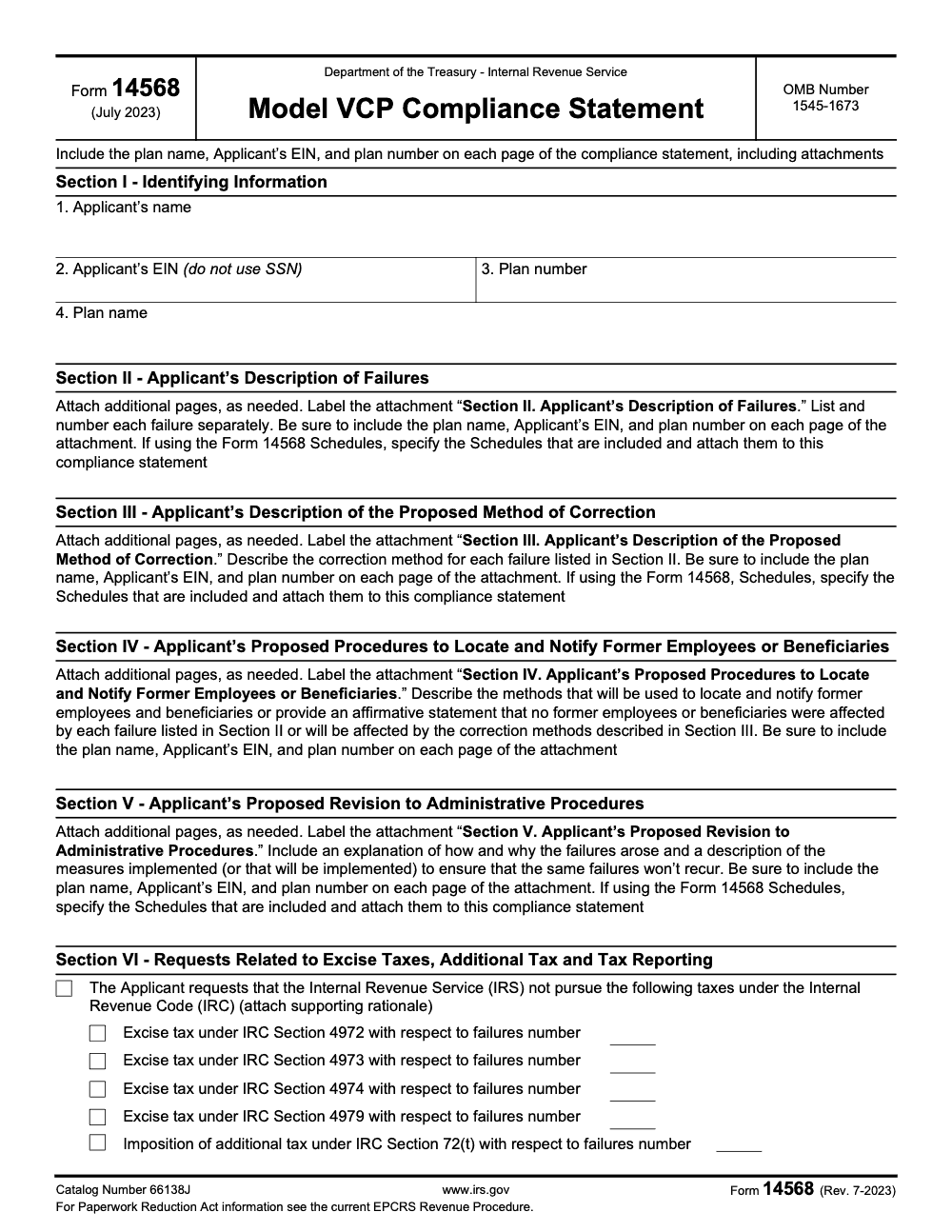
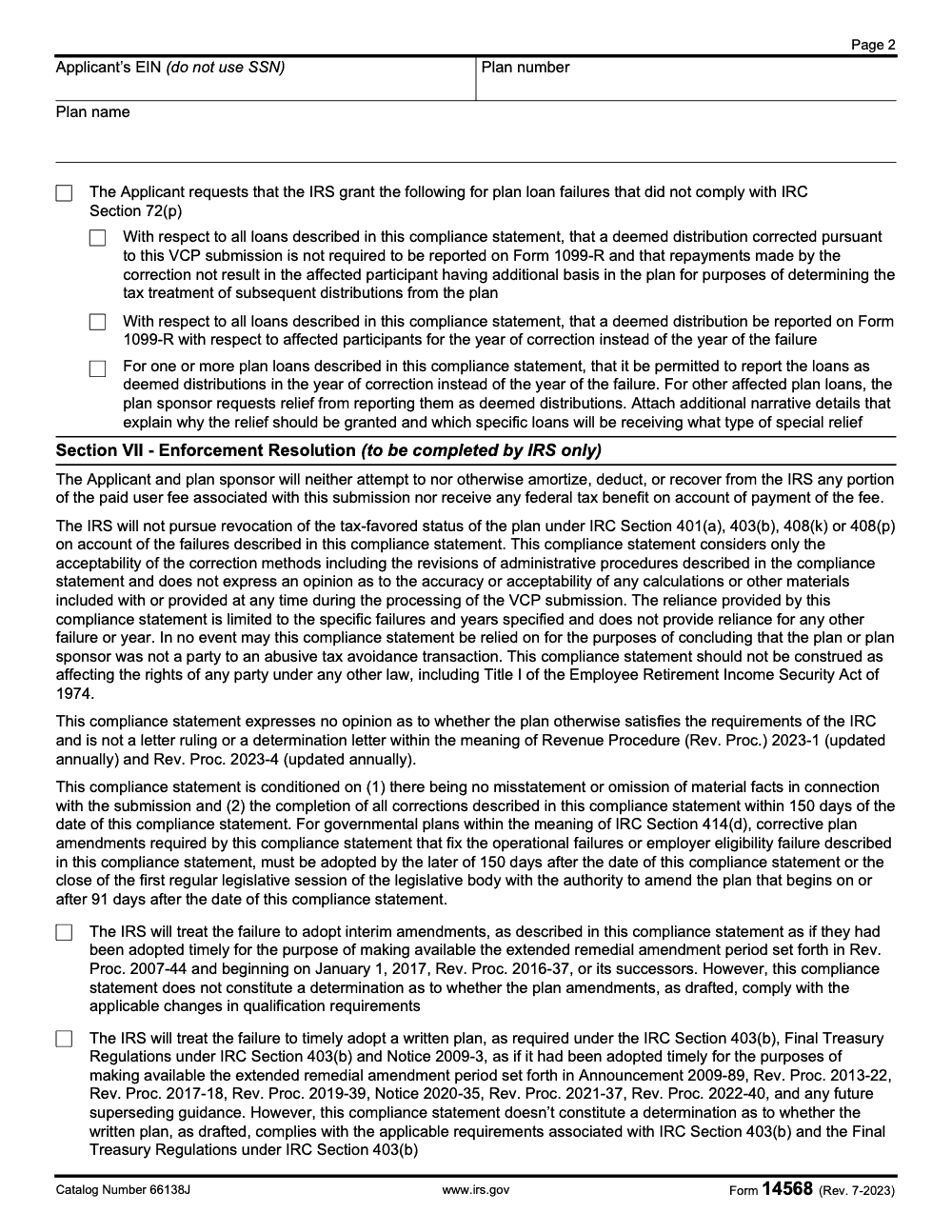
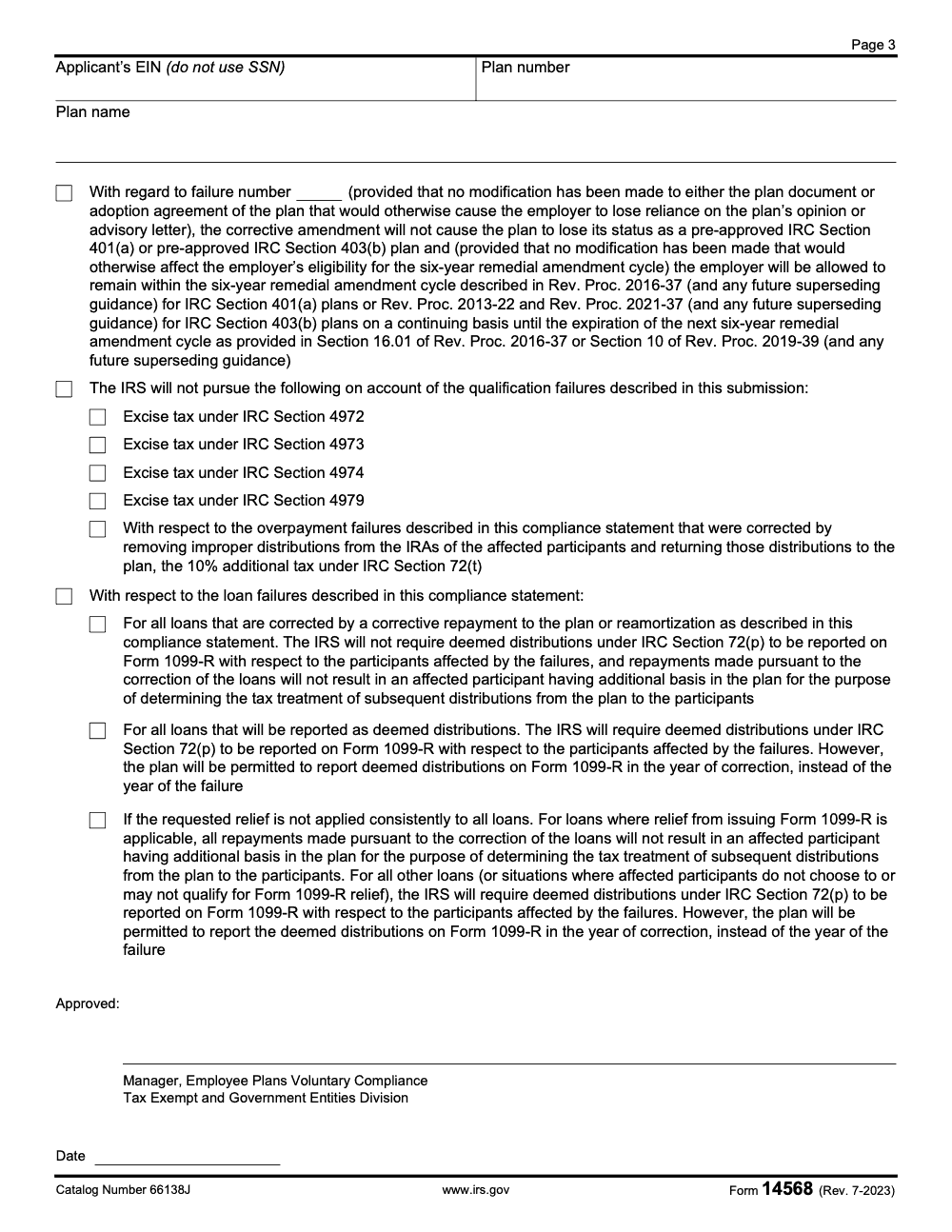
Form 14568 is the IRS Model VCP Compliance Statement (Rev. July 2023, Catalog Number 66138J, OMB 1545-1673) that plan sponsors use under the Employee Plans Compliance Resolution System to document and obtain IRS approval for correcting qualified retirement plan failures (per the IRS.gov EPCRS overview and the currently effective Rev. Proc. 2021-30, as modified by SECURE 2.0 and Notice 2023-43). All described corrections must be completed within 150 days of the date the IRS dates the signed compliance statement, and Section VII (Enforcement Resolution) is filled in only by the Manager, Employee Plans Voluntary Compliance, not the applicant.
A plan sponsor discovers a qualified retirement plan failure, wants to correct it cleanly, and needs the IRS to bless the fix. That is the job Form 14568 does. It is the Model VCP Compliance Statement under the Employee Plans Compliance Resolution System, and you use it to name each failure, state the exact correction, and attach the matching schedule from the A through I set.
Treat the model wording as fixed. You never edit IRS model language, numbering, or layout; every explanation goes into separate labeled attachments that the form cross-references. The whole submission ships as one non-fillable PDF of 15 MB or less through Pay.gov, paired with Form 8950, and the corrections you describe have to be completed within 150 days of the date the IRS dates the signed statement.
Key Takeaways
- Form 14568 is the IRS Model VCP Compliance Statement. You use it to identify each failure and the exact correction under EPCRS, then attach the matching Form 14568 schedules, A through I.
- Never edit any IRS model form. Preserve IRS wording, numbering, and layout. Put every explanation in separate, clearly labeled attachments and cross‑reference them from the form.
- Upload a single, non‑fillable PDF, 15 MB or less, via Pay.gov. Flatten fillable forms, compress images, and remove duplicate pages. Fax overflow exhibits with your Pay.gov Tracking ID on the cover.
- Match each failure to the right schedule, for example, 14568‑H for RMD failures and 14568‑F for employer eligibility issues. Use the schedule exactly as issued, then expand in your narratives.
- Keep identifiers consistent on every page, plan name, EIN, plan number, plan years, amounts, and dates. Inconsistency is the most common cause of follow‑up requests.
Why this matters for busy accounting firms
You do not struggle for lack of clients, you struggle for delivery. When workload spikes, partners get trapped in review loops, deadlines slip, and quality drifts. VCP filings are especially unforgiving because a single out‑of‑order attachment or an edited model PDF can trigger delay. The solution is workflow discipline, not heroics. A standardized 14568 process protects your review time, avoids rework, and removes the guesswork from packaging.
If you are weighing offshore help, remember that capacity without structure causes chaos. Treat VCP assembly like an operations function, not a staffing errand. The right team works in your templates, respects IRS model documents, and documents every decision so partner review is quick and focused.
What Form 14568 is, and how it fits in EPCRS
Form 14568 is the IRS Model VCP Compliance Statement. Think of it as your cover framework for each failure and correction under EPCRS – an approved statement is not a letter ruling or determination letter, and reliance is limited to the specific failures and years you describe. The IRS built nine schedules, A through I, that align to common failure categories. In many cases, you can file one or more schedules without the main 14568 if the schedule fully covers your scenario. Either way, the rule stands, do not edit the model forms. You keep them pristine, then add concise, well‑labeled narratives to explain facts, root cause, scope, method, and prevention.
The What‑How‑Wow, in plain terms
- What, the model forms standardize how you present failures and corrections so the IRS can review faster.
- How, you attach targeted narratives and exhibits, then send one flat PDF through Pay.gov, with overflow by fax.
- Wow, small packaging choices, like labeling exhibits by failure and plan year, can cut review questions in half and shave weeks from closure.
Form 14568 schedules, mapped to typical use
Here is a quick table you can drop into your internal playbook. Keep the model language intact, then expand in your attachments.
| Schedule number | Schedule letter | Typical use case | Practical note |
| 1 | A | 403(b) plan document failures | Point to document provisions and missed adoption dates, include amendments in exhibits. |
| 2 | B | Nonamender failures for 401(a) plans | Tie facts to the specific required amendment window, add proof of adoption dates. |
| 3 | C | SEPs and SARSEPs | Show contribution corrections and earnings clearly, include participant samples. |
| 4 | D | SIMPLE IRAs | Include communications and stop dates where contributions were affected. |
| 5 | E | Plan loan failures | Align with 72(p), plan terms, and cure method, for example, re‑amortization, deemed distribution (under VCP loan relief, the plan may report the deemed distribution on Form 1099‑R in the year of correction instead of the year of failure). |
| 6 | F | Employer eligibility failures | For 401(k) and 403(b), explain why the sponsor was ineligible and when contributions ceased. |
| 7 | G | Excess elective deferrals, section 402(g) | Show distribution timing, amounts, and reporting by calendar year. |
| 8 | H | Required Minimum Distributions | Itemize participants and missed RMDs by year, include earnings and 1099‑R notes, request 4974 relief if appropriate. |
| 9 | I | Limited safe harbor by amendment | Use only when you squarely meet the IRS conditions, otherwise file 14568 with narratives. |
Fast rule, if a failure fits a schedule exactly, use it as designed. If it does not, use Form 14568 with narratives and only add schedules that actually help the IRS understand your correction.
Do not modify IRS model documents
This is non‑negotiable. You cannot change the wording, numbering, headings, layout, or fields on Form 14568 or any schedule. Even small edits, like inserting extra lines or adjusting fonts, risk delay. When you need more space, add a labeled exhibit and reference it on the form.
A simple preservation workflow
- Download the current Form 14568 and the exact schedules you need from IRS.gov. Avoid third‑party templates.
- Complete only the fields the IRS provides, keep the language intact.
- When a field is too short, print the completed form to a non‑fillable PDF and attach an exhibit for the overflow.
- Do not paste narrative paragraphs into form boxes. Put all prose in attachments, then cross‑reference from the unmodified form.
Required narratives, your blueprint for a smooth review
Your narratives are where you show your work. Keep them concise, complete, and labeled so a reviewer can trace every number from schedule to exhibit in seconds.
Narrative checklist you can copy
- Identification, plan name, EIN, plan number, schedule letter and number, and plan years involved
- Facts, what happened, discovery date, and who found it
- Scope, who was affected and how you counted them, include sample sizes
- Correction method, steps, dates, dollar amounts, and a clear earnings methodology
- Prevention, the control you implemented, the owner, and the effective date
Add one full participant example per failure type, per year, so the math is visible. Most follow‑up questions come from gaps in how you show the calculation.
Build one non‑fillable PDF for Pay.gov
Pay.gov takes one attachment. You must combine forms and exhibits into a single, non‑fillable PDF that is 15 MB or less. The fastest way to hit the size target is to print every completed form to PDF, export spreadsheets to PDF instead of pasting screenshots, compress images, and remove duplicates.
The required order inside your single PDF
- Form 8950 and any cover letter the instructions call for
- Form 14568 and the specific schedules, A through I, you are using
- Signed Form 2848 or Form 8821, if represented
- Penalty of perjury statement, when required
- Exhibits, plan documents and amendments, participant lists, calculations, and sample notices, grouped by failure and plan year
What to do when your file is still too big
- Keep the uploaded PDF at or under 15 MB, non‑fillable, in the required order.
- Fax overflow exhibits, and put the Pay.gov Tracking ID, EIN, applicant name, and plan name on the fax cover.
- Split large packets so each fax stays comfortably under the carrier’s size cap.
- Save fax confirmations in the case file and reference the exhibits by label in your narratives.
Coordination with Form 8950
File Form 8950 on Pay.gov, attach your single PDF, and pay the VCP fee during the submission flow (the user fee is not deductible, amortizable, or recoverable, and produces no federal tax benefit). Always use the employer’s EIN, never a Social Security number. After payment, save the Pay.gov confirmation email and record the Tracking ID in your workpapers. Every supplemental fax cover should show that Tracking ID, so your exhibits sync to your electronic submission.
Quick payment and tracking checklist
- Confirm the fee source and make sure the EIN is correct on 8950
- Pay by ACH, debit, or credit card, then save the Pay.gov receipt
- Record the Pay.gov Tracking ID in your exhibit header and case notes
- If you fax overflow exhibits, write the Tracking ID on the cover and in your narrative footers
Treat the Pay.gov Tracking ID like a control number. Put it on every supplemental fax cover and, if you create one, on your internal cover page. It shortens status calls and prevents misroutes.
RMD failures, how to complete Schedule 8 with confidence
Required Minimum Distribution issues are reviewed year by year. On Schedule 8, you identify each affected participant and each calendar year. In your attachments, compute missed RMDs, add earnings through the correction date, and state how and when you paid them. Include how you will handle 1099‑R coding and participant notices. If you are requesting waiver of the 4974 excise tax, say so plainly on the schedule and support it in your narrative.
RMD attachment structure that reviewers prefer
- Participant list by calendar year, counted separately per year
- Missed amount by year and participant, with earnings through the actual payment date
- Payment method and date, for example, check, rollover eligibility statements if relevant
- 1099‑R coding plan, including how you will communicate with participants
- A preventive control, for example, an RMD aging report with roles and due dates
Common RMD mistakes to avoid
- Totals on Schedule 8 do not reconcile to exhibit tables
- No earnings method is stated or the cut‑off date is unclear
- Beneficiary cases are forced into 14568‑H, when they often belong in a Form 14568 narrative instead
- 1099‑R coding is omitted, which forces a follow‑up question
Employer eligibility failures, use Schedule 6 the right way
Use 14568‑F when a 401(k) or 403(b) plan was sponsored by an ineligible employer. The schedule lays out the correction path. Your narrative fills in the timeline, the reason the employer was ineligible, the date contributions ceased, and the communication you provided to affected employees. Include corporate status documents or determinations as exhibits.
What to show for employer eligibility
- The specific rule that made the employer ineligible and when you discovered it
- The stop date for contributions and proof the stop was enforced
- Communications to participants, including what happens next and any distribution options permitted by the plan and the Code
- Preventive steps, for example, a standing eligibility check in onboarding or corporate changes
Representation and authorization, 2848 vs 8821
In a VCP filing, use Form 2848 if a representative will discuss the case with the IRS, respond to questions, or sign permitted documents. Use Form 8821 if you only want a designee to receive IRS correspondence. Make sure the plan sponsor signs, that the plan name and EIN are correct, and that you place the chosen form in the right spot inside the single PDF, behind Form 14568 and any schedules.
Quick POA checklist
- Correct sponsor name and EIN
- Plan number, if you use it in headings
- CAF number where required, accurate signer, and current contact details
- Placement, behind 14568, before your exhibits
Organize exhibits so reviewers can approve faster
A clean exhibit set is your best friend. Use short, predictable file names, for example, Exhibit‑A‑Facts‑2019.pdf, Exhibit‑B‑Calcs‑RMD‑2019.pdf, Exhibit‑C‑Participants‑2019.pdf. In every header, include the plan name, EIN, and plan number. Put one complete participant calculation per failure type and year, then reconcile totals to the schedule. A reviewer should be able to follow your math without a single email.
If your totals reconcile, your identifiers match, and your model forms are unedited, you will avoid 80 percent of avoidable delays.
Pay.gov, status, and follow‑through
Log in to Pay.gov, open Form 8950, attach your single non‑fillable PDF, confirm the employer’s EIN, and pay by ACH, debit, or credit card. Save the email confirmation and record the Pay.gov Tracking ID in the case file. If you have overflow exhibits, fax them right away and write that Tracking ID on the fax cover. For reassurance, keep the status inquiry number handy and be ready to provide the plan name, EIN, and Tracking ID.
Control points before you submit
- Single non‑fillable PDF, 15 MB or less, in the correct order
- EIN and plan number match on every page
- Model forms are unaltered, signatures are in place
- Exhibits are labeled and totals tie to schedules
- Overflow fax packets are prepared with the Tracking ID on the coversheet
When a PDF link fails or a form looks unavailable
Start at IRS.gov and use the site search for the exact form and revision, for example, Form 14568‑H, Schedule 8. If a link fails temporarily, document the error and wait for the IRS‑hosted PDF instead of using a third‑party template. When you resume, keep the IRS model forms unaltered, and include any notes in your cover page for transparency.
A safe fallback plan
- Document the issue, URL, date, and time
- Verify you have the right revision and title
- Use only IRS‑hosted PDFs for the final submission
- If timing is tight, complete your narratives and exhibits while you wait so you can assemble quickly once the form link is restored
Quality checklist you can print
- Identification appears on every page, plan name, EIN, plan number
- Dates, amounts, participants, and plan years are consistent across forms and exhibits
- The narrative addresses facts, scope, method, and prevention for each failure
- Sample participant math is complete and reconciles to totals
- The PDF is non‑fillable and 15 MB or less, overflow is faxed with the Tracking ID
- A cover page summarizes contents in order, with the Tracking ID at the top
Where Accountably fits, only when it adds control
You may have the expertise, but not the hours. If your team is buried in production and reviews, a disciplined offshore delivery partner can help you package a clean VCP file without giving up control. At Accountably, we integrate trained teams into your systems, apply strict SOPs, keep IRS model forms untouched, and build exhibits your reviewers can approve quickly. Use help for throughput, file hygiene, and predictable turnaround, not as a substitute for your judgment.
Example document plan you can adapt today
Inside the single PDF, in order
- Form 8950, fee step completed
- Form 14568, Schedule H for RMDs, Schedule F for employer eligibility, as applicable
- Signed Form 2848 or 8821, if represented, followed by a penalty‑of‑perjury statement if required
- Exhibits A through D, facts, sample computations, participant listings, sample notices
- Exhibits E through G, plan document pages, amendments, proof of controls implemented, for example, RMD aging report and 402(g) alerts
Labeling pattern that saves review time
- Exhibit A‑2019 Facts and Scope
- Exhibit B‑2019 Sample Participant Calcs, RMD with earnings
- Exhibit C‑2020 Participant Listing, RMD totals
- Exhibit D‑Controls, procedures and screenshots
Clear labels, consistent identifiers, and reconciled totals are your fastest route to a quick approval.
Final wrap‑up and printable checklist
- If you remember only four items, remember these:
- Keep IRS model forms unaltered, and put every explanation in labeled narratives
- Upload one non‑fillable PDF, 15 MB or less, in the prescribed order
- Put the employer’s EIN on everything, and the Pay.gov Tracking ID on any fax cover
- For RMDs, list participants and amounts by calendar year, compute earnings through correction, and request 4974 relief through VCP as needed
One‑page pre‑submission checklist
- Form 8950 completed on Pay.gov, fee paid, Tracking ID saved
- Form 14568 and the correct schedule(s), unedited and current revision
- Narratives for each failure, facts, scope, method, prevention, with one full participant example per year
- Signed Form 2848 or 8821, if used, and penalty‑of‑perjury statement when required
- Single non‑fillable PDF, 15 MB or less, headers standardized with plan name, EIN, and plan number
- Overflow exhibits prepared for fax with the Pay.gov Tracking ID on the coversheet
- Status inquiry number noted for follow‑up
About process, experience, and a short disclosure
This article reflects how I prepare and review VCP packages with teams who file during peak season. We rely on IRS model forms, tight exhibit labeling, reconciled totals, and strict PDF hygiene. Light automation helps with formatting and file checks, then a senior reviewer validates identifiers, math, and sequence before we upload. If your internal capacity is tight, a disciplined assist can protect your deadlines without sacrificing control.
If you want extra hands that work inside your systems and templates, Accountably can help you build clean exhibits, keep model forms untouched, and move submissions through review on time. Use support where it adds throughput and quality, not as a shortcut for judgment.
Common Mistakes We See Every Season
Across VCP submissions, the same handful of errors keep stalling reviews and triggering follow-up letters. Catch them before you upload to Pay.gov and you avoid weeks of avoidable back-and-forth with Employee Plans Voluntary Compliance.
Reusable Checklists
Use these checklists as copy-paste starters for your firm's VCP SOPs. They map to the conditions every approved compliance statement attaches and the rules Employee Plans Voluntary Compliance applies on review.
Pre-file VCP submission packet
- Confirm the Form 14568 revision is July 2023 (Rev. 7-2023); reject any earlier revision at intake.
- Section I complete: applicant name (field 1), EIN not SSN (field 2), plan number (field 3), plan name (field 4).
- Plan name, EIN, and plan number appear on every page of every attachment, including labeled exhibits.
- Section II lists and numbers each failure separately (operational, plan document, demographic, or employer eligibility).
- Section III describes a specific correction method for every failure listed in Section II.
- Section IV either describes how former employees and beneficiaries will be located and notified or affirms none were affected.
- Section V explains why each failure arose and the procedural revisions that prevent recurrence.
- Required Form 14568-A through 14568-I schedules attached and unaltered (no relabeling, no added lines).
- Form 8950 prepared, VCP user fee paid through Pay.gov, Tracking ID saved with the workpapers.
- Packaged as one non-fillable PDF, 15 MB or less, with Form 8950 ahead of Form 14568 and schedules in order.
Section VI relief request review
- For excise tax relief, the failure type matches one of IRC 4972 (nondeductible contributions), 4973 (excess contributions), 4974 (missed RMDs), or 4979 (excess aggregate contributions).
- Supporting rationale for every excise tax or IRC 72(t) relief request attached as a labeled exhibit.
- For overpayment corrections handled by returning improper distributions from participant IRAs to the plan, the 10% IRC 72(t) waiver box is checked.
- For plan loan failures, exactly one of the three IRC 72(p) loan-relief alternatives is selected (full Form 1099-R waiver for corrected loans, year-of-correction reporting, or mixed with narrative justification).
- For interim amendment relief, confirm the failure falls within Rev. Proc. 2007-44 or, beginning January 1, 2017, Rev. Proc. 2016-37 and successors before checking the box.
- For 403(b) written plan relief, confirm the failure is the timely-adoption issue addressed by Announcement 2009-89, Rev. Proc. 2013-22, Rev. Proc. 2017-18, Rev. Proc. 2019-39, Notice 2020-35, Rev. Proc. 2021-37, or Rev. Proc. 2022-40.
- Case note states that interim amendment and 403(b) written plan relief do not constitute a determination on the amendment language as drafted.
Post-approval 150-day correction
- Log the date the IRS dated the signed compliance statement; calendar the 150-day correction deadline from that date.
- For governmental plans within IRC 414(d), calendar the later of 150 days or the close of the first regular legislative session of the body with amendment authority that begins on or after 91 days after the signature date.
- Execute every corrective contribution, distribution adjustment, and participant notice described in Section III before the deadline.
- Adopt every corrective plan amendment described in Section V before the deadline.
- File any Form 1099-R reporting required by the Section VI loan election in the year of correction.
- Retain the signed compliance statement, Pay.gov Tracking ID, exhibits, and proof of completion in the plan's permanent records.
- If any misstatement or omission of material facts surfaces during the correction, escalate to counsel before the window closes (the compliance statement is conditioned on the absence of such misstatements).
Keep 14568 Season From Stalling
VCP submissions sit at the intersection of plan administration, tax accounting, and IRS procedure. A single Form 14568 packet can pull together payroll records, recordkeeping reports, prior-year Form 1099-R filings, and corrective contribution math under the EPCRS framework set out in Rev. Proc. 2021-30 (as modified by SECURE 2.0 and Notice 2023-43). When the season runs hot, that coordination is what slows reviewers down, not the underlying failure.
The fix is to treat every submission as a documented assembly job, not a writing assignment. Standardize the inputs, pre-build the exhibit set, and protect senior review time for judgment calls (relief elections, narrative framing) rather than file formatting.
- Lock the Form 14568 revision check at intake. Only the July 2023 (Rev. 7-2023) version is current; older revisions trigger an immediate procedural rejection.
- Build a Section II failure register before drafting narratives. Number each operational, plan document, demographic, or employer eligibility failure separately so Section III correction methods line up one-to-one.
- Pre-populate the Section I block (applicant name, EIN, plan number, plan name) into the exhibit template so the identifying information auto-appears on every page of every attachment.
- Pair every Section VI relief request with its supporting rationale exhibit in the same draft pass. Splitting the request from the rationale across review cycles is where excise tax relief asks and IRC 72(p) loan elections get lost.
- Standardize the Pay.gov assembly step: one non-fillable PDF, 15 MB or less, with Form 8950 ahead of Form 14568, schedules in order, and the user fee receipt and Tracking ID logged in the case file.
Accountably integrates into VCP workflows the same way we integrate into season-cycle tax work: trained staff prepare the schedules, exhibits, and Section III and V narratives against your SOP, your reviewer signs off on relief elections and final narrative framing, and the submission lands on Pay.gov clean. If VCP and EPCRS production is pulling senior partners away from advisory, see how our tax outsourcing services handle the production load.
FAQs
The IRS strongly encourages it because the model statement and schedules speed review. You can file one or more schedules without the main 14568 if a schedule fully covers your issue, but you still cannot edit the model forms and you must supply narratives.
No. Treat Form 14568 and Schedules A through I as fixed‑format. Do not add lines, change labels, or alter text. Put overflow content in labeled exhibits and cross‑reference it from the unmodified form.
One non‑fillable PDF, 15 MB or less. Convert fillable forms to flat PDFs, compress images, and remove duplicates. If you still exceed the limit, upload the core file and fax overflow exhibits with the Pay.gov Tracking ID on the cover.
It is the confirmation number you receive after payment. Treat it like a control number. Put it on every fax cover and inside your case notes so the IRS can connect overflow exhibits to your electronic submission.
Yes. You file Form 8950 through Pay.gov and pay the VCP user fee in that workflow. Keep the receipt and Tracking ID with your workpapers.
List participants and amounts by calendar year, compute earnings through the correction date, state payment method and timing, describe 1099‑R coding and notices, and request 4974 excise tax relief if appropriate. Include at least one full participant example per year.
Use 2848 if a representative will talk with the IRS or sign permitted items, use 8821 if you only want someone to receive copies of IRS correspondence. Place the signed form behind 14568 in your single PDF.
Fax the missing exhibit with the Pay.gov Tracking ID on the cover. In your case notes, reference the new exhibit label and date. If you receive a follow‑up letter, respond using the same exhibit naming and Tracking ID for continuity.
Use the IRS schedules as issued. You can include your internal schedules as exhibits, but you still must file the IRS model schedule unaltered for the failure type.
Other forms this guide names
- Form 8950: Complete VCP Filing Guide on Pay.gov
- Form 1099‑R: Box 7 Codes, Rollovers, 2025 Filing Guide
- Form 2848: Guide to Line 3, Filing, and Rules
- Form 8821: Tax Information Authorization
- Form 14568‑H: RMD VCP Guide and Checklist
- Form 4972: Lump‑Sum Distribution Tax, 10‑Year Averaging & NUA
About this guide
Accountably helps US CPA, EA, and accounting firms hire trained accountants and tax preparers in India.
About us Reviewed byJugal Thacker, CPAFounder and CEO at Accountably
A Washington-licensed CPA with 7+ years inside US firms – PwC, a real-estate tax practice, then a full-service firm, rising from reviewer to manager to advisory. This article was reviewed against current IRS guidance for the 2025 tax year and updated for filers preparing late returns, amendments, and 2026 estimates.
View profile →How we research, review, and update this guide
Every Accountably guide is researched against primary IRS sources, reviewed by a U.S. CPA, and refreshed as guidance evolves. Read our Editorial Guidelines to see how we source, fact-check, and update our content.




