
Summarize this article with AI
In Brief
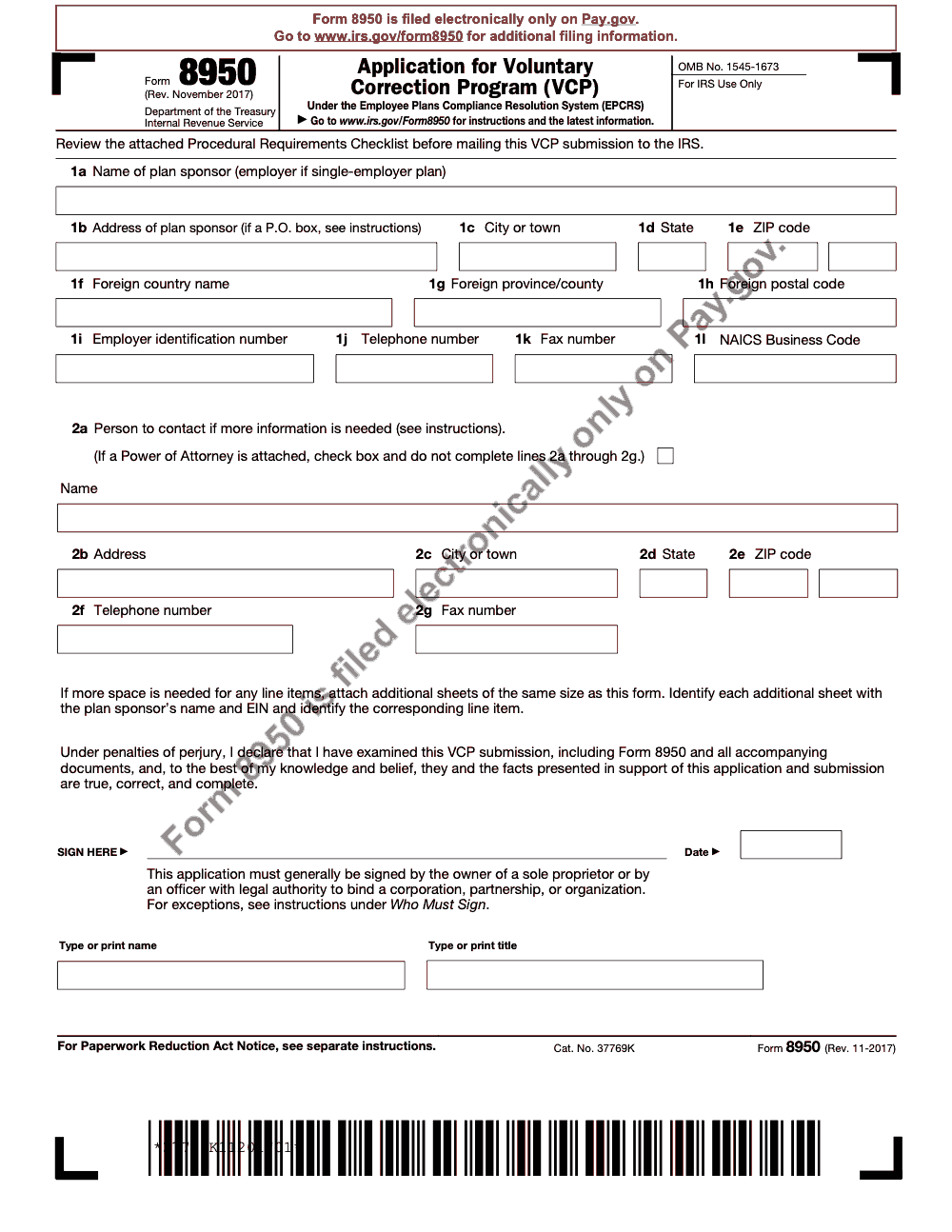
Form 8950 is the IRS application for the Voluntary Correction Program (VCP) under EPCRS – qualified plan sponsors use it to disclose and correct operational, demographic, and document failures. Per Rev. Proc. 2021-30 (the current EPCRS revenue procedure, as modified by SECURE 2.0 guidance through 2025), Form 8950 must be filed electronically on Pay.gov (paper has not been accepted since April 1, 2019), the VCP user fee is paid through the same submission, and Letter 5265 must be attached if you want a formal IRS acknowledgement.
When a plan sponsor finds an operational, demographic, or document failure in a qualified plan, the fix runs through the Voluntary Correction Program under EPCRS, and Form 8950 is the application that starts it. It is filed only electronically on Pay.gov; paper has not been accepted since April 1, 2019.
The part that derails first-timers is the single attachment rule. Pay.gov takes one file, so every VCP document goes into one flattened PDF, in the order the current EPCRS revenue procedure requires, kept at or under 15 MB, including your correction narrative, the signed penalty-of-perjury statement, Form 14568 with its schedules, and any Form 2848 or 8821. Eligible plans include qualified plans under section 401(a), 403(a) annuities, 403(b) plans, SEPs, and SIMPLE IRAs.
Key Takeaways
- Form 8950 is how you apply to the IRS Voluntary Correction Program under EPCRS for employer‑sponsored tax‑favored retirement plans. You must file it electronically on Pay.gov.
- Pay.gov accepts one attachment, so combine all VCP documents into a single flattened PDF in the order required by the current EPCRS revenue procedure. Keep the file at or under 15 MB.
- Include your correction narrative, signed penalty‑of‑perjury statement, Form 14568 and applicable Schedules A through I, and any Form 2848 or 8821.
- The Pay.gov Tracking ID on your payment confirmation is your IRS control number. Use it on any faxed overflow sent to 855‑203‑6996 so the IRS can match documents.
- Eligible plans include qualified plans under section 401(a), 403(a) annuities, 403(b) plans, SEPs, and SIMPLE IRAs. Governmental 457(b) corrections are filed by checking the 'Non-VCP 457(b) submission' box on Form 8950 line 3, and the IRS reviews these requests outside the formal EPCRS VCP framework with more limited relief.
- Anonymous VCP filings ended on January 1, 2022. You can still request an anonymous pre‑submission conference through Form 8950 using specific placeholder entries.
What Form 8950 Does And Why It Matters
Form 8950 is the IRS’s intake for VCP. You use it to identify the plan, confirm eligibility, choose the submission type, and certify under penalty of perjury. On Pay.gov, you complete the online 8950 screens, attach one combined PDF with all required documents, and pay the user fee. The IRS treats the Pay.gov Tracking ID on your confirmation as the control number for the case, and that confirmation becomes your receipt of a timely submission.
EPCRS gives you three paths, and Form 8950 sits at the center of one of them.
- SCP, self‑correction without filing, expanded by recent guidance.
- VCP, IRS‑approved correction with a user fee, filed on Pay.gov using Form 8950.
- Audit CAP, used when an issue is found on examination.
Here is why this matters for you. If you can self‑correct under SCP, do it. If you cannot, VCP gives you audit protection and a written compliance statement. Getting that package right, from file order to signatures and proof of payment, is what keeps the process smooth.
What, How, Wow
- What, Form 8950 is your application for VCP under EPCRS.
- How, file only on Pay.gov, attach one combined PDF in the required order, pay the fee, and use the Tracking ID on any follow up.
- Wow, you cut review time when your narrative maps each failure to a specific 14568 Schedule, shows earnings computations clearly, and uses standardized workpapers that make review easy.
Electronic Filing On Pay.gov, Start To Finish
You file Form 8950 only on Pay.gov. Paper submissions were phased out on April 1, 2019, and your Pay.gov payment confirmation now gives you a Tracking ID as a transaction receipt, not the formal IRS acknowledgement (however, the formal IRS Letter 5265 acknowledgement is still available and is only issued if you specifically attach Letter 5265 to your submission, per Procedural Requirements Checklist item 24). If you have not created a Pay.gov account yet, do that first. It is free, and you can reuse the same login across all clients and plans.
Account Setup And Access
- Create your Pay.gov username and password, then sign in.
- Use the search box and type “8950.” Select the Form 8950 Voluntary Correction Program page.
- Confirm your role before you begin. If you are an authorized representative, make sure you have a signed Form 2848 ready for the PDF.
Pro tip, before you type anything on Pay.gov, open a checklist and gather your EIN, plan name and number, plan type, plan document details, failure description, proposed correction, and earnings method. Having the data at hand reduces typos and keeps the online session short.
The One‑File Rule
Pay.gov accepts a single attachment for VCP. That means you will combine your entire package into one flattened, non‑fillable PDF that is no larger than 15 MB. If the complete package will exceed 15 MB, you upload the core to Pay.gov and fax the rest to 855‑203‑6996 with a cover page that shows the Pay.gov Tracking ID, plan sponsor EIN, applicant name, and plan name.
Use print to PDF or a PDF creator to flatten any fillable fields. Editable forms often break during upload or later when the IRS opens the file. Flatten once, verify legibility, and lock it.
The User Fee And Tracking ID
You pay the VCP user fee inside Pay.gov by ACH, debit, or credit. Once the payment is approved, Pay.gov shows your Tracking ID. That number is your IRS control number for the submission. Copy it into your index, your cover letter, and any fax cover sheets. If you later submit overflow, that ID is how the IRS matches those pages to your case.
Treat the Tracking ID as your file anchor. Put it at the top of every related document and save the Pay.gov confirmation in your records.
A Simple Timeline That Works
- Day 1, prepare your narrative, Forms 14568 and Schedules, penalty‑of‑perjury statement, and any 2848 or 8821.
- Day 2, assemble and flatten to one PDF, confirm size, and complete Pay.gov Form 8950.
- Day 2, pay the user fee, capture the Tracking ID, and immediately fax any overflow with a labeled cover page.
- Day 3, send your internal acknowledgment to stakeholders and save a read‑only copy of the package and Pay.gov receipt.
Common Pay.gov Errors And Quick Fixes
- Error, the PDF will not upload. Fix, flatten the file, remove fillable fields, reduce resolution on large images, and resave.
- Error, file size is too large. Fix, compress to under 15 MB, move schedules with raw data to fax, and reference them in your index.
- Error, wrong EIN or plan number in the online form. Fix, stop and correct before you pay. The EIN must match your PDF and plan records.
A Mini Case Story
When our team guided a sponsor through a complex late deferral deposit correction, the draft package was 27 MB because the workpapers included high resolution exports. We split it cleanly, uploaded a 12 MB core file with Form 8950, 14568, the narrative, and the signed statements, then faxed the remaining reconciliations and support with a cover page listing the Tracking ID, EIN, plan name, and a page index. The IRS matched it without a single follow up, and the compliance statement arrived on the expected timeline.
Preparing Your Single PDF The Right Way
Think of your combined PDF as a story, not a pile of forms. The IRS reviewer needs to see what went wrong, why it happened, how you corrected it, and how participants were made whole. Put the documents in a logical order and make the narrative easy to follow.
Required Components And Order
Place these items in one PDF, in this order, keeping total size at or under 15 MB.
- Form 8950 output screen or cover page as the first page of the package.
- Signed penalty‑of‑perjury statement for the sponsor, and if applicable, for the representative and conference request.
- Form 2848 or Form 8821 if a representative is involved.
- Form 14568 and any applicable Schedules A through I.
- The narrative, including facts, failures, affected periods, proposed and completed corrections, earnings method, and controls to prevent recurrence.
- Supporting schedules, for example, spreadsheets showing affected employees, contributions or allocations, and earnings computations.
- Any plan document or amendment pages that are necessary to evaluate the failure and correction.
- A short index that points the reviewer to key exhibits.
Sample File Naming And Version Control
| Section | Suggested file tag inside the combined PDF | Notes |
| Cover and index | 00_Cover_Index | Keep it one to two pages. |
| Statements | 01_PenaltyOfPerjury | Include date and signer’s title. |
| Authorization | 02_Form2848_or_8821 | Match names to Form 8950 entries. |
| 14568 core | 03_Form14568_and_Schedules | Use schedule letters in the header. |
| Narrative | 04_Narrative_Facts_Correction | Use clear subheadings. |
| Earnings | 05_Earnings_Method_Tables | Show method, rate, and timeframe. |
| Support | 06_Workpapers_Support | Split to fax if size grows. |
| Plan docs | 07_Plan_Excerpts | Only include pages you cite. |
Flatten the PDF after you merge. Save an internal editable folder with source files, but the file you upload must be non‑fillable and read only.
Writing The Narrative Reviewers Love
Use short paragraphs, headings, and a tone that is direct and factual.
- Facts, what happened, when, who was affected, and how you discovered it.
- Failure, the law or document provision you missed.
- Correction, the method, timing, and amounts including earnings.
- Prevention, the control you implemented to keep it from repeating.
Example opening line, “From January 2022 through March 2023, the plan failed to implement 12 timely deferral rate changes for auto‑enrolled participants due to a payroll integration gap. We corrected missed deferrals and match with earnings through June 30, 2024, under the safe harbor correction method.”
The Penalty‑Of‑Perjury Statement
Use the current statement language and sign with title and date. If you have a representative and a pre‑submission conference request, expect separate attestations. Place the sponsor’s statement first. If you use an e‑signature, include the certificate page behind the signature page to avoid questions.
Attachments That Speed Review
- A clean participant list with employee IDs, not SSNs.
- A table that shows each amount corrected, the date deposited, and the earnings through the deposit date.
- Screenshots or reports that demonstrate how you will prevent recurrence, for example, a payroll integration control, a reconciliation checklist, or a monthly audit log.
If the reviewer can follow your math and see your prevention control in action, your review time shrinks.
VCP Pre‑Submission Conferences, When And How To Use Them
A pre‑submission conference is optional. It is advisory and nonbinding, but it can save time when the failure is unusual or when you want to confirm a correction method before you invest in the full package. You request it through Form 8950 on Pay.gov and choose the conference option.
What To Include In The Conference Request
- A concise narrative that describes the failure, time period, participants, and proposed correction.
- How you will compute earnings.
- Any unique facts that could affect relief, such as late plan adoption, mergers, or prior corrections.
- Your questions for the IRS, framed clearly and limited to the key issues.
Keep it tight. Think two to four pages for the core facts and questions. You are not asking the IRS to audit your whole fact pattern, just to react to your proposed path.
Anonymity Conventions For Conferences
Anonymous VCP ended, but the IRS allows anonymity for the conference itself. Follow the placeholder conventions for plan number, business code, assets, and participants as instructed by the current revenue procedure. When you later file the full VCP, you will disclose the conference and enter the same Pay.gov Tracking ID that was assigned at the conference stage.
Representative Rules You Should Know
If a representative leads the conference request, you still prepare Form 8950 as if you were the sponsor, and you will need a signed Form 2848 for the later VCP filing. Be consistent with names and titles across your request, your later 2848, and your final submission. Small mismatches cause big delays.
When A Conference Is Worth It
- You have a plan document failure with overlapping amendments and you need alignment on the correction path.
- Your correction method is nonstandard and you want to confirm approach.
- Your situation spans multiple entities or mergers and you want to confirm which party files.
When To Skip The Conference
- You are dealing with well known failures, for example, late elective deferrals or missed match allocations with standard safe harbor corrections.
- You are under a tight deadline and already have a clean narrative and support ready to file.
If you can cite a clear correction method and your facts are straightforward, skip the conference, file VCP, and move on.
Payment, Tracking, Faxing, And Troubleshooting
Paying The User Fee
You pay the user fee on Pay.gov during submission by ACH, debit, or credit. Verify the current fee before you start, then complete the payment screens in one sitting. Save the confirmation as a PDF and paste the Tracking ID into your package index and your internal case tracker.
Using The Tracking ID Correctly
- Put the Tracking ID on your cover letter, index, and any fax cover sheets.
- Reference it in any emails or calls with the IRS.
- If you filed a pre‑submission conference, use the same Tracking ID when you submit the later VCP so the IRS can link the two.
Faxing Overflow To 855‑203‑6996
If your combined PDF would exceed 15 MB, upload a complete core file and fax the rest. Use a cover sheet that lists, Tracking ID, plan sponsor EIN, applicant name, plan name, number of pages, and a simple index of what is in the fax. If a single supplemental file is larger than 150 MB, split it and label the covers Part 1, Part 2, and so on. Keep your fax confirmations.
Organization Tips That Prevent Rework
- Insert page footers with “Plan Name, EIN, Tracking ID, and page X of Y.”
- Use bookmarks for each major section in the PDF.
- Use consistent exhibit labels, for example, Exhibit A, Exhibit B, and reference them in the narrative.
- Add a one page “Where to find it” map right after your index.
Preventing Common Roadblocks
- Missing or outdated penalty‑of‑perjury statement, refresh and resign.
- Mismatched EIN or plan name, fix entries to match Form 8950 and your plan records.
- Earnings calculations without dates or methodology, add a short paragraph that explains the method and the period.
- Workpapers with SSNs, replace with masked IDs or employee numbers and keep PII out of the PDF.
Security And Confidentiality
Use role based access in your document system. Limit who can open the VCP package, and keep a clean audit trail that shows who compiled, reviewed, and approved the filing. Never store local copies on unsecured devices. If you must share with outside counsel, use encrypted transfer and keep the Pay.gov confirmation separate from the working folder.
Clean control, clear indexing, and consistent identifiers turn a stressful filing into a predictable one.
A Final Word And A Ready To Use Checklist
I have seen thoughtful teams shave months off VCP processing by following the same habits every time, one combined PDF, clear order, strong exhibits, and predictable naming. If your internal team is at capacity and review loops are slowing you down, consider adding structured help. Accountably integrates disciplined offshore teams into your workflow, which means standardized workpapers, clear SOPs, and faster reviewer sign off without giving up control or security.
Common Mistakes We See Every Season
Across the VCP packages I have reviewed, the same handful of errors keep surfacing. Most are paperwork-level, not legal-judgment-level, which means a tighter intake checklist eliminates them before the package ever reaches Pay.gov.
Reusable Checklists
These are copy-paste ready for firm SOPs. Drop them into your engagement workflow, hand them to a preparer, and let the checkboxes do the tracking.
VCP intake packet
- Confirm plan sponsor's legal name, address, and EIN against the Form SS-4 confirmation (line 1a through line 1i).
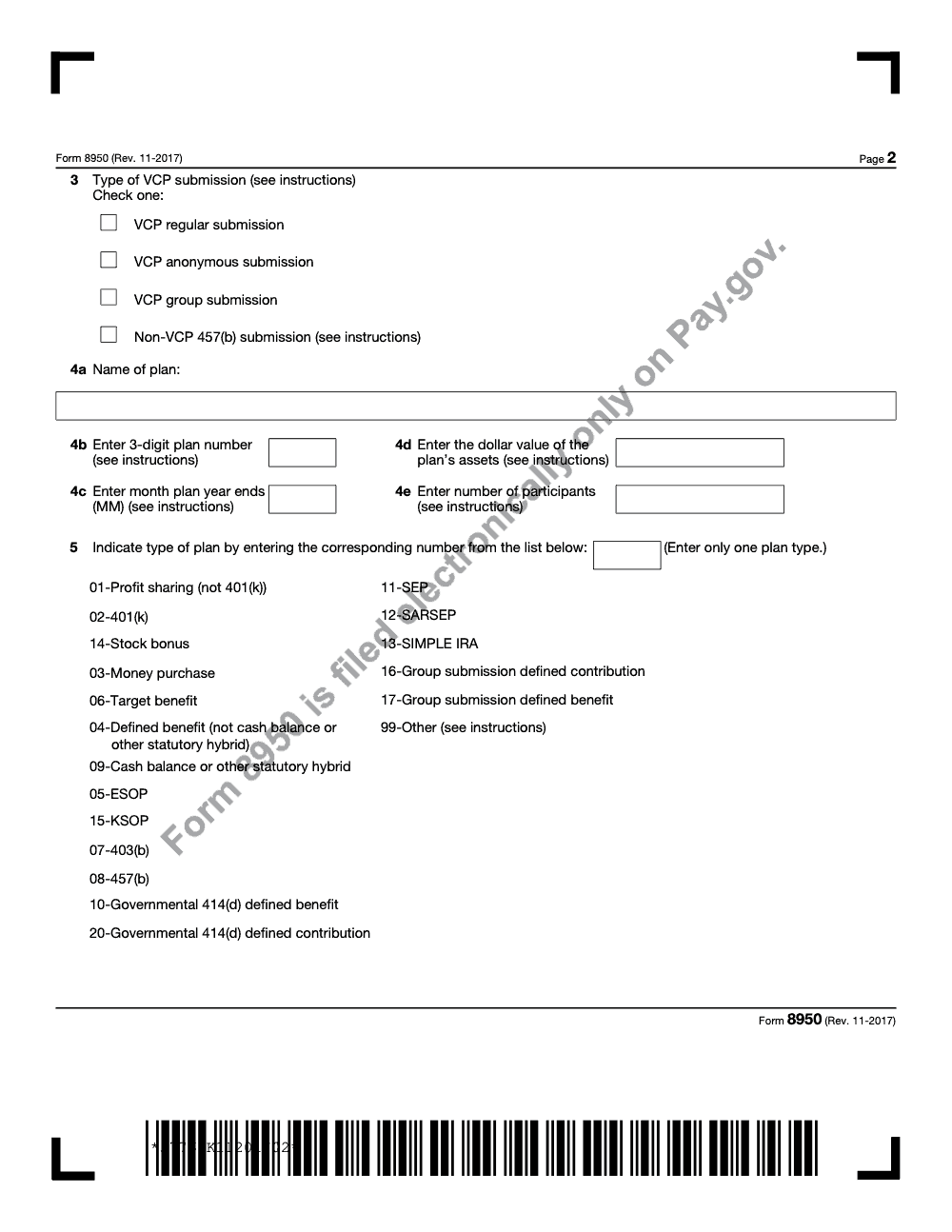
- Capture plan name, 3-digit plan number, plan-year-end month, asset value, and participant count (line 4a through line 4e).
- Select the single plan type code from the 19-code list on line 5 (one code only, even for KSOP or cash balance plans).
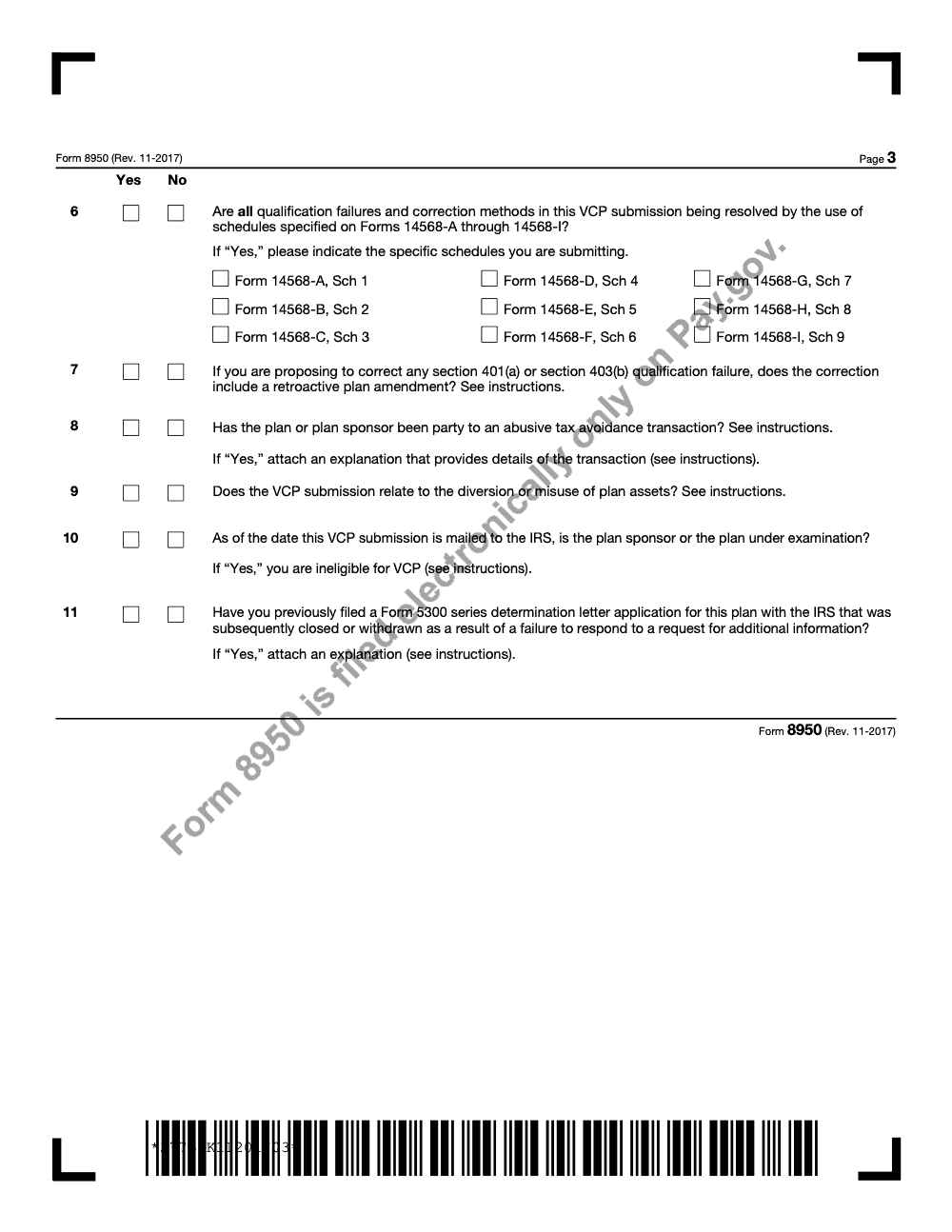
- Confirm the plan and sponsor are not under IRS examination as of the intended filing date (line 10). Pre-examination compliance check letters generally count as 'under examination' for VCP eligibility.
- Document each qualification failure: years affected and number of employees impacted.
- Collect the period-of-failure plan document, plus any restated plan with page and section references for corrective language.
- Identify the signer with legal authority to bind the sponsor entity (not just the plan administrator).
Single-PDF assembly
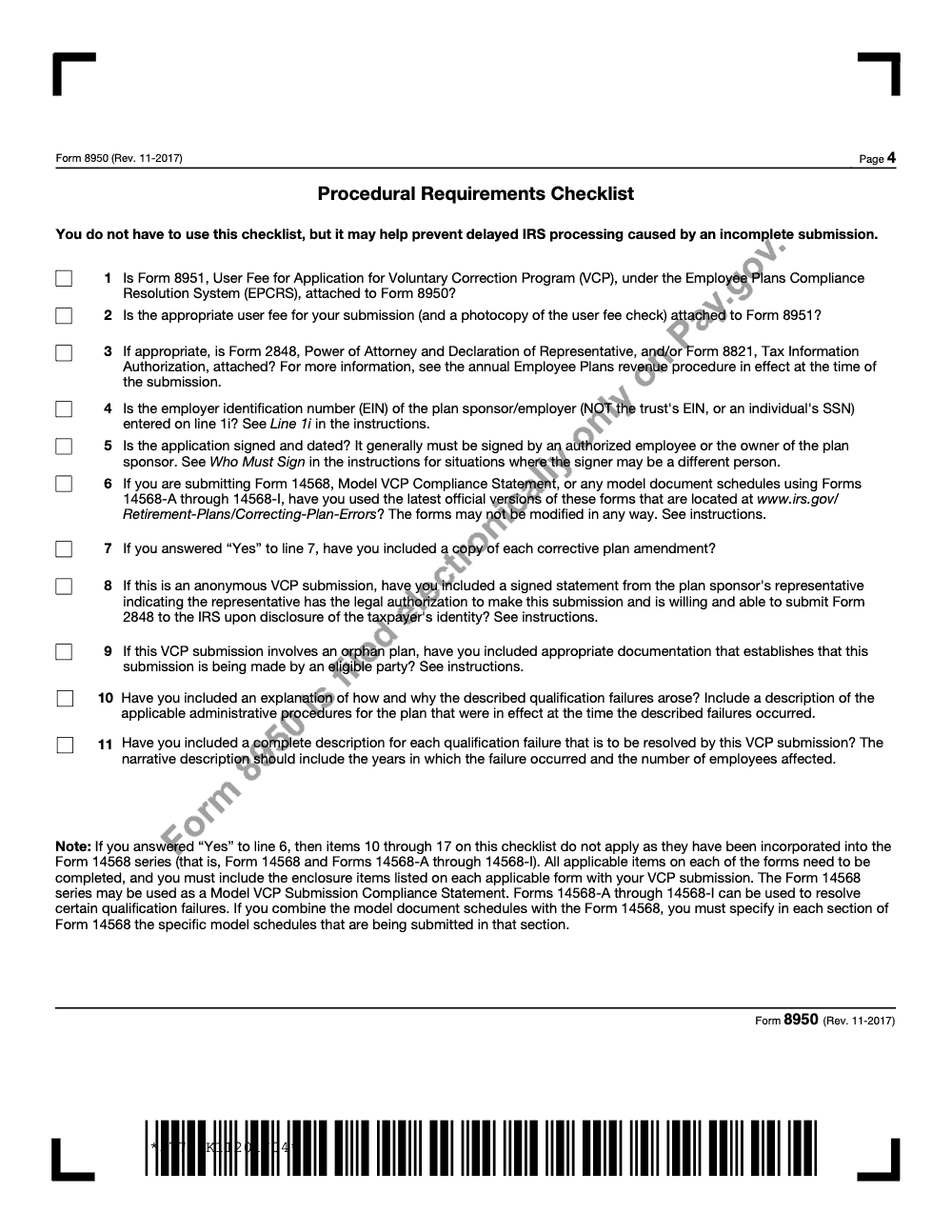
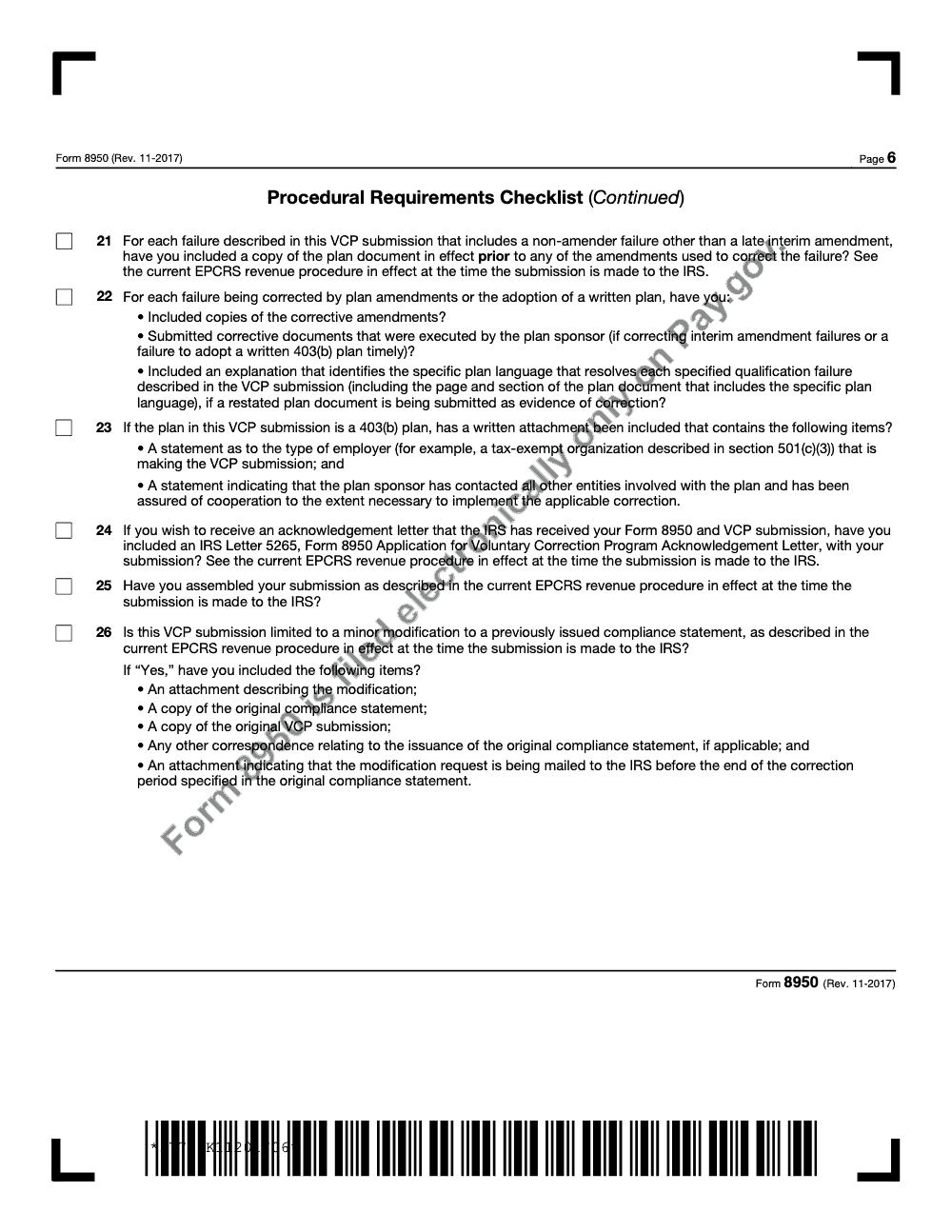
- Assemble in this order: Form 8950, Procedural Requirements Checklist, Form 14568 series schedules, supporting narratives, calculations, plan documents, Form 2848 if applicable, Letter 5265 if requested.
- Compress the combined PDF to under the Pay.gov 15 MB single-file cap.
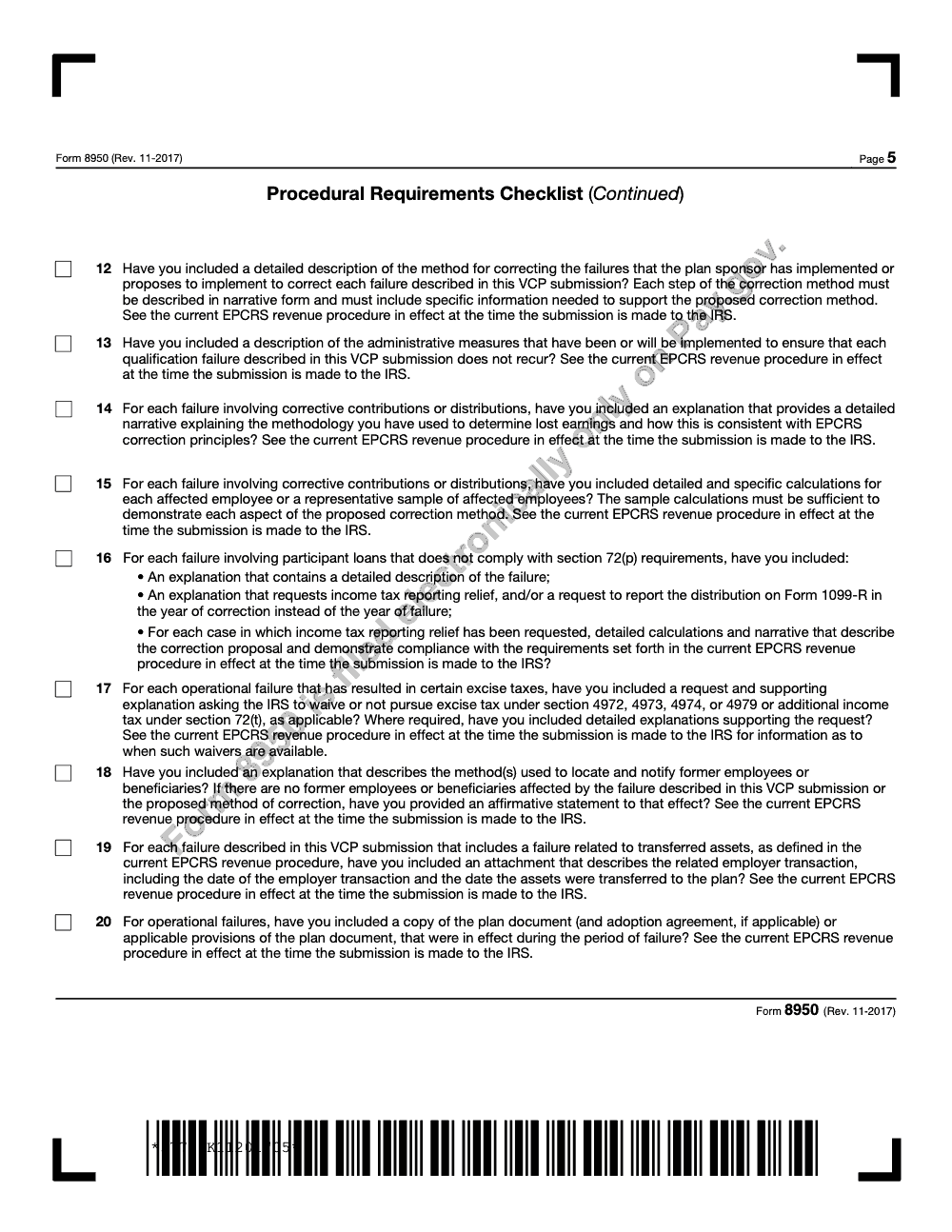
- Confirm the correction narrative describes the lost-earnings methodology and includes per-employee calculations (or a representative sample).
- Add an affirmative former-employee notification statement, or confirm in writing that no former employees or beneficiaries are affected.
- If using Forms 14568-A through 14568-I, verify each schedule is the latest unmodified IRS version and check line 6 = Yes (which removes Procedural Requirements Checklist items 10 through 17 from scope).
- If requesting §72(p) loan reporting relief, or excise-tax waivers under §4972, §4973, §4974, §4979, or §72(t), include a specific request with supporting calculations.
- For a 403(b) plan submission, attach the statement of employer type (§501(c)(3) tax-exempt organization or public school) and the cooperation assurance from related entities.
- Mask SSNs in workpapers; use employee numbers or other masked identifiers instead.
Pay.gov submission and post-filing
- Pay the VCP user fee through Pay.gov as part of the submission (Form 8951 is no longer filed as a separate paper attachment).
- Save the Pay.gov transaction confirmation and Tracking ID in the engagement file.
- If the PDF exceeds the 15 MB Pay.gov cap, fax the overflow per the IRS Pay.gov overflow procedure with a cover page that lists the Tracking ID, EIN, applicant, plan name, and a page index. Keep the fax confirmation.
- Confirm Letter 5265 was attached if a formal IRS acknowledgement is needed; the Pay.gov receipt alone is not the acknowledgement.
- Log the expected response window with the client and use the Tracking ID as the reference in all follow-up correspondence.
- Calendar a 90-day check-in to confirm the IRS has not opened an information request.
Keep 8950 Season From Stalling
VCP work has its own rhythm. It does not spike on a single April or quarterly deadline, but it lands in waves: a discovery during a Form 5500 review, a payroll-feed error caught during an audit, a missed RMD surfaced during a participant inquiry. Each one starts a multi-week scramble to assemble a single PDF, run lost-earnings calculations, and clear the package through senior review before the Pay.gov upload. Per Rev. Proc. 2021-30 (the current EPCRS revenue procedure, as modified by subsequent SECURE 2.0 guidance through 2025), the procedural bar has not loosened. If anything, the §72(p) reporting relief, excise-tax waivers, and Form 14568 schedule discipline reward teams that work the package methodically.
The teams that handle VCP cleanly are not the ones with the most experienced reviewers. They are the ones whose intake, calculation, and assembly steps look the same every time, regardless of which preparer touches the file. That is a process problem, not a talent problem.
- Build a single-source intake template that captures sponsor EIN (not trust EIN) on line 1i, the single plan type code on line 5, the plan-year-end on line 4c, and the under-examination check on line 10 before any narrative work begins.
- Standardize the lost-earnings workbook so every corrective-contribution calculation uses the same methodology section, period definition, and per-employee breakout the IRS expects.
- Lock the single-PDF assembly order (Form 8950, Procedural Requirements Checklist, Form 14568 schedules, narratives, calculations, plan documents) so reviewers always know where to look.
- Track Pay.gov Tracking IDs and Letter 5265 acknowledgements in one register so client status questions never trigger a file hunt.
- Pre-stage Form 2848 powers of attorney for the representatives who actually interact with the IRS, so line 2 contact information and the POA box stay consistent.
Accountably runs structured offshore execution for retirement-plan and tax-compliance work, including VCP package preparation, lost-earnings calculations, and Form 14568 schedule assembly, with multi-layer review before anything reaches the Pay.gov upload screen. See our tax delivery services for how this fits into a firm's seasonal capacity plan.
FAQs
Timelines vary, but you can influence speed. Clean narratives, clear earnings tables, and consistent identifiers cut follow ups. Plan for months, not weeks, and keep your stakeholders informed with the Tracking ID as your reference.
Include the current statement language, the signer’s name, title, and date. If you are filing a pre‑submission conference or a representative is involved, expect separate attestations and place the sponsor’s statement first.
Anonymous VCP ended on January 1, 2022. You may request an anonymous pre‑submission conference using the placeholder conventions. When you later file VCP, you will identify the plan and reference the same Tracking ID.
Governmental 457(b) is filed by checking the 'Non-VCP 457(b) submission' box on Form 8950 line 3. The IRS reviews these requests outside the formal EPCRS VCP framework with more limited relief, so evaluate whether a statutory self‑correction window applies before you prepare a submission.
Compress the core file to under 15 MB for upload, then fax overflow to 855‑203‑6996 with a cover page that lists the Pay.gov Tracking ID, EIN, applicant, plan name, and a page index. Keep your fax confirmation.
No. If the sponsor signs everything, you may not need a power of attorney. If a representative will interact with the IRS on the case, include a signed Form 2848 in the PDF.
You receive a Pay.gov confirmation with a Tracking ID. Use that in all correspondence. The IRS will contact you if it needs more information, and you will ultimately receive a compliance statement if your VCP is approved.
Other forms this guide names
- Form 14568: VCP Compliance Statement Guide 2025
- Form 2848: Guide to Line 3, Filing, and Rules
- Form 8821: Tax Information Authorization
- Form 14568-A: 403(b) VCP Guide to Fix Document Failures
About this guide
Accountably helps US CPA, EA, and accounting firms hire trained accountants and tax preparers in India.
About us Reviewed byJugal Thacker, CPAFounder and CEO at Accountably
A Washington-licensed CPA with 7+ years inside US firms – PwC, a real-estate tax practice, then a full-service firm, rising from reviewer to manager to advisory. This article was reviewed against current IRS guidance for the 2025 tax year and updated for filers preparing late returns, amendments, and 2026 estimates.
View profile →How we research, review, and update this guide
Every Accountably guide is researched against primary IRS sources, reviewed by a U.S. CPA, and refreshed as guidance evolves. Read our Editorial Guidelines to see how we source, fact-check, and update our content.




