
Summarize this article with AI
In Brief
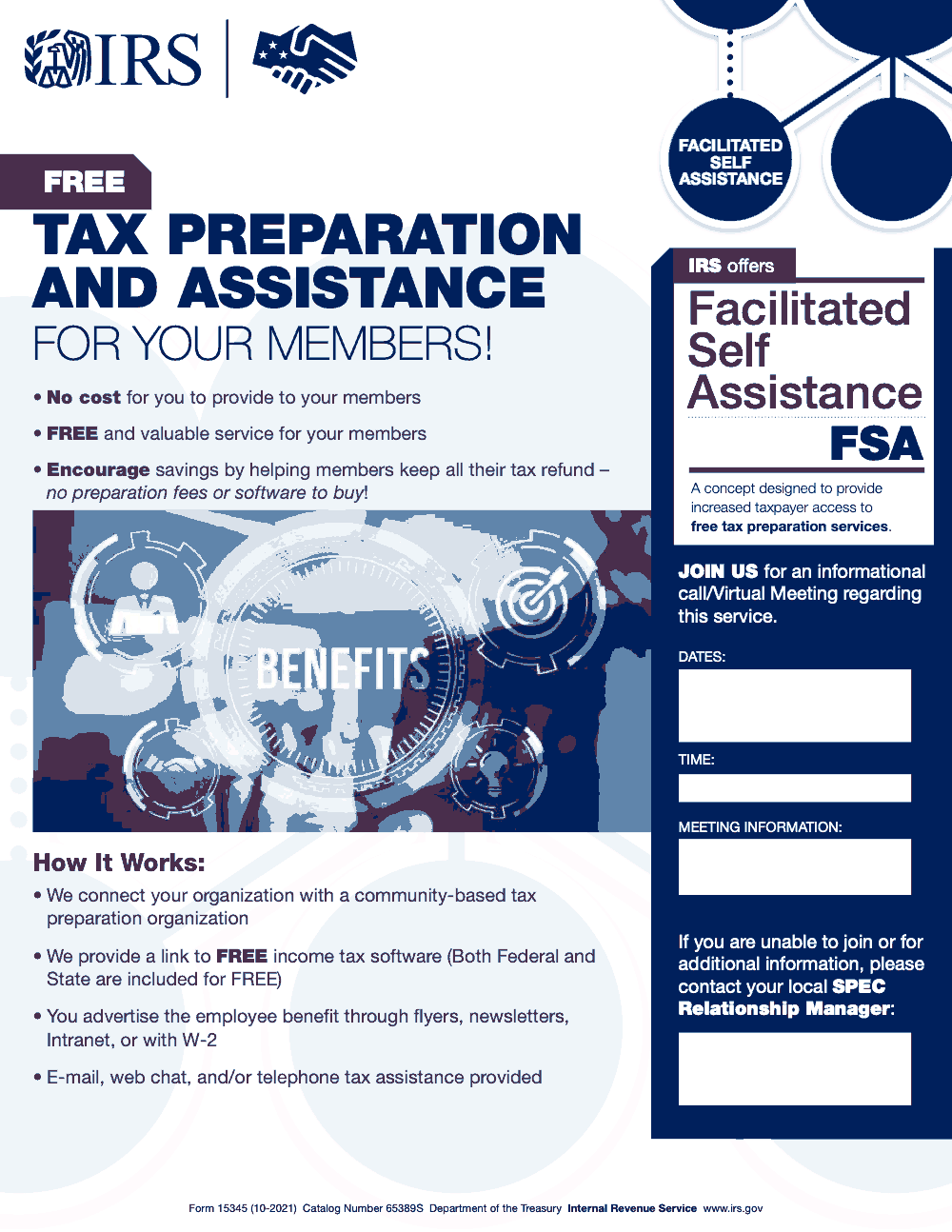
Form 15345 is an IRS outreach flyer (Catalog Number 65389S, October 2021 revision) that partner organizations use to advertise the Facilitated Self Assistance (FSA) free tax preparation program to their members. It is not filed with the IRS, has no tax computation, and costs the partner organization and its members $0 (per IRS Form 15345, Catalog 65389S). FSA bundles free federal and state tax software with remote support from a community-based tax preparation organization. For broader practitioner support, see our U.S. taxation services overview.
People ask where to file Form 15345, and the honest answer is that you do not file it anywhere. It is a one-page IRS outreach flyer for the Facilitated Self Assistance free tax preparation program, the version partner organizations such as employers, credit unions, and nonprofits use to advertise FSA to their members. The footer reads Form 15345 (10-2021), Catalog Number 65389S, and that footer is the entire administrative footprint.
FSA pairs members with a community-based tax preparation organization and gives them free federal and state tax software plus remote support by e-mail, web chat, and telephone. It costs the partner organization and its members $0. The only work on the flyer itself is four fields: Dates, Time, Meeting Information, and Point of Contact.
Key Takeaways
- Form 15345 is an IRS outreach flyer (Catalog Number 65389S, October 2021 revision) titled Free Tax Preparation and Assistance for Your Members. It is not filed with the IRS.
- Partner organizations – employers, credit unions, nonprofits, and similar groups – use the flyer to advertise the Facilitated Self Assistance (FSA) free tax preparation program to their members or employees.
- FSA pairs members with a community-based tax preparation organization and provides free federal and state tax software, with remote support by e-mail, web chat, and telephone.
- The flyer costs the partner organization and its members $0. There are no preparation fees and no software fees for federal or state returns.
- The form has four partner-completed fields: Dates, Time, Meeting Information (conference line or meeting link), and Point of Contact (the local SPEC Relationship Manager’s name, phone, and e-mail).
- Form 15345 has not been revised since October 2021; the 10-2021 version is the version in current circulation for the 2025 outreach cycle.
What Form 15345 Is and When to Use It
Form 15345 is an IRS outreach flyer titled Free Tax Preparation and Assistance for Your Members (Catalog Number 65389S, October 2021 revision). It is issued by the IRS Stakeholder Partnerships, Education and Communication (SPEC) function as part of the agency’s free tax preparation outreach. The flyer is not a tax return, schedule, or transmittal. It is a one-page marketing document with no tax computation, no signature line, and no submission to the IRS.
The flyer promotes Facilitated Self Assistance (FSA), an IRS concept that gives taxpayers increased access to free tax preparation by pairing them with community-based partners and free federal and state tax software. Partner organizations – employers, credit unions, nonprofits, government agencies, and similar groups – distribute Form 15345 to their members or employees to advertise the FSA benefit.
Under the FSA model, the IRS connects the partner organization with a community-based tax preparation organization that supports the partner’s members. The supporting organization provides remote tax assistance through e-mail, web chat, and/or telephone. Members use free federal and state tax software to prepare and file their own returns; no preparation fees and no software fees apply. The partner organization pays nothing to the IRS for the service, and members pay nothing for the software or support.
From my side of the desk: if a partner organization asks where to find Form 15345 or how to file it, the answer is that there is nothing to file. The flyer ships with four partner-completed fields – Dates, Time, Meeting Information, and Point of Contact – that the partner or the local SPEC Relationship Manager fills in before circulating it internally to members.
How to Complete Form 15345
Form 15345 ships with four partner-completed fields that the partner organization or the local SPEC Relationship Manager fills in before distributing the flyer to members. There is no signature line, no count field, no EIN field, and no certification language. The fields below are the only ones to complete.
| Field | What It Captures | Practitioner Tip |
|---|---|---|
| Dates | Date(s) of the informational meeting or rollout window when members can learn about FSA | Coordinate with your local SPEC Relationship Manager on the meeting calendar before populating the flyer |
| Time | Time of the meeting, including the time zone | State the time zone explicitly; partner organizations with members across regions otherwise get the meeting wrong |
| Meeting Information | Conference call line or virtual meeting link members will use to join | Use a stable link the SPEC Relationship Manager can host; avoid one-off URLs that expire before the rollout period ends |
| Point of Contact | Name, phone number, and e-mail of the local SPEC Relationship Manager | Confirm the SPEC Relationship Manager’s contact details with the local IRS SPEC territory office before distribution |
One process rule I always follow: lock the four fields in one source-of-truth document before editing the PDF. That way the rollout team is not editing the flyer live across multiple drafts.
Deadlines, Penalties, and Filing Requirements
Form 15345 has no filing deadline, no penalty regime, and no filing requirement with the IRS. It is not an information return, not a payee statement, and not a transmittal. The flyer is published by the IRS for partner organizations to distribute internally to their members.
Information return penalties under IRC § 6721 and payee statement penalties under IRC § 6722 do not apply to Form 15345 because the form is not an information return or a payee statement. There is no FIRE-system upload, no Form 8809 extension request, and no January 31 / February 28 / March 31 calendar dates to track for Form 15345 itself. The only practical timing question is when in the partner organization’s outreach cycle to distribute the flyer – typically before W-2 distribution, so members have the information they need ahead of the tax filing season.
If a partner organization needs to coordinate the rollout, the lead contact is the local SPEC Relationship Manager named on the flyer. The IRS SPEC function (Stakeholder Partnerships, Education and Communication) hosts informational calls and virtual meetings to walk partner organizations through the FSA service before they adopt it.
The IRS SPEC Outreach Program and FSA
Form 15345 is part of the IRS Stakeholder Partnerships, Education and Communication (SPEC) function’s free tax preparation outreach. SPEC partners with community organizations to expand access to no-cost tax preparation through three program models: VITA (Volunteer Income Tax Assistance), TCE (Tax Counseling for the Elderly), and FSA (Facilitated Self Assistance). Form 15345 is the flyer template for the FSA model.
What FSA Is and How It Differs From VITA and TCE
FSA is a facilitated self-preparation model. The member uses free federal and state tax software to prepare and file their own return, with remote support – e-mail, web chat, and telephone – provided by a community-based tax preparation organization that the IRS pairs with the partner organization. The flyer wording is explicit: A concept designed to provide increased taxpayer access to free tax preparation services.
VITA and TCE, by contrast, are full volunteer-prepared models: an IRS-certified volunteer prepares the return for the taxpayer. FSA is not a volunteer-prepared return. Confusing the two is the most common framing error when introducing the program to a partner organization’s members.
Who Distributes Form 15345
Partner organizations – employers, credit unions, nonprofits, government agencies, faith communities, and similar groups – distribute Form 15345 to their members or employees. The flyer suggests four distribution channels: a printed flyer, a member newsletter, the partner’s intranet, or an insert alongside the W-2. The partner organization pays nothing for the program; the members pay nothing for the software or support.
The Role of the Local SPEC Relationship Manager
Each partner organization is paired with a local SPEC Relationship Manager who serves as the point of contact for the program. The Relationship Manager hosts the informational call or virtual meeting referenced on the flyer, facilitates the introduction to the community-based tax preparation organization, and answers questions about adoption. When a partner organization signs up for FSA, the practical action is to schedule that meeting with the local SPEC Relationship Manager.
Updating and Re-Circulating the Flyer
Form 15345 has no Corrected indicator and no batch filing process because it is not filed with the IRS. The only updates a partner organization makes are to the four partner-completed fields: Dates, Time, Meeting Information, and Point of Contact. If any of those values change – a rescheduled informational meeting, a new conference line, a different SPEC Relationship Manager – update the PDF and re-circulate it internally.
When to Re-Circulate
Re-circulate the flyer if the informational meeting is rescheduled, the meeting link changes, or the local SPEC Relationship Manager’s contact details change. A short note in the member email or intranet post explaining the change is usually enough; no IRS notification is required because the IRS is not the recipient.
Version Control on the PDF
Save each customized version of the flyer under a versioned file name (for example, f15345-2025-rollout-v2.pdf) so prior drafts and outdated meeting details do not accidentally circulate. The footer of the underlying IRS PDF should still read Form 15345 (10-2021) Catalog Number 65389S – the IRS has not revised the form since October 2021, so the version in current circulation for the 2025 outreach cycle is the 10-2021 revision.
If the Form Itself Needs Updating
Only the IRS can revise Form 15345 itself. The form has not been updated since October 2021, and the same 10-2021 version applies for the 2025 outreach cycle. If a future revision is issued, the IRS will publish it at irs.gov/pub/irs-pdf/f15345.pdf; check that location before circulating to confirm you are using the current version.
Common Mistakes That Slow Things Down
Most slip-ups around Form 15345 come from assuming it behaves like every other numbered IRS form. It does not, and the recurring traps below show up almost every time a partner organization or firm encounters the flyer for the first time.
Practical Checklists You Can Reuse
The checklists below cover the practical decisions a partner organization or supporting firm works through before distributing Form 15345. Copy them straight into your internal SOP.
FSA partner readiness checklist
- Confirm the flyer footer reads Form 15345 (10-2021) Catalog Number 65389S.
- Schedule a discovery call with your local SPEC Relationship Manager before W-2 work begins.
- Decide which channels carry the flyer (email, intranet, W-2 envelope, member newsletter).
- Identify the community-based tax preparation organization the IRS pairs you with.
- Confirm member-facing language reads free federal and state tax software.
- Document the support channels you will list (e-mail, web chat, telephone).
- Save the customized PDF under a version-controlled file name before distribution.
Four partner-completed fields on Form 15345
- Dates of the informational meeting or rollout window.
- Time of the meeting, including time zone.
- Meeting Information – conference line, dial-in, or virtual meeting URL.
- Point of Contact – name, phone, and e-mail of the local SPEC Relationship Manager.
- Final QA pass for typos in the four fields before distribution.
Member-facing message review
- State that both federal and state tax software are free under FSA.
- Name the support channels members can use (e-mail, web chat, telephone).
- Clarify FSA is self-preparation with remote support, not in-person volunteer prep.
- Include the meeting date, time, and meeting link from the four partner fields.
- Direct questions to the local SPEC Relationship Manager named on the flyer.
Keep 15345 Season From Stalling
Form 15345 sits at an awkward point in the calendar. It is not a return tied to a fixed deadline, but partner organizations that want to roll out Facilitated Self Assistance for their members typically scramble in the weeks before W-2 distribution. The flyer is a single page (Catalog Number 65389S, October 2021 revision per IRS Form 15345), but the coordination behind it – pairing with a community-based tax preparation organization, briefing the local SPEC Relationship Manager, customizing the four partner fields – is where the delay actually lives.
The fix is not more capacity. It is documenting the rollout once so the next cycle does not start from scratch.
- Lock the four partner-completed fields (Dates, Time, Meeting Information, Point of Contact) in one source-of-truth document, not edited live in the PDF.
- Calendar the SPEC Relationship Manager informational meeting before payroll year-end work starts.
- Maintain a single distribution checklist that names the channel (intranet, payroll insert, member newsletter) and the owner for each.
- Pre-write the member-facing message so it states free federal and state tax software – the most-missed line on follow-up calls.
- Keep a roster of community-based tax preparation organizations the IRS has matched you with in prior cycles, so renewals do not restart at intake.
Where this stalls is the same place every outreach program stalls – the coordination work has no named owner. Our U.S. taxation delivery teams handle the operational tail behind annual outreach materials, so the SPEC handoff, partner-field updates, and member messaging are documented once and reused, not re-derived each January.
FAQs
Form 15345 is an IRS outreach flyer (Catalog Number 65389S, October 2021 revision) titled Free Tax Preparation and Assistance for Your Members. Partner organizations – employers, credit unions, nonprofits, and government agencies – use it to advertise the Facilitated Self Assistance (FSA) free tax preparation program to their members. No one files Form 15345 with the IRS. It is a one-way outreach flyer the IRS publishes for partners to distribute internally; there is no signature line, no tax computation, and no submission process.
Form 15345 and Form 1094-B serve unrelated purposes. Form 1094-B is the transmittal for the 1095-B information return series used by MEC providers to report health coverage to the IRS. Form 15345 is an IRS outreach flyer for the Facilitated Self Assistance free tax preparation program; it has no filing role, no transmittal function, and no relationship to MEC reporting. The two forms share a number prefix and nothing else.
No. Form 15345 has no return count, no batch submission, and no FIRE system relationship. The flyer is a single-page outreach document with four partner-completed fields – Dates, Time, Meeting Information, and Point of Contact – that the partner organization or local SPEC Relationship Manager fills in before distribution. It is not filed with the IRS, so no rejection process applies.
Form 15345 has no Corrected indicator and no batch filing process because it is not filed with the IRS. If you need to update the four partner-completed fields (Dates, Time, Meeting Information, Point of Contact) – for example, the informational meeting was rescheduled or the local SPEC Relationship Manager changed – edit the PDF, save under a new version-controlled file name, and re-circulate it internally to your members.
No. Form 15345 carries no penalty regime. The form is an IRS outreach flyer with no filing requirement, no signature line, no covered-individual statements, and no information return obligation. IRC § 6721 and § 6722 penalties apply to information returns and payee statements – categories Form 15345 does not fall into. The flyer is published by the IRS for partner organizations to distribute internally; there is nothing to file late or incorrectly.
Other forms this guide names
- Form W‑2: Deadlines, E‑File Rules, Boxes, and W‑2c Corrections
- Form 1094-B: Deadlines, Line 9, E‑File Guide
About this guide
Accountably helps US CPA, EA, and accounting firms hire trained accountants and tax preparers in India.
About us Reviewed byJugal Thacker, CPAFounder and CEO at Accountably
A Washington-licensed CPA with 7+ years inside US firms – PwC, a real-estate tax practice, then a full-service firm, rising from reviewer to manager to advisory. This article was reviewed against current IRS guidance for the 2025 tax year and updated for filers preparing late returns, amendments, and 2026 estimates.
View profile →How we research, review, and update this guide
Every Accountably guide is researched against primary IRS sources, reviewed by a U.S. CPA, and refreshed as guidance evolves. Read our Editorial Guidelines to see how we source, fact-check, and update our content.




