Summarize this article with AI
In Brief
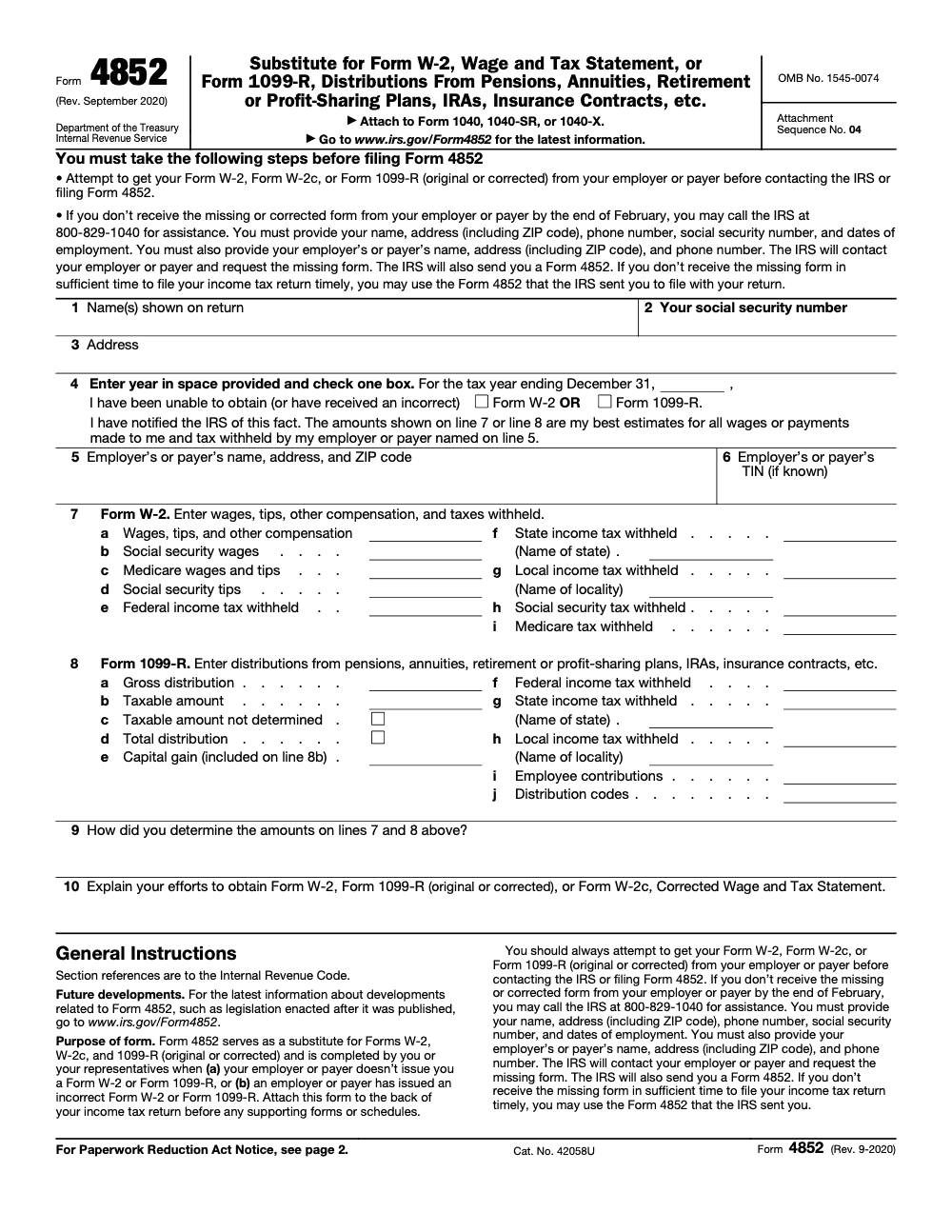
Form 4852 is the IRS-prescribed substitute for a missing or incorrect Form W-2 or Form 1099-R (per Form 4852 instructions, revised September 2020). Use it only after requesting the missing or corrected form from the employer or payer and, if it has not arrived by end of February, calling the IRS at 800-829-1040; attach it to the back of Form 1040, 1040-SR, or 1040-X with Attachment Sequence No. 04, and amend on Form 1040-X if a correct form arrives later showing different figures.
The W-2 never arrives, or it arrives wrong and the employer will not fix it, and the filing deadline keeps coming anyway. Form 4852 is the IRS-prescribed substitute that lets you file without waiting indefinitely, but it is a last resort, not a first move.
Use it only after you have asked the employer or payer for the missing or corrected form and, if it still has not shown up by the end of February, called the IRS at 800-829-1040. Build your figures from the final pay stub or year-to-date totals, keep proof of how you calculated every number, and remember you remain responsible for an accurate return. Attach it to the back of Form 1040, 1040-SR, or 1040-X with Attachment Sequence No. 04. If the real W-2 or 1099-R turns up later showing different numbers, you amend on Form 1040-X.
Key Takeaways
- Form 4852 is a substitute for a missing or incorrect W‑2 or 1099‑R, so you can file without waiting indefinitely.
- Use reasonable estimates from your final pay stub or year‑to‑date totals, and keep proof of how you calculated every number; you remain responsible for an accurate return regardless of whether the W‑2 or 1099‑R arrived, and materially wrong figures can still trigger the 20% accuracy‑related penalty under IRC §6662 (75% for civil fraud, or a $5,000 §6702 penalty for frivolous filings).
- If you receive the real W‑2 or 1099‑R later and it differs, you must amend with Form 1040‑X.
- You can e‑file a return that relies on Form 4852 when used correctly, although some consumer tools still push you to paper. EROs must follow e‑file rules and retain required authorizations.
- As of December 30, 2025, IRS lists “None at this time” under Recent Developments, and the most recent posted revision lineage for Form 4852 traces to 2020. Always pull the current PDF from IRS.gov before filing.
What Form 4852 is, and when you should use it
Form 4852 is the IRS’s official substitute for Form W‑2 or Form 1099‑R. You use it when the employer or payer never sends the form, sends an incorrect one, or cannot correct it in time for you to file. If the form you received was wrong, the IRS expects you to first request a corrected version (W‑2c or corrected 1099‑R) from the employer or payer; Form 4852 is only the fallback when that correction cannot be obtained in time. That way, you can report wages or retirement distributions and withholding accurately, even if the original form is not in hand.
You will include your identifying details, the payer’s name and address, the employer identification number if known, your best estimates for income and federal withholding, and a plain explanation of your attempts to obtain the original. Keep copies of final pay stubs, payroll reports, or plan statements because the IRS can ask how you arrived at the figures.
The timeline that matters for 2025‑2026
Employers should furnish Forms W‑2 and 1099‑R by early February. For this filing season, the IRS guidance says to follow up if you do not have the form by February 2, 2026, then call the IRS at 800‑829‑1040 if you still do not receive it by the end of February. If the payer does not deliver a corrected form in time, you may file using Form 4852 with reasonable estimates.
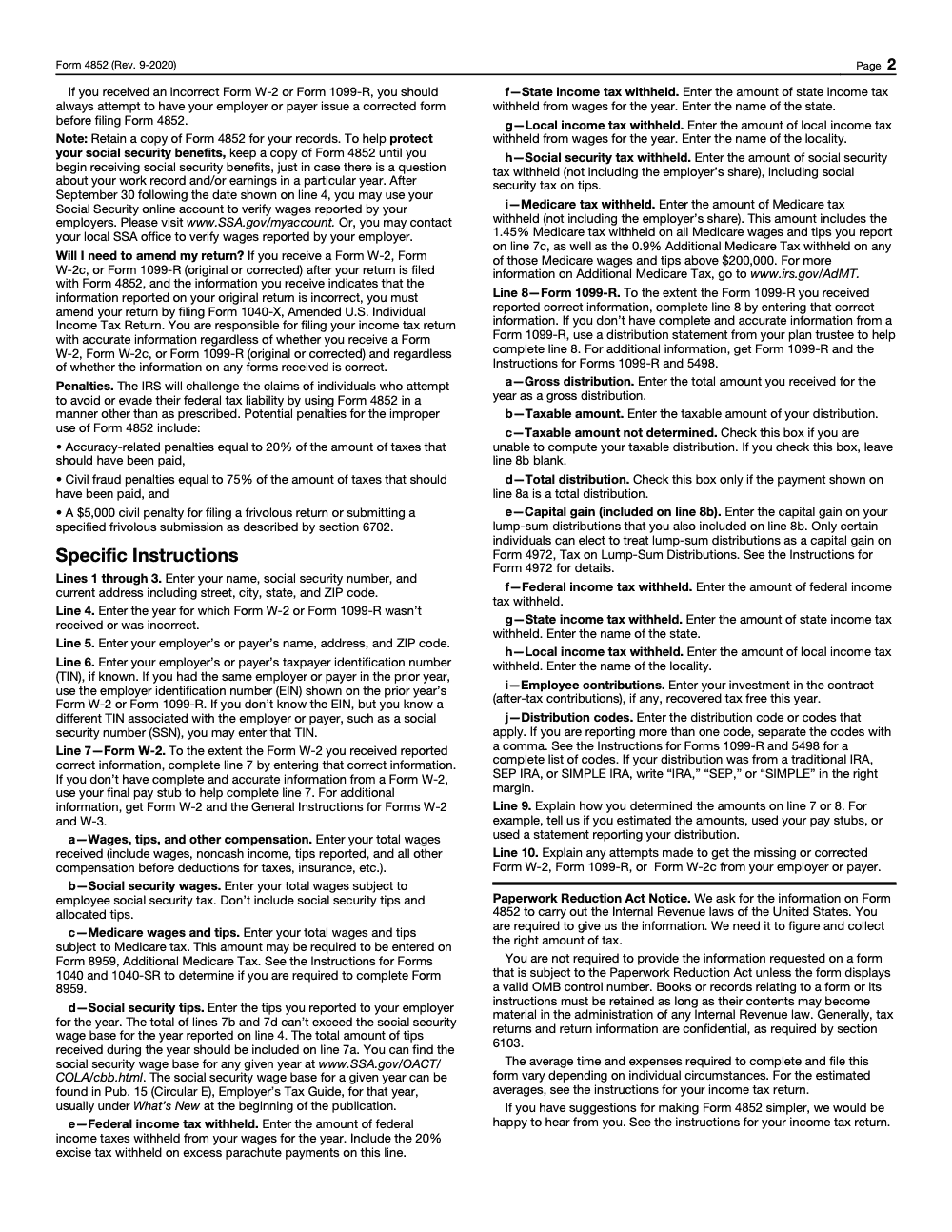
If a late or corrected W‑2 or 1099‑R arrives after you file with Form 4852 and the numbers are different, you must file Form 1040‑X to correct your return.
Why this matters to you
Missing or incorrect year‑end forms create stress, delay refunds, and raise audit anxiety. Form 4852 is your safety valve. It lets you file on time while staying accurate, provided you document your method and retain your records. That balance, timely filing with evidence, is what the IRS expects.
From my side of the desk, the smoothest outcomes happen when you treat Form 4852 like an audit‑ready project. You confirm the latest IRS PDF, you gather pay stubs or plan statements, you write a tight explanation of your chase attempts, and you keep an organized packet in case the IRS or your ERO asks for it later (the IRS advises retaining your Form 4852 copy until you begin receiving Social Security benefits, since SSA may need it to defend your earnings record decades from now). The process is simple, and it works.
Step‑by‑step, how to complete Form 4852
Here is a practical, field‑tested workflow you can follow today.
- Get the form Download the current Form 4852 PDF from IRS.gov, since the IRS page is your authoritative source and lists the current file. Save the PDF you used and note the date you retrieved it.
- Assemble records Pull final pay stubs, YTD payroll summaries, or retirement plan statements. If you are replacing a W‑2, focus on wages, tips, other compensation, and federal income tax withheld. If you are replacing a 1099‑R, pull gross and taxable distributions, basis if any, and federal withholding.
- Capture payer details Enter the payer’s legal name and address. Add the EIN if you have it. If you cannot find the EIN after reasonable effort, you may use the EIN from a prior year's Form W‑2 or 1099‑R from the same employer, or another TIN such as an SSN associated with the payer; note your fallback choice on the form and explain your attempts in the narrative section.
- Estimate amounts carefully Use the figures from your records to estimate income and withholding. Do the math once, then check it again. If multiple stubs are involved, reconcile to the YTD totals to avoid double counting. Document each source you used.
- Write a clear explanation Briefly list your attempts to obtain the W‑2 or 1099‑R. Include dates, names, phone numbers, and outcomes. This shows diligence and makes your position easy to understand if the IRS reviews your file.
- Sign and file Sign and date Form 4852. If you are e‑filing through a paid preparer, follow their e‑signature process. If you print and mail, attach the signed Form 4852 to the back of your Form 1040, before any supporting forms or schedules (Attachment Sequence No. 04). Keep your packet of proof.
The core fields you cannot miss
| Field | Why it matters | What you enter |
| Your identity | IRS must match the return | Legal name, SSN, address |
| Payer identity | Verifies the source | Name, address, EIN if known |
| Form replaced | Drives treatment | Check W‑2 or 1099‑R |
| Income and withholding | Tax calculation | Wages or distribution, federal withholding |
| Explanation | Shows diligence | Dates, contacts, results |
| Signature and date | Certifies accuracy | Sign and date clearly |
Each number should trace to a document in your file. I like to write a quick worksheet, for example “Line 1 wages equals YTD wages on final stub dated 12‑31, $XX,XXX.XX,” then clip that on top of the stubs in case anyone asks later.
A quick example
Say your final pay stub shows YTD wages of 58,250 and federal withholding of 4,120. Your employer changed payroll companies and the W‑2 never came. You enter those amounts on Form 4852, list your HR emails and calls from February 3, February 14, and March 1, then sign and file. If a W‑2 arrives in April showing 58,400 and 4,150, you file Form 1040‑X to adjust the 50 wage difference and the 30 withholding difference. That is exactly what the IRS expects.
E‑file rules, explained in plain language
Good news, you can e‑file a return that uses Form 4852 when the form is completed in accordance with IRS rules. The IRS specifically allows e‑filing after Form 4852 is completed when you cannot obtain a correct W‑2 or 1099‑R. Some consumer software still does not support this cleanly, which is why many taxpayers end up printing and mailing. The rule is not the barrier, software is.
Modernized e‑File supports PDF attachments, which helps software vendors handle documents that are not native XML. Paid preparers may also follow paperless filing procedures where they retain authorization forms and supporting documents in their files rather than mailing them. Your ERO will tell you which method your software supports.
What to attach, what to retain, and when to mail
Here is a quick way to think about it.
- If your software does not support attaching a PDF of Form 4852, you may still be able to e‑file by entering the data and retaining the signed Form 4852 in the ERO’s records. If the software cannot accommodate that, you will print and mail with the signed form attached. Follow your provider’s guidance.
- Form 8453 is used to send specific paper documents listed on that form. The IRS says not to mail Forms W‑2, W‑2G, or 1099‑R with Form 8453, and in many cases EROs will retain required documents instead of mailing. Check your software’s workflow.
- EROs must receive and retain the proper e‑signature authorization, such as Form 8879 for a 1040, and keep it on file for three years. That document is not mailed unless the IRS asks for it.
Quick reference table
| Scenario | Can you e‑file? | What you or your ERO must do |
| Missing or incorrect W‑2 or 1099‑R, Form 4852 completed | Yes, allowed by IRS | Enter substitute data, retain signed Form 4852 in records, attach PDF only if your software supports it |
| Your tool cannot handle 4852 in e‑file | Not with that tool | Print and mail 1040 with signed Form 4852 attached |
| Additional supporting docs required by IRS checklist | Sometimes | If listed on Form 8453, mail with 8453, otherwise ERO usually retains |
IRS MeF accepts PDF attachments, and e‑file returns can be submitted year‑round, except during scheduled shutdowns. Your provider decides which attachments are supported inside their software.
After filing, if the real form shows up
If you later receive the official W‑2 or 1099‑R and it does not match your estimates, file Form 1040‑X to correct income and withholding. If tax increases, pay the difference and interest to stop more interest from accruing. If tax decreases, expect a refund after processing. Keep your pay stubs and your contact log with the employer.
Current revision, and how to confirm you are using the latest Form 4852
The IRS “About Form 4852” page shows the current PDF and, as of December 4, 2025, lists “None at this time” for recent developments. The “All Revisions” index shows the most recent revision lineage as 2020. In practice, that means the 2020 edition remains the operative version, but you should always download the current PDF from IRS.gov immediately before filing and document your retrieval date.
For extra belt and suspenders, archive the file you used and note the URL you pulled it from, along with a brief change log in your workpapers. This is a small step that saves time if questions come up later.
Dates to keep in mind for this season
- Employers should furnish W‑2 and 1099‑R by early February, with the IRS advising taxpayers to follow up if not received by February 2, 2026, then call IRS by the end of February if still missing.
- 1040 MeF accepts the current tax year and two prior years once the season opens, which helps if you are catching up older returns.
Pro tips for firms, so Form 4852 does not become a fire drill
If you run a tax practice, the best way to keep Form 4852 rare is to standardize the upstream work.
- Create a W‑2 and 1099‑R chase log with target dates, assigned owners, and weekly review.
- Require a short 4852 worksheet that ties each reported figure to a pay stub or plan statement.
- Add a one‑page script for staff to contact employer payroll or plan administrators, with dates and outcomes recorded.
- Keep an ERO retention checklist that covers Form 8879 and any 4852 documentation, and confirm your software’s policy on binary attachments.
If you need a controlled way to scale this kind of work without burning out your reviewers, you can build it into your offshore delivery playbook. At Accountably, we partner with firms that want disciplined production, not resume stacks. Our teams work inside your systems and SOPs, which makes 4852 cases easier to document, easier to review, and less likely to bounce back late in the season. Mentioning this only where it truly helps, the point is structure, not resume farming.
Final word
Form 4852 is not a loophole, it is the official path to get an accurate return filed when a W‑2 or 1099‑R is missing or wrong. Download the current IRS PDF, build your numbers from real records, write a clean explanation, and keep your packet. If the real form arrives later and changes the math, amend quickly. That is how you protect your refund, your compliance, and your peace of mind.
Common Mistakes We See Every Season
Form 4852 looks simple, but the same trip-ups repeat every season because preparers treat the form as a free-text estimate instead of a structured reconciliation against pay stubs or plan statements.
Reusable Checklists
These checklists are written to paste straight into an internal SOP. Each item is what we ask the preparer to confirm before a Form 4852 file moves to senior review.
Pre-4852 intake packet
- Final pay stub of the year (or the plan trustee's distribution statement for a 1099-R substitute).
- Documented employer/payer contact: dated email, certified letter, or call log with names.
- IRS contact note (post-February) recording the 800-829-1040 call, date, and outcome.
- Prior-year W-2 or 1099-R for the EIN fallback on line 6 if the current EIN is unknown.
- State and local withholding source documents, if a state or local return is also being filed.
- Confirmation the taxpayer attempted to obtain Form W-2c or a corrected 1099-R first.
Line-by-line review (preparer to senior)
- Line 4: tax year entered; W-2 box OR 1099-R box checked, never both.
- Line 5: employer or payer legal name, address, and ZIP entered in full.
- Line 6: EIN entered, or alternative TIN/SSN used, or explicit "unknown" note recorded.
- Line 7a includes gross wages, tips, and noncash compensation before deductions.
- Line 7b + line 7d capped at $176,100 (2025 Social Security wage base).
- Line 7e includes the 20% excise tax withheld on any excess parachute payment.
- Line 7h reports the employee share of SS tax only; line 7i reports the employee share of Medicare tax only.
- Line 8b left blank when line 8c is checked; line 8d checked only on a total distribution.
- IRA, SEP, or SIMPLE written in the right margin for IRA-type distributions.
- Line 9 names the estimation source (pay stub date, payroll register, plan distribution statement).
- Line 10 documents every employer and IRS contact attempt with dates and outcomes.
Post-file retention and amendment watch
- Form 4852 attached to the back of Form 1040, 1040-SR, or 1040-X, ahead of supporting schedules (Attachment Sequence No. 04).
- Form 8959 attached if Medicare wages on line 7c cross the filing-status threshold.
- Form 4972 reviewed for any qualifying lump-sum distribution captured on line 8e.
- Client copy of Form 4852 retained in the permanent file until the taxpayer begins receiving Social Security benefits.
- Calendar reminder set for September 30 of the year following line 4 to verify wages at www.SSA.gov/myaccount.
- Follow-up chases scheduled at 60 and 120 days for the corrected W-2 / 1099-R.
- If a corrected form arrives showing different figures, open a Form 1040-X workpaper within 14 days.
Keep 4852 Season From Stalling
Form 4852 work spikes in two predictable waves: late-March individual filers whose W-2 never arrived, and the post-April-15 stretch when a corrected 1099-R surfaces and the return has to be reopened. Both pull senior reviewer time onto files that pay the least, and the trip-ups are mostly documentation discipline, not technical complexity. Per IRS Publication 17, the taxpayer remains responsible for an accurate return whether or not the W-2 or 1099-R arrives, so the firm carries the documentation burden either way.
The fix is to treat Form 4852 as a structured reconciliation, not a free-text estimate. Build the intake packet upstream, run the line-by-line review with the same rigor as a clean W-2 file, and pre-stage the amendment workflow so a corrected form does not stall the engagement.
- Standardize the line 9 narrative: name the source document (pay stub date, payroll register run, plan distribution statement) instead of "estimated".
- Cap line 7b + line 7d at the current Social Security wage base ($176,100 for 2025) at intake, not at review.
- Trigger a Form 8959 sub-check whenever Medicare wages on line 7c approach the $200,000 employer-withholding threshold.
- Pre-open a Form 1040-X workpaper on every Form 4852 file so the amendment is a 30-minute follow-up, not a rebuild.
- Track the post-February IRS contact (800-829-1040) and the September 30 SSA wage verification on a single client calendar.
This is the kind of structured-but-repetitive work our delivery teams own end-to-end. Accountably's tax outsourcing service assigns a trained U.S.-led offshore preparer plus a documented review layer, so a Form 4852 file reaches the senior reviewer with the intake packet, line-by-line check, and amendment workpaper already staged.
FAQs
Yes, but Form 4852 is a last‑resort substitute. First ask your employer for the missing or corrected W‑2, and if it still has not arrived by the end of February, call the IRS at 800‑829‑1040 before falling back to Form 4852 with your final pay stub and other records, then file your return. Keep your proof and be ready to amend with Form 1040‑X if the later W‑2 is different.
Not necessarily. E‑filed returns are generally processed faster than paper, and the IRS indicates typical refund timing for accepted e‑files. Delays usually come from missing data or math errors, so complete Form 4852 carefully.
Often no. IRS allows e‑filing after Form 4852 is completed when a correct W‑2 or 1099‑R is unavailable. Some software does not support transmitting a 4852 PDF, so your ERO may retain it instead, or you may need to paper‑file if your tool cannot handle it.
Download it directly from IRS.gov, or call 800‑829‑3676 to request a copy. Verify you are using the current PDF and save a copy with your records.
Compare every box to your estimates. If any numbers differ, file Form 1040‑X to correct your return, and pay any added tax and interest promptly.
Other forms this guide names
- Form W‑2: Deadlines, E‑File Rules, Boxes, and W‑2c Corrections
- Form 1099‑R: Box 7 Codes, Rollovers, 2025 Filing Guide
- Form 1040‑X: How to Amend Your Tax Return in 2025
- Form 1040: Filing Guide for 2025 Returns (AGI, Deductions, Deadlines)
- Form 8453: What to Mail, Address, and 3-Day Deadline
- Form W-2c: Guide to Correcting W-2 Errors
Summarize this article with AI
About this guide
Accountably helps US CPA, EA, and accounting firms hire trained accountants and tax preparers in India.
About us Reviewed byJugal Thacker, CPAFounder and CEO at Accountably
A Washington-licensed CPA with 7+ years inside US firms – PwC, a real-estate tax practice, then a full-service firm, rising from reviewer to manager to advisory. This article was reviewed against current IRS guidance for the 2025 tax year and updated for filers preparing late returns, amendments, and 2026 estimates.
View profile →How we research, review, and update this guide
Every Accountably guide is researched against primary IRS sources, reviewed by a U.S. CPA, and refreshed as guidance evolves. Read our Editorial Guidelines to see how we source, fact-check, and update our content.