Summarize this article with AI
In Brief
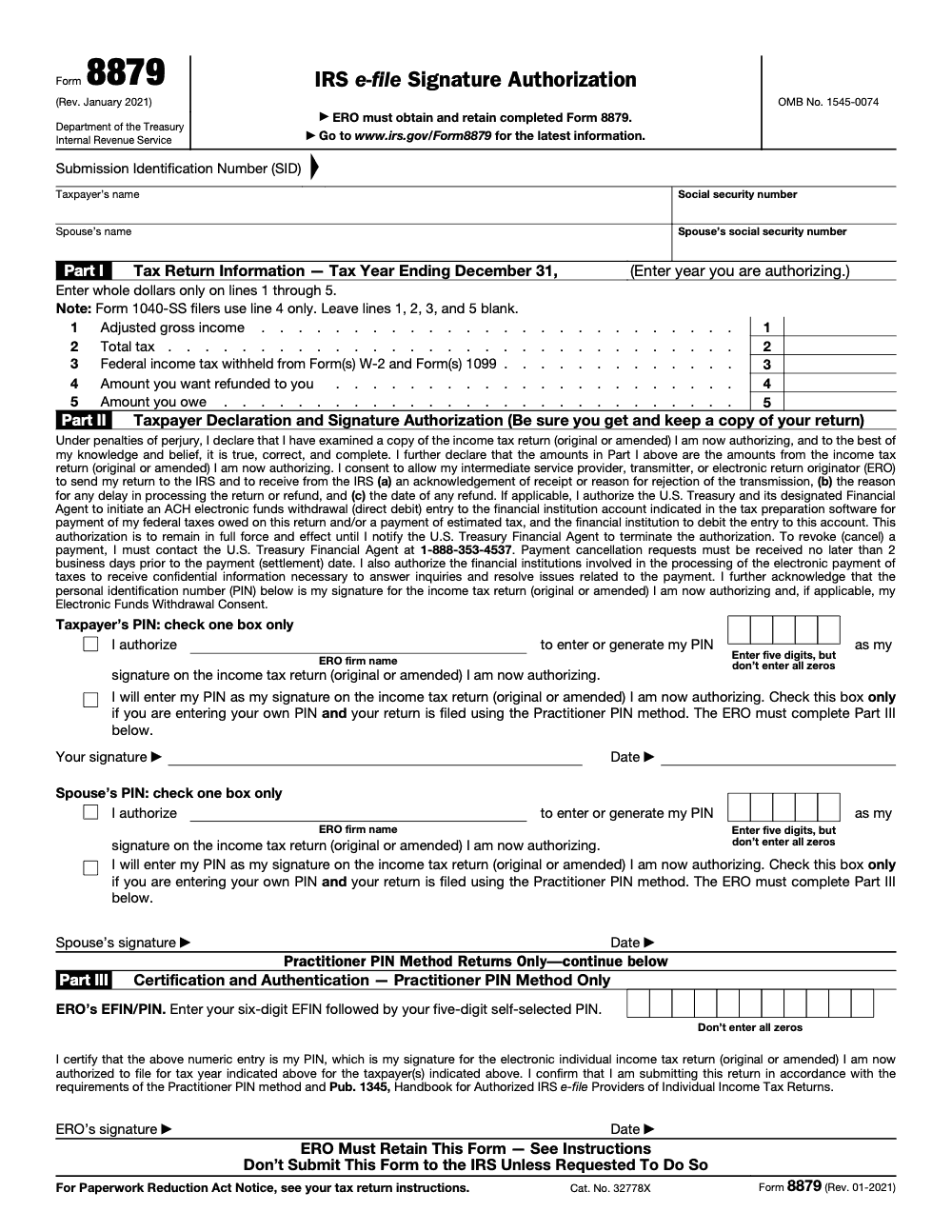
Form 8879 is the IRS e-file Signature Authorization for the 1040 series – it lets an Electronic Return Originator (ERO) apply a five-digit PIN, any digits except all zeros, as the taxpayer's signature on Forms 1040, 1040-SR, 1040-NR, 1040-SS, and 1040-X (per the Form 8879 instructions, Rev. January 2021). Part I restates the return's key figures, including adjusted gross income on Line 1 and total tax on Line 2; the ERO retains the signed form for 3 years from the return due date or IRS received date, whichever is later, and does not file it with the IRS unless the IRS specifically requests it.
Form 8879 is not a tax return, and reading it as one is where firms get the retention rule wrong. It is your client's authorization to apply a five-digit PIN as an electronic signature so an Electronic Return Originator can transmit the 1040-series return. You keep it on file, and you do not mail it to the IRS.
The form covers Forms 1040, 1040-SR, 1040-NR, 1040-SS, and 1040-X, and Part I restates the return's key figures, including adjusted gross income on Line 1 and total tax on Line 2. The PIN can be any digits except all zeros, joint filers each have one, and the ERO retains the signed form for three years from the return due date or IRS received date, whichever is later.
Key Takeaways
- Form 8879 authorizes a five‑digit PIN in place of a handwritten signature on a 1040‑series return (business entities do not use it, they file their own 8879‑series forms such as 8879‑CORP, 8879‑S, or 8879‑PE). It is required when you use the Practitioner PIN method or when the ERO enters or generates the taxpayer PIN.
- The PIN can be any five digits except all zeros. Joint filers each have a PIN.
- With Self‑Select PIN, the taxpayer supplies date of birth and prior‑year AGI or prior‑year PIN. With Practitioner PIN, those items are not required, but a signed Form 8879 is.
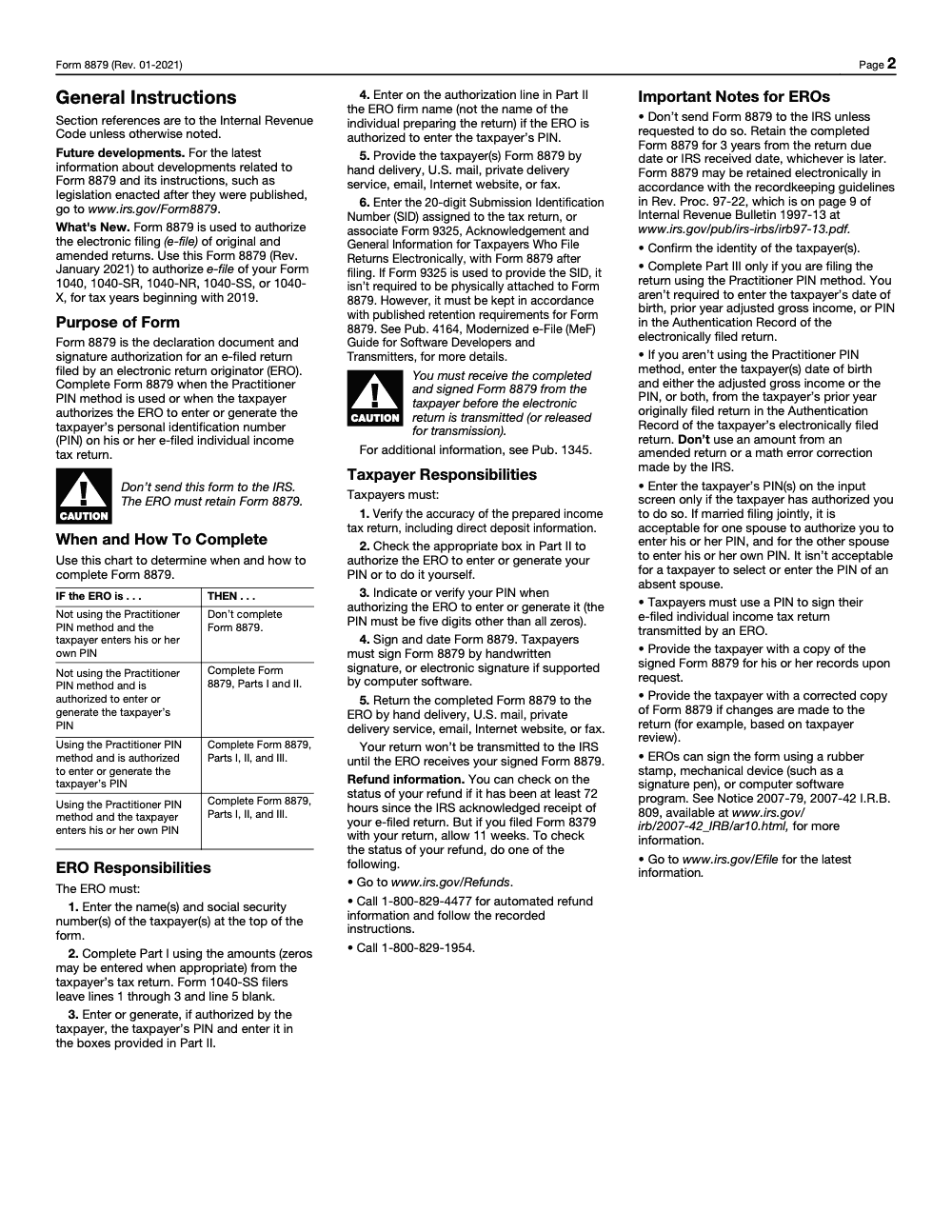
- Do not send Form 8879 to the IRS. Retain it for three years from the return due date or the IRS received date, whichever is later. Electronic imaging that meets Rev. Proc. 97‑22 is acceptable.
- Remote e‑signature is allowed if your software supports identity verification. If the client fails knowledge‑based authentication after three tries, obtain a handwritten signature.
What Form 8879 is and why it matters
Form 8879, IRS e‑file Signature Authorization, is your client’s written consent that lets you, as the Electronic Return Originator, apply a five‑digit PIN to a 1040‑series return and transmit it. You use it when you follow the Practitioner PIN method or when you enter or generate the taxpayer PIN on the return. That consent substitutes for a wet signature and documents that the taxpayer reviewed the return and agreed to its contents.
Here is the line that trips teams up. Form 8879 is required in two very common cases, and not required in another:
- Required, if you use the Practitioner PIN method.
- Required, if you enter or generate the taxpayer’s PIN.
- Not required, if the taxpayer personally enters their own PIN using the Self‑Select PIN method.
The PIN rules are straightforward. The taxpayer’s PIN must be five numbers, anything except all zeros. Your practitioner PIN is separate from the taxpayer’s PIN. For consistency, the IRS encourages an ERO to use the same 11‑digit practitioner PIN during the filing season, with the first six positions equal to the EFIN and the last five any digits except all zeros.
Who this guide serves
- You, the ERO or preparer, who wants zero drama on signature days.
- Your operations lead, who cares about retention rules, remote e‑signature, and audit‑ready documentation.
- Your reviewer or partner, who wants fewer stop‑starts and a reliable way to prove consent.
As a team that has handled thousands of client files, we have learned that getting Form 8879 right is one of the easiest wins you can claim in peak season. The payoff is faster approvals, fewer rejects, and cleaner workpapers that protect you during questions or audits.
How the IRS views electronic signatures on 1040‑series returns
The IRS allows two PIN‑based electronic signature methods for individual returns.
Self‑Select PIN, when the taxpayer signs
- Taxpayer chooses any five digits except all zeros.
- They also enter date of birth and either prior‑year AGI or their prior‑year self‑select PIN for authentication (use the AGI from the originally filed prior‑year return, not an amount from an amended return or an IRS math‑error correction).
- Each spouse on a joint return signs with their own PIN; one taxpayer cannot select or enter the PIN of an absent spouse.
- When the taxpayer enters their own PIN, Form 8879 is generally not required.
Practitioner PIN, when you manage the signing
- You may enter or generate the taxpayer’s five‑digit PIN with the taxpayer’s authorization.
- The taxpayer does not need to provide prior‑year AGI or prior‑year PIN.
- A signed Form 8879 is required to document consent.
Remote e‑signature and identity verification
If you collect Form 8879 electronically, your software must support identity verification for remote transactions. If a taxpayer fails knowledge‑based questions after three attempts, you must obtain a handwritten signature. This keeps your file defensible and aligns with IRS expectations.
The retention rule most firms get wrong
Keep every signed Form 8879 or 8878 for three years from the return due date or the date the IRS received the return, whichever is later. Do not mail the signed form to the IRS unless requested. You may store it electronically if your system meets Rev. Proc. 97‑22 for accurate imaging and legibility.
That three‑year clock matters during firm migrations, platform changes, or offboarding staff. If you centralize your retention policy and standardize filenames, reviewers will spend less time hunting for proof of consent and more time focusing on quality.
Step‑by‑step, how to complete Form 8879 without rework
Here is the same checklist our team uses during peak weeks. It is simple, fast, and audit‑defensible.
- Pull final figures. Confirm names, SSNs, filing status, AGI, refund or balance due, and tax year match what will be transmitted.
- Confirm the PIN method. Self‑Select means the taxpayer enters their own PIN and provides date of birth and prior‑year AGI or prior‑year PIN. Practitioner PIN means you will enter or generate their PIN and you must have a signed Form 8879.
- Capture identity details. If you are using remote e‑signature, your software should perform identity verification. If the taxpayer cannot pass the knowledge‑based check in three tries, switch to a handwritten signature.
- Record the taxpayer’s five‑digit PIN. Remind clients that any five digits are fine except all zeros. For joint returns, capture both PINs.
- Have the taxpayer sign and date Form 8879. Paper or compliant e‑signature is acceptable. Do not transmit until you have the signed authorization that shows the intended PIN.
- Enter your practitioner PIN and complete required authentication fields in your software.
- Store the signed Form 8879 in your DMS. Use a standard naming pattern and ensure the image shows a clear signature and date. Retain for three years per the IRS rule.
- Transmit and monitor acknowledgments. If the return rejects, clear the error and retransmit. Keep your Form 8879 with the final file.
Self‑Select PIN vs Practitioner PIN, side by side
The short version
- Self‑Select PIN is the taxpayer’s do‑it‑yourself signature method. It requires DOB and prior‑year AGI or prior‑year PIN for identity verification. Form 8879 is generally not required when the taxpayer enters the PIN themselves.
- Practitioner PIN is your managed signature method. You enter or generate the taxpayer’s PIN with their consent. A signed Form 8879 is required and prior‑year AGI is not.
Detailed comparison table
| Item | Self‑Select PIN | Practitioner PIN |
| Who enters the taxpayer PIN | Taxpayer | ERO enters or generates |
| Five‑digit PIN rule | Any five digits, not all zeros | Any five digits, not all zeros |
| Prior‑year AGI or prior‑year PIN required | Yes | No |
| Form 8879 required | Generally no, because taxpayer enters their own PIN | Yes, to document authorization |
| Joint return | Each spouse uses a separate PIN | Each spouse authorizes PINs on Form 8879 |
| Where to keep the form | Keep a copy for your records if generated | ERO must retain for three years |
| Send to IRS | No | No |
Sources for the table details: IRS Topic No. 255 and About Form 8879 pages.
Form 8878 vs Form 8879, when to use each
Use Form 8878 to authorize a PIN on an extension request, like Form 4868 or 2350. Use Form 8879 to authorize a PIN on the actual 1040‑series return. You keep both forms on file, not with the IRS, and you retain them for three years from the return due date or IRS received date, whichever is later.
A practical example
- March: Your client wants an extension and agrees to an electronic funds withdrawal. They sign Form 8878 to allow you to enter a PIN on Form 4868.
- April or later: When the return is complete, they review the finished 1040 and sign Form 8879 so you can enter the five‑digit PIN and e‑file. You store both forms with the engagement file for the required retention window.
Identity protection PINs and how they interact with 8879
If your client has an IP PIN, they must enter the six‑digit IP PIN when prompted. For Self‑Select, the IP PIN replaces the need to provide prior‑year AGI or prior‑year PIN. For Practitioner PIN, you still need a signed Form 8879, and the IP PIN must be correct to avoid rejection. Treat the IP PIN as highly confidential and only request it at signature time.
What to print, what to store, and what not to send
Some software prints Form 8879 only when you indicate that the ERO entered the taxpayer PIN or when you select Practitioner PIN. If you use Self‑Select and the taxpayer enters their own PIN, 8879 may not print at all, which is fine because it is not required in that case. Regardless of printing behavior, your duty is to retain signed Forms 8879 and 8878, paper or imaged, for three years and to provide a copy to the taxpayer upon request. Do not send these forms to the IRS unless the IRS asks.
Common mistakes that cause delays, and how you can avoid them
Most 8879 delays trace back to the same handful of process gaps, not to anything complicated about the form itself. Here are the ones my team flags most often, with the fix we bake into the SOP.
FAQ, straight answers for fast decisions
What is Form 8879 used for?
It authorizes you, the ERO, to apply a five‑digit PIN as the taxpayer’s electronic signature on a 1040‑series return and to transmit it. It is required with Practitioner PIN or when you enter or generate the taxpayer’s PIN.
What is the difference between Form 1040 and Form 8879?
Form 1040 is the tax return. Form 8879 is the signature authorization that documents consent to e‑file using a five‑digit PIN. Keep 8879 on file, do not send it to the IRS unless asked.
Can I use Form 8879 as proof of income?
No. It proves consent to e‑file, not income. If a lender asks for income proof, provide pay stubs, W‑2s, the actual 1040, or an IRS transcript.
Do I have to print and mail Form 8879 to the IRS?
No. You retain it for three years. You may image and store it electronically if your system meets Rev. Proc. 97‑22.
When is Form 8878 used instead?
Use 8878 to authorize a PIN on an extension request like Form 4868 or 2350. Use 8879 for the finalized individual return.
Operational tips that make 8879 painless
- Standardize filenames, for example, “TY2025_8879_LastFirst_SSN4_Date.pdf.”
- Build a same‑day review window so a senior confirms names, SSNs, and dollar amounts match the e‑file.
- Use templated emails with plain instructions, for example, “Choose any five digits except all zeros.”
- Log acknowledgment records and keep them alongside the 8879 image for a complete trail, especially useful if the IRS questions whether the return was signed and accepted.
Where Accountably fits, when it actually helps
If your firm is drowning in review loops or struggling to collect and retain 8879s at scale, the problem is usually process, not people. This is where disciplined delivery helps. Accountably integrates trained offshore teams into your workflow with SOPs for signature collection, identity checks, naming rules, and retention so partners spend less time chasing forms and more time on client work. We do this inside your systems, with clear SLAs and layered QC for review protection.
Compliance note and dating
This guide reflects IRS guidance reviewed on December 23, 2025. For the current filing season rules that apply to 2024 returns filed in 2025 and 2025 returns filed in 2026, always confirm details on IRS.gov before you transmit. Key sources include the About Form 8879 page, Topic No. 255, and the IRS e‑signature FAQs and IRM retention instructions.
Simple call to action
If you want our checklist, SOP template, and sample client email for Form 8879 collection, download the kit or talk to our team. We are happy to share what works, so you can get back to advising clients instead of chasing signatures.
Reusable Checklists
These are copy-paste ready for your firm SOP. Drop them into your engagement workflow and check items off as you go.
Signature-day checklist
- Confirm names, SSNs, filing status, and tax year match the return being transmitted.
- Confirm the PIN method: Self-Select or Practitioner PIN.
- Verify Part I figures, AGI on Line 1, total tax on Line 2, and the refund on Line 4 or balance due on Line 5, against the final return.
- Collect a five-digit PIN that is not all zeros, and capture both PINs on a joint return.
- For remote e-signature, run identity verification, and after three failed knowledge-based attempts switch to a handwritten signature.
- Have the taxpayer sign and date the form before you transmit.
- Enter your 11-digit ERO EFIN and PIN combination where required.
Retention and storage checklist
- Save the signed form with a standard filename, for example TY2025_8879_LastFirst.pdf.
- Confirm the image is legible and meets Rev. Proc. 97-22 if stored electronically.
- Record the 20-digit Submission Identification Number, or associate Form 9325, with the file.
- Set retention to three years from the return due date or IRS received date, whichever is later.
- Do not mail the form to the IRS, and release it only on a specific IRS request.
- Provide the taxpayer a copy of the signed form on request.
PIN-method selection checklist
- Practitioner PIN: complete Parts I, II, and III; prior-year AGI is not required.
- Self-Select with an ERO-entered PIN: complete Parts I and II, and leave Part III blank.
- Self-Select with a taxpayer-entered PIN: Form 8879 is generally not required.
- For Self-Select authentication, use the prior-year AGI from the originally filed return, not an amended or math-error-corrected amount.
- Form 1040-SS filers: complete Line 4 only, and leave Lines 1, 2, 3, and 5 blank.
- Re-issue a corrected Form 8879 if the return changes after signing.
Keep 8879 Season From Stalling
Form 8879 is rarely the hard part of a return, yet it is one of the most common reasons a finished 1040 sits unfiled during the April crunch. The return will not transmit until you hold the signed authorization, so every unreturned signature becomes a stalled e-file in the busiest weeks of the season. IRS Publication 1345 sets the Authorized e-file Provider duties that make this signature a hard gate, not a formality.
The fix is to treat signature collection as a tracked production step, handled with the same rigor as preparation and review, rather than an afterthought left to whoever is free. When the workflow makes the signed 8879 a visible status, reviewers stop chasing forms and start clearing acknowledgments.
- Standardize the Part I check so AGI on Line 1, total tax on Line 2, and the refund on Line 4 or balance due on Line 5 are confirmed against the return before the form goes out.
- Lock transmission behind a "signed 8879 received" flag so nothing releases early.
- Default to the Practitioner PIN method where it fits, since it skips prior-year AGI authentication and cuts back-and-forth with the client.
- Run remote e-signature with identity verification, and route any failed knowledge-based check to a handwritten signature path.
- Apply one retention rule, three years from the return due date or IRS received date, whichever is later, with images that meet Rev. Proc. 97-22.
That is the discipline Accountably builds into a firm's workflow: documented SOPs for signature collection, identity checks, file naming, and retention, run by trained offshore teams with layered review. See how it maps to your engagements on our tax outsourcing services page.
FAQs
It authorizes you, the ERO, to apply a five‑digit PIN as the taxpayer’s electronic signature on a 1040‑series return and to transmit it. It is required with Practitioner PIN or when you enter or generate the taxpayer’s PIN.
Form 1040 is the tax return. Form 8879 is the signature authorization that documents consent to e‑file using a five‑digit PIN. Keep 8879 on file, do not send it to the IRS unless asked.
No. It proves consent to e‑file, not income. If a lender asks for income proof, provide pay stubs, W‑2s, the actual 1040, or an IRS transcript.
No. You retain it for three years. You may image and store it electronically if your system meets Rev. Proc. 97‑22.
Use 8878 to authorize a PIN on an extension request like Form 4868 or 2350. Use 8879 for the finalized individual return.
Other forms this guide names
Summarize this article with AI
About this guide
Accountably helps US CPA, EA, and accounting firms hire trained accountants and tax preparers in India.
About us Reviewed byJugal Thacker, CPAFounder and CEO at Accountably
A Washington-licensed CPA with 7+ years inside US firms – PwC, a real-estate tax practice, then a full-service firm, rising from reviewer to manager to advisory. This article was reviewed against current IRS guidance for the 2025 tax year and updated for filers preparing late returns, amendments, and 2026 estimates.
View profile →How we research, review, and update this guide
Every Accountably guide is researched against primary IRS sources, reviewed by a U.S. CPA, and refreshed as guidance evolves. Read our Editorial Guidelines to see how we source, fact-check, and update our content.