
Summarize this article with AI
In Brief
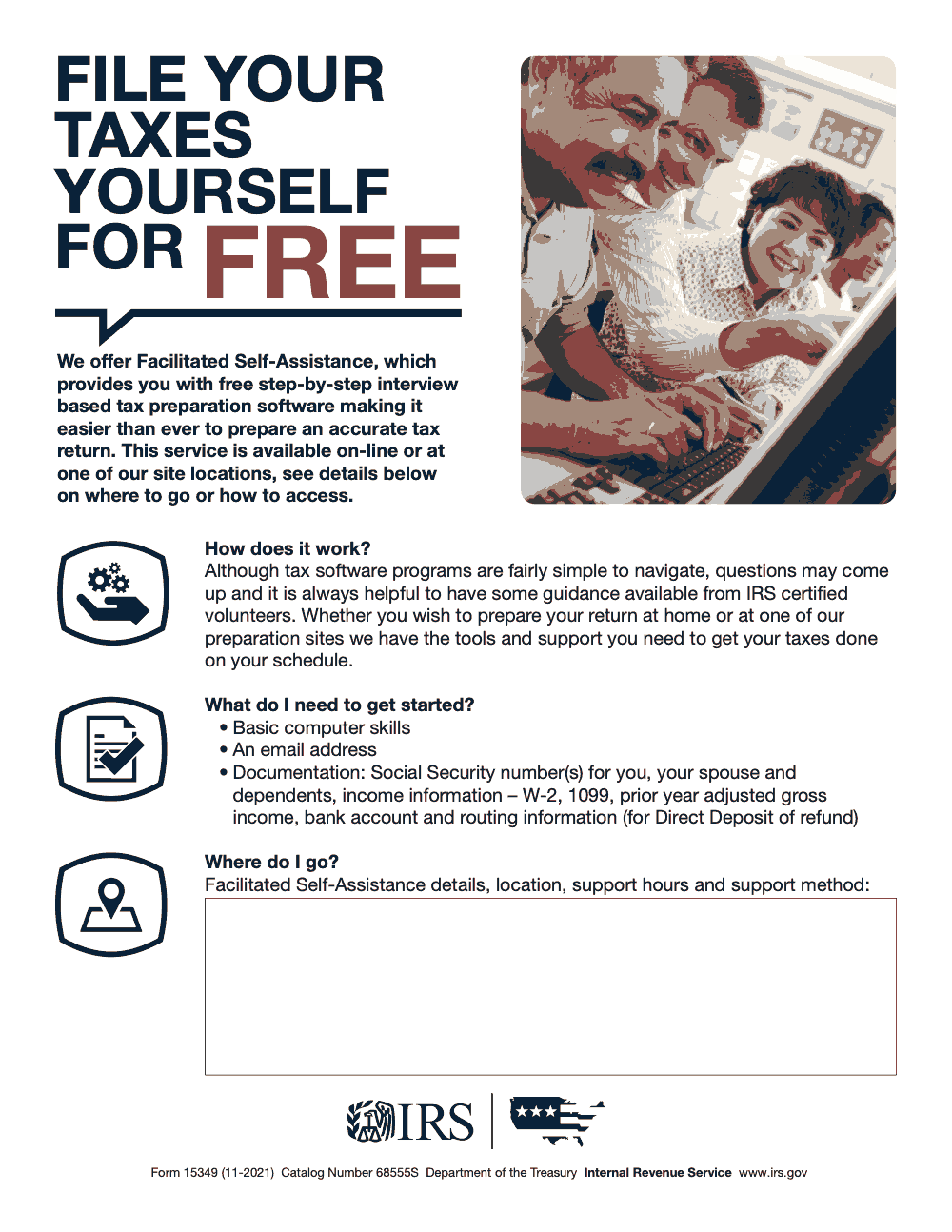
Form 15349 is a one-page IRS flyer promoting Facilitated Self-Assistance (FSA) – a free, software-guided tax preparation service offered online from home or at an IRS volunteer site (per IRS Form 15349, Catalog Number 68555S, revised November 2021). Taxpayers do not fill out Form 15349 or mail it in; they use it to find an FSA access point and then self-prepare with support from IRS-certified volunteers. Before starting, gather basic computer skills, an email address, Social Security numbers for everyone on the return, current-year W-2s and 1099s, prior-year adjusted gross income, and bank account and routing numbers for any direct-deposit refund.
Work an FSA intake table for an afternoon and you learn that the slowest part is never Form 15349 itself. It is a one-page flyer, not a return. The delay is the taxpayer who shows up with a current-year W-2 but no prior-year AGI, no email address they can log into from the site, or a return that plainly outgrew a self-prep tool. The flyer is easy; making sure the person in front of you has what it asks for is the work.
Form 15349 promotes Facilitated Self-Assistance, a $0 service offered through IRS volunteer programs, where the taxpayer self-prepares with interview-based software and IRS-certified volunteers on hand for questions. The flyer carries Catalog Number 68555S and revision date 11-2021. One thing the SOP should catch: IRS sites must fill in the blank Where do I go? block with their own address, hours, and support method before handing it out.
Key Takeaways
- Form 15349 is a one-page IRS marketing flyer – not a tax return – promoting the Facilitated Self-Assistance (FSA) free tax-preparation program. Taxpayers do not fill it out or mail it in.
- Who uses it: IRS volunteer sites and partner organizations distribute Form 15349 to taxpayers who want to self-prepare a federal return for free, either online from home or at an IRS volunteer site.
- Cost: Facilitated Self-Assistance is a $0 (free) service offered through IRS volunteer programs (VITA/TCE). The flyer carries Catalog Number 68555S and revision date 11-2021.
- FSA vs. VITA/TCE: With FSA, the taxpayer self-prepares using interview-based software with IRS-certified volunteers available for guidance – not the same as full volunteer return preparation under traditional VITA or TCE.
- What to bring: Before starting an FSA return, gather basic computer skills, an email address, Social Security numbers for you/spouse/dependents, current-year W-2s and 1099s, prior-year adjusted gross income, and bank account and routing numbers for direct-deposit refunds.
- SOP tip: IRS sites must fill in the "Where do I go?" block on Form 15349 with their own address, support hours, and support method – the flyer ships with that block intentionally blank for local customization.
What Form 15349 Is and How It Is Used
Form 15349, titled "File Your Taxes Yourself for Free (Facilitated Self-Assistance Flyer)," is a one-page IRS promotional flyer (Catalog Number 68555S, revision 11-2021). It advertises the IRS Facilitated Self-Assistance (FSA) free tax-preparation program, which provides taxpayers with step-by-step interview-based software for self-prepared returns. The flyer is not a tax form; it has no taxpayer fields, signature line, or IRS submission address.
The flyer is distributed in two ways. IRS volunteer sites and partner organizations hand it to walk-in taxpayers to advertise on-site FSA access. The same flyer is also used to promote the at-home, online version of FSA. The form contains a customizable "Where do I go?" block that the issuing site fills in with its own address, support hours, and support method before distribution.
From my side of the desk, Form 15349 is not paperwork – it is a triage tool. When a taxpayer is handed the flyer at an IRS site or partner location, the work is helping them confirm the FSA prerequisites (basic computer skills, an email address, the documentation list printed on the flyer) and then routing them either to an on-site PC or to the at-home online version of FSA. Taxpayers do not fill the flyer out and do not send it anywhere.
How FSA Differs From VITA and TCE
Form 15349 promotes Facilitated Self-Assistance, which is the self-prep lane of the IRS volunteer program. Traditional VITA and TCE are the volunteer-prepared lanes – the taxpayer hands over their documents and a certified volunteer prepares the return. With FSA the taxpayer prepares the return using interview-based software, and IRS-certified volunteers are available to answer questions during preparation.
When the Flyer Is Distributed
Form 15349 is distributed throughout filing season at IRS volunteer sites, community partner locations, and outreach events. The IRS has not issued a newer revision since November 2021; the same 11-2021 version is still in circulation. Before reprinting or stocking, the issuing site fills in the “Where do I go?” block with its own address, support hours, and support method so taxpayers see a single, actionable contact.
What Is Printed on Form 15349
Taxpayers do not complete Form 15349. The flyer is one page with no taxpayer fields, no signature line, no calculation boxes, and no IRS submission address. It contains promotional copy about FSA, a "What do I need to get started?" prerequisites list (basic computer skills, an email address, and the documentation listed below), and a blank "Where do I go?" block that the issuing IRS site fills in.
| Element on the Flyer | What It Contains | Who Fills It In |
|---|---|---|
| "File Your Taxes Yourself for Free" headline | Promotional headline announcing the free FSA service | Pre-printed by the IRS – not editable |
| FSA description block | Explains that FSA provides free step-by-step interview-based software and is available online or at IRS volunteer sites | Pre-printed by the IRS – not editable |
| "What do I need to get started?" list | Three prerequisites: basic computer skills, an email address, and documentation (SSNs, W-2 / 1099 income docs, prior-year AGI, bank account and routing details for direct-deposit refund) | Pre-printed by the IRS – not editable |
| "Where do I go?" block | Blank box for the FSA location, support hours, and support method | The issuing IRS site or partner organization fills this in before distribution |
| Footer (Catalog Number 68555S, revision 11-2021) | IRS identifying information confirming the flyer version | Pre-printed by the IRS – not editable |
What the Taxpayer Brings to the Site
Because Form 15349 is a flyer, the relevant “documentation” is what the taxpayer brings to prepare the actual return in FSA: Social Security numbers for the taxpayer, spouse, and every dependent; current-year W-2 and 1099 income documents; prior-year adjusted gross income for e-file identity verification; and bank account and routing details for direct deposit of any refund. The flyer prints this list under “What do I need to get started?”
Distribution and Timing
Form 15349 is not filed. It is a one-page IRS promotional flyer that IRS sites and partner organizations print and distribute to taxpayers throughout filing season to advertise the Facilitated Self-Assistance (FSA) free tax-preparation program. There is no statutory deadline because no submission is required.
| Scenario | Recommended Timing | Key Risk of Delay |
|---|---|---|
| Stocking the flyer at a new volunteer site | Before filing season opens; fill in the “Where do I go?” block first | Taxpayers receive a flyer without a local contact and bounce back asking where to go |
| Reprinting for a new partner organization | As soon as the partnership is confirmed; confirm Catalog Number 68555S and revision 11-2021 are on the footer | Out-of-date copies circulate alongside the current version, creating confusion |
| Handing the flyer to a walk-in taxpayer | At intake, paired with a prerequisite check against the flyer’s document list | Taxpayer sits down at a PC without prior-year AGI and stalls the queue |
Submission Address
Form 15349 has no IRS submission address. The flyer is a marketing piece distributed by IRS volunteer sites and partner organizations – it is never mailed or submitted to the IRS by taxpayers.
Who the Flyer Is For and When It Helps
Form 15349 is a one-page IRS flyer that introduces Facilitated Self-Assistance to taxpayers who could prepare their own federal return for free if pointed to the right place. Understanding the cohorts who get the most out of FSA helps sites distribute the flyer where it lands best.
First-Time Self-Preparers
Taxpayers who would otherwise pay for a basic return but have the prerequisites on the flyer – basic computer skills, an email address, the listed documentation – are the core audience. FSA gives them interview-based software at no cost and IRS-certified volunteers on call when a question comes up.
Taxpayers Returning to Self-Prep
Filers who used a paid preparer in prior years but have a simpler return this year benefit from being handed the flyer at a community partner site or library. The flyer surfaces the at-home online option, which many taxpayers do not realize is part of the IRS volunteer program.
Volunteer Sites and Partner Organizations
Sites that already run traditional VITA or TCE benefit from stocking the flyer for taxpayers who want to prepare their own return with light support, rather than waiting in the volunteer-prepared queue. The flyer’s “Where do I go?” block lets each site customize the location, support hours, and support method.
Taxpayers Who Need Direct Deposit Guidance
The flyer lists bank account and routing information as a required item specifically so any refund can be issued by direct deposit. Sites that distribute the flyer alongside a short direct-deposit explainer reduce the number of taxpayers who finish a return only to realize they cannot complete the refund step.
What Happens After the Flyer Is Handed Out
Form 15349 is not filed by the taxpayer and is not mailed anywhere. The flyer is a starting point: it tells the taxpayer that a free, software-guided tax preparation option exists and where to access it.
The Taxpayer Self-Prepares the Return
After receiving the flyer, the taxpayer prepares their own federal return using the FSA interview-based software. The flyer itself does not record any of that work – it is simply the printed introduction to the program.
IRS-Certified Volunteers Provide Guidance
When questions come up during preparation, IRS-certified volunteers are available to help. This is the “facilitated” part of Facilitated Self-Assistance – the taxpayer is in the driver’s seat, but support is on call.
How the Flyer Is Used at the Site
After receiving a Form 15349 flyer, the taxpayer uses it to identify the FSA access point printed in the "Where do I go?" block (a site address, support hours, and support method, or a URL for the online FSA option). The taxpayer then self-prepares the return using the FSA software, with IRS-certified volunteers available to provide guidance during preparation.
Routing Taxpayers Whose Returns Exceed FSA
Not every taxpayer who picks up Form 15349 belongs in FSA. Some returns exceed what an interview-based self-prep tool is built to handle, and the right move is to route those taxpayers out of the FSA queue rather than push them through it.
When the Return Exceeds Self-Prep
Multi-state returns, Schedule C with depreciation, multiple K-1s, and prior-year unresolved IRS notices are signals that FSA is not the right fit. The flyer’s prerequisite list (computer skills, email, SSNs, prior-year AGI, bank routing details) is the real triage tool – the flyer itself does not gate access.
Helping Taxpayers Who Outgrow FSA
Quick rule you can copy into your SOP: if a taxpayer hands you a Form 15349 flyer and the return turns out to exceed FSA self-prep (multi-state, Schedule C with depreciation, multiple K-1s, or prior-year unresolved notices), route them to a paid preparer rather than holding the FSA queue. The flyer itself does not gate access – the prerequisite list (computer skills, email, SSNs, prior-year AGI, bank routing details) is the real triage tool.
Stocking Multiple Outreach Channels
Sites that distribute Form 15349 effectively place it at intake desks, in waiting areas, at community partner locations (libraries, community centers, senior centers), and at outreach events run during filing season. The flyer is the same template nationwide, so the local customization in the “Where do I go?” block carries the actionable detail.
What Form 15349 Is Not
One of the most common questions at intake is whether the taxpayer needs to fill out or sign the flyer. They do not. Naming this clearly upfront prevents the most common slowdown at the desk.
Form 15349 Is Never Filed by Taxpayers
Form 15349 is a promotional flyer – not a return, election, or notice. Taxpayers never fill it out or submit it in any context. The flyer has no signature line, no calculation fields, and no IRS submission address. IRS volunteer sites and partner organizations print it and hand it out to advertise the FSA free tax-preparation program.
It Is Not a Return or an Election
The flyer has no taxpayer fields, no signature line, no calculation boxes, and no IRS submission address. It is one page of promotional copy plus a customizable “Where do I go?” block. Taxpayers do not complete it, sign it, or send it anywhere.
It Is Not a Substitute for the Actual Return
From my side of the desk, the most useful framing at intake is: the flyer points the taxpayer to the place where they will prepare their return for free. The actual return is prepared in the FSA software using the prerequisites the flyer lists – SSNs, current-year W-2s and 1099s, prior-year AGI, and bank routing details for direct deposit.
Common Mistakes That Slow Things Down
Most slowdowns I see around Form 15349 do not come from the flyer itself – they come from assumptions about what it is and what it asks of the taxpayer. Five recur often enough that they belong in any site SOP or client-facing brief.
Practical Checklists You Can Reuse
These are copy-paste ready for an FSA site SOP, a partner playbook, or a client intake folder. Each list is short on purpose so a volunteer or office manager can run it without losing time.
FSA taxpayer document packet
- Social Security numbers for the taxpayer, spouse, and every dependent on the return.
- Current-year income documents: W-2, 1099-NEC, 1099-MISC, 1099-INT, 1099-DIV, and any other 1099 series the taxpayer received.
- Prior-year adjusted gross income from the prior-year Form 1040 (used for e-file identity verification).
- Bank account and routing numbers for any refund the taxpayer wants by direct deposit.
- An email address the taxpayer can access during the session for account verification.
FSA readiness check before starting the return
- Confirm the taxpayer has basic computer skills sufficient to navigate an interview-based prep tool.
- Confirm an active email address and that the taxpayer can log in to it from the prep location.
- Confirm the document packet above is complete; pause if prior-year AGI is missing.
- Confirm whether the taxpayer wants to prep at home or on site, and route to the right access method.
- Surface the volunteer-support option so the taxpayer knows how to ask for guidance during prep.
Issuing site or partner customization
- Fill the Where do I go? block with the site's physical address or the URL for the online FSA option.
- List the site's support hours and the exact support method: in-person, phone, chat, or scheduled call.
- Confirm the flyer copy still references Catalog Number 68555S and revision date 11-2021 before reprinting.
- Stock the flyer at intake, in waiting areas, and at any community-partner location that refers FSA-eligible taxpayers.
- Train front-desk staff to differentiate FSA (self-prep with support) from traditional VITA or TCE (volunteer-prepared) at first contact.
Keep 15349 Season From Stalling
Filing-season delivery does not stall on Form 15349 itself – it stalls on the surrounding workload. Volunteer sites and partner organizations that promote Facilitated Self-Assistance still juggle limited PC stations, peak intake on the Saturdays before April 15, and a steady stream of taxpayers who outgrow self-prep mid-return and need an actual preparer. The flyer (per IRS Form 15349, Catalog Number 68555S, revision 11-2021) lists a $0 service cost, but the cost shows up elsewhere when intake throughput, volunteer hours, and overflow routing are not planned in advance.
The fix is not to push more taxpayers through the same desk. It is to separate FSA-eligible self-prep traffic from returns that should not be in FSA in the first place, and to make sure each lane has a clean handoff.
- Triage at intake against the FSA prerequisite list – basic computer skills, email, SSNs, prior-year AGI, and bank routing details – and pull anyone short of those items into a documents-needed queue before they touch a PC.
- Pre-fill the Where do I go? block on every flyer that leaves the site, so referred taxpayers do not bounce back asking where to go.
- Tag returns that exceed the FSA self-prep envelope (multi-state, Schedule C with depreciation, multiple K-1s, or prior-year unresolved notices) and route them to a paid preparer track instead of holding the volunteer queue.
- Reconcile the volunteer-support load weekly during peak weeks so questions are answered while the taxpayer is still in front of the screen, not after they have left.
- Capture taxpayers who started in FSA and dropped off into a follow-up list, so they get one outreach before the April 15 deadline rather than a silent miss.
For sites and firms that want overflow returns handled to U.S. standards without growing local headcount, Accountably runs structured offshore preparation and review on a documented SOP with U.S.-led oversight on every return. The detail lives on the taxation services page.
FAQs
Form 15349 is a one-page IRS promotional flyer (Catalog Number 68555S, revision 11-2021) advertising the Facilitated Self-Assistance (FSA) free tax-preparation program. It is not a tax form taxpayers complete or mail in – IRS volunteer sites and partner organizations distribute it to promote on-site and at-home FSA access.
No. Form 15349 promotes Facilitated Self-Assistance (FSA), where the taxpayer self-prepares the return using interview-based software with IRS-certified volunteers available for guidance. Traditional VITA and TCE are the volunteer-prepared lanes, where a certified volunteer prepares the return for the taxpayer.
Yes. Per Form 15349, Facilitated Self-Assistance is explicitly available both online from home and at IRS volunteer site locations. Both modes are free, and IRS-certified volunteers are available to provide guidance during preparation.
No. Form 15349 is a one-page IRS promotional flyer with no taxpayer signature line, calculation fields, or IRS submission address. IRS volunteer sites and partner organizations distribute it to advertise the Facilitated Self-Assistance (FSA) free tax-preparation program; taxpayers use the flyer to find an FSA access point, then self-prepare their return using the FSA software.
Per Form 15349, the prerequisites are: basic computer skills, an email address, and documentation including Social Security numbers for the taxpayer, spouse, and dependents, current-year income documents (W-2 and 1099), prior-year adjusted gross income, and bank account and routing information for direct deposit of any refund.
Other forms this guide names
Summarize this article with AI
About this guide
Accountably helps US CPA, EA, and accounting firms hire trained accountants and tax preparers in India.
About us Reviewed byJugal Thacker, CPAFounder and CEO at Accountably
A US-licensed CPA with 7+ years inside US firms – PwC, a real-estate tax practice, then a full-service firm, rising from reviewer to manager to advisory. This article was reviewed against current IRS guidance for the 2025 tax year and updated for filers preparing late returns, amendments, and 2026 estimates.
View profile →How we research, review, and update this guide
Every Accountably guide is researched against primary IRS sources, reviewed by a U.S. CPA, and refreshed as guidance evolves. Read our Editorial Guidelines to see how we source, fact-check, and update our content.




