
Summarize this article with AI
In Brief
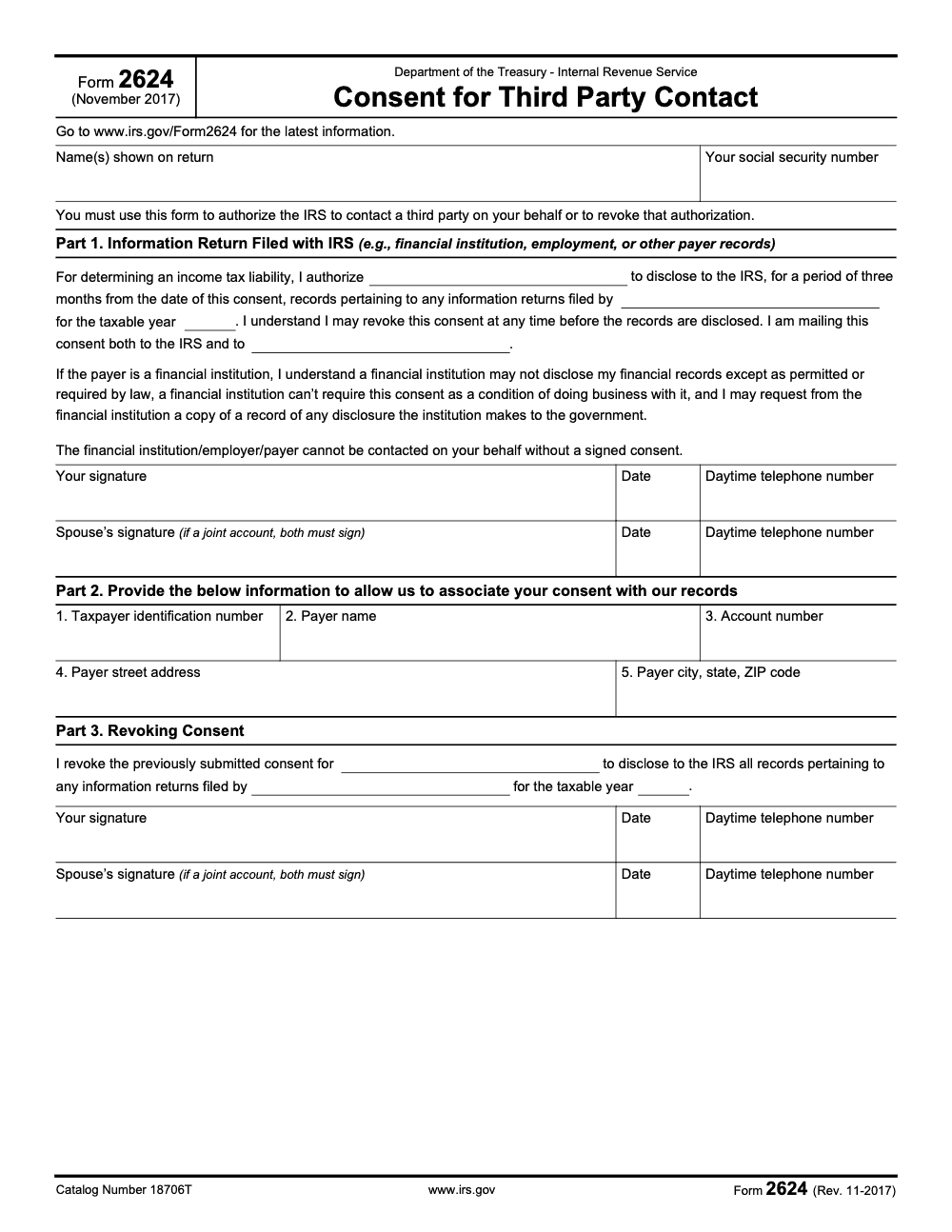
Form 2624, Consent for Third Party Contact, is the signed authorization a taxpayer uses to let the IRS contact a financial institution, employer, or other payer about an information return tied to an income tax liability. The November 2017 revision (Catalog Number 18706T) is still the current version for the 2025 cycle; the consent runs for three months from the signature date, the form is mailed to both the IRS office on the most recent notice and the named third party, and on joint items both spouses must sign Part 1 (per the Form 2624 instructions on IRS.gov).
A client opens an IRS notice about a 1099 or W-2 they cannot reconcile, calls the payer twice, and gets nowhere. The first question is always the same: did you ask the bank, employer, or payer directly for a corrected statement first? Form 2624 is built for the case where the taxpayer cannot get the information on their own, not as a shortcut around a payer who simply has not been asked.
Form 2624, Consent for Third Party Contact, is the signed authorization that lets the IRS reach a financial institution, employer, or other payer about an information return. It is not representation and grants no decision authority. The consent runs for three months from the signature date, both spouses must sign on joint items, and you mail it to the IRS office shown on your notice.
Key Takeaways
- Use Form 2624 to let the IRS contact a named third party about a specific information return for a stated tax year. It is not representation, and it does not grant decision authority. That is Form 2848. Disclosure without representation is Form 8821.
- The consent on Form 2624 is limited to a short window, typically 3 months from the date you sign, and both spouses must sign if the information return is joint. Mail it to the IRS office shown on your notice. Keep copies.
- IRS operations still have their own internal third‑party contact procedures and may document taxpayer authorizations on Form 12180. That is separate from your publicly available Form 2624.
- Always download the latest PDF from IRS.gov, verify the revision date in the footer, and avoid third‑party mirrors. As of February 17, 2026, the current revision on IRS.gov is “Rev. 11‑2017.”
What Form 2624 Is, And When You Should Use It
Form 2624, Consent for Third Party Contact, allows the IRS to speak with a specific third party about an information return that affects your income tax liability. Think W‑2, 1099‑INT, 1099‑K, or similar payer‑filed statements that feed the IRS matching systems. You name the institution or employer, specify the tax year, sign, and the IRS can follow up directly with that party inside the consent window. The form is concise by design, which is a blessing when a notice clock is ticking.
Situations where Form 2624 helps most:
- A payer refuses or delays issuing a corrected W‑2 or 1099.
- You are mid‑exam or AUR notice response and need the IRS to confirm what the payer actually filed.
- You tried to resolve it with the payer and hit a wall, and time matters (per the IRS instructions, you must first request a corrected income statement or written verification from the payer; Form 2624 is only available once you cannot get that information directly).
The IRS treats Form 2624 seriously in its Automated Underreporter workflows, which is why sending a clean, complete form can move your case faster.
Form 2624 vs 2848 vs 8821 vs 12180
You have four very different tools in play. Use the right one.
- Form 2624, Consent for Third Party Contact, lets the IRS contact a named third party about an information return for a defined period and year. No representation authority.
- Form 2848, Power of Attorney, appoints a representative to act for you before the IRS for specific tax matters and years. It includes authority to receive and inspect your confidential tax information.
- Form 8821, Tax Information Authorization, allows someone to receive your tax information for listed years and matters. It does not allow them to act for you.
- Form 12180, Third‑Party Contact Authorization Form, is an IRS internal document agents can use to record your permission when they will contact a third party. It often appears in the Internal Revenue Manual and is separate from your public filings.
Quick rule of thumb, 2624 is about IRS contact with a specific payer, 2848 is representation, 8821 is disclosure only, and 12180 is internal documentation when IRS staff records your okay to contact a third party.
How To Get The Real Form 2624 From IRS.gov
Always pull the PDF from IRS.gov, then confirm the revision date in the footer. It should read “Form 2624 (Rev. 11‑2017).” The PDF itself tells you to check the IRS page for the latest info. Avoid unofficial mirrors, which can host outdated or altered files.
Quick Download Checklist
| Step | What you do | Why it matters |
| 1 | Search IRS.gov for “Form 2624” | Ensures you land on the official page |
| 2 | Open the PDF and check the footer for the revision date | Confirms you have the current version |
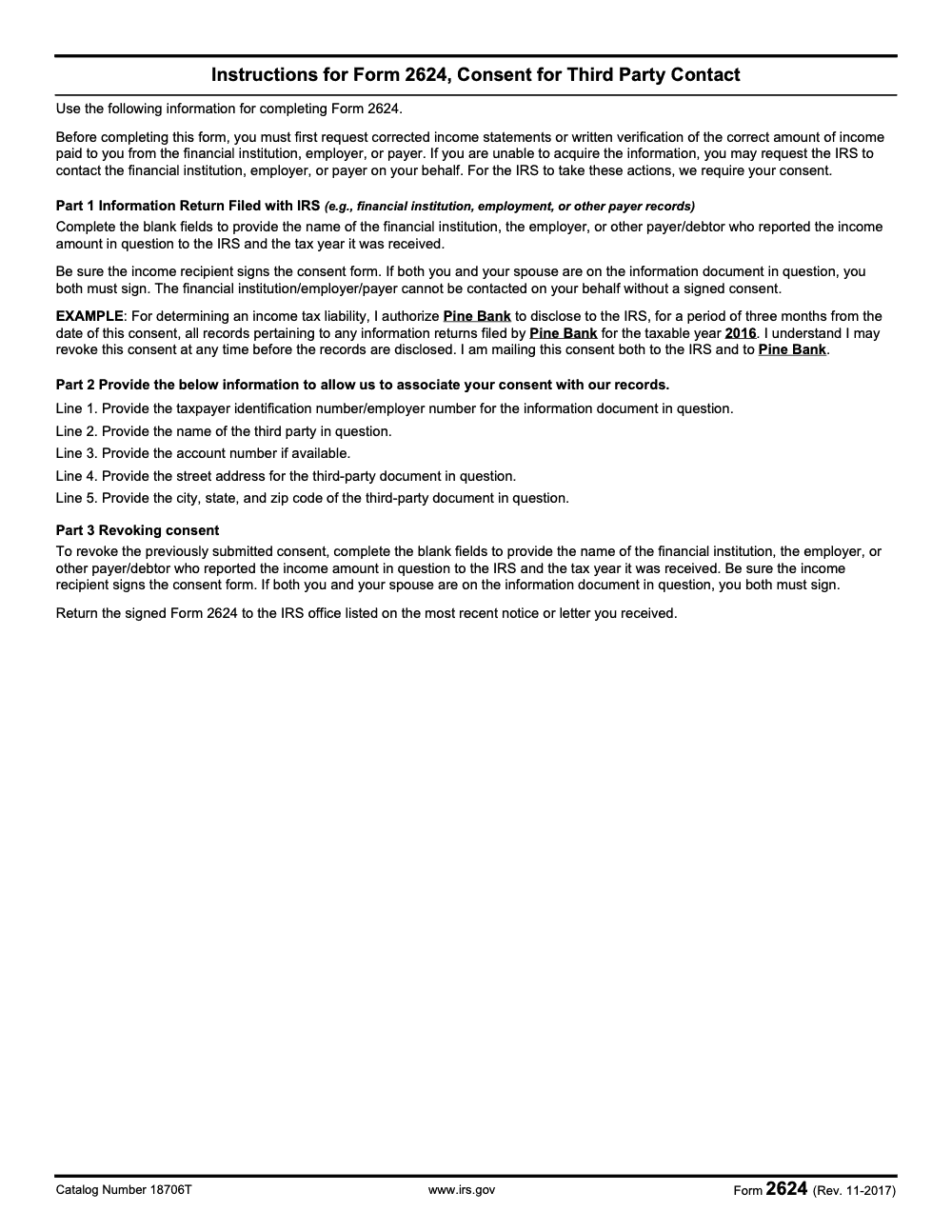
| 3 | Read the short instructions page 2 | Aligns entries with IRS expectations |
| 4 | Print or e‑sign if accepted by your IRS contact | Keeps the timeline moving |
| 5 | Mail or upload to the office on your notice | Routes your consent to the right team |
Step‑By‑Step, Completing Form 2624 Correctly
Form 2624 is one page with three parts, plus a one‑page instruction sheet. Here is the clean sequence.
Header, identify yourself
- Enter your legal name exactly as it appears on your return and your SSN or ITIN. Precision prevents intake delays.
Part I, give consent
- Fill in the financial institution, employer, or other payer, the exact tax year, then sign and date. If the information return is joint, both spouses must sign. The consent typically runs for 3 months from the date you sign. Include a daytime phone. Mail the consent to the IRS and, per the form text, mail a copy to the payer you named.
Part II, help IRS match your case
- Add your TIN, the payer’s legal name, account number if any, and the payer’s full address. This anchors the consent to the right record so the IRS can contact the correct party without guesswork.
Part III, revoke if needed
- If you need to pull back or change consent, complete Part III with the payer name and year, then sign and date (if the original consent was joint, both spouses must sign Part III too). Revocation only works before the third party has released records to the IRS, so move quickly – once the payer has handed records over, revoking will not pull them back. File it with the office on your most recent IRS notice and keep proof of submission.
Where To File, With Or Without A Notice
- If you received a notice, follow the filing instructions and address on that notice. That routes your consent to the exact IRS unit handling your case. Keep copies and use trackable mail or the upload portal if provided.
- If you do not have a notice, call your local IRS office to confirm the correct submission path before you send anything. This small step avoids idle time while a form gets re‑routed.
AUR and priority handling
In the Automated Underreporter environment, responses that include Form 2624 are flagged for priority handling. This is helpful if you are trying to resolve income mismatches quickly as deadlines approach. Labeling your response clearly and including a complete, legible 2624 can reduce back‑and‑forth.
Common Mistakes That Slow Everything Down
Across the Form 2624 requests my team handles each year, the same handful of errors keep showing up. They are all fixable if you build them into the engagement SOP.
How Form 2624 Fits With IRS Third‑Party Contact Rules
The IRS has two parallel ideas that can be confusing at first glance. There are taxpayer authorizations for disclosure or representation, like 2848 and 8821, and there are IRS‑initiated third‑party contacts under section 7602. Your Form 2624 lives in the consent bucket and gives the IRS a narrow, time‑boxed green light to contact a payer about an information return. The Internal Revenue Manual also explains how IRS employees may document your authorization on Form 12180 and that authorizations are not blanket, they are specific to named third parties.
Since the Taxpayer First Act, IRS employees generally must provide advance notice if they plan to contact third parties during a defined period. When you provide written authorization for a specific contact, the IRS does not have to send that advance notice or keep a record of those authorized contacts, which is why your signed consent is important when time is tight.
Practical Workflow, From Dispute To Resolution
Here is a simple path I recommend when a payer‑filed form looks wrong.
- Ask the payer for a correction first
- Request a corrected W‑2 or 1099 in writing. Set a follow‑up date. Keep the emails and letters.
- If the payer stalls, prepare Form 2624
- Fill the header and Part I, then Part II with precise payer details. Copy the payer on your consent. Sign and date. If joint, both sign.
- File the form with the IRS office on your notice
- Add a brief cover note that lists the notice number and explains that you are authorizing third‑party contact for verification. Use trackable mail or the upload portal if available.
- Keep building your file
- If the mismatch persists, you may need to submit Form 4852 or other support during an audit or an amendment. Keep a clean evidence trail until you see the IRS correct the record.
Sanity checks that save you time
- Verify the 3‑month consent window will cover the IRS contact period. If not, plan ahead to re‑sign if needed.
- Confirm that the person you listed at the payer can receive IRS inquiries. Some banks and payroll firms have specific compliance teams.
- If your case involves identity theft or fraud, use the IRS’s identity theft procedures first. That changes handling priorities.
Form 2624, Clean Entry Guide
Use this quick reference before you submit.
Required consent elements
- Legal name and SSN or ITIN, exactly as on IRS records
- Payer name and full address, plus account or reference number if shown
- Specific tax year under review
- Your signature and date, and your spouse’s too if joint
- Daytime phone number
Payer data verification checklist
- Match the payer’s legal name and address to the information return
- Confirm the payer’s TIN if shown on the document
- Copy the account or payroll ID from the return or statement
- Recheck the tax year and make sure it matches the notice
Submission tips
- Include a short cover note referencing your notice number, tax year, and payer name
- Use trackable mail or the approved upload portal
- Keep a scanned copy of the signed form and tracking receipt
Avoid Confusion With Other Authorizations
- The IRS page on authorizations explains what each option does and does not do. If you need someone to act for you, 2848 is your path. If you only want them to see information, 8821 is enough. If you want the IRS to contact a specific payer about an information return, use 2624. These are different tools for different jobs.
Compliance Notes For 2026
- The current published revision of Form 2624 on IRS.gov is November 2017. The PDF footer instructs you to check the form page for the latest information. If the IRS updates this form or its handling rules, follow the newest revision and the instructions on your notice. Date checked, February 17, 2026.
- IRS guidance also explains when agents must give advance notice of planned third‑party contacts and how they can document your authorization internally on Form 12180. That background helps you understand why a clean 2624 can speed up payer verification.
Mini Case Example
A client receives a CP2000 proposing extra income from a 1099‑K they do not recognize. Your team asks the platform for a correction, gets no response, and the reply‑by date approaches. You prepare Form 2624 naming the platform, list the specific tax year, and send the consent to the IRS unit on the notice and to the platform’s compliance address. The IRS contacts the platform, confirms a payer mismatch, and your client’s case closes without an assessment. The keys were a clean 2624, a tight paper trail, and filing it with the right IRS office.
Quick Reference Table
| Topic | Use this form | What it does |
| Let IRS contact a named payer about an information return | Form 2624 | Authorizes IRS to contact a specific third party for a specific year, typically for 3 months from signature |
| Representation before IRS | Form 2848 | Authorizes a representative to act for you on listed matters and years |
| Disclosure only | Form 8821 | Allows someone to receive and view your tax information |
| IRS internal record of your authorization for a contact | Form 12180 | Internal IRS documentation, not a public filing |
Final Checklist Before You Send
- Current IRS PDF, revision verified
- Names and TINs match IRS records
- Payer name, address, and account number copied exactly
- Correct year listed, signatures present, daytime phone included
- Filed to the office on your notice, payer copied, proof of delivery saved
Reusable Checklists
These checklists are copy-paste ready for firm SOPs. Each item is written so a preparer can tick it off without leaving the engagement file.
Pre-send: before the client signs Form 2624
- Confirm the taxpayer first requested a corrected statement or written verification from the payer, and log the date and result.
- Pull the most recent IRS notice and copy the issuing office return address verbatim.
- Confirm whether the underlying information return is joint; if yes, schedule both spouses for the signing meeting.
- Verify the taxpayer identification number, payer name, account number, payer street address, and payer city, state, and ZIP for Part 2.
- Confirm the taxable year for which records are needed and enter it on Part 1.
- Print two stamped copies of Part 1: one for the IRS envelope, one for the third party.
- Calendar the signature date plus three months as the consent expiration trigger.
Part 2 clean entry: the five identifying lines
- Line 1, taxpayer identification number for the information document in question.
- Line 2, payer name (financial institution, employer, or other payer).
- Line 3, account number, if available.
- Line 4, payer street address.
- Line 5, payer city, state, and ZIP code.
- Cross-check every entry against the 1099, W-2, or original notice rather than the client's recollection.
- Spell-check the payer name against the source document; a mismatch with the IRS records will delay routing.
Revocation: stopping consent before disclosure
- Confirm with the IRS office whether records have already been transmitted; revocation only works before disclosure.
- Complete Part 3 with the name of the financial institution, employer, or other payer and the tax year.
- If the underlying item is joint, both spouses must sign Part 3.
- Mail the signed Part 3 to the same IRS office that issued the underlying notice.
- Send a courtesy copy of the revocation to the third party so they know the consent is no longer active.
- Log the revocation in the engagement file with the date and method of mailing.
Keep 2624 Season From Stalling
Form 2624 requests do not arrive on a season. They land on a desk the same week an IRS notice opens an income discrepancy, and they compete with the rest of the engagement workload. Each request involves a payer outreach attempt, joint-signature coordination, two separate mailings, and a three-month consent window that starts the day the client signs (per the Form 2624 instructions on IRS.gov). When any one of those steps slips, the underlying examination stalls and the client calls back.
The fix is a small workflow inside the engagement file, not a bigger form library. Three or four standing rules keep the consent moving even when notices arrive in clusters.
- Build a Form 2624 packet with the prior payer-outreach log, a fresh Part 1 draft, and a copy of the underlying notice, so the signing meeting takes ten minutes instead of forty.
- For joint information returns, calendar both spouses on the same signing slot; one missed signature on Part 1 stops the bank from releasing records.
- Print two stamped copies at signing, one routed to the IRS office on the notice and one to the named payer; track both mailings on the same task line.
- Calendar the signature date plus three months as a review trigger; if the IRS has not contacted the payer by that point, reissue a fresh consent rather than waiting for a return-to-sender.
- Log the original consent and any subsequent Part 3 revocation in the engagement file so the next preparer touching the matter sees the timeline at a glance.
That is the kind of structured workflow Accountably's tax delivery teams run inside the engagement file, so consent requests, the underlying notice, and the original return all move on the same calendar rather than queueing behind each other.
FAQs
It authorizes the IRS to contact a specific third party, like a bank or employer, about information returns that affect your income tax liability for a specified year. It does not let anyone represent you, make decisions for you, or file anything on your behalf. For representation use Form 2848, and for disclosure without representation use Form 8821.
By default the consent period on the form text is 3 months from the date you sign. If the IRS contact will happen later, you can reissue consent. Both spouses must sign for joint items.
No. DD Form 2624 is a Department of Defense document for drug testing chain of custody. It is unrelated to taxes and should not be used for IRS matters.
Yes. The form text tells you to mail the consent to the IRS and to the named payer. This helps the payer route the contact when the IRS reaches out.
Follow the instructions on your notice. Some units provide secure upload options, others require mail. If you do not have a notice, confirm the submission method with your local IRS office before sending.
Other forms this guide names
- Form 2848: Guide to Line 3, Filing, and Rules
- Form 8821: Tax Information Authorization
- Form W‑2: Deadlines, E‑File Rules, Boxes, and W‑2c Corrections
- Form 1099-K: Rules, Thresholds, and State Triggers
About this guide
Accountably helps US CPA, EA, and accounting firms hire trained accountants and tax preparers in India.
About us Reviewed byJugal Thacker, CPAFounder and CEO at Accountably
A Washington-licensed CPA with 7+ years inside US firms – PwC, a real-estate tax practice, then a full-service firm, rising from reviewer to manager to advisory. This article was reviewed against current IRS guidance for the 2025 tax year and updated for filers preparing late returns, amendments, and 2026 estimates.
View profile →How we research, review, and update this guide
Every Accountably guide is researched against primary IRS sources, reviewed by a U.S. CPA, and refreshed as guidance evolves. Read our Editorial Guidelines to see how we source, fact-check, and update our content.




