
Summarize this article with AI
In Brief
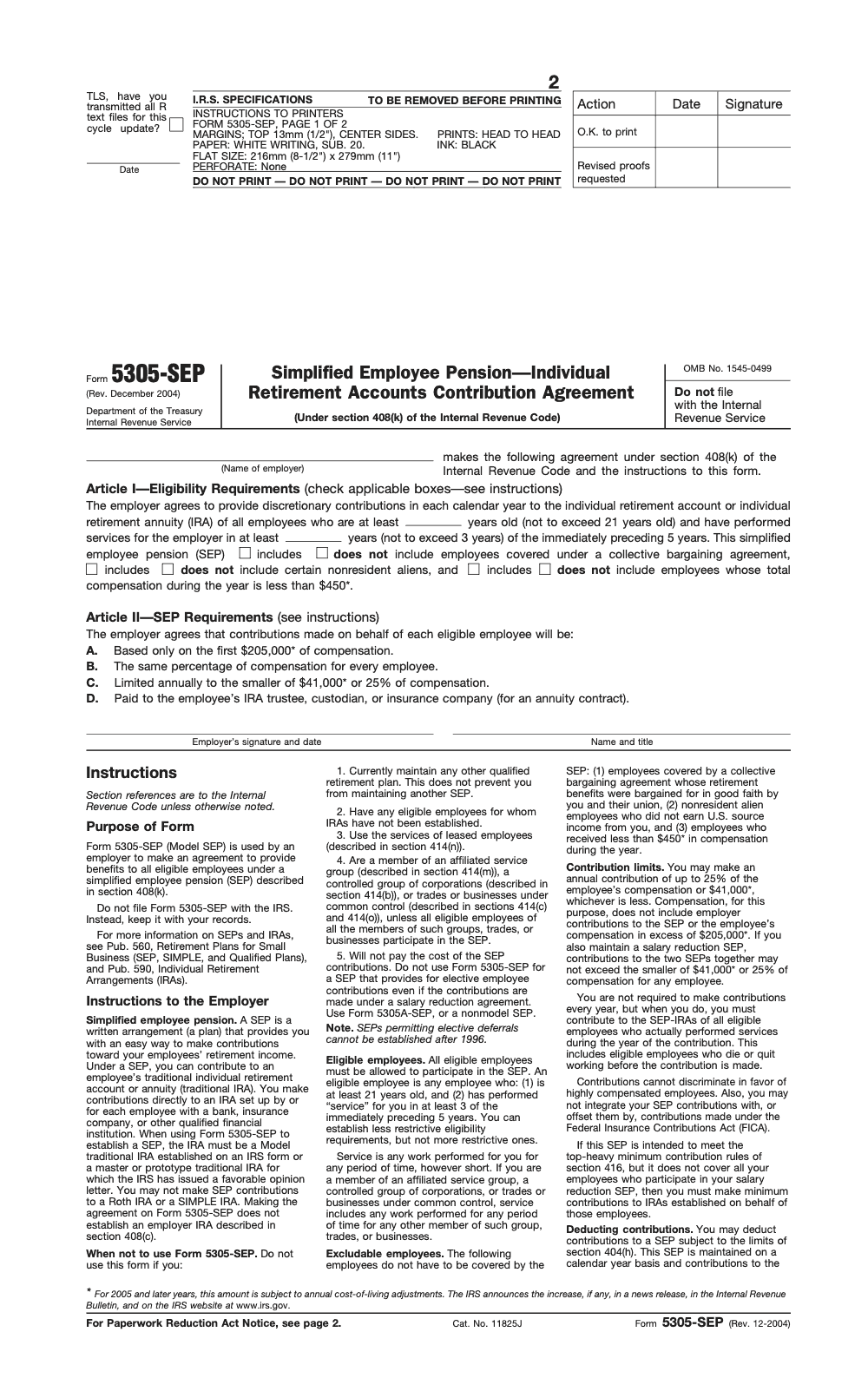
Form 5305-SEP is the IRS model agreement employers use to adopt a Simplified Employee Pension without filing anything with the IRS – per IRS Publication 560 and IRC §408(k), the employer keeps the signed form on file and delivers a copy to each eligible employee with the four required disclosures. For tax year 2025 the SEP contribution limit is the lesser of 25 percent of compensation or $70,000, compensation is capped at $350,000, the minimum coverage compensation is $750 (IRS Notice 2024-80), and contributions are due by the employer's tax return deadline, including valid extensions.
The call that lands every March is the same one: an owner asks whether a SEP can still save tax for last year. Usually the answer is yes, because Form 5305-SEP lets you adopt and fund a SEP for the prior year as late as the business tax return due date, including extensions. What trips firms up is rarely the timing. It is the uniform-percentage rule, the 3-of-5 eligibility test, and the part-time worker nobody was tracking.
Anchor every dollar figure to the current limits, because the printed form will not do it for you. For 2025 the contribution ceiling is the lesser of 25 percent of compensation or $70,000, compensation counts only up to $350,000, and an employee is eligible at age 21 after working 3 of the last 5 years and earning at least $750. Read the disqualifying conditions too, since a non-calendar plan year, leased employees, or another qualified plan rules the model form out entirely.
Key Takeaways
- Form 5305‑SEP is the IRS’s model agreement for setting up a SEP, you adopt the unmodified form, give it to eligible employees, keep it on file, and you do not file it with the IRS.
- You can establish and fund a SEP for the prior year as late as your business tax return due date, including extensions.
- Standard eligibility, at most, is age 21, served in 3 of the last 5 years, and earned at least 750 in the current year for 2025. You can choose looser criteria, not stricter.
- Contributions must be a single, uniform percentage for all eligible employees, and are limited to the lesser of 25 percent of compensation or the annual dollar cap, which is 70,000 for 2025. Compensation above 350,000 is ignored.
- Do not use Form 5305‑SEP if you want a non‑calendar plan year, use leased employees, maintain another qualified plan, or want Social Security‑integrated formulas. Use a prototype or custom SEP instead.
What Form 5305‑SEP Is, and When It Fits
Form 5305‑SEP is the IRS’s off‑the‑shelf SEP agreement. You sign it, operate exactly as written, and make employer contributions into each eligible worker’s SEP‑IRA. The big win is speed, clear rules, and no annual Form 5500 filing. You keep the form with your records and give a copy, plus the required notices, to each eligible employee.
When it fits best:
- You want a basic, clean plan with a single percentage of pay for everyone who qualifies.
- You do not maintain any other qualified plan, besides another SEP.
- You are fine with a calendar‑year plan and the model’s default structure.
You can set it up as late as your tax return due date for that year, including extensions. Many owners adopt after year‑end, then fund before filing, which keeps cash flow flexible without losing the deduction.
The 2025 Numbers You Need
Two ceilings control SEP funding. First, the 25 percent of compensation limit. Second, the annual dollar cap, which rose to 70,000 for 2025. Also, only compensation up to 350,000 counts when you run the math. These figures come from the IRS’s 2025 cost‑of‑living adjustments.
Eligibility still uses the familiar “3 of 5 years” and a compensation threshold that remains 750 for 2025 under Code section 408(k)(2)(C). Age 21 is the typical age filter, and you can choose less restrictive thresholds if you want to include more people.
When Not to Use Form 5305‑SEP
Some designs just do not fit the model document. Do not use 5305‑SEP if you:
- Maintain any other qualified plan, other than another SEP.
- Use leased employees.
- Want a plan year that is not the calendar year.
- Want permitted disparity, that is, Social Security‑integrated allocation formulas.
In these cases, switch to a prototype SEP from a provider or an individually designed document so you can tailor eligibility, plan year, or allocation rules.
How This Guide Helps You
Here is how we will make this practical and easy to apply:
- We will walk through eligibility with clean examples and a simple checklist.
- You will see the exact steps to adopt and operate a 5305‑SEP without guesswork.
- We will give you the 25 percent math, 2025 limits, and owner edge cases, including S corp wages versus sole proprietor net income.
- You will get a short list of mistakes and fixes, so you can keep your plan clean if something goes sideways.
If you lead a CPA or accounting firm and your team prepares client SEP workpapers, you know how much clean documentation speeds reviews. A disciplined checklist and uniform naming convention reduce review cycles and prevent deadline stress, especially during extensions.
Can You Use 5305‑SEP? Restrictions and Alternatives
The best way to decide is to test your facts against the model’s rules. If you clear these, 5305‑SEP likely works.
When 5305‑SEP Is Allowed
You can use 5305‑SEP when all of the following are true:
- You do not maintain any other qualified plan, other than another SEP.
- You want a uniform employer contribution rate for all eligible participants.
- You are fine with a calendar‑year plan.
- You do not need Social Security‑integrated formulas.
- You will furnish the unmodified form and required notices to eligible employees.
| Requirement | What’s Allowed on 5305‑SEP | If Not, Use |
| Other qualified plan | None, other than another SEP | Prototype or individually designed SEP |
| Plan year | Calendar year | Prototype SEP with non‑calendar year |
| Allocation | One uniform percentage for all eligibles | Prototype with custom allocation |
| Social Security integration | Not allowed | Prototype with permitted disparity |
| Leased employees | Not allowed | Prototype that permits coverage |
The model gives you speed and clarity, the tradeoff is flexibility.
Situations It Cannot Cover
Skip 5305‑SEP if you want to, or already do, any of the following:
- Run a fiscal‑year plan, not calendar.
- Use an allocation formula tied to Social Security.
- Cover leased employees.
- Keep another qualified plan in force alongside the SEP.
If you need any of these, a pre‑approved prototype document from a bank, insurer, or recordkeeper is usually the fastest path. You still stay in SEP territory, you just gain flexibility.
Why Uniform Percentage Really Matters
5305‑SEP expects strict uniformity. Employer contributions must equal the same percentage of compensation for every eligible employee. Most model SEPs, including 5305‑SEP, do not permit permitted disparity, so you cannot bump rates for higher earners based on Social Security integration. Review your math each year to confirm every eligible employee lands at the same percent.
Timing, Filing, and Notices
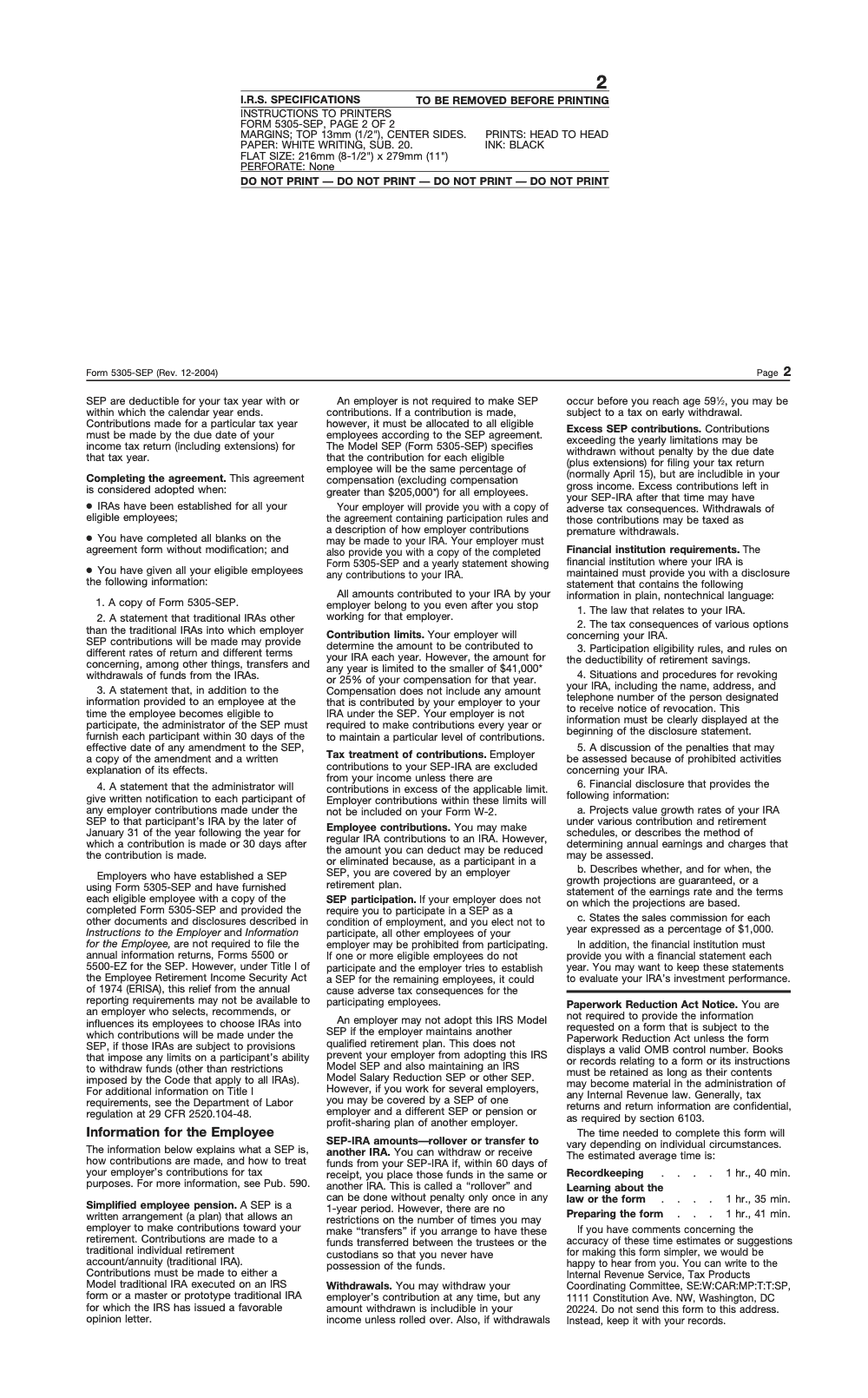
Good news, there is no annual Form 5500 for a standard SEP, provided you do not steer employees into IRAs with employer-imposed withdrawal restrictions, which voids the exemption under DOL guidance at 29 CFR 2520.104-48. You do need to give employees the model document and the listed disclosures, plus an annual contribution statement. As the SEP administrator, you must give each participant written notification of any employer contribution to their SEP-IRA by the later of January 31 of the year following the contribution year or 30 days after the contribution is made.
Keep one calendar of three dates, adoption date, funding deadline, participant notice. That calendar will save you every season.
A Quick Decision Flow
- Want a basic, calendar‑year SEP with a single rate for all eligible employees, and no other plan exists, use 5305‑SEP.
- Need a fiscal‑year, Social Security integration, or you already sponsor another plan, ask your provider for a prototype SEP document.
If you are a firm leader standardizing client plans, add this flow to your onboarding checklist so your team can flag when 5305‑SEP is off limits and switch to a prototype without losing time.
5305‑SEP Eligibility, Who Qualifies and How To Document It
You keep your SEP clean by applying the same simple test every year. An employee is eligible if they are at least age 21, worked for you in any 3 of the last 5 years, and earned at least 750 in compensation in the current year. You can choose looser rules, for example a younger age or fewer years, but you cannot be stricter. You must also include part‑time and seasonal workers who meet the test, and you may exclude union employees covered by a bargaining agreement and nonresident aliens with no U.S.‑source pay.
Practical steps I use with clients:
- Export a list of all W‑2 and self‑employed participants, then tag any service in each of the past 5 plan years. Service can be as little as a single day, which is why the tag matters.
- Filter for those who meet age and compensation thresholds, then document your inclusion or exclusion reason for each person.
- Recheck controlled group or affiliated service group relationships if ownership spans multiple entities, since those employees may count for eligibility.
One missed eligible employee can unravel an otherwise clean year. Run the eligibility check before you fund.
Quick Reference, Who You May Exclude
| Category | Excludable on 5305‑SEP? | Notes |
| Under age 21 | Yes | You may choose a lower age to include more people. |
| Less than 3 years of service in last 5 | Yes | You may choose a less restrictive rule. |
| Compensation below the threshold | Yes | Minimum compensation remains indexed, verify the current amount each year. |
| Union employees covered by CBA | Yes | If retirement benefits were bargained in good faith. |
| Nonresident aliens with no U.S.‑source pay | Yes | Document the status and pay source. |
Complete Form 5305‑SEP, Step by Step
You do not file Form 5305‑SEP with the IRS. You adopt it, keep it on file, and give each eligible employee a copy of the completed form and the listed disclosures. Then you set up a SEP‑IRA for every eligible worker at a bank, insurer, or other qualified institution.
Eligibility and Participation
- Confirm you are allowed to use the model form, no other qualified plan besides another SEP, no leased employees, calendar year, and no Social Security integrated allocation. If you do not meet these, switch to a prototype or custom document.
- Apply the 3‑of‑5, age 21, and compensation rules consistently, then provide the adopted 5305‑SEP and notices to every newly eligible employee.
- Open a separate SEP‑IRA for each eligible employee. The employee owns the IRA, you fund it, and contributions vest 100 percent immediately (no vesting schedule is allowed under the model SEP).
Pro tip for payroll: do not include SEP contributions on Form W‑2, but do check the retirement plan box in box 13. This small box matters for individual IRA deductibility rules.
Allocation and Deadlines
Form 5305‑SEP expects one uniform employer percentage for all eligible employees for the plan year. You can pick a different percentage next year, but everyone who is eligible for the year gets the same rate, including employees who quit or died mid-year if they performed any services during the contribution year. Most model SEPs, including 5305‑SEP, do not allow permitted disparity, so hold the line on uniformity.
Deadlines are friendly. You can adopt and fund a SEP for last year up to your business tax return due date, including extensions. That is why many owners adopt after year‑end and fund before filing. Keep the signed 5305‑SEP in your records.
| What | Requirement | Where it is stated |
| Written plan | Adopt 5305‑SEP, keep on file, do not file with IRS | |
| Uniform allocation | One percentage for all eligible employees | |
| Adoption and funding | By employer tax return due date, including extensions | |
| Employee notices | Provide the model document and disclosures |
If you already have another qualified plan and you still want a SEP, you can, but you must use a prototype or custom SEP document rather than 5305‑SEP.
Set Up Your SEP, Trustees, SEP‑IRAs, and The Right Notices
Here is the clean setup sequence I use with owners and firm teams:
- Choose the trustee or custodian that will hold the SEP‑IRAs, bank, insurer, or another qualified institution.
- Execute the unmodified Form 5305‑SEP as your written plan, include the employer name, participation rules, and a definite allocation formula.
- Provide every eligible employee the completed 5305‑SEP and its disclosures, then open a SEP‑IRA for each eligible employee.
Notices to participants: you must furnish the plan information and give an annual contribution statement. Trustees also report contributions on Form 5498 and send participant statements on the IRS schedule, typically by late May or early June for the prior year. Keep your internal contribution report as well, it speeds audits and answer requests.
Keep a one‑page “SEP packet” for every employee, the executed 5305‑SEP, the eligibility memo, the allocation percent for the year, and the contribution amount posted to their SEP‑IRA.
5305‑SEP Contribution Limits and The 25 Percent Rule
Two limits work together every year. First, a percentage limit. Second, an annual dollar cap set by the IRS.
Annual Dollar Caps
For 2025, the defined contribution annual additions limit is 70,000, and the compensation cap is 350,000. These caps come from the IRS cost‑of‑living adjustments. If your plan calculation crosses either number, you stop at the cap.
Publication 560 confirms the 2024 figures and notes the increases for 2025, which is helpful when you reconcile a fiscal year that overlaps two calendar years. Keep a copy of the current Pub 560 in your workpapers.
25 Percent of Compensation
Employer SEP contributions are limited to the lesser of 25 percent of compensation or the annual dollar cap for the year. On a model 5305‑SEP, that 25 percent rate must be applied uniformly to all eligible employees, and you ignore compensation above the IRS cap when you run the math.
For self‑employed owners, compensation for the limit is not W‑2 wages. You must first compute net earnings from self‑employment, then reduce by one‑half of self‑employment tax and by the SEP deduction itself, which is why most owners use the Pub 560 rate table or worksheet.
| Factor | Constraint | Working note |
| Percentage limit | 25% of plan compensation | Same rate for all eligible employees on 5305‑SEP. |
| Dollar cap | Annual additions limit | 70,000 for 2025, check each year. |
| Compensation cap | 401(a)(17) limit | 350,000 for 2025, ignore pay above this cap. |
| Self‑employed calc | Special worksheet | Use Pub 560 tables to get the effective rate. |
Deadlines and Deductions
You can adopt and fund your SEP for the prior year up to the due date of your return, including extensions. That timing preserves the deduction, which is why SEPs are a favorite for late‑season planning. Document your uniform percentage in the file, then post each employee’s amount to their SEP‑IRA by that deadline.
Compliance tip for firms: after you fund, spot check three files, a high earner at the comp cap, a mid earner, and a part‑timer who barely met the threshold, to confirm the uniform percentage landed correctly.
If your team handled a prior year with the wrong definition of compensation or missed the uniform rate, use the IRS SEP Fix‑It Guide and correct it now, do not wait for a notice.
5305‑SEP Deadlines You Must Hit, Adoption, Funding, Reporting
- Adoption deadline, you can establish a SEP for last year as late as your federal business tax return due date, including extensions.
- Funding deadline, the same date as adoption for deductibility, your tax return due date including extensions.
- Reporting, you do not file the 5305‑SEP with the IRS, you keep it on file and furnish employees the document and required disclosures.
- Participant statements, trustees report IRA contributions on Form 5498 and furnish participant statements on the IRS schedule, typically by early June for the prior year. Provide your own annual contribution statement as well.
One calendar, three checkpoints, adopt, fund, furnish. Put those three on your year‑end checklist.
Run Your 5305‑SEP Each Year, A Simple Operating Rhythm
- Re‑test eligibility, apply the 3‑of‑5, age, and compensation rules, and add newly eligible employees.
- Set the uniform employer percentage for the year and document it in your plan file.
- Deposit contributions to each SEP‑IRA by your return due date, including extensions.
- W‑2 handling, do not show SEP employer contributions on the W‑2, check the retirement plan box.
- Corrections, if you miss someone or miscalculate, use the SEP Fix‑It Guide or EPCRS pathways and correct promptly.
Small firm workflow tip, store a signed PDF of the current 5305‑SEP, the current Pub 560, and your eligibility worksheet template in a shared folder so reviews move faster during extensions.
Withdrawals and Rollovers, The IRA Rules Apply
A SEP‑IRA is still an IRA, so distribution rules match traditional IRAs. Withdrawals are taxable and, if you are under age 59½, generally subject to a 10 percent additional tax unless an exception applies. Loans are not permitted.
Rollovers follow the standard IRA rules. You have 60 days to roll over a distribution or you can use a trustee‑to‑trustee transfer, which avoids the 60‑day clock and the one‑per‑year limit. The IRS limits you to one IRA‑to‑IRA rollover in any 12‑month period, across all your IRAs, including SEP‑IRAs, so transfers are usually safer.
Helpful form pointers:
- Distributions are reported on Form 1099‑R by the custodian, including codes for exceptions.
- IRA contributions, including SEP employer contributions, are reported on Form 5498 by the custodian, furnished to participants and filed with the IRS on the stated schedule.
If you think a rollover missed the 60‑day window for a reason outside your control, check the IRS waiver guidance before you give up on tax‑free rollover treatment.
Where Accountably helps, briefly and only if you need it, if your firm prepares many SEPs during extensions, standardized workpapers, uniform naming, and a second‑person review prevent last‑minute errors and rework. If you want disciplined offshore support that follows your templates and cuts review time, our team can plug into your workflow with clear SLAs and quality checks so your partners stay out of review loops.
Common 5305‑SEP Mistakes and Fast Fixes
- Missing the uniform percentage, one employee gets a different rate. Fix it by contributing the shortfall plus earnings to put the employee in the position they should have been in, and document the correction.
- Using the wrong compensation definition or ignoring the annual compensation cap. Recalculate, correct excesses or shortfalls, and update your worksheet template.
- Excluding someone who met the 3‑of‑5 test, even if they only worked a few days in those years. Make a corrective contribution with earnings and update your eligibility report.
- Adopting 5305‑SEP when you also maintain another qualified plan, or when you need non‑calendar plan years or Social Security integrated formulas. Replace the model with a prototype or custom SEP that supports your design.
- Letting your document go stale. Keep the current 5305‑SEP revision or a current provider document on file.
A 10‑minute quarterly file check beats a 10‑hour cleanup in September.
Conclusion and Next Step
You now have the full playbook for Form 5305‑SEP, who is eligible, how to adopt, how to fund, what to report, and how to correct mistakes quickly. Keep one uniform percentage, confirm eligibility before you fund, post to each SEP‑IRA by your tax return deadline, and keep clean records. Use trustee‑to‑trustee transfers for moves, follow the 60‑day and one‑per‑year rollover rules if you receive a check, and correct any slip with the IRS Fix‑It guidance.
Common Mistakes We See Every Season
SEP mistakes cluster around the same handful of misreadings every season, and most of them come from treating the printed form as if it were current law.
Reusable Checklists
Each checklist below is built to drop straight into a firm SOP or a client onboarding file. Copy the markup as is and the page state will persist for the reader as they tick items off.
Pre-adoption screen for Form 5305-SEP
- Confirm the employer maintains no other qualified retirement plan, other than a second SEP, per IRC §408(k).
- Confirm the employer does not use leased employees under IRC §414(n).
- Confirm a calendar-year plan year is acceptable; non-calendar designs require a prototype SEP.
- Confirm no Social Security integration or tiered allocation is required; Article II mandates a uniform percentage.
- Confirm every member of any controlled or affiliated group will participate, per IRC §414(b), (c), (m), and (o).
- Confirm the form will be adopted unmodified; any edit to the printed text voids the model safe harbor.
- Confirm SEP-IRAs will be established for every eligible employee before the agreement is treated as adopted.
Annual SEP funding packet
- Pull the full-year payroll register and apply the eligibility test: age 21, service in 3 of the immediately preceding 5 years, and at least $750 of 2025 compensation.
- Cap each employee's compensation at $350,000 for the 2025 contribution calculation, per IRS Notice 2024-80.
- Set the uniform employer percentage for the year and document the decision in the plan file.
- For each sole proprietor or partner, run the Rate Worksheet for Self-Employed in IRS Publication 560.
- Confirm the per-employee contribution does not exceed the lesser of 25 percent of capped compensation or $70,000.
- Deposit contributions to each SEP-IRA by the business tax return due date, including any valid extension.
- Reconcile the deposit register against the eligibility worksheet before closing the file.
Notices and recordkeeping handoff
- Deliver each eligible employee a copy of the signed Form 5305-SEP plus the four required disclosure items.
- Notify each participant of the employer contribution by the later of January 31 of the following year or 30 days after the contribution.
- Confirm the trustee has issued the annual disclosure statement and financial statement to each SEP-IRA holder.
- File the signed Form 5305-SEP, the eligibility worksheet, the funding calculation, and the participant notices in the employer's retirement-plan binder.
- Confirm employer SEP contributions are excluded from Box 1 of each employee's Form W-2 and that Box 13 'Retirement plan' is checked.
- Diary the next plan-year re-test and any amendment notice 30-day window.
Keep 5305-SEP Season From Stalling
SEP work concentrates in two windows. The first runs from late January through April when owners and self-employed filers ask if a prior-year SEP is still doable. The second runs from August through October as extended business returns close and last-call SEP deposits hit the queue. Form 5305-SEP has not been revised since December 2004 (IRS catalog 11825J), so every preparer is reconciling a 2004-era form against the current-year limits in IRS Notice 2024-80 by hand.
That hand-reconciliation is where errors creep in. The form prints $41,000 and $205,000; the law for 2025 says $70,000 and $350,000. A junior who pulls a figure off the PDF, an eligibility worksheet that misses a part-time employee, or a sole-proprietor calc that skips the rate-reduction step in IRS Publication 560 each turns into a corrective contribution, a plan-year amendment, or partner-review time that nobody bills.
- Lock the 2025 SEP constants ($70,000 §415(c) cap, $350,000 §401(a)(17) compensation cap, $750 minimum coverage compensation) into the workpaper template so no preparer copies them off the form PDF.
- Standardize the eligibility worksheet around the 3-of-5 test and force a part-time payroll pull before sign-off; the rule treats any service in a year as a year of service.
- Route every sole-proprietor and partner contribution through the Rate Worksheet for Self-Employed in IRS Publication 560, never the headline 25 percent.
- Diary three checkpoints per engagement (adoption, funding, and participant notice by the later of January 31 or 30 days after the contribution) so nothing slips between preparer and reviewer.
- Default SEP-IRA transfers to trustee-to-trustee so the once-per-12-month rollover trap never lands on a participant who already received a check.
Accountably plugs trained offshore preparers into the SOP layer above. We hold the constants, the eligibility worksheet, the Publication 560 rate calc, and the notice-timing diary inside our tax preparation workflow so the partner reviews exceptions, not arithmetic.
FAQs
Both are model SEPs. In general, 5305‑SEP is used when you adopt the standard model and operate under its rules, while 5304‑SEP is used when each employee chooses their own IRA provider. If you need design flexibility beyond either model, use a prototype or custom SEP.
Yes, but you cannot use the 5305‑SEP model document if you maintain another qualified plan. In that case, adopt a prototype or individually designed SEP.
You can establish and fund by your business tax return due date, including extensions, and still deduct the contribution for the prior year.
Generally, no annual Form 5500. Keep your signed 5305‑SEP on file, give employees the required notices, and the custodian files Form 5498 reporting IRA contributions.
Use Pub 560’s rate table or worksheet. Start with net earnings from self‑employment, subtract one‑half of SE tax, then apply the reduced effective rate from the table to avoid circular math.
Other forms this guide names
About this guide
Accountably helps US CPA, EA, and accounting firms hire trained accountants and tax preparers in India.
About us Reviewed byJugal Thacker, CPAFounder and CEO at Accountably
A Washington-licensed CPA with 7+ years inside US firms – PwC, a real-estate tax practice, then a full-service firm, rising from reviewer to manager to advisory. This article was reviewed against current IRS guidance for the 2025 tax year and updated for filers preparing late returns, amendments, and 2026 estimates.
View profile →How we research, review, and update this guide
Every Accountably guide is researched against primary IRS sources, reviewed by a U.S. CPA, and refreshed as guidance evolves. Read our Editorial Guidelines to see how we source, fact-check, and update our content.




