
Summarize this article with AI
In Brief
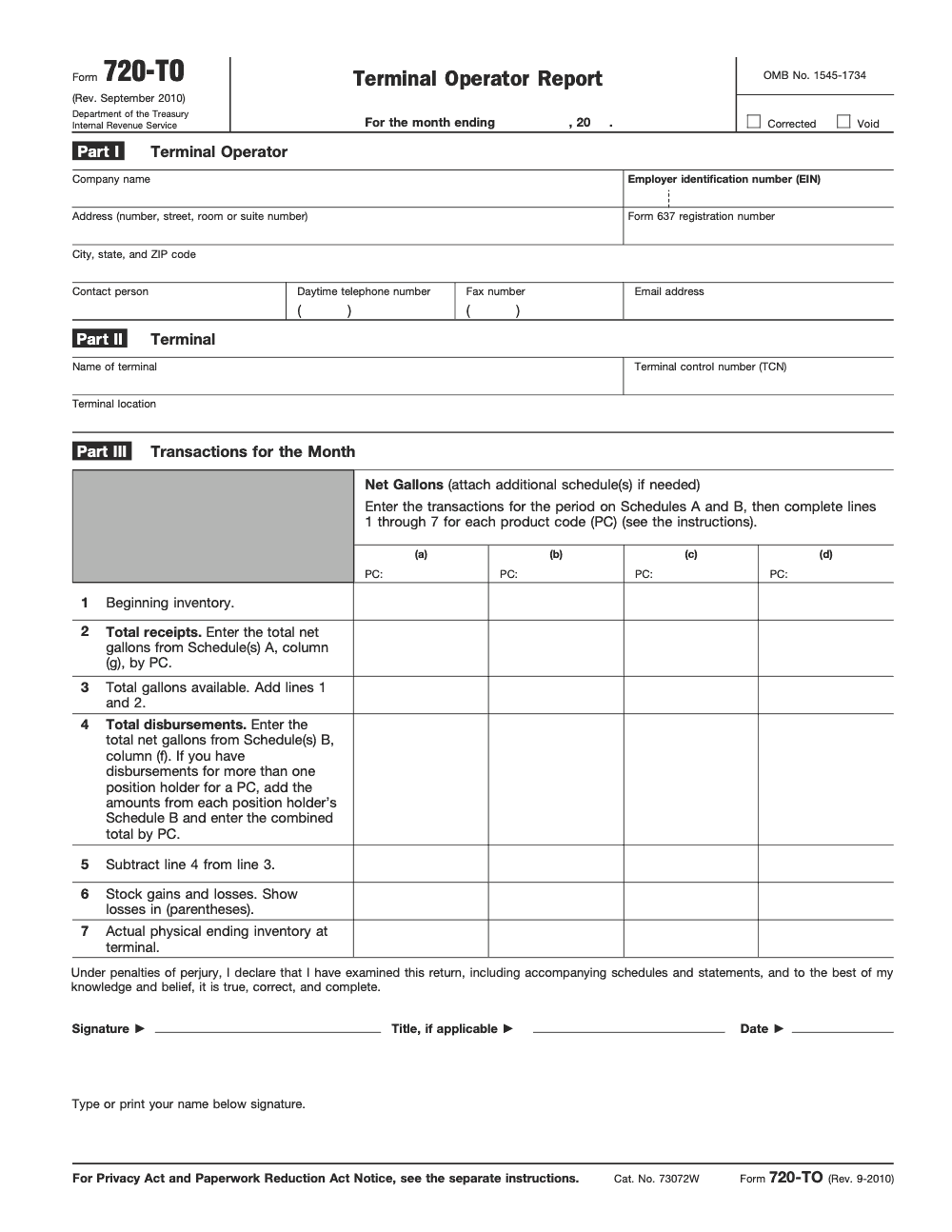
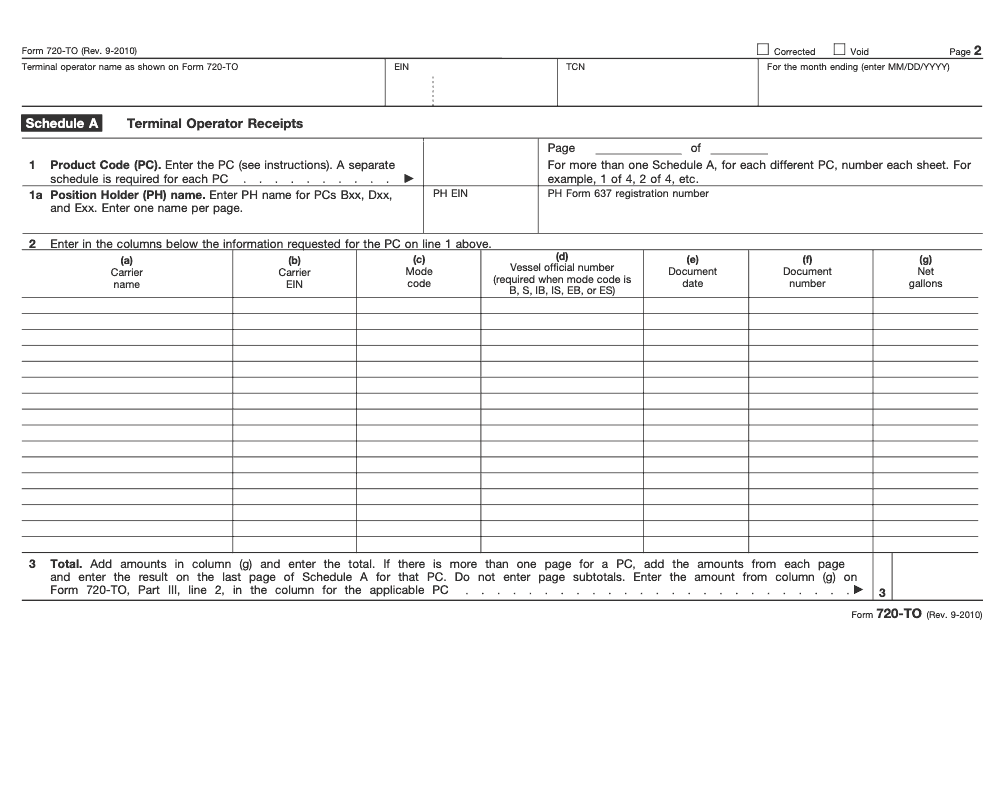
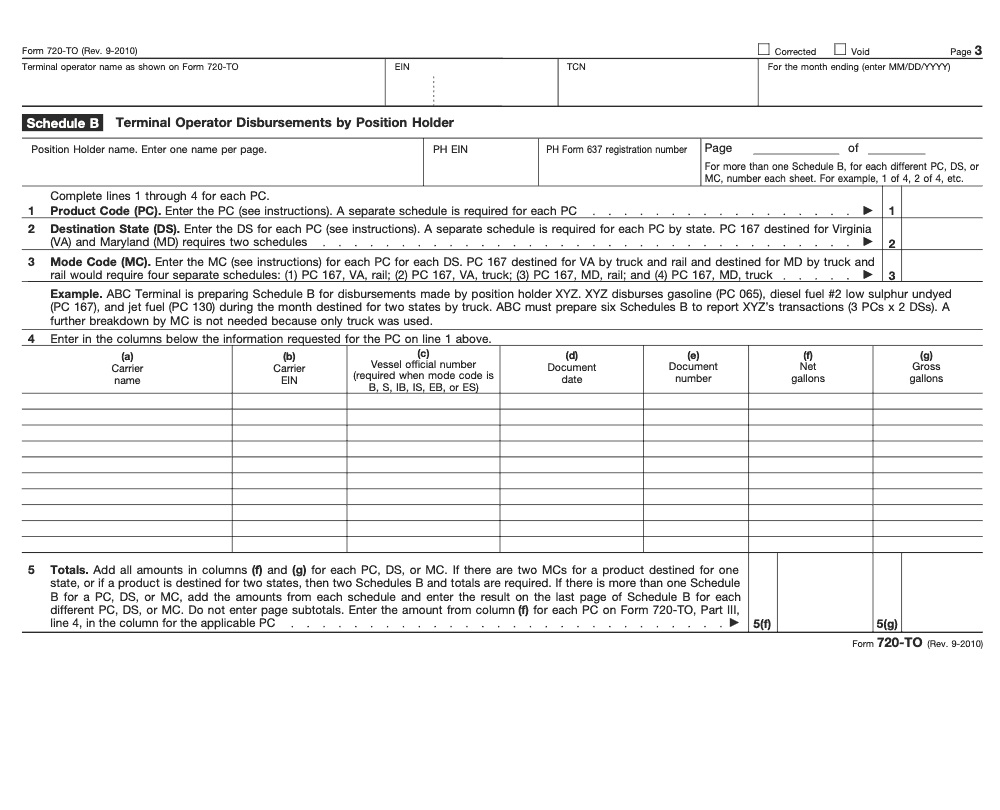
Form 720-TO is the IRS Terminal Operator Report – a monthly information return (OMB control number 1545-1734) filed by terminal operators registered under IRC Section 4101 to report fuel receipts on Schedule A and disbursements on Schedule B. Per the Form 720-TO instructions (Rev. September 2010), filers prepare a separate Schedule A per product code and a separate Schedule B per unique product code, destination state, and mode code combination, and the form is distinct from the quarterly Form 720 federal excise tax return – we cover both filings through our U.S. tax outsourcing service.
A regional petroleum distributor ran a bulk liquid terminal for years thinking the quarterly Form 720 covered everything it owed, when the monthly Form 720-TO was due as well. The IRS notices were going to an old address, and by the time the operator sorted it out the information return penalty exposure had grown into a real number, all of it avoidable with a registration and filing routine from day one.
Form 720-TO is the Terminal Operator Report, a monthly information return rather than a tax payment, filed by terminal operators registered under IRC Section 4101 to report fuel receipts on Schedule A and disbursements on Schedule B. It is due the 24th day of the month following the reporting period, every month, with no extensions, and each fuel product is reported separately by IRS product code. Penalties run per return under IRC Sections 6721-6722, with no cap for intentional disregard, which is why a clean month-end lock matters.
Key Takeaways
- Form 720-TO is a monthly information return, not a tax payment return – terminal operators file it to report fuel inventories received, removed, and held at their facilities.
- Who files: Any operator of a taxable fuel terminal registered under IRC Section 4101 with the IRS – this means facilities receiving fuel by pipeline or vessel for storage and redistribution.
- Due date: The 24th day of the month following the reporting period, every month without exception. No extensions are available for this filing.
- Each fuel product is reported separately using IRS-defined product codes (gasoline, diesel, kerosene, aviation fuel, dyed variants), so your inventory system must track by code (and a separate Schedule A is required for each product code – multiple PCs cannot be combined on one schedule).
- Penalties apply per return under IRC Sections 6721–6722 for late, incomplete, or incorrect filings. Intentional disregard carries no cap on penalties.
- Quick SOP rule: Lock month-end fuel position data by the 10th of the following month to give your preparer 14 days of runway before the 24th deadline.
What Form 720-TO Is and When to Use It
Form 720-TO, formally titled Terminal Operator Report, is a monthly information return filed with the IRS by operators of taxable fuel terminals. It is part of the IRS’s fuel tax administration system under the Taxpayer Relief Act of 1997, which established a registration and reporting infrastructure designed to track taxable fuel movements from the terminal rack level onward.
The core logic is straightforward: the IRS taxes most motor fuel and aviation fuel when it is removed from the terminal. To enforce that tax point correctly, the IRS needs data on what fuel entered the terminal, what was removed, and what remained in inventory at month end. Form 720-TO is the mechanism for that data collection.
This is not a tax payment return. Terminal operators who owe federal excise tax on fuel removal pay that through Form 720 (the Quarterly Federal Excise Tax Return). Form 720-TO is purely informational – it tells the IRS about physical fuel positions. Think of it as the inventory reconciliation the IRS requires alongside the tax payment mechanism.
The form is required every month you operate a terminal, even in months with no fuel activity. A zero-activity month still requires a filing to maintain the integrity of the reporting chain.
Who Must Register and File
To file Form 720-TO, you must first be registered with the IRS as a terminal operator under IRC Section 4101. Registration is accomplished via Form 637, Application for Registration (For Certain Excise Tax Activities), using Activity Letter “S” for terminal operators. Without an active registration and a Registrant Activity Number, you cannot file 720-TO properly and cannot participate in the registered terminal system.
The filing obligation falls on the operator of the terminal – the entity that has operational control over the bulk liquid storage facility. Key characteristics of a terminal that triggers this obligation:
- Receives taxable fuel by pipeline or vessel (not by truck)
- Holds fuel in bulk storage for redistribution
- Fuel is later removed from the terminal into commerce (typically at the rack)
- The facility is registered and subject to IRC Chapter 31 excise tax rules
Truck-only fuel storage facilities (often called “bulk plants”) generally do not qualify as terminals and do not file Form 720-TO. The distinction matters significantly for compliance planning when a client is expanding their fuel distribution infrastructure.
Designated Agent Filing
A terminal operator may designate an agent to file Form 720-TO on its behalf. The agent must be disclosed in the filing, and the terminal operator remains legally responsible for the accuracy and timeliness of the return. From my side of the desk, I always recommend that the engagement letter explicitly address who bears responsibility for monthly filing deadlines when we are serving as the designated filing agent.
How to Complete Form 720-TO, Line by Line
The form itself is organized around a terminal-by-terminal, product-by-product reporting structure. Each terminal you operate gets its own set of lines. Here is how to work through it:
Header Information
| Field | What to Enter | Notes |
|---|---|---|
| Name | Legal name of the terminal operator entity | Must match Form 637 registration |
| EIN | Employer Identification Number | Not SSN; entity-level filing |
| Terminal Control Number (TCN) | IRS-assigned TCN for each terminal | Required in Part II; must match IRS records |
| Reporting Period | Calendar month and year being reported | e.g., January 2026 |
| Phone Number | Contact number for the preparer or operator | IRS may call to verify data |
Product Code Lines – Beginning Inventory
For each product code held at the terminal, you report the beginning inventory in gallons as of the first day of the reporting month. This number must match the ending inventory reported for the prior month. Any discrepancy between the prior return’s closing inventory and this month’s opening inventory triggers a reconciliation issue the IRS will flag.
Receipts
Report all gallons received at the terminal during the month, broken out by product code. Receipts include fuel arriving by pipeline and by vessel. Do not include fuel received by truck; that would indicate the facility is not a true terminal. Receipts are reported in net gallons on Schedule A, column (g); gross gallons are not entered on Schedule A (gross gallons appear only on Schedule B for disbursements, in column (g)).
Disbursements / Removals
Report all gallons removed from the terminal during the month. This is the critical line for excise tax purposes – removals from the terminal at the rack are generally the taxable event under IRC Section 4081. Removals are categorized by destination and type (e.g., removed for sale to registered ultimate vendors, removed tax-free under specific exemptions, removed as aviation fuel).
Ending Inventory
Beginning inventory + receipts – disbursements = ending inventory. The math must balance. Any inventory variance – gains or losses due to evaporation, measurement error, or commingling – should be reported and documented. Unreconciled variances are a red flag during IRS excise tax examinations.
Fuel Product Codes and Reporting Categories
One of the most operationally intensive aspects of Form 720-TO is maintaining clean product code data throughout the month. The IRS uses a standardized product code system for fuel reporting. Terminal operators must map their internal inventory systems to these codes before they can file accurately.
| Product Code | Fuel Type | Key Notes |
|---|---|---|
| 065 | Gasoline | Most common product code at motor fuel terminals |
| 066 | Gasoline (unblended) | Straight petroleum gasoline without oxygenate blending |
| 160 | No. 2 Fuel Oil / Diesel (undyed) | Highway diesel; subject to full motor fuel excise tax |
| 228 | Kerosene (undyed) | Can be used as aviation fuel or heating oil; tax treatment varies by use |
| 072 | Aviation Gasoline | Subject to aviation fuel excise tax rates |
| 130 | Jet Fuel (kerosene-type) | Commercial jet fuel; lower tax rate applies if removed for commercial aviation |
| 167 | Diesel Fuel #2 (low sulphur, undyed) | Highway diesel; subject to full motor fuel excise tax |
| 231 | Kerosene (dyed) | Tax-free heating fuel; cannot be used in highway vehicles |
Dyed fuel is a particular area of scrutiny. If dyed diesel or dyed kerosene is commingled with undyed product, or if it is removed for highway use, the penalties under IRC Section 6715 are severe – $10 per gallon or 10 times the tax that would otherwise apply, whichever is greater. My team treats dyed/undyed segregation as a hard control, not an assumption.
Blended Fuel Reporting
When a terminal blends fuel – for example, adding ethanol to gasoline – the blending activity and the resulting blended product must be tracked separately. The blender (which may or may not be the terminal operator) has its own registration and reporting obligations. If you are the terminal operator and the blender, both sets of obligations apply.
Deadlines, Penalties, and Filing Requirements
| Item | Detail |
|---|---|
| Filing frequency | Monthly – every calendar month of terminal operation |
| Due date | 24th day of the month following the reporting period |
| Example | January report → due February 24 |
| Zero-activity months | Must still file – submit with all inventory lines showing zero |
| Extension | Not available – no extension mechanism exists for Form 720-TO |
| Amended returns | Corrections submitted on a superseding 720-TO with the Corrected box at the top of the form checked (without checking the box, the IRS may treat the resubmission as a duplicate filing); contact IRS excise tax unit for the process |
| Late filing penalty (IRC §6721) | Up to $310 per return (2025); higher if not corrected within 30 days |
| Intentional disregard | $630 per return minimum, no annual cap (2025 amounts) |
| Incorrect information | Same penalty schedule as failure to file; accuracy matters as much as timeliness |
The “no extension” rule catches clients off guard. Unlike income tax or even the quarterly Form 720 (which can sometimes be addressed with penalty abatement requests), the monthly 720-TO has no mechanism for extension requests. If your client has a natural disaster, system failure, or personnel crisis, you file what you have and correct it after the fact. Do not assume you can request more time.
How Form 720-TO Relates to Form 720
Practitioners new to fuel excise tax compliance often conflate these two forms. Understanding the relationship is essential to building a complete compliance picture for terminal operator clients.
| Feature | Form 720-TO | Form 720 |
|---|---|---|
| Type | Information return | Tax payment return |
| Frequency | Monthly | Quarterly |
| Purpose | Report fuel positions and movements | Report and pay excise tax liability |
| Tax due? | No | Yes |
| Who files? | Terminal operators (registered under §4101) | Any entity with federal excise tax liability |
| Key IRC section | §4101, §4102 | §4081, §4091 |
A single terminal operator may have obligations under both forms simultaneously. The 720-TO captures inventory positions monthly; the Form 720 captures and pays the tax on removals from the terminal quarterly (with semi-monthly deposit requirements if tax liability exceeds $2,500 for the quarter). Both are required – neither substitutes for the other.
The IRS cross-references 720-TO data against Form 720 filings as part of its excise tax compliance matching program. Removals you report on 720-TO should reconcile to the taxable removals reported on Form 720. Discrepancies are examined, and the explanation burden falls on the taxpayer.
E-Filing Requirements and EDI Reporting
The IRS accepts Form 720-TO via electronic filing, and for high-volume terminal operators, Electronic Data Interchange (EDI) submission through the IRS’s Motor Fuel EDI program is the standard method. This is not optional for large operators – the IRS strongly encourages electronic filing and has built its matching infrastructure around EDI data.
To participate in EDI reporting, terminal operators must register with the IRS’s EDI program separately from their Form 637 registration. The EDI format uses ANSI X12 transaction set 867 (Product Transfer and Resale Report), which is the standard for fuel inventory reporting in the industry.
Software and Service Providers
Most terminal management systems – including Magellan, Opis, and various ERP platforms used in the petroleum distribution space – can generate the EDI output needed for 720-TO filing. If your client is still filing manually on paper forms, the first project should be integrating their terminal management system with an IRS-approved EDI transmitter. The accuracy improvement alone justifies the investment, not to mention the time savings.
Recordkeeping for EDI Filings
Retain EDI submission acknowledgments and the underlying data files for a minimum of four years. IRS excise tax examinations can go back three years for non-fraud cases, but maintaining four years of records gives a buffer for late-assessed deficiencies. For dyed fuel, I recommend six-year retention given the heightened penalty exposure.
Record-Keeping Obligations
Form 720-TO creates a chain of documentation that must be maintained contemporaneously. The IRS does not accept reconstructed records during an excise tax examination as readily as it might for income tax, because fuel volumes are measurable physical quantities. Meter readings, tank dip measurements, and pipeline batch records are the primary source documents.
What to Retain
- Pipeline and vessel receipts: Bills of lading, pipeline ticket numbers, carrier delivery records – gross and net gallons received, product code, date
- Rack removal records: Bill of lading for every load-out, including purchaser identity, product code, gross and net gallons, transport vehicle identification
- Meter calibration records: Documentation that meters measuring receipts and disbursements are calibrated and accurate
- Inventory reconciliation worksheets: Monthly worksheets showing beginning inventory, receipts, disbursements, and ending inventory by product code, with explanation of any variance
- Exemption certificates: For any tax-free removal (e.g., to a registered ultimate vendor or for export), retain the exemption certificate from the purchaser
- Dyed fuel certification records: Documentation that dyed fuel met IRS dyeing standards at the point of dyeing
Quick rule you can copy into your SOP: assign a terminal operations contact who owns the meter-reading and inventory-reconciliation process, and require that person to close the month-end position by the 8th of the following month. That gives the preparer 16 days before the 24th deadline to review, question, and file.
Common Mistakes That Slow Things Down
Across the terminal operator engagements we support, the same handful of mistakes account for most Form 720-TO rejections and IRS notice letters. Each one is mechanical – tied to the structure of Schedules A and B, the Part III math, or the Part I identification block – which means each one is preventable with a one-time fix in your monthly close SOP.
Practical Checklists You Can Reuse
These checklists are copy-paste ready for your terminal operations SOP. Drop them into your inventory close workflow and your monthly Form 720-TO filing routine, then assign owners per step so the close survives staff changes and PTO.
Monthly close packet (pre-file)
- Confirm Form 637 registration number is current and matches the value reported in Part I
- Confirm Terminal Control Number (TCN) for each terminal matches IRS records and is entered in Part II
- Pull beginning inventory (Part III line 1) per PC from the prior month's ending inventory (Part III line 7)
- Reconcile Schedule A column (g) total to Part III line 2 for each Product Code
- Reconcile Schedule B line 5(f) Net total to Part III line 4 for each Product Code
- Confirm physical ending inventory (Part III line 7) is supported by a meter or gauge reading dated within the reporting month
- Show any stock losses on Part III line 6 in parentheses; gains as positive numbers
- Complete Part I contact block (daytime phone, fax, email) and signature line under penalties of perjury
Schedule A and Schedule B build review
- One Schedule A per Product Code – no PC consolidation on a single schedule
- One Schedule B per unique Product Code, Destination State, and Mode Code combination
- Position Holder name entered on Schedule A for Product Codes starting with B, D, or E – one PH per page
- Vessel official number entered in Schedule A column (d) and Schedule B column (c) for mode codes B, S, IB, IS, EB, or ES
- Multi-page schedules numbered (e.g., 1 of 4); subtotals left blank on every page except the last
- Schedule A reports Net gallons only in column (g); Schedule B reports both Net (column f) and Gross (column g) gallons
- If more than four Product Codes are reported, attach additional Part III pages – the form only provides four columns per page
Corrected or void return handoff
- Identify the original filing month and document what changed line by line
- Check the Corrected box (or Void box) at the top of Form 720-TO and on each accompanying schedule
- Re-prepare every page that materially changed – do not patch one schedule and reuse the rest unchanged
- Record the reason for the correction in the filing log for audit support
- Match the transmission method to the original filing (paper to paper, EDI to EDI) where possible
- Update the prior-month ending inventory roll-forward if the correction changes Part III line 7 for any PC
Keep 720-TO Season From Stalling
Form 720-TO is a monthly grind, not a seasonal sprint. Twelve filings a year, each one tied to a short window after month-end close, and each one requiring the same reconciliation of Schedule A receipts and Schedule B disbursements against the Part III inventory math – per the Form 720-TO instructions (Rev. September 2010). Miss one month and the IRS Excise Tax Operations group sends a notice; miss several months and the information-return failures compound across the year because each missed filing is treated as a separate failure.
The terminal operators who stay ahead treat the close like a manufacturing process: standard inputs, standard owners, standard sign-offs. The ones who fall behind almost always lose the same way – a single person owns the manual data pull from the terminal inventory system, and when that person is out or transitions, the next month's filing slips. The fix is to take the single-point-of-failure out of the workflow before the next reporting period.
- Lock the Form 637 registration number and Terminal Control Number into a monthly filing template so Part I and Part II auto-populate from the same source every month
- Build inventory exports keyed by Product Code, Destination State, and Mode Code so Schedule A and Schedule B fall out of the source system in the structure the form requires
- Assign two reviewers per filing – preparer and senior – with the senior responsible for the Part III line 5 (gallons remaining) and line 6 (gains and losses, with parentheses for losses) sign-off
- Run a marine-mode validator on every Schedule A column (d) and Schedule B column (c) that flags B, S, IB, IS, EB, or ES rows missing the vessel official number before the file is closed
- Track corrected and void filings in a separate log so the Corrected and Void checkboxes are never skipped on resubmission, and so prior-period roll-forwards stay accurate
That is the operating discipline we build into every terminal operator engagement at Accountably – documented SOPs, dual-reviewer sign-off, and a closing log that survives staff transitions. If the monthly 720-TO grind is eating senior bandwidth in your operation, our U.S. tax outsourcing service can take the production work off your plate while you keep control of the review and final sign-off.
FAQs
Any operator of a taxable fuel terminal registered under IRC Section 4101 must file Form 720-TO monthly. The obligation applies to facilities that receive taxable motor fuel or aviation gasoline by pipeline or vessel and hold it for removal into commerce. Facilities that only receive fuel by truck do not meet the terminal definition and are not required to file.
Form 720-TO is due by the 24th day of the month following the reporting period. January’s report is due February 24, February’s is due March 24, and so on. There are no extensions available for this monthly information return. Zero-activity months still require a filing.
Terminal operators report all taxable fuel held and moved at the terminal, using IRS product codes: gasoline (blended and unblended), No. 2 diesel (undyed), kerosene (undyed), aviation gasoline, jet fuel, dyed diesel, and dyed kerosene. Each product code is reported separately. Accurate product-code tracking in the terminal’s inventory system is prerequisite to accurate filing.
No. Form 720 is the Quarterly Federal Excise Tax Return used to calculate and pay federal excise tax on fuel removals. Form 720-TO is a monthly information return that reports fuel inventory positions and movements. They serve different purposes, are filed on different schedules, and are not interchangeable. Terminal operators typically have obligations under both forms simultaneously.
Failure to file or filing an incorrect Form 720-TO can result in penalties under IRC Sections 6721 and 6722 for information return failures – up to $310 per return (2025 inflation-adjusted amounts). Intentional disregard of the filing requirement carries a minimum of $630 per return with no annual cap. Because 720-TO is filed monthly, a full year of non-filing can produce 12 separate penalty assessments.
Other forms this guide names
Summarize this article with AI
About this guide
Accountably helps US CPA, EA, and accounting firms hire trained accountants and tax preparers in India.
About us Reviewed byJugal Thacker, CPAFounder and CEO at Accountably
A US-licensed CPA with 7+ years inside US firms – PwC, a real-estate tax practice, then a full-service firm, rising from reviewer to manager to advisory. This article was reviewed against current IRS guidance for the 2025 tax year and updated for filers preparing late returns, amendments, and 2026 estimates.
View profile →How we research, review, and update this guide
Every Accountably guide is researched against primary IRS sources, reviewed by a U.S. CPA, and refreshed as guidance evolves. Read our Editorial Guidelines to see how we source, fact-check, and update our content.




