
Summarize this article with AI
In Brief
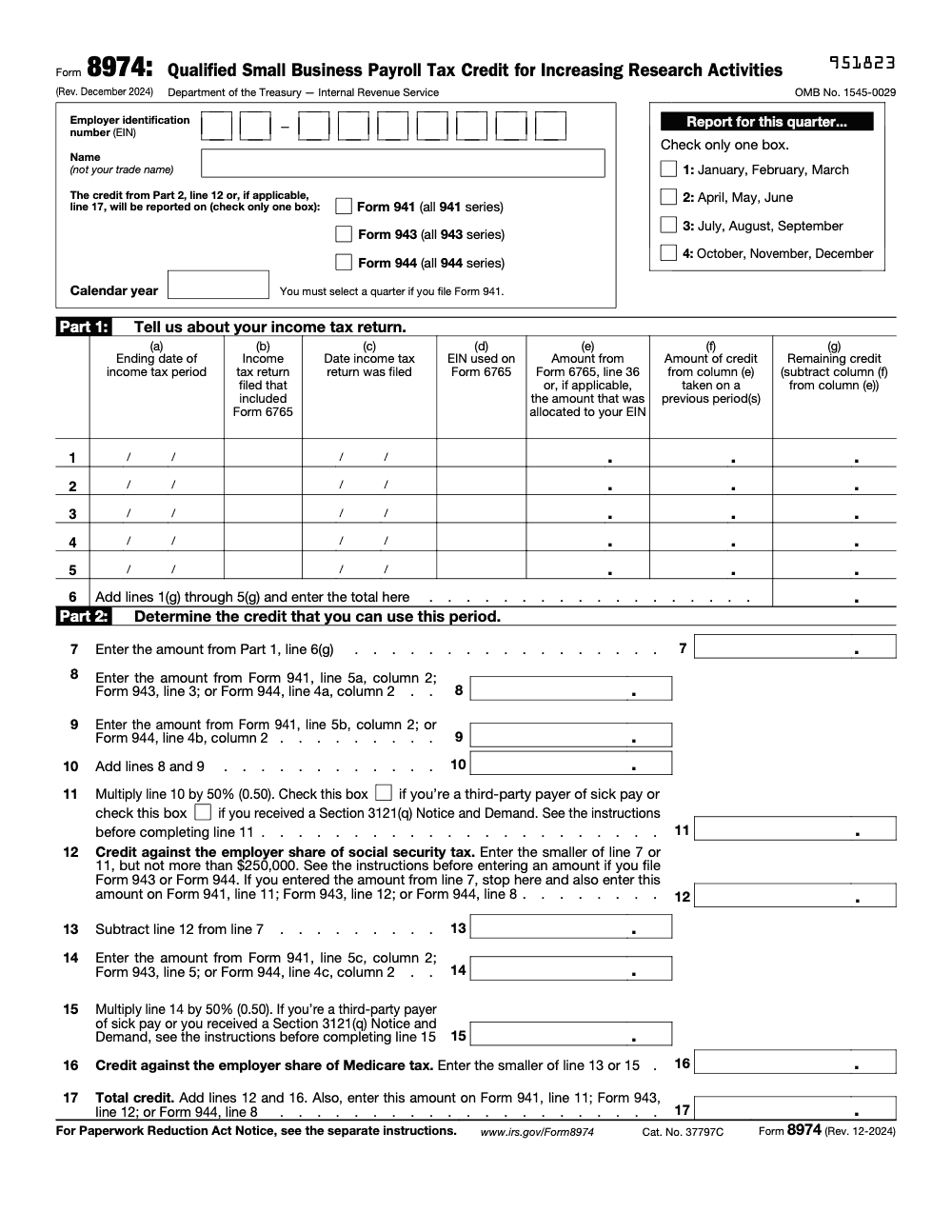
Form 8974 is the Qualified Small Business Payroll Tax Credit for Increasing Research Activities, the one-page form that carries a prior Form 6765 R&D election onto your payroll return. It applies up to $250,000 against the employer share of Social Security on line 12, then any remaining credit against employer Medicare on lines 13 through 17, with the line 17 total reported on Form 941 line 11, Form 943 line 12, or Form 944 line 8 (per the Form 8974 instructions, Rev. December 2024).
A quarterly employment tax return is sitting there with a balance due, and a valid R&D election is the thing that quietly lowers it. Form 8974 is the one-page form that carries a prior Form 6765 election onto your payroll return, turning part of the research credit into payroll relief you can see on Form 941, 943, or 944.
The credit applies up to $250,000 against the employer share of Social Security on line 12, then any remaining credit against employer Medicare on lines 13 through 17. Only a Qualified Small Business can elect this, meaning under $5 million of gross receipts for the credit year. For tax years beginning after December 31, 2022, the annual payroll offset cap is $500,000.
Key Takeaways
- The election happens on Form 6765, then Form 8974 applies it to payroll. You must elect on an original, timely income tax return.
- Since tax years beginning after December 31, 2022, the annual payroll offset cap is $500,000. It applies first to employer Social Security, up to $250,000 per quarter, then to employer Medicare. Any remainder carries forward.
- For income tax years beginning in 2024 or later, carry the elected amount from Form 6765 line 36 to Form 8974. For earlier years, it was line 44.
- On Form 941, report the credit from Form 8974 line 12 or line 17 on line 11 of the 941 (report line 17, the combined total, whenever lines 13 to 17 produce a Medicare-portion credit, and report line 12 alone only when the credit fits entirely within the Social Security cap and the form tells you to stop at line 12). Attach Form 8974.
- Only a Qualified Small Business can elect the payroll offset. That means under $5 million of gross receipts for the credit year and no gross receipts before the 5‑tax‑year period ending with that year, measured with controlled‑group aggregation.
What Form 8974 Is And Who Must File It
Form 8974, Qualified Small Business Payroll Tax Credit for Increasing Research Activities, is a one‑page calculator that determines how much of your elected R&D credit can reduce the employer share of Social Security and Medicare for the current payroll period. If you made the election on Form 6765 with your original, timely income tax return, you must attach Form 8974 to the first employment tax return that begins after that filing date, typically Form 941 for the very next quarter.
Who files it? Any employer that:
- Is a Qualified Small Business for the election year,
- Elected the payroll credit on a timely Form 6765, and
- Wants to apply that credit against current employment taxes on Form 941, 943, or 944.
You will enter your EIN and legal name exactly as shown on your payroll return, check the box for 941, 943, or 944, and list the credit election details from your income tax return in Part 1. For tax years beginning in 2024 or later, bring over the elected amount from Form 6765 line 36. If your election relates to earlier years, use line 44.
Who Counts As A Qualified Small Business
To be a QSB in the year you elect, you need both of the following:
- Gross receipts under $5 million for that tax year, and
- No gross receipts in any tax year before the five‑tax‑year period ending with that year.
Controlled‑group rules apply. For this test, members of the same controlled group are treated as a single taxpayer, so you must combine gross receipts across the group. This is where teams often trip up if they ignore aggregation or predecessor entities.
If you meet the QSB rules and you properly elected on Form 6765, you can claim the payroll offset starting with the first calendar quarter that begins after the date you filed that income tax return. That timing rule matters for annual filers on Forms 943 or 944, and it affects how you compute line 12 in Part 2 of Form 8974.
Why Teams Get Stuck On 8974
Most firms do not struggle here because of tax theory, they struggle because of delivery. When calendars compress, review notes pile up, and workpapers are inconsistent, Form 8974 gets attached late or with mismatched data. That creates avoidable cash timing issues. You can fix most of this with disciplined SOPs, named workpapers, and a clear review flow, especially when multiple entities, states, or seasonal spikes enter the picture.
On Accountably’s side, we see that when firms add repeatable structure, 8974 becomes routine. A simple checklist, credit source tie‑outs, and a final reviewer double‑check against the 941 lines save hours and prevent rework. Use that discipline even if your internal team, not a vendor, prepares the return. This is about control, not bodies.
How Form 6765 And Form 8974 Work Together
Think of Form 6765 as the “election and amount” and Form 8974 as the “application to payroll.” The sequence is strict.
- On your original, timely income tax return, file Form 6765 and make the payroll tax election.
- That election fixes the annual amount you can use via payroll. Bring that amount to Form 8974.
- Attach Form 8974 to the first employment tax return for the first calendar quarter that begins after the income tax return was filed, then to each later quarter until the elected credit is exhausted or the year ends.
For tax years beginning in 2024 or later, the elected payroll amount appears on Form 6765 line 36. For earlier years, it is line 44. You must use the correct line number when you populate Part 1, column (e), on Form 8974.
Where The Credit Shows On Form 941
When Form 8974 is attached to Form 941, the amount you can use this quarter flows to Form 941, line 11, as the “Qualified small business payroll tax credit for increasing research activities.” You cannot enter an amount on line 11 unless you attach Form 8974.
Timing, Quarter By Quarter
- The election is allowed only on an original, timely filed income tax return, including extensions.
- The payroll offset is allowed in the first calendar quarter that begins after the filing date of that return, then in later quarters.
- If you miss the first quarter, you can still attach 8974 in a later quarter, but the offset starts when you actually file it.
Schedule R And Aggregate Filers
If you are a CPEO, section 3504 agent, or other aggregate filer, include a Schedule R and attach a separate Form 8974 for each client taking the credit. On each client’s 8974, use the amounts that client would have shown on its own 941 lines, not the aggregate amounts. This preserves client‑level caps and audit trail.
Picking The Correct Employment Return
Most employers file Form 941 quarterly. Agricultural employers use Form 943 annually. Small employers approved by the IRS may file Form 944 annually instead of 941. Regardless of the form, you still attach Form 8974 and apply the same cap logic, with a special adjustment for line 12 if you file 943 or 944 because the credit can begin only after the quarter that starts post‑election.
Quick Cross‑Reference Table
| Form | Where you pull base amounts for Part 2 | Where the credit lands | Notes |
| 941 | Line 5a and 5b, column 2 feed 8974 lines 8–10 | 941 line 11 | Attach 8974. Amount from 8974 line 12 or 17 goes here. |
| 943 | 943 line 3 feeds 8974 line 8 | 943 credit line via attached 8974 | Use the annual filer adjustment for 8974 line 12. |
| 944 | 944 line 4a and 4b, column 2 feed 8974 lines 8–10 | 944 credit line via attached 8974 | Use the annual filer adjustment for 8974 line 12. |
Eligibility Rules, Confirmed For 2025
A Qualified Small Business can elect up to $500,000 per year for tax years beginning after December 31, 2022. The credit must be elected on a timely, original return. The first $250,000 per quarter reduces employer Social Security, and any remaining elected credit reduces employer Medicare for that same quarter. Unused amounts carry forward. These rules remain in place for 2025.
To confirm you are a QSB, test both prongs in the election year: under $5 million of gross receipts and no receipts before the five‑tax‑year window, applying controlled‑group aggregation. Use the Form 6765 instructions for exact definitions of gross receipts, including short year annualization and predecessor rules.
Practical tip, build a one‑page eligibility memo for your file each year. Note the election year, gross receipts, aggregation, the filing date of your income tax return that included Form 6765, and the quarter you first claimed the 8974 credit.
Completing Business And Period Information, Then Part 1
Start at the top. Enter your EIN and legal name (the legal entity name, not a trade name or DBA) exactly as they appear on the payroll return you are attaching. Check the box for Form 941, 943, or 944, and enter the matching quarter or year. If you are an aggregate filer using Schedule R, include client EINs as required and attach a separate 8974 per client.
Part 1, Income Tax Return Details
Part 1 is your control panel for carryforwards. For each tax year that you elected the payroll credit, list:
- The income tax return period end and return type,
- The filing date, and the EIN used on that income tax return,
- The elected payroll amount from Form 6765. Use line 36 for income tax years beginning in 2024 or later, or line 44 for earlier years,
- Any payroll credit you already used in prior quarters, and
- The remaining balance for that year.
Order rows earliest to latest and total the remaining column on line 6, which will feed Part 2 line 7.
Completing Part 2, Determining The Credit You Can Use This Period
Part 2 is where Form 8974 aligns your remaining elected amount with this quarter’s payroll tax bases and the statutory caps.
- Line 7, bring down the total remaining elected amount from Part 1, line 6.
- Lines 8–10, pull Social Security taxes from your payroll return, which represent both employer and employee shares.
- Line 11, take 50% of line 10 to approximate the employer share of Social Security. For annual filers on 943 or 944, use the special line 12 adjustment in the instructions so you only count quarters that began after your Form 6765 filing date.
Your Social Security portion on line 12 is the lesser of line 7 or line 11, up to the statutory $250,000 per quarter ceiling. Any elected credit still remaining after line 12 moves to the Medicare step. If line 12 already equals your full line 7 amount, the form tells you to stop there, skip lines 13 to 17, and report line 12 on the parent return.
- Lines 14–15, compute the Medicare base from your payroll return, which represents both shares.
- Line 16, apply the lesser of the remaining elected amount or the employer Medicare share allowed, then
- Line 17, add the Social Security and Medicare portions. This is your total payroll credit for the period and the number that flows to Form 941 line 11 when you file quarterly. Attach Form 8974.
A Quick, Real‑World Example
Say your Part 1 total on line 6 is $180,000. Your 941 shows Social Security tax totals on lines 5a and 5b, column 2, of $220,000 combined, so line 10 is 220,000 and line 11 is 110,000. Your Social Security portion on line 12 is the lesser of 180,000 or 110,000, so $110,000. You now have $70,000 left to test against Medicare on lines 14–16. If the Medicare tax total on your 941 line 5c, column 2, is $140,000, then the employer share is half, or $70,000, so line 16 is $70,000. Your total for line 17 is $180,000, which lands on 941 line 11. That clears your elected amount for the year in a single quarter, and you will not carry forward anything from this election year. Always tie these numbers back to your payroll return and retain workpapers.
Carryforwards, Tracking, And Corrections
Form 8974 is designed for carryforwards. If you do not use the entire elected amount this quarter, the remainder stays in Part 1, column (g), for future quarters. If you later discover an error, correct it using the appropriate amended payroll return, Form 941‑X, 943‑X, or 944‑X, not by editing a previously filed 8974. Keep row order by oldest year first so you spend credits correctly and keep a clean audit trail.
Checkpoints That Prevent Rework
- Confirm QSB status and controlled‑group aggregation before you elect.
- Record the exact date you filed the income tax return that included the 6765 election.
- Reconcile Part 1, column (e), to your Form 6765 line 36 or 44, and column (f) to prior quarters used.
- Tie Part 2 lines 8–10 and 14–15 to 941 lines with screenshots or exports.
- For annual filers, apply the line 12 adjustment so you do not overstate the Social Security cap.
2023–2025 Updates And What They Mean In Practice
Two permanent habits keep you accurate. First, confirm that you are using the current IRS instructions. Second, update your cross‑references each January. For 2025, the big items are steady:
- The annual payroll offset cap remains $500,000.
- The sequencing rule still applies, Social Security up to $250,000 per quarter, then Medicare.
- The election must be on an original, timely return.
- For income tax years beginning in 2024 or later, the elected amount flows from Form 6765 line 36 to Form 8974. Earlier years used line 44.
On the employment tax return, the amount from Form 8974 line 12 or 17 is reported on Form 941 line 11. The 941 instructions confirm this placement for the March 2025 revision, which the IRS expects to use all year.
Common Filing Mistakes And Easy Fixes
- Filing Form 8974 without a valid, timely 6765 election. You cannot do that. Elect first on an original, timely return, then attach 8974 to your payroll return.
- Pulling the wrong line from Form 6765. For 2024‑beginning years, use line 36, not 44. Earlier years still use 44. Label your workpaper clearly.
- Missing the annual filer adjustment on line 12 for Forms 943 or 944. Only count quarters that began after your election return was filed.
- Overlooking Schedule R steps for aggregate filers. Attach a separate 8974 for each client and use client‑level amounts for lines 8–10 and any adjustments.
- Putting the credit on the wrong 941 line. For 2025, it is line 11. Attach Form 8974.
Official Resources
- IRS page, Qualified small business payroll tax credit for increasing research activities, with timing and sequencing.
- IRS page, Research credit against payroll tax for small businesses, confirming the $500,000 cap and Social Security‑then‑Medicare order.
- Instructions for Form 8974, December 2024 revision, including the 6765 line change, Part 2 math, and annual filer adjustment.
- Instructions for Form 941, March 2025, confirming placement on line 11.
- Instructions for Form 6765, January 2025, defining QSB and controlled‑group aggregation.
Final Thoughts, Plus A Practical Workflow
If you run a busy tax shop, make Form 8974 a checklist item, not a fire drill. Tie Part 1 to Form 6765 line 36 or 44, tie Part 2 to your 941 lines, keep a one‑pager with the election filing date, and save screenshots. That is how you protect margins and deadlines without burning out your team.
If you are stretched and want a disciplined way to handle production during peak season, consider building an SOP‑driven workflow with standardized workpapers and layered review. At Accountably, we help firms integrate trained offshore teams into that structure so partners spend more time on strategy and less time in review loops. Use this only if it solves a real delivery problem for you, not as a shortcut.
Compliance note, this article is for general information. Confirm your facts with the current IRS instructions and your advisor. The IRS updated 8974 and 941 guidance for 2025, referenced above, and those pages are the final word.
Common Mistakes We See Every Season
Most Form 8974 errors are mechanical, not conceptual. They come from rushing the attachment and the line-by-line carryovers when payroll deadlines stack up. Here are the ones my team catches most often.
Reusable Checklists
These checklists are copy-paste ready for your firm SOPs. Drop them into your workpaper template so Form 8974 runs the same way every quarter.
QSB eligibility and election packet
- Confirm gross receipts under $5 million for the credit year.
- Confirm no gross receipts before the five-tax-year period ending with the credit year.
- Combine gross receipts across the controlled group before applying the test.
- File Form 6765 and make the payroll election on an original, timely income tax return.
- Record the elected amount from Form 6765 line 36 (or line 44 for earlier years).
- Note the date the income tax return was filed; the offset starts the first quarter that begins after it.
Form 8974 Part 1 and Part 2 tie-out
- Enter the legal entity name and EIN, not a trade name or DBA.
- Check exactly one parent-form box: Form 941, Form 943, or Form 944.
- For Form 941, select the matching quarter (1, 2, 3, or 4).
- Tie Part 1 column (e) to Form 6765 line 36 and column (f) to credit already used.
- Confirm column (g) equals column (e) minus column (f), then total it on line 6.
- Carry line 6 to Part 2 line 7.
- Pull lines 8 and 9 from Form 941 line 5a and 5b, column 2 (or the 943 and 944 sources).
- Cap line 12 at $250,000 against the employer Social Security share.
- Compute the Medicare portion on lines 13 to 16, then total on line 17.
Filing and carryforward review
- Report line 17 (or line 12 when you stop there) on Form 941 line 11, Form 943 line 12, or Form 944 line 8.
- Attach Form 8974 to the parent payroll return before submission.
- Confirm the credit reduces only the employer share, never employee withholding.
- Roll the unused balance forward in Part 1 column (g) for the next quarter.
- Correct any error with Form 941-X, 943-X, or 944-X, not by editing a filed 8974.
- Save workpapers tying every Part 2 line back to the payroll return.
Keep 8974 Season From Stalling
Form 8974 does not arrive once a year and disappear. Because the payroll offset attaches to every Form 941 until the election is used up, the same 17-line, two-part calculation (per the Form 8974 instructions, Rev. December 2024) repeats quarter after quarter, each time tied to a fresh set of payroll numbers. When deposit deadlines and month-end close collide, that recurring tie-out is exactly where credits slip or get reported on the wrong line.
The fix is not more hours, it is a repeatable Part 1 to Part 2 routine that runs the same way each quarter. Treat the credit like a running balance, not a one-time entry, and the quarterly attachment stops being a fire drill.
- Lock Part 1 column (e) to Form 6765 line 36 once, then update only column (f) and column (g) each quarter.
- Tie Part 2 lines 8 and 9 to Form 941 line 5a and 5b, column 2, with an export saved to the workpaper.
- Cap line 12 at $250,000 against employer Social Security, then test the remainder on lines 13 to 16.
- Carry line 17 to Form 941 line 11 and confirm Form 8974 is attached before filing.
- Roll unused credit forward in column (g) so the next quarter starts from the right balance.
That is the kind of structured, repeatable execution our team builds into client workflows. If quarterly credit tracking is eating into review time, our offshore tax delivery handles the production tie-outs while your reviewers keep final sign-off.
FAQs
It turns the R&D credit you elected on Form 6765 into a payroll offset you can apply on Form 941, 943, or 944. It calculates how much you can actually use this period after testing Social Security first, then Medicare, and it tracks carryforwards for the next quarter.
In the first calendar quarter that begins after the date you filed the income tax return with the 6765 election. Example, if you filed on April 10, you start with the quarter that begins July 1.
On line 11, and only if Form 8974 is attached. Use the amount from Form 8974 line 12 or line 17.
You still attach Form 8974. Apply the special line 12 adjustment in the 8974 instructions so Social Security is limited to quarters that began after your election return was filed.
A corporation, partnership, or other eligible filer with under $5 million of gross receipts in the election year and no gross receipts before the five‑tax‑year window, applying controlled‑group aggregation.
Other forms this guide names
- Form 941: Employer's Quarterly Tax Return Guide 2025
- Form 6765: R&D Tax Credit Guide for Business Owners 2025
- Form 943: Agricultural Employer Guide, Deadlines, Filing Steps
- Form 944: Eligibility & Due Dates
- Form 941‑X: Correct Payroll Tax Errors and Claim Refunds
- Form 944-X: Instructions, Deadlines, How to File
Summarize this article with AI
About this guide
Accountably helps US CPA, EA, and accounting firms hire trained accountants and tax preparers in India.
About us Reviewed byJugal Thacker, CPAFounder and CEO at Accountably
A Washington-licensed CPA with 7+ years inside US firms – PwC, a real-estate tax practice, then a full-service firm, rising from reviewer to manager to advisory. This article was reviewed against current IRS guidance for the 2025 tax year and updated for filers preparing late returns, amendments, and 2026 estimates.
View profile →How we research, review, and update this guide
Every Accountably guide is researched against primary IRS sources, reviewed by a U.S. CPA, and refreshed as guidance evolves. Read our Editorial Guidelines to see how we source, fact-check, and update our content.




