
Summarize this article with AI
In Brief
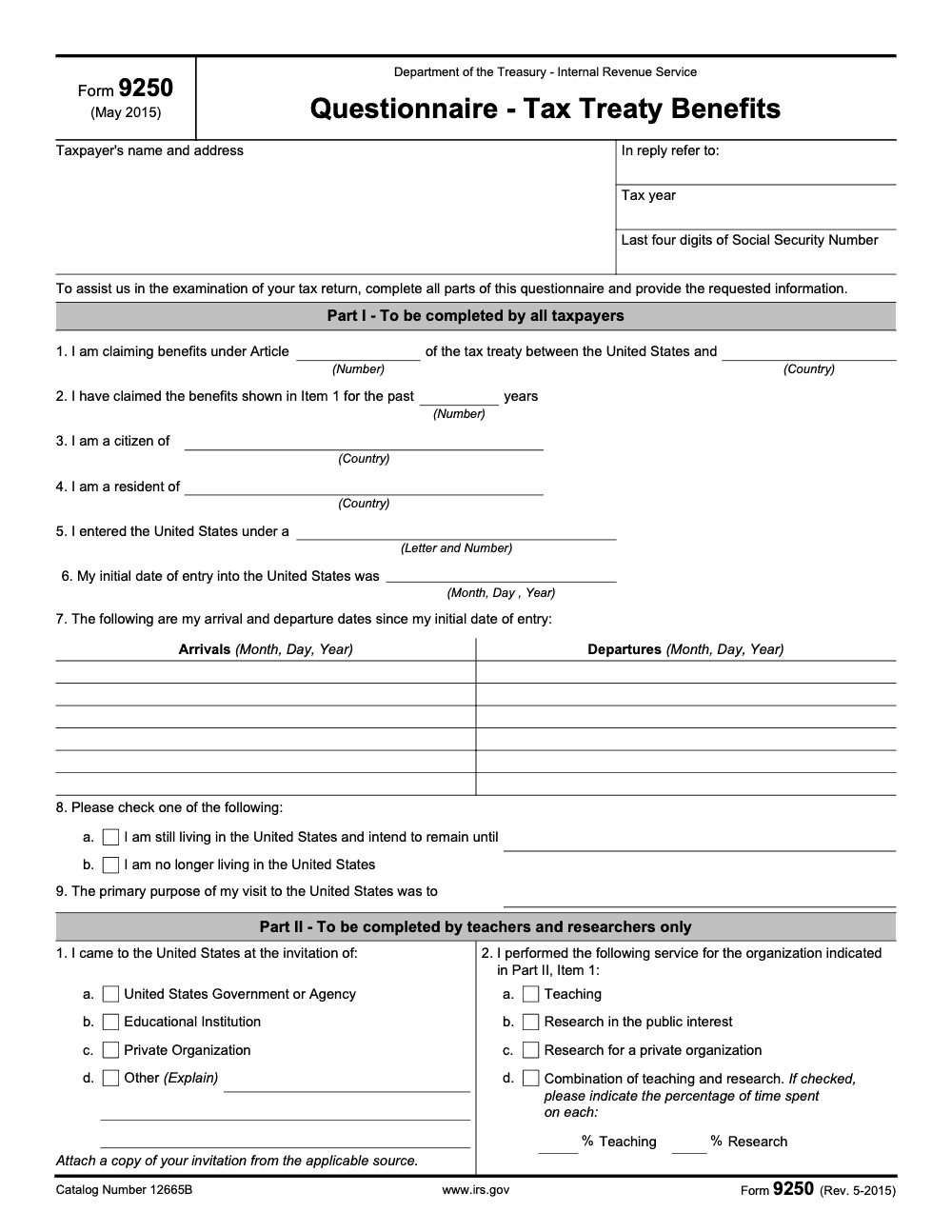
IRS Form 9250 (Rev. 5-2015), the Questionnaire - Tax Treaty Benefits (Catalog Number 12665B), is a two-page form an examiner sends you to substantiate a treaty benefit already claimed on your return. Per the form itself, Part I is completed by all taxpayers, Part II by teachers and researchers only, Part III by students, apprentices, and trainees only, and Part IV is a free-form Remarks section. The header asks for only the last four digits of your Social Security Number, and you sign under penalties of perjury.
Someone claims a treaty exemption on their return, the return is accepted, and the matter feels closed. Then an examiner mails Form 9250 and asks them to back up the treaty position they already took. That delayed second look is the whole point of the form: it does not create a new claim, it substantiates one you made earlier, often the same position disclosed on Form 8833.
Form 9250 is the IRS Questionnaire - Tax Treaty Benefits, a two-page form with four parts. Part I is for all taxpayers, Part II for teachers and researchers only, Part III for students, apprentices, and trainees only, and Part IV is a free-form Remarks section. The questions reward exact answers: the treaty Article number with the country, the precise visa classification such as F-1 or J-1, and complete arrival facts. The header asks for only the last four digits of your Social Security number, and you sign under penalties of perjury.
Key Takeaways
- Form 9250 is the IRS Questionnaire - Tax Treaty Benefits (Rev. 5-2015, Catalog Number 12665B), issued during an examination to gather the facts behind a treaty benefit you already claimed on a return.
- It is not a tax return and not a stand-alone treaty election. It does not by itself establish the treaty claim; it substantiates one you already made, often disclosed earlier on Form 8833.
- The form has four parts. Part I is completed by all taxpayers, Part II by teachers and researchers only, Part III by students, apprentices, and trainees only, and Part IV is a free-form Remarks section.
- Specificity wins. Part I, Item 1 asks for both the treaty Article number and the country, Item 5 asks for the exact visa classification (the letter and number, such as F-1 or J-1), and Item 7 asks for your complete arrival and departure history since first entry.
- Quick rule you can copy into your SOP: the moment a treaty client receives Form 9250, pull the original return, the Form 8833 disclosure, and the underlying travel and visa records before drafting a single answer.
- Attachments and signatures are mandatory. Teachers, researchers, students, and trainees must attach the invitation copy (plus grant copies and an institution attendance statement where they apply), and the taxpayer signs under penalties of perjury, with the spouse also signing if the underlying return was joint.
What Form 9250 Is and When You Receive It
Form 9250 is titled Questionnaire - Tax Treaty Benefits, issued by the Department of the Treasury - Internal Revenue Service. The form itself states its purpose plainly: it is sent “to assist us in the examination of your tax return,” and asks you to complete all parts that apply and provide the requested information. In other words, the IRS already has a return in front of it on which you claimed an income tax treaty benefit, and this questionnaire collects the supporting facts.
The current revision is May 2015 (Rev. 5-2015), Catalog Number 12665B. That date trips people up. Because the form is labeled 2015, some assume it has been replaced. It has not. The May 2015 revision remains the current version of Form 9250, and examiners continue to issue it in tax treaty examinations.
You do not file Form 9250 proactively. You receive it. The header includes an “In reply refer to:” field that ties your response back to the IRS correspondence that requested it, plus the specific tax year under examination and the last four digits of your Social Security Number. Leave the “In reply refer to” field blank and the IRS may be unable to match your questionnaire to the open examination file.
Who Form 9250 Is For
The questionnaire covers the most common treaty-benefit fact patterns: nonresident teachers and researchers, and nonresident students, apprentices, and trainees, plus any taxpayer claiming a treaty Article that turns on residency, citizenship, visa status, and time spent in the United States. Part I applies to everyone. Part II and Part III then split by role, which I cover in the walkthrough below.
What Form 9250 Does Not Do
Form 9250 is not a tax return, and it is not a treaty election. Returning a completed questionnaire does not create or guarantee a treaty benefit. It gives the examiner the facts to decide whether the benefit you already claimed holds up. Treat it with the same care as a return, because you sign it under penalties of perjury.
How to Complete Form 9250, Part by Part
Form 9250 runs two pages and is organized into four Parts. Part I is the foundation everyone fills in. Then you complete Part II or Part III based on your role, and Part IV for any extra context. Here is how the Parts break down.
| Part | Who Completes It | What It Captures |
|---|---|---|
| Part I (Items 1-9) | All taxpayers | Treaty Article and country, years claimed, citizenship, residency, visa class, entry date, travel history, current residence status, and primary purpose of the visit |
| Part II (Items 1-2) | Teachers and researchers only | Source of the invitation and the type of service performed (teaching, public-interest research, private research, or a combination) |
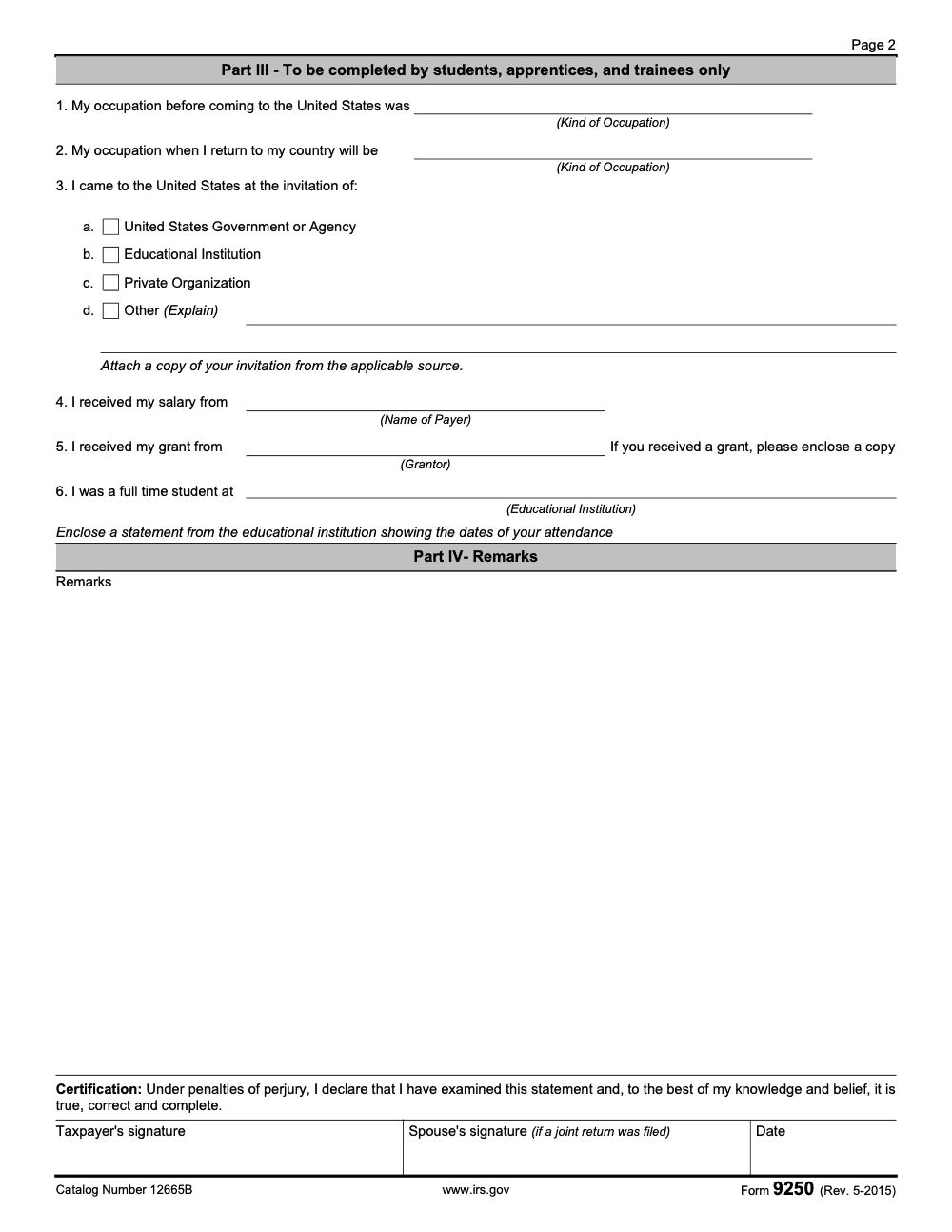
| Part III (Items 1-6) | Students, apprentices, and trainees only | Prior and intended occupation, source of invitation, salary payer, grantor, and the educational institution attended |
| Part IV | Anyone | Free-form Remarks for additional information |
Part I: Completed by Everyone
Part I has nine numbered items. Item 1 asks you to name both the treaty Article number and the foreign country that is party to the U.S. tax treaty. Item 2 asks how many past years you have claimed the same benefit. Items 3 and 4 are deliberately separate questions: the country you are a citizen of, and the country you are a resident of. Treaty benefits usually turn on residency, not citizenship, so answer both truthfully even when they differ.
Item 5 wants your exact visa classification, the letter and number such as F-1, J-1, or H-1B. Item 6 is your initial date of entry into the United States, and Item 7 is a table where you list every arrival and departure since that initial entry, with month, day, and year for each. Item 8 asks you to check exactly one box: still living in the U.S. with an intended end date, or no longer living in the U.S. Item 9 asks the primary purpose of your visit.
Part II: Teachers and Researchers Only
Part II has two items. Item 1 records the source of your invitation, with four checkbox options: U.S. Government or Agency, Educational Institution, Private Organization, or Other. Item 2 records the service you performed, again with four options: teaching, research in the public interest, research for a private organization, or a combination of teaching and research. If you check the combination box (Item 2d), you must indicate the percentage of time spent on each, written as % Teaching and % Research. Skip those percentages and the examiner cannot tell which treaty Article governs which portion of your income.
Part III: Students, Apprentices, and Trainees Only
Part III has six items: your occupation before coming to the United States (Item 1), your occupation when you return home (Item 2), the source of your invitation (Item 3, same four options as Part II), the payer of your salary (Item 4), the grantor of any grant (Item 5), and the educational institution where you were a full-time student (Item 6). Teachers and researchers should not use this section to describe their background; Part II is theirs.
Part IV: Remarks
Part IV is a free-form Remarks area. Use it to add context that does not fit the structured items, such as an explanation of a gap in your travel history or a note about a mid-year change in visa status.
Attachments, Signatures, and Returning the Form
A complete Form 9250 is more than the boxes on the page. The form asks for specific documents to be attached, and it carries a perjury certification. Return it without the attachments or without the right signatures and the examination stalls while the examiner chases what is missing.
| Requirement | Who It Applies To | What To Provide |
|---|---|---|
| Invitation copy | Part II (teachers, researchers) and Part III (students, apprentices, trainees) | A copy of the invitation from the source named in Part II Item 1 or Part III Item 3 |
| Grant copy | Part III filers who received a grant | A copy of the grant identified in Part III, Item 5 |
| Attendance statement | Part III filers naming a school | A statement from the educational institution in Item 6 showing the dates of your attendance |
| Taxpayer signature | Every filer | Signature under penalties of perjury, plus the date |
| Spouse signature | Filers whose underlying return was joint | The spouse signs as well, even if only one spouse is the treaty beneficiary |
The Certification You Are Signing
The certification block states that, under penalties of perjury, you have examined the statement and that to the best of your knowledge and belief it is true, correct, and complete. That is the same exposure as signing a return. A misstated residency answer, an understated treaty-year history in Item 2, or an incomplete travel log in Item 7 is a perjurable misstatement, not a harmless oversight.
Responding on Time
Form 9250 does not carry a statutory due date of its own. It carries the response deadline stated in the IRS correspondence that requested it. Diary that date the day the questionnaire arrives, and use the “In reply refer to:” reference on every page and cover note so your response is matched to the open examination file. If you cannot gather an attachment in time, contact the examiner before the deadline rather than returning an incomplete package.
What the IRS Is Really Checking
Form 9250 looks like a simple intake sheet, but every item maps to a treaty eligibility test. When you understand what the examiner is testing, the answers practically write themselves.
Residency, Citizenship, and the Treaty Article
Items 1, 3, and 4 work together. The examiner is confirming that the Article you named in Item 1 actually applies to a resident of the country you named, and that your citizenship answer (Item 3) and residency answer (Item 4) are consistent with that Article. This is why listing only the country without the Article number leaves the claim ambiguous, and why assuming citizenship equals residency can quietly defeat your own benefit.
Time in the United States
Many treaty Articles for teachers, researchers, students, and trainees carry time limits. That is what Item 6 (initial entry date) and Item 7 (full arrival and departure history) are for. The examiner reconciles your visa class from Item 5 against your cumulative presence to test substantial-presence and any treaty time cap. List only your current stay and the math breaks, which is why the complete history since first entry matters.
The Nature of Your Activity
For teachers and researchers, Part II Item 2 separates teaching from public-interest research, private research, and combinations, because different treaty provisions can apply to each. For students and trainees, Part III ties the income source (salary payer in Item 4, grantor in Item 5) and the school in Item 6 to the student-Article requirements. Small errors create big cleanup, so match each answer to the activity the treaty Article actually covers.
Form 9250 vs. Form 8833
The single most common confusion I see is between Form 9250 and Form 8833. They are related but distinct, and mixing them up leads people to file the wrong thing at the wrong time.
Different Purpose, Different Timing
Form 8833, Treaty-Based Return Position Disclosure Under Section 6114 or 7701(b), is filed proactively by the taxpayer with the return to disclose a treaty-based position. Form 9250 is the questionnaire the IRS issues afterward, during an examination, to substantiate that position. One is taxpayer-initiated and forward-looking; the other is IRS-initiated and backward-looking. You do not choose to file Form 9250 instead of Form 8833.
How They Work Together
In a clean treaty matter, the taxpayer claims the benefit on the return, attaches Form 8833 to disclose it, and only later, if the return is selected for examination, receives Form 9250 asking for the supporting facts. When you respond to Form 9250, keep your answers consistent with what you reported on the original return and on any Form 8833 you filed. Inconsistencies between the two are exactly what an examiner is looking to surface.
A Note on the Revision Date
Because Form 9250 still carries the May 2015 revision, people sometimes ask whether a newer treaty questionnaire exists. As of the 2025 tax year, no later revision has been published. Rev. 5-2015 is the form examiners issue, so do not go hunting for a replacement that does not exist.
Common Mistakes That Slow Things Down
Most Form 9250 examinations drag out for the same handful of reasons, and almost all of them are avoidable. Here are the recurring errors I flag for my team before we return a questionnaire.
Practical Checklists You Can Reuse
These checklists are copy-paste ready for your firm SOPs. Drop them into your examination-response template so every Form 9250 leaves your office complete the first time.
Part I intake (all taxpayers)
- Confirm the tax year under examination from the IRS correspondence.
- Copy the “In reply refer to:” reference onto the form and cover note.
- Enter only the last four digits of the Social Security Number.
- Item 1: record the treaty Article number and the foreign country.
- Item 2: state the number of past years the same benefit was claimed.
- Items 3 and 4: enter country of citizenship and country of residency separately.
- Item 5: enter the exact visa classification (letter and number).
- Items 6 and 7: record initial entry date and the full arrival and departure log.
- Item 8: check exactly one residence-status box; Item 9: state the primary purpose of the visit.
Role section (Part II or Part III)
- Decide whether the filer is a teacher or researcher (Part II) or a student, apprentice, or trainee (Part III); never both.
- Part II Item 1 or Part III Item 3: check the correct invitation source from the four options.
- Part II Item 2: select the service performed; if combination teaching and research, enter the % Teaching and % Research split.
- Part III Items 1 and 2: record prior occupation and intended occupation on return home.
- Part III Items 4, 5, and 6: name the salary payer, the grantor, and the educational institution.
- Use Part IV Remarks for any context the structured items cannot capture.
Attachments and signatures before mailing
- Enclose a copy of the invitation named in Part II Item 1 or Part III Item 3.
- Enclose a copy of any grant from Part III, Item 5.
- Enclose a statement from the educational institution in Item 6 showing dates of attendance.
- Confirm the taxpayer signature and date in the certification block.
- Add the spouse signature if the underlying return was joint.
- Re-read every answer against the original return for consistency before sealing the envelope.
Keep Treaty Exams From Stalling
Treaty examination questionnaires do not arrive on a tidy calendar. A Form 9250 lands whenever the IRS pulls a return that claimed a treaty benefit, which means it competes with whatever else is already on the desk. The response clock is the date in the IRS notice, not a familiar filing season, so these requests are easy to under-prioritize until they become urgent. Per the form itself, a complete response means reconstructing travel history since first entry (Item 7), the exact visa class (Item 5), and gathering invitation, grant, and attendance attachments, which is real work that does not compress well at the last minute.
The fix is to treat each questionnaire as a small, documented engagement with a fixed checklist rather than an ad hoc favor squeezed between deadlines. Standardize the intake the day the notice arrives, assign the attachment gathering early, and route the draft through a second reviewer before the perjury signature goes on.
- Open a file the day the notice arrives and diary the response date from the IRS correspondence.
- Reconcile Item 1 (Article and country), Items 3 and 4 (citizenship and residency), and Item 5 (visa class) against the original return and any Form 8833 disclosure.
- Rebuild the Item 7 arrival and departure log from passport stamps and I-94 records before drafting answers.
- Pull the Part II or Part III attachments early: invitation copy, grant copy, and the institution attendance statement.
- Run a final review for the taxpayer signature, the spouse signature on joint returns, and the “In reply refer to” reference on every page.
This is exactly the kind of structured, review-protected execution we build for client work. Accountably integrates trained offshore teams into your workflow with documented SOPs and multi-layer review, so questionnaire responses and the rest of your tax preparation and review work get handled without more burnout on your senior staff.
FAQs
Form 9250 (Rev. 5-2015), Questionnaire - Tax Treaty Benefits (Catalog Number 12665B), is a two-page questionnaire the IRS issues during an examination to gather the facts that support a tax treaty benefit a taxpayer already claimed on a return. It is not a tax return and it does not by itself establish a treaty claim. You complete it when the IRS asks for it and return it with the requested attachments.
Part I must be completed by all taxpayers. Part II is for teachers and researchers only. Part III is for students, apprentices, and trainees only. Part IV is a free-form Remarks section. Choose Part II or Part III based on the role for which the treaty benefit is claimed, not on incidental teaching or study.
No. Form 8833 is the Treaty-Based Return Position Disclosure that a taxpayer attaches to a return to disclose a treaty position. Form 9250 is the questionnaire the IRS issues afterward to substantiate that position during examination. They differ in purpose, timing, and who initiates them.
The header asks only for the last four digits of the Social Security Number, not the full nine-digit number. Writing the complete SSN discloses more than the form requests, so enter only the last four digits in the designated field.
Teachers and researchers (Part II) and students, apprentices, and trainees (Part III) must attach a copy of the invitation from the source identified on the form. A student or trainee who received a grant (Part III, Item 5) must enclose a copy of that grant, and anyone naming an educational institution (Part III, Item 6) must enclose a statement from that institution showing the dates of attendance.
Other forms this guide names
- Form 8833: Filing Requirements, Exceptions, and Penalties
About this guide
Accountably helps US CPA, EA, and accounting firms hire trained accountants and tax preparers in India.
About us Reviewed byJugal Thacker, CPAFounder and CEO at Accountably
A Washington-licensed CPA with 7+ years inside US firms – PwC, a real-estate tax practice, then a full-service firm, rising from reviewer to manager to advisory. This article was reviewed against current IRS guidance for the 2025 tax year and updated for filers preparing late returns, amendments, and 2026 estimates.
View profile →How we research, review, and update this guide
Every Accountably guide is researched against primary IRS sources, reviewed by a U.S. CPA, and refreshed as guidance evolves. Read our Editorial Guidelines to see how we source, fact-check, and update our content.




