Summarize this article with AI
In Brief
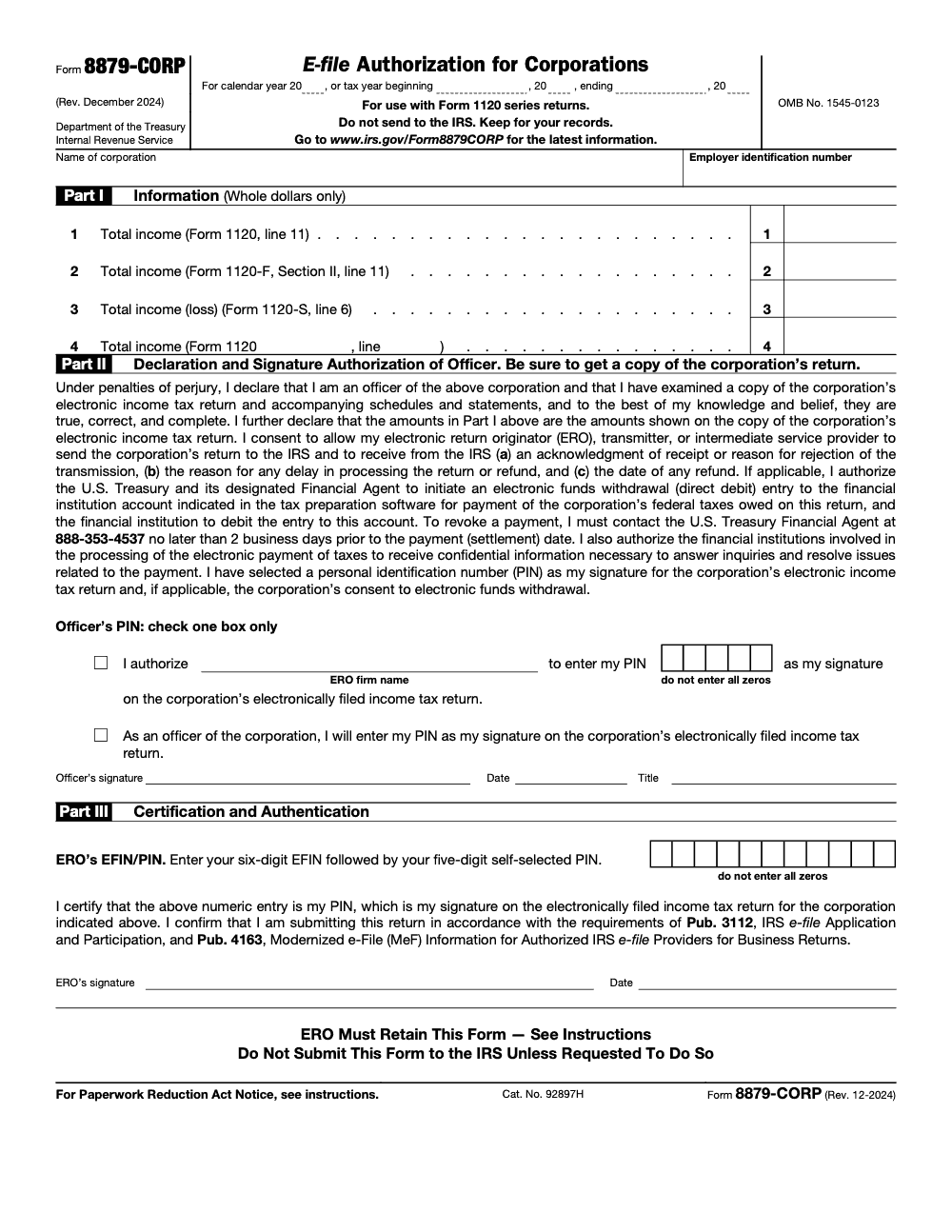
Form 8879-CORP is the IRS e-file signature authorization for corporations – the corporate officer signs with a five digit PIN and the ERO appends a six digit EFIN plus five digit PIN as the electronic signature on an e-filed 1120 series return (1120, 1120-F, 1120-S, or 1120-H). Per the Form 8879-CORP instructions (Rev. December 2024), the ERO keeps the signed form rather than mailing it and retains it for three years from the return due date or the IRS received date, whichever is later, with Part I totals pulled from Form 1120 line 11, Form 1120-F Section II line 11, or Form 1120-S line 6.
A corporation can have a finished 1120 sitting in the software, reviewed and balanced, and still miss its window because one signature line is wrong. Form 8879-CORP is where that happens. The corporate officer signs with a five digit PIN, the ERO adds a six digit EFIN and a five digit PIN, and those two pieces together stand in for ink on the e-filed 1120 series return, whether that is an 1120, 1120-F, 1120-S, or 1120-H.
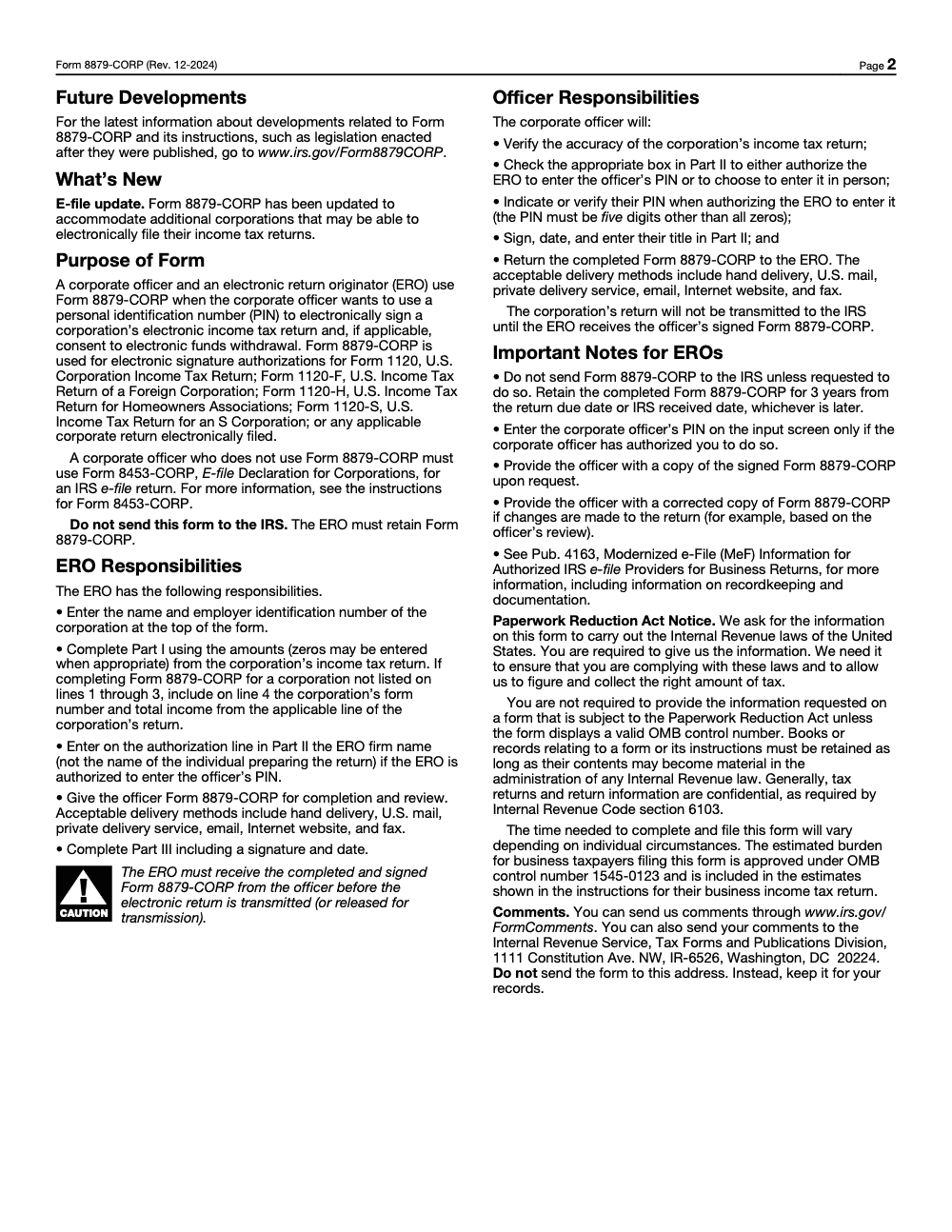
The part people forget is that you never send this form to the IRS. The ERO keeps it for at least three years from the later of the return due date or the IRS received date. It is the permission slip that ties a valid signature to the return the IRS actually receives, so a sloppy PIN entry can hold up a return that was otherwise ready to go.
Key Takeaways
- Use Form 8879-CORP to authorize e-signature and e-filing of your corporation’s 1120 series return with a practitioner PIN. You do not mail the form to the IRS. The ERO must retain it.
- Copy “Total income” from the correct line, 1120 line 11, 1120 F Section II line 11, or 1120 S line 6, and fill only the line that matches your return type.
- A corporate officer signs Part II with a five digit PIN, not all zeros. The ERO completes Part III with their six digit EFIN and five digit PIN.
- Retention is at least three years from the return due date or the IRS received date, whichever is later. The ERO must keep the signed form and provide a copy on request.
- If you are not using the PIN method, you will use Form 8453-CORP and attach it as a PDF to the e-filed return.
What Form 8879-CORP actually authorizes
Form 8879-CORP does two big things for you. First, it authorizes a corporate officer to sign the electronic return using a five digit PIN, and it allows the ERO to apply their 11 digit electronic signature, the six digit EFIN plus a five digit self selected PIN. Second, if you chose electronic funds withdrawal, it captures your consent to debit the bank account specified in your tax software. That is why 8879-CORP sits at the center of your e-file audit trail even though it is never mailed.
If you are filing a corporate return in the 1120 series, including 1120 F for foreign corporations, 1120 S for S corporations, or 1120 H for homeowners associations, the current 8879-CORP revision covers you. It is exclusively for the 1120 series, so partnership returns (Form 8879-PE), exempt-organization returns (Form 8879-TE), and fiduciary returns (Form 8879-F) each use their own authorization form, not 8879-CORP. If you prefer a paper declaration instead of a PIN, you can use 8453-CORP, which is uploaded as a PDF with the return.
Who must use 8879-CORP, and what changed after 2022
If you are e filing a corporate return and your ERO will use the Practitioner PIN method, you will complete Form 8879-CORP. Beginning with Tax Year 2022, the IRS Modernized e File rules consolidated prior corporate signature authorizations into 8879-CORP for the 1120 family of returns. The Internal Revenue Manual notes that 8879-CORP replaced earlier corporate variants, and that the practitioner PIN for the ERO is an 11 digit structure, six digits for the EFIN followed by five digits the ERO chooses.
You may still see older pages or PDFs for Form 8879 S in circulation for earlier years, but the current 8879-CORP form itself explicitly lists 1120 S and 1120 H among covered returns. When in doubt, use the revision date on the form you are holding, the latest 8879-CORP is Rev. December 2024 and states “for use with Form 1120 series returns.”
The 2025 status you should know
- The IRS “About Form 8879-CORP” page confirms the form is used to authorize e-signature for Forms 1120, 1120 F, and 1120 S, and it lists Publication 3112 and Publication 4163 as governing references for e-file providers. Page last reviewed December 3, 2024.
- The current 8879-CORP PDF is Rev. December 2024. It adds coverage for the 1120 H return and repeats the three year retention rule.
- If you do not use the PIN method, Form 8453-CORP is the paper declaration you attach as a PDF. The December 2024 8453-CORP instructions spell this out and mirror the same “total income” line references.
- The IRS has integrated its e-signature program into the Internal Revenue Manual, so the digital signature framework that began as temporary relief now continues without a sunset date in the IRM. That update sits in IRM 10.10.1 and is summarized on the IRS newsroom page about e-signatures.
What, how, wow
- What, Form 8879-CORP is your electronic signature authorization for the 1120 series. It ties your officer PIN and the ERO’s EFIN plus PIN to the exact return data you reviewed.
- How, complete the header exactly, enter the correct “total income” line for your return type in Part I, sign Part II with a five digit PIN, then ensure your ERO completes Part III with their 11 digit signature and the date. Keep your copy, your ERO retains the original for at least three years.
- Wow, the latest revision now explicitly covers more 1120 series returns such as 1120 H, and it aligns with Publication 4163’s business e-file rules, which is why you can streamline your signature workflows without mailing anything.
Step by step, completing 8879-CORP without second guessing
Header checklist, match exactly
Start with precision. Type the corporation’s legal name as it appears on the return, the EIN, and the tax year or fiscal year dates at the top. Accuracy here prevents avoidable rejections. If the filing is consolidated, make sure the return setup in your software matches that reality before you prepare the authorization. Small mismatches ripple into big delays with acknowledgements.
- Enter the corporation’s legal name exactly as the return shows it.
- Enter the EIN with no spaces or dashes in data entry fields if your software requires it.
- Use the correct tax year ending date for fiscal filers.
- Do not mail the form, your ERO retains it.
Part I, the “Total income” crosswalk
Part I looks simple, and it is, but you must pull the figure from the correct line on the return you are filing. That number is used to authenticate the return in the e-file record.
- Form 1120, enter “Total income” from line 11.
- Form 1120 F, enter “Total income” from Section II, line 11.
- Form 1120 S, enter “Total income, loss” from line 6.
- Form 1120 H or other 1120 series return, use line 4 in Part I and specify the form number and the applicable total income line.
Pro tip from painful experience, copy the whole dollar amount exactly as filed, no commas, no cents, and recheck after any last minute return edits. If the return changes materially after review, ensure the officer sees and approves a corrected 8879-CORP, then re retain that version.
Part II, the officer’s declaration and PIN
The officer reads the perjury statement, confirms Part I amounts match the return, then chooses one of two paths, either they enter their own five digit PIN, not all zeros, or they authorize the ERO firm to enter their five digit PIN on their behalf. Then they sign, date, and include title, president, vice president, treasurer, assistant treasurer, chief accounting officer, or another officer formally authorized to sign the corporate return.
If you are paying by electronic funds withdrawal, the same signature authorizes that debit. To revoke a scheduled debit, the form provides the U.S. Treasury Financial Agent phone number and the two business day timing window (notifying the ERO or asking your bank to stop payment does not cancel an EFW, and calls later than that window are not honored). Keep that number handy if your cash timing changes near the deadline.
Part III, ERO certification and the 11 digit signature
Your ERO completes Part III by entering their six digit EFIN immediately followed by their five digit self selected PIN, then they sign and date. That 11 digit entry is the ERO’s electronic signature under the Practitioner PIN method, and Pub. 4163 governs how providers handle signatures, records, acknowledgements, and transmissions for business returns. The ERO must receive the officer’s signed 8879-CORP before transmitting the return.
- Enter EFIN and PIN with no spaces, then sign and date.
- Keep the completed 8879-CORP for at least three years from the return due date or IRS received date, whichever is later.
- Provide a copy to the officer on request and update it if the return changes after officer review.
8879-CORP vs 8453-CORP, which one do you use
If you sign electronically with the PIN method, use 8879-CORP. If you prefer a paper declaration or your process requires it, use 8453-CORP. The two are mutually exclusive alternatives, so you complete one or the other for a given return, never both. Your software will attach 8453-CORP as a PDF to the e-filed return. Both forms ask for the same “total income” line references, and both carry forward the officer’s perjury statement. The big operational difference is who keeps what and how the return is signed in the e-file system.
Quick comparison
| Item | 8879-CORP | 8453-CORP |
| Purpose | PIN based e-file signature authorization | Paper declaration attached as PDF |
| Who signs | Corporate officer in Part II, ERO in Part III | Corporate officer in Part II, ERO and possibly paid preparer in Part III |
| When used | Practitioner PIN method | When PIN method is not used |
| Retention | ERO retains, do not mail | Attached to return as PDF, do not mail paper copy |
| “Total income” lines | 1120 line 11, 1120 F Section II line 11, 1120 S line 6, or other 1120 series on Part I line 4 | Same line mapping in Part I |
Record retention, timing, and e-signature hygiene
The retention clock is simple. Keep the signed 8879-CORP for at least three years from the return due date or the IRS received date, whichever is later. The ERO houses the original, and the officer should keep a copy. If the return is adjusted after officer review and changes the amounts referenced in Part I, provide and retain a corrected copy. Publication 4163 sets out the broader recordkeeping and documentation expectations for business e-file providers.
On e-signatures generally, the IRS has folded its pandemic era e-signature flexibilities into the Internal Revenue Manual, and the program continues. That is good news for busy officers who approve filings from the road. Follow your software’s identity verification steps and keep your audit trail tidy.
Common pitfalls and how to avoid them
Mismatched totals in Part I
If the “total income” amount on 8879-CORP does not match the amount on the e-filed return, you invite delays. Recreate the e-file after final review, regenerate 8879-CORP, then have the officer sign that version. If your process needs a paper declaration instead, 8453-CORP instructions explain when a corrected form is required after changes.
The wrong signer
Only an authorized officer can sign. That typically means president, vice president, treasurer, assistant treasurer, or chief accounting officer. A controller, bookkeeper, internal accountant, or outside tax preparer who is not a corporate officer cannot sign Part II, because that declaration is made under penalties of perjury. If you delegate, make sure you have formal corporate authority in place. When in doubt, match the officer who would sign a paper 1120.
Missing EFIN and practitioner PIN clarity
Your ERO’s electronic signature is an 11 digit entry, six digit EFIN followed by a five digit self selected PIN. Enter it as a continuous number, then sign and date. This is how the system authenticates the ERO under the Practitioner PIN method for business returns.
Mailing the form
Do not mail 8879-CORP to the IRS. Your ERO must keep it and provide it only if the IRS asks. The form itself states this in bold.
Software setup tips that save you during crunch time
- Map your entity type correctly, single entity versus consolidated, before you enable federal e-file.
- Generate the return, perform a full recompute in your software, and recreate the e-file after any configuration change.
- Choose the Practitioner PIN workflow so 8879-CORP populates.
- Print or export the signed copy to your records and confirm storage with your document management policy.
If you run high volume filings, set a simple pre flight checklist, name control match, EIN format, tax year end, return type, total income crosscheck, practitioner PIN, EFIN plus PIN, signatures and dates, storage location. Two minutes here prevents hours of cleanup later.
Security, confidentiality, and a clean audit trail
Follow your firm’s information security policy and the IRS guidance for e-file providers. Limit who can view or edit 8879-CORP, capture identity verification steps in your workpapers, and store the signed authorization alongside your e-file acknowledgements. Publication 4163 lays out provider responsibilities for recordkeeping, signatures, acknowledgements, and safeguarding taxpayer information.
Where Accountably fits, lightly and only when helpful
If you struggle to keep signatures, dates, and acknowledgements aligned during peak season, the fix is usually workflow discipline, not more emails. Accountably integrates trained offshore teams into your existing systems in a controlled way, so tasks like preparing 8879-CORP, confirming “total income” lines, and filing acknowledgements are tracked and ready for review without slowing partners down. We keep the focus on delivery controls your reviewers can trust.
Officer and ERO responsibilities at a glance
Officer
- Review the final return copy and verify Part I amounts.
- Choose a five digit PIN, not all zeros, or authorize the ERO to enter it.
- Sign, date, and include your title.
- If paying by electronic funds withdrawal, understand the timing and the phone number to revoke at least two business days before the debit date.
ERO
- Enter the corporation’s name and EIN, complete Part I, and add your firm name on the authorization line in Part II if the officer authorizes you to enter their PIN (use the ERO firm name, not the individual preparer’s name).
- Receive the completed and signed 8879-CORP before transmitting the return.
- Complete Part III, EFIN plus PIN, sign, and date.
- Retain the signed 8879-CORP for at least three years and provide a copy to the officer on request.
Practical quality checks your reviewers will love
- Name and EIN match the return.
- The return type in Part I matches your actual e-filed return.
- “Total income” is from the correct line and in whole dollars.
- Officer PIN is five digits, not all zeros, and signature and date are present.
- ERO EFIN plus five digit PIN is contiguous, signed, and dated.
- Signed copy stored with acknowledgements and engagement workpapers.
Source notes and updates
- About Form 8879-CORP confirms the form’s purpose and covered returns, and it lists Publication 4163 for provider rules. Page last reviewed December 3, 2024.
- The latest 8879-CORP is Rev. December 2024, states “Do not send to the IRS,” covers 1120, 1120 F, 1120 S, and 1120 H, provides PIN instructions, and repeats the three year retention rule.
- The current 8453-CORP is Rev. December 2024, it is the paper declaration when the PIN method is not used and is attached as a PDF to the return.
- IRM 3.42.4 explains the Practitioner PIN structure for the ERO and notes 8879-CORP as the consolidated authorization for 1120 series returns in recent years.
- The IRS newsroom page notes that the agency incorporated e-signature rules into the Internal Revenue Manual, making the digital signature framework ongoing rather than temporary.
A short, human checklist you can paste into your SOP
- Confirm return type, 1120, 1120 F, 1120 S, 1120 H.
- Recompute and recreate the e-file after final review.
- Generate 8879-CORP, complete header and Part I.
- Officer signs Part II with a five digit PIN, not all zeros.
- ERO completes Part III, EFIN plus five digit PIN, signature, date.
- Store the signed 8879-CORP, keep for at least three years, share a copy with the officer on request.
Final word, and a gentle next step
If you have ever spent an evening hunting for a missing signed authorization, you know how stressful a simple oversight can feel three days before a deadline. Build a small ritual around 8879-CORP, the correct totals, clear signatures, and predictable storage, and you will feel the weight lift. If you want an extra set of hands that respects your standards, Accountably is an offshore and outsourced accounting and tax staffing company built by a CPA for CPA, EA, and accounting firms that can handle the e-file authorization workflow with documented SOPs and review.
Common Mistakes We See Every Season
I see the same handful of slips every corporate e-file season, and almost all of them trace back to treating Form 8879-CORP like a formality instead of the document that ties a valid signature to the return. Here are the ones worth a guardrail, drawn from the corporate work our tax team reviews every season.
Reusable Checklists
These are copy-paste ready for your firm's SOP library. Drop them into your corporate e-file workflow and tick items off as you go.
Pre-transmit 8879-CORP packet
- Confirm the return type: 1120, 1120-F, 1120-S, or 1120-H.
- Enter the corporation name and EIN at the top of Form 8879-CORP.
- Complete Part I from the return: Form 1120 line 11, Form 1120-F Section II line 11, or Form 1120-S line 6.
- For any other 1120 series return, write the form and line number on Part I, line 4.
- Enter all Part I amounts in whole dollars only.
- Send the draft to the officer for review by one approved delivery method.
Signature and authentication check
- Confirm the officer examined a copy of the complete return before signing.
- Verify exactly one Part II PIN method box is checked, not both and not neither.
- Confirm the officer's five digit PIN is not all zeros.
- Confirm Part II shows officer signature, date, and corporate title.
- If the ERO entered the PIN, confirm the ERO firm name, not the preparer name, is on the authorization line.
- Complete Part III with the six digit EFIN plus five digit PIN, ERO signature, and date.
Retention and handoff
- File the signed Form 8879-CORP in the engagement's e-file folder.
- Record the retention date: three years from the return due date or IRS received date, whichever is later.
- Provide the officer a copy of the signed form on request.
- If the return changes after signing, void the old form and obtain a fresh signature.
- If an electronic funds withdrawal was scheduled, note the 888-353-4537 revocation line and the two business day cutoff before settlement.
- Keep the form retrievable in case the IRS requests it.
Keep 8879-CORP Season From Stalling
Corporate e-file season rarely stalls because the return is wrong. It stalls because a finished 1120 series return sits in the queue waiting on a signed Form 8879-CORP, since the ERO cannot transmit until that authorization is in hand. The December 2024 revision of the form, per the Form 8879-CORP instructions, was expanded to cover additional corporations now able to e-file, which means more officers, more PIN collection, and more chances for a signature to go missing during crunch week.
The fix is to treat the authorization as a tracked deliverable rather than an afterthought you chase on deadline day. When the signature step carries the same rigor as the return itself, transmissions stop backing up.
- Pre-fill Part I straight from the return so Form 1120 line 11, Form 1120-F Section II line 11, or Form 1120-S line 6 never get transcribed by hand under pressure.
- Lock a single delivery method for getting the form to the officer and back, so nothing lives in three inboxes.
- Build a transmit gate that blocks release until a non-zero five digit officer PIN and the eleven digit ERO EFIN plus PIN are confirmed.
- Tag every signed form with its three year retention date the moment Part III is complete.
- Flag any post-signature change to Part I totals for a fresh form before re-transmitting.
When volume climbs, a structured second set of hands keeps the signature pipeline moving without loosening your standards. That is the model our tax preparation and review team runs: documented SOPs, multi-layer review, and predictable turnaround so finished returns actually leave the building on time.
FAQs
It is the IRS e-file signature authorization that lets a corporate officer sign a corporation’s 1120 series return with a five digit PIN, and it lets the ERO append their EFIN plus PIN as the electronic signature on the e-filed return. You do not mail it, the ERO retains it for at least three years.
The ERO completes the header and Part I, then the corporate officer completes Part II and signs with a five digit PIN. The ERO completes Part III with the six digit EFIN plus five digit PIN, signs, and dates.
For Tax Year 2022 and later, the consolidated 8879-CORP form is used for 1120 series returns, including 1120 S. Older 8879 S PDFs still exist for prior years, but the current 8879-CORP clearly lists 1120 S among covered returns. Check the revision date on your form, the latest 8879-CORP is Rev. December 2024.
Yes. If you are not using the PIN method, use 8453-CORP. Your software will attach it as a PDF with the e-filed return. The officer still signs and the ERO completes their section.
At least three years from the return due date or the IRS received date, whichever is later. The ERO retains the form and must provide it if the IRS asks.
Use 1120 line 11, 1120 F Section II line 11, 1120 S line 6, or specify the correct line for another 1120 series return on Part I, line 4. Enter whole dollars only.
Other forms this guide names
- Form 1120: Corporation Tax Return Guide
- Form 8453-CORP: IRS E-file Declaration Guide
- Form 1120‑F: Guide, Filing, Deadlines, Protective Return
- Form 1120-F: Schedule Q, QDD Filing Guide
- Form 1120-S: Guide for S‑Corp Filing, K‑1, K‑2/K‑3, Deadlines
- Form 8879: IRS e-file Signature Authorization Explained
Summarize this article with AI
About this guide
Accountably helps US CPA, EA, and accounting firms hire trained accountants and tax preparers in India.
About us Reviewed byJugal Thacker, CPAFounder and CEO at Accountably
A Washington-licensed CPA with 7+ years inside US firms – PwC, a real-estate tax practice, then a full-service firm, rising from reviewer to manager to advisory. This article was reviewed against current IRS guidance for the 2025 tax year and updated for filers preparing late returns, amendments, and 2026 estimates.
View profile →How we research, review, and update this guide
Every Accountably guide is researched against primary IRS sources, reviewed by a U.S. CPA, and refreshed as guidance evolves. Read our Editorial Guidelines to see how we source, fact-check, and update our content.