Summarize this article with AI
In Brief
Form 8453-CORP authenticates an electronically filed 1120-series corporate return when the officer does not sign via a PIN on Form 8879-CORP – the officer signs Part II, the form is scanned to PDF, and the PDF is transmitted with the return through MeF. A corrected Form 8453-CORP is required if total income shifts by more than $150 or taxable income by more than $100 after signing (per the Instructions for Form 8453-CORP, Rev. December 2025), and any electronic funds withdrawal authorized under Box C must be revoked through the U.S. Treasury Financial Agent at least 2 business days before the settlement date.
An officer signs Part II on Monday, and on Wednesday the bookkeeper catches a missed reclass that moves total income. Now the question is whether the existing signature still holds or a corrected Form 8453-CORP is needed. The form authenticates an e-filed 1120-series return when the officer is not signing by PIN on Form 8879-CORP, and that late-change rule is where teams stumble.
The thresholds are specific: if total income shifts by more than $150 or taxable income by more than $100 after signing, you re-sign a corrected form rather than retransmit on the old one. Part I holds one figure, the return's total income in whole dollars, the officer signs Part II, the ERO completes Part III, and the signed form is scanned to PDF and attached, never mailed.
Key Takeaways
- Form 8453-CORP is the IRS e-file declaration that authenticates your corporate return when you are not using the officer PIN via Form 8879-CORP.
- It covers Form 1120, 1120-F, 1120-H, 1120-S, and other eligible 1120-series returns through a single declaration.
- You enter one figure in Part I, the return’s total income in whole dollars, and a corporate officer signs Part II.
- The ERO completes Part III, and the signed form must be scanned and attached to the e-file. Do not mail paper.
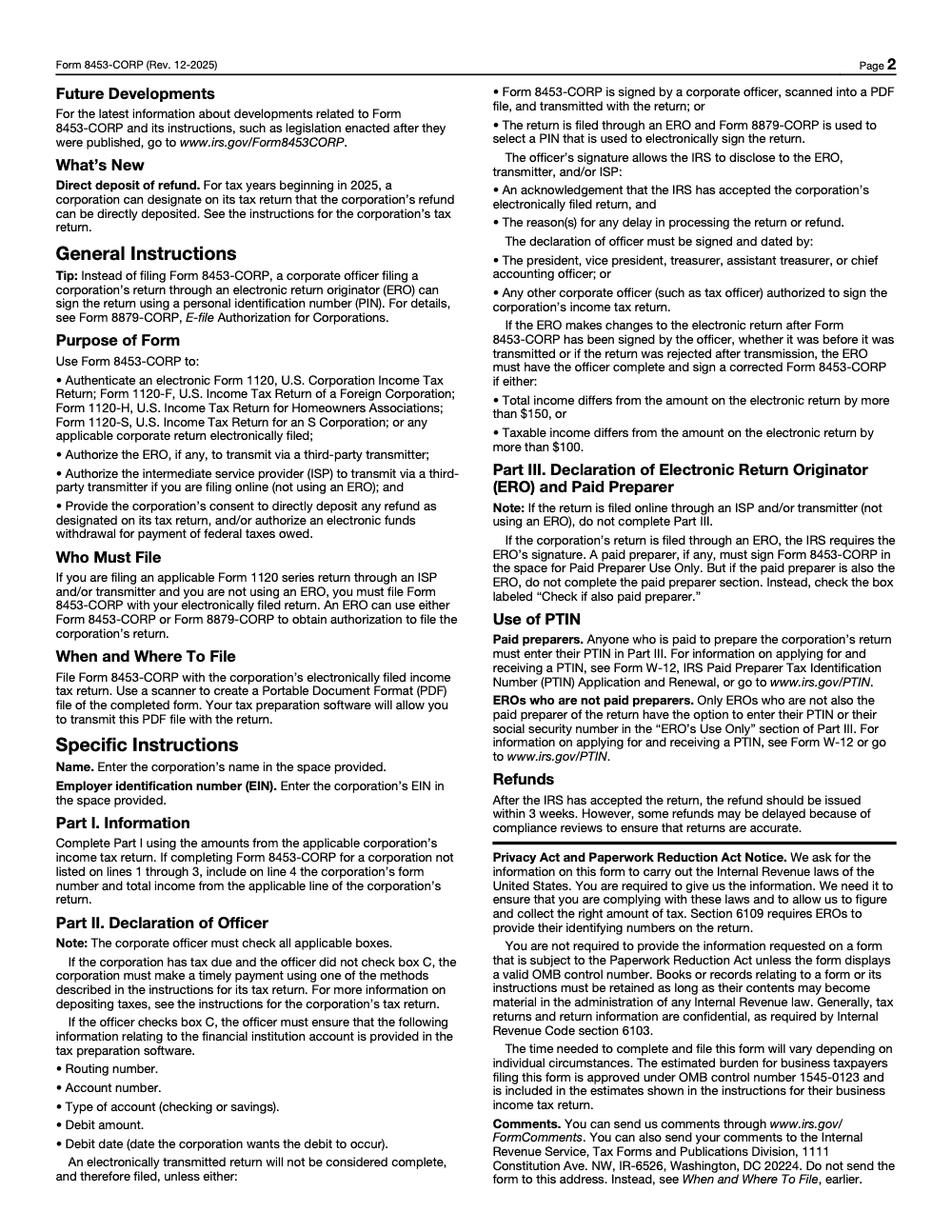
- If total income changes by more than $150 or taxable income by more than $100 after signing, you must re-sign a corrected 8453-CORP.
What Is Form 8453-CORP
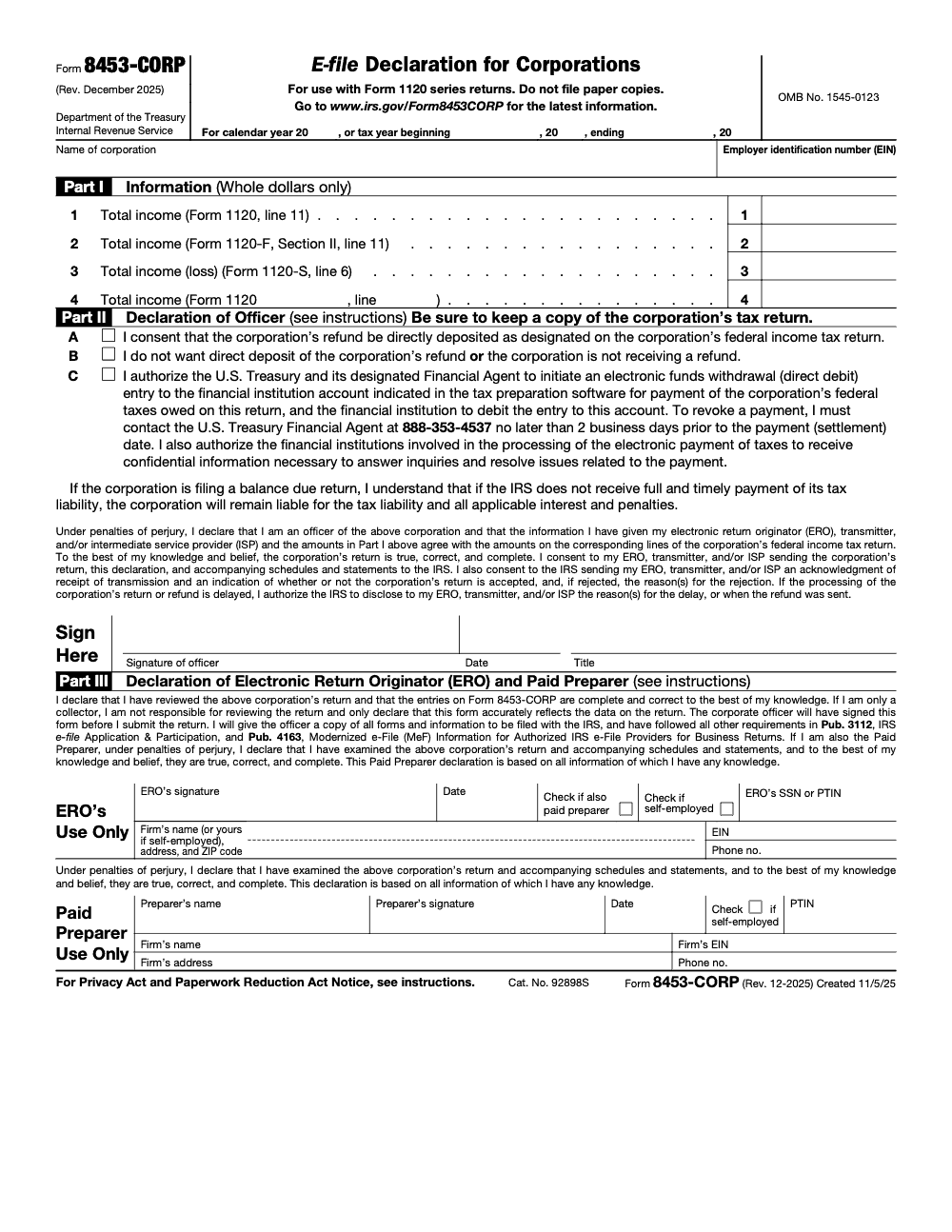
Form 8453-CORP is the IRS e-file declaration for corporations. You use it to authenticate an electronic corporate income tax return and to give consent for transmission, refunds by direct deposit, or an electronic funds withdrawal if you choose. It is the signature document you attach when the return is filed without an officer PIN.
The current revision is Rev. December 2025. It explicitly supports 1120, 1120-F, 1120-S, and other 1120-series returns, with a catchall line for additional eligible 1120 forms.
A corporate officer can alternatively sign using a PIN with Form 8879-CORP. That option replaces the need to attach Form 8453-CORP.
Who Must File Form 8453-CORP
You must include a signed Form 8453-CORP with the electronic return if you are filing through an ISP or transmitter and not using an ERO, or if your ERO is not using the 8879-CORP PIN method. In short, if there is no PIN signature, attach the signed 8453-CORP PDF to the e-file package.
If you do file through an ERO, the ERO can use either 8453-CORP or 8879-CORP to capture the officer’s authorization. Your return is not considered complete unless a signed 8453-CORP is attached or a valid 8879-CORP PIN signature is on file.
A useful edge case, large taxpayers
The Internal Revenue Manual notes that large taxpayers who originate their own e-filed corporate returns often must use the 8453 scanned signature method. If you are in that category and filing directly, plan on attaching the signed 8453-CORP PDF.
When Form 8453-CORP Is Not Required
You do not need Form 8453-CORP when the officer signs electronically with a PIN on Form 8879-CORP. That is a complete and valid e-signature, so there is no separate declaration to attach.
You also do not use 8453-CORP for paper returns because it is designed for the electronic filing workflow only. The IRS expects a signed PDF attachment with the MeF submission or a valid PIN signature, not a paper mailing.
A quick note on form history
Beginning with tax year 2022, Form 8453-CORP replaced several older corporate signature forms and now covers a wider set of 1120-series returns within one document. If you are looking at an older 8453-C, 8453-I, or 8453-S, that was the prior approach.
How To Access The Current Form And Instructions
Go to the IRS page for “About Form 8453-CORP” to download the current fillable PDF. The page is the official source of the latest revision and points to related guidance, including e-file publications for providers.
Open the PDF itself to confirm you are on Rev. December 2025. The form includes the Part I lines, the officer declarations in Part II, and the ERO and paid preparer section in Part III, along with key instructions such as the re-signing thresholds.
Do not mail paper copies. Create a readable PDF and attach it to the return. This is the expected Modernized e-File process.
Part I, One Number In Whole Dollars
Part I asks for just one figure, your return’s total income, and it must exactly match the return, rounded to whole dollars. Choose the single line that matches your return type.
- For Form 1120, enter total income from Line 11.
- For Form 1120-F, enter total income from Section II, Line 11.
- For Form 1120-S, enter total income, or loss as a negative, from Line 6.
- For other eligible 1120-series returns, use Part I, line 4, and specify the form and the applicable total income line.
Consistency is everything here. If Part I does not match the e-filed return, you may need a corrected 8453-CORP before transmission can be finalized.
Common Part I mistakes
- Entering cents instead of whole dollars.
- Copying the wrong line from the return.
- Completing more than one line instead of the single applicable line. Each creates avoidable review friction for your ERO and increases the chance you will need to re-sign.
Part II, Declaration Of Officer And Payment Choices
In Part II, a corporate officer signs under penalties of perjury. You confirm the return is true, correct, and complete, and that the Part I number matches the e-filed return. You also choose how the IRS handles any refund or payment by checking all applicable boxes in Part II, not just one (for example, a corporation receiving a refund and separately authorizing an EFT for a balance due can mark more than one box).
- Box A, consent that the corporation’s refund be directly deposited as designated on the corporation’s federal income tax return (this is new for tax years beginning in 2025, corporate refund direct deposit was not available on prior revisions of the form).
- Box B, no direct deposit or no refund.
- Box C, authorize an electronic funds withdrawal, and ensure the routing number, account number, account type, debit amount, and debit date are present in your software (authorizing the debit does not by itself satisfy the liability, if the IRS does not receive full and timely payment the corporation remains liable for the tax, interest, and penalties; to cancel the debit, contact the U.S. Treasury Financial Agent at 888-353-4537 no later than 2 business days before the scheduled settlement date, calling on the settlement date itself is too late).
Acceptable signers include the president, vice president, treasurer, assistant treasurer, chief accounting officer, or another authorized officer such as a tax officer. Sign and date Part II, and print your title.
Your return is not considered filed until the IRS receives either a signed 8453-CORP PDF with the submission or a valid 8879-CORP PIN signature through an ERO.
Part III, ERO And Paid Preparer Declarations
If you file through an ERO, the ERO must sign Part III. If there is a paid preparer, they sign as well and include a PTIN. When the ERO is also the paid preparer, they check the box indicating both roles rather than duplicate the paid preparer section.
The ERO attests they reviewed the return (or, if acting only as a collector, the ERO is not responsible for reviewing the return and only declares that Form 8453-CORP accurately reflects the data on the return) and followed the rules in Publication 3112 and Publication 4163 for authorized IRS e-file providers. This is the IRS’s quality and accountability layer for the transmitted package.
Identification details to verify
- ERO name, firm name, address, and phone
- ERO PTIN or SSN as applicable, and firm EIN
- Paid preparer PTIN and firm details when separate from the ERO Accurate identification prevents mismatches and delays.
Signing, Scanning, And Attaching The PDF
Here is the practical workflow most teams use during busy season:
- Prepare the return and generate Form 8453-CORP in your software.
- Print and obtain the officer’s wet signature on Part II.
- Scan to a clear PDF. Do not password protect the file. Keep the file size reasonable and readable.
- Attach the signed PDF to the e-file submission in your software.
- Have the ERO complete and sign Part III if applicable.
- Transmit the return through the MeF system. Do not mail paper copies.
Modernized e-File expects either a PIN signature via 8879-CORP or a scanned, attached Form 8453-CORP. Paper mailing is not part of this process.
Quick pre-transmission checklist
- Part I matches the return in whole dollars
- Officer signature, date, and correct title in Part II
- Box A, B, or C selected, and payment details present if Box C is used
- ERO and paid preparer sections complete, with PTIN where required
- Signed PDF attached, not encrypted, and clearly legible
Changes After Signature, Re-signing Rules
If your ERO makes changes after the officer has signed, you may need a corrected form. You must obtain a newly signed 8453-CORP when total income changes by more than $150, or when taxable income changes by more than $100, whether the change happens before first transmission or after a reject that requires resubmission. Attach the corrected signed PDF to the final submission.
Why this matters
Those small thresholds protect the integrity of the signature. They ensure the officer’s declaration still matches the return that is on file, and they prevent avoidable IRS rejects that slow refunds and confirmations.
8453-CORP vs 8879-CORP, A Simple Comparison
Both paths are valid. Your choice comes down to PIN availability and workflow preference.
| Item | 8453-CORP | 8879-CORP |
| Signature method | Wet signature on paper, scanned to PDF and attached | Officer PIN and ERO PIN captured electronically |
| When used | No PIN available, or you prefer a signed PDF | Officer is set up to sign with a PIN through an ERO |
| Who signs | Corporate officer in Part II, ERO and possibly paid preparer in Part III | Officer in Part II, ERO in Part III of 8879-CORP |
| Paper mailing | Never mailed, attached as PDF | Not mailed, retained by ERO |
| Re-signing thresholds | Triggered if total income changes by > $150 or taxable income by > $100 | Re-signed 8879-CORP if data used for PIN changes post-signing per e-file rules |
| Official references | Form 8453-CORP Rev. 12-2025, IRM MeF guidance | About Form 8879-CORP page, current revision |
Citations, 8453-CORP and PIN alternative.
Common Errors We See, And How You Can Avoid Them
- Wrong line in Part I, for example copying 1120 line 1 instead of line 11. Double check the instruction inside the form.
- Missing title for the officer in Part II. The IRS lists acceptable officer roles, include one.
- Selecting Box C without payment details in software. Add routing number, account number, account type, debit amount, and debit date.
- Mailing paper. The correct process is to attach a readable PDF, not to mail.
- Not re-signing after a material change. Apply the $150 and $100 thresholds.
Quick Scenario, From Start To Accepted
You are e-filing a Form 1120-S through an ERO without a PIN. You complete Part I with the exact figure from 1120-S line 6 in whole dollars. Your CFO signs Part II and chooses Box C for electronic funds withdrawal. The ERO signs Part III, scans the document to a clean PDF, attaches it in software, and transmits. The return is considered filed because it includes a valid scanned 8453-CORP, and the IRS can acknowledge acceptance to your ERO.
Accountably’s Role, Only Where It Helps
If your team wants a clean, repeatable path for signature capture and attachments during peak season, we can fold 8453-CORP into your standardized e-file checklist. That means precise Part I entries, officer sign-off logistics, and ERO controls that prevent last-minute hunts for signatures. This is a small but high-impact step in an overall delivery system that keeps filings moving.
Final Notes And Compliance
This guide reflects the current IRS materials as of Rev. December 2025 for Form 8453-CORP and related MeF guidance reviewed in 2025. Always confirm you are using the latest revision on the IRS site before filing.
Keep your workflow simple. Pick one path, PIN with 8879-CORP or signed PDF with 8453-CORP, and standardize it across your corporate filings. Your future self will thank you.
Common Mistakes We See Every Season
Across corporate e-file seasons, the same handful of 8453-CORP misses keep showing up. Each one is small in isolation and big when it blocks the MeF acknowledgment.
Reusable Checklists
These checklists are written to drop straight into a firm's SOP wiki. The data-checklist ids power the on-page checkbox state, so swap items as your workflow evolves and keep the kebab-case slug stable.
Officer pre-signature packet
- Confirm the return type (Form 1120, 1120-F, 1120-H, 1120-S, or other 1120-series) and the matching Part I line.
- Enter Part I total income from the source line (Form 1120 line 11, Form 1120-F Section II line 11, or Form 1120-S line 6).
- For a non-listed 1120-series return such as Form 1120-H, write the form number and total-income line on Part I, line 4.
- Walk Box A, Box B, and Box C with the officer and check every box that applies.
- If Box C is checked, capture routing number, account number, account type, debit amount, and debit date inside the tax software.
- Identify the signing officer by title (president, vice president, treasurer, assistant treasurer, chief accounting officer, or another authorized officer).
- Officer signs and dates Part II before the ERO submits the return.
- Save the signed PDF in a consistent naming pattern (entity-EIN-tax-year-8453corp.pdf).
ERO transmission checklist
- Confirm the signed 8453-CORP PDF is attached inside the MeF submission, not mailed separately.
- Compare Part I figures on the signed PDF to the final return amounts on the corresponding 1120-series lines.
- Enter the ERO identifying number in Part III (PTIN or SSN if the ERO is not also the paid preparer; PTIN only when the ERO is also the paid preparer).
- If the ERO and paid preparer are the same person, leave the paid preparer section blank and check "Check if also paid preparer."
- Confirm Part III is blank when the corporation is filing online without an ERO through an ISP or transmitter.
- Provide the corporate officer a copy of all forms and information being filed, per Pub. 3112 and Pub. 4163.
- Transmit, capture the IRS acknowledgment, and route the acceptance notice to the officer.
Post-signature number-change decision
- Pull the signed Part I figures and the current final return figures into a one-screen diff.
- Compute the total-income delta against the more-than-$150 trigger.
- Compute the taxable-income delta against the more-than-$100 trigger.
- If either trigger is crossed, prepare a corrected 8453-CORP and route to the officer for a fresh signature before retransmission.
- If neither trigger is crossed, document the delta in the file and retransmit with the existing signed PDF.
- Note in the workflow that the rule applies whether the change occurred pre-transmission or after a rejected transmission.
Keep 8453-CORP Season From Stalling
Corporate e-file weeks tend to stack their last 72 hours with the exact failure modes Form 8453-CORP was written to prevent. The Rev. December 2025 revision added a direct deposit box for corporate refunds, the EFW revocation window with the U.S. Treasury Financial Agent stays at 2 business days before settlement, and the re-signing math still triggers on a more-than-$150 total-income shift or a more-than-$100 taxable-income shift (per the Instructions for Form 8453-CORP, Rev. December 2025).
The fix is structural, not heroic. Treat the 8453-CORP as a gate that gets walked the same way on every engagement, with the same Part I, Part II, and Part III checks before any officer signature, and the same diff routine after any post-signature adjustment.
- Lock the Part I source-line crosswalk (Form 1120 line 11, Form 1120-F Section II line 11, Form 1120-S line 6, and the write-in pattern on line 4 for 1120-H and other variants) into the SOP so preparers stop guessing.
- Calendar a daily revocation-window check in any week where Box C EFW payments are active, with a 3-business-day cutoff before settlement so there is a one-day buffer.
- Build a one-screen Part I diff so the re-signing decision against the $150 and $100 thresholds takes seconds, not a manual recalculation.
- Standardize the ERO-is-also-paid-preparer rule in the e-file software template so the "Check if also paid preparer" box is never missed when both PTINs match.
- Save every signed 8453-CORP PDF in a single naming pattern so the post-acknowledgment file does not need to be reconstructed under deadline pressure.
This is the kind of cycle work an outside delivery team can carry end-to-end. Our taxation service runs the 8453-CORP signature loop, the Part I diff, and the EFW settlement check inside a documented SOP, so the officer signs once, the ERO transmits once, and deadline-week reruns stop.
FAQs
It authenticates an electronic corporate return when you do not use the officer’s PIN. It also provides consent for the ERO or ISP to transmit and lets you opt into direct deposit or electronic funds withdrawal. You attach it as a signed PDF with the submission.
A corporate officer signs Part II, for example the president, vice president, treasurer, assistant treasurer, chief accounting officer, or another authorized officer. If filed through an ERO, the ERO completes Part III, and a paid preparer, if any, also signs.
No. You scan and attach the signed PDF to the e-file package. Mailing a paper copy is not part of the MeF process and can cause confusion.
If total income changes by more than $150 or taxable income by more than $100, you must prepare and sign a corrected 8453-CORP and attach that version. This applies even if you are resubmitting after a reject.
8879-CORP captures the officer’s electronic PIN signature through an ERO, so there is no PDF attachment to sign and scan. 8453-CORP uses a wet signature that you scan and attach to the e-file. Both are valid signature methods.
Other forms this guide names
- Form 8879-CORP: PIN Authorization for 1120, 1120-F, 1120-S
- Form 1120: Corporation Tax Return Guide
- Form 1120-S: Guide for S‑Corp Filing, K‑1, K‑2/K‑3, Deadlines
- Form 1120‑F: Guide, Filing, Deadlines, Protective Return
- Form 1120-F: Schedule Q, QDD Filing Guide
- Form 1120-H: HOA Tax Guide, Eligibility, Rates, Filing
Summarize this article with AI
About this guide
Accountably helps US CPA, EA, and accounting firms hire trained accountants and tax preparers in India.
About us Reviewed byJugal Thacker, CPAFounder and CEO at Accountably
A Washington-licensed CPA with 7+ years inside US firms – PwC, a real-estate tax practice, then a full-service firm, rising from reviewer to manager to advisory. This article was reviewed against current IRS guidance for the 2025 tax year and updated for filers preparing late returns, amendments, and 2026 estimates.
View profile →How we research, review, and update this guide
Every Accountably guide is researched against primary IRS sources, reviewed by a U.S. CPA, and refreshed as guidance evolves. Read our Editorial Guidelines to see how we source, fact-check, and update our content.