
Summarize this article with AI
In Brief
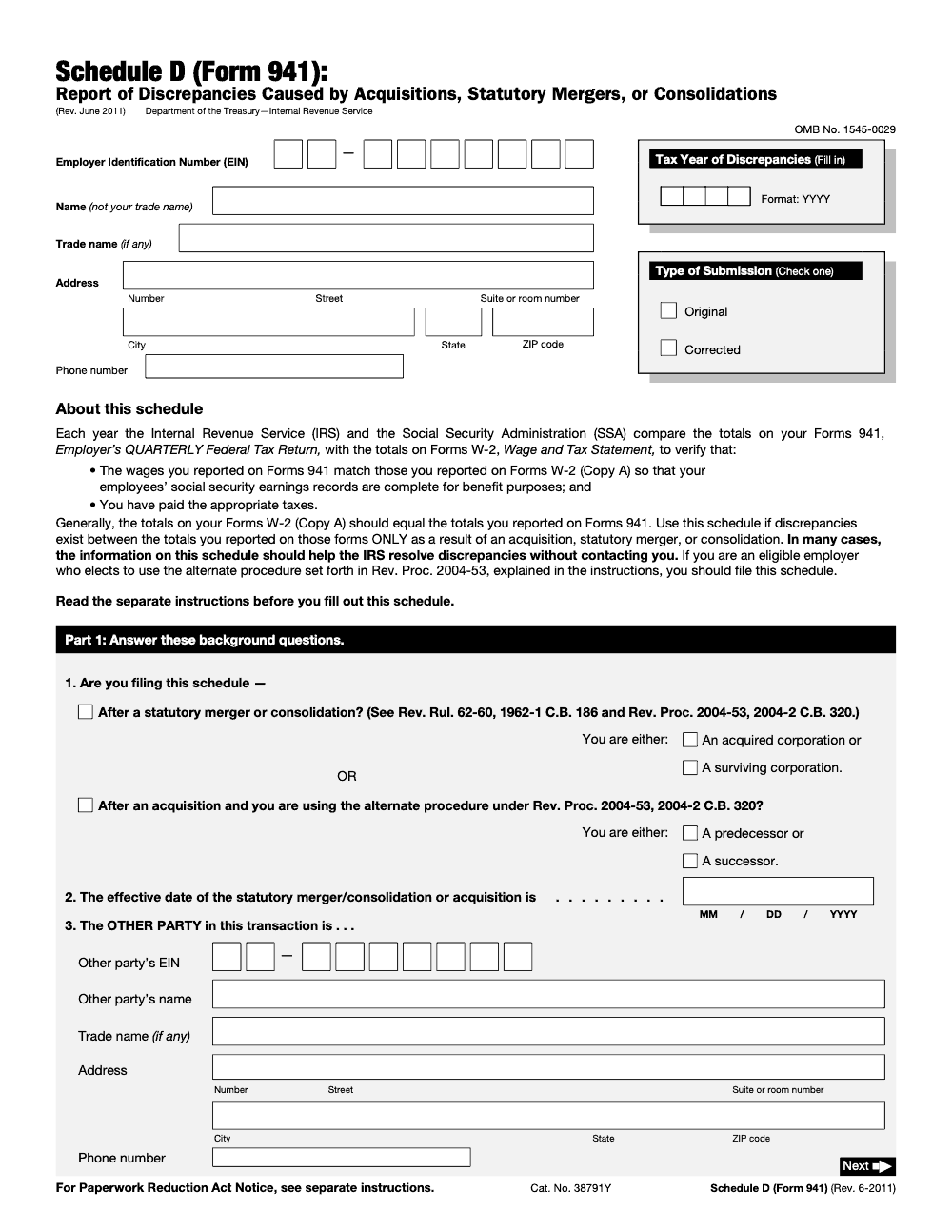
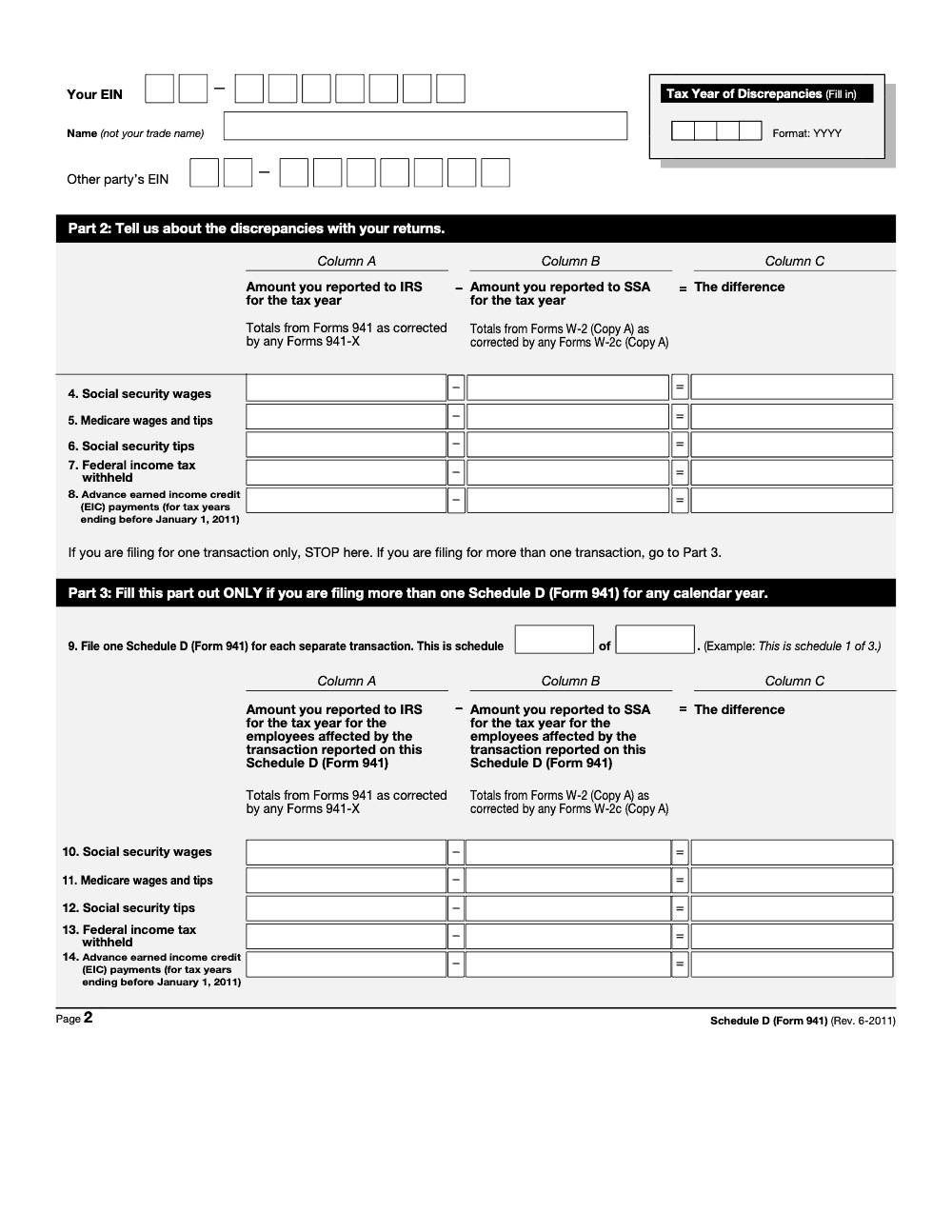
Schedule D (Form 941) is the IRS Report of Discrepancies Caused by Acquisitions, Statutory Mergers, or Consolidations – you file it when an acquisition, statutory merger, or consolidation makes your Form 941 totals differ from the Form W-2 (Copy A) totals that the IRS and SSA reconcile each year (per the Schedule D (Form 941) instructions, Rev. June 2011). Part 2 reports five wage and tax categories on lines 4 through 8, and Column C equals Column A (amount reported to IRS) minus Column B (amount reported to SSA). You file one Schedule D per transaction, not quarterly, which is exactly the reconciliation our tax preparation team tracks during deal work.
A buyer takes over the seller's payroll mid-quarter, and the problem surfaces at year-end: the Form 941 totals stop matching the Form W-2 (Copy A) totals the IRS and SSA reconcile, because the wages were reported under two different EINs. Without Schedule D, the IRS may assess penalties based on apparent underreporting, since the numbers it sees from one EIN look incomplete.
Schedule D (Form 941) is the Report of Discrepancies Caused by Acquisitions, Statutory Mergers, or Consolidations, filed once per transaction for the affected tax year rather than attached to a single quarter. Part 2 reports five wage and tax categories on lines 4 through 8, where Column C equals Column A minus Column B. The most common error is failing to file Schedule D at all, or filing it for the wrong quarter.
Key Takeaways
- Form 941 Schedule D – “Report of Discrepancies Caused by Acquisitions, Statutory Mergers, or Consolidations” – explains to the IRS why employment tax amounts reported do not match expected figures due to a business combination.
- It is required whenever an acquisition, statutory merger, or consolidation makes a successor employer’s Form 941 totals differ from the Form W-2 (Copy A) totals for the tax year, because wages were reported under two different EINs during the year.
- Schedule D is filed once per transaction for the affected tax year, not attached to a specific quarter’s Form 941.
- Without Schedule D, the IRS may assess penalties based on apparent underreporting – the numbers it sees from one EIN look incomplete without knowing about the predecessor’s contribution.
- The most common error is failing to file Schedule D at all, or filing it for the wrong quarter.
- Quick rule you can copy into your SOP: any acquisition, statutory merger, or consolidation that splits a tax year’s wages across two EINs must trigger a Schedule D flag during the payroll setup review.
What Form 941 Schedule D Is and When to Use It
Form 941 Schedule D is a specialized attachment to Form 941 used by successor employers when a business acquisition, statutory merger, or consolidation creates discrepancies in employment tax reporting. The discrepancy arises because wages paid to the same employees during the same calendar year may be split across two different employer EINs – the predecessor’s and the successor’s.
The IRS tracks employment tax reporting by EIN. When a successor employer takes over a workforce during the year, the wages reported under the successor’s EIN look artificially low against the full-year Form W-2 (Copy A) totals, because the predecessor paid wages earlier in the year under its own EIN. Without an explanation, the IRS’s system cannot reconcile the successor’s Form 941 totals against expected W-2 wage figures. And the IRS is not the only agency running this check – each year the Social Security Administration (SSA) performs the same Form 941-versus-W-2 (Copy A) reconciliation to keep employees’ social security earnings records complete.
Schedule D provides that explanation. It documents the amount of wages and employment taxes already reported by the predecessor, which the successor employer is now accounting for in its own return. The IRS uses Schedule D to reconcile the combined reporting across both EINs.
What Constitutes a “Discrepancy” for Schedule D Purposes
A discrepancy occurs when wages reported on Form 941 for the successor employer do not equal the expected amount based on W-2 data for employees who were active for the full year. If employees worked under the predecessor for three months and then under the successor for nine months, the successor’s four Form 941s for the year will not show a full year of wages – the predecessor’s three months are missing from the successor’s EIN history. Schedule D bridges that gap.
When Schedule D Is Not Required
If the acquisition does not change the tax year’s Form 941 totals relative to the Form W-2 (Copy A) totals – for example, a stock acquisition where the employing entity and its EIN do not change – there is no discrepancy to report. In that case, Schedule D is not needed. The form is required whenever an acquisition, statutory merger, or consolidation makes the tax year’s Form 941 totals differ from the Form W-2 (Copy A) totals the IRS and SSA reconcile.
Predecessor vs. Successor Employer Defined
In an acquisition under the Rev. Proc. 2004-53 alternate procedure, the predecessor is the acquired entity and the successor is the entity that continues the business; a statutory merger or consolidation instead labels the filer an acquired corporation or a surviving corporation. One labeling caveat worth knowing: on Schedule D itself, the words ‘predecessor’ and ‘successor’ are used specifically when you elect the alternate procedure under Rev. Proc. 2004-53 after an acquisition – a statutory merger or consolidation instead identifies the filer as an ‘acquired corporation’ or a ‘surviving corporation.’ For payroll tax purposes, “successor employer” has a specific meaning under IRC §3121(a)(1): the successor continues to employ substantially the same workers in the same or similar business. Both the predecessor and successor must use their own EINs for their respective periods of payroll.
How to Complete Form 941 Schedule D
Schedule D is divided into three parts: Part 1 covers background questions and the other party’s identity, Part 2 reports the discrepancy for a single transaction, and Part 3 is completed only when you file more than one Schedule D for a calendar year. Here is a section-by-section guide.
Part 1: Predecessor Employer Information
Enter the other party’s name, EIN, trade name, address, and phone, along with the effective date of the merger, consolidation, or acquisition (MM/DD/YYYY) and the four-digit tax year of the discrepancies. This identifies whose prior reporting is being explained by the discrepancy. If multiple predecessor entities were involved (as in a multi-entity merger), include information for each. Keep in mind that each separate transaction requires its own Schedule D (Form 941) rather than being combined on a single one; when more than one is filed for the same calendar year, number them sequentially (‘schedule 1 of 3,’ and so on).
| Field | What to Enter | Practitioner Note |
|---|---|---|
| Predecessor name | Legal name as registered with IRS | Match exactly to predecessor’s CP575 or 147C letter |
| Predecessor EIN | Nine-digit EIN of predecessor entity | Do not use the successor’s EIN here |
| Effective date and tax year | Effective date of the merger, consolidation, or acquisition (MM/DD/YYYY) and the four-digit tax year of the discrepancies | Use the effective date of the transaction, not the legal closing date |
| Amount reported to IRS for the tax year | Form 941 totals for the tax year as corrected by any Form 941-X (Column A) | Pull the corrected tax-year totals, not a single quarter’s figures |
| Predecessor’s taxes withheld | Federal income tax and FICA taxes withheld by predecessor | Verify against predecessor’s payroll system records |
Part 2: Reconciliation of the Discrepancy
Part 2 reconciles the discrepancy between the wages the IRS expects to see on the successor’s Form 941 and the wages actually reported. For each line, enter the amount you reported to the IRS for the tax year in Column A, the amount you reported to the SSA for the tax year in Column B, and their difference (Column A minus Column B) in Column C. Use the predecessor’s figures as corrected by any Form 941-X, and reconcile them against the Form W-2 (Copy A) totals as corrected by any Form W-2c, rather than original-only filings.
Attaching to Form 941
Schedule D is filed once per transaction for the affected tax year, not attached to a particular quarter’s Form 941. You file one Schedule D for each separate transaction in the calendar year it affected. The schedule reports a full tax year of discrepancies (the Tax Year of Discrepancies field, format YYYY), not a single quarter. Enter the four-digit tax year in which the discrepancy arose so the IRS and SSA can match it to that year’s reconciliation.
Deadlines, Penalties, and Filing Requirements
| Event | Deadline | Notes |
|---|---|---|
| Schedule D (Form 941) for a transaction | Filed per transaction for the affected tax year | One Schedule D per transaction; reports the full Tax Year of Discrepancies (YYYY), not a quarter |
| Extended deadline if deposits were timely | 10th day of second month after quarter-end | e.g., Q1 extends to May 10 if deposits were current |
Consequence of Not Filing Schedule D
If Schedule D is not filed and the IRS cannot reconcile the successor’s 941 with expected W-2 totals, the IRS may issue a notice of discrepancy, assess additional employment taxes, or trigger a compliance inquiry. The penalty exposure mirrors standard Form 941 late-filing penalties: 5% per month on unpaid tax, plus potential failure-to-deposit penalties if deposits are also affected.
Electronic Filing
Form 941 is typically e-filed by most employers and payroll providers. Schedule D is filed as an attachment within the e-file transmission. Verify that your payroll software or e-file system supports Schedule D attachment. If your software does not, paper file the Form 941 with Schedule D for the acquisition quarter.
Types of Business Combinations That Trigger Schedule D
Not all business transactions require Schedule D. The form is specific to situations where an acquisition, statutory merger, or consolidation makes a tax year’s Form 941 totals differ from the Form W-2 (Copy A) totals. Understanding which transaction types qualify helps you catch the Schedule D requirement during deal work and post-acquisition payroll setup.
Asset Acquisitions
When a buyer purchases the assets of a business and retains the employees, the buyer becomes a new employer for those workers under a new EIN. When this happens during the year, the seller reported wages under its EIN for the earlier part of the year and the buyer reports wages under its EIN for the remainder, so the buyer’s Form 941 totals differ from the full-year Form W-2 (Copy A) totals. Schedule D documents that tax-year discrepancy.
Statutory Mergers and Consolidations
A statutory merger occurs when one entity is absorbed into another by operation of state law, with the surviving entity continuing the business. A consolidation creates a new entity from two or more merging entities. Both can move a workforce to a new EIN during the year, splitting the year’s wages across two EINs. Schedule D reconciles the year’s Form 941 totals against the Form W-2 (Copy A) totals; for a statutory merger the filer is the acquired or the surviving corporation.
Stock Acquisitions (Generally No Schedule D Required)
When a buyer acquires the stock of a company, the target entity continues as the employer under the same EIN. No payroll EIN change occurs, and typically no Schedule D is needed. The exception is if the stock acquisition is accompanied by a restructuring that changes the employing entity and its EIN during the year, creating a tax-year discrepancy.
Spin-Offs and Divestitures
When a parent company spins off a division and establishes a new EIN for the divested entity, employees who move to the new entity create a mid-quarter EIN change if the spin-off happens during a quarter. Schedule D would be filed by the newly established entity for the affected tax year to explain the wages previously reported under the parent’s EIN.
Successor Employer Rules and Payroll Transitions
The IRS has specific rules governing how payroll transitions work in business combinations. These rules affect more than just Schedule D – they also determine how FICA tax caps and FUTA wage bases are calculated across predecessor and successor in the year of the combination.
FICA Wage Base Continuity
Under IRC §3121(a)(1), if the successor employer is treated as the same employer as the predecessor for FICA purposes, the Social Security wage base ($168,600 for 2024) carries over. An employee who earned $120,000 under the predecessor and $60,000 under the successor in the same year would have total wages of $180,000 – exceeding the FICA cap by $11,400. The successor can reduce its Social Security tax withholding once the combined wages cross the cap.
FUTA Wage Base Continuity
Similar continuity rules apply to FUTA. If the successor qualifies as the same employer under FUTA rules, the $7,000 FUTA wage base carries over from predecessor to successor. An employee who earned more than $7,000 total across both entities does not have FUTA wages restart at the successor. For more on FUTA treatment, see our Form 940 Schedule A guide.
Payroll System Setup After Acquisition
Getting the payroll system right after an acquisition is critical. I always recommend a payroll bridge document that shows, for each transferred employee: total wages paid under the predecessor, taxes withheld, and the remaining FICA wage base capacity for the successor. This document directly supports the Schedule D figures and prevents under-withholding in the post-acquisition period.
Common Mistakes That Slow Things Down
After a deal closes, payroll reconciliation is the last thing anyone wants to revisit, which is why the same Schedule D errors resurface every year-end. Here are the ones my team catches most often.
Practical Checklists You Can Reuse
These checklists are copy-paste ready for your acquisition and year-end close SOPs. Drop them into a shared workpaper so every transaction gets the same Schedule D treatment.
Schedule D trigger scan
- Confirm the discrepancy results solely from an acquisition, statutory merger, or consolidation.
- Verify a within-year payroll change moved the same employees’ wages across two EINs.
- Identify the filer’s role: acquired or surviving corporation for a statutory merger, predecessor or successor for the Rev. Proc. 2004-53 alternate procedure.
- Collect the other party’s EIN, legal name, trade name, address, and phone for item 3.
- Enter the four-digit tax year of the discrepancies.
- Note whether more than one transaction occurred this year, so you can plan one schedule for each.
Columns A, B, and C reconciliation
- Pull Form 941 totals as corrected by any Form 941-X for Column A.
- Pull Form W-2 (Copy A) totals as corrected by any Form W-2c for Column B.
- Compute Column C as Column A minus Column B on each line.
- Report Social security wages, Medicare wages and tips, Social security tips, and Federal income tax withheld on lines 4 through 7.
- Leave Advance EIC (line 8) blank for any tax year ending after December 31, 2010.
- Stop after Part 2 for a single transaction; complete Part 3 only when filing more than one schedule.
Submission and cross-reference
- Check exactly one Type of Submission box: Original or Corrected.
- Number each schedule on Line 9 when more than one transaction is filed for the year (schedule X of Y).
- Repeat your EIN, name, the other party’s EIN, and the tax year on page 2.
- Read the separate Schedule D (Form 941) instructions before completing the form.
- File one Schedule D per transaction; do not combine transactions or carry the schedule into later quarters.
Keep 941 Schedule D Season From Stalling
Schedule D never lands on a tidy calendar. It surfaces whenever an acquisition, statutory merger, or consolidation closes mid-year, and the mismatch only becomes visible once the IRS and the Social Security Administration run their annual Form 941-versus-W-2 (Copy A) reconciliation, the check the Schedule D (Form 941) instructions are built around. By then the deal team has moved on, and the payroll records you need often sit in a system someone is about to decommission.
The fix is to treat every transaction as a Schedule D event at closing, not at year-end. When the trigger is captured during deal work, the reconciliation becomes a documentation exercise instead of a forensic one.
- Capture the other party’s EIN, legal name, trade name, address, and phone the day payroll transfers, so item 3 is never a year-end scramble.
- Snapshot the predecessor’s Form 941 totals (as corrected by any 941-X) and W-2 (Copy A) totals for Columns A and B before any system is retired.
- Tag the transaction type up front so the role boxes match: acquired or surviving for a statutory merger, predecessor or successor for the Rev. Proc. 2004-53 alternate procedure.
- Open one Schedule D per transaction and number them on Line 9 when a single year holds more than one deal.
- Reconcile Column C (Column A minus Column B) across lines 4 through 8 while the source data is still warm.
That discipline is what keeps a Schedule D from stalling a close. Our tax preparation team builds the reconciliation into a documented, SOC-2-aligned workflow, so the schedule is ready when the IRS and SSA run their match, not weeks after a notice arrives.
FAQs
Schedule D (Form 941) explains to the IRS and SSA why an employer’s Form 941 totals differ from its Form W-2 (Copy A) totals for the tax year, solely because of an acquisition, statutory merger, or consolidation. It documents the wages and taxes reported under the other party’s EIN for that year, so the IRS can reconcile the combined figures without contacting you.
Schedule D is required whenever a business acquisition, statutory merger, or consolidation causes a discrepancy between the Form 941 totals and the Form W-2 (Copy A) totals for the tax year, because the same employees’ wages were reported under two EINs during the year. It is not needed when the transaction causes no such 941-versus-W-2 difference for the year.
You do not attach Schedule D to a particular quarter. File one Schedule D (Form 941) for each separate transaction, and report the full tax year of the discrepancies (the Tax Year of Discrepancies field, format YYYY). When you file more than one Schedule D for a calendar year, number them on Line 9 as ‘schedule 1 of 3,’ and so on.
Usually not. A stock acquisition typically does not change the employing entity or its EIN – the target company continues as the employer. Schedule D is needed when an asset purchase, statutory merger, consolidation, or similar transaction moves the workforce to a new EIN during the year and makes the year’s Form 941 totals differ from the Form W-2 (Copy A) totals.
You need the other party’s legal name, EIN, trade name, address, and phone, plus the Form 941 totals (as corrected by any Form 941-X) and the Form W-2 (Copy A) totals for the tax year. Pull these from the actual filed and corrected returns – do not estimate. The figures must accurately reflect what the predecessor reported on its own Form 941 for that period.
Other forms this guide names
- Form 941: Employer's Quarterly Tax Return Guide 2025
- Form W‑2: Deadlines, E‑File Rules, Boxes, and W‑2c Corrections
- Form 941‑X: Correct Payroll Tax Errors and Claim Refunds
- Form W-2c: Guide to Correcting W-2 Errors
Summarize this article with AI
About this guide
Accountably helps US CPA, EA, and accounting firms hire trained accountants and tax preparers in India.
About us Reviewed byJugal Thacker, CPAFounder and CEO at Accountably
A Washington-licensed CPA with 7+ years inside US firms – PwC, a real-estate tax practice, then a full-service firm, rising from reviewer to manager to advisory. This article was reviewed against current IRS guidance for the 2025 tax year and updated for filers preparing late returns, amendments, and 2026 estimates.
View profile →How we research, review, and update this guide
Every Accountably guide is researched against primary IRS sources, reviewed by a U.S. CPA, and refreshed as guidance evolves. Read our Editorial Guidelines to see how we source, fact-check, and update our content.




