
Summarize this article with AI
In Brief
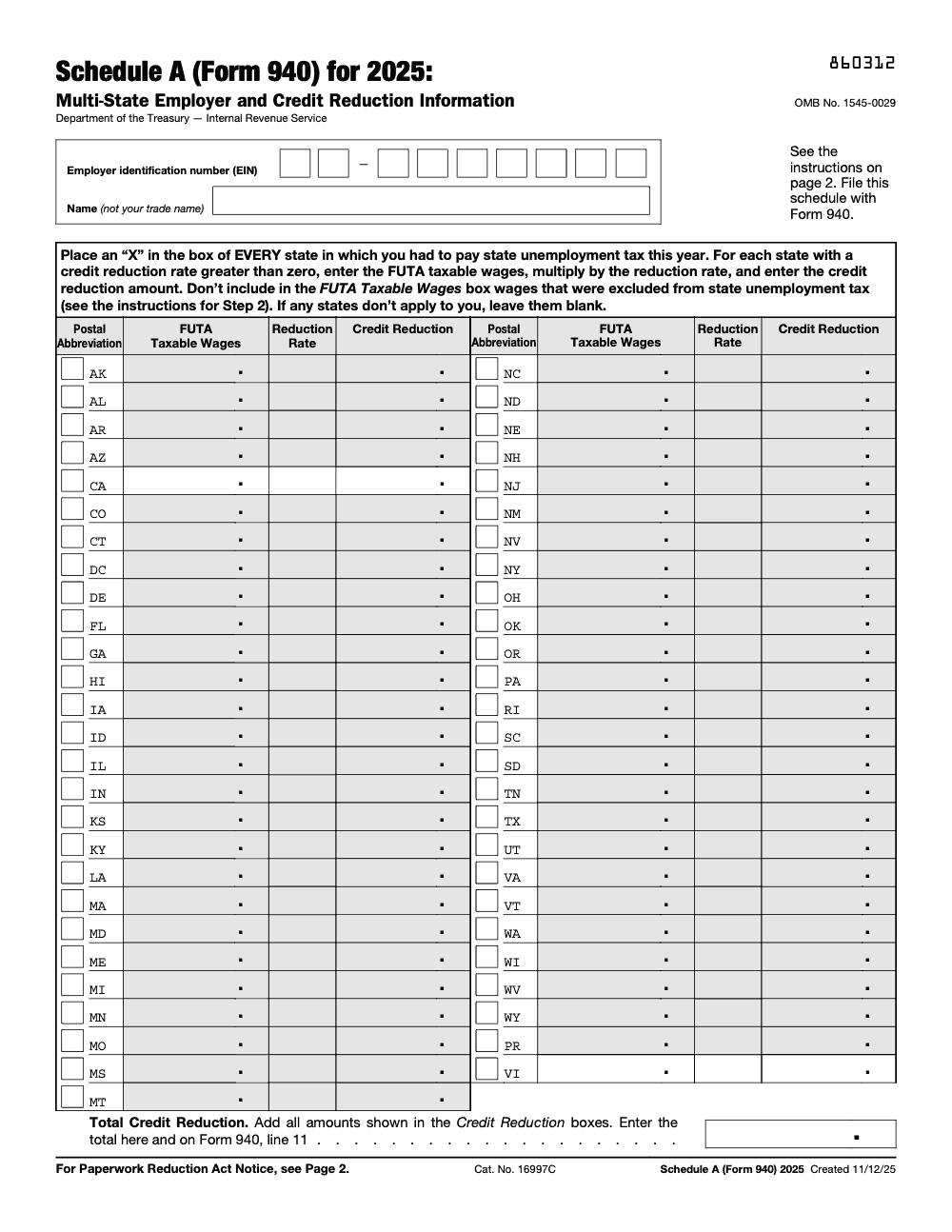
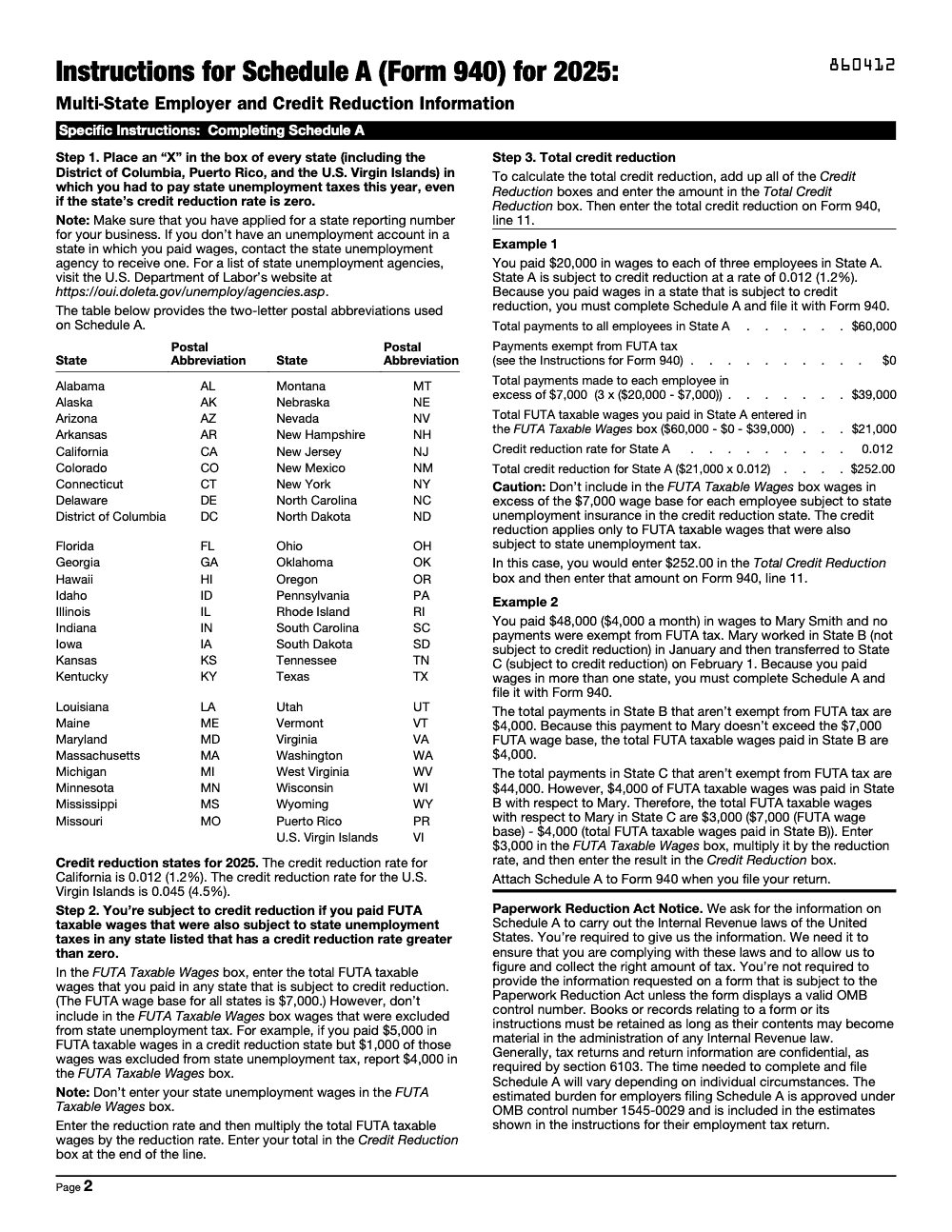
Schedule A (Form 940) is the multi-state employer and credit reduction information worksheet that any employer who paid FUTA taxable wages in more than one state, or in a credit reduction state, files as an attachment to Form 940. For tax year 2025, only California (1.2%) and the U.S. Virgin Islands (4.5%) carry a credit reduction (per the IRS Instructions for Schedule A (Form 940)); apply that rate to FUTA wages capped at $7,000 per employee, then carry the combined total to Form 940, line 11. Our multi-state tax preparation team handles these reconciliations end to end.
An employer runs payroll in three states all year and never thinks of it as a multi-state filing, because the work just happens where the crews happen to be. That habit is where Schedule A trips them up. The moment wages touch more than one state, or any credit-reduction state, Schedule A becomes a required attachment to Form 940, and skipping it understates the tax.
For tax year 2025 the list is short: only California carries a credit reduction of 1.2% and the U.S. Virgin Islands carries 4.5%. You apply that rate to FUTA wages capped at $7,000 per employee, then carry the combined total to Form 940, line 11. The trap is applying the reduction to the wrong wage base, or missing a state entirely when someone worked across locations.
Key Takeaways
- Schedule A is required on every Form 940 filed by an employer who paid wages in more than one state, or who paid wages in any state subject to FUTA credit reduction.
- Credit reduction states are those that borrowed from the federal unemployment trust fund and have not fully repaid it – the IRS publishes the list annually each November or December.
- The standard Form 940 FUTA rate is 6.0%, but employers normally claim a 5.4% credit for state unemployment taxes paid, netting 0.6%. Credit reduction states reduce that offset, raising effective FUTA costs.
- Due date mirrors Form 940: January 31 for the prior calendar year (extended to February 10 if all FUTA deposits were made on time).
- The biggest pitfall is applying the credit reduction to the wrong taxable wage base or missing a state entirely when employees worked across multiple locations during the year.
- Quick rule you can copy into your SOP: pull the IRS Notice 1036 or Revenue Procedure each November to confirm credit reduction states before December payroll closes.
What Form 940 Schedule A Is and When to Use It
Form 940 Schedule A – officially titled “Multi-State Employer and Credit Reduction Information” – is an attachment to the core Form 940, the Employer’s Annual Federal Unemployment (FUTA) Tax Return. Any employer who paid FUTA-taxable wages in more than one state during the year must complete Schedule A. It also catches employers who paid wages in any state designated as a credit reduction state for that year, even if they only operate in one state.
The schedule has two distinct purposes. First, it collects state-level FUTA taxable wage totals so the IRS can verify the employer’s credit calculations. Second, it applies the credit reduction percentage to wages paid in credit reduction states, effectively increasing the employer’s net FUTA liability for those states.
From my side of the desk, the multi-state aspect catches firms off guard more often than the credit reduction side. A client with employees who relocated mid-year, traveled for extended project work, or worked remotely from a new state is suddenly a multi-state employer – and that triggers Schedule A even if no credit reduction state is involved.
Who Must File Schedule A
An employer must attach Schedule A to Form 940 if they fall into either of these categories: (1) they paid wages in more than one state during the calendar year, or (2) they paid wages in any state that the IRS has designated as a credit reduction state for that filing year. The two categories overlap but are not identical – a single-state employer in a credit reduction state still needs the schedule.
What Credit Reduction Means in Practice
The credit reduction reduces the 5.4% normal FUTA credit by a percentage ranging from 0.3% to 2.1% or higher, depending on how long a state has had an outstanding federal loan balance. A 0.3% credit reduction on a $7,000 taxable wage base per employee translates to $21 of additional FUTA tax per worker. At 50 employees in one affected state, that’s $1,050 in unanticipated tax – small for a large firm but real money for a smaller practice.
The Annual Publication Cycle
The IRS announces credit reduction states for each tax year in late November or early December. The information typically appears in IRS Notice 1036 and is also embedded in the updated Form 940 instructions released for that tax year. My team adds a calendar reminder to check the IRS website the first week of December every year, without exception.
How to Complete Form 940 Schedule A
Schedule A is a one-page form organized as a grid of all 50 states plus the District of Columbia and U.S. territories. Each entry on the schedule feeds directly into Line 11 of Form 940. Here is how to work through it accurately.
Part 1: States Where You Paid Wages
Check the box for every state where you paid FUTA-taxable wages during the year, even if that state’s credit reduction rate is zero. Step 1 of Schedule A requires marking every state where you had to pay state unemployment tax, not only the credit reduction states. “Paid wages” means wages were earned and paid in that state, not merely that an employee physically passed through. If an employee worked in Texas for ten months and then relocated to California for two months, check both states.
| Step | Action | Practitioner Note |
|---|---|---|
| 1 | Check each state where FUTA wages were paid | Tie to payroll tax jurisdiction records, not just employee addresses |
| 2 | Enter FUTA taxable wages for each state | Cap at $7,000 per employee; excess wages are excluded |
| 3 | Identify credit reduction states from IRS list | Confirm against the most current IRS Form 940 instructions for the year |
| 4 | Apply credit reduction rate to taxable wages for those states | Rate varies by state; California has historically carried a 0.9% reduction |
| 5 | Total all credit reduction amounts | This sum flows to Form 940, Line 11 |
Calculating FUTA Taxable Wages Per State
The FUTA taxable wage base is $7,000 per employee per year. If an employee earned $50,000 during the year, only the first $7,000 is FUTA-taxable. For employees who worked across multiple states, you must allocate the $7,000 cap proportionally across states based on when the wages were paid, not where the employee currently lives. The $7,000 base is per employee per year, not a fresh $7,000 for each state the employee works in, so wages already counted in one state reduce the base remaining for the next.
Most payroll systems will generate a state-level FUTA taxable wage report. I always reconcile that report against the W-2 box 16 totals to catch any state that the payroll system may have coded incorrectly.
Credit Reduction Calculation Line by Line
For each credit reduction state on the schedule, multiply the FUTA taxable wages paid in that state – after backing out any wages that were excluded from state unemployment tax in that state – by the applicable credit reduction rate. The result is your additional FUTA tax owed for that state. Sum all state credit reduction amounts and enter the total on the designated line of Schedule A, which then transfers to Form 940 Line 11.
Tying Schedule A Back to Form 940
Line 11 on Form 940 asks for total credit reductions. The sum you calculated on Schedule A goes here. If you leave this line blank when a credit reduction applies, the IRS will send a CP2000 or a notice adjusting your liability. Small errors create big cleanup.
Deadlines, Penalties, and Filing Requirements
Schedule A has no separate filing deadline; it follows Form 940 exactly. But the deposit rules and penalty structure are worth understanding independently because FUTA deposits are quarterly, while the return is annual.
| Event | Due Date | Notes |
|---|---|---|
| Form 940 (and Schedule A) filing | January 31 | For the prior calendar year |
| Extended filing deadline | February 10 | Only if all required FUTA deposits were timely made |
| Quarterly FUTA deposit (if liability exceeds $500) | Last day of the month following quarter-end | April 30, July 31, October 31, January 31 |
| Annual credit reduction payment | January 31 | Credit reduction amounts not covered by deposits are due with the return |
Failure-to-File Penalties
The IRS assesses a 5% per month penalty on unpaid tax, up to 25%, for late filing of Form 940. If the late filing also reflects unpaid FUTA tax from credit reductions that were not deposited, the failure-to-deposit penalty (FTD) applies separately at rates of 2%, 5%, 10%, or 15%, depending on how many days late the deposit is.
Electronic Filing Thresholds
Employers who file at least 10 information returns in a calendar year are required to file electronically. The IRS also encourages e-filing for all Form 940 submissions through their e-file for Business portal. Most payroll software handles this automatically.
Understanding Credit Reduction States: A Deeper Look
Credit reduction states arise under the Federal Unemployment Tax Act framework. When a state’s unemployment trust fund runs out during a recession, the state borrows from the federal government to keep paying benefits. If that loan is not repaid within two years, the IRS reduces the employer’s normal FUTA credit by 0.3% for each year the debt remains outstanding.
Historical Context
Following the 2008–2009 recession, more than 20 states carried credit reductions for multiple years. By the mid-2010s, most had repaid their loans. The COVID-19 pandemic created new borrowing, though the timeline for repayment varied significantly by state. My team has seen California carry credit reductions for nearly a decade at various points – a meaningful cost for employers with large California headcounts.
How the Rate Escalates
Year 1 of an outstanding loan: 0.3% credit reduction. Year 2: 0.6%. Year 3 and beyond: additional increments apply, and the IRS also applies a Benefit Cost Rate (BCR) add-on for states with particularly high borrowing relative to taxable wages. This can push effective credit reductions well above 1.0% in some years for high-debt states.
Planning for Credit Reduction States
If you have clients in states with persistent trust fund deficits, I recommend building a provisional FUTA liability adjustment into your payroll accruals as early as Q3. This prevents a year-end surprise when the IRS officially announces the credit reduction states. Firms that wait until January to calculate the additional liability often scramble to fund the deposit before the return deadline.
Multi-State Wage Allocation on Schedule A
The multi-state aspect of Schedule A trips up firms that grew through remote work adoption. Before 2020, most small employers had employees in one or two states. By 2022, many had employees scattered across ten or more states, which created a significant compliance surface on Schedule A.
Allocating Wages When an Employee Works in Multiple States
The IRS does not provide explicit allocation guidance in the Form 940 instructions, so firms default to the same method used for state unemployment insurance (SUI) purposes. The four-factor test – localization, base of operations, direction or control, and residence – determines which state has jurisdiction. For FUTA purposes, wages are generally allocated to the state where the employee performs services, with SUI jurisdiction serving as the proxy.
Remote Work Complications
When an employee works remotely from a state where the employer has no registered presence, the employer may still owe SUI in that employee’s state of residence. If SUI is owed in that state, the FUTA wages for that employee should be reflected on Schedule A for that state as well. I see firms miss this regularly when their payroll address does not match where the employee actually works.
Acquiring a New Entity Mid-Year
If your client acquired a business mid-year and inherited employees in new states, those states must be included on Schedule A for the acquisition year even if the acquirer had no presence there before. The Form 941 Schedule D handles payroll discrepancies from acquisitions and mergers on the 941 side – similar care is needed on Schedule A for 940 purposes.
Common Mistakes That Slow Things Down
Schedule A looks simple, a grid of states and a few boxes, but the same errors surface every January when we review multi-state 940 packets. Here are the ones that create the most cleanup.
Practical Checklists You Can Reuse
Drop these into your SOP library so multi-state 940 work runs the same way every January. Each box saves as you check it, so you can leave a packet and return to it.
Multi-State Schedule A Setup
- Confirm whether the client paid wages in more than one state, or in any credit reduction state, this year.
- List every state where state unemployment tax was actually deposited.
- Verify the client holds a state unemployment account in each of those states.
- Mark an “X” for each SUTA state on the grid, including DC, Puerto Rico, and the U.S. Virgin Islands where applicable.
- Confirm the legal name and EIN on Schedule A match the Form 940 it attaches to, not a trade name.
2025 Credit Reduction Calculation
- Confirm the current credit reduction states in the IRS Instructions for Schedule A (Form 940): California (1.2%) and the U.S. Virgin Islands (4.5%) for 2025.
- Pull FUTA taxable wages for each credit reduction state, capped at $7,000 per employee.
- Back out any wages that were exempt from state unemployment tax in that state.
- Multiply each state’s FUTA taxable wages by its 2025 rate to get the Credit Reduction amount.
- Adjust the remaining wage base for employees who worked in more than one state during the year.
- Add the state amounts and enter the sum in the Total Credit Reduction box.
Pre-File Review and Handoff
- Recompute at least one state’s credit reduction independently before sign-off.
- Trace the Total Credit Reduction to Form 940, line 11.
- Confirm Schedule A is attached to Form 940 and not submitted separately.
- Confirm the Form 940 filing deadline and whether all FUTA deposits were made on time, which sets the applicable due date.
- Retain the worksheets and supporting payroll records for as long as they may be material.
Keep 940 Schedule A Season From Stalling
The 940 Schedule A crunch is not about volume, it is about precision under a single annual deadline. Schedule A lists 53 jurisdictions (per the IRS Instructions for Schedule A (Form 940)), yet for tax year 2025 only two carry a credit reduction, so the real work is reconciling which states each employee actually triggered SUTA in and backing every figure down to the $7,000 FUTA base before the return goes out.
When that reconciliation happens in the final week, small classification errors turn into amended returns. The fix is to move the state-by-state work upstream into a repeatable process instead of a January scramble.
- Maintain a running map of every state where each employee triggered state unemployment tax, so the “X” grid is built before year-end, not at filing.
- Reconcile FUTA taxable wages to the $7,000 per-employee base for workers who moved between states mid-year.
- Flag exposure to the 2025 credit reduction states, California and the U.S. Virgin Islands, the moment payroll runs there.
- Recompute each Credit Reduction box and tie the total to Form 940, line 11 under a second-reviewer step.
That is the kind of structured, reviewed execution we build into every engagement. Our tax preparation team runs multi-state FUTA reconciliations against documented SOPs and a multi-layer review, so the credit reduction math is right the first time and the annual deadline stops being a fire drill.
FAQs
Schedule A is used by multi-state employers and employers in credit reduction states to report state-level FUTA taxable wages and calculate any additional FUTA tax owed due to credit reductions. It is an attachment to Form 940 and is required whenever either condition applies. The credit reduction total from Schedule A flows directly to Line 11 of Form 940.
Any employer that paid FUTA-taxable wages in more than one state during the calendar year must file Schedule A. Additionally, any employer that paid wages in a state designated as a credit reduction state by the IRS for that year must file the schedule – even if they only operate in that one state. The IRS publishes the credit reduction state list in the Form 940 instructions for each tax year.
Schedule A is filed as part of Form 940 and follows the same deadline: January 31 for the prior calendar year. If all required FUTA deposits were made on time, the deadline extends to February 10. There is no separate extension form for Schedule A beyond the Form 940 extension process.
Credit reduction states are states that borrowed from the federal unemployment trust fund and have not fully repaid the loan within the required period. The IRS reduces the normal 5.4% FUTA credit for wages paid in these states, typically by 0.3% for each year the debt remains outstanding. This increases the effective FUTA tax rate on wages paid in those states and requires the additional tax to be calculated and reported on Schedule A.
For each credit reduction state, multiply the FUTA taxable wages you paid in that state (capped at $7,000 per employee per year) by the applicable credit reduction rate for that state in that tax year. Sum the results for all credit reduction states and enter the total on Schedule A and on Form 940 Line 11. The credit reduction rates are listed in the Form 940 instructions published by the IRS each fall.
Yes. If the single state where the employer operates is designated as a credit reduction state for that tax year, Schedule A is still required. The multi-state checkbox condition and the credit reduction state condition are independent – meeting either one triggers the Schedule A filing requirement. Verify each year whether your client’s state of operation appears on the IRS credit reduction list.
Other forms this guide names
Summarize this article with AI
About this guide
Accountably helps US CPA, EA, and accounting firms hire trained accountants and tax preparers in India.
About us Reviewed byJugal Thacker, CPAFounder and CEO at Accountably
A Washington-licensed CPA with 7+ years inside US firms – PwC, a real-estate tax practice, then a full-service firm, rising from reviewer to manager to advisory. This article was reviewed against current IRS guidance for the 2025 tax year and updated for filers preparing late returns, amendments, and 2026 estimates.
View profile →How we research, review, and update this guide
Every Accountably guide is researched against primary IRS sources, reviewed by a U.S. CPA, and refreshed as guidance evolves. Read our Editorial Guidelines to see how we source, fact-check, and update our content.




