Summarize this article with AI
In Brief
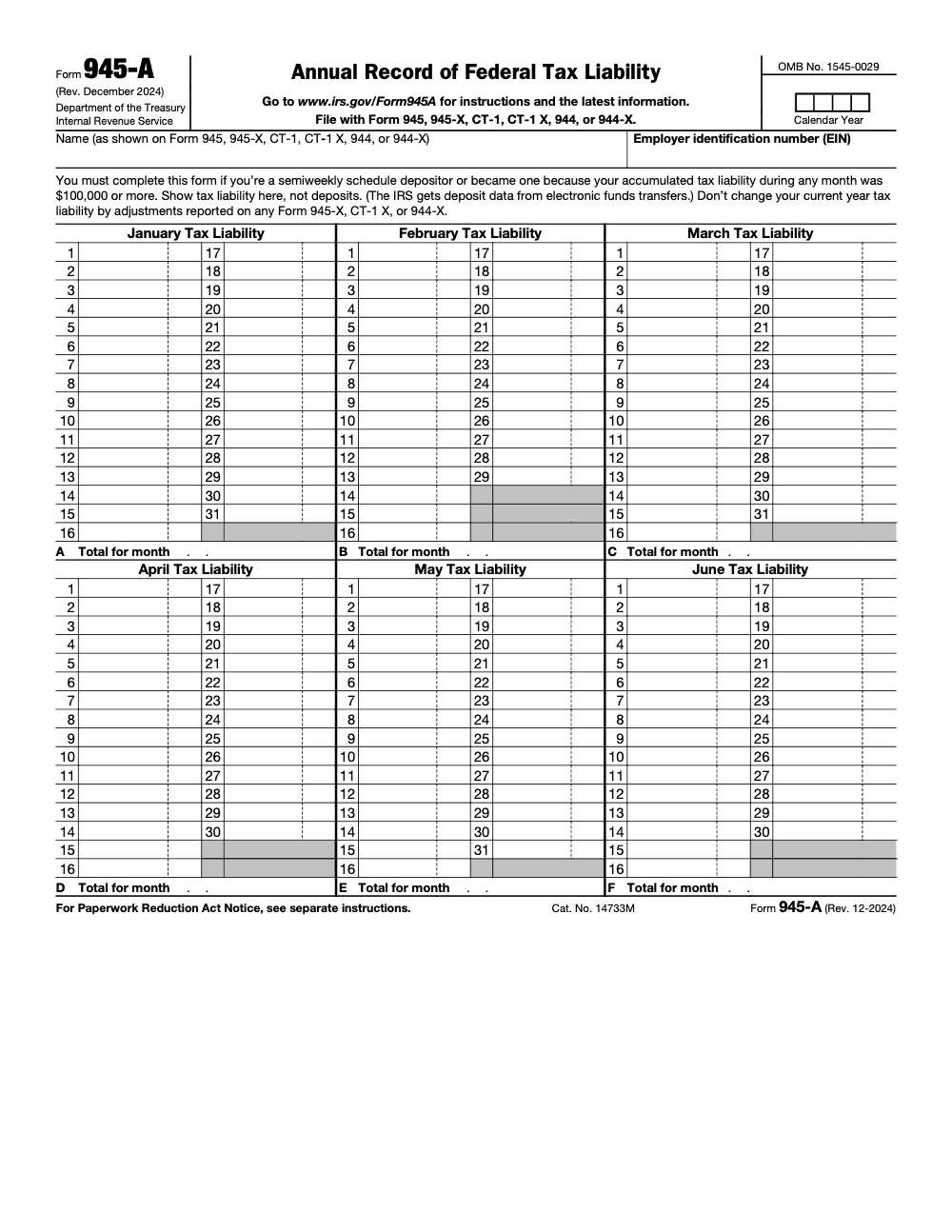
Form 945-A is the Annual Record of Federal Tax Liability that semiweekly depositors attach to Form 945, Form 944, or Form CT-1 to report daily nonpayroll federal income tax withholding (per the Form 945-A instructions, Rev. December 2024). Line M must equal Form 945 line 3, Form 944 line 9, or Form CT-1 line 15, and the 2025 filing deadline is February 2, 2026, or February 10, 2026 if every deposit was timely and paid in full.
Two depositors can owe the IRS the same total for the year and end up in very different places, because Form 945-A is scored by date, not by total. It is the annual record of federal tax liability that semiweekly depositors attach to Form 945, Form 944, or Form CT-1, recording each day's nonpayroll withholding by the date the liability actually arose.
The matching check is unforgiving: Line M must equal Form 945 line 3, Form 944 line 9, or Form CT-1 line 15. Record the dates correctly and the math ties out and the firm is protected. Get the dates wrong and the IRS may average your deposits and assess penalties, at which point an amended Form 945-A is how you get it recomputed. The 2025 filing deadline is February 2, 2026, or February 10, 2026 if every deposit was timely and paid in full.
Key Takeaways
- Form 945-A is a daily liability calendar for nonpayroll withholding, and the IRS uses it to match liabilities to deposits and compute timeliness. Record by liability date, not deposit date.
- You must file it if you are a semiweekly depositor. Monthly depositors file only if any single day in a month reaches 100,000, which also flips you to semiweekly for the rest of that year and the next. The 2,500 annual liability exception applies.
- For the 2025 return year, Form 945 is due February 2, 2026, or February 10, 2026 if all deposits were on time. Attach Form 945-A as required. General rule, the annual return is due January 31, but specific-year calendars can shift the date.
- If the IRS assesses an FTD penalty and your dates were off, file an amended Form 945-A so the IRS can recompute the penalty using correct daily liabilities.
What Form 945-A actually is
Form 945-A is the Annual Record of Federal Tax Liability for your nonpayroll withholding world, for example backup withholding, pensions and annuities, certain payments on IRAs, and gambling winnings. Although it rides with your annual return, it is a daily calendar. You enter each day’s tax liability on the exact date that liability arose. The IRS then compares those daily liabilities with your electronic deposits to verify timing and accuracy. If Form 945-A is missing or misprepared when required, the IRS can propose an averaged FTD penalty, even when every deposit was timely, because the IRS spreads your annual liability evenly across the year and computes penalties against that averaged figure rather than your actual daily liabilities.
- Use it with Form 945 for nonpayroll withholding.
- Use it with Form 944 when applicable.
- Use it with Form CT‑1 for Railroad Retirement Tax Act liabilities.
- Do not use Form 945-A with Form 941 or Form 943. Form 941 semiweekly filers attach Schedule B (Form 941), and Form 943 semiweekly filers attach Form 943-A. Form 945-A is not the universal semiweekly schedule for every employment-tax return.
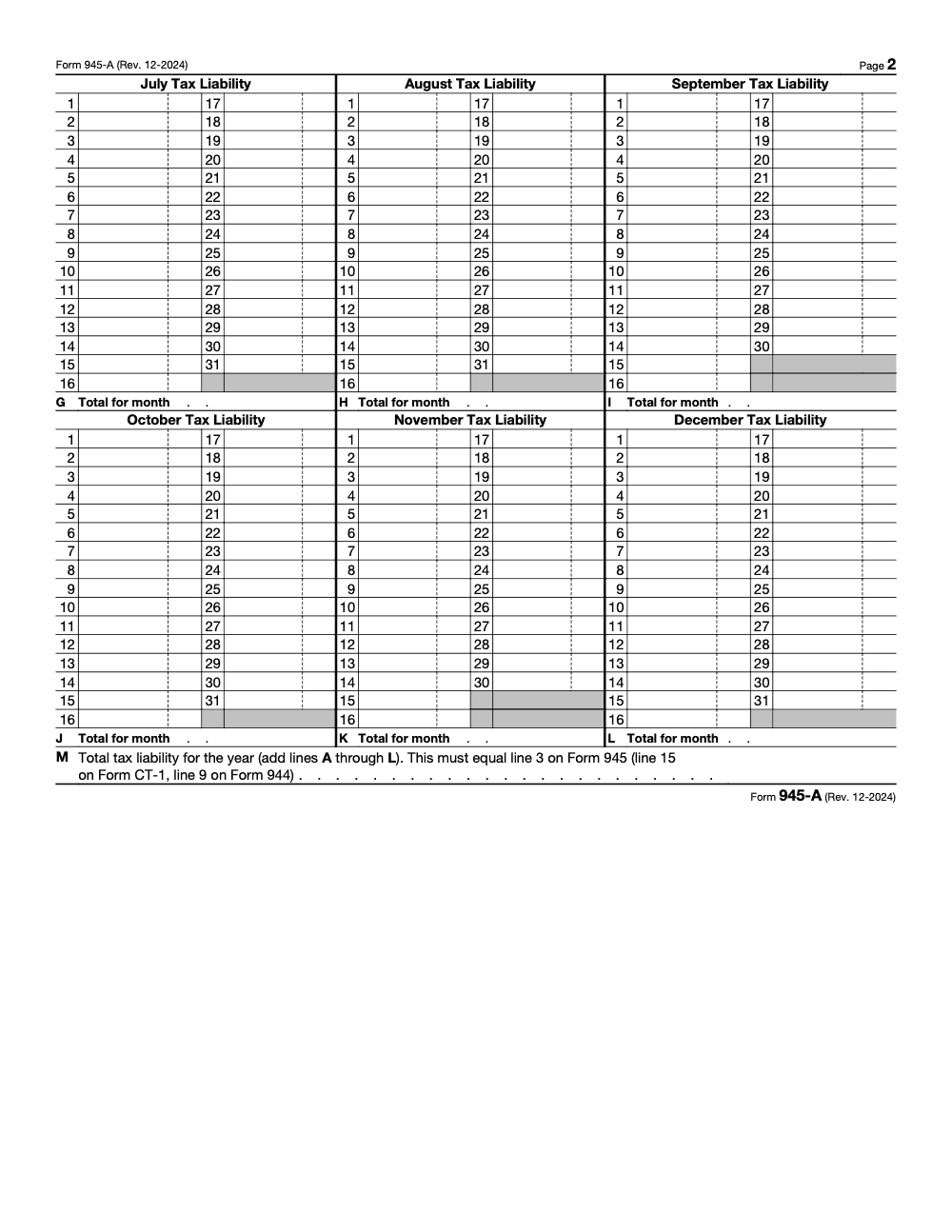
You will total each month on lines A through L, then sum those on line M. Line M must equal the net tax on the annual return you attach, for example Form 945 line 3. If the numbers do not match, expect questions and possible penalty notices.
Why accounting firms struggle with 945-A in the real world
You are not short on clients. Delivery is the ceiling. When teams are buried in production, review loops, and late-season spikes, the first thing that suffers is documentation discipline, including the daily accuracy Form 945-A demands. We see three patterns that create avoidable penalties:
- Liabilities posted by deposit date instead of the liability date.
- A missed 100,000 day for a monthly depositor, which silently flips the firm into semiweekly status, then the attachment requirement is overlooked.
- A mismatch between line M and the annual return because late-December liabilities were forgotten or prior-period adjustments were mixed into current-year totals.
This is an operations problem, not a sales problem. If your workflow makes dating and review hard, penalties follow.
Where Accountably fits, briefly
Accountably focuses on controlled delivery, not headcount. When firms ask us to help, we set up SOP-driven workpapers, calendar discipline, and multi-layer review so daily liability entries and line M reconciliation happen correctly and on time. That structure cuts review time and shrinks penalty risk without giving up control of your workflow or security. Keep reading for the exact rules and steps, then we will show you how to make the process bulletproof in your firm.
Who must file Form 945-A
If you withhold federal income tax on nonpayroll payments and your deposit schedule is semiweekly, you must complete and attach Form 945-A to your annual return. Monthly depositors do not file Form 945-A unless a single day’s liability reaches 100,000, which triggers the Next‑Day Deposit Rule and a switch to semiweekly for the rest of that year and the following year. You do not complete Form 945-A if your total annual nonpayroll withholding is under 2,500 – but only if you are reasonably certain the year will land below that threshold. If there is any doubt, deposit under the applicable monthly or semiweekly schedule from the start, because once year-end totals exceed 2,500 the FTD penalty can apply retroactively to any amount you should have deposited.
Quick reference table
| Filer type | Trigger | Form 945-A required |
| Semiweekly depositor | Any liability in the year | Yes |
| Monthly depositor | Single day reaches 100,000 | Yes, for the entire year |
| Midmonth schedule change | 100,000 day occurred | Yes, show daily detail for the whole year |
| Under 2,500 in annual nonpayroll withholding | Low liability | No |
Source, IRS instructions for Form 945-A.
The 100,000 Next‑Day Deposit Rule, with exact consequences
Here is the part that trips up busy teams. If you accumulate at least 100,000 in tax liability on any one day during a deposit period, you must deposit by the next business day. Measure that liability on a gross basis, before any reduction for nonrefundable credits, because the 100,000 test is run on pre-credit liability per IRS Publication 15. If you were a monthly depositor, your status changes the very next day to semiweekly, and it stays that way for the rest of the year and for the following year. You also must complete and file Form 945-A for the entire year, even if the annual total is small.
Two precise points to keep straight:
- The trigger is the day the liability arose, not the day you sent the money.
- Deposit periods matter. Once you accumulate at least 100,000 within a single deposit period, stop accumulating at the end of that day and begin fresh on the next day – the same 100,000 cannot be combined with later accumulations within the period (per IRS Publication 15).
If the next-day due date falls on a Saturday, Sunday, or legal holiday in D.C., the deposit is timely on the next business day.
Example you can picture
You are a monthly depositor. On March 24, your backup withholding from a large 1099 payment pushes the day’s nonpayroll liability to 112,400. Deposit by the next business day. On March 25, you become a semiweekly depositor for the rest of the year and all of next year. You must complete and attach Form 945-A for the entire year, and each entry on the form must reflect the calendar day the liability arose.
The 2,500 threshold
If your total nonpayroll withholding for the year is under 2,500, you generally do not complete Form 945-A. Keep daily records anyway, because if a month includes a 100,000 day, Form 945-A is required and your deposit status changes. And if you are not certain the year will land under 2,500, deposit under the applicable monthly or semiweekly schedule from the start. Once year-end totals exceed the threshold, IRS Publication 15 lets the FTD penalty apply retroactively to any amount you should have deposited.
Filing deadlines you actually need for 2024 and 2025 activity
General rule, you file Form 945-A with the annual return it supports. That timing usually means January 31 following the calendar year. However, specific-year calendars and on-time deposit relief can change the exact date. For the current cycle:
- 2024 calendar-year Form 945 filers, file by January 31, 2025. If all deposits were made on time in full, you may file by February 10, 2025.
- 2025 calendar-year Form 945 filers, file by February 2, 2026, because January 31, 2026 is a Saturday. If all deposits were on time in full, you may file by February 10, 2026. Attach Form 945-A as required by your depositor status.
If you file Form 944 or CT‑1 instead of Form 945, follow those returns’ due dates and attach Form 945-A when the rules say you must. Form 944’s 2024 due date is January 31, 2025, with February 10, 2025 available if deposits were timely. CT‑1 and CT‑1X follow their own calendars and examples in the instructions.
Always align the Form 945-A year with the calendar year of the return you attach it to, for example 2025 Form 945 with 2025 Form 945-A.
Exactly what to enter on Form 945-A
Think of the form as a year-long desk calendar. Your job is to enter the federal tax liability on the exact day it arose, then subtotal each month and sum the year.
Step-by-step for lines A through M
- Enter each day’s liability on the numbered date for that month, 1 through 31. Never shift to match a deposit date. The IRS matches these daily liabilities to your deposits to check timing.
- At the end of each month, total the entries and write the subtotal on the lettered line for that month, A for January through L for December.
- Add lines A through L. That sum is line M, your annual liability. Line M must agree exactly with the net taxes on your attached annual return. For Form 945, that is line 3.
- If you are a semiweekly depositor, attach Form 945-A and check the semiweekly box on Form 945. Do not fill out the monthly summary on Form 945.
Quality checks reviewers expect
- Confirm A through L equals line M.
- Confirm line M equals the net tax on your annual return.
- Confirm EIN and name match across all forms.
- Confirm there are no blank dates where liabilities should exist, for example late December payments that were deposited in January but belong on December liability dates.
A note on deposit schedules and daily dating
Deposit schedules tell you when to deposit after a liability arises. They do not change the dates you record on Form 945-A. You always record the day the liability arose, then deposit according to monthly or semiweekly rules, or the next-day rule when you hit 100,000.
If you are new to this, remember, schedule status is based on a lookback period and total taxes, not how often you pay people or vendors. The 50,000 lookback threshold determines monthly versus semiweekly. For Form 945, the lookback period is the second preceding calendar year (your 2025 schedule comes from calendar year 2023), not the four-quarter window Form 941 filers use.
Matching Line M to your annual return, without surprises
You have entered every day, totaled each month on lines A through L, and now you are staring at line M. This is where many penalties start, not because the math is hard, but because work is hectic.
- Line M must equal the net tax on your annual return. For Form 945, that is line 3.
- Do not fold prior period corrections from 945‑X, 944‑X, or CT‑1X into the current year unless an IRS notice tells you to amend 945‑A.
- Names and EINs must match across every form. Treat this as a three point match, A through L equals M, M equals the return, and entity data matches.
Quick test before you file: A through L equals M, M equals the annual return, and entity data matches. If any part fails, slow down and fix it now.
What reviewers check in two minutes
- The daily log shows activity on dates that align to real payment days, for example late December distributions.
- The monthly totals roll up correctly, especially in April and December.
- Any midmonth switch to semiweekly is visible on the calendar view, not hidden in a memo.
- The 100,000 day is clearly marked on the correct date.
Special situations and realistic examples
Mistakes often happen when something changes midstream. Use the calendar to show the change, do not hide it in a spreadsheet tab.
Example 1, 100,000 day for a monthly depositor
- March 24 daily liability, 112,400.
- Deposit by the next business day.
- You become semiweekly for the rest of the year and the following year.
- File Form 945‑A for the entire year, not only for March.
- Your March line shows daily entries for every liability day, including the spike on the 24th.
Example 2, semiweekly filer with late December activity
- December 28 through 31 include payouts that will be deposited in early January.
- You still record those liabilities on the exact dates in December.
- Line L includes the December total, and line M still equals the annual return.
Example 3, prior period correction on a 945‑X
- You filed a 945‑X for last year.
- The current year Form 945‑A should not change unless the IRS assessed a failure to deposit penalty that requires an amended schedule to recompute timing.
- Keep your current year daily calendar clean and focused on current year liabilities only.
SOP, a simple checklist your team can follow
You do not need a complicated policy. You need a playbook your team will actually use.
- Capture the liability on the calendar date it arises, never on the deposit date.
- Reconcile daily logs to system reports at least weekly, then lock the month on the fifth business day.
- Total lines A through L at each month end, then cross check M equals the annual return before year end close.
- If a 100,000 day occurs, document the date, deposit next business day, and switch the schedule in your payroll or tax software that same day.
- If you receive a penalty notice, prepare an amended Form 945‑A that fixes date errors and mail it to the address on the notice with your cover letter.
Workpaper structure that makes reviews faster
- A single PDF per month, named YYYY‑MM‑945A‑Liability‑Calendar.
- An index page that lists daily totals and the monthly subtotal.
- A support folder for each high value day, for example backup withholding exceeding 25,000, with payment details and source reports.
- A reviewer checklist that forces the A through L to M match and the M to return match.
If a day exceeds 100,000, add a one page memo that states the date, amount, next day deposit confirmation, and the schedule switch date in your system. This single page often prevents a penalty from sticking.
Amending Form 945‑A to reduce or remove FTD penalties
If the IRS assessed a failure to deposit penalty and your daily dates or amounts were off, file an amended Form 945‑A. Mark it Amended at the top. Correct only the dates and daily liability amounts that affect deposit timing. The IRS will recompute the penalty using the corrected calendar.
- Use an amendment when the correction changes deposit timing or supports penalty reconsideration.
- Do not amend solely to mirror a timely 945‑X unless the IRS notice requests it.
- If your 945‑X adds tax for the year and you file it late, include an amended 945‑A to avoid averaging assumptions.
How to package an amendment
- A cover letter that explains the original issue, the corrected dates, and the impact on deposit timeliness.
- The amended Form 945‑A with clear highlights on changed days.
- Proof of deposits, for example EFTPS confirmations.
- A reconciliation page that shows A through L equals M, and M equals the annual return.
Keep the story simple. Show the wrong date, show the right date, show the deposit confirmation, and show the math.
Common errors and how to avoid them for good
Most penalties come from three preventable issues. Fix these, and you will avoid almost every notice we see.
Mismatched line M totals
- Cause, transposed digits in a monthly subtotal, ignored late December liability, or changes from a schedule switch that moved deposit dates but not liability dates.
- Fix, reconcile A through L to M, then match M to the return, and perform a second person review that initials the tie outs.
Wrong liability dates
- Cause, posting by deposit date or accrual instead of the day the payment created liability.
- Fix, retrain the team, lock dating rules in your SOP, and add a review test that spot checks the five largest days each month against payment records.
Missing semiweekly attachment
- Cause, you became semiweekly after a 100,000 day, but the team still filed the monthly summary on Form 945 and omitted Form 945‑A.
- Fix, attach Form 945‑A for the entire year and check the semiweekly box on Form 945. If you already received a notice, amend Form 945‑A and respond to the IRS.
Semiweekly versus monthly, a quick comparison
| Topic | Monthly depositor | Semiweekly depositor |
| When you file 945‑A | Only if a single day hits 100,000, or status changes midmonth | Every year |
| How you record on 945‑A | By liability date only, when required | By liability date, full year |
| Next‑day rule applies | Yes, once a day reaches 100,000 | Yes, within applicable deposit period |
| Line M requirement | Must equal annual return when 945‑A is filed | Must equal annual return |
A short word on operations
If your firm struggles to keep dates and totals straight, it is not a knowledge gap. It is an execution gap. This is where a disciplined delivery model helps. With SOP driven workpapers, structured naming, and a multi layer review that checks A through L to M, you stop the penalty cycle and give partners back review time they can use for client strategy.
Government resources and where to file
Use the official IRS instructions for the return you are filing, for example Form 945, 944, or CT‑1, then attach Form 945‑A when required by your depositor status. Filing addresses and e‑file options follow the return, not the schedule. If you receive an FTD penalty notice, follow the address and instructions in that notice when you submit an amended Form 945‑A.
Keep a current PDF of the official instructions in your workpapers for the year you are filing. Mark the due date on the title page so reviewers see it on the first screen.
Make this process painless in your firm
You want fewer penalties, faster reviews, and predictable delivery. That starts with calendar accuracy and review discipline. If you need help building the structure so this happens every month without partner heroics, Accountably can plug in a trained offshore team that works inside your systems and templates, follows your SOPs, and keeps Form 945‑A airtight. We focus on delivery control, not resume farming, which means you get workload stability, clear review notes, and on time filings without babysitting.
Practical help, not promises. That is how you keep delivery from becoming your growth ceiling.
Final checklist
- Record liabilities by liability date, not deposit date.
- If any day hits 100,000, deposit next business day and switch to semiweekly.
- Total A through L, then confirm M equals the annual return.
- Attach Form 945‑A if you are semiweekly, or if you were monthly and hit 100,000 on any day.
- If penalized, amend Form 945‑A with corrected dates and proof of deposits.
Quick note on accuracy
This article is general information, not tax advice. Always confirm current year instructions, deposit rules, and due dates before filing. If your facts involve multiple entities, multistate activity, or prior period corrections, talk with a qualified tax professional.
Common Mistakes We See Every Season
Across the 945-A returns we review each January, the same handful of errors show up year after year. Most of them survive review because the IRS notice does not arrive until eight to fourteen months later, by which time the original preparer has moved on to other engagements.
Reusable Checklists
These three lists track the work that has to happen every January for any client with nonpayroll withholding. Copy them directly into your firm's SOP library and assign owners where it helps.
Annual 945-A pre-file packet
- Pull every 1099-R, W-2G, and backup-withholding event posted during the calendar year.
- Confirm depositor status from the lookback period (calendar year 2023 for the 2025 return; calendar year 2024 for the 2026 return).
- Build the daily liability ledger by payment date, not deposit date.
- Total each month into Lines A through L on the working paper before transcribing.
- Tie Line M to Form 945 line 3, Form 944 line 9, or Form CT-1 line 15 before submitting.
- Verify no daily box or monthly total contains a negative amount.
- Confirm the filing deadline: February 2, 2026, or February 10, 2026 if every deposit was timely and paid in full.
- Archive the supporting daily records for the 4-year retention period (per IRS Publication 15).
Line M reconciliation review
- Pull the final Form 945 line 3 (or Form 944 line 9, or Form CT-1 line 15) figure.
- Sum Lines A through L on Form 945-A and confirm the total ties to the parent return to the dollar.
- Recompute backup withholding at 24% on the underlying payment file and trace to the daily schedule.
- Spot-check three daily entries against the underlying 1099-R or W-2G amount.
- Verify any prior-year adjustments are routed to Form 945-X (or Form 944-X or Form CT-1 X), not netted into current-year amounts.
- Sign the reviewer line only after the Line M tie-out workpaper is in the file.
100,000 next-day rule response
- Measure single-day liability before any nonrefundable credit reduction.
- Initiate the EFTPS deposit by 3:00 p.m. Eastern on the next business day (8:00 p.m. Eastern the day before if the payment exceeds $1 million).
- Document the trigger date in the engagement workpaper and the client permanent file.
- Convert the deposit calendar to semiweekly for the remainder of the current year.
- Keep the calendar semiweekly for the entire following calendar year, regardless of lookback totals.
- If the EFTPS cutoff is missed, contact the client's bank to initiate a same-day FTCS wire (per IRS Publication 15).
Keep 945-A Season From Stalling
Form 945-A lives inside one tight window every January. Twelve months of 1099-R, W-2G, and backup-withholding activity collapse into a single daily ledger that has to tie to Line M on or before February 2, 2026, or February 10, 2026 if every deposit was timely and paid in full (per the Form 945 instructions). The IRS holds a 4-year recordkeeping standard against that ledger, so the workpaper has to survive long after the engagement closes.
The stall point is almost never the math. It is the reconciliation between three independent sources: the payment file, the EFTPS deposit record, and the parent-return total on Form 945 line 3, Form 944 line 9, or Form CT-1 line 15. Each one is owned by a different team, and the year-end handoff is where the daily detail tends to evaporate.
- Lock the depositor-status decision in October by reading the second-preceding-year lookback total against the $50,000 cutoff, so January work starts with a known schedule.
- Maintain the daily liability ledger month by month through the year, not in a January reconstruction sprint that quietly misses a $100,000 trigger date.
- Use a one-page Line M tie-out workpaper that maps each monthly subtotal (A through L) to the corresponding line on the parent return before the preparer signs off.
- Route every prior-year correction through Form 945-X (or Form 944-X or Form CT-1 X) and keep the current 945-A free of any negative entries.
- Tag any client that crossed the $100,000 single-day threshold so the semiweekly schedule carries through the entire following calendar year without a quiet revert to monthly.
Accountably runs Form 945-A as a year-round ledger rather than a January scramble. Our U.S.-led tax delivery team maintains the daily liability record alongside EFTPS reconciliation, builds the Line M tie-out workpaper inside the engagement file, and closes the depositor-status review every October so the February filing is a transcription job rather than a reconstruction.
FAQs
It is the daily calendar you use to report nonpayroll federal tax liabilities by the exact date they arise. The IRS uses it to check deposit timeliness and compute penalties. You total each month on A through L, then sum to M, which must equal the annual return.
You must file it if you are a semiweekly depositor. If you are a monthly depositor, you file it for the entire year if any single day in a month reaches 100,000, which also switches you to semiweekly for the rest of that year and the next. If your total annual nonpayroll withholding is under 2,500, you generally do not file it.
If your liability reaches 100,000 on any day, deposit by the next business day. If you were monthly, you become semiweekly the next day for the rest of the year and the following year. The trigger is the liability date, not the deposit date.
You attach Form 945‑A to the annual return it supports and send it to the filing address for that return, or e‑file if available. If you are responding to an FTD notice, send your amended Form 945‑A to the address shown on that notice.
Yes. If your original schedule used wrong dates or missed a 100,000 day, an amended Form 945‑A can allow the IRS to recompute the penalty using the correct daily liabilities. Include proof of deposits and a simple reconciliation.
Other forms this guide names
- Form 945: Backup Withholding, Deadlines, and Deposits
- Form 944: Eligibility & Due Dates
- Form 941: Employer's Quarterly Tax Return Guide 2025
- Form W‑2G: Gambling Winnings Reporting Guide
- Form 944-X: Instructions, Deadlines, How to File
- Form 1099‑R: Box 7 Codes, Rollovers, 2025 Filing Guide
Summarize this article with AI
About this guide
Accountably helps US CPA, EA, and accounting firms hire trained accountants and tax preparers in India.
About us Reviewed byJugal Thacker, CPAFounder and CEO at Accountably
A Washington-licensed CPA with 7+ years inside US firms – PwC, a real-estate tax practice, then a full-service firm, rising from reviewer to manager to advisory. This article was reviewed against current IRS guidance for the 2025 tax year and updated for filers preparing late returns, amendments, and 2026 estimates.
View profile →How we research, review, and update this guide
Every Accountably guide is researched against primary IRS sources, reviewed by a U.S. CPA, and refreshed as guidance evolves. Read our Editorial Guidelines to see how we source, fact-check, and update our content.