Summarize this article with AI
In Brief
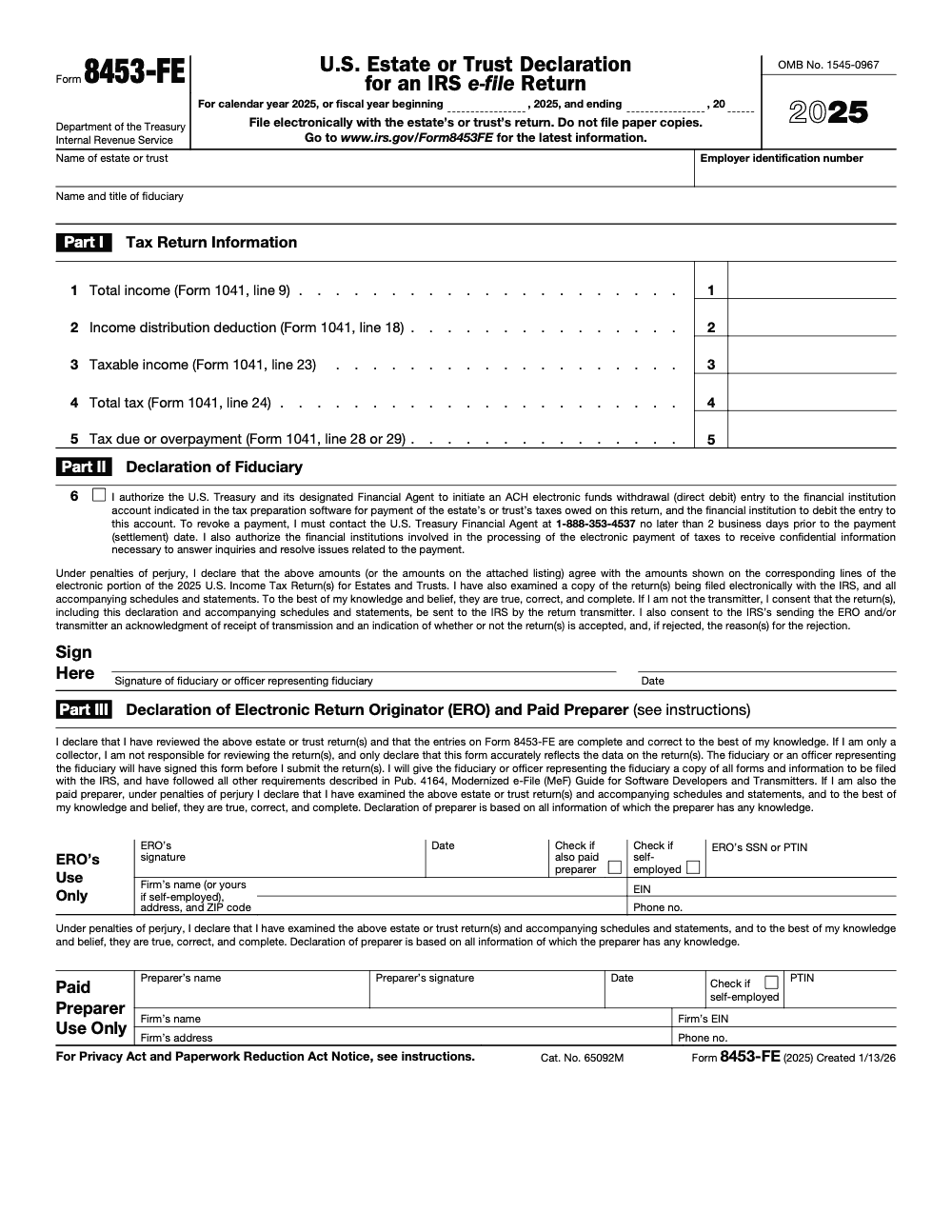
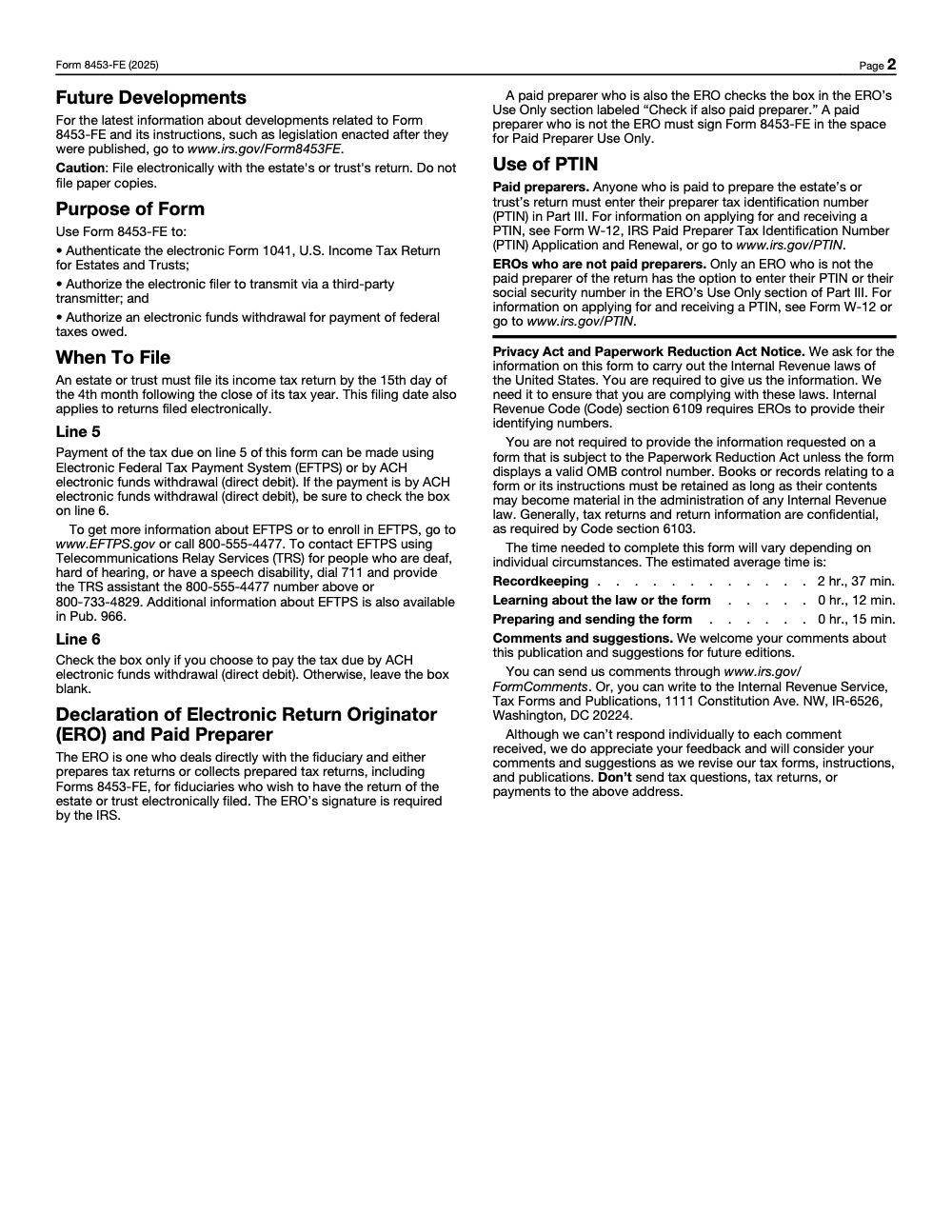
Form 8453-FE is the U.S. Estate or Trust Declaration for an IRS e-file Return – the fiduciary signs it to authenticate an e-filed Form 1041, authorize transmission through an ERO, and optionally approve an ACH electronic funds withdrawal on line 6 (per the 2025 Form 8453-FE instructions). For calendar-year 2025 estates and trusts, the underlying Form 1041 is due April 15, 2026, and Form 8453-FE travels with the e-file submission – paper copies must not be filed.
The Form 8453-FE rejections we see almost never come from the figures on Part I. They come from a fiduciary's wet signature scanned after the ERO already pressed transmit, or from the line 6 ACH box getting checked on a trust that was actually paying through EFTPS. The form is the fiduciary's declaration that authenticates an e-filed Form 1041 and authorizes the ERO to transmit it.
When no PIN is used, the software usually generates the form for you, and the order of operations is what keeps it clean: print it, get a wet signature, scan to a single legible PDF, then attach before transmission. For calendar-year estates and trusts the 2025 Form 1041 is due April 15, 2026, and if the fiduciary would rather sign with a PIN, you use Form 8879-F and skip 8453-FE entirely.
Key Takeaways
- Form 8453-FE is the signature declaration for an e-filed Form 1041 when the fiduciary does not sign using a PIN or Form 8879-F. You sign it, scan it to one PDF, and attach it to the electronic return, you do not mail it.
- The form’s purpose is threefold, authenticate the e-filed 1041, authorize the ERO to transmit, and, if you choose, authorize an electronic funds withdrawal for any balance due.
- If the fiduciary wants to sign with a PIN, you use Form 8879-F instead, which the ERO retains, and you do not attach 8453-FE.
- For calendar-year estates and trusts, the 2025 return is due April 15, 2026. Fiscal years follow the 15th day of the fourth month after year end. Extensions use Form 7004.
- Your software often generates Form 8453-FE when no PIN is used. Print, get a wet signature, scan as a single, legible PDF, then attach before transmission.
What Is Form 8453-FE, In Practical Terms
Form 8453-FE, U.S. Estate or Trust Declaration for an IRS e-file Return, is the document that stands in for an electronic PIN signature on an e-filed Form 1041. When the fiduciary cannot or will not use a self-selected PIN, you print 8453-FE, obtain the fiduciary’s physical signature, scan it to a clean, single PDF, and attach it to the e-file package. That attached PDF is the official signature for the return, and it can also serve as authorization for an electronic funds withdrawal if you elect that option.
Quick check, if you used Form 8879-F and a PIN, you do not file Form 8453-FE. If you did not use a PIN, you must attach the signed 8453-FE PDF, you do not mail it.
Who Must File It, And When
Use Form 8453-FE only when you are e-filing Form 1041 and the fiduciary is not using a PIN. That is it. In that scenario, Form 8453-FE becomes the required signature declaration you must attach as a PDF to the electronic return. Do not mail a paper copy to the IRS, mailing does not satisfy the e-file signature requirement.
Timing follows the 1041 due date, and that same deadline applies whether you file on paper or e-file (e-filing does not shift or extend it). For calendar-year returns for 2025, file by April 15, 2026. For fiscal-year filers, the due date is the 15th day of the fourth month after the year ends. If you need more time to file, request an extension with Form 7004. Remember, an extension extends time to file, not time to pay.
Due-Date Snapshot
- Calendar-year 1041 for 2025, due April 15, 2026.
- Fiscal-year 1041, due the 15th day of the fourth month after year end.
- File Form 7004 if you need extra time, then complete and attach the signed 8453-FE if no PIN is used.
How To Complete The Top Taxpayer Information
Match the 1041, exactly. Enter the estate or trust name exactly as shown on the return. Enter the nine digit EIN exactly, no stray characters. If the entity uses a fiscal year, complete the fiscal year fields correctly. List the fiduciary’s legal name and title, for example, Trustee or Executor, plus a daytime phone and mailing address. Any mismatch, even a small one, can lead to rejection and rework. This is why many firms standardize naming conventions and have one person verify the header fields before printing for signature.
Practical tips that help during busy season:
- Copy the name and EIN directly from the return header in your software, then paste into 8453-FE fields if your system allows it.
- Use a quick two person check, one reads the EIN aloud, the other confirms what is on screen and on the return.
- If the estate or trust changed addresses, confirm the return shows the current address before you draft the 8453-FE.
The IRS does not need a mailed copy of this form. You must attach the signed PDF to the electronic 1041 submission, otherwise the IRS cannot treat the e-file as signed.
Part I, The Return Figures You Must Mirror
Part I holds a handful of figures that must match the Form 1041 exactly. Pull Total Income, Income Distribution Deduction, Taxable Income, Total Tax, and the resulting balance due or overpayment from the corresponding 1041 lines. Enter them word for word and number for number, do not round differently here than you did on the return. Your software’s printout usually points to the correct source lines, however, it is still your responsibility to make sure they match the filed numbers.
Pro move, after you enter the numbers, have your reviewer compare Part I to a final PDF of the 1041, not to a draft. That single cross check removes a surprising amount of friction when you are under deadline pressure.
Part II, The Fiduciary’s Declaration And Optional Payment Authorization
Part II is where the fiduciary signs under penalties of perjury that Form 8453-FE matches the electronic Form 1041 and that the return is true, correct, and complete to the best of their knowledge. The fiduciary prints their name, lists their title, signs, and dates. If there is a balance due and you want to pay by ACH direct debit, you can authorize an electronic funds withdrawal as part of the e-file by checking the line 6 ACH box, which 8453-FE supports when a PIN is not used (leave line 6 blank if you are paying by EFTPS, by check, or any method other than ACH direct debit).
If you choose electronic funds withdrawal, you will supply routing and account information within the e-file authorization flow in your software, then the signed 8453-FE confirms that consent. You can also pay by EFTPS or by check with Form 1041-V instead, do not attach a payment with the 8453-FE PDF.
Part III, ERO And Paid Preparer Declarations
Part III is the ERO and, if applicable, paid preparer declaration. The ERO signs and dates, includes a PTIN or SSN as required (a paid preparer must use a PTIN; only an ERO who is not also the paid preparer has the option to enter a PTIN or an SSN), firm information, and a phone number. If a paid preparer is not the ERO, the preparer completes the “Paid Preparer Use Only” section and signs. When the same person is both the ERO and the paid preparer, sign once in ERO’s Use Only and check the “Check if also paid preparer” box, do not sign in both sections. These are formal declarations, and they carry the same seriousness as signing the return itself. Include the completed, signed pages in the single PDF you attach to the e-file package.
Reminder for PIN users, if you and the fiduciary use the PIN method, you work with Form 8879-F instead, which the ERO retains, and you do not submit Form 8453-FE.
Filing And Attachment Rules For E-filed 1041s
Your sequence should be simple, prepare the return, print Form 8453-FE, get the wet signature, scan to a single legible PDF, attach the PDF to the electronic file, then transmit. The IRS explicitly directs filers not to mail Form 8453-FE, a mailed copy does not satisfy the e-file signature requirement. Your software usually warns you if a signature document is missing, but do not rely on a warning at the very end of your batch. Build the attachment step into your workflow and your review checklist.
PDF Attachment, The Nonnegotiable Step
| Step | Requirement | Result |
| Prepare | Obtain a physical signature on Form 8453-FE | Valid signature on file |
| Scan | Create one clear, legible PDF, check page order | Acceptable attachment |
| Attach | Link the PDF to the 1041 e-file package in software | Clean transmission |
Form 8453-FE can also authorize an electronic funds withdrawal when selected. If you prefer EFTPS, schedule it separately. If you pay by check, use Form 1041-V and mail the payment voucher and check together, do not include Form 8453-FE with the payment.
Do Not Mail Form 8453-FE
- Do not mail Form 8453-FE, attach the signed PDF to the electronic return.
- Do not attach 8453-FE if the fiduciary signed using a PIN on Form 8879-F.
- If you mail a check, include Form 1041-V and the check only, not the 8453-FE.
Payment Methods And How To Choose
You have three clean options for paying a 1041 balance when you e-file. Per the 2025 Form 8453-FE instructions, the form itself only authorizes two payment channels for tax due on line 5 – EFTPS or ACH electronic funds withdrawal (direct debit). A check or money order with Form 1041-V is a separate channel handled outside Form 8453-FE.
- Electronic funds withdrawal, authorize through the return, confirmed by the signed 8453-FE. This is efficient when you want a specific debit date tied to the e-file.
- EFTPS, schedule a payment on your own timeline, then ensure the amount and date match the filed return.
- Check or money order with Form 1041-V, mail separately to the IRS, include the estate or trust name, EIN, “Form 1041,” and the tax year on the memo line.
Form 8453-FE Versus Form 8879-F
Both documents relate to e-file signatures, they are not interchangeable. Use 8453-FE when there is no PIN signature, it is scanned and attached to the return. Use 8879-F when the fiduciary uses a PIN, the ERO retains the signed 8879-F, and nothing is attached for signature. Estate and trust filers should confirm they are using the correct form before printing, it saves you a redo and a client call.
Quick Comparison Table
| Topic | Form 8453-FE | Form 8879-F |
| Who signs | Fiduciary, plus ERO and, if applicable, paid preparer | Fiduciary and ERO |
| How it works | Wet signature, scanned to PDF, attached to the e-file | PIN method, ERO retains signed 8879-F, nothing attached |
| Payment tie-in | Can authorize electronic funds withdrawal | Can consent to electronic funds withdrawal |
| When used | When fiduciary will not or cannot use a PIN | When fiduciary will sign using a PIN |
Sources, IRS About Form 8453-FE, and IRS About Form 8879-F.
Note on freshness, the IRS page for Form 8453-FE was last reviewed August 4, 2025. Always check your software updates and the IRS page for any changes before filing.
Common Errors That Trigger Rejections, And How To Avoid Them
- Mismatched header data, the estate or trust name or EIN on 8453-FE does not exactly match the 1041. Fix it with a copy paste from the return header and a second-person check.
- Missing or unreadable signature, low resolution scans or partial pages. Set your scan preset to PDF, 300 dpi, black and white, and confirm legibility before attaching.
- Wrong form used, 8879-F was expected, but you attached 8453-FE, or vice versa. Decide your signature method first, then generate the right form.
- No PDF attachment, the most common oversight in bulk transmission. Use a visible status column in your tracker that flags “8453-FE attached, yes or no.”
A Simple, Repeatable 8453-FE Workflow
- Lock the return, finalize numbers, and produce a final PDF of the 1041.
- Generate Form 8453-FE, complete the header and Part I with figures that exactly match the locked 1041.
- Obtain the fiduciary wet signature for Part II, and ERO or preparer signatures for Part III, before you transmit the return; submitting first and collecting the fiduciary signature afterward does not meet the e-file signature requirement.
- Scan to one legible PDF, name it consistently, for example, 1041_8453FE_EstateName_EIN_YYYY.pdf.
- Attach the PDF in your software, confirm the attachment in the e-file payload, then transmit.
- Archive the signed PDF in your document system with the return.
Expected Subtopics, Covered Quickly
- Extensions, if you need more time to file, use Form 7004. This does not extend time to pay.
- Due dates, for calendar-year 2025 returns, the deadline is April 15, 2026, and fiscal-year returns follow the fourth-month rule.
- E-signatures, Form 8879-F supports PIN signatures for 1041 returns and is retained by the ERO, not attached.
8453 Variants, Choosing The Right One
Form 8453 comes in flavors by entity type. For estates and trusts, you want 8453-FE, not the individual-return 8453 series, which is for personal Form 1040 filings and cannot be used to authenticate a 1041. Partnerships have 8453-PE, many now prefer the 8879-PE route. Individuals use 8453 for certain situations, and corporate filers largely moved to 8879 variants. The key is to confirm the entity and signature method before you collect signatures, then generate the correct form and follow the specific attachment rule for that form.
Entity Quick Guide
| Entity | If no PIN is used | If PIN is used |
| Estate or Trust | 8453-FE, signed PDF attached to e-file | 8879-F, retained by ERO |
| Partnership | 8453-PE in limited cases | 8879-PE is common |
| Individuals | 8453 in certain cases | 8879 for 1040 series |
| Tax Exempts | 8453-TE for e-file declaration | 8879-EO for signature authorization |
Reference, IRS listings for current 8453 family and 8879 family forms.
A Note On Software Behaviors
Most modern tax systems will prompt you for a signature path early in the e-file workflow. If you select PIN, the software generates 8879-F and retains it. If you select 8453-FE, it suppresses 8879-F and expects a PDF attachment with a wet signature. Understanding that toggle prevents dual-generation confusion and duplicate signature requests to your client. Some vendor help centers even show the exact screens for choosing between 8453-FE and 8879-F.
Operations, Quality, And When Accountably Helps
When you are pushing dozens or hundreds of fiduciary returns through in a short window, the risk is not the tax math, it is the delivery system. Missed attachments, inconsistent file names, and unclear review roles are what slow teams down. If your firm needs a more controlled way to move 1041s with 8453-FE through preparation, review, signature, and transmission, a disciplined offshore delivery setup can shoulder the production, while your partners stay focused on client strategy and advisory work.
Accountably integrates trained offshore teams into your workflow, inside your software and templates, so tasks like drafting 8453-FE from final figures, collecting wet signatures, creating one clean PDF, and attaching it correctly happen the same way every time. That consistency cuts review time and reduces rejections, especially in peak season. Mentioned here only because some firms want a reliable way to scale compliance without losing control of quality or security.
If you are evaluating help for 1041 season, ask for SOPs, workpaper standards, attachment checklists, and review protection steps, not just resumes. That is what keeps your signature documents clean and your e-files accepted.
Quick Compliance Checklist
- Decide signature method first, PIN with 8879-F, or wet signature with 8453-FE.
- Match header data on 8453-FE to the 1041 exactly, name, EIN, and year.
- Enter Part I figures exactly as on the 1041.
- Get fiduciary signature in Part II, ERO and preparer signatures in Part III as applicable.
- Scan to one legible PDF, attach to the e-file, and confirm the attachment before you transmit.
- If paying by EFTPS or check with 1041-V, handle payment separately.
Closing Thought
You work hard to get the tax right. Do not let preventable signature steps hold the return hostage. Confirm the signature path, fill in 8453-FE cleanly when needed, collect the wet signature without delay, and attach one readable PDF before you push send. Your acceptance rate goes up, your rework drops, and your clients feel the confidence of a firm that keeps its word on deadlines.
Sources And Notes
- IRS, About Form 8453-FE, last reviewed August 4, 2025.
- IRS, About Form 8879-F.
- IRS, Instructions for Form 1041, due date guidance for 2024 returns filed in 2025.
- IRS, When to file 1041, general rule for fiscal years.
Disclaimer
This article is for general information. Always confirm the current year’s IRS forms and instructions, update your software, and follow your firm’s compliance procedures. If your situation involves special filing conditions or late elections, consult a qualified tax professional.
Common Mistakes We See Every Season
The same Form 8453-FE rejections cycle through our review queue every season. None of them are exotic – they come from skipping a sequencing step or defaulting a checkbox that should have stayed blank.
Reusable Checklists
Copy these into your firm's SOP or your client folder template. Each list is built around the steps that cause Form 8453-FE acknowledgments to clear on the first transmission.
Pre-transmit signature packet
- Confirm fiduciary identity and EIN match the Form 1041 header.
- For fiscal-year filers, enter beginning and ending tax-year dates at the top of Form 8453-FE.
- Mirror Form 1041 line 9 (Total income) into Form 8453-FE line 1.
- Mirror Form 1041 line 18 (Income distribution deduction) into line 2.
- Mirror Form 1041 line 23 (Taxable income) into line 3 and line 24 (Total tax) into line 4.
- Mirror Form 1041 line 28 (Tax due) or line 29 (Overpayment) into Form 8453-FE line 5.
- Decide the payment method before touching line 6.
- Obtain the fiduciary's wet signature and scan to one PDF.
- Confirm ERO signature plus PTIN or SSN entry in Part III.
- Attach the signed PDF inside the e-file submission and then transmit.
ACH direct-debit payment setup
- Confirm tax due on Form 1041 line 28 matches the amount the fiduciary intends to pay.
- Check line 6 only after the fiduciary signs off on ACH as the payment method.
- Capture routing number, account number, and account type from the fiduciary.
- Verify the requested settlement date is on or before the filing deadline (April 15, 2026 for calendar-year 2025 estates and trusts).
- Note the revocation rule in the client file: U.S. Treasury Financial Agent, 1-888-353-4537, at least 2 business days before settlement.
- Save the e-file acknowledgment showing the payment was accepted.
ERO quality review before submission
- Verify the fiduciary's signature date precedes the planned transmission time.
- Confirm Part I figures match the Form 1041 e-file payload line for line.
- If ERO is also the paid preparer, sign in ERO's Use Only and check the "also paid preparer" box; leave the Paid Preparer block blank.
- If a separate paid preparer is involved, confirm the PTIN is entered in Paid Preparer Use Only.
- Run software validation against IRS Publication 4164 MeF requirements before transmit.
- Retain Form 8453-FE and supporting records under the firm's materiality-based retention policy, not a fixed term.
Keep 8453-FE Season From Stalling
Estate and trust filings carry their own delivery rhythm. The IRS estimates an average burden of roughly 3 hours per Form 8453-FE between recordkeeping (2 hr., 37 min.), learning the form (12 min.), and preparing and sending it (15 min.), per the Paperwork Reduction Act notice on the 2025 form. Multiply that across a fiduciary book and the signature-collection workflow, not the math, becomes the bottleneck.
What stalls a Form 8453-FE cycle is rarely the form itself. It is the chase for fiduciary signatures, the back-and-forth on payment method, and the version drift between the prepared Form 1041 and the figures landing on lines 1 through 5 of the declaration.
- Lock the signature sequence in writing. Signed PDF first, ERO transmission second. Never the other way around.
- Standardize how Part I lines 1 through 5 are sourced from Form 1041 lines 9, 18, 23, 24, and 28 or 29, so reviewers verify a mapping rather than reconstruct it from memory each return.
- Treat line 6 as a payment-method decision, not a default. The rule: line 6 stays blank unless ACH direct debit was selected and the routing details are captured.
- Run the ERO and Paid Preparer block as a single decision: same person uses ERO's Use Only with the "also paid preparer" box; different people each sign their own block with the correct identifier (PTIN for paid, PTIN or SSN for non-paid ERO).
- Keep the ACH revocation window posted in the client file: 1-888-353-4537, 2 business days before settlement, so a last-minute client request never becomes an emergency.
This is the kind of structured execution our offshore tax delivery teams handle inside fiduciary-return workflows: signature sequencing, line-by-line mirroring from Form 1041, payment-method gating on line 6, and review notes documented before transmission.
FAQs
It authenticates an e-filed Form 1041 when the fiduciary does not use a PIN, authorizes the ERO to transmit through a third party, and can authorize an electronic funds withdrawal if you choose that payment method. You sign it, scan to one PDF, and attach it to the electronic return, you do not mail it.
8453-FE is a scanned wet signature PDF that you attach to the e-filed 1041 when the fiduciary does not use a PIN. 8879-F is the PIN-based signature authorization that the ERO retains, nothing is attached for signature when you use the PIN path.
For calendar-year 2025 returns, the due date is April 15, 2026. Fiscal-year returns are due on the 15th day of the fourth month after the year ends. If you need more time, file Form 7004 for an automatic extension.
Yes. You can authorize electronic funds withdrawal through the e-file process that 8453-FE supports, or you can pay separately via EFTPS, or mail a check with Form 1041-V. Form 8453-FE itself only authorizes EFTPS or ACH electronic funds withdrawal (direct debit) – a mailed check with Form 1041-V is handled outside the form. If you mail a payment, do not include Form 8453-FE.
No. You attach the signed PDF to the electronic 1041 submission. A mailed copy does not meet the e-file signature requirement.
Other forms this guide names
- Form 1041: Guide for Estates & Trusts, Deadlines & K-1s
- Form 8879‑F: PIN Authorization for Form 1041
- Form 1041‑V: Payment Voucher: How to Fill, Pay, and Mail
- Form 8453: What to Mail, Address, and 3-Day Deadline
- Form 7004: Business Tax Extension Guide, Deadlines & E‑File
- Form 8879: IRS e-file Signature Authorization Explained
Summarize this article with AI
About this guide
Accountably helps US CPA, EA, and accounting firms hire trained accountants and tax preparers in India.
About us Reviewed byJugal Thacker, CPAFounder and CEO at Accountably
A Washington-licensed CPA with 7+ years inside US firms – PwC, a real-estate tax practice, then a full-service firm, rising from reviewer to manager to advisory. This article was reviewed against current IRS guidance for the 2025 tax year and updated for filers preparing late returns, amendments, and 2026 estimates.
View profile →How we research, review, and update this guide
Every Accountably guide is researched against primary IRS sources, reviewed by a U.S. CPA, and refreshed as guidance evolves. Read our Editorial Guidelines to see how we source, fact-check, and update our content.