Summarize this article with AI
In Brief
Form 8453 is the U.S. Individual Income Tax Transmittal for an IRS e-file return – a paper cover sheet used only to mail the specific supporting documents the IRS cannot accept electronically with an e-filed individual income tax return, such as a Form 8283 qualified appraisal or an 8949 statement. Per the 2025 Form 8453 instructions, an Electronic Return Originator must mail it within 3 business days of the IRS acceptance acknowledgement to the Austin, TX 73344-0254 address, and the form must not be signed.
For some e-filed Form 1040 returns, IRS acceptance is not the last step. The attachments the IRS cannot accept electronically, like an 8283 qualified appraisal or an 8949 statement, still go on paper with Form 8453, and sending the wrong contents in that envelope is the fastest way to cause a delay.
Once the IRS acceptance acknowledgement arrives, the form must be mailed within 3 business days to the Austin, TX 73344-0254 address, with no payment and no signature on the cover sheet itself. If you file through an online provider, the same three-day rule starts when your ISP or transmitter confirms the IRS accepted the e-file, so for 2025 returns it runs off acceptance, not the April 15, 2026 due date.
Key Takeaways
- Form 8453 is a paper transmittal for certain documents that the IRS cannot accept electronically with your e‑filed Form 1040 series return. Do not send W‑2, W‑2G, or 1099‑R with it.
- Mail Form 8453 only after the IRS accepts your e‑file, and mail it within three business days. EROs and online providers follow the same three day rule once acceptance is confirmed.
- You do not sign Form 8453. It is a cover sheet only. Signature authorization for e‑file is handled elsewhere, for example Form 8879 or self‑select PIN.
- Mail to: Internal Revenue Service, Attn: Shipping and Receiving, 0254, Receipt and Control Branch, Austin, TX 73344‑0254. Use trackable mail and keep proof.
- Never include a payment with Form 8453. Use Form 1040‑V or electronic payment options instead. For 2025 returns, the standard due date is April 15, 2026.
What Form 8453 actually does in the e‑file process
Think of Form 8453 as the addressed folder for paper only proof that supports parts of an already accepted e‑file. It does not calculate tax, it does not authorize payment, and it is not a substitute for your e‑signature. Its job is simple, carry specific attachments the IRS lists on the face of the form, then get out of the way. The IRS explicitly says not to send W‑2, W‑2G, or 1099‑R with Form 8453, and not to mail a copy of your e‑filed 1040.
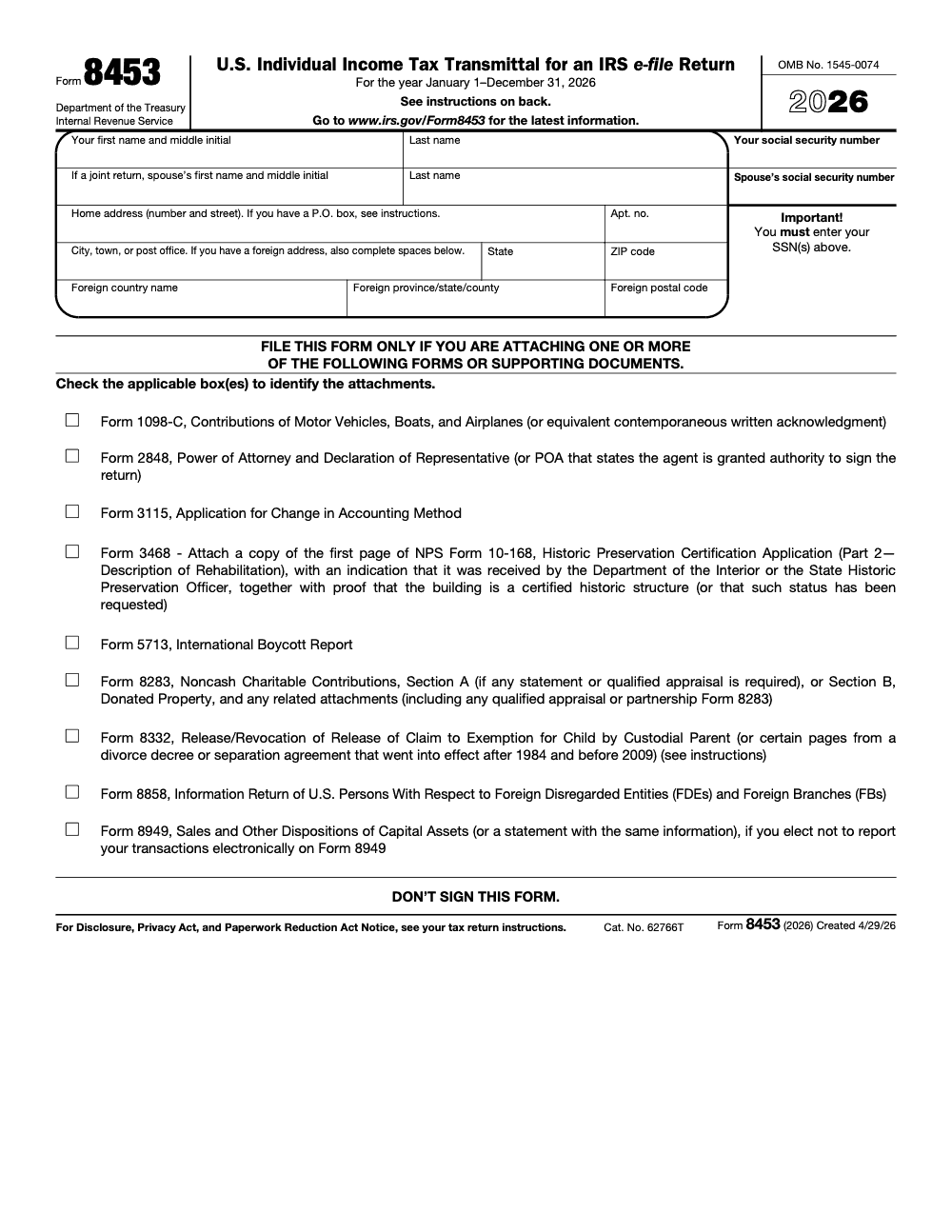
Here are examples of attachments the 2025 form accepts, exactly as the IRS lists them:
- 1098‑C, Contributions of Motor Vehicles, Boats, and Airplanes
- 2848, Power of Attorney and Declaration of Representative, or a POA that authorizes the agent to sign the return (a generic 2848 is not enough, the POA must specifically grant authority to sign the income tax return)
- 3115, Application for Change in Accounting Method
- 3468 support, first page of NPS Form 10‑168 and proof the building is certified historic or under review
- 4136 certificates and, when applicable, reseller statements for biodiesel, renewable diesel, and sustainable aviation fuel claims
- 5713, International Boycott Report
- 8283, Noncash Charitable Contributions, including any required qualified appraisal or partnership 8283 (send it via Form 8453 only when Section A requires a statement or qualified appraisal, or when Section B donated property is reported, not for every 8283)
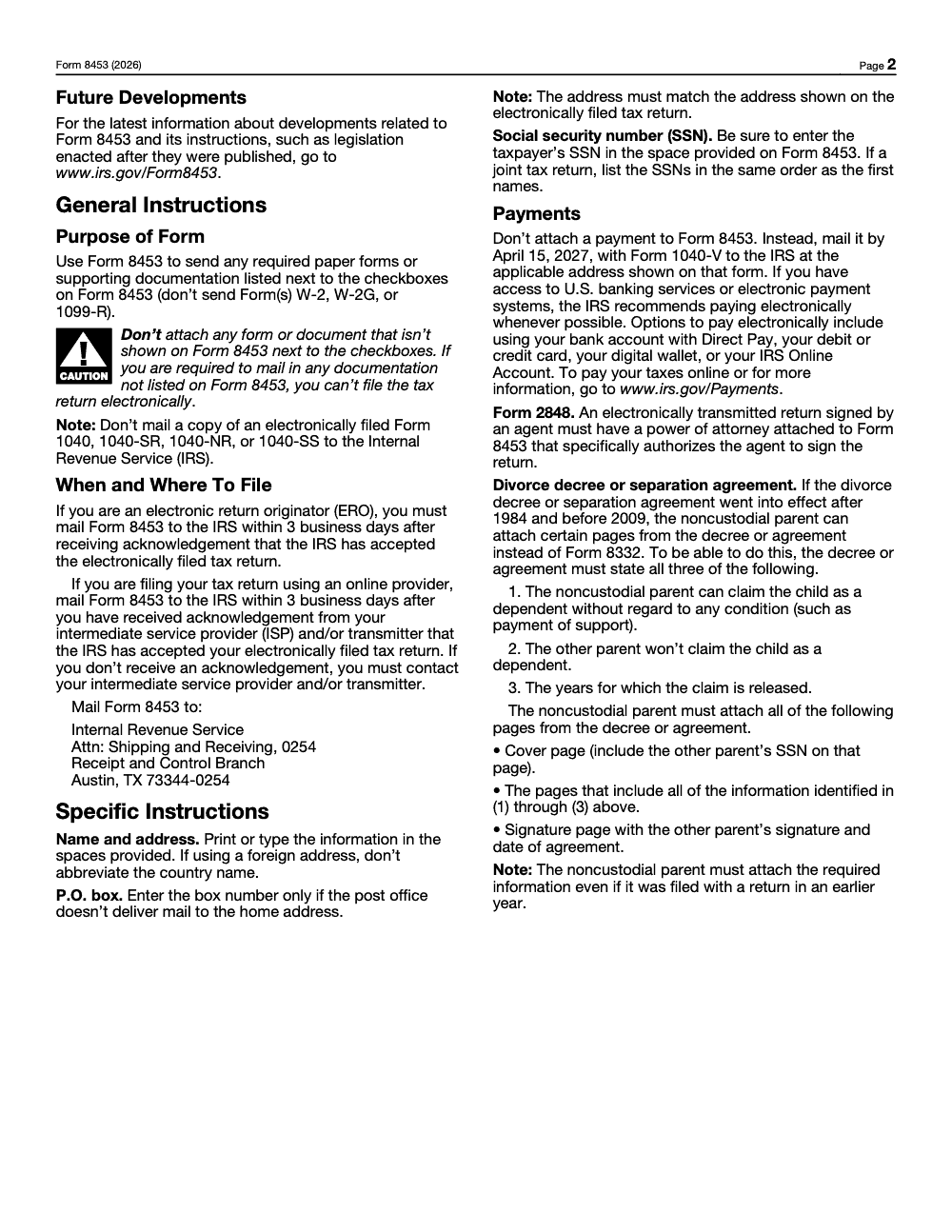
- 8332, or certain divorce decree pages for agreements effective after 1984 and before 2009 (agreements that went into effect in 2009 or later do not qualify and require Form 8332 signed by the custodial parent), see the specific instruction details
- 8858, Information Return for FDEs and Foreign Branches
- 8864 certificates and reseller statements as applicable
- 8949, or a statement with the same information if you choose not to report transactions electronically on 8949
Because these items cannot ride along with the e‑file transmission, you or your ERO mail them with Form 8453 after IRS acceptance. The IRS uses that barcode‑less packet to finish matching your paper proof to your electronic return.
Timing, deadlines, and why “three business days” matters
Once your return is accepted, the three day clock starts, and it runs from the IRS acceptance acknowledgement, not from the date you transmitted the e‑file. If you are an ERO, the IRS requires you to mail Form 8453 within three business days of acceptance. If you file through an online provider, you follow the same three day rule once your intermediate service provider or transmitter confirms that the IRS accepted the e‑file, since that ISP or transmitter acknowledgement is the trigger, not a separate letter from the IRS. If you did not receive an acknowledgement, the IRS instructs you to contact your provider.
Many firms aim to get it out within 48 hours. That is not an IRS rule, it is a practical buffer that reduces the risk of delays, lost mail, or correspondence. In my experience, sending within two days, using tracking, and keeping copies prevents most timing headaches.
The exact mailing address
- Internal Revenue Service
- Attn: Shipping and Receiving, 0254
- Receipt and Control Branch
- Austin, TX 73344‑0254
Use a trackable method, and keep the receipt with your engagement workpapers. If you manage a team, log the mailing date and tracking number on your internal checklist so reviewers can confirm when the IRS should have it.
What to include and what to leave out
The fastest way to cause a delay is to send the wrong contents. Use this quick comparison.
| Item | Mail with 8453? | Notes |
| Forms listed on 8453 checkboxes, for example 1098‑C, 2848, 3115, 3468 support, 4136 support, 5713, 8283 with required appraisals, 8332, 8858, 8864 support, 8949 statement | Yes | These are the purpose of Form 8453. |
| Copy of your e‑filed Form 1040 series | No | Do not mail a copy of an e‑filed return. |
| W‑2, W‑2G, 1099‑R | No | Keep with your records unless paper filing, do not send with 8453. |
| Payments | No | Use Form 1040‑V or electronic payments instead. |
| Random supporting documents not named on 8453 | No | If it is not listed and you are required to mail it, you cannot e‑file the return at all and must paper file it; if it is not required, keep it in your records. |
Important, you do not sign Form 8453. The 2025 form states this in bold. Signature authorization for e‑file is handled with other methods, commonly Form 8879 or a PIN.
How to complete and mail Form 8453, step by step
You can set this up like a short shipping workflow. Think “pack, label, ship, verify.”
- Confirm IRS acceptance
- Check your software or the ERO acknowledgement that the IRS accepted your e‑file. If you do not get an acknowledgement, follow up with your provider before mailing.
- Gather only the allowed attachments
- Pull the exact items the IRS lists on Form 8453, for example an 8283 with a qualified appraisal or an 8949 statement when you elected not to transmit transactions electronically. Avoid stuffing the envelope with extra schedules the IRS did not ask for.
- Complete the top lines neatly
- Enter the taxpayer name and SSN exactly as shown on the accepted e‑file, and match the address on the return. The instructions are clear that the address must match.
- Leave the signature line alone
- Do not sign Form 8453. That is by design.
- Package and label
- Place attachments behind Form 8453 in a sensible order, for example 8453 first, then 8283 with appraisal pages, then any credit certificates. Keep copies in your workpapers and note the attachment list on your internal checklist.
- Mail within three business days
- Use the Austin, TX address the IRS gives and a trackable service. Keep the receipt with the client’s file and add the tracking number to your workflow tracker.
- Payments go elsewhere
- If there is a balance due, remit with Form 1040‑V or pay electronically. The 2025 instructions remind you not to attach a payment to Form 8453, and they reference the 2026 deadline for 2025 individual returns.
What happens inside the IRS once you mail 8453
The IRS associates your paper packet with the accepted e‑file. Internal manuals note that Form 8453 records are trackable in IRS systems and include acceptance details, correction history, and whether an incomplete 8453 was received. That is why complete, correct packets get processed faster.
Common mistakes that slow refunds, and how to avoid them
Across a filing season, the same handful of slip-ups show up on Form 8453 packets, and each one is avoidable with a single SOP note.
A simple playbook for busy firms
If you lead a CPA or EA firm, you know that delivery, not sales, is usually the ceiling. Returns stall in review, mailings get missed, and someone is stuck on hold with the IRS. A small amount of structure around 8453 removes friction.
- Put Form 8453 in your SOPs Include a one page SOP that covers acceptance check, contents, three day clock, address, tracking, and owner signoff.
- Standardize workpapers Add a labeled “8453 Attachments” PDF section with a checklist. If an 8283 requires an appraisal, require the appraisal PDF before review starts.
- Add delivery KPIs Track “8453 mailed within 3 business days” as a metric and review it weekly from February through April.
- Create a continuity plan During peak weeks, preassign a backup staffer who can prepare and mail packets if someone is out. This prevents last minute scrambles.
Where it helps, a partner like Accountably can plug disciplined offshore execution into your workflow so 8453 packets are assembled, checked, and mailed on time, using your systems and templates. That keeps partners out of review loops and protects deadlines without adding chaos. Use this only if you truly need extra hands and want tight SOPs, not resumes.
I have seen firms cut refund delays dramatically by treating 8453 like a shipping task with a three day service level and visible tracking. The difference is not theory, it is consistent follow through.
Processing impact, payments, and addresses, with 2025 specifics
From a processing standpoint, your e‑file is not fully complete until the IRS receives the 8453 packet when one is required. Late or missing packets can lead to letters, holds on related credits, or slower refunds. The IRS lists the accepted attachment types on the 2025 form and requires mailing to the Austin address below. Use that exact address unless the IRS updates it in a future revision.
- Internal Revenue Service, Attn: Shipping and Receiving, 0254, Receipt and Control Branch, Austin, TX 73344‑0254.
Payments are separate. Do not include money with 8453. Pay with Form 1040‑V or online through Direct Pay, card, digital wallet, or your IRS Online Account. For 2025 returns, the standard due date is April 15, 2026, unless extended by disaster relief or other IRS announcements.
Quick checklist you can copy into your workflow tool
- Accepted e‑file confirmed
- Correct year Form 8453 prepared
- Only allowed attachments included, for example 8283 plus appraisal when required
- No W‑2, W‑2G, 1099‑R, no copy of the 1040
- Not signed, signature not required on 8453
- Mailed within three business days to the Austin address
- Tracking number captured in workpapers
- Payment handled separately with 1040‑V or electronically
Final notes and resources
- IRS About Form 8453 page, current as of October 15, 2025. Good for overview and links.
- 2025 Form 8453 PDF. Use for the exact mailing address, attachment list, and timing rules.
- IRS internal manual excerpt on accepted 8453 attachments, confirms the list for Tax Year 2023 and later. Helpful for practitioners who want deeper background.
Reusable Checklists
These checklists are copy-paste ready for a firm SOP or a solo workflow tracker. Drop them into your process so every Form 8453 packet goes out complete and on time.
Pre-mail 8453 packet review
- Confirm the IRS accepted the e-file and record the acceptance acknowledgement date
- Verify the taxpayer name and SSN match the accepted return exactly
- Confirm the address on Form 8453 matches the address on the e-filed return
- Include only documents listed next to the 11 checkboxes (1098-C, 2848, 3115, 3468, 4136, 5713, 8283, 8332, 8858, 8864, 8949)
- Attach the Form 8283 qualified appraisal when Section A requires it, or for Section B donated property
- Confirm no W-2, W-2G, 1099-R, or copy of the e-filed 1040 series is in the envelope
- Leave the signature line blank
- Set the mailing due date to 3 business days from the acceptance acknowledgement
Mail and track
- Order the packet with Form 8453 on top, then each supporting document behind it
- Address it to Internal Revenue Service, Attn: Shipping and Receiving, 0254, Receipt and Control Branch, Austin, TX 73344-0254
- Use a trackable mail service and keep proof of mailing
- Capture the tracking number in the client workpapers
- Mail within 3 business days of the acceptance acknowledgement
- Handle any balance due separately with Form 1040-V or an electronic payment by April 15, 2026 for 2025 returns
Noncustodial dependent attachment check
- Confirm whether a signed Form 8332 is available from the custodial parent
- If relying on a divorce decree instead, confirm it took effect after 1984 and before 2009
- Confirm the decree states all three required points: the unconditional claim, the other parent's waiver, and the years released
- Attach the cover page, the pages containing the three statements, and the signature page
- Re-attach these pages every year the noncustodial parent claims the child
Keep 8453 Season From Stalling
The pressure point with Form 8453 is not preparation, it is the handoff after acceptance. The IRS gives an Electronic Return Originator 3 business days to mail the packet once the acceptance acknowledgement arrives, according to the 2025 Form 8453 instructions, and that window often lands in the busiest stretch of February through April when staff are already buried in review.
The fix is to treat the post-acceptance packet as its own tracked task rather than an afterthought tacked onto a finished return. When the mailing step has an owner, a due date tied to the acceptance acknowledgement, and a clean attachment list, packets stop slipping past the 3-business-day mark.
- Trigger the mailing task off the acceptance acknowledgement date, not the transmit date, so the 3-business-day clock is accurate
- Gate approval on the conditional attachments: a Form 8283 qualified appraisal or an 8949 election statement must be in the file before the packet ships
- Keep a standing exclusion list so W-2, W-2G, 1099-R, and copies of the e-filed return never reach the envelope
- Route balance-due payments to Form 1040-V or an electronic option separately, so the 8453 packet mails clean to Austin, TX 73344-0254
When the post-acceptance crunch outpaces your team, Accountably can run the Form 8453 packet workflow inside your systems, assembling, checking, and mailing on schedule with documented review. See how our tax preparation and execution support keeps deadlines covered without adding headcount.
FAQs
It is a paper transmittal used to mail specific supporting documents that the IRS cannot accept electronically with an e‑filed Form 1040 series return. The form itself carries only the documents listed on its checkboxes, and it should not include W‑2, W‑2G, or 1099‑R.
No. The 2025 form states “Do not sign this form.” Your e‑file signature is handled through other methods, such as Form 8879 or a self‑select PIN.
Your e‑file includes items that the IRS cannot accept electronically, for example an 8283 with a qualified appraisal or an 8949 statement when you elected not to transmit transactions electronically. After the IRS accepts your e‑file, mail the 8453 packet within three business days.
Mail it to Internal Revenue Service, Attn: Shipping and Receiving, 0254, Receipt and Control Branch, Austin, TX 73344‑0254. Use a trackable service and keep proof of mailing.
No. Do not attach a payment to Form 8453. Use Form 1040‑V or pay electronically through IRS Direct Pay, card, digital wallet, or your IRS Online Account.
Mail it as soon as possible and keep proof of mailing. The IRS can still match your packet, but delays increase the odds of correspondence or slower processing of items tied to those attachments. The three day rule exists to keep processing smooth.
Form 8453 family
- Form 8453-X: Guide for Section 527 Filings
Other forms this guide names
- Form 8283: Noncash Charitable Contributions Guide 2025
- Form 1040‑V: IRS Payment Voucher & Mailed Check Guide
- Form W‑2: Deadlines, E‑File Rules, Boxes, and W‑2c Corrections
- Form W‑2G: Gambling Winnings Reporting Guide
- Form 1099‑R: Box 7 Codes, Rollovers, 2025 Filing Guide
- Form 8949: How to Report Capital Gains & Losses
Summarize this article with AI
About this guide
Accountably helps US CPA, EA, and accounting firms hire trained accountants and tax preparers in India.
About us Reviewed byJugal Thacker, CPAFounder and CEO at Accountably
A Washington-licensed CPA with 7+ years inside US firms – PwC, a real-estate tax practice, then a full-service firm, rising from reviewer to manager to advisory. This article was reviewed against current IRS guidance for the 2025 tax year and updated for filers preparing late returns, amendments, and 2026 estimates.
View profile →How we research, review, and update this guide
Every Accountably guide is researched against primary IRS sources, reviewed by a U.S. CPA, and refreshed as guidance evolves. Read our Editorial Guidelines to see how we source, fact-check, and update our content.