Summarize this article with AI
In Brief
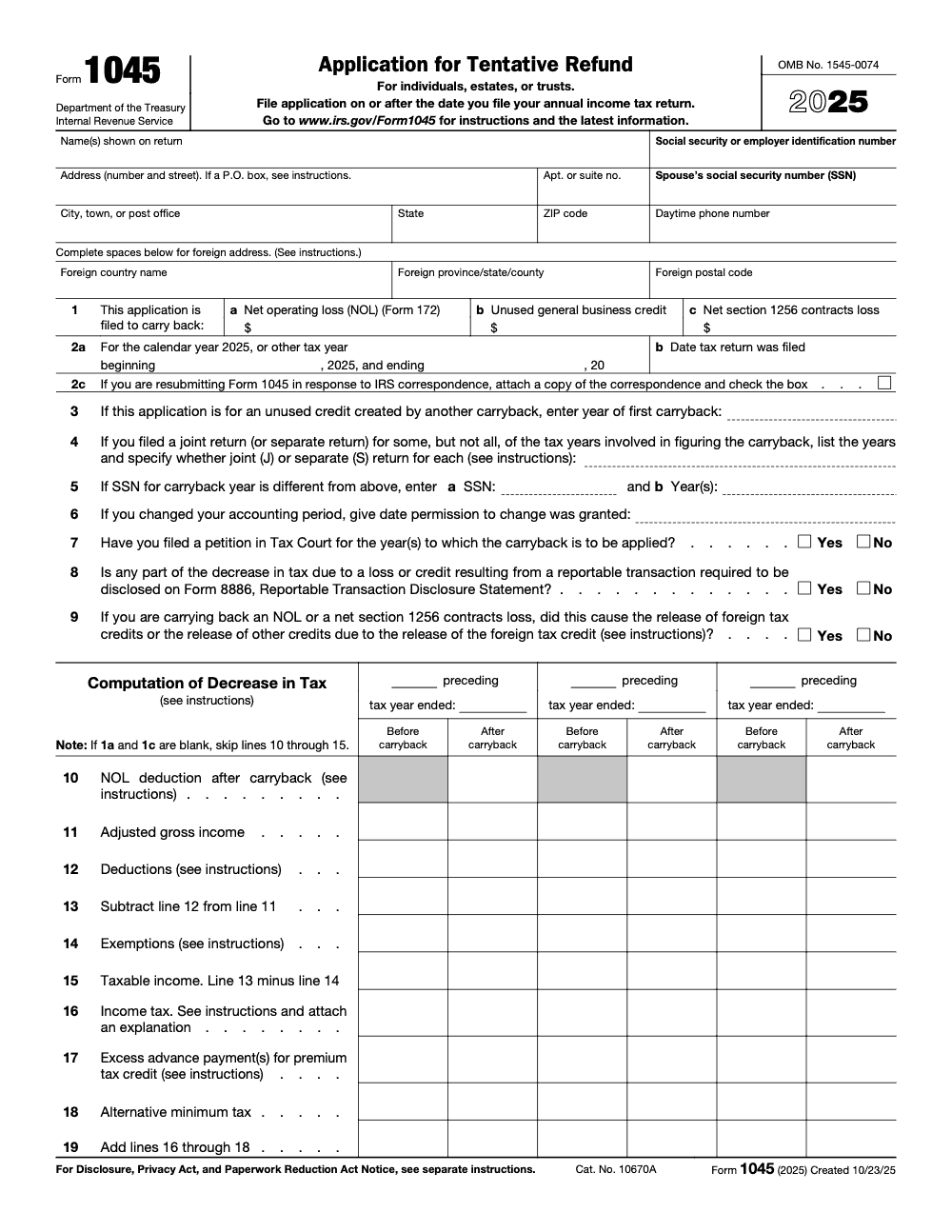
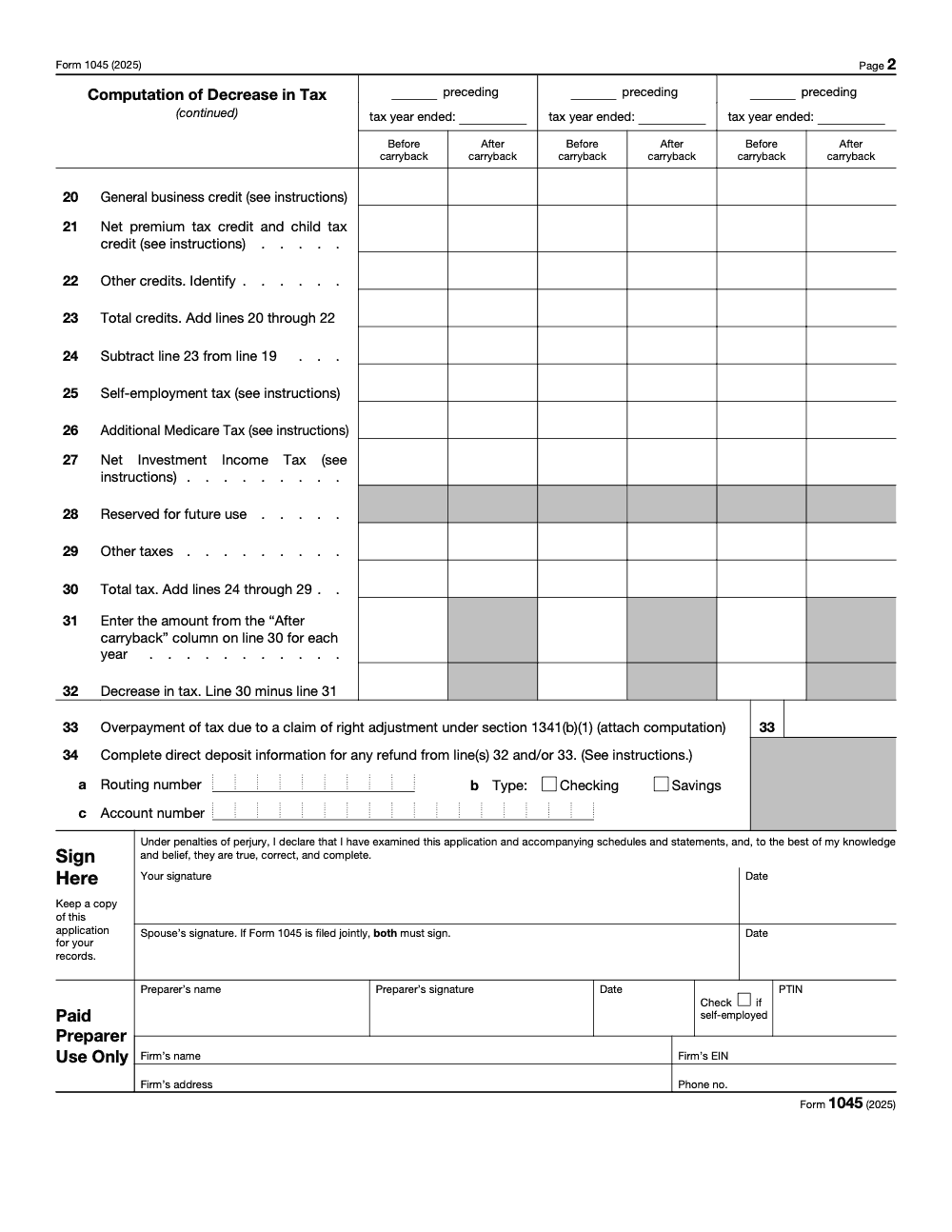
Form 1045 is the IRS Application for Tentative Refund, filed by individuals, estates, and trusts (not corporations, which use Form 1139) to claim a fast carryback refund. Line 1 sets out the three permitted bases: a net operating loss figured on Form 172 (line 1a), an unused general business credit (line 1b), and a net section 1256 contracts loss (line 1c). File only on or after the date the loss-year return is filed, and each preceding year's decrease in tax lands on line 32 (per the IRS Instructions for Form 1045 and IRS Publication 17). When you need this work produced cleanly, our tax services team handles the packet end to end.
A client books a real loss this year and wants the cash from prior years back fast, not on the slow amended-return timeline. That is the whole reason Form 1045 exists: it is the Application for Tentative Refund, and the IRS targets roughly 90 days to process a complete one. The catch is the deadline: you have to file within one year after the end of the year the loss arose, and a single missing attachment turns a quick refund into a slow one.
If you have not prepared one in a few seasons, one change will surprise you. Starting with 2024 returns, the NOL itself gets figured on the new Form 172, and Schedules A and B came off Form 1045 entirely. Line 1 still sorts your basis into an NOL on line 1a, an unused general business credit on line 1b, or a net section 1256 loss on line 1c, but the math that used to live inside the form now lives next door.
Key Takeaways
- You use Form 1045 to request a quick, tentative refund from prior years when you have a qualifying carryback, for example an NOL, an unused general business credit, a net section 1256 loss, or a claim of right adjustment under section 1341.
- You must file within one year after the end of the year the loss or event arose. The IRS targets about 90 days to process a complete application.
- Starting with 2024 returns, you figure NOLs on the new Form 172. Form 1045 remains the refund application. Schedules A and B were removed from Form 1045.
- Most post‑2020 NOLs cannot be carried back, except certain farming losses. The 80 percent taxable income limit applies to post‑2017 NOLs used in years after 2020.
- Section 1256 losses may be carried back three years. Unused general business credits can be carried back one year. Claim‑of‑right adjustments are handled on line 33, and the section 1341 deduction or credit method applies only when the amount repaid was more than $3,000.
What Form 1045 Actually Does
Form 1045 is the Application for Tentative Refund. It gives you a faster route than amended returns when a carryback reduces prior year tax. The refund is provisional, which means the IRS can review and adjust it later, but the application is still signed under penalties of perjury and an erroneous refund claim can draw a 20 percent penalty on any disallowed amount. This is still the preferred tool when speed matters and the facts are straightforward, because the IRS aims to process complete applications in about 90 days.
Tip from the review desk: a “complete” application is not just a filled form. Include every worksheet and schedule the instructions call for, or your clock stops.
What Counts As A Qualifying Carryback
- Net operating loss, subject to current carryback limits
- Unused general business credit
- Net section 1256 contracts loss
- Claim of right adjustment under section 1341 The form supports three carryback bases on line 1: an NOL, an unused general business credit, and a net section 1256 contracts loss, while a claim of right adjustment is handled separately on line 33. If your fact pattern sits outside these, you are in amended‑return territory.
Who Can File
Individuals, estates, and trusts can file Form 1045. Corporations use Form 1139. If a section 965 inclusion year is involved, you generally cannot use Form 1045 and must amend instead.
Timing, The One‑Year Rule, And The 90‑Day Clock
- File Form 1045 within one year after the end of the tax year in which the NOL, unused credit, section 1256 loss, or claim‑of‑right event arose, but never before you file the annual income tax return for that loss year, since Form 1045 must be filed on or after that return. If a federally declared disaster applied to you, you may have additional time.
- The IRS will process your application within about 90 days of the later of the filing date of a complete application, or the last day of the month that includes the due date of the loss year return. That 90‑day service goal is not an audit shield. It is a quick cash mechanism subject to later review.
If you prefer finality over speed, you can use 1040‑X or 1041, which have longer statutes, but you will wait longer for payment. In practice, many firms use 1045 for cash flow now, then reconcile lingering items with amended returns if needed.
The Big 2024 Change, Meet Form 172
Beginning with 2024 returns, you no longer compute the NOL on Form 1045’s page 3. The IRS moved NOL calculations to a new form, Form 172, with its own instructions. You attach Form 172 to your Form 1045 package when an NOL is part of your claim. The IRS also confirmed Form 1045 electronic filing is available for 2024 forms filed in 2025.
- What moved: NOL Schedule A and Schedule B that used to sit on Form 1045.
- What stayed: Pages 1–2 of Form 1045, which capture the carryback years and the before or after carryback computations.
- Practical effect: reviewers now expect a clean Form 172 set as your NOL proof, along with all the usual supporting forms for the carryback years.
Current NOL Rules That Affect Your Strategy
- Most NOLs arising after 2020 cannot be carried back. Certain farming losses are still eligible for a two‑year carryback.
- Post‑2017 NOLs used in years after 2020 are subject to the 80 percent taxable income cap. These reminders live in the new Form 172 instructions and will drive whether Form 1045 even applies.
Quick Comparison, 1045 Versus 1040‑X
| Purpose | Speed | Finality | When to use |
| Form 1045, Application for Tentative Refund | Fast, about 90 days from a complete filing | Provisional, subject to later review | Clean carrybacks where cash flow matters now |
| Form 1040‑X or 1041 amended return | Slower | Final once processed | Complex adjustments, section 965 years, or when 1045 is disallowed |
You can file an amended return later if your 1045 is denied or only partly allowed, but watch the statutes. The one‑year deadline for 1045 does not extend the amended‑return window.
What To Attach So Your Claim Moves Fast
The fastest 1045 files make reviewers smile. Build a consistent packet every time:
- First two or three pages of the prior‑year return set the IRS requests for the loss year and each carryback year.
- Form 172 for NOL computation, if an NOL is in the claim.
- Form 4952, if investment interest matters.
- Form 461, excess business loss limitation, with any year it applies.
- All Schedules K‑1, K‑2, K‑3 that feed the carryback.
- Any AMT support, for example original and revised Form 6251 for each carryback year.
- Any amended Schedules D and Form 6781 if a section 1256 loss is carried back.
- Election statements, extensions, and any required disclosures.
I recommend a simple cover index that mirrors the 1045 instruction checklist. Reviewers love it, and your team will stop chasing missing pages during busy season.
Quality check before you e‑file or mail: reconcile “before” and “after” columns for each carryback year, and label each change so a reviewer can track it without guessing.
How To Complete Form 1045, A Straightforward Walkthrough
When a client calls asking for cash relief, you do not have time for guesswork. Use this simple flow, then add your firm’s review steps so nothing slips.
Step 1, Confirm Eligibility And Deadlines
- Verify that your fact pattern fits one of the three line 1 carryback bases, NOL, unused general business credit, or section 1256 loss, or a claim of right adjustment handled separately on line 33.
- Check that you are within the one year window after the end of the loss or event year.
- Decide on speed versus finality. Form 1045 is the quick route, amended returns are slower but final.
Quick gut check I use in reviews, can we prove the carryback, the year, and the decrease in tax for each affected year using clean workpapers the IRS can follow in under five minutes? If not, tighten your packet before filing.
Step 2, Build Your Workpaper Set
Create a single PDF stack in this order. This mirrors how most reviewers scan a claim.
- Cover index, list every attachment in order.
- Form 1045 pages 1–2, signed.
- Form 172 set if your claim includes an NOL.
- First two pages of each carryback year’s return, and any schedules directly impacted.
- Schedules K‑1, K‑2, K‑3 that flow into the carryback years.
- Form 4952 if investment interest matters.
- AMT support, for example Form 6251 for each year, before and after.
- Year specific schedules, for example Form 6781 for section 1256 or Form 3800 for credits.
- Any election statements or waivers.
Keep names human, for example “2019 1040 p1‑2,” not “scan1234.pdf.”
Step 3, Complete Pages 1–2 And The Before, After Columns
- Enter the taxpayer identity, SSN or EIN, and loss year.
- List each carryback year and fill the “before” amounts exactly as filed.
- Enter the “after” amounts that reflect the carryback, and compute the decrease in tax.
- If the software allows it, use form level diagnostics and lock the file once reviewed.
Step 4, Sign, E‑File If Available, Or Mail With Tracking
- E‑file where supported, it is faster and your attachments travel with the file.
- If you paper file, use a tracked method and keep a copy of the full packet as submitted.
What To Attach, A Handy Table
| Attachment | Why the IRS expects it | Tips to avoid delays |
| Form 1045 pages 1–2, signed | Core application | Sign, date, and include preparer section if used |
| Form 172 set, if NOL | Replaces old Schedules A and B | Reconcile to loss year return and each carryback year |
| Prior year returns, first 2 pages | Snapshot of tax for each year | Label “Before” and “After” clearly |
| Schedules K‑1, K‑2, K‑3 | Source detail that feeds carryback | Include entity EINs and year matching notes |
| Form 4952, if applicable | Investment interest limitation can change carryback | Tie to brokerage 1099‑INT and 1099‑DIV support |
| AMT forms, for example 6251 | NOL or credit changes can hit AMT | Provide both versions, before and after |
| Section 1256, Form 6781 | Required for contracts losses | Include trade detail or broker statements summary |
| General business credit forms | Proves unused credit and carry periods | Show carry to, carry from, and remaining balance |
| Claim of right statements | Section 1341 support | Provide original year income proof and current year claim |
Label each item with the year, the form, and whether it is part of the “before” or “after” set. Reviewers should not have to guess.
Qualifying Carryback Events, The Short Course
You get three line 1 carryback bases, plus the separate claim of right adjustment on line 33. Pick the right one and stay inside its rules.
Net Operating Loss, The Most Common
- Use Form 172 to compute the NOL and how much is used in each carryback year.
- Watch the modern NOL rules. Many post‑2020 NOLs do not carry back, and the 80 percent cap applies when used in later years.
- Consider state impact. If the state does not allow the same carryback, note that for your client.
Unused General Business Credit
- Confirm there is a true unused credit and identify the carryback period that applies.
- Build a simple rollforward to show beginning credit, used, carried back, carried forward, and remaining.
- Attach the original credit forms and the carry computation.
Net Section 1256 Contracts Loss
- Prepare Form 6781 for the loss year and include contract summaries or broker composite statements.
- Confirm your carryback years and compute the impact year by year.
- Expect reviewers to look closely at reconciliation from brokerage statements to the return.
Claim Of Right, Section 1341
- Document the year the income was originally taxed and the year you are entitled to deduct or credit.
- Include your choice calculation, deduction versus credit, and show which one lowers the tax more in the carryback year.
Pro Tips To Keep Partner Review Time Low
- Use a one page overview on top that answers three questions, what is the carryback, which years are affected, and how much cash is requested.
- Add a “changes only” set for each carryback year, for example revised Form 6251, Form 6781, and Schedule D.
- Color highlight only the year labels and the before, after columns. Keep everything else black and white so it prints cleanly.
If you manage heavy March and April traffic, build a shared SOP and a short Loom video so staff and offshore reviewers follow the same pattern. A consistent packet beats heroics every time.
Detailed Steps, Line By Line Where It Matters
This section covers the parts that usually trigger questions in review or during IRS screening.
Required Filer Details, Page 1
- Legal name, address, SSN or EIN, and the tax year the loss or other event arose.
- Check the box for the type of carryback, for example NOL or section 1256 loss.
- If multiple carryback years are affected, create a clean line for each year, not a blended total.
Page 2, The Decrease In Tax Calculation
- The left column is your original return, the right column is the recalculated result after the carryback.
- If your software prints workpapers showing the math, include those right behind page 2.
- Tie each change to a form so the reviewer can click through in sequence.
Computing NOLs With Form 172
- Start with the full loss computation and reconcile it to the filed return.
- Identify any adjustments for capital loss limits, section 1202 exclusion, excess business loss limits, or AMT.
- Build a short bridge that explains how the current year NOL flows to each carryback year, then to any remaining carryforward.
Use a simple one‑line narrative under your Form 172 cover, “NOL of X reduces 2022 taxable income to Y, eliminates 2021 tax, leaves Z carried forward.”
Section 1256 Loss Carryback Package
- Include the loss year Form 6781 and a one page summary of trades if you have a high count brokerage report.
- For each carryback year, include a revised Form 6781 and any changes to Schedule D.
- Watch the 60, 40 treatment. The split can change AMT or capital loss interactions.
Unused General Business Credit Package
- Provide a rollforward table and include the original source forms, for example Form 3468 or 5884.
- For each carryback year, show the credit allowed and any limits.
- If the credit interacts with AMT or other limitations, include those forms in the same year section.
Claim Of Right Documentation
- Provide proof that income was included in a prior year and the right to a deduction or credit exists now, and attach the supporting computation for any amount you enter on line 33, which the form expressly requires.
- Compute both the deduction method and the credit method, then choose the better result.
- Show the line impact in the carryback year return excerpt.
Common Pitfalls And How To Avoid Them
- Missing attachments. The number one delay remains a thin packet. Use the checklist table above every time.
- Wrong carryback periods. Confirm the statute and the specific carry period for your item before you compute.
- AMT surprises. Always provide before and after AMT forms for each year.
- State mismatches. Clients expect federal cash, but state balances still matter. Note the state treatment to set expectations.
- Sloppy naming. If reviewers cannot find a form in under ten seconds, they will pause your file.
Internal SOP, A Simple Four Box
- Intake, confirm eligibility, deadline, and carryback basis.
- Compute, build Form 172 if NOL, and compute each affected year.
- Review, senior first, then manager, then partner only for a short readout.
- File, e‑file if possible, or mail tracked, then calendar a 30, 60, 90 day follow up.
I ask for a one slide readout in partner review, “who, what, when, how much.” If the team cannot fit it on one slide, the packet is not ready.
The 1045 Versus 1040‑X Decision Tree
- Use Form 1045 when timing is tight and facts are clean.
- Use amended returns when you need to correct other items, handle a section 965 year, or when the event is not one of the three 1045 carryback bases or the line 33 claim of right adjustment.
- Consider filing 1045 now for cash, then filing an amended return later for any remaining issues, while watching the statutes carefully.
Software Workflows That Save You Hours
Different shops use different tools. The goal is the same, a packet a reviewer can approve without rework.
Drake Tax, Practical Notes
- Start at Screen 60, Tentative Refund, to populate Form 1045 pages 1–2.
- For 2024, the program also builds Form 172 from the same area, so your NOL math and refund lines stay aligned.
- Drake only automates NOL carrybacks on 1045. You must prepare general business credit and section 1256 carrybacks manually.
- Use the 1045, 172 view to confirm before and after figures match your workpapers, then print Wks CARRY to show remaining amounts.
- E‑file support is available for the 2024 revision. If you paper file, print the packet in the same order as your index.
Lacerte, UltraTax, CCH Axcess, TaxAct
- Set the loss year return as the control file, then open prior year proforma or a stand‑alone file for each carryback year.
- Use the program’s NOL or carryback worksheets to compute before and after, then print both versions to PDF.
- Confirm that the software version supports Form 172 for 2024 NOLs. If not, add a manual Form 172 PDF behind Form 1045.
- Most suites allow PDF attachments for e‑file. If your attachment limit is tight, compress the K‑1 set and split very large broker statements.
Software is great until it guesses. Lock your numbers first in a spreadsheet bridge, then tie the software output to that bridge. This avoids accidental overrides.
Naming And Version Control
- Use a standard pattern, “TaxpayerName_YYYY_FormName_v1.” Increment only when a manager approves changes.
- Store the final packet in a read‑only folder and keep the working files separate.
- If a reviewer requests a fix, create v2 and note the exact change in the file comments, for example, “added Form 6251 for 2019.”
Review Protection, Layered Quality Control
A good 1045 packet is about reducing back‑and‑forth. Build layers so the partner does not become a bottleneck.
- Preparer checklist, confirm the four bases, deadline, year mapping, and carry math.
- Senior review, prove the decrease in tax for each year, confirm attachments.
- Quality review, read it like an IRS screener, is the story obvious in five minutes.
- Partner review, sign off on amounts and risk notes only.
Simple Risk Notes To Include
- Any uncertain positions, for example an allocation method that could be challenged.
- Whether an amended return will follow.
- State differences that clients might ask about later.
Aim for a ten minute partner review. If it takes longer, the packet needs a tighter story.
Where A Disciplined Offshore Team Helps, Without Losing Control
If your internal team is underwater, a trained offshore pod can help you scale this work without ballooning review time. The key is structure, not resumes.
- Standard naming, checklists, and a clear handoff from preparer to senior.
- Work inside your systems and templates so reviewers see the same pattern every time.
- Use turn‑around SLAs and live tracking so partners can promise delivery with confidence.
Accountably supports firms that want this kind of disciplined production for Form 1045 packets and similar compliance projects, while keeping quality control, security, and workflow ownership inside your firm. Mention it to your ops lead if you are considering building this capacity for busy season.
Drake Tax, Detailed Workflow For Clean 1045 Files
When you use Drake, the fastest path is to start where the form lives and let the program build what it can, then you add the missing pieces.
Data Entry And Worksheet Output, Screen 60
- Open Screen 60, Tentative Refund, and enter the carryback year and the prior year AGI. This initializes Form 1045 pages 1–2.
- Enter taxable income before carryback for each affected year and the specific adjustments, for example net capital loss limit or section 1202 exclusion, so the decrease in tax columns compute correctly.
- For 2024 and later, use the right side of Screen 60 to generate Form 172 pages 1–3 for the NOL. Drake will also print Wks CARRY, which shows any remaining carryforward.
- Do not enter an NOL on the general LOSS screen if you are building a 1045 packet. Use the 1045, 172 area, otherwise you will duplicate or distort amounts.
- If Schedule A or B style outputs do not generate, confirm the 1045 entry exists for each year and that the loss is present on Form 172. Add an additional 1045 entry if you have separate lines by year.
Quick sanity check, run a “before and after” comparison report for each carryback year. If the totals do not tie to your spreadsheet bridge within a few dollars, stop and find the mismatch before you file.
Limitations And Manual Requirements In Drake
- Drake automates NOL carrybacks with Form 1045, however you must prepare unused general business credit and section 1256 carrybacks manually.
- If you perform your NOL computations outside Drake, do not check the NOL carryback option inside the program. That setting will try to automate what you already calculated.
- For older tax years, e‑file might not be available. Print a clean PDF packet, then mail with tracking in the order of your index.
Schedule A Behavior In Drake 2023 And Prior
Older versions can surprise you with a phantom Schedule A.
- Schedule A auto‑generates whenever a current year NOL exists.
- The PRNT setting “Print Form 1045 page 3” can also force Schedule A if AGI minus deductions is negative, even without a real NOL.
- If Schedule A shows up unexpectedly, first confirm whether an NOL truly exists under the Code. Do not rely on the appearance of the schedule.
PRNT Option, How It Affects Output
- With PRNT “Print Form 1045 page 3” checked, Drake will print Schedule A based on a negative AGI minus deductions value.
- If that is not your filing position, uncheck the PRNT box, recompute, and confirm the schedule disappears from the forms set.
- Document the change in your review notes so future staff know why the schedule is not present.
Removing Schedule A When It Is Not Required
- Verify there is no valid NOL under section 172 and related rules.
- Go to the PRNT screen, clear “Print Form 1045 page 3,” then regenerate the return.
- Save a new version of the packet and add a brief note, “No NOL exists, Schedule A suppressed.”
A Simple Automation Table, What Drake Handles And What You Handle
| Item | Drake 2024+ | Your Action |
| Form 1045 pages 1–2 | Automated from Screen 60 | Review and tie to workpapers |
| Form 172 for NOL | Automated from Screen 60 right side | Reconcile to filed return and bridge to each year |
| Wks CARRY | Automated | Use as support for remaining amounts |
| Unused general business credit carryback | Not automated | Build manual forms and a rollforward table |
| Section 1256 loss carryback | Not automated | Prepare Form 6781 and year by year changes |
| E‑file 1045 | Supported for 2024 | Attach all PDFs in the order of your index |
Rule of thumb, if Drake does not compute a carryback type, create a short manual packet for that item and place it directly behind Form 1045 in your final PDF.
Building Repeatable Review, Keep The Partner Out Of The Weeds
A layered review model keeps quality high without burning partner time.
Preparer Checklist
- Confirm the four bases, the one year deadline, and the exact carryback years.
- Build the spreadsheet bridge, then tie software outputs to the bridge.
- Assemble the packet using the standard index order.
Senior Review
- Recreate the decrease in tax for each year in two minutes or less using the bridge and the “before and after” pages.
- Confirm every attachment in the index is present and labeled with the year and “before” or “after.”
- Write a three line summary, what changed, which years, how much cash.
Quality Review
- Read it like an IRS screener. If the story is not obvious, ask for a tighter overview page.
- Confirm signatures, dates, and, for e‑file, that all required PDFs are attached and legible.
- Note any risk items and whether an amended return will follow.
Partner Review
- Approve the cash request amount, the years, and the risk note.
- Sign or authorize e‑file.
- Calendar a 30, 60, 90 day follow up.
Step By Step, Generating Form 1045 And Filing It
When time is short, use this short sequence. It keeps your team in sync and your claim moving.
Open Screen 60 first, enter the carryback year and prior year AGI to initiate Form 1045.
Step 1, Initialize
- Create or open the loss year file.
- Populate Screen 60 for each carryback year you plan to use.
- Enter “before” figures exactly as filed, not as you remember them.
Step 2, Compute And Reconcile
- Build Form 172 for the NOL if applicable, then reconcile to the filed return.
- For credits or section 1256 losses, compute the changes year by year.
- Update the “after” columns on Form 1045 and confirm the decrease in tax matches your bridge.
Step 3, Assemble The Packet
- Index page with a one page overview.
- Form 1045 pages 1–2, signed.
- Form 172 set if there is an NOL.
- Year sections in chronological order, each with “before” and “after” pages and affected schedules.
- K‑1 set, AMT forms, Form 4952, and any other forms the instructions require.
- Risk note and next steps, for example whether you expect to file an amended return later.
Step 4, File And Track
- E‑file where available. For paper, mail with tracking.
- Calendar three check points, 30, 60, 90 days. Ask your admin to own the calendar.
- If the IRS requests more information, reply with a single updated packet, not scattered pages, and if you are resubmitting in response to IRS correspondence, attach a copy of that correspondence and check the line 2c box.
State And Local Notes
Form 1045 is a federal tool. States have their own rules and forms.
- Some states mirror the federal carryback approach. Others disallow NOL carrybacks and allow only carryforwards.
- If you reference a state form such as Michigan MI‑1045, confirm the current year’s instructions and deadlines. Maintain a separate index and packet per state so nothing crosses wires.
- Manage expectations with clients in writing, federal cash may arrive while state positions adjust on a different schedule.
Quality Control Checklist, Use This Before You Click File
- The four bases were checked and one applies.
- You are inside the one year window and the calendar reminders are set.
- Form 172 reconciles to the loss year return and ties to each carryback year.
- The “before and after” columns tie to the spreadsheet bridge for every year.
- K‑1s, 4952, 6251, 6781, and any credit forms are included and labeled.
- The packet reads in five minutes, not fifteen, thanks to a one page overview.
- The packet is signed, dates are correct, and the preparer section is complete.
- E‑file attachments are in the correct order, or paper mail is set with tracking.
If anything on this list is a “no,” fix it before you file. Corrections after submission break the 90 day rhythm.
Resources Your Team Should Bookmark
- Form 1045, Application for Tentative Refund, current revision and instructions
- Form 172, NOL computations for 2024 and later, plus instructions
- Publication 536, Net Operating Losses for Individuals, Estates, and Trusts
- Form 6781 instructions for section 1256 contracts
- Form 3800 and related credit forms and instructions
- Practitioner Priority Service contact information for follow up
Keep a shared folder with the current PDFs, rename each file by year and title, and update it every January.
Conclusion, Make Your 1045 Files Boring, Fast, And Right
You do not need heroics to win fast refunds, you need a calm, repeatable system. Confirm a qualifying carryback exists, hit the one year deadline, compute cleanly, and attach a packet that tells the story in minutes. If you are using Drake or another suite, lock your numbers in a spreadsheet bridge first, then let the software print the forms. Keep the partner out of the weeds with a one page overview and a layered review.
If your in‑house team is buried, a trained offshore pod can handle standardized 1045 packets without drama, working in your systems and templates so you keep control. This is where a disciplined partner like Accountably can help, building stable capacity with clear workpaper standards, predictable turnaround times, and review protection so your partners get their time back.
Common Mistakes We See Every Season
Most rejected or delayed Form 1045 claims fail on procedure, not on the underlying math. These are the line-level slips my team flags most often before a packet goes out.
Reusable Checklists
These are built to paste straight into a firm SOP or a personal filing folder. Work top to bottom before the packet leaves your desk.
Eligibility and basis gate
- Confirm the filer is an individual, estate, or trust (a corporation uses Form 1139 instead).
- Identify which line 1 basis applies: NOL on line 1a, unused general business credit on line 1b, or net section 1256 contracts loss on line 1c.
- Verify the loss-year annual income tax return is already filed, then record that date for line 2b.
- If the carryback is an unused credit created by a prior carryback, complete line 3 with the year of first carryback.
- Check line 7 for any Tax Court petition covering a carryback year.
Computation and attachments
- Figure the NOL on Form 172 and reconcile it to the loss-year return before touching line 1a.
- Complete the three preceding-year columns, each split into before-carryback and after-carryback amounts.
- Skip lines 10 through 15 if line 1a and line 1c are both blank.
- Attach the explanation of how line 16 income tax was computed for every column.
- Confirm each year's decrease in tax flows to line 32, and attach the computation for any claim of right amount on line 33.
- Include supporting forms (Form 3800 for credits, Form 6781 for section 1256, K-1s) and label them.
Disclosure and sign-off
- Answer line 8 and attach Form 8886 if any part of the decrease ties to a reportable transaction.
- Answer line 9 if the carryback releases foreign tax credits or other credits.
- Use line 4 to label each carryback year joint (J) or separate (S) when filing status changed.
- Disclose any prior SSN and the year it applied to on line 5a and line 5b.
- For direct deposit, enter the routing number, account type, and account number on line 34 (all three).
- Have both spouses sign a jointly filed application, and keep a copy for the file.
Keep 1045 Season From Stalling
A Form 1045 claim does not run on a tidy annual calendar. It lands whenever a loss year closes, and the filing window is short, so the work arrives in bursts that are hard to staff against. Each claim also reaches back across three preceding tax years, each with its own before-carryback and after-carryback math, which is far more reconciliation than a single-year return. Because the signature sits under penalties of perjury and a disallowed claim can draw a 20% erroneous-claim-for-refund penalty (per IRS Publication 17), there is little room to rush.
The fix is not more hours during the crunch. It is a standardized packet and a layered review so every claim moves the same way, whoever picks it up.
- Lock the NOL on Form 172 first and tie it to line 1a before any carryback year is computed.
- Standardize the three-year grid so the before-carryback and after-carryback columns reconcile to one source workbook.
- Make the line 16 tax explanation and the line 32 decrease-in-tax figure required attachments, not afterthoughts.
- Run a disclosure pass on lines 8, 9, 4, and 5 so reportable transactions, credit releases, and SSN or filing-status changes are caught before filing.
- Calendar a follow-up on each claim so a slow refund gets chased, not forgotten.
A disciplined offshore pod can produce these packets inside your systems and templates, with documented SOPs, predictable turnaround, and a preparer-to-reviewer chain that keeps partners out of the line-level detail. That is the model behind our tax services, built to add stable capacity without giving up control of quality or process.
FAQs
Form 1045 is a fast way to request a tentative refund from prior years when a qualifying carryback reduces tax. You get speed, usually around 90 days from a complete submission, but the result is provisional. If the facts are complex or outside the three carryback bases, use an amended return instead.
Form 1045 is for quick cash on a qualifying carryback, it is processed faster and can be adjusted later. Form 1040‑X is a full correction, it takes longer but provides final determination. Many firms file 1045 for cash now, then amend later if needed.
No. You can skip it and file amended returns. Use 1045 when timing matters and your carryback fits the rules. Use amended returns when you need final resolution, when a section 965 year is involved, or when your issue does not qualify for 1045.
Very. You must file within one year after the end of the year the loss or event occurred. Put a reminder on your loss year close checklist so you never miss the window.
For current revisions, yes, most professional suites support attaching the required PDFs and e‑filing. For older years, you may need to paper file. Always read the year‑specific instructions in your software and on the IRS form set.
It is Michigan’s version of a tentative refund application for carrybacks. Rules, timing, and attachments differ from federal. Treat it as a separate packet with its own checklist.
No. State rules vary. Some allow carrybacks, others only carryforwards. Tell clients up front how their state will treat the item so expectations stay aligned.
Other forms this guide names
- Form 172: NOL Carryforward, Carryback, How to File
- Form 1040‑X: How to Amend Your Tax Return in 2025
- Form 4952: Net Investment Income Limits, Elections, Carryforward
- Form 3800: How to Claim the General Business Credit in 2025
- Form 1041: Guide for Estates & Trusts, Deadlines & K-1s
Summarize this article with AI
About this guide
Accountably helps US CPA, EA, and accounting firms hire trained accountants and tax preparers in India.
About us Reviewed byJugal Thacker, CPAFounder and CEO at Accountably
A Washington-licensed CPA with 7+ years inside US firms – PwC, a real-estate tax practice, then a full-service firm, rising from reviewer to manager to advisory. This article was reviewed against current IRS guidance for the 2025 tax year and updated for filers preparing late returns, amendments, and 2026 estimates.
View profile →How we research, review, and update this guide
Every Accountably guide is researched against primary IRS sources, reviewed by a U.S. CPA, and refreshed as guidance evolves. Read our Editorial Guidelines to see how we source, fact-check, and update our content.