Scale Your CPA Firm Without Adding Headcount
Build your offshore team that works your way, trained, compliant, and white-labeled under your firm.
???? Book a Discovery CallTable of Contents
- Scale Your CPA Firm Without Adding Headcount
- Key Takeaways
- What Form 8586 does, in plain English
- Hundreds of Firms Have Already Used This Framework.
- Who files it, and who does not
- Why this process breaks in real firms
- Improve Margins Without Compromising Quality
- Current status and what to download
- Recent developments, simplified
- Purpose and scope, in your workflow
- How Form 8586 supports Form 3800
- Where teams usually get stuck
- Certification and annual reporting, Forms 8609 and 8609‑A
- Recapture rules and Form 8611, without the stress
- Reporting your LIHTC on Form 3800
- How to complete IRS Form 8586, step by step
- Taxpayer information requirements
- Lines 1 through 4, what reviewers look for
- Lines 5 through 7, entity reporting and allocations
- Software workflow, without surprises
- Where to find Form 8586 and related resources
- General Business Credit hub, what to remember
- Where Accountably fits, lightly and only if needed
- Related reading and quick references
- Frequently asked questions
- Closing checklist and next steps
- Simplify Delivery, Improve Margins, Stay in Control.
We fixed it, the return went out, and nobody lost sleep the night before filing. That moment is why clear, calm process around Form 8586 matters.
You use Form 8586 to report the Low‑Income Housing Credit, then route it to Form 3800 or, for partnerships and S corps, to Schedule K so owners get their share. Most of the heavy lifting comes from your Forms 8609 and 8609‑A, so clean documentation and accurate BINs are your best friends. As of December 8, 2025, the IRS “About” pages show no new developments for Form 8586 and Form 8609‑A, and the recapture page for Form 8611 also shows no changes, so you can work off current instructions with confidence.
Key compliance note, current as of December 8, 2025. The IRS pages above show “Recent developments: none,” and list their last review dates as December 4, 2024 for Form 8586, January 29, 2025 for Form 8609‑A, and July 30, 2025 for Form 8611. Always check your software for updates before filing.
Key Takeaways
- Form 8586 reports the Low‑Income Housing Credit and sends it to Form 3800 for most filers, or to Schedule K for partnerships and S corporations.
- Attach and tie out Forms 8609‑A for each building, list BINs, and answer the qualified basis decrease question cleanly.
- Partnerships and S corporations usually stop at line 5, then pass the credit through to owners on K‑1. Estates and trusts continue to lines 6 and 7 for beneficiary allocations.
- If your only source is a pass‑through, many filers report the credit directly on Form 3800 without filing Form 8586. See the IRS guidance that explains this exception.
- Recapture risk sits with basis decreases, set‑aside failures, or dispositions. File Form 8611 in the year of the event.
What Form 8586 does, in plain English
Form 8586 is the annual cover sheet for the Low‑Income Housing Credit. Think of it as your summary page that proves up the credit amount coming from each building’s Form 8609‑A, then hands the total to Form 3800 so it can live with the rest of your general business credits. Owners of qualified residential rental buildings use it to figure and report the LIHTC. The IRS treats this credit as part of the general business credit, so the routing step to Form 3800 is part of the standard process.
Hundreds of Firms Have Already Used This Framework.
Join the growing list of CPA and accounting firms using Accountably’s Offshore Playbook to scale faster.
???? Get Your FREE Playbook
???? Visit Jugal Thacker’s LinkedIn
Send him a connection request and message “Playbook” to get your copy.
The credit is typically claimed over ten years, while compliance runs fifteen years. That is why your annual Form 8609‑A matters so much. Each filing confirms continued eligibility and flags any basis changes that might affect current‑year credit or trigger recapture.
Who files it, and who does not
You file Form 8586 if you are the owner that needs to compute the LIHTC for one or more certified buildings and send those amounts to Form 3800 or to Schedule K. Partnerships and S corporations complete the form, stop at line 5, then report the amount on Schedule K so it flows to K‑1s. Estates and trusts allocate on lines 6 and 7, then carry the remainder to Form 3800.
Here is the exception that trips people up. If your only source of the LIHTC is from a pass‑through entity, many taxpayers report the credit directly on Form 3800 without filing Form 8586. The IRS Internal Revenue Manual and the Form 3800 instructions both explain this flow. Your software should mirror that behavior.
Why this process breaks in real firms
You are not short on clients, you are short on clean delivery. LIHTC projects touch multiple buildings, state agencies, BINs, and different tax teams. Spikes near filing deadlines cause review bottlenecks, and unstructured workpapers multiply rework. When Forms 8609‑A are missing, named inconsistently, or not tied to the right building, Form 8586 grinds to a halt. This is a delivery system issue, not a sales issue.
If you lead a firm that hates last‑minute scrambles, standardize your Form 8586 package, train teams on documentation logic, and give reviewers a predictable path. That is where disciplined workflow, clear SLAs, and layered review give you time back for client strategy, not fire drills.
Improve Margins Without Compromising Quality
Offshore staffing helps firms deliver more, scale faster, and stay compliant, without adding local headcount.
???? Book a Discovery CallCurrent status and what to download
You want the official forms first, then you can trust your software math. As of December 8, 2025, there are no IRS‑announced changes that alter how you complete Form 8586. Always check the IRS site and your software release notes on the day you file, then store a PDF copy of what you used in your workpapers with the date you accessed it.
Available PDF contents, at a glance
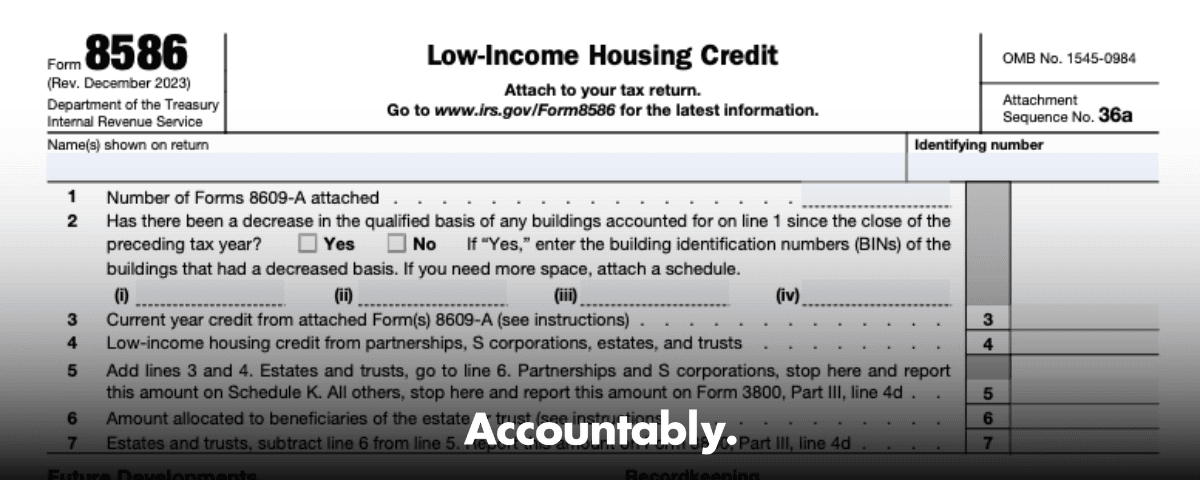
The current Form 8586 PDF is straightforward. You will enter your name and TIN, count how many Forms 8609‑A you attach, and total the current‑year credit. The form then gives you a place to report credits that came from pass‑through entities. From there, most filers send the total to Form 3800. Partnerships and S corporations generally stop at line 5 and move the amount to Schedule K so it flows to owners. Estates and trusts keep going to lines 6 and 7 to allocate beneficiary shares.
What trips teams up is not the math, it is the documentation. Your reviewer needs to see each building’s Form 8609‑A, the BINs, and any basis change schedule in the same subfolder or tab, named in a way that matches the return. If you keep that tidy, review time drops dramatically.
Update status summary
- No new IRS bulletins are affecting the mechanics of Form 8586 as of the date above.
- The “About” pages for Forms 8586, 8609‑A, and 8611 show no current developments that change line‑by‑line entries.
- Software platforms may update screens and help text, so let the IRS PDF be your source of truth, then use software to populate and route amounts.
Practical tip: save the IRS PDF you used, note “Accessed December 8, 2025” in your workpaper footer, and lock the folder. If something changes later, you can show what you relied on when you filed.
Recent developments, simplified
There are no listed changes to how you compute the Low‑Income Housing Credit on Form 8586 right now. That means you can proceed with your current approach, watch for qualified basis shifts, and keep Form 8611 ready if a recapture event occurs. Your checklist should still include a same‑day review of the IRS pages and your software’s update log, especially during peak season. If anything changes, update the workpapers first, then the return.
No IRS updates are currently flagged for Form 8586, so keep following the instructions, keep your documentation tight, and prepare for recapture if basis drops or a set‑aside fails.
Purpose and scope, in your workflow
Form 8586 is how you, as the filer or pass‑through entity, report the Low‑Income Housing Credit from certified buildings and get it into the right place on the return. If you manage partnerships or S corporations, you will compute the credit at the entity, then stop at line 5 and report it on Schedule K. Owners pick up their share on their own returns. If you manage an estate or trust, you will allocate to beneficiaries on line 6, then carry the estate or trust share to Form 3800 on line 7.
What this form really does for you is standardize the numbers so they move cleanly to Form 3800, which handles general business credit limits and carryforwards. It also forces the basis conversation that prevents surprises. If any building’s qualified basis went down, you must list those BINs and attach a schedule. That single step is what often surfaces a potential recapture before you file.
Who uses Form 8586
You will use Form 8586 if you:
- Operate a partnership or S corporation with LIHTC properties, compute the current‑year credit, then pass it through to owners on Schedule K and K‑1.
- Administer an estate or trust that allocates a share of the credit to beneficiaries and carries the estate or trust share to Form 3800.
- Need to disclose a qualified basis decrease and identify the affected BINs so reviewers can assess recapture exposure.
Individuals usually do not file Form 8586. If you only receive LIHTC from a pass‑through, you typically report it directly on Form 3800 and attach the pass‑through details.
How Form 8586 supports Form 3800
Form 3800 is the hub for the general business credit. Your Form 8586 total becomes one of the credits that Form 3800 aggregates and limits. The usual flow looks like this:
- Gather all Forms 8609‑A and compute the current‑year credit per building.
- Add any credit received from pass‑through entities.
- Put the sum on line 5 of Form 8586.
- Route to Form 3800 for the final limitation and carryforward calculations.
If your entire credit comes from pass‑throughs, your software may not print Form 8586 at all. You still include the credit on Form 3800, and you keep the K‑1 detail and any state allocation letters in your records. The key is consistent documentation and tie‑outs, not which page physically prints.
Where teams usually get stuck
- Workpapers named inconsistently with BINs, which slows the review.
- A missing 8609‑A for a building that has a current‑year credit, which forces a last‑minute scramble.
- The basis decrease question left blank, which creates a review loop.
- Credits from pass‑throughs booked on a trial balance but not tied to K‑1 support.
In my experience, a short prep checklist at the top of your folder, plus a reviewer checklist that mirrors Form 8586 lines 1 through 7, removes 80 percent of these stalls. Keep it simple, keep it visual, and reviewers will thank you.
Certification and annual reporting, Forms 8609 and 8609‑A
Everything starts with certification. You must have a separate Form 8609 for each building placed in service. That document shows allocation details, the applicable credit percentage, and baseline data for qualified basis. Then, every year for up to fifteen years, you file Form 8609‑A to confirm continued eligibility and report any changes that affect the credit. Form 8586 pulls its totals from those annual 8609‑A filings.
File Form 8609‑A every year you claim the credit, keep BINs consistent, and note any change in qualified basis with a short explanation in your workpapers.
Practical process that works well:
- Store each building’s 8609 and 8609‑A in its own subfolder named with the BIN and project nickname.
- Use a standard workpaper index, for example 1.0 8609, 2.0 8609‑A, 3.0 basis schedule, 4.0 rent and unit count checks, 5.0 correspondence.
- Add a cover sheet that lists the BIN, PIS date, applicable fraction, and the ten‑year credit period.
E‑E‑A‑T, what we look for in reviews
When we review LIHTC files, we expect to see the BINs cross‑referenced in three places, the return, the workpaper index, and the 8609‑A filename. We also expect a one‑page basis summary that explains any swing year over year. That one page saves thirty minutes of back and forth on most reviews.
Recapture rules and Form 8611, without the stress
Recapture exists to claw back credit if a project falls out of compliance during the fifteen‑year period. If your building fails the set‑aside, loses qualified basis, or you dispose of it, you may have to recapture part of the credit. You compute that on Form 8611 and attach it to the return for the year of the event.
Here are the common triggers and what you do next.
| Trigger | What changes | What you file or document |
| Disposition of the building | Ownership ends or transfers | Test for recapture and file Form 8611 with the return |
| Decrease in qualified basis | Fewer qualified units or lower applicable fraction | Recalculate the credit, attach your basis schedule, file 8611 if required |
| Set‑aside failure | Minimums not met for the period | Identify the affected years, adjust credit, consider 8611 |
| Noncompliance year | A year with reportable issues | Prorate by the year since the credit started, document fixes |
| Return filing year | The year the event occurs | Include Form 8611, increase tax, and keep support in your binder |
A quick recapture sanity check
Before you file, ask one question for each building, did anything happen this year that would lower qualified basis or stop us from meeting the set‑aside? If the answer is yes, open the 8611 instructions, run the calc, and attach the schedule. If the answer is no, document that conclusion with a one‑line note, “No basis decrease or set‑aside failure identified for 2025,” and move on.
Reporting your LIHTC on Form 3800
Form 3800 is the final stop for most filers, since the Low‑Income Housing Credit is part of the General Business Credit. Your goal is simple. Get an accurate total from Form 8586, apply any limitations on Form 3800, and document carryforwards so next year’s prep is easy.
The practical flow
- Confirm each building’s credit on its Form 8609‑A.
- Add any credit received from pass‑through entities.
- Place the total on Form 8586, line 5.
- Route the amount to Form 3800.
- Apply general business credit limits and record any carryforward or carryback.
If your only source is a pass‑through, many taxpayers report the credit directly on Form 3800 and retain K‑1 support with the EIN and project references. Your software should handle either path as long as your source documents are squared away.
Quick review tip: reconcile the Form 3800 LIHTC line back to a one‑page binder summary that lists each BIN, the current‑year amount, and the total by entity. That summary should match Form 8586 or, if applicable, your pass‑through detail.
How to complete IRS Form 8586, step by step
Here is a clean sequence you can hand to a preparer or use as a reviewer.
- Enter the taxpayer name and identifying number exactly as shown on the federal return.
- Line 1, count attached Forms 8609‑A, one per building.
- Line 2, answer the qualified basis decrease question. If yes, list the affected BINs and attach a schedule that explains the change.
- Line 3, total the current‑year credit from all attached 8609‑A forms.
- Line 4, add credits received from pass‑through entities.
- Line 5, add lines 3 and 4. Partnerships and S corporations usually stop here and report this amount on Schedule K so it flows to K‑1s.
- Lines 6 and 7, estates and trusts allocate beneficiary shares, then carry the estate or trust portion to Form 3800.
- Lock the binder and retain all support for the fifteen‑year compliance window.
Attachments and cross‑checks
- Attach each Form 8609‑A used to compute line 3, organized by BIN.
- If line 2 is “Yes,” include a brief basis schedule and any state compliance correspondence that supports the change.
- If line 4 includes pass‑through credits, keep K‑1s and allocation letters with entity EINs and building references.
- Reconcile all totals to your general ledger or project tracking sheet.
Taxpayer information requirements
Accurate identification comes first. Use the correct TIN, name control, and address block. Then reconcile the count of attached 8609‑A forms to the project list you maintain with the housing credit agency. If any building’s qualified basis decreased, disclose it and list the BINs. This is the control point that prevents a late scramble and a possible recapture miss.
Fiduciary returns need a little more care. Estates and trusts should prepare a beneficiary allocation worksheet that ties to line 6, then confirm that each beneficiary receives the amount and detail needed to claim the credit on Form 3800.
A simple three‑point ID check
- Verify the TIN against last year’s return or IRS notices.
- Match the list of buildings to the number of 8609‑A attachments.
- Confirm the sign‑off on the basis decrease question and support.
Lines 1 through 4, what reviewers look for
You can shave real time off reviews by aligning documents with the form lines. Use this quick map.
| Line | What you enter | What to attach or check |
| 1 | Number of Forms 8609‑A attached | 8609‑A for each building, filed for the current year |
| 2 | Basis decrease, Yes or No | If Yes, list BINs and attach a short basis schedule |
| 3 | Total current‑year LIHTC from 8609‑A | Tie out to each building’s 8609‑A credit figure |
| 4 | LIHTC from pass‑through entities | K‑1s and allocation letters with EINs and project detail |
Tie these four lines precisely. Downstream totals, owner allocations, and Form 3800 all depend on this foundation.
Lines 5 through 7, entity reporting and allocations
Line 5 is your consolidation line, the sum of line 3 and line 4. What you do next depends on the entity type.
- Partnerships and S corporations usually stop at line 5. Report that amount on Schedule K so it flows to owners on K‑1s. Do not claim it at the entity level.
- Estates and trusts continue. Line 6 reports the portion allocated to beneficiaries. Line 7 is the amount the estate or trust claims and carries to Form 3800.
Estate and trust specifics
- Build a beneficiary worksheet that mirrors line 6.
- Allocate based on the governing document and tax rules, usually proportionate to distributable net income where applicable.
- Provide beneficiaries with the detail they need to claim the credit on Form 3800, including entity name, EIN, and building references.
Reviewer note: confirm that line 6 allocations match beneficiary statements and that the remaining amount on line 7 agrees to Form 3800. A one‑line tick mark in the binder saves a round of emails.
Software workflow, without surprises
Whether you use UltraTax, CCH Axcess, Lacerte, ProConnect, Drake, or another platform, the inputs are similar. You will enter the count of 8609‑A forms, the current‑year building credits, and any pass‑through credits. Most systems then generate the Form 8586 total and push the amount to Form 3800. If your entire credit is from pass‑throughs, some systems will suppress Form 8586 and post directly to Form 3800. That behavior is normal as long as your support shows the source and the EIN.
A short software checklist
- Verify you are on the current‑year release before you start.
- Use a consistent naming convention for each building, project nickname plus BIN.
- Attach PDFs of each 8609‑A to the e‑file, if the software and e‑file schema allow.
- Run the diagnostics and clear any basis decrease prompts before review.
Where to find Form 8586 and related resources
You can always download the current Form 8586 and its instructions from the IRS site. The same hub provides Forms 8609 and 8609‑A and their instructions, plus general business credit materials for Form 3800. Add the documents you used to your binder with an “Accessed on” date.
Quick download steps
- Go to irs.gov/forms‑pubs and search “Form 8586.”
- Download the form PDF and instructions.
- From the same page, open the links to Forms 8609 and 8609‑A and their instructions.
- If you expect recapture, pull Form 8611 and its instructions.
- Add the PDFs to your workpaper folder and note the access date.
Task and source table
| Task | Source |
| Obtain Form 8609 | Your state housing credit agency |
| Obtain Form 8609‑A | Your state housing credit agency |
| Download Form 8586 and instructions | IRS website, forms and publications |
| Map to Form 3800 | IRS website, Form 3800 instructions |
| Software import | Your tax software or your preparer’s system |
General Business Credit hub, what to remember
Form 3800 aggregates multiple credits, applies limits, and tracks carryovers. That is why clean routing from Form 8586 matters. Keep your LIHTC summary in the same folder as other credits, and write one clear note that lists any carryforward created this year. Next year’s team will bless you for it.
Documentation first, then math. When the binder tells a clean story, Form 3800 is a short job, not a late‑night adventure.
Where Accountably fits, lightly and only if needed
If you manage multiple LIHTC projects, you already know the pain points. Reviews bog down when 8609‑A files are inconsistent, the basis question is unanswered, or allocations do not match K‑1s. Accountably integrates offshore teams into your workflow with disciplined SOPs, structured workpapers, and layered reviews, so your Form 8586 package shows up complete and on time. Use this only if you need predictable capacity during peak season. Otherwise, keep the checklists in this guide and you are set.
Related reading and quick references
Use these as a table of contents for your binder. You do not need to print everything, but you should store a PDF of the instructions you actually relied on this season.
| Resource | Why you keep it |
| Form 8586 instructions | Line‑by‑line rules, BIN listing, lines 1 through 7 |
| Form 8609 and 8609‑A instructions | Certification, annual filing, basis concepts |
| Form 8611 instructions | Recapture events, calculations, and filing |
| Form 3800 instructions | General Business Credit limits and carryovers |
| Publication 535 (selected sections) | Background on business credits and interactions |
Frequently asked questions
What is Form 8586 used for?
You use Form 8586 to calculate and report the Low‑Income Housing Credit for qualifying residential rental buildings. It consolidates credit amounts from each building’s Form 8609‑A and routes totals to Form 3800 or, for partnerships and S corporations, to Schedule K so owners can claim their shares. Keep BINs, basis schedules, and any pass‑through K‑1s in the same folder for a clean review.
Do I need Form 8586 if all LIHTC comes from a pass‑through?
Often, no. If your only LIHTC comes from a pass‑through, many filers report the credit directly on Form 3800 and keep the K‑1 and EIN details as support. Follow your software’s workflow and the instructions for Form 3800, and make sure your binder shows the source and allocation.
How long do I keep LIHTC records?
Keep building‑level documents, 8609 and 8609‑A, basis schedules, correspondence, and return copies for at least the fifteen‑year compliance window. Store recapture workpapers beyond that if any Form 8611 was filed during the period.
What triggers recapture on Form 8611?
Common triggers include a decrease in qualified basis, a failure to meet the low‑income set‑aside, or a disposition of the building during the fifteen‑year period. If a trigger occurs, compute the recapture, attach Form 8611 to the return for the year of the event, and save the calculation and support in your binder.
Can consumer tax software handle Form 8586?
Most consumer tools are not designed for multi‑building LIHTC. Professional systems like UltraTax, CCH Axcess, Lacerte, ProConnect, or Drake are a better fit for partnerships, S corporations, and fiduciaries with project‑level attachments. If you do use consumer software, confirm it can attach 8609‑A PDFs and route credits correctly to Form 3800.
Does Form 8586 affect state filings?
It can. Many states that allocate housing credits require their own forms or attachments. Keep state allocation letters and state credit computations next to the federal binder and confirm any add‑backs or adjustments.
Closing checklist and next steps
- Verify the entity TIN, name, and address.
- Confirm the number of 8609‑A attachments equals the building list.
- Answer the qualified basis decrease question and attach BINs and a short schedule if needed.
- Total current‑year building credits and add pass‑through credits.
- Post the sum to Form 8586, line 5.
- Partnerships and S corporations, pass to Schedule K and K‑1.
- Estates and trusts, complete lines 6 and 7, then carry to Form 3800.
- On Form 3800, apply limits and record carryforward.
- Save PDFs of the instructions you used and date‑stamp your binder.
Simplify Delivery, Improve Margins, Stay in Control.
Offshore support that works exactly like your in-house team.
???? Let’s Talk