Scale Your CPA Firm Without Adding Headcount
Build your offshore team that works your way, trained, compliant, and white-labeled under your firm.
???? Book a Discovery CallTable of Contents
- Scale Your CPA Firm Without Adding Headcount
- Hundreds of Firms Have Already Used This Framework.
- Key Takeaways
- What Form 8944 Is, Who It’s For, and Why It Exists
- The What‑How‑Wow Snapshot
- Eligibility, Put Simply
- Hardship Reasons and Proof That Works
- Improve Margins Without Compromising Quality
- Step‑by‑Step, Line‑by‑Line
- Documentation Checklist You Can Copy
- Timing, Processing, and What Happens Next
- Who Should Not File, With Examples
- Make Your Package Easy to Approve
- Common Mistakes That Trigger Denials
- Practical Scenarios
- Where to Get the Form and the Latest Status
- FAQs
- When a Waiver Is Not the Real Fix
- Final Notes and Quick Actions
- Simplify Delivery, Improve Margins, Stay in Control.
E‑file was not realistic that season. They did the right thing, they documented the problem and filed Form 8944 on time. A few weeks later, the waiver arrived, they filed paper where needed, and they kept clients calm because they had proof and a plan.
If you are a paid preparer who expects to clear the 11‑return e‑file threshold, Form 8944 is your safety valve when e‑filing is truly unreasonable, not just inconvenient. Used correctly, it protects you from penalties and avoids last‑minute scrambles. Used carelessly, it gets denied and puts you back at square one. This guide shows you how to do it right, with plain‑English checklists, examples, and links to the IRS pages you will actually use.
You use Form 8944 when you are a specified tax return preparer and e‑filing would create an undue hardship. It is not for individual taxpayers.
Hundreds of Firms Have Already Used This Framework.
Join the growing list of CPA and accounting firms using Accountably’s Offshore Playbook to scale faster.
???? Get Your FREE Playbook
???? Visit Jugal Thacker’s LinkedIn
Send him a connection request and message “Playbook” to get your copy.
Key Takeaways
- You are a “specified tax return preparer” if you, or your firm in total, reasonably expect to file 11 or more covered returns in a calendar year. That triggers the e‑file mandate.
- File Form 8944 during the window from October 1 through February 15 for the calendar year at issue. Mail it with documentation to the IRS Andover address shown on the form. Late requests need a written reason that fits the IRS standard.
- Acceptable hardship grounds include bankruptcy, economic hardship with two third‑party cost estimates, disaster impact, or other documented barriers such as limited infrastructure.
- Lacking an EFIN is not a valid hardship reason, and the IRS says so. Include your PTIN on the form and keep it consistent everywhere.
- Waivers are not permanent. They are granted case by case for one calendar year, and you must reapply if the hardship continues.
What Form 8944 Is, Who It’s For, and Why It Exists
Form 8944 is the request you submit when you meet the mandate to e‑file, yet documented circumstances make e‑filing unreasonable for some returns you prepare. The IRS calls this an undue hardship waiver. The form is for paid preparers who meet the “specified preparer” definition, not for individual taxpayers.
You are a specified preparer if you, or your firm in the aggregate, expect to file 11 or more covered returns, for example, 1040, 1040‑NR, 1040‑SR, or 1041. If a two‑person firm expects six each, that is 12 total, so both are in scope for the mandate.
There are also situations where you do not need a waiver at all. If a client chooses to file on paper, you can honor that, and you should attach Form 8948 to that paper return. Some forms or situations cannot be e‑filed, those paper returns are allowed, and Form 8948 is how you note it.
The What‑How‑Wow Snapshot
- What Form 8944 is the IRS process to request relief from the e‑file requirement when you can prove a real barrier, for example, bankruptcy, persistent connectivity failure, or economic hardship tied to required upgrades.
- How You complete Lines 1 through 9, select your hardship category, attach evidence, sign under penalties of perjury, and mail it between October 1 and February 15 to the Andover, MA address on the form. Expect a written decision, and plan 4 to 6 weeks for processing.
- Wow Most denials come from missing evidence, inconsistent identifiers, or late filing. Simple fixes, like labeling exhibits clearly and including two current vendor quotes for economic claims, turn borderline requests into approvals.
Eligibility, Put Simply
- Who should file You, the paid preparer who meets the 11‑return threshold, should file when e‑file is impracticable for reasons you can prove with third‑party documentation. That includes operations affected by a declared disaster, ongoing infrastructure gaps, or court‑documented bankruptcy.
- Who should not file Do not file if you do not meet the mandate threshold, if your reason is simply preference, or if the issue is “no EFIN.” The IRS explicitly states that lack of an EFIN is not a valid hardship basis.
- Timing that actually matters File only in the published window, October 1 through February 15, for the coming calendar year. If a due date lands on a weekend or holiday, the next business day is acceptable. Mail to the Andover address printed on the form.
Hardship Reasons and Proof That Works
Here is a practical view of what the IRS expects to see attached to a strong Form 8944 package.
| Hardship category | What to attach | Why it helps |
| Bankruptcy | Court filings that show case status | Confirms a documented legal barrier |
| Economic hardship | Your net income or average prep fee figures, plus two current third‑party cost estimates for the needed tech or connectivity | Quantifies burden and shows you requested independent quotes, which the IRS expects |
| Infrastructure or connectivity limits | ISP letters, outage records, dated speed tests, vendor error logs | Shows the barrier is persistent and outside your control |
| Disaster impact | FEMA or IRS disaster references and dated proof of impact on your operations | Ties a recognized event to your ability to e‑file |
| Other substantive barriers | Independent documentation that fits the facts | Creates a verifiable trail, not just assertions |
All of these align with the instructions on the current PDF and the IRS manual sections that staff use to evaluate requests.
Improve Margins Without Compromising Quality
Offshore staffing helps firms deliver more, scale faster, and stay compliant, without adding local headcount.
???? Book a Discovery CallStep‑by‑Step, Line‑by‑Line
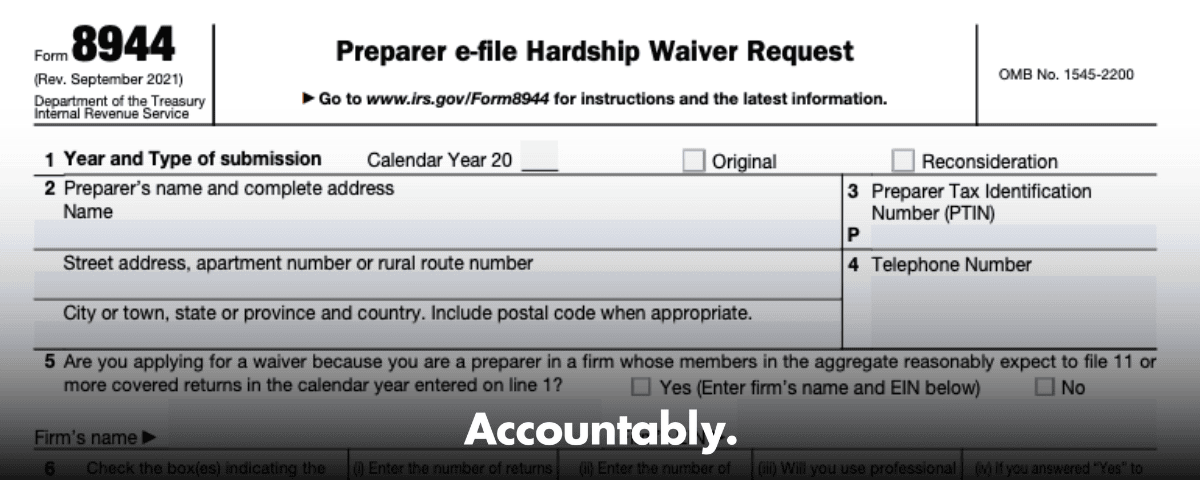
- Line 1, Year and submission type Enter the calendar year, then check Original, or Reconsideration if you are supplying new facts after a denial. Keep this consistent with your attachments.
- Lines 2–4, Identifiers Use your legal name and full address, your PTIN in the correct format, and a phone number that you actually monitor in busy season. If the PTIN format is off, staff will flag it.
- Line 5, Firm threshold Answer Yes if your firm expects to file 11 or more covered returns. Enter the firm name and EIN. Even if you personally handle fewer than 11, the firm’s total controls the mandate.
- Line 6, Return types and counts Check the forms for which you need relief, then list last year’s actual counts, this year’s reasonable expectation, whether you use professional software, and if you answered Yes on Line 5, the firm’s expected totals. This section proves you are in scope for the mandate.
- Lines 7–9, Hardship reason and narrative Pick one primary reason, attach the right proof, and explain how it directly blocks e‑file. Economic claims must include net income or average fee data and two current cost estimates from third parties, not your own internal memo.
- Signature Sign under penalties of perjury and date the form. Keep a scan of the signed package. A missing signature is an automatic stop.
Documentation Checklist You Can Copy
- Include a short cover note that lists every exhibit.
- Label each attachment in the upper‑right corner, for example, Exhibit A, ISP Letter, dated 01‑10‑2025.
- Put your name and PTIN in the header or footer of each exhibit, this is a practical safeguard for routing, even though the form only requires the PTIN entry on Line 3.
- For economic hardship, include your net income or average prep fee calculations, plus two third‑party quotes on the required items, such as software licenses, new workstations, or business‑grade internet. Quotes must be current.
- For connectivity limits, include provider confirmations, ticket numbers, logs, and speed tests with dates.
- For disasters, include the FEMA or IRS disaster reference and proof of direct operational impact, for example, office closure notice, damage photos, or landlord communications.
- Mail to the address printed on the form and keep proof of mailing.
Timing, Processing, and What Happens Next
- When to file Submit between October 1 and February 15 for the calendar year you list on Line 1. If the deadline lands on a weekend or federal holiday, the next business day is fine. Late filings must include a statement that explains an unusual, unforeseen, and unavoidable reason for delay.
- Where to send it Mail the signed form and exhibits to: Internal Revenue Service, 310 Lowell Street, Stop 983, Andover, MA 01810. Keep mailing proof.
- Processing timeframe and outcome Plan for roughly 4 to 6 weeks for a written approval or denial. Approved waivers apply for that calendar year only. If you paper‑file covered returns because a client chose paper or a return cannot be e‑filed, attach Form 8948 and, if relevant, list the waiver reference on it.
- Do not file paper early Do not paper‑file covered returns on the assumption your waiver will be approved. Wait for the letter. If it is denied, follow the Form 8948 rules when paper filing applies for other reasons.
The IRS About page for Form 8944 shows no new developments as of February 20, 2025. The current fillable PDF is Rev. September 2021, and the filing window and address remain the same. Always check the IRS page again before you mail.
Who Should Not File, With Examples
- Below the threshold If you, and your firm in total, expect fewer than 11 covered returns for the year, the mandate does not apply, so you do not need a hardship waiver.
- Client choice or non‑e‑file situations When a client chooses paper, or when the IRS does not accept a return electronically, use Form 8948 with the paper return. You do not need Form 8944 for those situations.
- No EFIN Lack of an EFIN is not a hardship reason. The OMB paperwork notice for this form states that such requests will not be considered.
Make Your Package Easy to Approve
- Use a simple naming convention “Exhibit A, Bankruptcy Petition, filed 01‑07‑2025,” “Exhibit B, ISP Letter, 01‑10‑2025,” and so on. Put your name and PTIN in the header. This helps the IRS team route and verify your materials quickly.
- Tell a brief, factual story In your Line 9 narrative, write two short paragraphs that connect the dots. Explain what happened, when it started, how it blocks e‑file, what you tried, and why the barrier will continue into the filing season.
- Cross‑check counts and dates Make sure your Line 6 counts agree with your internal reports, and the dates on your exhibits support the claim period. If you cite a disaster, include the relevant FEMA or IRS disaster reference and the date it affected your operations.
Quick Pre‑Mailing Checklist
- Calendar year on Line 1 matches your exhibits and cover note.
- PTIN format is correct, PXXXXXXXX, and your address and phone are current.
- Line 5 answered correctly, with firm name and EIN if you expect 11 or more covered returns as a firm.
- Line 6 shows prior counts, expected counts, software usage, and firm totals if Line 5 is Yes.
- One hardship reason selected, with clear Line 9 narrative and matching exhibits.
- Two current third‑party quotes included for economic hardship.
- Signature and date present, keep a scanned copy.
Common Mistakes That Trigger Denials
- Thin or missing documentation Assertions without third‑party proof are the fastest way to a denial. For economic hardship, the IRS expects your net income or average fee data, plus two current third‑party quotes for the tech or connectivity you would need.
- Missed window A request mailed after February 15 must include a detailed statement that shows unusual, unforeseen, and unavoidable reasons. If it does not, the IRS will return it.
- Inconsistent identifiers If your name, PTIN, firm name, or EIN do not match IRS records, processing slows, and denials become more likely. Align everything with your current PTIN and firm records first.
- Wrong tool for the job Do not submit Form 8944 to solve client collection issues or attempt general “hardship” relief for taxpayers. That misunderstanding is common on the internet, and it is incorrect.
Practical Scenarios
- Persistent connectivity failure Your office park has repeated multi‑day outages and no viable business‑grade alternative before filing season. You attach ISP letters, ticket logs, and dated speed tests. Your Line 9 narrative explains the pattern and the timing. Approval is likely because you proved a continuing barrier.
- Economic hardship, small solo shop Your net income fell sharply last year. Your tax software vendor quote plus a second independent quote for the hardware and connectivity upgrades both exceed reasonable capacity. You include revenue detail and both quotes. That is exactly what the IRS asks for.
- Disaster impact A declared disaster closes your office, damages equipment, and delays internet restoration through March. You include FEMA or IRS disaster references and proof of impact on operations. This is a classic fit for a temporary waiver.
Waivers are granted case by case and last for one calendar year. Reapply if the hardship continues.
Where to Get the Form and the Latest Status
- Download the current fillable PDF of Form 8944 from the IRS page. As of February 20, 2025, the PDF is Rev. September 2021 and the IRS notes no recent developments. Always verify before you mail.
- Review the Internal Revenue Manual section used by IRS staff, which confirms the October 1 to February 15 filing window and Andover address.
FAQs
What is IRS Form 8944 used for?
Form 8944 lets a paid preparer request a waiver of the e‑file mandate when e‑filing would cause undue hardship. You select a reason, attach evidence, sign, and mail it during the filing window. It is not for individual taxpayers.
What is the deadline to file Form 8944?
You must submit between October 1 and February 15 for the calendar year you list on the form. If the deadline falls on a weekend or holiday, the next business day is acceptable.
Do I need an EFIN to request a waiver?
No. An EFIN is not required to submit Form 8944, and lack of an EFIN is not considered a hardship reason. Include your PTIN on the form.
What if my client chooses paper?
You can honor a client’s choice to paper‑file. Attach Form 8948 to the paper return to explain why it was not e‑filed. That is separate from Form 8944.
How long does an approval last?
Approvals are for the calendar year only. If the hardship continues, you must reapply for the next year.
When a Waiver Is Not the Real Fix
Sometimes the hardship is real, and Form 8944 is the right move. Other times, the root issue is capacity, workflow discipline, or review bottlenecks. If your team is already buried, every outage feels like a five‑alarm fire. That is not a sales problem, it is a delivery system problem, and it shows up as missed deadlines, uneven workpapers, and stressed reviewers.
If you decide to shore up capacity so you are not leaning on waivers year after year, do it with structure. Our view is simple, offshore only works when it is built like operations, with SOPs, standardized workpapers, layered reviews, and SLAs you can measure. That is how you protect quality and turnaround while you scale.
Accountably builds controlled offshore delivery for CPA and EA firms that need stable production without losing review control. We integrate trained offshore teams into your tools and templates, with file standards and review steps that cut rework. If you want a second set of eyes on your delivery model, we can walk you through how the structure works and where it saves partner time in review.
Final Notes and Quick Actions
- Download the current Form 8944 and verify the filing window and address one more time before you mail.
- If your reason is economic hardship, add two current, independent quotes. Do not rely on a single vendor email.
- If your client chooses paper or a return cannot be e‑filed, use Form 8948 with the paper filing.
- Save a PDF of your signed package and mailing proof.
- Calendar a reminder to reapply next year if the hardship will continue. Approvals last for one year.
Simplify Delivery, Improve Margins, Stay in Control.
Offshore support that works exactly like your in-house team.
???? Let’s Talk