Summarize this article with AI
In Brief
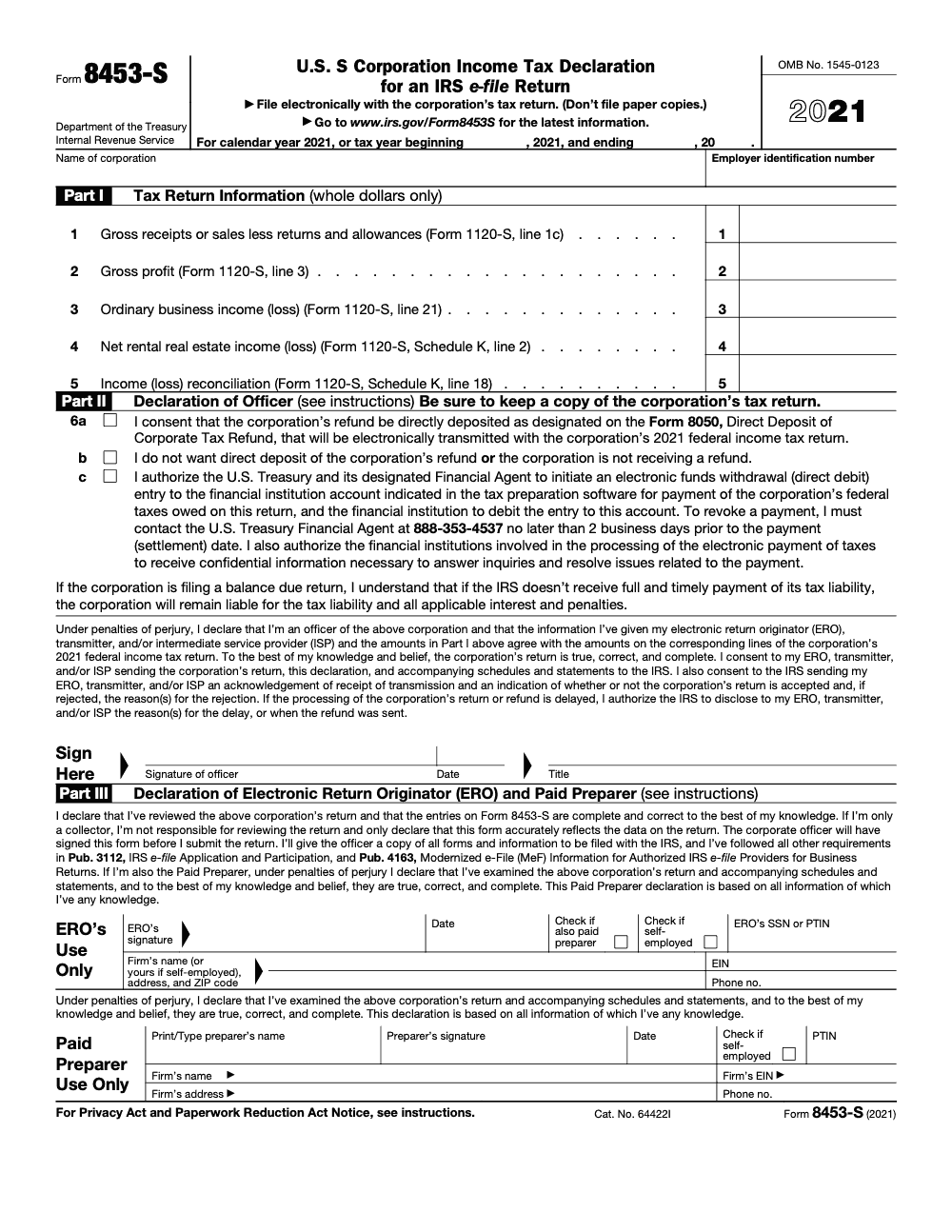
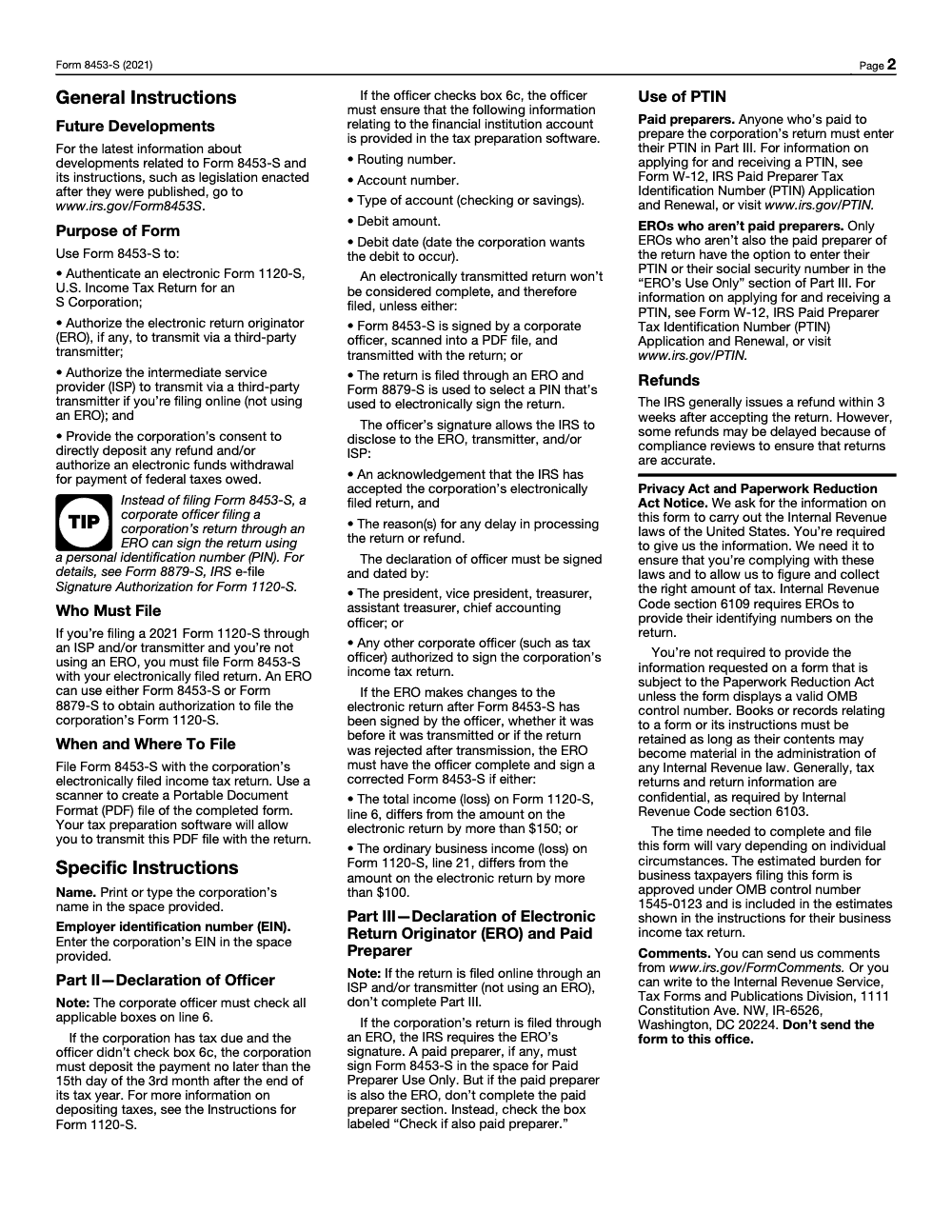
Form 8453-S is the U.S. S Corporation Income Tax Declaration for an IRS e-file Return, used to authenticate an electronically filed Form 1120-S when an S corporation files through an Intermediate Service Provider or transmitter without an Electronic Return Originator (per IRS Form 8453-S instructions). When an ERO is involved, the corporate officer can sign with a PIN on Form 8879-S instead. The form is e-file only as a scanned PDF, calendar-year 2025 returns are due March 16, 2026, and a corrected Form 8453-S is required if total income on Form 1120-S line 6 changes by more than $150 or ordinary business income on line 21 changes by more than $100. See our U.S. tax preparation services for S corp e-file handling end to end.
The 8453-S problem shows up the same way every March. An officer signs the declaration early in the month, the preparer catches a Schedule K-1 fix a few days later, ordinary business income on Form 1120-S moves by a few hundred dollars, and nobody re-signs before transmission. The IRS accepts the e-file, but the signed declaration no longer matches the return, and that small gap is what turns into a long IRS letter in October.
Form 8453-S is the S corporation declaration that authenticates an electronically filed Form 1120-S when you file without an Electronic Return Originator. When an ERO captures the officer's PIN, Form 8879-S takes its place instead. Watch the two triggers that catch teams off guard: a post-signature change to the return means a corrected declaration, and only an authorized officer can sign unless the agent rules under Form 2848 are properly met.
Key Takeaways
- Form 8453-S is the U.S. S Corporation Income Tax Declaration for an IRS e-file Return, used to authenticate an electronically filed Form 1120-S for tax year 2025.
- If your officer signs with a PIN through an ERO, use Form 8879-S instead of Form 8453-S.
- If you do not use the PIN method, scan and attach Form 8453-S as a PDF with the e-filed Form 1120-S. Do not mail paper copies.
- For direct deposit of a corporate refund, you may need Form 8050 in addition to any banking consents on Form 8453-S.
- Only an authorized corporate officer can sign. A representative may sign only when the IRS rules for agent signatures are met and properly documented with Form 2848.
What Form 8453-S is, and the 2025 update you cannot ignore
Form 8453-S is the S corporation's e-file declaration and authorization. It authenticates your electronic Form 1120-S, allows an ERO or transmitter to submit the return, and captures consents for refund direct deposit or electronic funds withdrawal.
Quick reality check, Form 8453-S is the current S corp e-file declaration. The PIN-based alternative when you file through an ERO is Form 8879-S.
If your officer prefers an electronic PIN signature through an ERO, use Form 8879-S instead of a scanned Form 8453-S.
When exactly is 8453-S required versus 8879-S
- Use Form 8879-S when the officer signs with a PIN through an ERO, either self-entered or authorized for the ERO to enter.
- Use Form 8453-S when you do not use the PIN method. Scan the signed Form 8453-S and attach it to the electronic return as a binary PDF. Do not mail paper copies.
One more guardrail, do not try to use an 8879 form as the signature for a paper 1120-S. The IRS is clear that 8879-S is not a valid paper-return signature substitute. Paper returns must be signed on the return itself.
What you authorize when you sign
When an officer signs Form 8453-S for a 1120-S e-file, you certify the return is true, correct, and complete, and you authorize your ERO, ISP, or transmitter to send the return, exchange acknowledgments, and, if selected, process direct deposit or electronic funds withdrawal.
| Authorization | What you permit |
| Validate 1120-S | Officer certifies the electronic return is true, correct, complete |
| Transmit return | ERO or ISP may transmit via a third-party transmitter |
| Handle IRS comms | ERO may receive and discuss acknowledgments for the e-filed return |
| Banking actions | Consent to direct deposit and electronic funds withdrawal when used |
| Refund routing | For corporate direct deposit, use Form 8050 when applicable |
This matters in practice. It controls who can push the button, what bank rails can be used, and what the ERO can discuss after transmission. Getting it right prevents avoidable rejects and keeps your review bandwidth focused on real risks.
How to complete and sign 8453-S for an S corp
Here is a straightforward sequence we give new staff during busy season. It keeps production moving and protects the review queue.
- Entity identifiers Verify the legal name, EIN, and tax period match the 1120-S exactly. Mismatches trigger processing friction you do not need in March.
- Declaration and officer signature Have an authorized corporate officer sign and date. Titles must reflect actual authority under corporate governance. If a representative must sign for cause, follow the agent signature rules in the Form 2848 instructions and attach the required statement.
- ERO section If an ERO is involved, complete EFIN, firm details, and contact information. Keep this consistent with your ERO enrollment records and submission logs.
- Payments and refunds If you want electronic funds withdrawal for a balance due, enter routing number, account number, account type, debit amount, and debit date. The officer can revoke an authorized debit by calling the U.S. Treasury Financial Agent at 888-353-4537 no later than 2 business days before the settlement date, and authorizing the debit does not eliminate the underlying liability if the withdrawal fails or is revoked (the corporation still owes the tax plus interest and penalties). For refunds, confirm whether your workflow requires Form 8050 to request direct deposit to a corporate account, then align the banking details across your package.
- Attachment method If you are not using the PIN method, scan the signed Form 8453-S and attach it to the e-filed return as a binary PDF. Do not mail paper copies.
Pro tip, we once shaved a full day off a review loop by standardizing signature timing. Collect the officer signature before final packaging and hold release until the last reviewer signs off. That way, you never scramble for signatures after a late edit.
In my experience, the two most common blockers are officer title errors and stale banking data. Both are completely avoidable with a preflight checklist and a final reviewer who actually confirms names, titles, and accounts before clicking transmit. Keeping this discipline turns April from whack-a-mole into a steady rhythm.
Filing and recordkeeping, what to keep and for how long
You have two signature pathways, and each has its own retention rule.
- If you used the PIN method with Form 8879-S, the ERO must retain the signed 8879-S for 3 years from the return due date, extended due date, or IRS received date, whichever is later. Do not send it to the IRS unless asked.
- If you used the scanned signature method with Form 8453-S, attach the signed PDF to the e-filed Form 1120-S. The IRS instructs filers not to mail paper copies.
Keep your acknowledgments with the submission ID, keep your signature record, and keep your banking authorizations. A tidy e-file binder saves hours when the IRS or a partner asks for proof.
I like a simple retention playbook. Store the signed 8879-S or the 8453-S attachment evidence, the accepted acknowledgment, and any direct deposit or withdrawal confirmations in the same digital folder. Lock access, log views, and mirror that structure for every S corp client so your team never wonders where a signature lives.
Submission channels that actually work under busy-season pressure
If you want a smooth e-file day, pick the channel that matches your controls and the way your team already moves work.
- ERO driven Your ERO prepares, reviews, collects the officer signature, and transmits. This is the most common path for firms that want one point of accountability.
- Platform plus transmitter You prepare the return inside a platform such as UltraTax CS or CCH Axcess, then route the file through a third-party transmitter. Make sure your signature method, either 8879-S or attached 8453-S, is captured in the same workflow.
- Online provider with integrated e-sign If your software supports officer e-sign and PIN capture, standardize on 8879-S. It cuts down on scanning and attachment mistakes.
A simple, repeatable workflow you can copy
- Pre-sign package Final reviewer finishes the 1120-S, then triggers the signature packet. If you use 8879-S, route for e-sign. If you use 8453-S, send a fillable PDF and collect a wet or electronic signature, then scan to PDF.
- Signature lock Freeze the return in your system until the signed authorization is back. No last-minute edits after signature without reissuing the form.
- Transmission and verification Transmit, wait for the acknowledgment, then drop the ack, the signed authorization, and any payment confirmation into the client’s year folder.
Small change, big payoff. We cut rework by insisting that the signed authorization lands before the transmitter gets the green light. No more chasing signatures at 8 p.m. on April 15.
Common errors that block acceptance and how to avoid them
- Name or EIN mismatch Cross-check the entity name and EIN on 8453-S against the 1120-S. Use your software’s compare view before you route for signature.
- Wrong year form Use the current-year 8453-S or 8879-S that matches the tax year on the return. Archive prior-year templates in a clearly labeled folder so staff do not grab the wrong one.
- Officer title problems Only an authorized officer can sign. If an agent must sign, make sure a valid Form 2848 and the required statement are in the file. Add an SOP note that reviewers must verify title before sending the signature packet.
- Banking data drift Confirm routing, account type, and account number each year. Add a checkbox in your packet that requires the officer to reconfirm bank details.
- Attachment mistakes If you use 8453-S, the signed form must be attached to the electronic return as a PDF. Train staff on the correct attachment location in your software so it does not get lost in general docs.
Quick comparison, which form and when
| Purpose | Use this if | What happens | Who keeps what |
| Officer PIN signature for 1120-S e-file | You want a clean e-sign flow with no scanned attachment | Use 8879-S, transmit return, no signature PDF attached | ERO retains signed 8879-S for at least 3 years |
| Scanned officer signature for 1120-S e-file | You are not using a PIN workflow | Use 8453-S and attach the signed PDF to the return | ERO retains evidence of the attached form plus a copy in the client file |
| Direct deposit of corporate refund | Your S corp expects a refund to a corporate account | Use Form 8050 when required, align banking data across the package | Keep bank authorization and deposit confirmation with the e-file ack |
The checklists our teams rely on
Here are the two checklists we use with new staff. They are short on purpose and designed for speed.
Pre-filing checklist
- Verify legal name, EIN, and tax period match across all pages.
- Confirm the signer is an authorized officer.
- Choose your signature path, 8879-S or 8453-S.
- Confirm payment choice, electronic funds withdrawal or no withdrawal.
- If expecting a refund, decide on direct deposit and whether Form 8050 is needed.
- Lock return version before routing the signature packet.
Post-filing checklist
- Save the IRS acknowledgment with the submission ID.
- File the signed 8879-S or the 8453-S evidence with the ack.
- Save bank confirmations for withdrawals or deposits.
- Update the tracking sheet so reviewers can see status in real time.
- If the IRS requests any follow up, log who owns the task and the date due.
Want a painless April The best firms obsess over small controls. One tight checklist is worth ten Slack threads.
Where Accountably fits, only when it helps
You do not need more resumes. You need returns that move from prep to review to acceptance without drama. When firms ask us for help, we plug into your software stack and enforce the simple controls above. Our teams work inside UltraTax, CCH Axcess, ProConnect, Lacerte, Drake, Canopy, Karbon, TaxDome, and Suralink, and we standardize signature capture so your partners spend less time chasing forms and more time advising clients. That is the entire point, controlled delivery without chaos.
Related forms and practical links to keep handy
- Form 8453-S, U.S. S Corporation Income Tax Declaration for an IRS e-file Return. Use this when you are not using a PIN and need a signed declaration attached as a PDF.
- Form 8879-S, IRS e-file Signature Authorization for Form 1120-S. Use this when the officer signs with a PIN and you want the simplest path with no attachment.
- Form 8050 Direct Deposit of Corporate Tax Refund. Confirm whether this applies to your situation, then align banking details across the package.
- Form 2848 Power of Attorney and Declaration of Representative. If a representative must sign, follow the agent signature rules and keep matching ID and documentation in the file.
Tip, save current-year PDFs in a single “Signatures and Refunds” folder for staff. Remove old-year copies or relabel them clearly as prior-year to avoid mixups.
Compliance best practices that hold up under scrutiny
- Use the correct-year forms and instructions. If you template your packets, update them each January and tag the year in the file name.
- Keep the signed authorization, the acknowledgment, and the bank confirmations in the same folder. This is your proof kit.
- Document your signer authority. A short memo that ties officer title to your bylaws or resolutions can save emails later.
- Record retention means at least 3 years for the signed authorization in your ERO files, and longer for supporting records if your firm policy or your state requires it.
- Set an internal SLA on signature turnaround. Most stalls come from waiting on officers. A simple reminder sequence beats fire drills every time.
FAQ
What is Form 8453-S today
It is the current S corporation e-file declaration for tax year 2025. Use Form 8453-S to authenticate an electronically filed Form 1120-S when filing through an ISP or transmitter without an ERO. When an ERO is involved, Form 8879-S with a PIN signature is the alternative.
Do I always need a 8453 form
No. If the officer signs with a PIN through an ERO, you use Form 8879-S and do not attach Form 8453-S. If you do not use a PIN, you attach Form 8453-S to the electronic return as a PDF.
Who can sign the authorization
An authorized corporate officer. If a representative needs to sign, follow Power of Attorney rules and keep the right documentation in the file.
Can I reuse last year’s banking details
Do not assume. Confirm routing, account number, and account type each year. One wrong digit can delay a refund or bounce a withdrawal.
What about 1040 vs 1040-SR
This is a personal return question that pops up even in business tax season. 1040-SR is for people age 65 or older. It uses the same calculations as 1040, includes larger font, and shows a standard deduction chart. It does not apply to S corporations.
A short closing you can act on right now
You now have the playbook. Decide on your signature path, set tight checklists, and align your team around one simple truth, speed comes from clean controls. If you want help that sticks, not another pile of resumes, we can slot in a trained offshore unit that works inside your systems, follows your SOPs, and keeps partners out of review loops. That frees time for advisory and keeps client trust high.
Common Mistakes We See Every Season
Every busy season we see the same 8453-S patterns repeat, almost always tied to signature timing, who signs which section, and what triggers a corrected declaration. Below are the five we catch most often, each paired with the SOP fix we use to prevent it.
Reusable Checklists
These are copy-paste ready for an S corp e-file SOP. Each item is one practitioner action, not a high-level reminder. Drop them into your workpaper template, paste into your engagement letter, or print as a deskside reference.
Pre-signature packet for the officer
- Form 1120-S draft is complete, with line 6 (total income) and line 21 (ordinary business income) values reconciled to the workpaper
- Schedule K and Schedule K-1 amounts agree with the 1120-S line 21 result
- Direct deposit choice for any refund is confirmed in writing (line 6a or 6b)
- Electronic funds withdrawal authorization for any balance due is confirmed (line 6c) with routing number, account number, account type, debit amount, and debit date
- Corporation name and EIN are printed or typed at the top of Form 8453-S, per the Form 8453-S instructions
- Authorized officer is identified by name and title, with a backup signer named if the primary is unavailable
- Officer receives a full copy of all forms and schedules to be transmitted, per the Form 8453-S instructions
Corrected Form 8453-S trigger scan
- Compare signed line 6 (total income) to current line 6; flag if variance exceeds $150
- Compare signed line 21 (ordinary business income) to current line 21; flag if variance exceeds $100
- If either threshold is crossed, halt transmission and route to the officer for a corrected signature
- Apply the same scan after any rejection and re-transmission, not just for pre-transmission edits
- Log the comparison in the workpaper (signed values, final values, threshold result) for the audit trail
- If thresholds are not crossed, document the variance and proceed without re-signing
ERO transmission readiness
- Signed Form 8453-S scanned to PDF, page 1 readable end to end
- PDF attached in the tax software in the 8453-S slot, not as a generic attachment
- Part III completed only if an ERO is involved; left blank for ISP or transmitter without an ERO
- Paid preparer PTIN entered if the preparer is paid; SSN substitution is not allowed
- If the same person is ERO and paid preparer, only the ERO section is signed and the "Check if also paid preparer" box is marked
- IRS acknowledgement received and saved with the workpaper before closing the file
- If a balance is due and line 6c is not checked, confirm payment is deposited by the 15th day of the 3rd month after year-end (March 16, 2026 for calendar-year 2025)
Keep 8453-S Season From Stalling
S corp e-file season is short. From year-end to the calendar-year Form 1120-S deadline of March 16, 2026 (the IRS-published due date because March 15 falls on a Sunday) is roughly ten weeks, and Form 8453-S sits at the choke point. Nothing transmits until the officer signs, and any post-signature change above the $150 total-income or $100 ordinary-business-income threshold sends the package back through review.
Most stall-outs we see do not come from the return itself, they come from signature logistics: chasing officers for re-signs that the Form 8453-S instructions do not actually require, hand-routing PDFs across email threads, and discovering on March 14 that the EFTW bank details on line 6c have a transposed digit. The fix is process, not effort.
- Lock the line 6 and line 21 baseline at the moment the officer signs Form 8453-S, and re-route only when the corrected-form thresholds are actually crossed
- Standardize the signed-PDF capture inside one tool so signed declarations never live in email attachments waiting to be downloaded
- Verify EFTW routing and account fields against a void check or recent statement before line 6c is signed, not after the file is transmitted
- Pre-stage Part III on returns going through an ERO and confirm the "Check if also paid preparer" box is correctly used when the ERO is also the preparer
- Keep a same-day fallback: if the officer cannot sign in time, file Form 7004 to extend the 1120-S to September 15, 2026, instead of pushing a non-officer signature
Where this falls apart is usually capacity, not knowledge. If a team is rebuilding the same 8453-S workflow every March, a trained offshore unit working inside your software, your SOPs, and your review queue can take preparer-level production off the partner desk. That is what our U.S. tax preparation services are built for.
FAQs
It is the current S corporation e-file declaration for tax year 2025. Use Form 8453-S to authenticate an electronically filed Form 1120-S when filing through an ISP or transmitter without an ERO. When an ERO is involved, Form 8879-S with a PIN signature is the alternative.
No. If the officer signs with a PIN through an ERO, you use Form 8879-S and do not attach Form 8453-S. If you do not use a PIN, you attach Form 8453-S to the electronic return as a PDF.
An authorized corporate officer. If a representative needs to sign, follow Power of Attorney rules and keep the right documentation in the file.
Do not assume. Confirm routing, account number, and account type each year. One wrong digit can delay a refund or bounce a withdrawal.
This is a personal return question that pops up even in business tax season. 1040-SR is for people age 65 or older. It uses the same calculations as 1040, includes larger font, and shows a standard deduction chart. It does not apply to S corporations.
Other forms this guide names
- Form 1120-S: Guide for S‑Corp Filing, K‑1, K‑2/K‑3, Deadlines
- Form 8879-S: 1120-S e-File PIN Guide
- Form 8050: Direct Deposit of Tax Exempt or Government Entity Tax Refund
- Form 1040: Filing Guide for 2025 Returns (AGI, Deductions, Deadlines)
- Form 1040-SR: Standard Deduction, Schedules, E-file Tips
- Form 2848: Guide to Line 3, Filing, and Rules
Summarize this article with AI
About this guide
Accountably helps US CPA, EA, and accounting firms hire trained accountants and tax preparers in India.
About us Reviewed byJugal Thacker, CPAFounder and CEO at Accountably
A Washington-licensed CPA with 7+ years inside US firms – PwC, a real-estate tax practice, then a full-service firm, rising from reviewer to manager to advisory. This article was reviewed against current IRS guidance for the 2025 tax year and updated for filers preparing late returns, amendments, and 2026 estimates.
View profile →How we research, review, and update this guide
Every Accountably guide is researched against primary IRS sources, reviewed by a U.S. CPA, and refreshed as guidance evolves. Read our Editorial Guidelines to see how we source, fact-check, and update our content.