Summarize this article with AI
In Brief
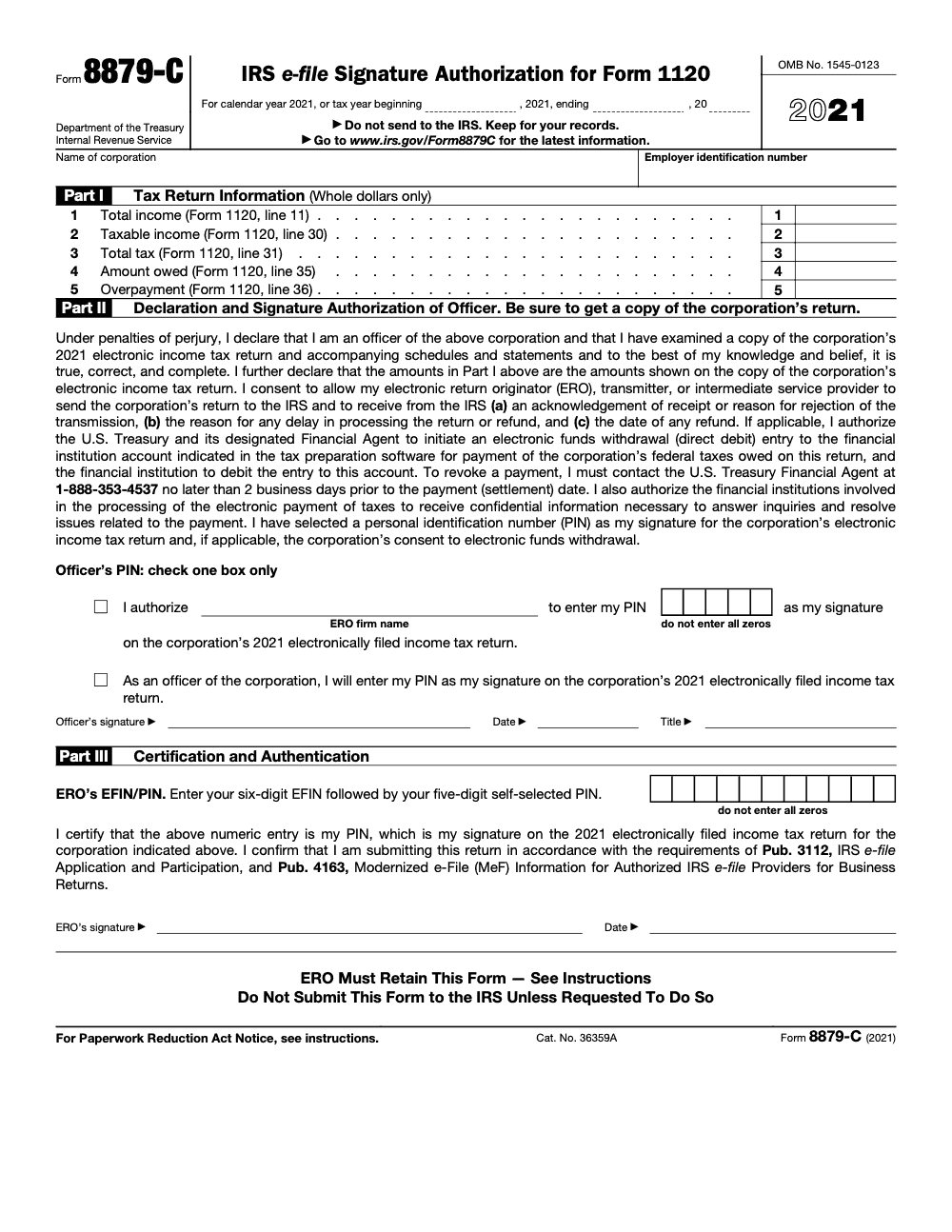
Form 8879-C is the IRS e-file signature authorization for Form 1120, the form a corporate officer signs so an Electronic Return Originator (ERO) can transmit a C corporation’s return. Part I carries five figures straight from Form 1120 – total income (line 11), taxable income (line 30), total tax (line 31), amount owed (line 35), and overpayment (line 36) – and the ERO retains the signed form for 3 years rather than sending it to the IRS, per the IRS Form 8879-C instructions.
A CFO traveling internationally cannot sign the 8879-C before the Form 1120 e-file deadline, and suddenly the return is going on extension to avoid transmitting on an unsigned authorization. That scenario is exactly why the signature step belongs early in the engagement, not the week the return is due.
Form 8879-C is the IRS e-file signature authorization for Form 1120, the document a corporate officer signs so an ERO can transmit a C corporation's return. Part I carries five figures straight from Form 1120, including total income on line 11, taxable income on line 30, and total tax on line 31. It must be signed and dated before transmission, and the ERO retains it for three years rather than sending it to the IRS.
Key Takeaways
- Form 8879-C authorizes an Electronic Return Originator (ERO) to electronically file Form 1120 (U.S. Corporation Income Tax Return) on behalf of the corporation – it serves as the corporation’s consent to transmit.
- A corporate officer with authority to sign the corporation’s tax return must sign Form 8879-C – the ERO does not sign the taxpayer portion.
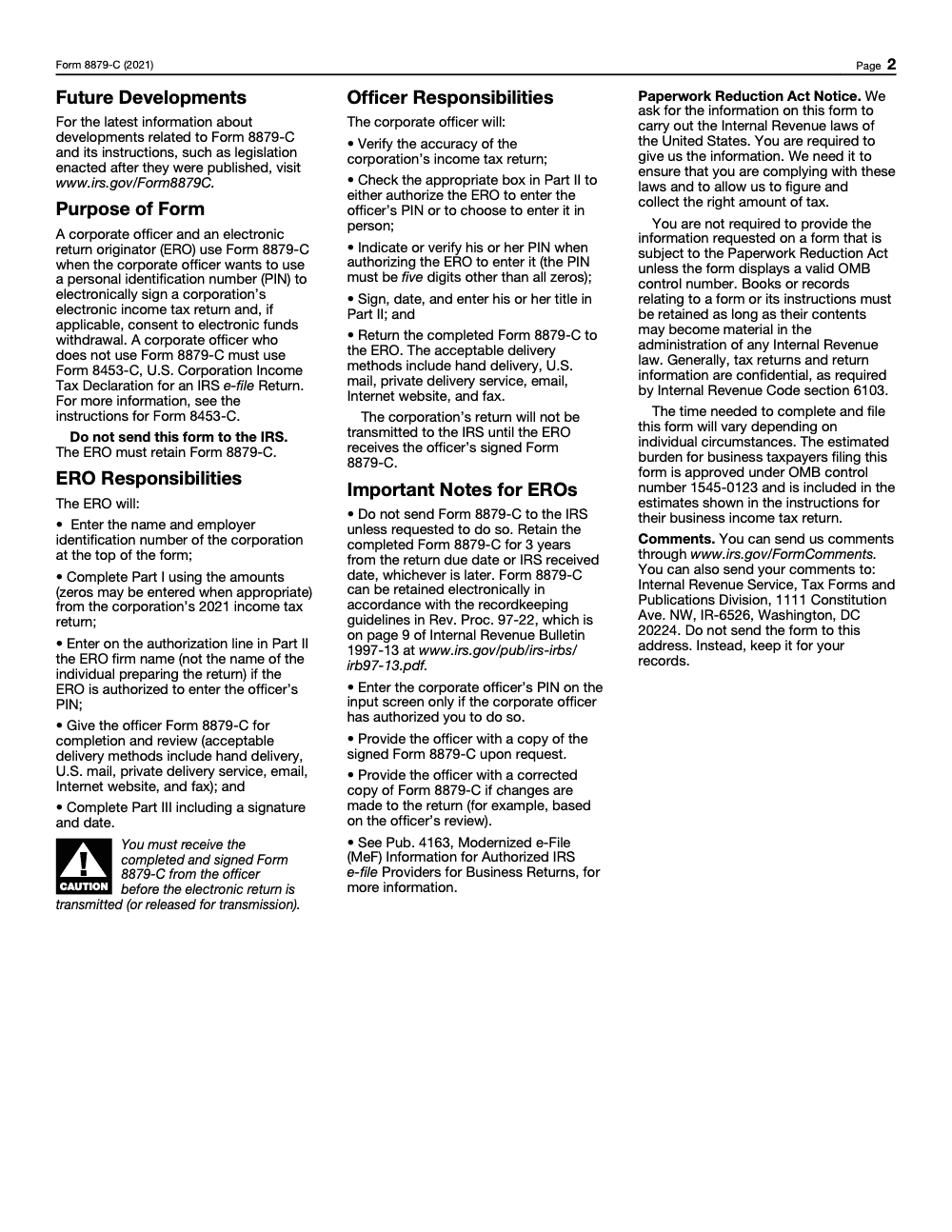
- The form is not transmitted to the IRS – it is retained by the ERO for three years from the return due date or filing date, whichever is later.
- The corporate officer selects a 5-digit PIN as the electronic signature, which becomes part of the e-filed return data (the PIN must be five digits other than all zeros, so 00000 is not a valid placeholder).
- Form 8879-C must be signed and dated before the return is transmitted; transmitting before authorization is a compliance failure.
- Quick rule for your SOP: send the 8879-C to the client for signature at the same time you send the draft return for review – collecting both together prevents last-minute authorization delays.
What Form 8879-C Is and When to Use It
Form 8879-C, IRS e-file Signature Authorization for Form 1120, is used when a corporation’s income tax return (Form 1120) is filed electronically through an authorized Electronic Return Originator. The form accomplishes two things: it authorizes the ERO to transmit the return on the corporation’s behalf, and it confirms that the corporate officer has reviewed the return and agrees with the PIN that will serve as their electronic signature on the submission.
The IRS e-file system requires that every electronically filed return have an associated authorization document in the ERO’s files. For individual returns, this is Form 8879. For C corporations filing Form 1120, it is Form 8879-C. The document is never transmitted – it stays in the ERO’s records and is produced if the IRS audits the e-file authorization process or if a dispute arises about whether the officer authorized the filing.
Who Must Sign Form 8879-C
The person who signs Form 8879-C must be a corporate officer authorized to sign the corporation’s tax return under the instructions to Form 1120. For most corporations, this means the president, vice president, treasurer, assistant treasurer, chief accounting officer, or any other officer the corporation has authorized to sign. A CPA or tax preparer cannot sign in the officer’s place, even with a power of attorney, unless specific IRS procedures for signing on behalf of an officer apply (which are narrow and subject to strict requirements).
When Form 8879-C Is Required
Form 8879-C is required whenever a C corporation e-files its Form 1120 through an ERO, unless the officer instead signs Form 8453-C, the U.S. Corporation Income Tax Declaration that serves as the paper-signature alternative. It is not required if the corporation files on paper or if the return is filed through the corporation’s own IRS-approved software without an ERO intermediary (which is uncommon for most filers). Corporations with gross receipts or total assets above certain thresholds are required to e-file, making Form 8879-C a standard part of their annual compliance process.
How to Complete Form 8879-C
The form has three parts: Part I (return information), Part II (declaration and authorization by corporate officer), and Part III (ERO declaration, signature, and authorization). The ERO completes Part I by entering the key financial figures from the return, Part II is completed and signed by the officer, and Part III is completed and signed by the ERO after the officer has signed.
| Section | Who Completes | What It Contains |
|---|---|---|
| Part I – Return Information | ERO | Total income, taxable income, total tax, amount owed or overpayment from Form 1120 – the officer uses these to confirm the return matches what they reviewed |
| Part II, Box 1 – PIN entry method | Corporate officer | Officer enters their self-selected 5-digit PIN (cannot be all zeros) |
| Part II, Box 2 – ERO-generated PIN option | Corporate officer and ERO | If the officer authorizes the ERO to enter the officer’s PIN, the officer still selects and verifies their own 5-digit PIN and signs the authorization; the ERO only enters that PIN on the input screen |
| Part II – Officer signature and date | Corporate officer | Wet or electronic signature; must be dated; officer must also enter their title in Part II (all three fields are required); must be obtained before transmission |
| Part III – ERO declaration | ERO | ERO confirms they have obtained the officer’s authorization and will transmit the return as authorized |
| Part III – ERO EFIN/PIN | ERO | ERO’s Electronic Filing Identification Number and ERO PIN, identifying the authorized transmitter |
Electronic Signature Options for the Corporate Officer
The IRS has expanded the options for how a corporate officer can sign Form 8879-C. The traditional method is a handwritten (wet) signature on a paper form that the ERO retains. The IRS also allows electronic signatures obtained through conforming electronic signature processes – meaning the signature method must produce a record linking the signature to the signing officer and protecting the form from subsequent alteration. Third-party e-signature platforms (DocuSign, Adobe Sign, etc.) that meet these requirements are acceptable. Remote signature workflows became standard practice during the COVID-19 pandemic and the IRS has issued guidance confirming their ongoing acceptability for many forms including 8879-C.
Deadlines, Penalties, and Filing Requirements
| Requirement | Timeline | Notes |
|---|---|---|
| Officer must sign Form 8879-C | Before the return is transmitted to IRS | Transmitting before signed authorization is a compliance failure |
| Form 1120 e-file deadline (calendar year) | April 15; extended to October 15 with Form 7004 | Form 8879-C must be signed before the applicable deadline date |
| ERO retention of Form 8879-C | 3 years from return due date or filing date (whichever is later) | IRS may request a copy during an e-file compliance review |
| Providing copy to corporate officer | Required upon officer request | Best practice to provide the signed copy to the client for their records |
Form 1120 E-File Requirement
Corporations with total assets of $10 million or more that file at least 250 returns annually are required to e-file Form 1120. Corporations below these thresholds may still e-file voluntarily. The IRS has proposed expanding the mandatory e-file thresholds, and many software platforms route corporate returns to e-file by default. Every corporation using an ERO to e-file Form 1120 needs a signed Form 8879-C, or a signed Form 8453-C if the officer does not use Form 8879-C.
ERO Responsibilities and Liability
The ERO (typically the CPA firm, enrolled agent, or other preparer who transmits the return) has specific obligations when using Form 8879-C. The ERO must ensure the form is signed by an authorized corporate officer before transmitting, enter the officer’s PIN into the return software accurately, retain the signed form for at least three years (a minimum that open audits or fraud investigations can extend), and provide a copy of the return to the officer upon request. The ERO is responsible for the accuracy of the return data in Part I that the officer reviews before signing – if these figures don’t match the actual return, the officer’s authorization is based on incorrect information.
From a liability perspective, filing a return without a signed 8879-C, or transmitting a return that differs materially from what the officer reviewed and signed, exposes the ERO to preparer penalties and potential loss of e-file authorization. The IRS treats the absence of a properly executed 8879-C as a serious compliance failure. Build the form collection into your workflow, not as an afterthought.
Multiple Filers and Controlled Groups
When a corporate client is part of a controlled group filing separate 1120 returns, each corporation needs its own Form 8879-C signed by the authorized officer for that specific entity. The parent corporation’s officer cannot sign on behalf of subsidiaries unless they are also an authorized officer of those subsidiaries. For large corporate families with multiple entities, the 8879-C collection process should be mapped to each entity’s authorized signer at the start of each engagement.
Form 8879-C vs. Other 8879-Series Forms
The IRS maintains a family of 8879-series forms, each covering a different return type. Form 8879-C applies specifically to Form 1120 (C corporation). Related forms include Form 8879 (individual returns – Form 1040), Form 8879-S (S corporation Form 1120-S), Form 8879-PE (partnership Form 1065), Form 8879-EO (exempt organization Form 990), and Form 8879-EG (estate, gift, and generation-skipping transfer tax returns in the 709/706 series). Excise returns (Forms 720, 2290, and 8849) use Form 8879-EX. All serve the same purpose – documenting authorized electronic signature authorization for the ERO – but each applies to a specific return type and has its own retention and process requirements.
When a client operates both a C corporation and an S corporation, you need separate 8879-C and 8879-S forms for each entity, each signed by the applicable authorized officer. Mixing up which form applies to which return is an easy error to make in a high-volume practice, and worth flagging explicitly in your engagement workflow documentation.
Common Mistakes That Slow Things Down
The same handful of slip-ups show up every 1120 e-file season, and almost all of them trace back to sequence and recordkeeping rather than the tax math itself.
Practical Checklists You Can Reuse
These are copy-paste ready for your firm SOP. Drop them into your 1120 e-file workflow and tick items off as you move each return through review and transmission.
8879-C pre-transmission packet
- Confirm the signer is an actual corporate officer (president, vice president, treasurer, or chief accounting officer), not a controller without officer title.
- Enter the corporation name and EIN at the top of the form.
- Complete Part I from the final Form 1120 in whole dollars: total income (line 11), taxable income (line 30), total tax (line 31), amount owed (line 35), and overpayment (line 36).
- Confirm the Part I figures match the e-filed Form 1120 exactly.
- Have the officer check only one Part II PIN authorization box.
- Collect the officer signature, date, and title in Part II before transmitting.
- Enter the ERO six-digit EFIN and five-digit PIN (11 digits total) and complete Part III.
Retention and recordkeeping
- Set the 3-year retention clock to the later of the return due date or the IRS received date.
- Store the signed form in the engagement file, on paper or electronically per Rev. Proc. 97-22.
- Do not mail or transmit Form 8879-C to the IRS; submit it only on specific IRS request.
- Keep the corporation’s copy ready to provide on request.
- Retain underlying books and records as long as they may be material to a return.
Post-signature change review
- Freeze the return before routing it for signature.
- If any figure changes after signing, issue a corrected Form 8879-C.
- Have the officer re-review the updated Part I and re-sign.
- Confirm no transmission went out against the superseded authorization.
- Log the corrected form in the engagement record.
Keep 8879-C Season From Stalling
Form 8879-C never moves the corporate return forward on its own. The Form 1120 will not transmit until the ERO holds the officer’s signed authorization, so when a CFO is traveling or a controller is waiting on one last adjusting entry, that single signature becomes the bottleneck that stalls a finished return.
The fix is to treat signature collection and the Part I tie-out as scheduled steps rather than last-minute scrambles. The IRS Form 8879-C instructions require Part I to mirror Form 1120 line for line and the signed form to be retained for 3 years from the later of the due date or the received date, so the discipline that gets the signature in early also keeps the record clean for the next three years.
- Lock the Part I figures – total income (line 11), taxable income (line 30), total tax (line 31), amount owed (line 35), and overpayment (line 36) – before the form goes out for signature.
- Confirm the signer is an actual corporate officer and that only one Part II PIN box is checked.
- Pre-load the six-digit EFIN and five-digit ERO PIN (11 digits total) so Part III is ready the moment signed Part II comes back.
- Re-issue a corrected Form 8879-C whenever a post-signature change touches any Part I figure.
- Tie the 3-year retention date to the filing acknowledgment, not the signing date.
That kind of structured, repeatable execution is what we build at Accountably. Our tax delivery teams run the signature chain, the Part I tie-out, and retention tracking as documented SOP steps, so corporate returns clear review and transmit on schedule instead of waiting on a missing signature.
FAQs
An authorized corporate officer must sign Form 8879-C – typically the president, vice president, treasurer, assistant treasurer, or chief accounting officer. The person must be an officer of the corporation with authority to sign the Form 1120 itself. A CPA, enrolled agent, or tax preparer cannot sign in the officer’s place simply by virtue of being the preparer.
No. Form 8879-C is not transmitted to the IRS. It is retained by the Electronic Return Originator (ERO) for three years from the later of the return due date or the date the return was filed. The IRS may request a copy during an e-file compliance review, but it is not part of the electronic return submission itself.
Yes. The IRS accepts electronic signatures on Form 8879-C when the electronic signature process meets IRS requirements – specifically, the process must authenticate the signer’s identity and produce a record that links the signature to the signer and protects the document from subsequent alteration. Third-party e-signature platforms that meet these standards are acceptable. Remote signature workflows are now standard practice in many tax firms.
If the return is materially revised after the corporate officer has signed the 8879-C, a new Form 8879-C is required before transmitting the revised return. The officer must review the updated Part I figures and sign a new authorization. Transmitting a return that differs materially from what the officer reviewed and signed means the filing is not properly authorized.
No. Form 8879-C applies specifically to C corporations filing Form 1120. S corporations filing Form 1120-S use a separate form: Form 8879-S. The forms are structured similarly, but they are distinct documents covering distinct return types. Using 8879-C for an S corporation is incorrect, and the correct form must be in the ERO’s files for each return type.
Other forms this guide names
- Form 1120: Corporation Tax Return Guide
- Form 8879-S: 1120-S e-File PIN Guide
- Form 1120-S: Guide for S‑Corp Filing, K‑1, K‑2/K‑3, Deadlines
- Form 8879: IRS e-file Signature Authorization Explained
- Form 8879-PE: E-File Authorization, SOPs, and Workflow for 1065
Summarize this article with AI
About this guide
Accountably helps US CPA, EA, and accounting firms hire trained accountants and tax preparers in India.
About us Reviewed byJugal Thacker, CPAFounder and CEO at Accountably
A Washington-licensed CPA with 7+ years inside US firms – PwC, a real-estate tax practice, then a full-service firm, rising from reviewer to manager to advisory. This article was reviewed against current IRS guidance for the 2025 tax year and updated for filers preparing late returns, amendments, and 2026 estimates.
View profile →How we research, review, and update this guide
Every Accountably guide is researched against primary IRS sources, reviewed by a U.S. CPA, and refreshed as guidance evolves. Read our Editorial Guidelines to see how we source, fact-check, and update our content.