
Summarize this article with AI
In Brief
Form 8879-EX is the IRS e-file signature authorization for excise returns, covering Form 720, Form 2290, and Form 8849 (per IRS Form 8879-EX instructions, December 2010 revision, OMB 1545-2081). The Electronic Return Originator retains the signed form for 3 years from the later of the return's due date or the IRS received date and does NOT mail it to the IRS – when a PIN signature is not used, Form 8453-EX is the alternative.
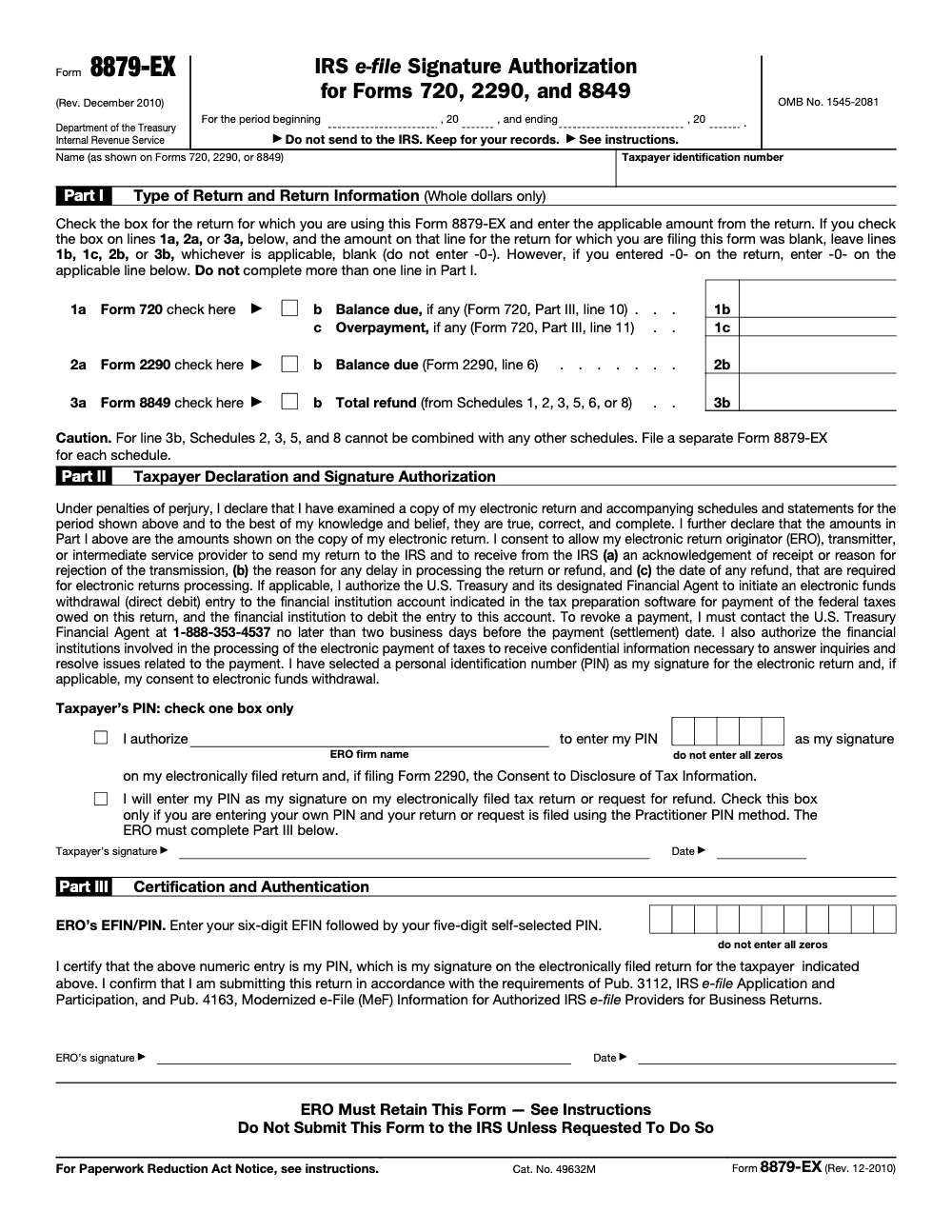
Form 8879-EX covers the excise side of e-filing, letting a taxpayer sign Form 720, Form 2290, or Form 8849 with a PIN instead of paper. The signature itself is eleven digits: the ERO's six digit EFIN followed by a five digit PIN that cannot be all zeros. You do not mail the form, the ERO keeps it on file for at least three years from the later of the due date or the IRS received date.
The trap on this one is Form 8849. Schedules 2, 3, 5, and 8 cannot be combined on a single authorization, so you prepare a separate 8879-EX for each schedule. When a PIN signature is not used, Form 8453-EX is the alternative path. Every technical point here was checked against the current IRS pages and the form itself as of January 22, 2026.
Key Takeaways
- Form 8879-EX is the IRS e-file Signature Authorization for excise returns, used with Forms 720, 2290, and 8849. Do not send it to the IRS, your ERO keeps it.
- Use Form 8453-EX only when you must transmit paper attachments or you are not using a PIN‑based e-signature.
- For Form 8849, Schedules 2, 3, 5, and 8 cannot be combined. Prepare a separate 8879-EX for each of those schedules.
- The practitioner PIN is 11 digits, your ERO’s six‑digit EFIN followed by a five‑digit PIN that is not all zeros.
- Keep the signed 8879-EX on file for at least three years from the due date or the IRS received date, whichever is later.
What Is Form 8879-EX and Who Uses It?
Think of Form 8879-EX as your e-file signature card for excise tax returns. You and your Electronic Return Originator, the ERO, use it to authorize a PIN‑based electronic signature on Form 720, Form 2290, or Form 8849 (the "EX" suffix means excise tax only, do not confuse Form 8879-EX with Form 8879 used for individual income tax 1040 returns or Form 8879-CORP used for 1120 corporate returns). When you sign Part II, you confirm you reviewed the return, you agree it is true, correct, and complete, and you allow the ERO or transmitter to send and receive IRS acknowledgments tied to that return. You do not mail this form to the IRS, your ERO keeps it, and must show it if asked.
If you are not using a PIN signature, or you have supporting documents that must be sent on paper, you will use Form 8453-EX instead. The IRS’ page confirms 8453-EX is the paper declaration option for e-filed excise returns when attachments are required.
Form 8879-EX vs. Form 8453-EX, a Quick Decision Table
| Scenario | Use 8879-EX | Use 8453-EX |
| You reviewed the e-filed return and want to e‑sign with a PIN | ✅ | |
| You need to send paper attachments that cannot go with the e-file | ✅ | |
| You prefer not to use a PIN signature | ✅ | |
| You want the ERO to enter a practitioner PIN on your behalf | ✅ |
When You Should Use Form 8879-EX
Use Form 8879-EX when you authorize your ERO to e-file your excise return with a PIN, instead of a handwritten signature. You can use it for Form 720, Form 2290, or Form 8849. For Form 8849, prepare a separate 8879-EX for Schedules 2, 3, 5, and 8, since those schedules cannot be combined. Sign only after review, because Part II is a perjury certification. Keep the signed form on file, the ERO retains it for at least three years, and provides a copy on request.
Pro tip if you are claiming refunds on Form 8849, certain electronically filed schedules, including 2, 3, and 8, typically process faster than paper, the IRS notes that some 8849 schedule refunds process within 20 days after acceptance. That speed is another reason firms standardize on PIN‑based e-signatures where they fit.
The Practitioner PIN, How It Really Works
- Taxpayer PIN, five numeric digits, not all zeros.
- Practitioner PIN, eleven digits, the ERO’s six‑digit EFIN followed by a five‑digit PIN, not all zeros. This combined entry is the ERO’s electronic signature.
If the taxpayer cannot or will not enter a PIN in person, Form 8879‑EX allows the ERO to input the taxpayer’s PIN with the taxpayer’s signed authorization. This is standard in the IRS e‑file program for business returns, and the completed 8879‑EX remains in the ERO’s records, not in the e‑file transmission.
Bottom line, decide your PIN method first, then complete 8879‑EX, then transmit the return. The form must be signed before the return is released for e‑file.
Why This Matters for Accuracy
Electronic filing helps cut math errors and missing‑item mistakes because software checks the return before transmission. The IRS has repeatedly encouraged e‑file for this reason. Historically, IRS sources have reported paper return error rates around 20 percent for some return types, while e‑filed returns have error rates under 1 percent, a gap that explains why many firms push PIN‑based signatures for speed and accuracy.
Complete the Header Correctly, Reporting Period, Name, and TIN
Getting the top of the form right saves you from avoidable rejects and rework. The 8879‑EX header must match the e‑filed return it authorizes.
Reporting Period Entry
- Enter the exact reporting period for the return you are e‑filing.
- Calendar year filers can enter the year.
- Fiscal year filers should enter the precise MM/DD/YYYY to MM/DD/YYYY dates that appear on the return.
- Amended or corrected filings should use the period that matches the original tax year.
- Always check your software’s auto‑fill against the return header.
| Scenario | Entry Example | Why It Matters |
| Calendar year filer | 2025 | Must match the return year exactly |
| Fiscal year filer | 07/01/2024–06/30/2025 | Dates must align with the return |
| Amended return | Original period | Keep period consistent with original filing |
The form literally prints “For the period beginning, and ending,” so treat the header like a binding link between the taxpayer, the return, and your authorization.
Taxpayer Name Accuracy
- Use the exact legal name that appears on the e‑filed return.
- For individuals, match the Social Security card.
- For entities, match the EIN name control.
- Keep hyphens, apostrophes, and suffixes identical to the return.
- For joint filings tied to Form 2290 ownership, follow the same order and spelling you used on the return.
Small mismatches here often trigger rejects that waste a review cycle.
TIN Field Completion
- Enter the SSN, ITIN, or EIN exactly as shown on the return.
- Do not leave it blank, and do not change format from what your software expects.
- Validate against the source document before you move on to Part I.
- Only select a PIN after you have confirmed the TIN.
- This keeps your signature authorization aligned to a single taxpayer record.
Part I, Choose the Return Type and Enter the Correct Amounts
Form 8879‑EX uses Part I to bind the authorization to one, and only one, return type and dollar amount.
- Check one box only, Form 720, Form 2290, or Form 8849.
- For Form 720, enter the balance due or overpayment from Part III.
- For Form 2290, enter the balance due from line 6.
- For Form 8849, enter the total refund for the specific schedule you are filing. If it is Schedule 2, 3, 5, or 8, you must not combine schedules, prepare a separate 8879‑EX for each.
Accuracy tip, copy the exact whole‑dollar amounts from the return, including zeros where the return shows zero, and leave the line blank if the return’s corresponding line is blank. The form text spells this out to avoid mismatches.
Part II, Taxpayer Declaration, PIN Choice, and Signature
When you sign Part II you are certifying under penalty of perjury that you examined the return and it is true, correct, and complete. You also consent to allow the ERO, transmitter, or intermediary to receive the IRS acknowledgment, any rejection reason, processing delay notices, and the refund date that are required for e-file processing. If you opt for electronic funds withdrawal for a balance due, you authorize Treasury’s financial agent to debit your account. You may revoke a debit by contacting the agent no later than two business days before the scheduled settlement date at 1‑888‑353‑4537 (the IRS itself does not handle these revocations, only the U.S. Treasury Financial Agent at that number can stop the debit, and only if the call is made at least two business days before settlement).
Pick Your PIN Method
- Option 1, you authorize the ERO to enter your PIN.
- Option 2, you enter your own five‑digit PIN, not all zeros. Either option is acceptable under the practitioner PIN rules. If you choose the self‑select route, you still sign and date Part II on paper or with an approved e‑signature your ERO supports.
Quick reminder, Form 8879‑EX must be completed and signed before the electronic return is transmitted or released for transmission. Do not push the return until this is done.
Authorizations Covered by 8879‑EX
By signing, you authorize three things.
- Filing authorization, the ERO can submit your return electronically.
- Information flow, the ERO or transmitter can receive IRS acknowledgments, rejection reasons, and refund status messages for this return.
- Payment, if selected, Treasury may debit your account by electronic funds withdrawal, subject to the two business day revocation window above.
One more reason firms prefer 8879‑EX, e-filing reduces errors because software checks the math and prompts for missing items before transmission. That built‑in validation is why the IRS urges e‑file and direct deposit for faster, cleaner processing.
Part III, What the ERO Must Enter and Certify
Part III is the ERO’s side of the signature. The practitioner PIN equals the six‑digit EFIN followed by a five‑digit PIN of the ERO’s choosing, and it must not be all zeros. Enter that eleven‑digit PIN, sign, and date. This entry is the ERO’s electronic signature on the return. The Internal Revenue Manual confirms this format for business returns, including excise.
| Requirement | What It Means in Practice |
| Practitioner PIN | Enter EFIN + five‑digit PIN, this is the ERO’s signature on the return |
| Signature and date | Handwritten or approved e‑signature according to IRS rules for business e‑file |
| Certification scope | You certify compliance with Pub. 3112 and Pub. 4163 for MeF business returns |
| Retention | Keep the fully executed form for at least three years, provide on request |
Keep a clean chain of custody, store signed 8879‑EX forms in a secure, searchable repository, many firms scan to PDF and rely on an electronic storage system that meets Rev. Proc. 97‑22 standards. The IRS allows electronic retention if quality and legibility are preserved.
Filing Rules for Form 8879‑EX
- Do not mail or e-file Form 8879‑EX, it never goes to the IRS unless the IRS asks for it.
- File the actual tax return electronically, this form only authorizes the signature and any electronic funds withdrawal.
- Retain 8879‑EX for at least three years from the due date or the IRS received date, whichever is later.
- If you are filing Form 8849 schedules 2, 3, 5, or 8, prepare a separate 8879‑EX for each schedule.
If you have supporting documents that the system cannot transmit, use Form 8453‑EX as the paper declaration with those attachments. The IRS “About” page for 8453‑EX confirms its role in authenticating e‑filed excise returns when paper attachments are needed.
Recordkeeping That Protects You
Good records are your safety net. Here is a simple, high‑confidence checklist that aligns to what the IRS puts in the form and the IRM.
- Verify the taxpayer’s legal name and TIN match the return header, then confirm the reporting period.
- Confirm Part I amounts exactly match the filed return, copy whole dollars as shown.
- Confirm the taxpayer PIN method, collect a clear signature and date in Part II.
- ERO enters EFIN+PIN, signs, and dates Part III.
- Store the fully executed 8879‑EX for at least three years, electronically is fine if your system meets Rev. Proc. 97‑22 standards.
Common Mistakes I Still See
- Leaving the reporting period blank or mismatched to the return.
- Entering a taxpayer PIN with all zeros.
- Copying the wrong dollar line for Part I, especially for Form 720 or the wrong 8849 schedule.
- Combining Form 8849 Schedules 2, 3, 5, and 8 on one 8879‑EX. You must separate them.
Practical Tips That Save Time
- Build a short pre‑transmission checklist in your tax software that forces validation of name control, TIN, reporting period, and PIN selection before release.
- If you schedule an electronic funds withdrawal, place a calendar reminder two business days before the settlement date in case a client asks to change or revoke. The revocation phone number is on the form, 1‑888‑353‑4537.
- For Form 8849 refunds, check whether your e‑file provider supports all schedules you need. The IRS lists which schedules are accepted electronically and notes that some process in about 20 days after acceptance.
For Firms That Care About Review Time
You can cut review cycles by standardizing how Form 8879‑EX is prepared, named, and stored. On Accountably’s side, our teams work inside your systems, using your templates and SOPs, so 8879‑EX packets are labeled the same way, validated the same way, and ready for retrieval during exam or lender requests. That structure means fewer last‑minute scrambles and faster partner sign‑off. We mention this because it is directly related to the delivery discipline firms ask us to build, not as a sales pitch.
Compliance Notes and Helpful References
- Practitioner PIN format and rules for business e‑file, see the Internal Revenue Manual’s e‑file for business returns section.
- 8453‑EX, purpose and current status, see the IRS “About Form 8453‑EX” page, last reviewed April 29, 2025.
- Form 8879‑EX itself is authoritative for non‑combinable 8849 schedules, the two‑business‑day revocation rule, and the retention requirement.
Final Checklist You Can Copy
- Header matches the return, taxpayer name, TIN, reporting period.
- Part I, correct return type, correct dollar amounts, no mixed 8849 schedules when prohibited.
- Part II, taxpayer selects PIN method, signs, dates, and, if applicable, authorizes EFW.
- Part III, ERO enters EFIN+PIN, signs, and dates, then retains the form for three years.
Policy note, this article reflects IRS pages and the form text available as of January 22, 2026. Always check the current IRS page for Form 8879‑EX and for Form 8453‑EX before filing season starts.
Conclusion
If you treat Form 8879‑EX like a small, high‑leverage control, you will file faster and review less. Choose the right signature path, confirm the header, copy the exact amounts, separate Form 8849 schedules where required, and keep your records organized for at least three years. When you set this up once and train your team, you remove a common delivery bottleneck and give your partners back time for client strategy.
Common Mistakes We See Every Season
The mistakes that hit Form 8879-EX most often are not about complex tax law, they are about treating the form like an afterthought instead of a controlled production step. Here are the five we catch most often during e-file review.
Reusable Checklists
These checklists are copy-paste ready for your firm SOP library. Drop them straight into your e-file workflow tool so every preparer follows the same path on every excise authorization.
Pre-transmission signature packet
- Confirm taxpayer name and TIN at the top of Form 8879-EX match the underlying return exactly.
- Enter the period beginning and ending dates at the top so the authorization ties to the right excise filing window.
- Mark exactly one return type in Part I (Form 720, Form 2290, or Form 8849), never more than one.
- Pull dollar amounts from the e-filed return PDF in whole dollars only, mirroring blank as blank and -0- as -0- on lines 1b, 1c, 2b, and 3b.
- Confirm the taxpayer's 5-digit PIN is not 00000 and that one of the two Part II PIN-method boxes is checked.
- Capture the signed PDF into the client's ERO retention folder before releasing the return for transmission.
- Attach a copy of the signed 8879-EX to the engagement record so it can be produced if the IRS requests it.
Form 8849 schedule split-out
- List every Form 8849 schedule being claimed for the current refund cycle.
- Pull Schedules 2, 3, 5, and 8 out of the bundle, per IRS Form 8879-EX instructions, and queue a separate 8879-EX template for each.
- For each split-out schedule, enter the refund amount on Part I line 3b in whole dollars.
- Confirm the underlying schedule's refund total matches Part I line 3b to the dollar.
- Tag each 8879-EX file with the schedule number so retention and audit pulls stay clean.
- Route every split 8879-EX to the same taxpayer for signature in the same cycle.
3-year ERO retention setup
- Record the IRS received date alongside the original return due date for every excise filing.
- Calculate retention as 3 years from the LATER of due date or IRS received date, per IRS Form 8879-EX instructions.
- File the signed 8879-EX in the client's retention folder by return type and period covered.
- Track corrected 8879-EX versions alongside the original when the underlying return is amended after first signature.
- Confirm the ERO firm name (not the individual preparer's name) is shown on the Part II authorization line.
- Verify Part III shows the 6-digit EFIN followed by the 5-digit ERO PIN, totaling 11 digits, neither set to all zeros.
- Schedule a retention purge date so authorization files are not destroyed before the 3-year window closes.
Keep 8879-EX Season From Stalling
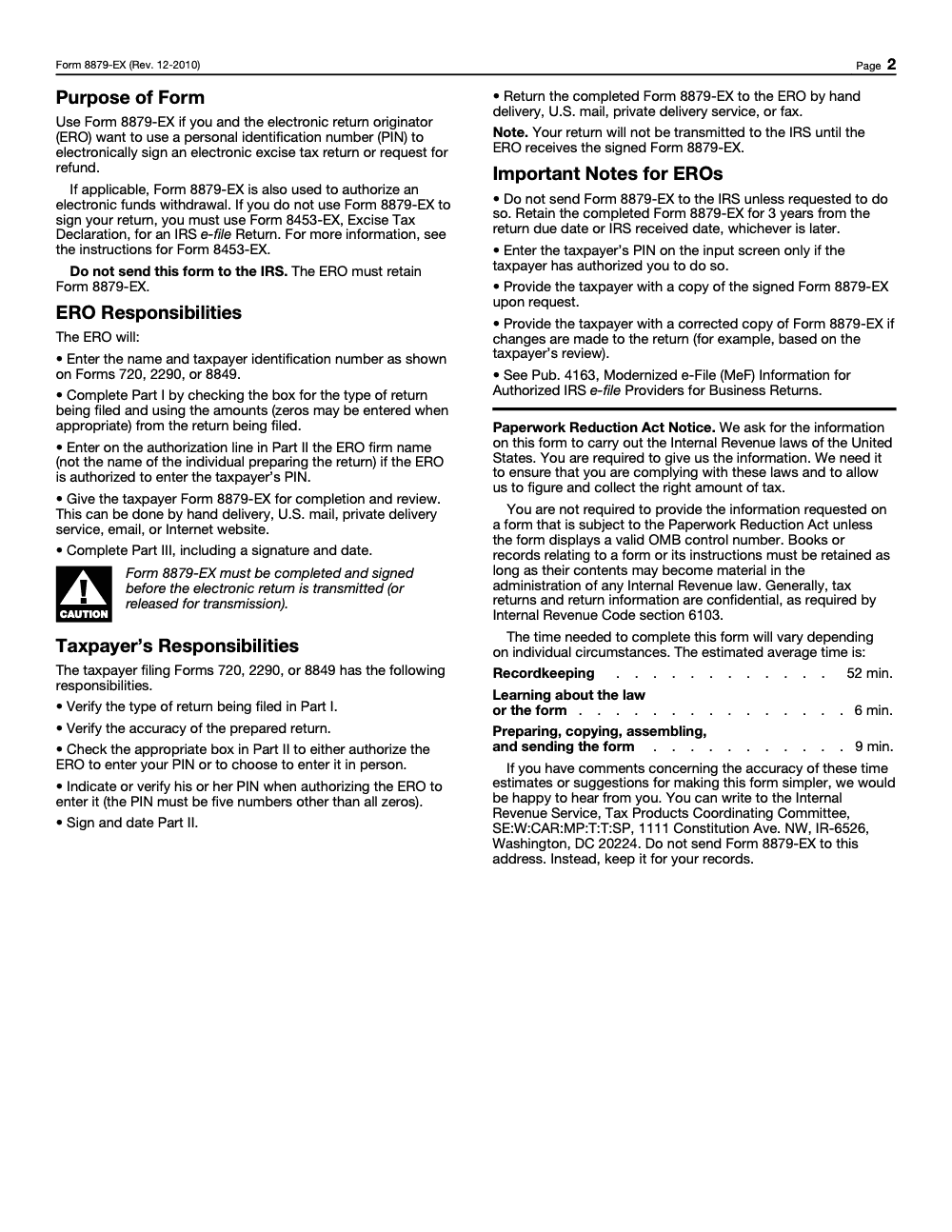
Form 8879-EX may look like a one-page signature wrapper, but every excise return your e-file shop authorizes needs its own. Form 720 hits four quarterly cycles, Form 2290 surges during heavy-vehicle filing season, and Form 8849 refund claims land throughout the year. The IRS itself estimates 67 minutes of work per 8879-EX between recordkeeping, learning, and preparing (per IRS Form 8879-EX paperwork-reduction estimates, totaling 52 minutes recordkeeping, 6 minutes learning the form, and 9 minutes preparing). Multiply that across a busy excise book and the authorization step becomes a measurable delivery bottleneck.
The fix is to treat Form 8879-EX as a controlled production step, not an end-of-prep afterthought. Standardize the template, lock the signature workflow before transmission, and split out the schedules and return types the IRS instructions require to be authorized separately.
- Map every excise authorization to its own template: one 8879-EX per return type (Form 720, Form 2290, or Form 8849), never bundled.
- Split Form 8849 Schedules 2, 3, 5, and 8 onto their own 8879-EX authorizations before the preparer touches Part I.
- Build a Part III integrity check: 6-digit EFIN followed by a 5-digit self-selected ERO PIN, neither field set to all zeros.
- Mirror dollar lines from the e-filed return exactly on lines 1b, 1c, 2b, and 3b, with blank staying blank and -0- staying -0-.
- Stand up a 3-year retention calendar keyed to the LATER of the return's due date or the IRS received date, with corrected 8879-EX versions tracked alongside originals.
This is the kind of structured execution layer Accountably builds for teams running heavy excise books. Our offshore tax delivery teams work inside your e-file software, follow your SOPs for 8879-EX preparation and retention, and feed senior reviewers a clean Part I through Part III check before the return ever leaves the queue.
FAQs
It authorizes the ERO to apply a PIN as your electronic signature on a specific excise return, and, if selected, to arrange an electronic funds withdrawal for the balance due. It also lets the ERO or transmitter receive IRS acknowledgments, rejection reasons, processing delays, and refund dates for that return. You keep it on file, do not send it to the IRS.
Use 8453‑EX when you must submit paper attachments that cannot be transmitted with the e‑file, or when you are not using a PIN signature method. It is the paper declaration that pairs with your electronic filing and attachments.
At least three years from the return due date or the date the IRS received the return, whichever is later. Electronic retention is allowed if your storage system meets IRS standards for legibility and integrity.
Yes. Contact the Treasury financial agent no later than two business days before the scheduled payment date at 1‑888‑353‑4537 to revoke. This timing window is printed on the form itself.
Yes. The IRS encourages electronic filing because software checks math and required fields before transmission. Historically, official sources show paper returns can have error rates around 20 percent for some return types, while e‑filed returns are under 1 percent, which is why many firms standardize on e‑file.
Other forms this guide names
- Form 8453-EX: e-file authorization for Forms 2290, 720, 8849
- Form 720: Deadlines, Deposits, and PCORI, 2025 Guide
- Form 2290: Heavy Highway Vehicle Use Tax Guide with Deadlines, E‑File, and Schedule 1
Summarize this article with AI
About this guide
Accountably helps US CPA, EA, and accounting firms hire trained accountants and tax preparers in India.
About us Reviewed byJugal Thacker, CPAFounder and CEO at Accountably
A Washington-licensed CPA with 7+ years inside US firms – PwC, a real-estate tax practice, then a full-service firm, rising from reviewer to manager to advisory. This article was reviewed against current IRS guidance for the 2025 tax year and updated for filers preparing late returns, amendments, and 2026 estimates.
View profile →How we research, review, and update this guide
Every Accountably guide is researched against primary IRS sources, reviewed by a U.S. CPA, and refreshed as guidance evolves. Read our Editorial Guidelines to see how we source, fact-check, and update our content.




