
Summarize this article with AI
In Brief
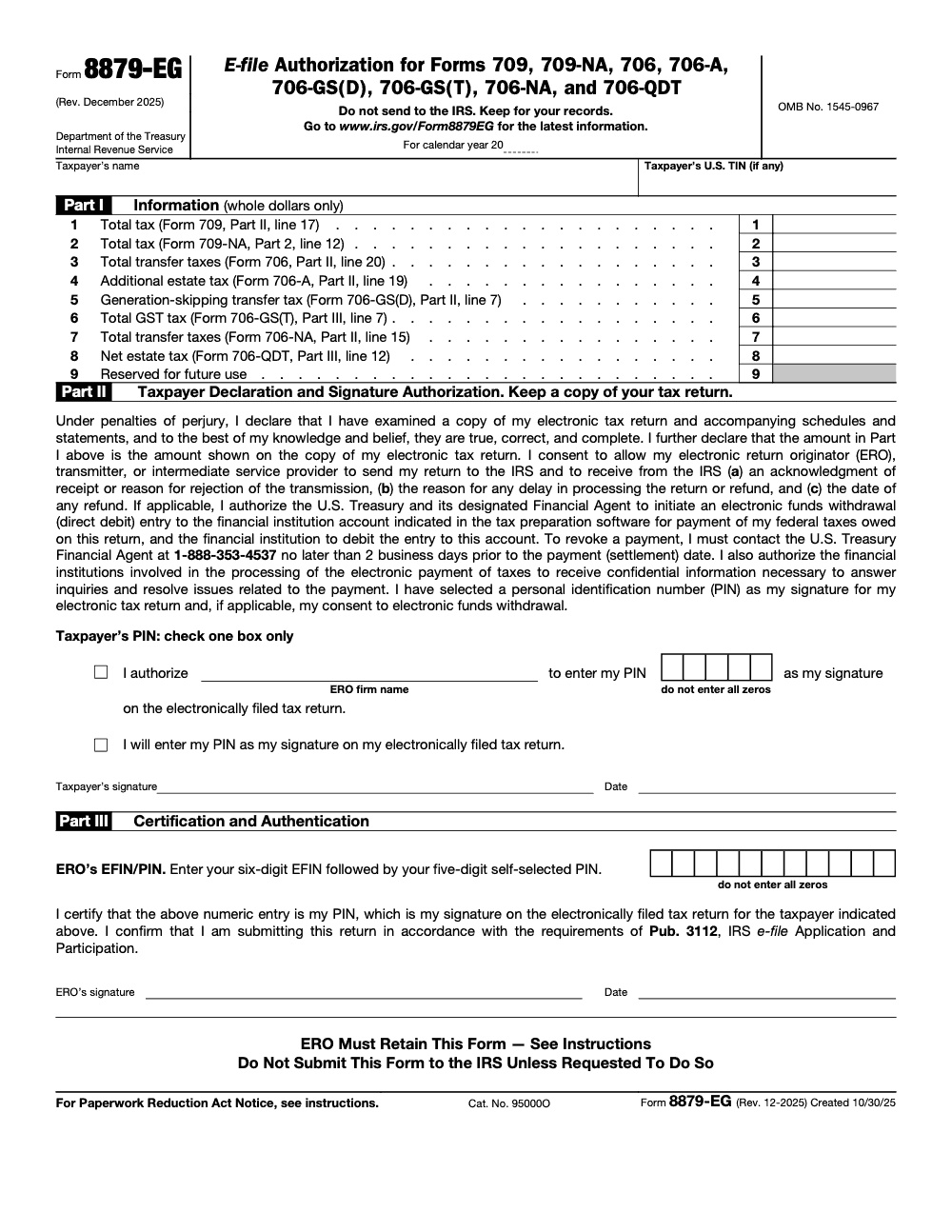
Form 8879-EG is the IRS e-file Signature Authorization for gift, estate, and generation-skipping transfer tax returns – Forms 709, 709-NA, and the 706 series, eight returns in all (per the Form 8879-EG instructions, Rev. December 2025, OMB 1545-0967). The Electronic Return Originator must receive the signed form before transmitting, retains it for three years from the later of the return due date or the IRS received date, and never sends it to the IRS unless asked. Today only Form 709 and Form 709-NA are e-fileable through it; a taxpayer who does not use it signs Form 8453-EG instead. See our tax preparation services for filing support.
Gift and estate e-files do not come up every season, which is exactly why the signature step on Form 8879-EG trips people up. The rule that catches teams is timing: the Electronic Return Originator must receive the signed form before the return is transmitted, and collecting the signature after it goes out does not cure anything.
Form 8879-EG is the e-file Signature Authorization for the gift, estate, and generation-skipping transfer returns, the 709, 709-NA, and 706 series, eight returns in all (Rev. December 2025, OMB 1545-0967). It is never filed with the IRS; the ERO keeps it for three years from the later of the return due date or the IRS received date and produces it only on request.
Key Takeaways
- Form 8879-EG authorizes an Electronic Return Originator (ERO) to electronically file gift, estate, and generation-skipping transfer tax returns – Forms 709, 709-NA, 706, 706-A, 706-GS(D), 706-GS(T), 706-NA, and 706-QDT, eight returns in all – on behalf of a taxpayer. Today only Forms 709 and 709-NA can actually be e-filed through it; the six 706-series forms are listed for when those returns become e-fileable.
- The taxpayer signs Part II under penalties of perjury and selects or verifies a five-digit PIN (which cannot be all zeros); the ERO completes Part III and does not sign the taxpayer’s authorization section.
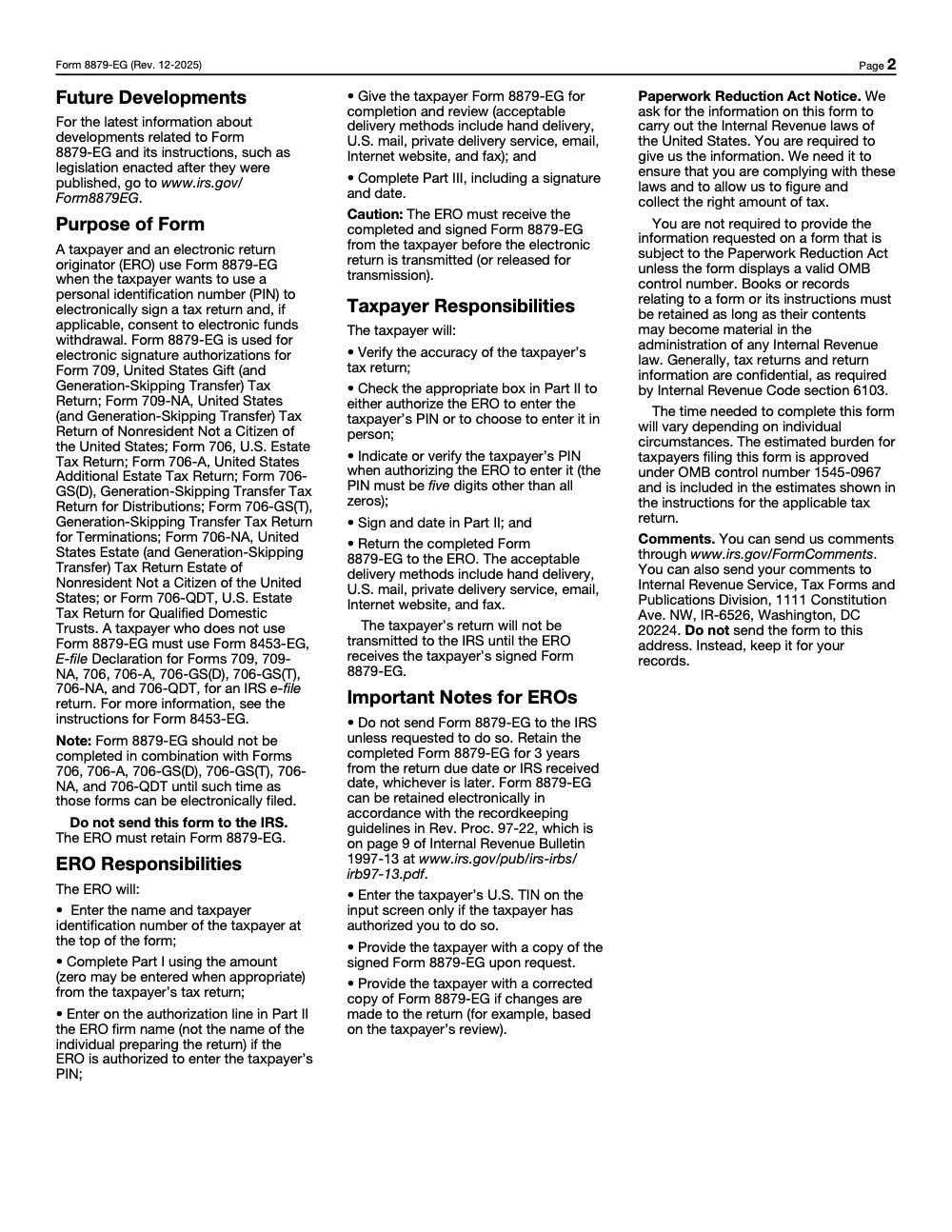
- Form 8879-EG is not filed with the IRS – the ERO retains it for three years from the later of the return due date or the IRS received date, and sends it to the IRS only if specifically requested.
- A taxpayer who does not use Form 8879-EG to sign one of the covered returns must instead use Form 8453-EG, the e-file declaration for the same gift, estate, and GST returns.
- The ERO must receive the signed form before the return is transmitted (or released for transmission) – collecting the signature after the return goes out does not cure it.
- Quick rule for your SOP: reconcile each Part I amount to the underlying return before delivery, and re-issue a corrected 8879-EG any time a Part I figure changes after the taxpayer has signed, however small the change.
What Form 8879-EG Is and When to Use It
Form 8879-EG, IRS e-file Signature Authorization for Forms 709, 709-NA, 706, 706-A, 706-GS(D), 706-GS(T), 706-NA, and 706-QDT, is the gift, estate, and generation-skipping transfer tax variant of the 8879-series e-file authorization forms. It works the same way as the other 8879 variants in purpose and mechanics – the taxpayer authorizes an ERO to transmit the return, selects a five-digit PIN as their electronic signature, and the ERO retains the form – but it applies specifically to the eight gift, estate, and GST returns it covers. Match the 8879 variant to the return type: income tax returns use Form 8879, while 8879-EG is reserved for the gift and estate forms.
The form lists all eight returns by number, but only Form 709 (the United States Gift and Generation-Skipping Transfer Tax Return) and Form 709-NA (the gift tax return for nonresidents not a citizen of the United States) can actually be e-filed through it today. The six 706-series returns are printed on the form in anticipation of future e-file capability; the instructions direct that Form 8879-EG should not be completed in combination with those forms until they can be electronically filed.
The Returns Form 8879-EG Covers
Form 709 and Form 709-NA are the gift and generation-skipping transfer tax returns that are currently e-fileable with this authorization. Part I, line 1 of Form 8879-EG reports total tax from Form 709, Part II, line 17, and line 2 reports total tax from Form 709-NA, Part 2, line 12.
The 706 series – Form 706, 706-A, 706-GS(D), 706-GS(T), 706-NA, and 706-QDT – covers estate tax, additional estate tax, generation-skipping transfer tax, nonresident estate tax, and qualified domestic trust estate tax. These returns are not yet electronically filable, so their lines on Form 8879-EG (lines 3 through 8) are reserved for when e-file becomes available. Line 9 is reserved for future use and is shaded out on the form.
Form 8453-EG is the paper alternative. A taxpayer who does not use Form 8879-EG to electronically sign one of the covered returns must instead use Form 8453-EG, the e-file declaration for the same set of returns. If the return is e-filed, an authorization on one of the two forms is required.
When Is Form 8879-EG Required
Form 8879-EG is required every time an ERO e-files one of the covered gift, estate, or GST returns on behalf of a taxpayer. Each covered return needs its own signed authorization. A taxpayer e-filing a gift tax return needs a signed Form 8879-EG in the ERO’s hands before that return can be transmitted (or released for transmission). Because these filings do not recur every quarter the way income tax season does, the friction tends to cluster around the signature handoff rather than raw volume, so a deliberate authorization checkpoint in the engagement calendar is worth setting up.
How to Complete Form 8879-EG
The form structure parallels other 8879-series forms, with sections for return information verification, taxpayer authorization, and ERO declaration. The distinguishing feature of 8879-EG is that Part I reports the total tax from whichever covered gift, estate, or GST return is being authorized.
| Section | Who Completes | What It Contains |
|---|---|---|
| Return identification | ERO | Reports the total tax from the covered gift, estate, or GST return in Part I, along with the calendar year and the taxpayer’s information |
| Taxpayer declaration and PIN | Taxpayer / authorized officer | Taxpayer reviews the return information, selects or authorizes ERO to select a 5-digit PIN (which cannot be all zeros), and signs the authorization |
| ERO declaration | ERO | ERO confirms receipt of signed authorization and enters EFIN/ERO PIN identifying the authorized transmitter |
Who Signs Form 8879-EG
The taxpayer signs Part II. By signing, the taxpayer declares under penalties of perjury that they have examined a copy of the electronic return and accompanying schedules and statements, and that the amounts in Part I match the amounts on that return. The taxpayer either authorizes the ERO to enter the PIN or chooses to enter it in person, then indicates or verifies a five-digit PIN that cannot be all zeros. The key rule: the person who signs the authorization must be the same person whose signature would appear on the paper version of the covered return. Having the preparer or ERO sign in the taxpayer’s place is not permitted. The ERO completes Part III only, including the EFIN/PIN combination, signature, and date.
Timing, Retention, and Recordkeeping
Form 8879-EG itself has no filing deadline and is never mailed to the IRS, so the timing rules that matter are about when the ERO must hold the signed form and how long it must be retained afterward.
| Step | Timing Rule | Notes |
|---|---|---|
| Signature before transmission | Before the return is transmitted | The ERO must receive the completed, signed Form 8879-EG before the electronic return is transmitted or released for transmission |
| Corrected form on change | Immediately on any Part I change | Any post-signature change to a Part I amount requires a corrected Form 8879-EG for the taxpayer to re-sign |
| ERO retention | 3 years | From the later of the return due date or the IRS received date; may be retained electronically under Rev. Proc. 97-22 |
| EFW revocation | At least 2 business days before settlement | Call the U.S. Treasury Financial Agent at 1-888-353-4537 to stop a scheduled electronic funds withdrawal |
| Submit to IRS | Only on request | Keep the form for your records; do not submit it to the IRS unless specifically requested to do so |
Retention and the Electronic Funds Withdrawal Authorization
The ERO retains Form 8879-EG for three years, measured from the later of the return due date or the IRS received date – not from the date the return was filed or signed. The form may be kept electronically rather than on paper, provided the storage system follows the recordkeeping guidelines in Rev. Proc. 97-22 (published on page 9 of Internal Revenue Bulletin 1997-13). If the underlying software set up a direct debit, signing Form 8879-EG also authorizes the U.S. Treasury and its designated Financial Agent to initiate that electronic funds withdrawal; to revoke it, the taxpayer must contact the Treasury Financial Agent at 1-888-353-4537 no later than 2 business days before the payment (settlement) date.
The PIN, the Perjury Declaration, and Part III
The taxpayer’s electronic signature is a self-selected Personal Identification Number that must be five digits and cannot be all zeros. In Part II the taxpayer checks one box only: either authorizing the ERO to enter the PIN, or choosing to enter it in person. When the ERO is authorized to enter the PIN, the ERO firm name – not the individual preparer’s name – goes on the authorization line.
The Part II declaration is not a clerical e-file consent. By signing, the taxpayer declares under penalties of perjury that they have examined a copy of the electronic return and accompanying schedules and statements and that, to the best of their knowledge, the figures are true, correct, and complete. Treat it with the same weight as signing the paper return itself.
What the ERO Certifies in Part III
The ERO completes Part III by entering the six-digit EFIN followed by the five-digit self-selected ERO PIN – eleven digits combined – along with the ERO signature and date. By signing, the ERO confirms that the return is being submitted in accordance with the requirements of IRS Publication 3112, IRS e-file Application and Participation. Part III is invalid without both a signature and a date.
Delivery, Confidentiality, and Do Not Send to the IRS
Form 8879-EG can move between the ERO and the taxpayer in either direction using any of six acceptable delivery methods: hand delivery, U.S. mail, private delivery service, email, an Internet website (such as a secure portal), and fax. Original paper signatures delivered in person are not the only option; the electronic channels are explicitly permitted for both the ERO-to-taxpayer hand-off and the taxpayer-to-ERO return.
Once signed, the form stays in the ERO’s file. The form face and footer both state that it should not be sent to the IRS and should be kept for the ERO’s records, to be submitted only if the IRS specifically requests it. Tax returns and return information handled through the form are confidential under Internal Revenue Code section 6103. The IRS comments address (1111 Constitution Ave. NW, IR-6526, Washington, DC 20224) is for sending comments about the form, not for filing it.
Common Mistakes That Slow Things Down
Most 8879-EG problems I see are process failures, not math errors. These are the slips that surface most often when a gift or estate return goes out the door.
Practical Checklists You Can Reuse
These are copy-paste ready for a firm SOP. Drop them into your gift and estate e-file workflow and check the boxes as you go.
ERO preparation packet
- Enter the taxpayer name and TIN at the top, entering the TIN only if the taxpayer authorized it.
- Complete Part I in whole dollars from the return, entering zero where the return shows zero.
- Pull each Part I amount from its source line, for example line 1 from Form 709, Part II, line 17.
- Enter the ERO firm name on the Part II authorization line if authorized to input the PIN.
- Deliver the form to the taxpayer for review by hand, U.S. mail, private delivery, email, secure portal, or fax.
- Complete Part III with the 11-digit EFIN and PIN combination, ERO signature, and date.
Taxpayer review and signature
- Verify the figures on the electronic return match Part I.
- Check one Part II box: authorize the ERO to enter the PIN, or enter it in person.
- Confirm the five-digit PIN, which cannot be all zeros.
- Sign and date Part II.
- Return the signed form to the ERO before any transmission.
Retention and EFW controls
- File the signed 8879-EG and do not send it to the IRS.
- Retain it three years from the later of the return due date or IRS received date.
- Store electronically only under Rev. Proc. 97-22 recordkeeping rules.
- If a Part I amount changes after signing, issue a corrected 8879-EG.
- To stop a scheduled electronic funds withdrawal, call the Treasury Financial Agent at 1-888-353-4537 at least two business days before the settlement date.
Keep 8879-EG Season From Stalling
Gift and estate e-file authorization rarely fails on the return itself; it stalls on the authorization handoff. Form 8879-EG governs eight gift, estate, and generation-skipping transfer returns (per the Form 8879-EG instructions, Rev. December 2025), yet today only Forms 709 and 709-NA actually move through it, so the friction clusters around signature timing and recordkeeping rather than raw volume.
The fix is a tight authorization workflow that treats the signed form as a gate, not paperwork. When the signature, the PIN, and the Part I figures are controlled before transmission, the return goes out clean and the file survives any later e-file compliance review.
- Reconcile each Part I line to its source before delivery, such as line 1 to Form 709, Part II, line 17 and line 3 to Form 706, Part II, line 20.
- Lock the ERO firm name on the Part II authorization line in your software template so a preparer name never slips in.
- Validate the five-digit, non-zero taxpayer PIN at intake.
- Track the three-year retention clock from the later of the return due date or IRS received date, storing electronically under Rev. Proc. 97-22.
- Re-issue a corrected 8879-EG the moment a Part I amount changes after signing.
When gift and estate filings spike, that authorization discipline keeps transmissions on schedule. Our tax execution teams run the preparer-to-review handoff with documented SOPs and turnaround SLAs, so signed authorizations and clean Part I figures are in hand before anything is released to the IRS.
FAQs
Form 8879-EG covers eight gift, estate, and generation-skipping transfer tax returns: Forms 709, 709-NA, 706, 706-A, 706-GS(D), 706-GS(T), 706-NA, and 706-QDT. Today only Forms 709 and 709-NA can actually be e-filed through it; the six 706-series forms are listed for when they become e-fileable.
No. Form 8879-EG is not sent to the IRS with the e-filed return. The Electronic Return Originator retains it for three years from the later of the return due date or the IRS received date, and submits it only if the IRS specifically requests it during a compliance review of the ERO’s records.
A taxpayer who does not use Form 8879-EG to electronically sign one of the covered returns must instead use Form 8453-EG, the e-file declaration for Forms 709, 709-NA, 706, 706-A, 706-GS(D), 706-GS(T), 706-NA, and 706-QDT. If a return is e-filed, an authorization on one of these two forms is required.
No. Each covered return requires its own signed Form 8879-EG, and the ERO must receive the signed form before transmitting that return. Form 8879-EG is the e-file signature authorization for gift, estate, and generation-skipping transfer returns such as Forms 709 and 709-NA, not for income or excise returns.
The taxpayer signs Part II, declaring under penalties of perjury that they have examined a copy of the electronic return and that the amounts match. The taxpayer also selects or verifies a five-digit PIN (which cannot be all zeros). The ERO completes Part III and cannot sign in the taxpayer’s place.
Other forms this guide names
- Form 709: Gift Tax Guide, Annual Exclusion and Deadlines
- Form 709‑NA: Nonresident Gift Tax Filing Guide (2025)
- Form 706: Estate Tax Return, DSUE Portability & Deadlines
- Form 706-A: Recapture Triggers and 6 month Deadline Guide
- Form 706-GS(D): How to File, Deadlines, GST Rate
- Form 706‑GS(T): Trustee Guide to GST Tax on Taxable Terminations
Summarize this article with AI
About this guide
Accountably helps US CPA, EA, and accounting firms hire trained accountants and tax preparers in India.
About us Reviewed byJugal Thacker, CPAFounder and CEO at Accountably
A US-licensed CPA with 7+ years inside US firms – PwC, a real-estate tax practice, then a full-service firm, rising from reviewer to manager to advisory. This article was reviewed against current IRS guidance for the 2025 tax year and updated for filers preparing late returns, amendments, and 2026 estimates.
View profile →How we research, review, and update this guide
Every Accountably guide is researched against primary IRS sources, reviewed by a U.S. CPA, and refreshed as guidance evolves. Read our Editorial Guidelines to see how we source, fact-check, and update our content.




