Scale Your CPA Firm Without Adding Headcount
Build your offshore team that works your way, trained, compliant, and white-labeled under your firm.
???? Book a Discovery CallTable of Contents
- Scale Your CPA Firm Without Adding Headcount
- Key Takeaways
- What Form 8948 is and who must use it
- Hundreds of Firms Have Already Used This Framework.
- When Form 8948 is required
- Choose your exception, then document it cleanly
- Map the reason to the right Form 8948 lines
- Taxpayer opt-out, how to document and retain
- Improve Margins Without Compromising Quality
- Waivers and religious objections, what to enter
- Rejected returns, how to enter codes and attempts
- Maintain supporting evidence like a pro
- Software limitations, exactly how to enter them
- Foreign or ineligible preparers, Line 6 entries that work
- Generating Form 8948 in ProConnect, step by step
- Troubleshooting when Form 8948 will not print
- Federal-only opt-out and state e-file ripple effects
- Filing and recordkeeping rules you should not skip
- Quick cross-references you will get asked about
- Sample narratives for Line 6 that pass the “reviewer test”
- Why this process protects you and your clients
- Where Accountably helps, without getting in your way
- FAQs
- Final checklist before you mail a paper return
- Conclusion
- Simplify Delivery, Improve Margins, Stay in Control.
That was the day I learned to treat Form 8948 like a seatbelt. You hope you will not need it, but when you do, it keeps your process safe, compliant, and on schedule.
Key Takeaways
- Form 8948 is attached to a paper-filed individual return to show why you are not e-filing even though you normally must. It is for specified preparers, which effectively means you expect to file 11 or more covered returns in the calendar year.
- You pick one valid reason per return, for example, taxpayer opt-out, approved hardship waiver, unresolvable IRS reject, software limitation, or preparer ineligibility.
- A taxpayer opt-out requires a signed choice statement that you retain, not attach. You still attach Form 8948 to the paper return.
- Keep evidence that supports your reason, for example, waiver number and date, reject code and attempts, or vendor confirmation of a software limit.
- Rules and thresholds are current as of January 21, 2026. Always check the IRS page for updates before filing.
What Form 8948 is and who must use it
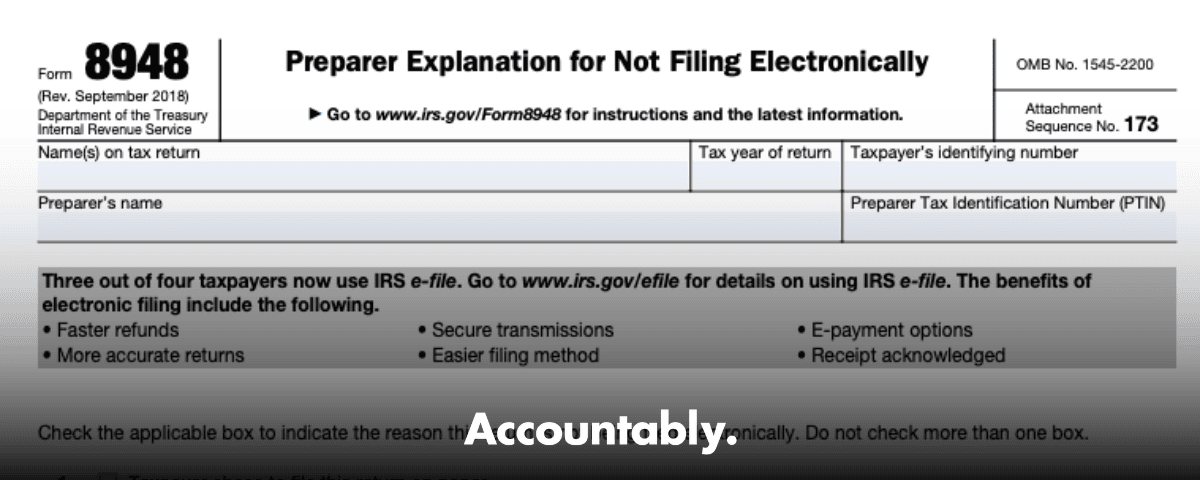
Form 8948 is the IRS form you attach to a paper-filed individual return to document a valid exception to the e-file requirement that applies to specified preparers. In plain terms, if you usually must e-file because you, or your firm in total, expect to file more than 10 covered individual, estate, or trust returns in the year, Form 8948 explains why a particular return is going on paper.
The law defines a “specified tax return preparer” broadly. Unless you reasonably expect to file 10 or fewer covered individual, estate, or trust returns in the calendar year, you are a specified preparer and the electronic filing mandate applies. If you expect 11 or more, you are in.
Quick reminder, your firm’s aggregate count controls the threshold. If three preparers each expect to file four covered returns, that is 12 in total, so everyone in that firm is a specified preparer.
Hundreds of Firms Have Already Used This Framework.
Join the growing list of CPA and accounting firms using Accountably’s Offshore Playbook to scale faster.
???? Get Your FREE Playbook
???? Visit Jugal Thacker’s LinkedIn
Send him a connection request and message “Playbook” to get your copy.
When Form 8948 is required
Use Form 8948 only when both are true, you are a specified preparer for the year and a covered individual, estate, or trust return must be paper filed. Then, you attach Form 8948 to the paper package so the IRS can see the single, valid exception that applies. The form’s checkboxes map to the allowed reasons.
- Taxpayer chooses paper filing and will mail the return, you keep a signed choice statement and attach Form 8948. Do not send the statement to the IRS.
- Approved undue hardship waiver, you enter the waiver reference number and approval date, and attach Form 8948.
- Recognized religious objection, you check that box and complete the brief details the instructions require.
- Unresolvable IRS reject after reasonable attempts, you enter the reject code and the number of attempts, then paper file with Form 8948 attached.
- Software limitation, you list each unsupported form or schedule exactly as titled.
- Preparer ineligibility, for example, a foreign preparer without an SSN or an e-file sanction in effect, you select the appropriate sub-box and give concise facts.
Choose your exception, then document it cleanly
Start by matching the reason to the facts, then complete only the fields that the instructions call for. One return, one exception. Avoid mixing causes, for example, do not combine a software limitation with a reject on the same Form 8948 unless the instructions say to do so, because the form expects a single path.
- If the taxpayer opted out, check the box for “Taxpayer chose to file on paper,” keep the signed choice statement in your file, and have the taxpayer mail the return. The signature belongs on the choice statement, not on Form 8948.
- If you have an approved waiver, enter the exact waiver number and approval date.
- If an IRS reject cannot be cleared, enter the reject code and the number of attempts. Keep screenshots or logs.
- If the software cannot support a required form or schedule, list the unsupported items exactly.
- If you are ineligible to e-file, select the correct ineligibility reason and provide concise details, for example foreign preparer without SSN with PTIN application on file, or current sanction period in effect.
Small process tip from hard experience, make Form 8948 part of your closing checklist and tie it to the filing method field in your software. That way nothing leaves your office without a defensible reason and matching documentation.
Map the reason to the right Form 8948 lines
The checkboxes on Form 8948 drive specific data fields. Complete only what your exception requires. Here is a quick reference you can keep near your review station.
Exception-to-lines map
| Exception you selected | Complete these fields on Form 8948 | What to include |
| Taxpayer choice to paper file | Line 1 | Keep the signed choice statement in your records, do not attach it to the return. |
| Approved waiver | Line 2 and Line 3 | Enter the waiver reference number and approval date exactly as shown in the IRS letter. |
| Religious objection | Line 3 | Check the box and provide a brief statement if your software asks for one. |
| Unresolvable reject | Line 4 and Line 5 | Enter the exact reject code and the number of attempts you made to fix it. |
| Software limitation | Line 6, form and schedule callouts | List unsupported forms and schedules exactly as titled. |
| Foreign or ineligible preparer | Line 6a, 6b, or 6c and the description area | Provide concise facts, for example foreign preparer without SSN with PTIN application on file, or sanctions letter in effect. |
Taxpayer opt-out, how to document and retain
When a client chooses paper, you must obtain a signed and dated choice statement that includes the required language. Keep it with your engagement records, do not send it to the IRS. Then attach Form 8948 to the paper return and have the taxpayer mail the package. Only one spouse must sign for a joint return.
Improve Margins Without Compromising Quality
Offshore staffing helps firms deliver more, scale faster, and stay compliant, without adding local headcount.
???? Book a Discovery CallThe IRS provides model language you can adapt. It must say the taxpayer chooses paper, understands that the preparer may be required to e-file, and that the taxpayer, not the preparer, will submit the paper return. Keep the hand-signed statement on file.
Practical steps for the opt-out statement
- Generate your software’s built-in opt-out, if available, or apply the IRS model language.
- Present the statement alongside the paper package, obtain the signature and date, then give the client a copy.
- Store the signed statement in your DMS or other access-controlled location, linked to the return.
- Confirm your software is not set to transmit the federal return. If your form will not print, recheck those settings.
Retention guidance you can live with
Set your retention to match your firm policy for individual returns, often 3 to 7 years, and keep the opt-out with your workpapers. For rejects, waivers, or software limits, file the supporting evidence next to the return copy, for fast pull during a question or a practice review. The IRS tells you to retain the choice statement and not attach it, which is why your records matter.
Waivers and religious objections, what to enter
If you received a hardship waiver, check the waiver box and enter the waiver reference number and the approval date as printed on the IRS letter. Do not attach the letter. Waivers are requested with Form 8944 and are generally valid for that calendar year.
Religious objections are allowed for members of recognized religious groups that conscientiously oppose using electronic technology, and the group must have existed continuously since December 31, 1950. Use the religious objection option on the form and keep your supporting documentation with your records.
Rejected returns, how to enter codes and attempts
If you tried to e-file and the return was rejected, use the reject option. Enter the exact reject code the IRS provided and the number of distinct attempts you made to fix the issue before deciding to paper file. Keep logs, PDFs, and screenshots that align to that code and attempt count. The IRS FAQ explains when an error simply cannot be fixed and how to show good-faith attempts.
Recording the IRS reject cleanly
- Enter the reject code in the designated 8948 field, and the number of attempts in the attempts field.
- Keep dated submission acknowledgments and error messages to support your entries.
- If your software will not generate the form, double check that your federal e-file option is not selected for that client.
What counts as an attempt
An attempt is a distinct action to clear the error, for example, correcting SSA name or birth date mismatches, updating spouse data, or revalidating a dependent TIN after a client update. If you cannot move the error after good-faith work, document what you tried and how you concluded that paper filing was necessary. The IRS FAQ gives practical examples of when to stop retrying.
My team keeps a lightweight “reject ticket” that includes the code, date, action taken, and outcome. It takes a minute, and it pays for itself the first time a reviewer asks for proof.
Maintain supporting evidence like a pro
Accuracy on Form 8948 protects you. Keep artifacts that prove your entries, and index them to the return so you can produce them in seconds.
- Transmission logs and acknowledgments for each attempt.
- Screenshots of error messages that show the code exactly as received.
- Vendor or IRS correspondence that shows why a reject could not be resolved or why a form was unsupported.
- The signed taxpayer choice statement when a client opts out.
Software limitations, exactly how to enter them
When your software cannot support a required form or schedule, select the software limitation option on Form 8948. List each unsupported form and schedule by number and title. Keep a copy of the vendor release notes or support communication that confirms the limitation, and then paper file with Form 8948 attached. Do not mix this reason with other causes on the same Form 8948.
Foreign or ineligible preparers, Line 6 entries that work
If you are a foreign preparer without an SSN who cannot enroll in IRS e-file, or you are currently sanctioned and ineligible to participate, you can use the Line 6 options. The IRS FAQ explains both cases and confirms that you attach Form 8948 and check the correct sub-box. Include concise facts, such as PTIN on file or sanction period effective dates, and retain your letters. Do not attach those letters to the return.
Generating Form 8948 in ProConnect, step by step
Menu paths vary by year, but the workflow is consistent. Open the return, go to General Electronic Filing, find the Form 8948 Preparer Explanation section, and select exactly one reason. Use the override fields to enter waiver numbers and dates, reject codes and attempt counts, or unsupported forms and schedules. For a taxpayer opt-out, check the paper-file choice, then print the software’s opt-out statement for signature and retention. This section reflects common practice, always confirm against your current-year software help.
If the form or the opt-out does not generate, make sure the federal return is not selected for electronic transmission in your client information screen. That single setting commonly controls whether paper-only forms will print.
Troubleshooting when Form 8948 will not print
- Recheck Electronic Returns settings for the client. If Federal is selected, deselect it and regenerate forms.
- Confirm you picked only one reason in the 8948 section. Conflicting options can suppress output.
- Use your software’s override fields for waiver numbers, dates, reject codes, attempts, and unsupported forms or schedules.
- If you run into program-specific e-file messages that block your workflow, review the year’s release notes and knowledge base first, then escalate to support with your diagnostics attached.
Federal-only opt-out and state e-file ripple effects
Some suites tie federal and state workflows together, so a federal paper choice can affect state e-file settings. In some programs, you may need to transmit the state before you finalize the federal paper package, or you may need to manually re-enable the state channel. Since behavior differs by vendor and update level, test with a non-production file first and document your steps for the team. This is a software behavior note, not an IRS rule.
Filing and recordkeeping rules you should not skip
If you are a specified preparer and you are paper filing a covered return under an allowed exception, attach Form 8948 to the paper return and keep your own completed copy. For a taxpayer opt-out, retain the signed statement with your records and do not attach it to the return. For a waiver, keep the letter in your file, enter the number and date on Form 8948, and do not attach the letter. For rejects, software limits, or ineligibility, retain the evidence that supports the checkbox you used.
Quality habit, store the signed choice statement, Form 8948 copy, and your evidence bundle together under the same naming standard. Future you will thank you.
Quick cross-references you will get asked about
- Form 8879 authorizes an ERO to enter the taxpayer’s PIN for an e-filed individual return. The ERO keeps it. If there is no 8879, the return must be paper filed.
- Form 8949 reports sales and other dispositions of capital assets and reconciles 1099-B or 1099-S data. Subtotals flow to Schedule D.
- Form 5498 is filed by the IRA trustee or issuer, not by the taxpayer. You use it as documentation when you prepare the return.
If you are building firm SOPs, align Form 8948 steps with your e-file authorization process and your 8879 workflow. That keeps the whole filing decision tree traceable.
Sample narratives for Line 6 that pass the “reviewer test”
When you need to use Line 6, keep it tight and factual. You are helping an IRS reviewer confirm your status quickly.
- Foreign preparer without SSN, PTIN application on file since MM/DD/YYYY, not eligible to enroll in IRS e-file, using Form 8948 per instructions.
- Currently ineligible to e-file due to IRS e-file sanction, sanction effective MM/DD/YYYY, application pending, using Form 8948 until reinstatement.
Why this process protects you and your clients
Form 8948 is not busywork. It is a control that proves you applied the e-file rule correctly, documented the single valid exception, and kept the right evidence. The regulation sets the 10-return threshold, the form defines acceptable reasons, and the revenue procedure explains the opt-out record you must keep. Taken together, they protect you during questions from clients, state agencies, or the IRS.
The cleanest files I see share three traits, one reason checked on the form, one clear trail of evidence, and one person accountable for that trail.
Where Accountably helps, without getting in your way
If your firm is scaling and you need returns prepared on time, at quality, and without burning out reviewers, the bottleneck usually is delivery structure, not sales. When you do rely on exceptions like opt-outs, waivers, or rejects, consistency matters. Accountably’s teams plug into your systems and templates, so recordkeeping for Form 8948, 8879, and state equivalents follows your SOPs, which keeps reviews predictable and audit-ready. Use us where capacity meets documentation discipline.
FAQs
Who needs to file Form 8948?
If you are a specified preparer, which generally means you expect to file more than 10 covered individual, estate, or trust returns in the calendar year, and a particular covered return will be paper filed, attach Form 8948 to that paper return.
What is Form 8949 used for, and how does it relate?
Form 8949 reports sales and other dispositions of capital assets and reconciles 1099-B and 1099-S information to your return. Totals flow to Schedule D. It is separate from Form 8948, which explains why a preparer did not e-file.
What is IRS Form 8879 used for?
Form 8879 authorizes an ERO to enter your PIN and transmit your return electronically. The ERO retains it, generally for three years. If Form 8879 is not signed, the return cannot be e-filed.
Do I need to “file” Form 5498 with a client’s return?
No. The IRA trustee or issuer files Form 5498. You use it as support while preparing the return and you keep it for your workpapers.
Final checklist before you mail a paper return
- Confirm you are a specified preparer for the year. If yes, confirm a single valid exception applies.
- Attach Form 8948 to the paper return and complete only the lines your exception requires.
- For taxpayer opt-out, retain the hand-signed choice statement and have the taxpayer mail the return.
- For waivers, rejects, or software limits, make sure reference numbers, dates, codes, attempts, and unsupported forms are captured and retained.
- If state e-file is allowed and desired, confirm that your software’s federal paper setting did not disable the state channel. Document any sequencing you use.
Conclusion
When a return cannot be e-filed, Form 8948 keeps your practice on the right side of the rules. Pick one exception that fits the facts, complete only the related lines, attach the form to the paper return, and keep the supporting evidence. For taxpayer opt-outs, retain a signed choice statement and do not attach it. For waivers, use the number and date fields, not the letter. For rejects, record the code and the attempts. If you do those basics and keep your software settings aligned, you will meet the IRS standard and avoid preventable rework.
Simplify Delivery, Improve Margins, Stay in Control.
Offshore support that works exactly like your in-house team.
???? Let’s Talk