Scale Your CPA Firm Without Adding Headcount
Build your offshore team that works your way, trained, compliant, and white-labeled under your firm.
???? Book a Discovery CallTable of Contents
- Scale Your CPA Firm Without Adding Headcount
- Key takeaways
- What Form W‑2 is and why it matters
- Why this article uses 2026 filing‑season dates
- Hundreds of Firms Have Already Used This Framework.
- Quick glossary of W‑2 boxes you will actually check
- How to file, furnish, and e‑file without drama
- Improve Margins Without Compromising Quality
- Copies and who gets what
- The 2026 filing‑season calendar
- Year‑end reconciliation that saves you hours
- Corrections, penalties, and how to avoid both
- Security risks that spike during W‑2 season
- Year‑end checklist that keeps you out of the W‑2c lane
- Where teams get stuck, and a practical fix
- FAQs
- Final word
- Simplify Delivery, Improve Margins, Stay in Control.
You use Form W‑2 to report each employee’s annual wages and the taxes you withheld for federal income tax, Social Security, and Medicare. The Social Security Administration receives Copy A and shares validated wage data with the IRS. Employees use their copies to file returns and to verify benefits, so accuracy here protects both your people and your practice. The form exists under 26 U.S.C. §6051 and its regulations, which also cover electronic furnishing rules.
Key takeaways
- Furnish Copies B, C, and 2 to employees, and file Copy A with SSA, by the statutory January deadline. For 2025 wages, the due date shifts to Monday, February 2, 2026, because January 31 falls on a weekend.
- If you file 10 or more total information returns for the year, including W‑2s and 1099s combined, you must e‑file. Paper Copy A is allowed only when permitted and must be the official scannable format or an approved substitute, not a website printout.
- Box 1 drives Form 1040 wages. Boxes 3 and 7 combined cannot exceed the Social Security wage base, which is 176,100 for 2025. Box 5, Medicare wages, has no cap.
- Corrections go on Form W‑2c with the SSA and a corrected copy to the employee, as soon as you find the error. BSO supports e‑filing W‑2c.
- Penalties are tiered per form for filings due after December 31, 2025, generally 60, 130, or 340, with at least 680 for intentional disregard, and annual caps that are higher for larger filers.
What Form W‑2 is and why it matters
Form W‑2, Wage and Tax Statement, reports calendar‑year wages and withheld taxes for each employee. SSA uses Copy A to update earnings records, then transmits validated wage data to the IRS for matching. You issue a W‑2 for an employee if you withheld any federal income, Social Security, or Medicare tax, or if total wages were at least 600. Employees use their copies to file federal and state returns and to verify benefits and loans, so clean reporting reduces audit and service friction for months after January.
The legal foundation in one line
Congress requires the statement under 26 U.S.C. §6051, and Treasury regulations specify format and electronic delivery rules, including consent and access periods when you furnish W‑2s online. If you plan to furnish electronically, make sure your process meets those consent, notice, and access standards.
Why this article uses 2026 filing‑season dates
You are preparing W‑2s for 2025 wages in January 2026. Because January 31, 2026 falls on a weekend, the furnish‑and‑file deadline moves to Monday, February 2, 2026. Mark that date in your calendar and in your payroll system reminders. If you need a filing extension, note that W‑2 extensions are limited and require Form 8809 with qualifying reasons, and they do not extend the employee furnish date.
Hundreds of Firms Have Already Used This Framework.
Join the growing list of CPA and accounting firms using Accountably’s Offshore Playbook to scale faster.
???? Get Your FREE Playbook
???? Visit Jugal Thacker’s LinkedIn
Send him a connection request and message “Playbook” to get your copy.
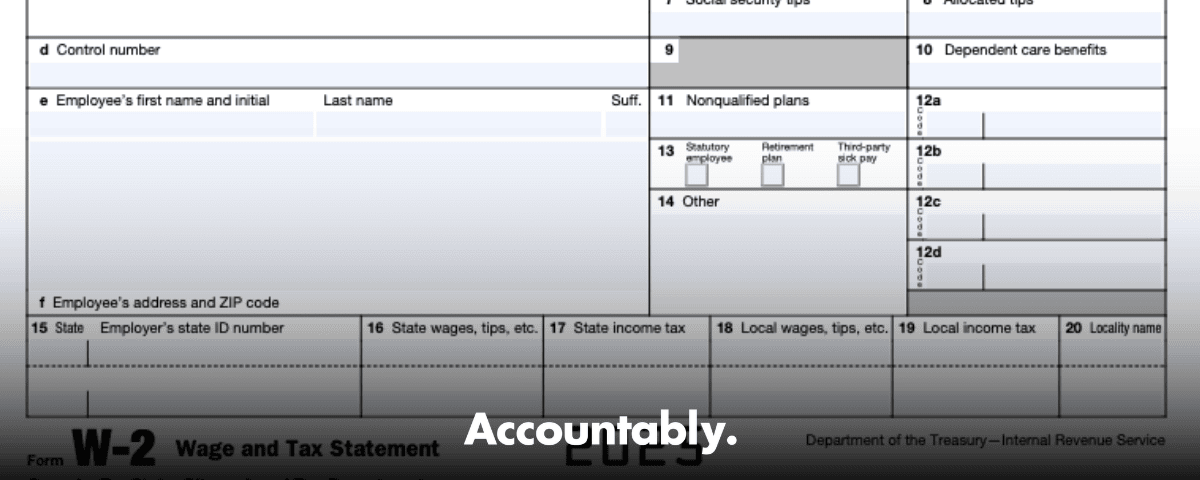
Quick glossary of W‑2 boxes you will actually check
- Box 1, wages, tips, other compensation, the amount your employees carry to Form 1040.
- Boxes 2, 4, 6, federal income tax, Social Security tax, and Medicare tax withheld.
- Box 3 Social Security wages, plus Box 7 Social Security tips, capped at the year’s wage base, 176,100 for 2025.
- Box 5 Medicare wages and tips, no wage base limit.
- Box 8 allocated tips, if you run a large food or beverage establishment, not included in Boxes 1, 3, 5, or 7.
- Box 12 codes, retirement deferrals, HSA, group‑term life over 50,000, and more. Use the IRS instructions for the full code list and examples, and build a year‑end check to catch fringe benefits and pre‑tax deductions that move Box 1 without touching Boxes 3 and 5.
Bottom line, a short “box logic” review in December saves you from last‑minute W‑2c runs in February.
How to file, furnish, and e‑file without drama
E‑file is now the default for most filers
If your total count of information returns for the year is 10 or more, you must e‑file W‑2s. Add up every return type you file, W‑2, 1099 series, 1095, 1042‑S, W‑2G, and others. When you e‑file with SSA Business Services Online, W‑3 data is created automatically, so you do not mail a paper W‑3. Register for BSO and sign in with Login.gov or ID.me, then either key forms online or upload an EFW2 file from payroll.
When paper is allowed, do it right
If you mail Copy A, it must be the red‑ink scannable form or an approved substitute that meets SSA specs. Do not print the website sample and mail it, and do not staple or fold forms. Send Copy A with a W‑3 to SSA’s Wilkes‑Barre address. Paper is slower, increases error risk, and can trigger penalties if you were required to e‑file, so use it only when permitted and necessary.
Furnishing employee copies electronically, the right way
You can furnish employee copies electronically, but only with affirmative consent that proves the employee can access the statement in that format. You must give clear disclosures, allow withdrawal, and keep access open through October 15 following the year. If you post W‑2s on a portal, send a specific notice telling employees how to access and print, and furnish paper if an electronic notice bounces and you cannot update the address. These rules live in Treasury’s electronic statement regulation, so align your HRIS or payroll portal workflow with them.
Pro tip, if you furnished the original W‑2 electronically, furnish the W‑2c electronically too, unless the rules say otherwise. Match your correction channel to the original channel.
Improve Margins Without Compromising Quality
Offshore staffing helps firms deliver more, scale faster, and stay compliant, without adding local headcount.
???? Book a Discovery CallCopies and who gets what
| Copy | Who gets it | Notes |
| Copy A | SSA | E‑file when you hit the 10‑return threshold, paper allowed only with the official scannable format or approved substitute. |
| W‑3 | SSA | Required only with paper Copy A. E‑filed submissions generate W‑3 data automatically. |
| Copy B | Employee | Used for the federal return. |
| Copy C | Employee | Keep for records and benefits verification. |
| Copy 2 | Employee | Attach to state or local return when required. |
| Copy 1 | State or local agency | Sent where state or local rules require it. |
| Copy D | Employer | Keep at least four years with payroll reconciliations. |
You may truncate the SSN on employee copies following IRS rules, however never truncate the SSN on Copy A you send to SSA. Check the instructions for the exact truncation format and placement before batch creation.
The 2026 filing‑season calendar
- Furnish Copies B, C, and 2 to employees by Monday, February 2, 2026.
- File Copy A with SSA by Monday, February 2, 2026.
- If you need an extension to file with SSA, request a limited 30‑day extension on Form 8809, which is granted only for extraordinary reasons, and note this does not extend the employee furnish date. Schedule internal cutoffs a few days earlier to protect your deadline.
Year‑end reconciliation that saves you hours
Before you lock your W‑2s, tie Forms 941 for all four quarters to your W‑3 totals, confirm Box 1 versus pre‑tax deductions and fringe benefits, check that Boxes 3 and 7 together do not exceed 176,100 for 2025, and confirm that Box 5 has no cap. Validate names and SSNs through SSA’s verification tools. This five‑point tie‑out prevents most W‑2c work.
If you have tipped employees, verify daily tip reports and make sure Box 7 and, if applicable, Box 8 are populated correctly. Keep your tip procedures tight so you do not end up chasing underreported tips in February.
Corrections, penalties, and how to avoid both
When to file Form W‑2c, and how
File a W‑2c any time a previously filed W‑2 had an incorrect amount, name, SSN, or EIN. File Copy A of the W‑2c with SSA, furnish the corrected copy to the employee, and, if taxes changed, amend the affected quarters with Form 941‑X. SSA’s “Helpful Hints” reminds filers to submit W‑2c as soon as you find an error, and to include a W‑3c with every W‑2c batch.
A simple workflow that works: identify the error and year, reconcile to corrected totals, prepare W‑2c for each impacted employee, prepare the W‑3c, e‑file through BSO, and document the root cause so you do not repeat it next year. If you are correcting only the name or SSN, complete boxes d through i on W‑2c and do not change the money boxes. If the prior W‑2 had blanks or zeros for both name and SSN, call SSA for instructions rather than filing a W‑2c.
The penalty matrix you should memorize
For filings due after December 31, 2025, penalties for late or incorrect W‑2s are indexed for inflation and applied per form. Correct within 30 days, 60 per W‑2, correct by August 1, 130 per W‑2, fix after August 1 or never correct, 340 per W‑2. Intentional disregard starts at 680 per W‑2 with no cap. There are lower annual caps for small businesses, and there are limited de minimis relief provisions and reasonable‑cause exceptions, but you should not plan on them.
Remember, filing on paper when you were required to e‑file is its own penalty‑trigger. Furnishing employee copies late runs on a parallel penalty track, with the same amounts. Accurate, on‑time e‑filing plus quick corrections keep you out of that loop.
Security risks that spike during W‑2 season
W‑2 files have everything identity thieves need, names, addresses, SSNs, and wages. That is why business email compromise spikes in January, often using executive spoofing to request a full W‑2 export.
Make W‑2 season a security freeze period. Limit who can export wage files, enforce MFA across payroll, portals, and storage, and require an out‑of‑band verification call to a saved number before any W‑2 data leaves your system. Train the team to spot urgent, unusual requests for all W‑2s. The IRS highlights W‑2 related phishing in its annual scam alerts and Dirty Dozen campaign, and it provides reporting channels if you are targeted.
Practical actions you can take today: turn on MFA, use least‑privilege access for wage files, send employee copies through a secure portal instead of email, and use SSA BSO only from secured devices. If you suspect a W‑2 data loss, the IRS publishes reporting steps and email contacts to contain damage quickly.
Employee copies, lost or missing
Employees who cannot obtain a W‑2 in time can file using Form 4852, Substitute for Form W‑2, and may need to amend later if the employer issues a W‑2 or W‑2c with different figures. Your clean and timely furnishing prevents that detour.
Year‑end checklist that keeps you out of the W‑2c lane
- Reconcile Q1–Q4 Forms 941 to W‑3 totals and sample a few W‑2s for box‑level tie out.
- Confirm Box 1 versus pre‑tax deductions and fringe benefits, especially group‑term life and HSAs in Box 12.
- Check that Boxes 3 and 7 combined are at or below 176,100 for 2025, and confirm Box 5 has no cap.
- Validate names and SSNs with SSA tools before you create your final file and employee copies.
- Test a small e‑file batch in BSO, then run your full EFW2.
- Lock addresses, multi‑state details, and local taxes before furnishing employee copies.
Where teams get stuck, and a practical fix
Most January slowdowns are delivery problems, not knowledge gaps. The common traps are missing SOPs, inconsistent workpapers, and unclear review roles. A one‑page W‑2 prep pack, a brief review rubric, and a time‑boxed correction window cut rework dramatically.
A brief note on Accountably
If your firm dreads W‑2 season because your team is buried in production and review loops, you may need structure, not more resumes. Accountably integrates trained offshore teams into your workflow with SOPs, structured workpapers, and layered reviews that protect partner time while meeting deadlines. We work inside your payroll and practice systems with role‑based access and predictable turnaround, so January feels manageable again. Mentioned here because many firms ask how to add capacity without losing control.
FAQs
What is Form W‑2 used for?
It reports annual wages and federal, Social Security, and Medicare taxes withheld for each employee. SSA uses Copy A to credit earnings and shares data with the IRS, while employees use their copies to file returns and verify benefits and loans.
What is the difference between a W‑4 and a W‑2?
A W‑4 tells you how much to withhold during the year. A W‑2 summarizes what you actually paid and withheld for the calendar year and is the basis for filing returns.
Do I need a W‑2 for someone paid less than 600?
Yes, if you withheld any federal income, Social Security, or Medicare tax. The 600 trigger applies when no taxes were withheld.
Can I email W‑2s to employees?
Only if the employee has affirmatively consented and your process meets the IRS electronic furnishing rules, including clear disclosures and access through October 15. Otherwise, furnish paper.
Do we send a W‑3 when we e‑file?
No, BSO creates the W‑3 data for you when you e‑file. You send a paper W‑3 only with paper Copy A.
What if an employee cannot get a W‑2?
Employees can use Form 4852 as a substitute when an employer fails to furnish a W‑2 on time or issues an incorrect one, then amend later if needed. Encourage employees to reach out early so you can resolve address or access issues.
Final word
You do not need a hero month, you need a repeatable system. When you standardize your prep pack, set clear review roles, e‑file on time, and keep security tight, W‑2 season becomes routine. Block time for the year‑end tie‑out, confirm your boxes, and protect that first week of February on your calendar. Your team ships on time, your clients stay calm, and you enter busy season with momentum.
Note, this article is general education, not tax advice. Always confirm dates, thresholds, and filing requirements against the latest IRS Instructions for Forms W‑2 and W‑3 and SSA guidance, especially if you read this after November 6, 2025.
Simplify Delivery, Improve Margins, Stay in Control.
Offshore support that works exactly like your in-house team.
???? Let’s Talk