Scale Your CPA Firm Without Adding Headcount
Build your offshore team that works your way, trained, compliant, and white-labeled under your firm.
???? Book a Discovery CallTable of Contents
- Scale Your CPA Firm Without Adding Headcount
- Key Takeaways
- What Form 4852 is, and when you should use it
- Hundreds of Firms Have Already Used This Framework.
- Why this matters to you
- Step‑by‑step, how to complete Form 4852
- Improve Margins Without Compromising Quality
- E‑file rules, explained in plain language
- What to attach, what to retain, and when to mail
- After filing, if the real form shows up
- Current revision, and how to confirm you are using the latest Form 4852
- Pro tips for firms, so Form 4852 does not become a fire drill
- FAQs
- Final word
- Simplify Delivery, Improve Margins, Stay in Control.
We did what you will likely do in that moment. We used Form 4852, we documented every assumption, and we got the return filed on time without guesswork.
If the payer does not send a W‑2 or 1099‑R, or sends one that is wrong and will not fix it in time, you may use Form 4852 as a substitute so you can file accurately and on schedule.
Key Takeaways
- Form 4852 is a substitute for a missing or incorrect W‑2 or 1099‑R, so you can file without waiting indefinitely.
- Use reasonable estimates from your final pay stub or year‑to‑date totals, and keep proof of how you calculated every number.
- If you receive the real W‑2 or 1099‑R later and it differs, you must amend with Form 1040‑X.
- You can e‑file a return that relies on Form 4852 when used correctly, although some consumer tools still push you to paper. EROs must follow e‑file rules and retain required authorizations.
- As of December 30, 2025, IRS lists “None at this time” under Recent Developments, and the most recent posted revision lineage for Form 4852 traces to 2020. Always pull the current PDF from IRS.gov before filing.
What Form 4852 is, and when you should use it
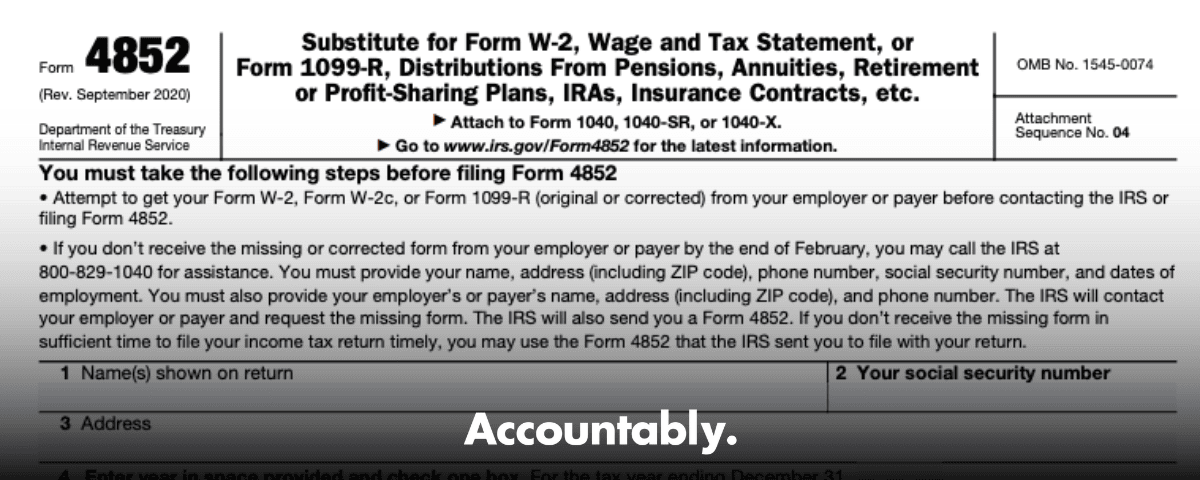
Form 4852 is the IRS’s official substitute for Form W‑2 or Form 1099‑R. You use it when the employer or payer never sends the form, sends an incorrect one, or cannot correct it in time for you to file. That way, you can report wages or retirement distributions and withholding accurately, even if the original form is not in hand.
You will include your identifying details, the payer’s name and address, the employer identification number if known, your best estimates for income and federal withholding, and a plain explanation of your attempts to obtain the original. Keep copies of final pay stubs, payroll reports, or plan statements because the IRS can ask how you arrived at the figures.
Hundreds of Firms Have Already Used This Framework.
Join the growing list of CPA and accounting firms using Accountably’s Offshore Playbook to scale faster.
???? Get Your FREE Playbook
???? Visit Jugal Thacker’s LinkedIn
Send him a connection request and message “Playbook” to get your copy.
The timeline that matters for 2025‑2026
Employers should furnish Forms W‑2 and 1099‑R by early February. For this filing season, the IRS guidance says to follow up if you do not have the form by February 2, 2026, then call the IRS at 800‑829‑1040 if you still do not receive it by the end of February. If the payer does not deliver a corrected form in time, you may file using Form 4852 with reasonable estimates.
If a late or corrected W‑2 or 1099‑R arrives after you file with Form 4852 and the numbers are different, you must file Form 1040‑X to correct your return.
Why this matters to you
Missing or incorrect year‑end forms create stress, delay refunds, and raise audit anxiety. Form 4852 is your safety valve. It lets you file on time while staying accurate, provided you document your method and retain your records. That balance, timely filing with evidence, is what the IRS expects.
From my side of the desk, the smoothest outcomes happen when you treat Form 4852 like an audit‑ready project. You confirm the latest IRS PDF, you gather pay stubs or plan statements, you write a tight explanation of your chase attempts, and you keep an organized packet in case the IRS or your ERO asks for it later. The process is simple, and it works.
Step‑by‑step, how to complete Form 4852
Here is a practical, field‑tested workflow you can follow today.
Improve Margins Without Compromising Quality
Offshore staffing helps firms deliver more, scale faster, and stay compliant, without adding local headcount.
???? Book a Discovery Call- Get the form Download the current Form 4852 PDF from IRS.gov, since the IRS page is your authoritative source and lists the current file. Save the PDF you used and note the date you retrieved it.
- Assemble records Pull final pay stubs, YTD payroll summaries, or retirement plan statements. If you are replacing a W‑2, focus on wages, tips, other compensation, and federal income tax withheld. If you are replacing a 1099‑R, pull gross and taxable distributions, basis if any, and federal withholding.
- Capture payer details Enter the payer’s legal name and address. Add the EIN if you have it. If you cannot find the EIN after reasonable effort, note that it is unknown in the form and explain your attempts in the narrative section.
- Estimate amounts carefully Use the figures from your records to estimate income and withholding. Do the math once, then check it again. If multiple stubs are involved, reconcile to the YTD totals to avoid double counting. Document each source you used.
- Write a clear explanation Briefly list your attempts to obtain the W‑2 or 1099‑R. Include dates, names, phone numbers, and outcomes. This shows diligence and makes your position easy to understand if the IRS reviews your file.
- Sign and file Sign and date Form 4852. If you are e‑filing through a paid preparer, follow their e‑signature process. If you print and mail, attach the signed Form 4852 to your Form 1040. Keep your packet of proof.
The core fields you cannot miss
| Field | Why it matters | What you enter |
| Your identity | IRS must match the return | Legal name, SSN, address |
| Payer identity | Verifies the source | Name, address, EIN if known |
| Form replaced | Drives treatment | Check W‑2 or 1099‑R |
| Income and withholding | Tax calculation | Wages or distribution, federal withholding |
| Explanation | Shows diligence | Dates, contacts, results |
| Signature and date | Certifies accuracy | Sign and date clearly |
Each number should trace to a document in your file. I like to write a quick worksheet, for example “Line 1 wages equals YTD wages on final stub dated 12‑31, $XX,XXX.XX,” then clip that on top of the stubs in case anyone asks later.
A quick example
Say your final pay stub shows YTD wages of 58,250 and federal withholding of 4,120. Your employer changed payroll companies and the W‑2 never came. You enter those amounts on Form 4852, list your HR emails and calls from February 3, February 14, and March 1, then sign and file. If a W‑2 arrives in April showing 58,400 and 4,150, you file Form 1040‑X to adjust the 50 wage difference and the 30 withholding difference. That is exactly what the IRS expects.
E‑file rules, explained in plain language
Good news, you can e‑file a return that uses Form 4852 when the form is completed in accordance with IRS rules. The IRS specifically allows e‑filing after Form 4852 is completed when you cannot obtain a correct W‑2 or 1099‑R. Some consumer software still does not support this cleanly, which is why many taxpayers end up printing and mailing. The rule is not the barrier, software is.
Modernized e‑File supports PDF attachments, which helps software vendors handle documents that are not native XML. Paid preparers may also follow paperless filing procedures where they retain authorization forms and supporting documents in their files rather than mailing them. Your ERO will tell you which method your software supports.
What to attach, what to retain, and when to mail
Here is a quick way to think about it.
- If your software does not support attaching a PDF of Form 4852, you may still be able to e‑file by entering the data and retaining the signed Form 4852 in the ERO’s records. If the software cannot accommodate that, you will print and mail with the signed form attached. Follow your provider’s guidance.
- Form 8453 is used to send specific paper documents listed on that form. The IRS says not to mail Forms W‑2, W‑2G, or 1099‑R with Form 8453, and in many cases EROs will retain required documents instead of mailing. Check your software’s workflow.
- EROs must receive and retain the proper e‑signature authorization, such as Form 8879 for a 1040, and keep it on file for three years. That document is not mailed unless the IRS asks for it.
Quick reference table
| Scenario | Can you e‑file? | What you or your ERO must do |
| Missing or incorrect W‑2 or 1099‑R, Form 4852 completed | Yes, allowed by IRS | Enter substitute data, retain signed Form 4852 in records, attach PDF only if your software supports it |
| Your tool cannot handle 4852 in e‑file | Not with that tool | Print and mail 1040 with signed Form 4852 attached |
| Additional supporting docs required by IRS checklist | Sometimes | If listed on Form 8453, mail with 8453, otherwise ERO usually retains |
IRS MeF accepts PDF attachments, and e‑file returns can be submitted year‑round, except during scheduled shutdowns. Your provider decides which attachments are supported inside their software.
After filing, if the real form shows up
If you later receive the official W‑2 or 1099‑R and it does not match your estimates, file Form 1040‑X to correct income and withholding. If tax increases, pay the difference and interest to stop more interest from accruing. If tax decreases, expect a refund after processing. Keep your pay stubs and your contact log with the employer.
Current revision, and how to confirm you are using the latest Form 4852
The IRS “About Form 4852” page shows the current PDF and, as of December 4, 2025, lists “None at this time” for recent developments. The “All Revisions” index shows the most recent revision lineage as 2020. In practice, that means the 2020 edition remains the operative version, but you should always download the current PDF from IRS.gov immediately before filing and document your retrieval date.
For extra belt and suspenders, archive the file you used and note the URL you pulled it from, along with a brief change log in your workpapers. This is a small step that saves time if questions come up later.
Dates to keep in mind for this season
- Employers should furnish W‑2 and 1099‑R by early February, with the IRS advising taxpayers to follow up if not received by February 2, 2026, then call IRS by the end of February if still missing.
- 1040 MeF accepts the current tax year and two prior years once the season opens, which helps if you are catching up older returns.
Pro tips for firms, so Form 4852 does not become a fire drill
If you run a tax practice, the best way to keep Form 4852 rare is to standardize the upstream work.
- Create a W‑2 and 1099‑R chase log with target dates, assigned owners, and weekly review.
- Require a short 4852 worksheet that ties each reported figure to a pay stub or plan statement.
- Add a one‑page script for staff to contact employer payroll or plan administrators, with dates and outcomes recorded.
- Keep an ERO retention checklist that covers Form 8879 and any 4852 documentation, and confirm your software’s policy on binary attachments.
If you need a controlled way to scale this kind of work without burning out your reviewers, you can build it into your offshore delivery playbook. At Accountably, we partner with firms that want disciplined production, not resume stacks. Our teams work inside your systems and SOPs, which makes 4852 cases easier to document, easier to review, and less likely to bounce back late in the season. Mentioning this only where it truly helps, the point is structure, not staffing.
FAQs
Can I file my taxes without a W‑2 if I have my final pay stub?
Yes. When you cannot get a correct W‑2 in time, you may complete Form 4852 using your final pay stub and other records, then file your return. Keep your proof and be ready to amend with Form 1040‑X if the later W‑2 is different.
Will filing with Form 4852 delay my refund?
Not necessarily. E‑filed returns are generally processed faster than paper, and the IRS indicates typical refund timing for accepted e‑files. Delays usually come from missing data or math errors, so complete Form 4852 carefully.
Do I have to mail Form 4852 to the IRS?
Often no. IRS allows e‑filing after Form 4852 is completed when a correct W‑2 or 1099‑R is unavailable. Some software does not support transmitting a 4852 PDF, so your ERO may retain it instead, or you may need to paper‑file if your tool cannot handle it.
Where do I get Form 4852?
Download it directly from IRS.gov, or call 800‑829‑3676 to request a copy. Verify you are using the current PDF and save a copy with your records.
What happens if the employer sends a corrected W‑2 after I file?
Compare every box to your estimates. If any numbers differ, file Form 1040‑X to correct your return, and pay any added tax and interest promptly.
Final word
Form 4852 is not a loophole, it is the official path to get an accurate return filed when a W‑2 or 1099‑R is missing or wrong. Download the current IRS PDF, build your numbers from real records, write a clean explanation, and keep your packet. If the real form arrives later and changes the math, amend quickly. That is how you protect your refund, your compliance, and your peace of mind.
Simplify Delivery, Improve Margins, Stay in Control.
Offshore support that works exactly like your in-house team.
???? Let’s Talk