
Summarize this article with AI
In Brief
Form 14765, the Employee Premium Tax Credit Listing, is an IRS‑prepared attachment to Letter 226‑J that ties a proposed Employer Shared Responsibility Payment to specific employees and months by displaying the 1095‑C Line 14 and Line 16 codes you reported (per the May 2021 IRS revision printed on the form). Non‑highlighted months are the assessable ones; respond on Form 14764, rebuilding any 2F, 2G, or 2H safe harbor with the plan‑year affordability percentage stated in the IRS instructions before the deadline printed on Letter 226‑J. See Accountably's tax delivery for help building the response packet.
Form 14765 looks intimidating because it is a grid of codes, but it reads like an audit workpaper once you know what the columns mean. It arrives attached to Letter 226-J and lists each full-time employee who triggered a Premium Tax Credit, month by month, alongside the 1095-C Line 14 and Line 16 codes you reported. Highlighted months are non-assessable; the unhighlighted ones are where the IRS sees liability.
Those unhighlighted months are exactly what you test, document, or correct on Form 14764. The affordability safe harbors hinge on the right year's percentage, 9.02 percent for 2025 plan years and 9.96 percent for 2026, and the penalties are indexed the same way, 2,900 and 4,350 for 2025 rising to 3,340 and 5,010 for 2026. Map every correction to the right year before you respond.
Key Takeaways
- Form 14765 arrives with Letter 226‑J and lists each full‑time employee who triggered a Premium Tax Credit, plus the month‑level 1095‑C Line 14 and Line 16 codes behind the proposed ESRP.
- Highlighted months are non‑assessable, unhighlighted months are where the IRS sees potential liability, so those are the months you test, document, or correct.
- Your response lives on Form 14764. You either agree and pay, or you disagree in whole or part and return Form 14765 with corrected codes and documentation.
- Affordability safe harbors matter. For 2025 plan years, the required contribution percentage is 9.02 percent. For 2026 plan years it rises to 9.96 percent. Use the right year’s percentage when you validate 2F, 2G, or 2H.
- Penalties are indexed. For 2025 the §4980H(a) amount is 2,900 and §4980H(b) is 4,350. For 2026 they rise to 3,340 and 5,010. Map any corrections to the right year’s rates.
What Is IRS Form 14765?
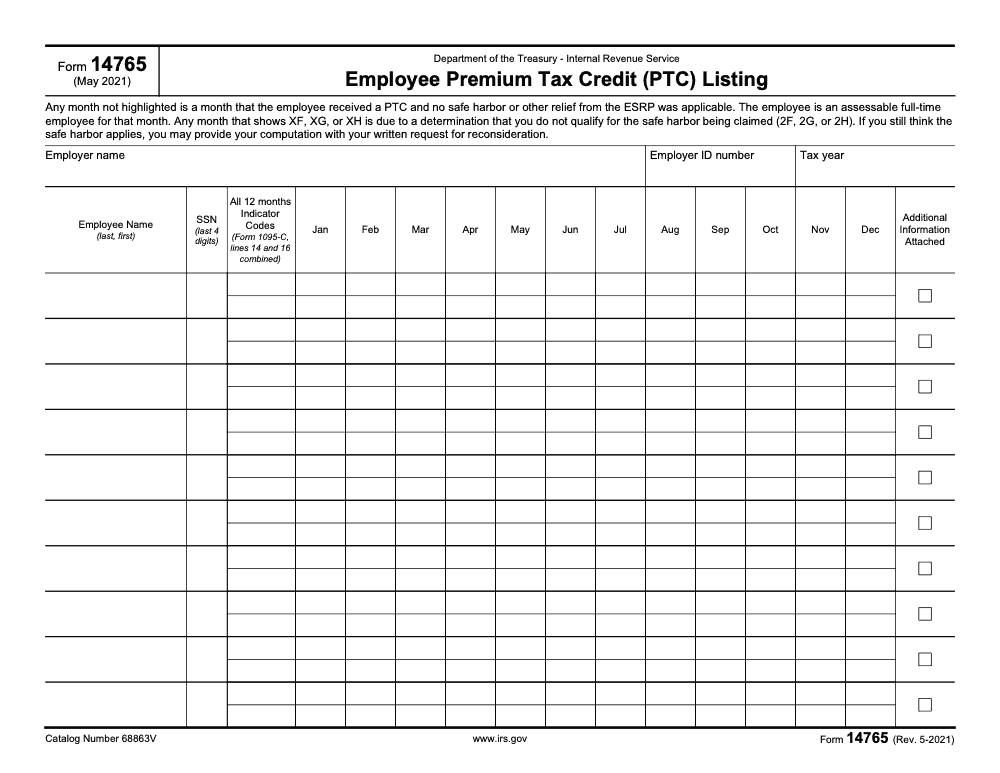
Form 14765, officially the Employee Premium Tax Credit Listing, is the attachment in a Letter 226‑J package that ties proposed ESRP dollars to specific full‑time employees and specific months. Each row shows the employee’s name and truncated SSN (only the last four digits appear on the listing), then a two‑row grid of monthly codes, Line 14 above Line 16, that reflect what you reported on Form 1095‑C. The IRS uses that grid, along with your 1094‑C and the employee’s return, to compute the proposed assessment. You use it to confirm your reporting and safe harbors, or to correct mistakes.
Why this matters to you. The IRS does not guess at ESRP. It cross checks your filings and flags months where an employee got a PTC and your codes do not block liability. Your job is to validate that each month is either protected by a correct Line 16 code or to supply the right code with proof. If you agree, you sign and return Form 14764 with payment. If you disagree, you return Form 14764 with a detailed explanation and a marked‑up Form 14765.
How Form 14765 Connects to Letter 226‑J and ESRP
Letter 226‑J is the IRS’s initial notice that you may owe an Employer Shared Responsibility Payment. It always includes Form 14765 and the Form 14764 response. The proposed amount is built month by month, employee by employee. That is why you review 14765 first, then translate what you find into your 14764 response. After you respond, the IRS issues a Letter 227 series letter that either closes the case or outlines revisions and next steps.
The PTC Listing’s Purpose
- List employees who received a PTC and the months that matter
- Show the reported 1095‑C Line 14 and Line 16 codes that drive, or block, ESRP
- Indicate non‑assessable months with highlighting
- Give you a clear map for agreements, corrections, or rebuttals on Form 14764
The What‑How‑Wow Framework
- What: Form 14765 is the IRS’s month‑level listing behind the proposed ESRP.
- How: Read each employee’s months, test affordability and status, then correct codes or provide proof, and return with Form 14764 by the deadline.
- Wow: Small fixes add up, for example, one misapplied 2H or a missed waiting period code can eliminate months of exposure when you document the math correctly with W‑2, rate of pay, or FPL.
Compliance note as of December 18, 2025: use 9.02 percent for 2025 plan years and 9.96 percent for 2026 plan years. Confirm the right percentage and penalty amounts for the year at issue before you finalize your packet.
How to Read the Employee PTC Listing Like a Reviewer
Open the Form 14765 PDF and work one employee at a time. For each month, read Line 14 over Line 16. Highlighted cells are non‑assessable. Unhighlighted cells are where the IRS thinks you may owe. Your job is to prove that Line 16 properly blocks liability or to correct Line 14 or 16 with support.
Interpreting 1095‑C Line 14 and Line 16 at a Glance
- Line 14 tells the type of offer for that month, for example 1A, 1E, 1H.
- Line 16 tells the relief or affordability status, for example 2F, 2G, 2H, 2A, 2B.
- If you see XF, XG, or XH on Form 14765, the IRS rejected your affordability safe harbor for that month (XF, XG, and XH are IRS-applied overrides of the 2F, 2G, or 2H codes you reported on Form 1095‑C line 16, not codes you entered, and the rejection is a proposed determination you can rebut with a written request for reconsideration). Be ready with math and records to fix it.
Quick Code Map With Examples
| Month | Line 14 Example | Line 16 Example | What to test |
| Jan | 1A qualifying offer | 2F W‑2 | Confirm the contribution as a percent of Box 1 wages fits the year’s percentage |
| Feb | 1E offer to EE plus dependents | XF rejection | Recompute affordability and supply proof or correct to proper code |
| Mar | 1H no offer | 2A not employed | Prove hire date or termination date matches payroll |
| Apr | 1E offer | 2H rate of pay | Rebuild the monthly rate‑of‑pay calculation with first‑day‑of‑coverage wages |
These are examples, not a full code chart. Always tie your code choice to the plan document, payroll, and enrollment records for that exact month.
The Documentation You Will Need
- Payroll details, including Box 1 wages and hourly rates as of the first day of the coverage month
- Plan rate sheets and the lowest cost self‑only premium for each month
- Enrollment and waiver records, plus hire, termination, and status change dates
- 1095‑C and 1094‑C copies as filed, and any amendments
- A short write‑up per month explaining the code you used or the correction you propose
Affordability Safe Harbors, Pick One and Prove It
Most disagreements come down to affordability, so decide which safe harbor you used, then do the math cleanly.
- 2F, W‑2 safe harbor. Compare the employee’s required contribution for the lowest cost single option to the right percentage of Box 1 wages for the year. For 2025 plan years use 9.02 percent. For 2026 plan years use 9.96 percent.
- 2G, Federal Poverty Line safe harbor. Use the current FPL table for the plan year and show that the monthly employee cost does not exceed the percentage for that year.
- 2H, Rate‑of‑Pay safe harbor. Multiply the hourly rate on the first day of the coverage period by 130, then apply the correct percentage. For salaried employees, use monthly salary. Keep screenshots or reports that show the rate effective at the start of the month.
Tip, rebuild your affordability math month by month, then attach a one‑page schedule showing the safe harbor, the required contribution, the percentage used, and the pass or fail result.
Penalty Math, Know the Year
Your proposed ESRP on Letter 226‑J is the sum of assessable months, but the dollars behind it change by year. For the 2025 calendar year, the §4980H(a) amount is 2,900 and §4980H(b) is 4,350. For 2026 they increase to 3,340 and 5,010. Use the correct figures when you recalculate exposure or demonstrate a reduction. The IRS bases these numbers on annual indexing rules, so always check the official tables for the year under review.
The Inverted Pyramid, What To Do First
- Sort the Form 14765 rows by dollars at risk, for example, months without any Line 16 code first. 2) Fix obvious status issues, like 2A not employed or 2B not full time, using hire dates, termination dates, and average hours. 3) Rebuild affordability for 2F, 2G, and 2H months, and address any XF, XG, XH rejections with clear math. 4) Only then, draft your Form 14764 narrative and mark up Form 14765 with corrected codes.
Practical Checklist, From First Read To Final Packet
Use this repeatable flow so you do not miss a month.
| Task | Evidence | Outcome |
| Match 14765 to your filed 1095‑C | Line 14 and 16 by month | Confirm what the IRS used |
| Validate employment status | Hire, term, hours, look‑back results | Apply 2A or 2B accurately |
| Confirm lowest cost premium | Rate sheets, SPD, carrier invoices | Prove the single‑only rate used |
| Rebuild affordability | W‑2, rate‑of‑pay, FPL tables | Prove 2F, 2G, or 2H month by month |
| Address rejections | XF, XG, XH notes | Correct code or show math with proof |
| Finalize corrections | Marked‑up 14765, summary by employee | Ready for 14764 narrative |
| Package response | 14764, exhibits, cover letter | Mail or fax by the deadline |
Your Form 14764 only stands up if every correction on Form 14765 is backed by records that a reviewer can retrace in minutes.
Writing a Clean Form 14764 Narrative
- Start with a one‑paragraph overview of your position, agree, partial disagree, or disagree.
- For each employee, cite the months at issue, the code you reported, the corrected code if any, and the specific exhibits that support your change.
- Close with a revised ESRP calculation if your corrections change the total. Keep your tone factual and brief.
Common Errors That Cost Time
- Using the wrong affordability percentage for the plan year at issue. Double check 2025 versus 2026.
- Missing the lowest cost self‑only premium for a month where rates changed midyear.
- Not documenting the first day of coverage rate for 2H.
- Forgetting to attach the filed 1095‑C that shows your original code, especially when you are supporting 2A or 2B.
- Treating XF, XG, XH as a dead end. They are a prompt to show your math or correct your code.
Real‑World Micro‑Anecdote
A mid‑market ALE received a 226‑J proposing a six‑figure ESRP tied mostly to months coded 1E with no Line 16 relief. We rebuilt affordability with 2H using hourly rates from the first day of each month. Half the flagged months cleared when we applied the correct 2025 percentage and attached rate screenshots. We corrected a handful of status months to 2A and 2B with hire and average‑hours proof. The IRS issued Letter 227‑K, case closed at zero. Your facts will differ, but the method is the same.
Advanced Tips That Save Review Hours
- Build a single affordability workbook and link every employee‑month to a row. Change the plan year percentage in one cell to update the whole model.
- Separate status defenses, 2A and 2B, from affordability defenses, 2F, 2G, 2H. That way, a reviewer can clear status items fast, then focus on math.
- When you fix a code, explain why the original code appeared, for example, a template error or a midyear rate change, so the IRS understands the correction is grounded in facts.
- Keep a signed, dated cover letter that lists every attachment. If you end up in appeals, that index is gold.
Security, Records, and Who Should Own This Work
Store the packet, your marked‑up Form 14765, and all exhibits with the same retention rules you use for 1095‑C. Limit access, require version control, and keep a reconciliation log for every change you make. If your team is underwater during busy season, consider structured help. On complex ACA responses, the hard part is disciplined workpapers and repeatable math, not heroics.
If you need extra hands, pick process, not resumes. The right partner should work in your systems, apply your templates, and follow your review tiers so your partners spend less time in review and more time on client strategy.
Briefly, where it is relevant, Accountably integrates trained offshore teams into firm workflows with SOPs, structured workpapers, and multi‑layer reviews, which helps firms move Form 14765 reviews from ad hoc to predictable without giving up control or security. Use help only where it truly reduces review time and improves accuracy.
Your Final Packet, A Simple Outline
- Form 14764, signed, with agree or disagree box marked
- Marked‑up Form 14765 with corrected codes circled or noted
- Cover letter that summarizes your position and lists exhibits
- Exhibits, payroll, rate sheets, enrollment, 1095‑C and 1094‑C, W‑2 or rate‑of‑pay schedules, FPL citations for the plan year, plus any amended returns
- A recalculated ESRP table, if your corrections change the dollars
- Proof of payment or EFTPS instructions if you agree in whole or part
Mini Reference, Definitions You Will Use
- ESRP, the Employer Shared Responsibility Payment, the assessment tied to §4980H.
- Letter 226‑J, the IRS’s initial notice proposing an ESRP, mailed after employee returns show who received a PTC.
- Letter 227, the follow‑up acknowledgement or revision letter after you respond.
- Form 14764, the response form you return to agree, partially disagree, or disagree.
- Form 14765, the Employee PTC Listing that maps employees and months to the proposed ESRP.
Conclusion
You do not have to outguess a Letter 226‑J. Form 14765 shows you the exact people and months behind the proposal. Work the listing like a reviewer, prove your safe harbor math with the right year’s percentage, and correct any code errors with clean documentation. Then translate your findings into a clear Form 14764 response, mailed or faxed by the deadline. Do this well and you reduce or eliminate the proposed ESRP, keep your audit trail clean, and move on with confidence.
Common Mistakes We See Every Season
The same handful of misreads show up on every Letter 226‑J packet we work. Most cost weeks of cleanup; all of them are avoidable if you slow down on the first pass.
Reusable Checklists
The checklists below are copy‑paste ready. Drop each block into a firm SOP, hand it to the team handling the response, and audit completion before the Form 14764 packet leaves the office.
Letter 226‑J Intake
- Date‑stamp the Letter 226‑J envelope and log the response deadline printed on the cover letter.
- Scan Letter 226‑J, Form 14765, and Form 14764 as a single PDF for the engagement file.
- Confirm the employer name, EIN, and Tax Year fields at the top of Form 14765 match the 1094‑C as filed.
- Pull the 1094‑C and 1095‑Cs (and any corrected returns) for the tax year on the listing.
- Pull payroll registers, plan rate sheets, and enrollment/waiver logs for every month covered by the listing.
- List every employee row flagged with an Additional Information Attached checkbox and gather those attachments.
- Open a workpaper index numbered to the row order on Form 14765, ready for per‑month notes.
Per‑Employee Row Review
- Read Line 14 over Line 16 for each non‑highlighted month before touching any highlighted month.
- For 1H plus 2A months, confirm hire and termination dates against payroll to the day.
- For 2F months, recompute affordability as Box 1 wages times the plan‑year affordability percentage stated in the IRS instructions.
- For 2G months, validate against the federal poverty line figure for the plan year and a household of one.
- For 2H months, rebuild rate‑of‑pay using the hourly rate on the first day of the coverage month, not the month average.
- Flag every XF, XG, or XH month for a written reconsideration request with supporting math.
- Note any 1095‑C code error and the corrected code proposed to the IRS, citing the source record.
- Sign off each row in the workpaper index before moving to the next employee.
Form 14764 Response Packet
- Choose the Form 14764 response box that matches the position: full agreement, partial agreement, or full disagreement.
- Attach the marked‑up Form 14765 with corrected codes in a contrasting color.
- Attach a per‑employee explanation page referencing the row number and the months addressed.
- Attach affordability computations for every safe harbor relied on, labeled by plan year.
- If a revised payment is owed, calculate using the §4980H(a) and §4980H(b) amounts published in the IRS instructions for that plan year.
- Run partner or controller review against this checklist before the packet is sealed.
- Ship by certified mail or fax per Letter 226‑J instructions, and capture proof of delivery.
- Calendar the Letter 227 follow‑up window for triage of the IRS reply.
Keep 14765 Season From Stalling
Letter 226‑J does not arrive on a predictable cadence. It lands months after the underlying 1094‑C and 1095‑C filings, often when payroll and benefits records are already archived, and the response deadline on the cover letter rarely leaves more than thirty days to assemble the packet. Form 14765 itself is short (per the May 2021 IRS revision, ten employee rows per printed page across twelve monthly columns), but every row ties a proposed ESRP dollar to one employee in one month, so the workload per row is real.
Treat the engagement like a documentation rebuild, not a tax computation. The first week sets the ceiling on how clean the response can be, so the work that pays off is gathering source records before any code analysis starts.
- Standardize a Letter 226‑J intake folder: original IRS packet, 1094‑C and 1095‑Cs as filed, payroll registers, plan rate sheets, enrollment and waiver logs.
- Build a per‑employee workpaper indexed to the row order on Form 14765, with Line 14 and Line 16 notes for every non‑highlighted month.
- Lock the plan‑year affordability percentage from the IRS instructions on day one so every 2F, 2G, and 2H recalculation runs against the same anchor.
- Track the Additional Information Attached checkboxes in a separate column so no IRS attachment is missed during drafting.
- Calendar the Form 14764 mail or fax date, the Letter 227 expected window, and a partner review checkpoint before the packet ships.
Accountably runs that rhythm as a standing service: payroll reconciliation, ACA workpaper assembly, and Form 14764 packet preparation handled by a U.S.‑led offshore team working documented SOPs. See Accountably's tax services for the engagement model.
FAQs
It is the IRS worksheet that lists full‑time employees who received a PTC and the months that may trigger an ESRP. It shows the 1095‑C Line 14 and 16 codes that drive the proposed assessment and accompanies Letter 226‑J and Form 14764.
You do not file it as a standalone form, but you mark it up with corrections and return it with Form 14764 when you disagree with the proposed ESRP. If you agree, you return Form 14764 with payment.
Use the contact information on Letter 226‑J to request additional time. Keep records of your request and any IRS replies.
The IRS will issue a Letter 227 series letter. It either confirms your agreement and closes the case or it shows a revised amount and next steps, including appeal options.
Match the plan year. For plan years beginning in 2025, use 9.02 percent. For plan years beginning in 2026, use 9.96 percent. Confirm percentages annually from the IRS.
Other forms this guide names
- Form 14764: How to Respond to IRS Letter 226-J
- Form 1095‑C: Deadlines, Codes, and Employer Filing Guide
- Form W‑2: Deadlines, E‑File Rules, Boxes, and W‑2c Corrections
- Form 1094-C: Deadlines, Authoritative Transmittal, E-file Rule
About this guide
Accountably helps US CPA, EA, and accounting firms hire trained accountants and tax preparers in India.
About us Reviewed byJugal Thacker, CPAFounder and CEO at Accountably
A Washington-licensed CPA with 7+ years inside US firms – PwC, a real-estate tax practice, then a full-service firm, rising from reviewer to manager to advisory. This article was reviewed against current IRS guidance for the 2025 tax year and updated for filers preparing late returns, amendments, and 2026 estimates.
View profile →How we research, review, and update this guide
Every Accountably guide is researched against primary IRS sources, reviewed by a U.S. CPA, and refreshed as guidance evolves. Read our Editorial Guidelines to see how we source, fact-check, and update our content.




