
Summarize this article with AI
In Brief
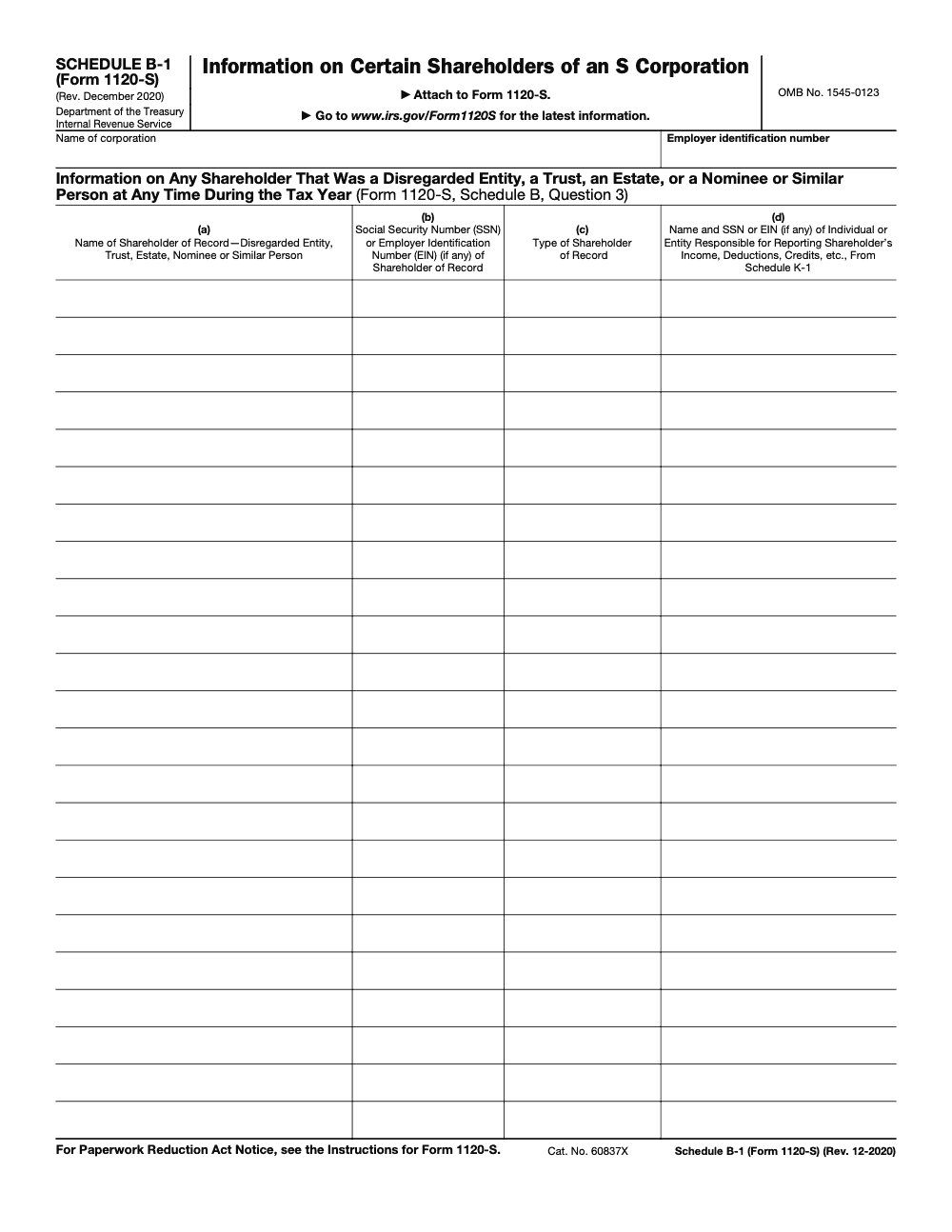
Schedule B-1 (Form 1120-S) is the disclosure schedule that lists any S corporation shareholder of record that was a disregarded entity, trust, estate, nominee, or similar person at any time during the tax year (per the Schedule B-1 instructions, revised December 2020). You attach it to Form 1120-S whenever Schedule B, Question 3 is answered "Yes," using the four-column grid (Catalog No. 60837X, OMB 1545-0123) and filing it on the same deadline as the parent return.
A trust holds shares in an S corporation, so the preparer answers Schedule B, Question 3 as Yes and moves on. That Yes is the trigger for Schedule B-1, and leaving it off is exactly the kind of omission that generates a notice. The schedule itself is short; the discipline is in catching when it applies.
Schedule B-1 lists any shareholder of record that was a disregarded entity, trust, estate, nominee, or similar person at any time during the year, alongside the responsible party who actually reports the income and their SSN or EIN. It uses a four-column grid and files on the same deadline as the parent Form 1120-S. Keep the names, TINs, and ownership figures consistent with Schedule B, the K-1s, and Schedule L, and the notices stay away.
Key Takeaways
- You must attach Schedule B‑1 to Form 1120‑S when Schedule B, line 3 is “Yes.” This happens any time a shareholder is a disregarded entity, trust, estate, nominee, or a similar person at any time during the year.
- Schedule B‑1 lists the shareholder of record and the responsible party who actually reports the income, plus their SSN or EIN, and the classification. Use the IRS PDF version if your software does not generate it.
- File it by the Form 1120‑S due date. For calendar‑year filers, the due date is generally the 15th day of the third month after year end, adjusted to the next business day if it falls on a weekend or holiday. You can request an automatic extension with Form 7004, generally for 6 months.
- Keep names, TINs, owner types, and ownership percentages consistent across Schedule B, Schedules K‑1, and equity on Schedule L to prevent notices and delays.
- In TaxSlayer Pro, a “Yes” on Schedule B, line 3 enables a PDF attachment step labeled “Form 1120‑S Schedule B‑1 Attachment.”
What Schedule B‑1 is for
Schedule B‑1, Information on Certain Shareholders of an S Corporation, gives the IRS a clear line of sight through intermediaries to the person responsible for reporting the income on a return. In plain terms, if the shareholder of record is not a flesh‑and‑blood individual, you disclose who really picks up the K‑1. The IRS description is straightforward, provide this information for any shareholder that was a disregarded entity, a trust, an estate, or a nominee or similar person at any time during the tax year.
If you answer “Yes” on Schedule B, line 3, attach Schedule B‑1 with the return. That instruction appears right on the face of Form 1120‑S.
When it is required, the exact trigger
The line 3 trigger on Schedule B
Schedule B, line 3 asks whether any shareholder during the tax year was a disregarded entity, a trust, an estate, or a nominee or similar person. A “Yes” triggers the duty to attach Schedule B‑1. There is no ownership percentage threshold and no asset threshold for this disclosure. It is simply, if any share is held through one of those intermediaries, attach B‑1.
Typical situations that require B‑1
- A single‑member LLC that did not elect corporate status holds S corp shares, this is a disregarded entity. An LLC that elected to be taxed as a corporation is not eligible to be an S corporation shareholder at all.
- A QSST or ESBT holds shares for an individual beneficiary.
- An estate holds shares after a shareholder’s death.
- A nominee, guardian, custodian, or agent is listed as shareholder of record.
- A grantor trust or a trust under section 678 is the record owner, and an individual is treated as owner for income tax. All of these are within the scope of Schedule B‑1.
Quick table, does B‑1 apply
| Shareholder of record | B‑1 required | Who you identify as responsible party | Notes |
| Individual | No | N/A | Keep identity aligned on K‑1 |
| Single‑member LLC, disregarded | Yes | Owner of the SMLLC, with SSN or EIN (the owner must itself be eligible to be an S corporation shareholder) | Also list the SMLLC as shareholder of record |
| QSST | Yes | The single individual beneficiary | ESBT rules differ |
| ESBT | Yes | ESBT itself, not each beneficiary | Special rule for ESBT reporting |
| Estate | Yes | Estate itself, not heirs or beneficiaries | Use estate EIN |
| Nominee, custodian, guardian, agent | Yes | Person for whom the stock is held | Attach if line 3 is “Yes” |
The form columns reflect this logic, you provide the shareholder of record, their TIN, the type of shareholder, and the person responsible for reporting the income with that person’s TIN.
How this ties back to the rest of the return
Schedule B‑1 is a disclosure that supports accurate K‑1 reporting and ownership transparency, required even when the disregarded entity's owner or the nominee's beneficial owner was already entered on Schedule K‑1. The IRS uses it to reconcile who is the shareholder of record with who is the beneficial owner. That helps validate downstream items on Schedule K‑1, interactions with Schedule K‑2/K‑3 when relevant to international reporting, Schedule D items that flow to K‑1, and basis reporting on Form 7203 that the IRS highlighted in 2025 developments.
The exact data to gather for Schedule B‑1
Gather these items before you touch the PDF. This prevents rework and review churn.
| Field on B‑1 | What to enter | Tips for accuracy |
| Legal name of shareholder of record | Full legal name of the disregarded entity, trust, estate, or nominee | Match organizing or court documents |
| SSN or EIN of shareholder of record | TIN of the shareholder of record | Verify against prior‑year files |
| Type of shareholder | Disregarded entity, trust, estate, nominee, similar person | Use the type names the IRS uses on the form |
| Responsible party name | Person or entity that actually reports the K‑1 income | For SMLLCs, list the owner, for QSST list the one beneficiary |
| Responsible party SSN or EIN | TIN of the responsible party | Double‑check digits, no truncation on the attached IRS copy |
| Ownership detail | Shares or percentage consistent with the engagement | Align to Schedule K‑1 and equity rollforward |
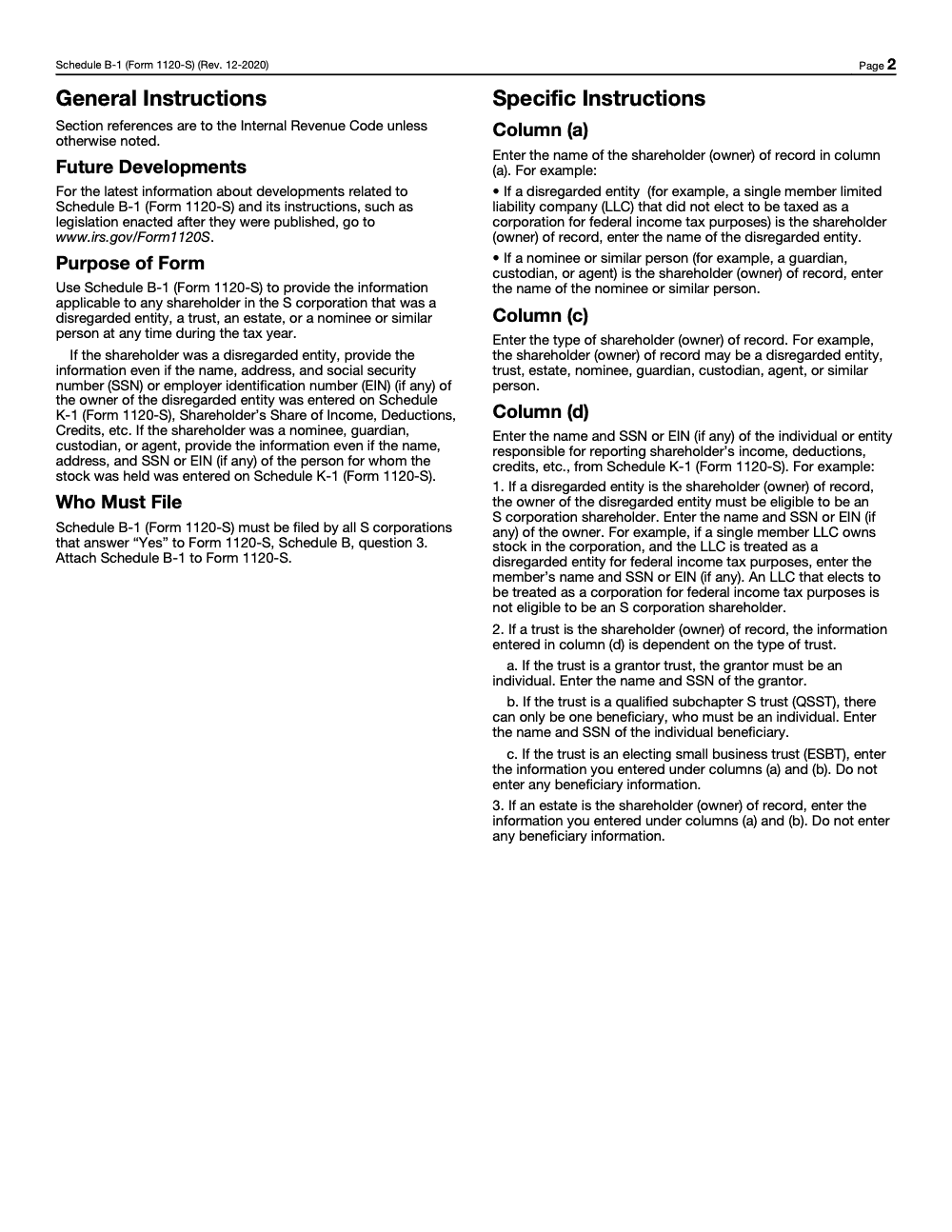
You can pull parts of this from your shareholder ledger, trust instruments, and prior‑year returns. When you prepare B‑1 for a trust, make sure you apply the type‑specific rules. For example, a QSST has exactly one individual beneficiary (a QSST cannot have multiple beneficiaries by definition), an ESBT reports differently, and a grantor trust or a section 678 trust points to the deemed owner (for a grantor trust, the grantor must be an individual). These distinctions are spelled out in IRS instructions that govern how you associate the shareholder of record with the person responsible for reporting the income.
Step by step, completing and attaching the PDF
Finish the B‑1 first
- Open the official IRS Schedule B‑1 PDF for Form 1120‑S.
- Enter the shareholder of record, their TIN, and select the shareholder type.
- Enter the responsible party’s legal name and SSN or EIN.
- Review totals and ownership periods, then save as PDF. The IRS B‑1 PDF is acceptable for electronic attachment.
Attach it in your software
- In TaxSlayer Pro, go to Schedule B, Other Information.
- Answer “Yes” to the disregarded entity question on line 3.
- Use the “Form 1120‑S Schedule B‑1 Attachment” option to browse and attach your saved PDF.
- Confirm the attached PDF details match your Schedule B answers and your K‑1s.
If your software does not create a native B‑1, that is fine. The IRS PDF you saved is designed for this purpose and can be attached with the return.
Filing timing and deadline guardrails
- General due date, an S corporation files Form 1120‑S by the 15th day of the third month after the end of its tax year. For a calendar year, this falls in March. If the date lands on a weekend or a federal holiday, you file on the next business day.
- Extensions, if you need more time, file Form 7004 by the original due date. The automatic extension is generally 6 months, but remember, it extends time to file, not to pay any corporate‑level taxes that may apply.
Practical note, weekends and DC holidays can shift the exact deadline. Always check the current year’s IRS tax calendar when you plan your internal cutoffs.
Common pitfalls to avoid
- Saying “Yes” on Schedule B, line 3, then forgetting to attach B‑1. This is the fastest way to invite a reject or a notice. The form itself warns you to attach B‑1 when line 3 is “Yes.”
- Missing or incorrect TINs for the shareholder of record or the responsible party.
- Misclassifying the shareholder type, for example, treating a disregarded entity as a corporation.
- Incomplete responsible party details for entity owners.
- Mismatches between B‑1, Schedule B answers, Schedule K‑1 ownership, and Schedule L equity.
- Forgetting trust‑specific reporting differences, especially QSST versus ESBT, when you decide who is the responsible party.
Related schedules and 2025‑season updates you should know
- Schedule K‑1, this is where the shareholder’s items flow, and it must stay consistent with your B‑1 disclosure.
- Schedule K‑2 and K‑3, the IRS noted expanded and new filing exceptions beginning tax year 2024. Confirm whether your facts meet an exception before skipping K‑2/K‑3.
- Form 7203, the IRS highlighted reporting of Schedule K‑1 box 13, code H amounts on Form 7203 in a 2025 update, so keep ownership and basis information aligned across your package.
Add a brief workpaper note that references B‑1 and the source documents you used. That makes reviews smoother and helps new staff understand why the disclosure looks the way it does.
A simple checklist you can hand to your team
- Confirm whether any shareholder of record is a disregarded entity, a trust, an estate, a nominee, or similar.
- If yes, prepare a Schedule B‑1 for each such shareholder.
- Gather legal names, TINs, owner types, and responsible party information, verify against prior‑year records.
- Align B‑1 entries with Schedule B answers, Schedules K‑1, and Schedule L equity.
- Save the IRS B‑1 PDF and attach it in your software.
- Re‑run diagnostics, then lock the return.
Practical tips from the trenches
- Add a pre‑review tick mark on Schedule B to reconfirm line 3 before you finalize.
- Store a standard naming convention for B‑1 PDFs, for example “B1_EntityName_TY2025.pdf,” to help reviewers.
- For trusts, keep a one‑page summary of trust type, beneficiary, and who is the responsible party, then link that note to the B‑1 workpaper.
- If you expect a late‑season ownership change into or out of a trust or SMLLC, set a reminder to reassess line 3 right before you transmit.
Where Accountably fits, lightly and only where it helps
If your team is buried in production, structured workpapers and standard checklists keep small items like B‑1 from slipping through. Accountably integrates disciplined workflows, consistent naming, and multi‑layer review so ownership disclosures and PDF attachments happen on time, inside your systems. Use us if you need stable capacity with file standards that reduce review time, not as a shortcut for staff. Keep control, meet deadlines, and protect compliance.
Conclusion
You now have a clear playbook. When any shareholder of record is a disregarded entity, a trust, an estate, a nominee, or a similar intermediary, answer “Yes” on Schedule B, line 3, complete Schedule B‑1, and attach it with your 1120‑S. Gather the right names and TINs, apply the correct trust rules, keep everything consistent across Schedule B, K‑1s, and equity, then file by the due date or extend on time. That ten minute form can save you a week of avoidable delay.
Common Mistakes We See Every Season
Schedule B-1 is short, but the rejects and notices it generates are almost always rooted in five recurring patterns. From my side of the desk, these are the ones I see every S-corp season.
Reusable Checklists
These checklists are written for copy-paste into firm SOPs. Each one is scoped to a single decision point in the Schedule B-1 workflow so a preparer can run it without context switching.
Pre-filing trigger check
- Pull the shareholder of record list as of any date during the tax year.
- Flag every shareholder that is not a U.S. individual filer (single-member LLC, trust, estate, nominee, guardian, custodian, agent).
- Answer Schedule B, Question 3 on Form 1120-S based on that flagged list.
- If Question 3 is "Yes," confirm Schedule B-1 (Form 1120-S), rev. December 2020, is attached to the return.
- Reconcile Schedule B-1 entries against the Schedule K-1 disclosures for the same shareholders.
- Confirm the Column (d) party for any disregarded entity is itself eligible to hold S-corp stock under IRC §1361.
Column-by-column data packet
- Column (a): name of the shareholder of record (the disregarded entity, trust, estate, or nominee itself, not the underlying owner).
- Column (b): SSN or EIN of the shareholder of record, or leave blank if no taxpayer ID exists.
- Column (c): type of shareholder, using disregarded entity, trust, estate, nominee, guardian, custodian, agent, or similar person.
- Column (d): name and TIN of the individual or entity responsible for reporting the K-1 income, deductions, and credits.
- Cross-check Columns (a) and (b) against the matching Schedule K-1 header for the same shareholder.
- Verify all section references in the instructions point to the Internal Revenue Code, per the Schedule B-1 (Form 1120-S) instructions revised December 2020.
Trust-and-estate Column (d) matrix
- Grantor trust: enter the individual grantor's name and SSN in Column (d); grantor must be an individual.
- QSST: enter the single individual income beneficiary's name and SSN in Column (d); a QSST has exactly one beneficiary.
- ESBT: repeat the trust's name and TIN from Columns (a) and (b) into Column (d); do not list beneficiaries.
- Estate: repeat the estate's name and TIN from Columns (a) and (b) into Column (d); do not list heirs or executors.
- Single-member LLC (disregarded): enter the LLC member's name and SSN in Column (d); confirm member eligibility under IRC §1361.
- Nominee or similar person: enter the beneficial owner's name and TIN in Column (d); the nominee itself sits in Column (a).
Keep 1120‑S (Schedule B‑1) Season From Stalling
Schedule B-1 is small but it sits on the critical path for every S-corporation return. For calendar-year filers, the parent Form 1120-S is due March 15, and a missing Schedule B-1 attachment cannot be patched after the fact without amending or extending the return. When trust certifications, nominee letters, or single-member LLC operating agreements show up late, Schedule B, Question 3 sits unanswered while a senior reviewer waits on documents and the whole return stalls.
The fix is document discipline upstream, not heroics at sign-off. Per the Schedule B-1 (Form 1120-S) instructions revised December 2020, the schedule has been stable for five years, so the required data fields are predictable and can be requested at engagement intake rather than discovered during review.
- Add Schedule B, Question 3 to the S-corp intake questionnaire so trusts, estates, nominees, and single-member LLCs are flagged before any K-1 work begins.
- Request the Column (d) responsible-party TIN at the same time you request the Column (a) shareholder name, not as a follow-up email two weeks later.
- Tag every trust shareholder as grantor, QSST, or ESBT on intake so the Column (d) rule is deterministic at preparation, not a judgment call at review.
- Run a shareholder-list filter at workpaper close: every entity-type shareholder must appear on Schedule B-1, and every individual direct shareholder must not.
- Cross-check Columns (a) and (b) against the matching Schedule K-1 header before sign-off so e-file rejects do not surface on March 14.
This is the kind of structured workpaper discipline our U.S.-led offshore tax delivery teams are trained to run by default, so the senior reviewer opens a clean Schedule B-1 packet instead of a March 15 fire drill.
FAQs
It is a disclosure schedule that lists any S corporation shareholder that is a disregarded entity, a trust, an estate, a nominee, or a similar person, and it identifies the responsible party that reports the income. You attach it whenever Schedule B, line 3 is “Yes.”
Your S corporation must attach B‑1 if any shareholder of record is not an individual, for example a disregarded entity, trust, estate, nominee, guardian, custodian, or agent. This applies for any amount of ownership and any asset size.
List the shareholder of record, their TIN, the owner type, and the responsible party with their TIN. Use trust‑specific rules, for example a QSST uses the single beneficiary, ESBT reporting differs, and grantor or section 678 trusts point to the deemed owner. Keep all names and numbers consistent with Schedule B and your K‑1s.
Yes. Schedule B‑1 is attached to Form 1120‑S and is due when the return is due. For calendar‑year filers that is the 15th day of the third month after year end, with the weekend and holiday rule. You can request an extension with Form 7004 for more time to file.
Use the IRS PDF for Schedule B‑1, complete it, save it, and attach it. In TaxSlayer Pro, once you answer “Yes” on Schedule B, line 3, you will see an attachment option labeled “Form 1120‑S Schedule B‑1 Attachment.”
Other forms this guide names
- Form 1120-S: Guide for S‑Corp Filing, K‑1, K‑2/K‑3, Deadlines
- Form 7004: Business Tax Extension Guide, Deadlines & E‑File
- Form 7203: S‑Corp Basis Guide, K‑1 Code H, Filing Triggers
Summarize this article with AI
About this guide
Accountably helps US CPA, EA, and accounting firms hire trained accountants and tax preparers in India.
About us Reviewed byJugal Thacker, CPAFounder and CEO at Accountably
A US-licensed CPA with 7+ years inside US firms – PwC, a real-estate tax practice, then a full-service firm, rising from reviewer to manager to advisory. This article was reviewed against current IRS guidance for the 2025 tax year and updated for filers preparing late returns, amendments, and 2026 estimates.
View profile →How we research, review, and update this guide
Every Accountably guide is researched against primary IRS sources, reviewed by a U.S. CPA, and refreshed as guidance evolves. Read our Editorial Guidelines to see how we source, fact-check, and update our content.




