
Summarize this article with AI
In Brief
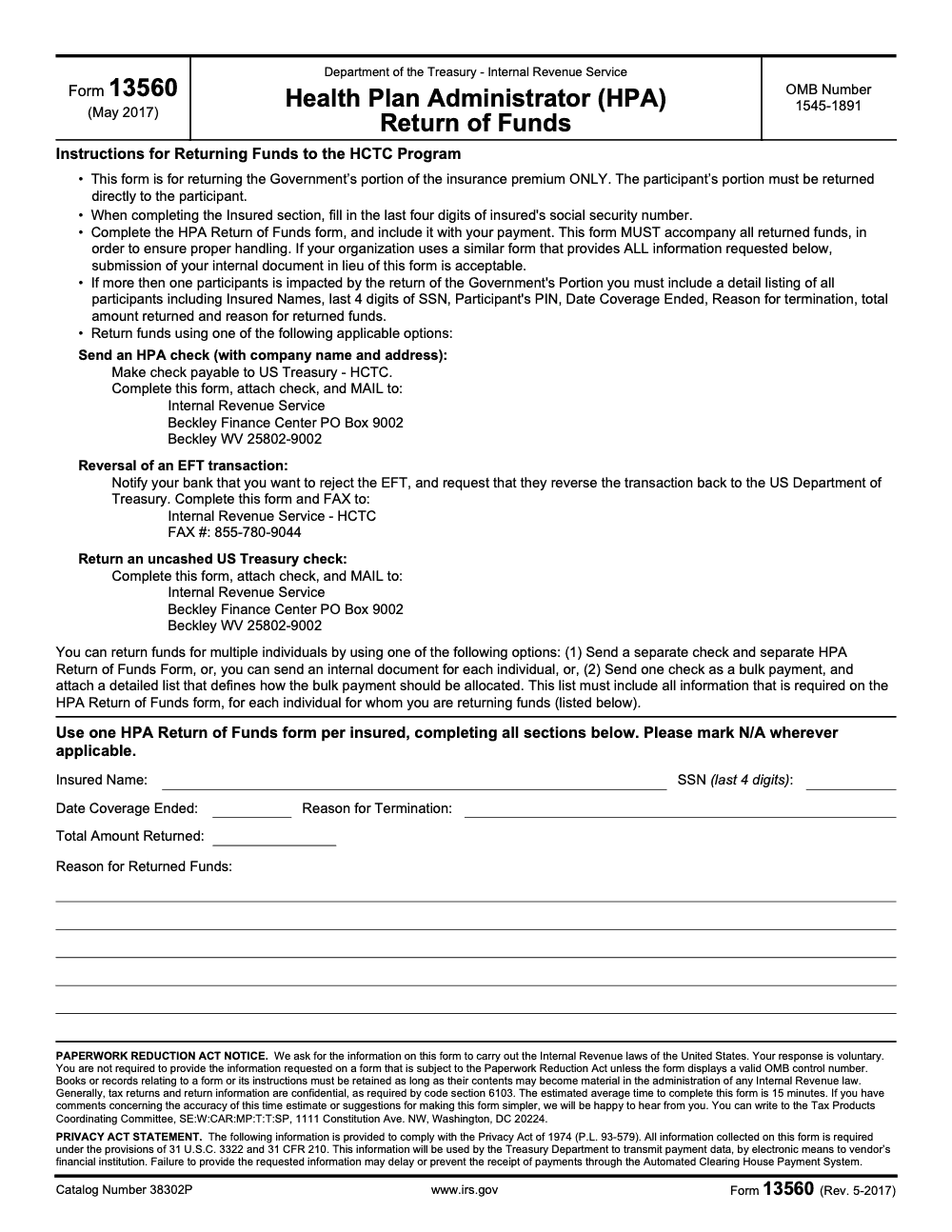
Form 13560 (Rev. May 2017) is the Health Plan Administrator (HPA) Return of Funds form, used to send the Government's portion of an HCTC premium subsidy back to the IRS (per the Form 13560 Paperwork Reduction Act notice, OMB 1545-1891, IRS Catalog 38302P). HPAs return funds through one of three approved methods: an HPA check payable to 'US Treasury - HCTC' mailed to the IRS Beckley Finance Center (PO Box 9002, Beckley WV 25802-9002), an EFT reversal documented by faxing the form to 855-780-9044, or an uncashed US Treasury check attached to the form and mailed back to the same Beckley address. For ongoing U.S. tax compliance support, see Accountably's taxation services.
A controller mails a refund and then waits while it never posts. The check had landed at a general IRS service center rather than the Beckley Finance Center, and the payee line read IRS instead of US Treasury - HCTC, so two corrections and a re-cut check later the funds finally cleared. Form 13560 is the Health Plan Administrator Return of Funds form, the one-page document that tells the IRS where to apply the Government's portion of an HCTC premium subsidy being sent back.
Now that HCTC has ended for tax years after December 31, 2021, you reach for this form mainly on legacy corrections, duplicate payments, and cleanups tied to prior periods. The routing rules are exact: a check payable to US Treasury - HCTC mailed to the Beckley Finance Center, or an EFT reversal documented by faxing the form to 855-780-9044. Below I walk it the way I walk it with new HPA finance teams, so the packet posts on the first pass without a Beckley follow-up letter.
Key Takeaways
- Form 13560 is the one‑page HCTC Health Plan Administrator Return of Funds form that tells the IRS where to apply returned money (the Government’s portion of the premium only, since the participant’s portion must be returned directly to the participant) and why it is being returned.
- The HCTC program ended for tax years after December 31, 2021, so today you use Form 13560 mainly for legacy corrections, duplicate payments, and cleanups tied to prior periods.
- The form, last revised in May 2017, remains listed on the IRS forms index. Include precise identifiers, the reason for return, and allocation by taxpayer and period.
- The information collection for this form is covered by OMB Control Number 1545‑1891, which confirms Paperwork Reduction Act oversight.
- Always package the funds and Form 13560 together with supporting proof to prevent suspense postings and misapplied credits. Keep PII minimal and accurate.
What is IRS Form 13560?
Form 13560, Health Plan Administrator Return of Funds, is the one‑page cover sheet you complete when you send HCTC dollars back to Treasury. It records your HPA identifiers, the payment you are returning, why you are returning it, and, most importantly, where the IRS should apply the money, by beneficiary and period. The current listing shows a May 2017 revision, and the form remains part of the IRS forms catalog for legacy HCTC activity.
Because it collects personally identifiable information, the form package falls under the Paperwork Reduction Act. The information collection is identified as OMB Control Number 1545‑1891, which simply means the IRS is authorized to collect the specific data the form requests and must display a valid control number.
Where Form 13560 fits now that HCTC has ended
The HCTC program covered premium assistance through tax year 2021. Congress did not extend it, and the IRS confirms HCTC applies only through December 31, 2021. That said, HPAs still encounter legacy cleanups, duplicate deposits, and enrollment corrections for those prior periods. Whenever you return money tied to those historical HCTC transactions, you should pair the funds with a completed Form 13560 so the IRS can credit the right account and month.
Practical implication for you, treat Form 13560 as your routing slip. It links each dollar you send back to the exact taxpayer and period, which reduces rework, phone calls, and suspense time.
Who must use Form 13560 and when
If you are a health plan administrator, insurer, or third‑party administrator that handled HCTC premium flows, you should use Form 13560 any time you return funds from that program. Typical triggers include overpayments, duplicate deposits, eligibility corrections, retroactive terminations, and reconciliations uncovered during audit or month‑end. Even though the program ended after 2021, legacy returns still surface, especially when you reconcile older coverage periods or correct a beneficiary’s status.
Timing that prevents suspense
- Send the completed form in the same package as the funds.
- Include a short explanation that names the beneficiary, the months affected, and the reason for return.
- Attach supporting proof, for example, remittance confirmations or check copies, to make posting easy on first pass.
If you delay the form or omit identifiers, the refund risks landing in suspense, which slows resolution and invites follow‑up letters. A paired, complete package usually posts faster and cleaner.
The essentials you will enter on Form 13560
- Your HPA name and EIN.
- Contact information for the person who can answer questions.
- Original payment details, amount, date, and how it was received.
- Reason for the return, for example, duplicate deposit, eligibility ended, or premium correction.
- Allocation instructions by beneficiary and period, plus any internal claim or policy numbers that help the IRS cross‑reference quickly.
Your goal is simple, make it easy for the IRS to apply every dollar to the right place on the first try.
Quick reference, what each section of the form accomplishes
| Element | What you enter | Why it matters |
| HPA identifiers | Name, EIN, contact | Confirms who is returning funds and who to call |
| Original payment | Amount, date, method | Links the return to the deposit you are reversing |
| Reason for return | Short, plain‑English explanation | Documents the variance for audit and routing |
| Allocation | Beneficiary, SSN or EIN, period, amount | Directs posting to the correct account and month |
| OMB and Privacy | Displayed in the form package | Confirms lawful collection and data handling under PRA |
Small detail, big impact, list multiple beneficiaries or months clearly. If space is tight, attach a schedule and reference it on the form.
Fill out Form 13560, a precise step‑by‑step
You are not just sending money back, you are giving posting instructions. Work through the form in this order so the IRS can apply every dollar on the first pass.
- HPA identifiers
- Enter your legal name and EIN exactly as they appear in your enrollment and banking records.
- Add a reachable contact, name, phone, and email, so an IRS analyst can resolve questions in one call.
- Original payment details
- List the amount you are returning, the original deposit date, and how it came in, check, ACH, or Treasury EFT.
- If you are correcting multiple deposits, attach a short schedule and reference it on the form.
- Reason for return
- Keep it plain and specific, duplicate deposit, eligibility ended, premium correction, or wrong period.
- If timing matters, state the coverage months, for example, “Jan 2021 to Mar 2021.”
- Allocation, who and when
- For each beneficiary, provide full name, SSN (only the last four digits, per the form’s Insured section instructions) or EIN, coverage period, and dollar amount to credit.
- If you are reallocating between months or people, show both the “from” and “to” lines.
- Attachments
- Include proof that ties the return to the original payment, remittance advice, check or ACH confirmations, internal ledger entries, or enrollment roster with minimal PII.
- Final checks
- Confirm OMB control number 1545‑1891 appears on the current form package, this indicates a valid collection under the Paperwork Reduction Act.
Aim for one outcome, an IRS poster can apply your funds without sending you a letter.
Required documentation and attachments
Strong attachments shorten processing time. Use this quick builder while you assemble the package.
| Attachment type | What to include | Why it helps |
| Payment evidence | Copy of check, ACH trace, or EFT confirmation | Proves the deposit you are reversing |
| Allocation schedule | Beneficiary, SSN or EIN, months, amounts | Directs posting line by line |
| Explanation memo | 3 to 6 sentences in plain English | Removes ambiguity about the reason for return |
| Enrollment roster, minimal PII | Name, last 4 of SSN, coverage dates | Confirms eligibility context without over‑sharing |
| Internal ledger extract | Journal entries, reference numbers | Speeds cross‑reference if IRS needs backup |
Keep PII to what is necessary, then store your records securely after you submit. The form package collects PII under OMB control number 1545‑1891, so treat the data like any other IRS form data you handle.
Reasons to return funds, with practical examples
Returns usually fall into a few patterns. Call them out clearly on the form and in your memo.
- Duplicate deposits Two identical remittances posted for the same person and month. Return one and state, “duplicate, credit to John Smith, SSN ending 1234, March 2021.”
- Eligibility ended retroactively Coverage terminated June 30, 2021, but July premium posted. Return the July portion and state the eligibility end date.
- Premium correction A rate table error billed 495 instead of 450. Return 45 and show the corrected monthly premium.
- Misapplied month or person Funds hit the wrong month or the wrong enrollee. Show the move from the incorrect line to the correct line in your allocation schedule.
These are legacy corrections now that HCTC ended for tax years after December 31, 2021, but they still surface during cleanups.
Overpayment identification tips you can trust
- Reconcile monthly, not just at year end. Match deposits to coverage months and eligibility files.
- Run a duplicate scan on amount, person, and period.
- Sample your largest postings by dollar value and by anomaly, for example, first month after an eligibility change.
- When you spot an issue, document it the same day, then prepare the Form 13560 package and mail with the funds.
Incorrect enrollment scenarios to watch
- Never‑effective enrollments, the payment predates the effective date.
- Medicare start midyear, eligibility ends, so you return the prorated overage.
- Trade status updates, the person no longer qualifies, you return the affected months.
- Beneficiary mix up, two people with similar names were crossed, your schedule shows the correction by SSN and period.
Where to apply the payment on Form 13560
This is the most important field on the page. Be unambiguous.
- Identify the taxpayer by name and SSN (last four digits only, per the form’s Insured section) or EIN.
- Specify the exact months and year.
- Label the type of credit, premium subsidy overpayment, reconciliation, or other HCTC category.
- For multiple people or months, add a one‑page schedule. Keep the same column order as the form, name, SSN or EIN, period, amount.
Think like a poster, if two lines on your schedule could be swapped without changing the totals, you need one more identifier.
When you do this well, you protect members’ benefits, you prevent suspense, and you keep correspondence to a minimum.
Common errors and how to avoid them
| Pitfall | What happens | How to prevent it |
| Missing Form 13560 | Refund lands in suspense | Always include the form with the funds |
| Wrong SSN or EIN | Misapplied credit or a letter to you | Cross‑check against eligibility and payment files |
| Handwritten or faint copies | Rework due to illegibility | Use the fillable PDF and print clearly |
| Vague reason for return | Extra IRS follow‑up | Write a short, plain‑English explanation |
| No OMB number shown | Processing questions | Use the current form that displays 1545‑1891 |
Build a simple submission checklist, date stamp, copy your package, and track delivery. If you receive a letter, respond with your copy of the form and your attachments so the poster can match records quickly.
If you operate without time to build checklists, a structured partner can help you template Form 13560 packages. Accountably does this with SOP‑driven workpapers and named reviewers, inside your systems, so legacy HCTC returns are clean and auditable, without adding overhead. Only mention us where it is helpful, quality and compliance come first.
Privacy, PII, and the required Privacy Act statement
Handling Form 13560 means you are handling sensitive data. Keep what you share to the minimum needed to post the funds correctly, then store everything like any other IRS record.
What PII appears and why
- HPA identifiers, legal name, EIN, address, and a direct contact.
- Beneficiary identifiers that allow accurate posting, name and the last four digits of SSN (the form does not ask for the full nine-digit number) or EIN, plus the coverage period and dollar amount.
- Transaction details, original deposit date, check or ACH reference, and the return amount with a clear reason.
Each field serves one purpose, to match the returned dollars to the correct account and month. If an item does not help with that goal, leave it out.
When in doubt, minimize. Include just enough to make posting a one‑pass task, then stop.
Privacy Act statement, what it tells you
The Privacy Act statement inside the form package explains the legal authority for collecting information, the purpose for using it, routine disclosures, and what happens if you choose not to provide an item. Read it before you finalize the package. It sets the ground rules for how the IRS can handle your data and how long it is kept. It also points to your responsibility to store and transmit the form securely inside your organization.
Practical safeguards you should adopt
- Collect only what is needed to allocate the refund, then redact anything extra on attachments.
- Use secure transfer and storage, encryption in transit and at rest where possible.
- Keep a clean copy of the form, your schedule, and proof of mailing, then lock down access with role‑based permissions.
- Set a retention period in your policy. Note that the Form 13560 instructions impose no fixed retention period – records must be kept as long as their contents may be material in the administration of any Internal Revenue law. Many teams use three years after submission as a working baseline, longer if disputes arise.
How OMB Control Number 1545‑1891 applies
The small box with the control number can look like a footnote, yet it matters. OMB Control Number 1545‑1891 signals that this information collection is approved under the Paperwork Reduction Act. In plain English, the IRS is authorized to request the exact elements the form asks you to provide.
What you should do with that:
- Confirm the control number appears on the current version you are using.
- Use the form as designed, avoid re‑creating it in a way that drops required fields.
- Keep the instructions with your records, they show intent and reduce confusion during audits.
If you do not see a control number on a form copy, find the current version and switch. It prevents avoidable processing questions later.
Where Form 13560 fits inside the HCTC payment cycle
Even though HCTC ended after 2021, legacy corrections still move through the same flow. Think in five steps.
- Receipt and reconciliation Your team finds the variance during month‑end or a targeted cleanup.
- Root cause confirmation You validate the issue with source records, eligibility files, and payment traces.
- Return package build You complete Form 13560, prepare a clear schedule, attach proof, and write a short memo.
- Remittance and tracking You send the funds with the form in the same package, then track delivery and retain copies.
- Posting confirmation You confirm the credit posted to the right beneficiary and month, then close the case in your ledger.
If any step stalls, document the date and the open item, then follow up. A two‑minute note today saves an hour of detective work next quarter.
Access, download, and print the form, plus when to contact the IRS
- Download the current, single‑page, fillable PDF from the IRS forms library.
- Verify it displays the control number.
- Complete it on screen for clarity, then print and sign if a signature is required by your policy or instructions.
- Avoid sending sensitive files by email unless your policy and the IRS instructions allow it and you can secure the channel.
- If you have a question about mailing addresses, acceptable attachments, or allocation entries, call the program contact listed in the instructions or use your standard IRS support channel. Capture the date, the name of the person you spoke with, and the guidance you were given.
Quick checklist you can copy
- Confirm the beneficiary and months to credit.
- Prepare Form 13560 with exact HPA identifiers.
- Write a six‑sentence memo, who, what, when, why, how much, and where to post.
- Attach proof, remittance advice or trace, roster with minimal PII, ledger extract.
- Pair the form and funds in the same package.
- Track delivery and confirm posting in your system.
- File the complete copy in a restricted folder with version and date.
If you manage a high volume of legacy cleanups, template the package. A standard memo, a standard schedule, and a review checklist will cut review time in half. Accountably builds and runs these SOPs inside your workflow if you want outside help without sacrificing control.
Templates and examples you can copy today
You can speed up Form 13560 prep with a short memo and a clean allocation schedule. Use the templates below and adjust names, dates, and amounts to fit your case.
One‑page memo template
Subject, Return of HCTC funds and allocation by beneficiary and month From, [Your HPA name and EIN] Date, [MM/DD/YYYY]
We are returning HCTC funds received on [original deposit date] in the amount of [total return amount]. The return corrects [duplicate deposit, eligibility end, premium adjustment, or misapplied period]. Please apply the funds as listed on the attached schedule, by beneficiary and month.
Contact for questions, [Name, title, phone, email].
Attachments, Form 13560, allocation schedule, remittance proof, enrollment roster with minimal PII, and ledger extract.
Sample allocation schedule, format
| Beneficiary name | SSN last 4 | Period, month and year | Amount to credit | Comment |
| John Smith | 1234 | March 2021 | 250.00 | Duplicate deposit |
| Maria Lee | 5678 | July 2021 | 300.00 | Eligibility ended June 30 |
| Ahmed Khan | 9012 | Jan 2021 | 45.00 | Premium correction, 495 to 450 |
Tips when you build yours, keep the columns in this order, sort by month, and match totals to your cover letter. If you need to move money between people or months, show both the “from” and “to” lines so posting is unambiguous.
Submission timeline you can reuse
- Day 0, identify issue during reconciliation, document the root cause in two sentences.
- Day 1, prepare Form 13560 and the allocation schedule, attach proof.
- Day 1, second reviewer checks SSN or EIN, periods, totals, and the reason line.
- Day 2, send funds and form in one package, track delivery, save a copy to a restricted folder.
- Day 7 to 21, verify posting and close the case in your ledger with a short note.
Two reviewers, one checklist, and a standard schedule will cut your review time by half while improving accuracy.
When a specialized partner helps
If you are handling a large backlog or you want the process to run the same way every time, a structured partner can help you standardize Form 13560 packages without losing control. Accountably integrates trained offshore teams into your workflow, uses SOPs, checklists, and layered review, and works inside your systems so the package is clean and auditable. You keep your templates and approval rules, we provide capacity that does not add chaos. Mentions stay minimal and practical, the goal is accurate posting and less rework.
Conclusion and next steps
You now have everything you need to return HCTC funds with confidence. Pair Form 13560 with the money you are sending back, attach a simple schedule and proof, and keep the explanation short and specific. Use two sets of eyes before you mail, then track delivery and confirm posting. The result is faster resolution, fewer follow‑ups, and a tidy audit trail you can trust.
If you want help building SOPs, templates, and review checklists for legacy HCTC cleanups, you can loop our team in for a short working session. We will map your current flow, turn it into a simple package kit, and keep the process inside your systems.
Common Mistakes We See Every Season
Most Form 13560 packets that bounce out of the Beckley Finance Center fail for the same handful of reasons. The form itself is one page, but the rules around payee, mailing address, and multi-participant detail catch the same HPA teams every reconciliation cycle.
Reusable Checklists
Use these as copy-paste starting points for your HPA SOPs. Each one tracks the specific fields and routing rules cited in the Form 13560 instructions, so a preparer running the checklist top-to-bottom produces a packet that posts cleanly on the first pass at the Beckley Finance Center.
Pre-mail packet review (single insured)
- Insured Name matches your enrollment record exactly.
- Only the last four digits of the SSN entered, not the full nine-digit number.
- Date Coverage Ended matches the HPA's termination record for the participant.
- Reason for Termination filled in (do not leave blank).
- Total Amount Returned reflects the Government's portion of the premium only, never the participant's share.
- Reason for Returned Funds is specific (overpayment, duplicate, eligibility correction, retroactive termination).
- HPA check payable to 'US Treasury - HCTC' verbatim, not 'IRS' or 'Internal Revenue Service'.
- HPA check shows company name and remitting address on the face.
- Inapplicable fields marked 'N/A' rather than left blank.
- Mailing label reads: Internal Revenue Service, Beckley Finance Center, PO Box 9002, Beckley, WV 25802-9002.
- Internal copy archived with the original deposit reference, retained as long as the contents may be material in IRS administration per the form's records-retention notice (no fixed retention period applies; IRC §6103 cited in the instructions governs confidentiality, not retention).
EFT reversal sequence
- HPA bank notified to reject the EFT and reverse the transaction back to the US Department of Treasury.
- Bank confirmation logged (date, contact, reference number) before the form goes out.
- Form 13560 completed for each insured affected by the reversal.
- Reason for Returned Funds references the EFT-reversal date and bank confirmation reference.
- Form faxed to 855-780-9044, not mailed (the fax line is reserved for EFT reversals).
- Fax transmission confirmation retained with the packet.
- Reconciliation entry posted in the HPA's books matching the reversal amount to the Treasury return.
Bulk allocation list review (multi-participant)
- Bulk check payable to 'US Treasury - HCTC' for the combined total of all participants.
- One Form 13560 (or equivalent internal cover document with the same fields) attached to the check.
- Allocation list includes every participant covered by the bulk return.
- Each row carries Insured Name, last four SSN digits, Participant's PIN, Date Coverage Ended, Reason for Termination, Total Amount Returned, and Reason for Returned Funds.
- Participant's PIN populated for every row, since this field is required for bulk lists even though it is not on the single-insured form.
- Sum of all per-participant amounts cross-foots to the bulk check total before mailing.
- Mailing label reads: Internal Revenue Service, Beckley Finance Center, PO Box 9002, Beckley, WV 25802-9002.
Keep 13560 Season From Stalling
Form 13560 looks like a quick administrative task. The IRS estimates 15 minutes to complete it (per the Form 13560 Paperwork Reduction Act notice, OMB 1545-1891), yet HPA finance teams still hit the same blockers every reconciliation cycle. Coverage end-date mismatches, terminated enrollees with overpaid premium subsidies, and routine EFT reversals each generate Return of Funds packets that must reach the Beckley Finance Center cleanly the first time. Otherwise the payment sits in suspense and the HPA's books never close.
The good news is the form itself is predictable. The drag is the workflow around it: matching the Participant's PIN to the right Termination Reason, getting the check payee exactly right, and routing EFT reversals through the bank before the IRS fax goes out. A short playbook around this one form removes most of the rework.
- Build one master template that captures the six Insured-section fields plus the Participant's PIN, so a single packet works for an individual return or a bulk allocation list.
- Lock the check payee in your AP system to 'US Treasury - HCTC' verbatim, since the Form 13560 instructions reject checks made out to 'IRS' or 'Internal Revenue Service' for HCTC routing.
- Use a separate SOP branch for EFT reversals: notify the bank first, confirm funds route back to the Department of the Treasury, and only then fax the completed Form 13560 to 855-780-9044.
- Mark inapplicable fields 'N/A' rather than leaving them blank, since the Beckley Finance Center treats blank fields as missing data and opens a follow-up request.
- Retain every Form 13560 packet (or your equivalent internal document) for as long as the underlying premium subsidy may be material to IRS administration, per the records-retention notice in the form instructions (no fixed retention period is imposed). IRC §6103, also cited in the instructions, governs confidentiality of return information rather than retention.
Repetitive compliance work like this benefits from documented SOPs and structured review, not ad-hoc handling by whoever has bandwidth. Accountably's tax and compliance delivery teams run Form 13560 packets through preparer, senior, and quality review, so coverage end dates, PINs, and payee fields are right the first time and the Beckley Finance Center never bounces a return for missing information.
FAQs
The one‑page form is the backbone, but a short memo helps reduce questions, especially when you have multiple beneficiaries or months. Keep it to six sentences and attach proof that ties back to the original deposit. If your return is straightforward, the form plus a clear schedule is often sufficient. Always keep a complete copy for your records.
Yes, as long as you list each line with the correct person, month, amount, and a short comment. If it gets crowded, use two schedules and reference both on the form. Clear labeling is more important than squeezing everything on one page. Keep totals accurate across the form and schedules.
Signature requirements can vary by process and timing. If your internal policy calls for ink, print and sign. If you plan to use an electronic signature, confirm the current IRS instructions for this form and keep proof of authorization. When in doubt, follow the most conservative option your compliance team approves.
The Form 13560 instructions impose no fixed retention period – records must be kept as long as their contents may be material in the administration of any Internal Revenue law. Many teams use at least three years after submission as a working baseline, longer if there is a dispute or a pending inquiry. Your internal retention policy controls, so align with it and your counsel’s guidance. Keep a clean PDF set, form, schedule, memo, and proof of delivery, in a restricted folder.
Use what your policy allows and what the IRS can use to post accurately. The last four digits with the name, month, and year can work when combined with supporting proof. If you are unsure, contact the IRS through your usual channel and document the guidance you receive.
Prepare a corrected schedule and a short note that references the original package, then contact the IRS through your support channel for instructions. Keep dates, names, and the advice you receive in your file. Correct early, it is easier before posting completes.
Summarize this article with AI
About this guide
Accountably helps US CPA, EA, and accounting firms hire trained accountants and tax preparers in India.
About us Reviewed byJugal Thacker, CPAFounder and CEO at Accountably
A US-licensed CPA with 7+ years inside US firms – PwC, a real-estate tax practice, then a full-service firm, rising from reviewer to manager to advisory. This article was reviewed against current IRS guidance for the 2025 tax year and updated for filers preparing late returns, amendments, and 2026 estimates.
View profile →How we research, review, and update this guide
Every Accountably guide is researched against primary IRS sources, reviewed by a U.S. CPA, and refreshed as guidance evolves. Read our Editorial Guidelines to see how we source, fact-check, and update our content.




