
Summarize this article with AI
In Brief
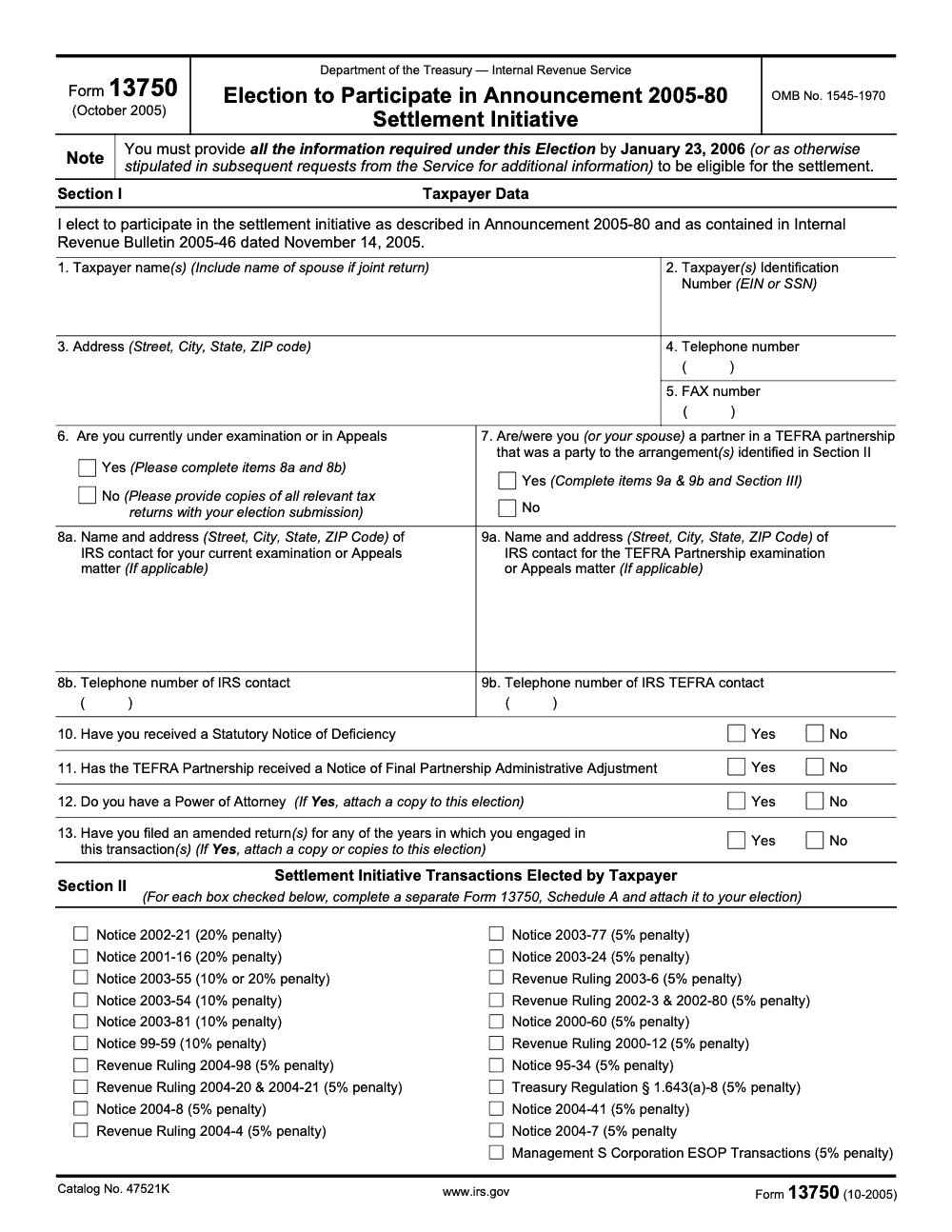
Form 13750 is the election form for the IRS Announcement 2005-80 Settlement Initiative, a one-time program covering 21 specific abusive tax transactions enumerated in Section II (per Internal Revenue Bulletin 2005-46). The election window closed January 23, 2006, so the form is historical today, used only to authenticate legacy elections and confirm finality. For partnership matters in tax year 2018 or later, the BBA centralized audit regime applies instead. See our tax services if a legacy file needs hands.
Most Form 13750 questions start when a partner inherits a binder, spots a reference to Announcement 2005-80, and wants to know whether those years are truly closed. You are never preparing a fresh election here. The window shut on January 23, 2006, and the form is historical, used today only to read old records and confirm finality.
Form 13750 was the election to enter the Announcement 2005-80 settlement initiative, a one-time program covering 21 specific abusive transactions, ending in a closing agreement under IRC §7121 once the IRS verified the information. The thing to know when a legacy file lands on your desk: if any of the years are tax year 2018 or later, the BBA centralized partnership audit regime applies instead.
Key Takeaways
- Form 13750 was the IRS election to enter the Announcement 2005‑80 settlement initiative for specified transactions and tax years under examination.
- The initiative set a structured way to resolve partnership and related items, ending with a closing agreement under IRC §7121 after the IRS verified information.
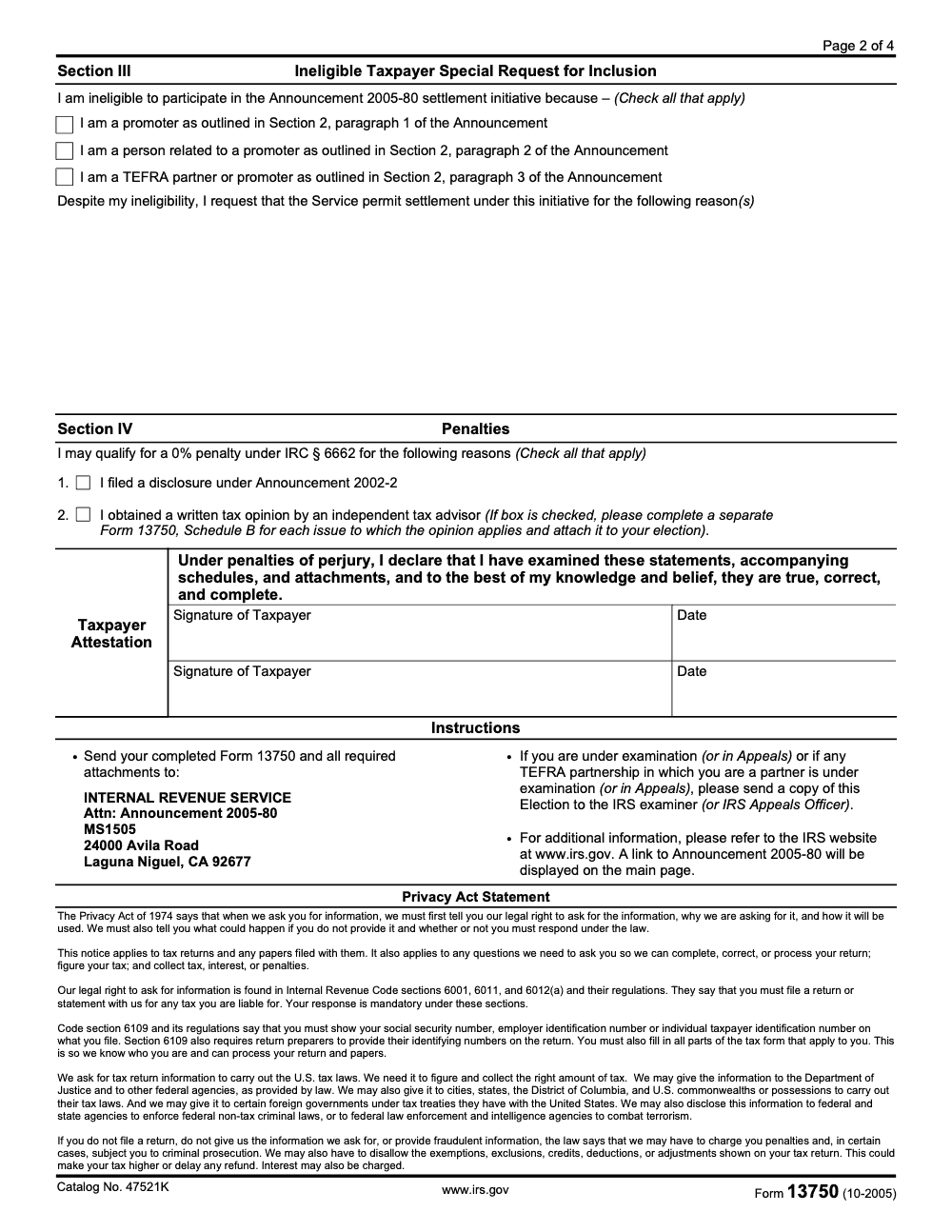
- The original filing deadline was January 23, 2006, and elections were mailed to the IRS Laguna Niguel address in the announcement.
- If a partnership was involved, affected partners generally needed to act for themselves, and those under exam or in Appeals had to send a copy to their IRS contact.
- Today, Form 13750 appears in the IRS forms inventory as an October 2005 revision, so treat it as historical. For current‑year audits beginning with 2018 tax years, the BBA centralized partnership audit regime applies, not TEFRA.
What Is Form 13750 And Why It Exists
Form 13750 is titled “Election to Participate in Announcement 2005‑80 Settlement Initiative.” In plain terms, you used it to tell the IRS that you wanted to settle certain listed or similar transactions under terms the Service published in late 2005. The form triggered the 2005‑80 process, which included document requests, calculations, and, if accepted, a binding closing agreement. The aim was speed, uniformity, and finality on defined issues, without a court fight.
The announcement spelled out the election mechanics and where to send the package. It also made clear that the Service could ask for more information, such as marketing materials or opinion letters, and that failing to provide what was requested on time could get you bounced from the initiative. Once the IRS had what it needed, it drafted a closing agreement under §7121, you signed within a set window, and payment followed.
If the transaction ran through a pass‑through entity, the person who would actually owe the tax, for example the partner or S corporation shareholder, had to submit the election in their own name. That design kept liability and documentation aligned with the taxpayer who would ultimately pay.
How This Interacts With Partnership Procedures
Back when 2005‑80 was live, partnership audits largely followed TEFRA procedures, and partners had consistency and settlement rights. If the IRS settled with one partner on partnership items, others could request the same terms within strict timelines. The Internal Revenue Manual explains those consistency rules and, where used, the role of closing agreements under §§6224(c) and 7121.
Fast forward. For tax years beginning January 2018, the BBA centralized partnership audit regime replaced TEFRA for most partnerships. Under BBA, the IRS generally assesses an imputed underpayment at the entity level, and partnerships may modify or “push out” adjustments. That is why Form 13750 is a historical tool. If your year is 2018 or later, you are almost certainly in BBA land, not 2005‑80.
Who Should Use, Or Historically Used, Form 13750
Here is the simple rule. If a taxpayer or a partner in a TEFRA partnership was involved in a transaction covered by Announcement 2005‑80, and the IRS invited participation, Form 13750 was the election to get in. The text of the announcement set the deadline, the mailing address, and the follow‑up steps. If you were already under examination or in Appeals, you were required to send a copy to your assigned IRS contact as well.
Below is a quick eligibility snapshot you can use when triaging old notices or inherited files.
| Criterion | Practical meaning |
| Eligible filer | Taxpayer directly involved in a 2005‑80 transaction, including partners tied to TEFRA partnerships |
| Trigger | You received an FPAA, exam activity, or a specific 2005‑80 settlement invitation referencing covered issues |
| Authority to sign | The taxpayer or an authorized representative with proper power of attorney |
| Timing | The original election had to be postmarked by January 23, 2006 |
| Scope limit | The election applied to specified transactions and years in the announcement or notice |
The IRS forms index still lists Form 13750 with an October 2005 revision date, which is useful when you are authenticating old workpapers or reconstructing a timeline for counsel.
Documents And Information The IRS Expected
When you elected into 2005‑80, the Service could ask for more than the filled‑out form. Plan to assemble, or verify in historical files, items such as:
- Copies of the IRS letter or exam report that referenced 2005‑80.
- A clear description of the transaction, including dates, entities, and steps.
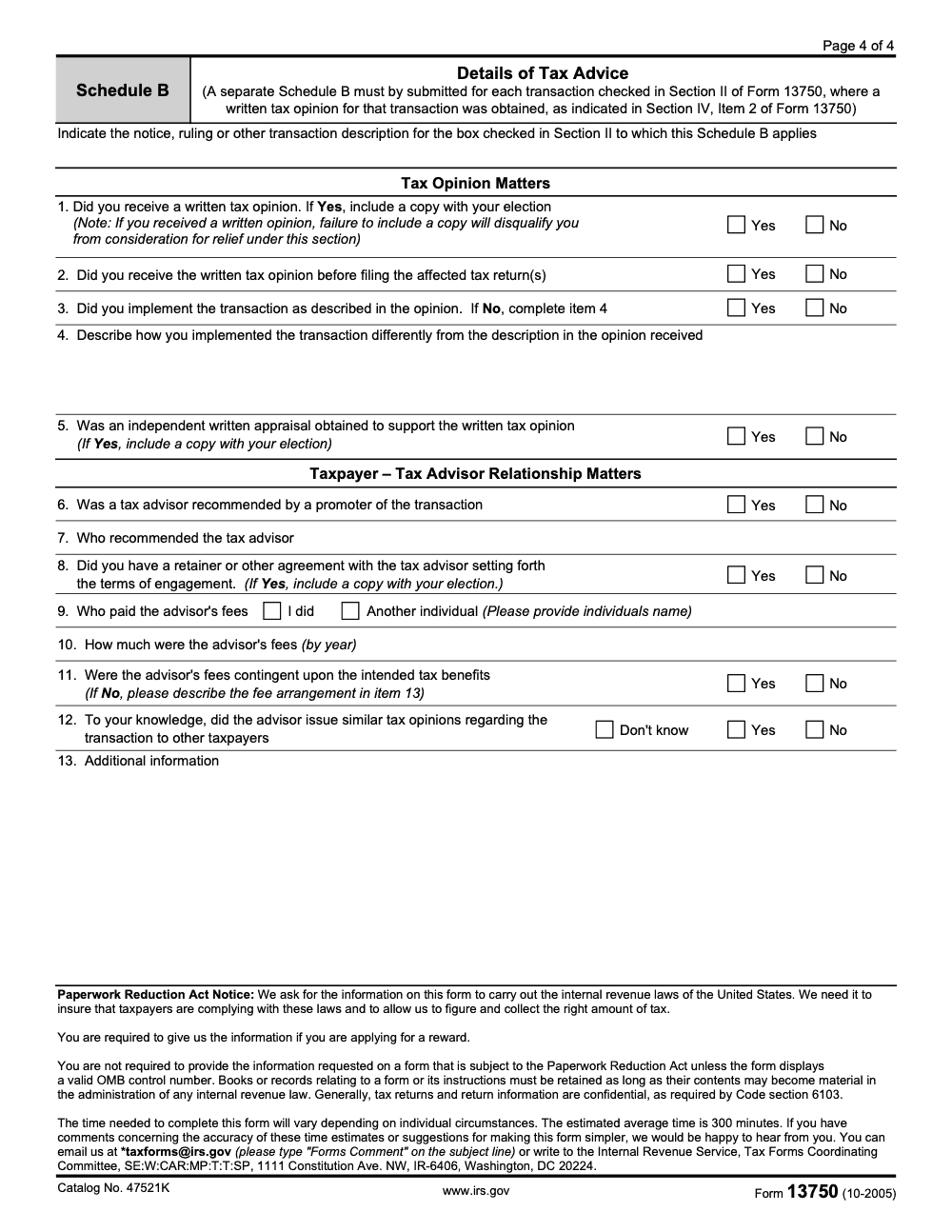
- Names of promoters, advisors, and any written tax opinions relied upon, with a complete physical copy of every opinion attached (under Schedule B Item 1, if a written opinion was received and a copy was not included with the election, the taxpayer was disqualified from Section IV relief).
- Computations supporting the tax, interest, and penalty framework under the announcement.
- For pass‑throughs, partner‑level schedules that show who bears the tax after consistent treatment.
The announcement allowed the IRS to request additional information within a 30‑day window, subject to extension for good cause. Missing that window could result in removal from the initiative.
Expect the endgame to be a closing agreement. That document binds both sides on the settled items and years and is authorized under IRC §7121. In TEFRA cases, the IRM recognizes closing agreements alongside §6224(c) settlements.
Where And How You Filed Back Then
When the initiative was open, elections were mailed to the IRS Laguna Niguel address shown below. If you were in exam or Appeals, you also sent a copy to your assigned IRS contact. There was no online portal for this election.
| Step | What you did |
| Prepare election | Complete Form 13750 and the required attachments under penalties of perjury |
| Mail election | Send to “Attn, Announcement 2005‑80, MS 1505, 24000 Avila Rd, Laguna Niguel, CA 92677,” by the stated deadline |
| If under exam/Appeals | Send a copy to your examiner or Appeals Officer |
| After filing | Respond quickly to IRS information requests, then review and sign the closing agreement within the deadline |
Those mechanics, including the exact address and the original January 23, 2006 deadline, are spelled out in the announcement.
How Form 13750 Worked, From Election To Finality
Think of Form 13750 as your election ticket into a specific, time‑boxed IRS settlement track. You completed the form, attached the required schedules, and mailed it to the Laguna Niguel address specified in Announcement 2005‑80 by the original cut‑off, January 23, 2006. If you were already assigned to an examiner or Appeals Officer, you sent that person a copy as well. The IRS then requested any additional documents it needed, computed the settlement, and, if it approved your case, issued a closing agreement for signature.
The closing agreement was the finish line. Under IRC §7121 and related guidance, a properly executed closing agreement is final and conclusive for the matters it covers, with very narrow exceptions like fraud or misrepresentation. This is why practitioners valued the 2005‑80 path for eligible cases. It tied off exposure cleanly and prevented issues from dragging on.
What The IRS Expected In Your Package
Beyond the signed election, expect the IRS to ask for a concise but thorough record of the transaction and who was involved. In practice, that meant copies of the IRS notice that referenced 2005‑80, descriptions and timelines of the steps taken, the identities of promoters and advisors, full physical copies of any written tax opinion received (mere reference to an opinion was not enough – Schedule B Item 1 disqualified the taxpayer from Section IV relief if the opinion was not attached), and computations showing how tax, interest, and any specified penalties would be determined under the announcement. The Service reserved the right to discard incomplete or late submissions that did not meet the election rules.
If You Missed The Window
The 2005‑80 election window was historical. For audits of tax years beginning January 2018 and later, you are under the BBA centralized partnership audit regime, which changes who pays, how assessments are made, and what elections are available. That is a different playbook, with concepts like the partnership‑level imputed underpayment and the optional push‑out election. So, if your file involves 2018 or newer tax years, Form 13750 is not the right tool.
Quick orientation, 2018 and later years generally follow BBA, earlier TEFRA years used FPAAs and partner‑level assessment. Different mechanics, different forms, different timelines.
Practical Timeline For A Legacy 2005‑80 File
If you are cleaning up an inherited file or reconstructing an old case for risk review, use this timeline to understand how a compliant path should look.
- Confirm coverage Pull the IRS notice and verify that Announcement 2005‑80 applied. Identify the exact tax years and transactions referenced, and list all pass‑throughs and affected owners.
- Verify the election timing Check for proof that the election was mailed to the Laguna Niguel address by the January 23, 2006 deadline. If the record is missing, look for mailing receipts or practitioner logs that document timely submission.
- Locate follow‑up correspondence Find any IRS information requests and responses. Note deadlines and whether the IRS accepted the case into the initiative. Keep an eye out for draft computations exchanged with the examiner or Counsel.
- Close‑out artifacts Confirm the presence of a fully executed closing agreement and payment proofs. Because §7121 agreements are binding, that document is the critical artifact showing finality on the covered matters.
TEFRA To BBA, What Changed That Matters Today
You will still see TEFRA language in older files, like FPAAs, tax matters partner references, and partner‑level settlement rights. Under TEFRA, adjustments happened at the partnership, but tax was generally assessed to partners. Under BBA, the default is different. The IRS can assess an imputed underpayment at the partnership level, then the entity may modify or push out adjustments. This affects strategy, cash planning, and who ultimately writes the check.
Here is a high‑level comparison to help you triage notices quickly.
| Feature | TEFRA (older years) | BBA, generally 2018+ |
| Point of contact | Tax matters partner | Partnership representative |
| Core notice at end of exam | FPAA | FPA |
| Who pays by default | Partners pay on partner returns | Partnership pays an imputed underpayment |
| Consistency and participation | Partner participation and consistency rules | No partner participation right to challenge adjustments |
| Options | Partner settlements and consistent treatment rights | Modify IU or elect push‑out if conditions met |
These points are drawn from the IRS’s BBA overview and comparison. Use the official chart when educating clients and staff.
Quick Checklist, Legacy 13750 File Review
- Pull the IRS notice that cites Announcement 2005‑80 and match the tax years and entities.
- Verify a timely election and that a copy went to the examiner or Appeals if applicable.
- Inventory all requested documents and confirm they were provided within the stated window.
- Locate the executed closing agreement, then align payments and abatement entries to the agreement terms.
- For any years 2018 or later in the same client group, switch to BBA procedures and evaluate PR designation, opt‑out eligibility, or push‑out strategy.
Plain‑English Definitions You Can Share With Clients
- Closing agreement, a written agreement under §7121 that finally resolves defined issues or years, subject only to narrow exceptions like fraud. Use it as your evidence of finality.
- FPAA, the final notice that ends a TEFRA partnership exam and tees up court options, commonly seen in older files. The BBA equivalent is the FPA.
- BBA push‑out, an election that shifts the effect of adjustments to reviewed‑year partners, rather than having the partnership pay the imputed underpayment. Timing and content rules are strict.
Step‑By‑Step, How To Validate A Legacy 13750 Election Today
If you inherited a file that references the 2005‑80 initiative, start with a calm, methodical review. Your goal is simple, confirm that the election was valid, the closing agreement was executed, and the account reflects the settlement.
- Pull the triggering IRS notice Locate the package that mentions Announcement 2005‑80. Note the tax years, entities, and any listed or similar transaction language. Create a short cover sheet so anyone on your team can see the scope at a glance.
- Prove the election was timely and complete Form 13750 elections were mailed by a hard deadline, historically January 23, 2006. Look for proof of mailing, certified receipts, or a practitioner log that ties the postmark to the deadline. Confirm the signer was authorized, and that names, EINs, and tax years on the form match the notice exactly.
- Trace IRS follow‑ups The announcement allowed the IRS to request more documents. In the file, you want a clean trail of requests and responses, with dates. Build a simple index, request number, date received, date responded, and what was sent.
- Confirm the closing agreement For accepted cases, the finish line is a fully executed closing agreement. Check for signatures by both the taxpayer and the IRS, an execution date, the resolved issues, and the payment terms. Reconcile the agreement to posted payments, abatements, and interest computations.
- Reconcile partner‑level effects If a partnership was involved, verify that partner‑level returns and schedules reflect the settlement. Your workpaper should show which owners were affected and how consistent treatment was achieved.
- Document finality Save a single PDF binder, Form 13750, the IRS notices, your proof of mailing, follow‑up correspondence, the signed closing agreement, and proof of payment. Add a one‑page memo summarizing dates, amounts, and where finality attaches. This becomes your institutional memory.
Tip, put a one‑minute “read‑me” at the front of the binder. If a new reviewer opens the file two years from now, they will still understand what was settled, when, and where the evidence sits.
Common Mistakes We Still See, And How To Fix Them
The pattern with legacy 13750 files is rarely a fresh error. It is a stale assumption that the original submission was tight, when the rules around schedules, attachments, and mailing copies were narrower than most binders show. Walk these six points before you sign off on finality.
Mini Case Sketch, How A Messy File Became A Clean Win
A new client came in with a three‑inch binder and a single directive, “Please tell me this is over.” The file contained a 2005‑80 reference, an FPAA, and scattered emails. We built a two‑page index first. Page one listed the triggering notice, the election date, and a certified mail receipt. Page two mapped three IRS follow‑up requests, our responses, and a fully executed closing agreement, signed two months later. Payments matched the agreement within 12 dollars of trailing interest, which we reconciled to transcripts. We archived everything into one PDF binder with a five‑paragraph memo. The partner was able to tell the client, with confidence, that the covered years were closed. More importantly, the team could answer that same question a year later, without starting over.
If Your Years Are 2018 And Later, Use The BBA Playbook
Most active partnership exams now sit under the centralized partnership audit regime. If your notices show 2018 or later tax years, apply this checklist instead of chasing a 2005‑80 election.
- Confirm the partnership representative designation and authority.
- Review the initial IDR discipline, who collects what, and by when.
- Model the default imputed underpayment versus modification or push‑out.
- Align books and workpapers to a reviewer‑friendly structure so computations flow.
- Keep an executive summary for partners, cash impact, timing, and decision points.
Different regime, different mechanics. Your workflow needs clear owners, dated steps, and a playbook the whole team can follow without improvising.
Where An Operational Partner Helps Without Taking Over
You do not need another vendor, you need delivery discipline. If your team is buried in production, set up an operational lane that does not drain partner time.
- Standardize workpapers so every reviewer sees the same order, naming, and tick marks.
- Clarify handoffs, preparer to senior to reviewer to signer, with due dates.
- Track turnaround times by engagement type so you can forecast, not guess.
- Put continuity plans in writing so a departure does not derail progress.
Accountably steps in only where it actually helps, building clean SOPs, structured workpapers, defined review layers, and service levels that keep exams and settlements on a clock. We work inside your systems and templates so your team retains control, and partners spend more time on client strategy, not sorting files.
Templates You Can Adapt In Your Firm
Workpaper Naming, Keep It Boring And Predictable
- 00 Executive Summary
- 10 Notices And Transcripts
- 20 Election And Mailing Proof
- 30 IRS Requests And Responses
- 40 Computations And Schedules
- 50 Closing Agreement, Signed
- 60 Payment Proofs And Interest Recons
- 90 Final Memo And Index
One‑Page Finality Memo, The Five Paragraphs
- Scope and years settled
- Election date and proof
- IRS requests and responses
- Summary of the closing agreement and amounts
- Payment, account status, and any open follow‑ups
Keep this memo to one page. If someone cannot understand the file from that page, your binder is doing too much or too little.
How Accountably Fits, Without Taking Over Your Practice
When partners tell me they want fewer surprises and fewer Saturday reviews, they are not asking for more resumes, they are asking for structure. That is the gap we fill.
- SOP‑driven execution, so every exam and settlement file follows the same spine.
- Structured workpapers, so reviewers can fly and partners only weigh in on judgment calls.
- Multi‑layer review, preparer to senior to quality to final, with dated sign‑offs.
- Turnaround service levels, so deadlines stop being a moving target.
- Continuity plans, so vacations or exits do not pause delivery.
We plug our trained offshore teams into your systems, QuickBooks, CCH, Thomson Reuters, Karbon, TaxDome, and more, and we adapt to your templates from day one. You keep control. You gain capacity, predictability, and calmer reviews.
Final Checklist And Next Steps
- If your file references Announcement 2005‑80, verify the election, the response trail, and the closing agreement.
- Bind the evidence into a single PDF with a one‑page memo.
- If your years are 2018 and later, switch to the BBA playbook and work from a push‑out or modification decision tree.
- Standardize your workpapers and review layers so the next legacy file takes hours, not days.
- If you want a delivery system that scales without burning out your team, bring in an operational partner who improves structure inside your tools, not outside them.
Our goal is simple, give you a repeatable way to reach finality faster, with fewer revisions and fewer weekend saves.
Reusable Checklists
The checklists below are copy-paste ready for your firm SOPs. Adapt the labels to your binder structure, but keep the steps in order – they mirror how the IRS reviewed these elections.
Legacy 13750 file validation packet
- Confirm the election was postmarked on or before January 23, 2006 (per Announcement 2005-80).
- Verify taxpayer name and EIN or SSN on Line 1 and Line 2 match the IRS notice exactly.
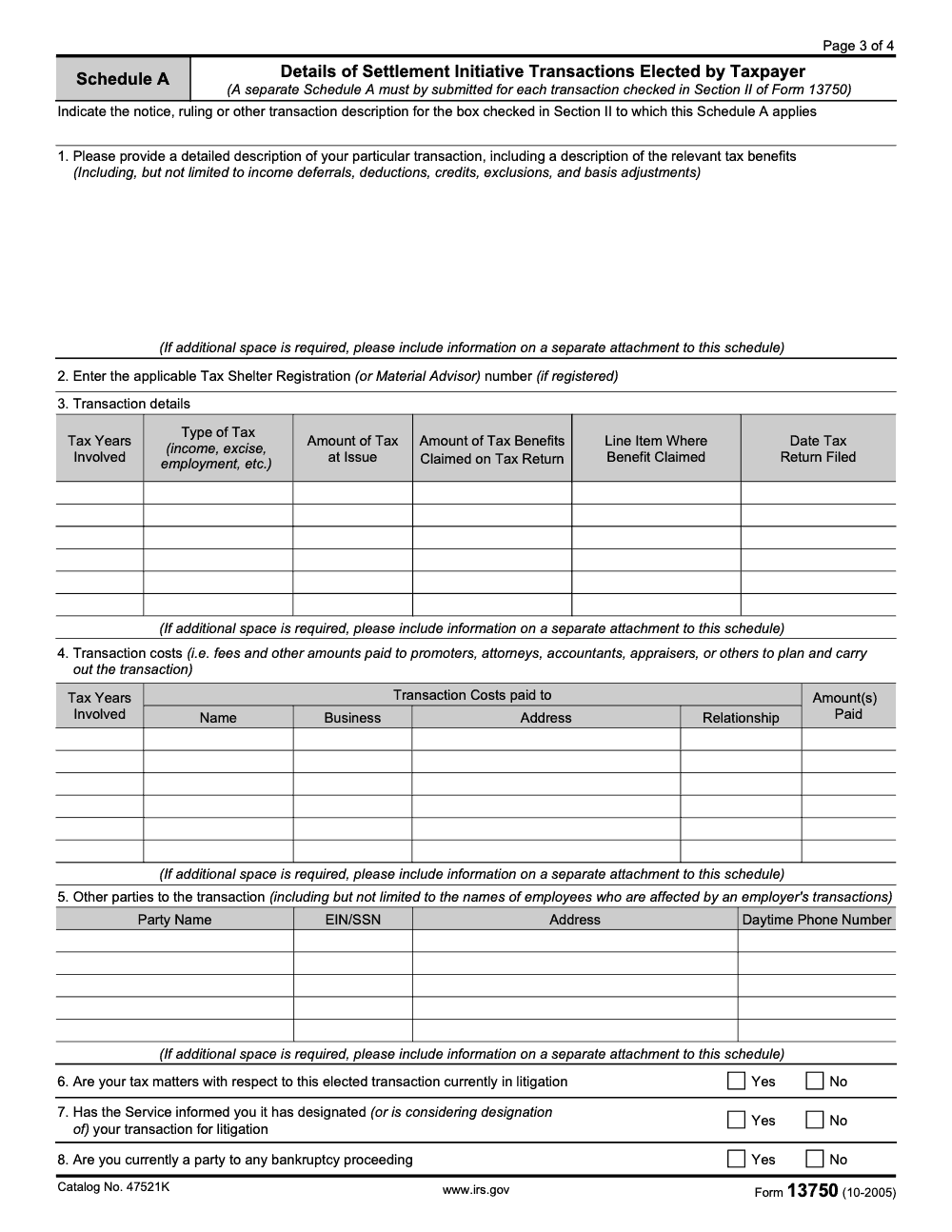
- Count checked boxes in Section II and confirm one Schedule A per checked box.
- Locate every written tax opinion referenced and confirm each is physically attached.
- If the filing was joint, verify both spouses signed under the perjury declaration.
- For exam or Appeals cases, locate proof of duplicate mailing to the IRS contact.
- For TEFRA partnership entries, confirm Section III items 9a, 9b, and the special-inclusion paragraph were completed.
Closing agreement reconciliation
- Locate the fully executed closing agreement and confirm both IRS and taxpayer signatures.
- List the covered years and issues from the agreement and match them to the original notice.
- Tie posted tax, penalty, and interest amounts on transcripts to the agreement totals.
- Reconcile any abatements, refunds, or payment installments to the agreement schedule.
- If a Section IV 0% penalty was claimed, confirm Schedule B and the written opinion are in the binder.
- Build a one-page finality memo and place it at the front of the PDF binder.
TEFRA-to-BBA cutover scan
- List every covered tax year in the file and tag each as pre-2018 (TEFRA-era) or 2018 and later (BBA).
- For pre-2018 years, look for FPAA references, partner consistency rights, and the original 2005-80 election trail.
- For 2018 and later years, switch to the BBA playbook with partnership representative, FPA, and imputed underpayment mechanics.
- If the file mixes both regimes, draft a one-page cover memo identifying which years sit in which lane.
- Surface any BBA push-out or modification decisions for partner-level handling.
Keep 13750 Season From Stalling
Form 13750 is historical, but the cleanup work it triggers is not. Legacy 2005-80 references surface in inherited audit binders, partner transitions, and quality control reviews, and each one asks the same question: are these years truly closed? The original election covered 21 abusive transaction categories enumerated in Section II (per Internal Revenue Bulletin 2005-46), and the IRS estimated 300 minutes of preparation time per election (per the Paperwork Reduction Act notice on Form 13750). Dense workpapers do not age well, and the answer is rarely in the first folder you open.
The fix is structure, not extra hours. A repeatable review playbook lets a senior reach the finality call without re-reading the entire binder, and lets a junior produce reviewer-ready workpapers on the first pass.
- Build a standard binder spine: notice, election, Schedules A and B, mailing proof, IRS correspondence, executed closing agreement, payment reconciliation.
- Confirm the Section II checkbox count matches the Schedule A count before any other review step.
- Track Section IV claims separately – the 0% penalty under IRC § 6662 only stands when the Announcement 2002-2 disclosure or attached independent opinion is in the binder.
- For partnership cases, draft a one-page year-by-year regime map: TEFRA for pre-2018 years, BBA for 2018 and later.
- End every legacy file with a one-page finality memo a new reviewer can read in five minutes.
Accountably plugs into this work without taking it over. Our trained offshore teams handle the workpaper assembly, reconciliation, and binder build inside your templates, so your senior signers spend their time on the finality call. See how our tax services integrate with legacy file cleanup and exam support.
FAQs
Form 13750 is a historical election tied to the 2005‑80 settlement initiative. Use it only when you are cleaning up or authenticating older files that reference that program. For 2018 and later partnership years, follow the BBA rules instead.
The signed closing agreement. Verify that both the taxpayer and the IRS signed, confirm the covered years and issues, and reconcile posted payments and abatements to the agreement. Keep that agreement with a short summary memo in a single PDF binder.
Not automatically. If a valid closing agreement exists, that document is your controlling evidence of finality. Document the gap, then tie every conclusion to the executed agreement and transcripts.
In TEFRA‑era files, partners had rights to consistent treatment. Build a partner schedule that shows who was affected, the amounts, and where those items landed on the partner returns. Tie the totals back to the agreement.
FPAA is a TEFRA term seen in older years. Under BBA, you will see an FPA instead. If the year is 2018 or later, think BBA, not TEFRA.
Closing agreements are designed to be final. Except for narrow issues like fraud or misrepresentation, you should treat them as conclusive. If a clerical error causes a posting mismatch, work with the IRS on account correction, not on reopening the agreement.
Summarize this article with AI
About this guide
Accountably helps US CPA, EA, and accounting firms hire trained accountants and tax preparers in India.
About us Reviewed byJugal Thacker, CPAFounder and CEO at Accountably
A US-licensed CPA with 7+ years inside US firms – PwC, a real-estate tax practice, then a full-service firm, rising from reviewer to manager to advisory. This article was reviewed against current IRS guidance for the 2025 tax year and updated for filers preparing late returns, amendments, and 2026 estimates.
View profile →How we research, review, and update this guide
Every Accountably guide is researched against primary IRS sources, reviewed by a U.S. CPA, and refreshed as guidance evolves. Read our Editorial Guidelines to see how we source, fact-check, and update our content.




