
Summarize this article with AI
In Brief
Form 13803 is the application to participate in the IRS Income Verification Express Service (IVES) program – the entry point to faster taxpayer transcript retrieval for mortgage, banking, background-check, credit, and licensing use cases. Per the Form 13803 instructions (Rev. August 2022), the IVES account principal listed on Line 9 must wet-sign the application and fax it to 844-251-8254; e-signatures are not permitted, and you cannot submit Form 4506-C until the IRS sends an acceptance notification after the suitability check completes.
Faxing Form 13803 to the IRS is not acceptance into the Income Verification Express Service, and you cannot send Form 4506-C until the IRS sends an acceptance notification after its suitability check on the business and every individual named. Form 13803 is the application to join IVES, the program behind faster taxpayer transcript retrieval for mortgage, banking, and other verification uses.
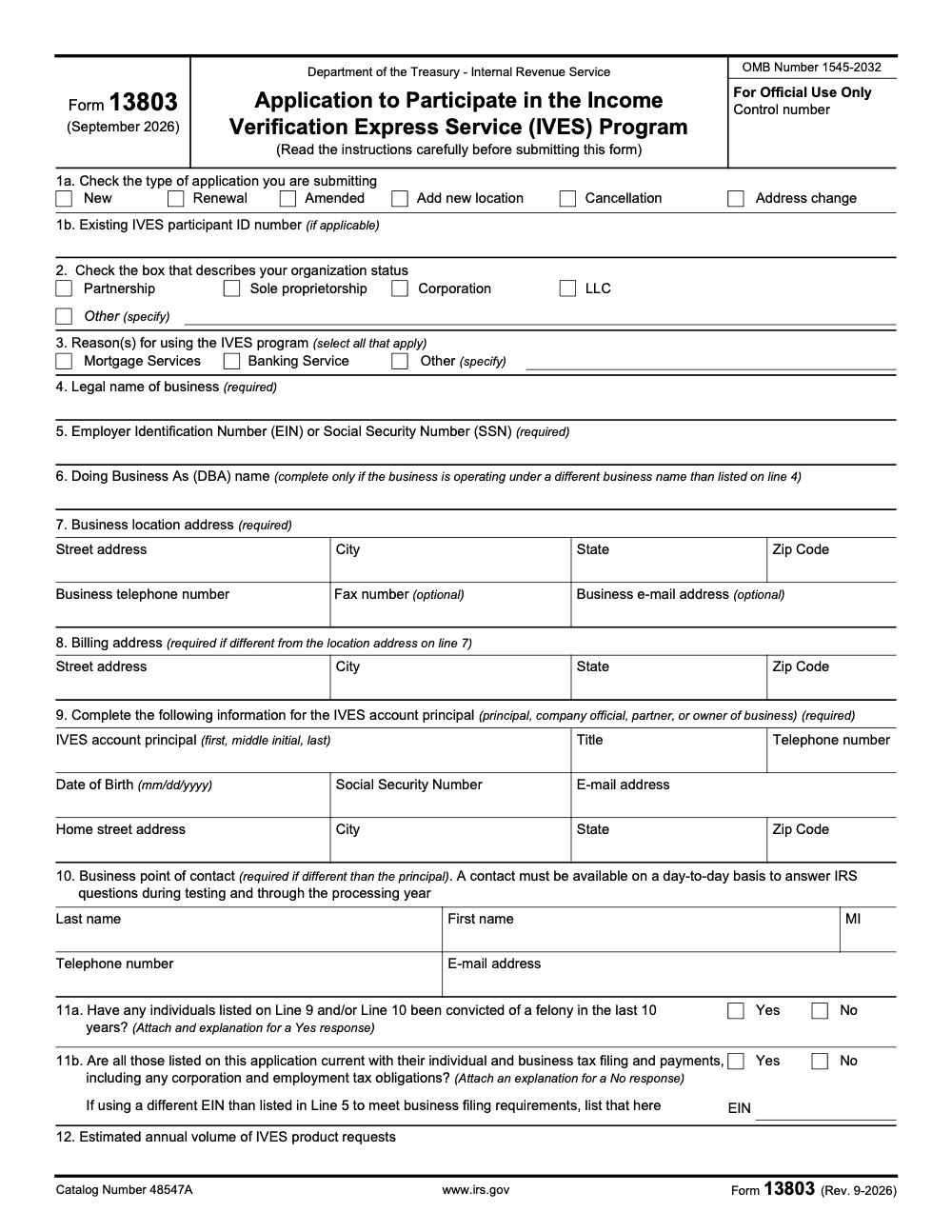
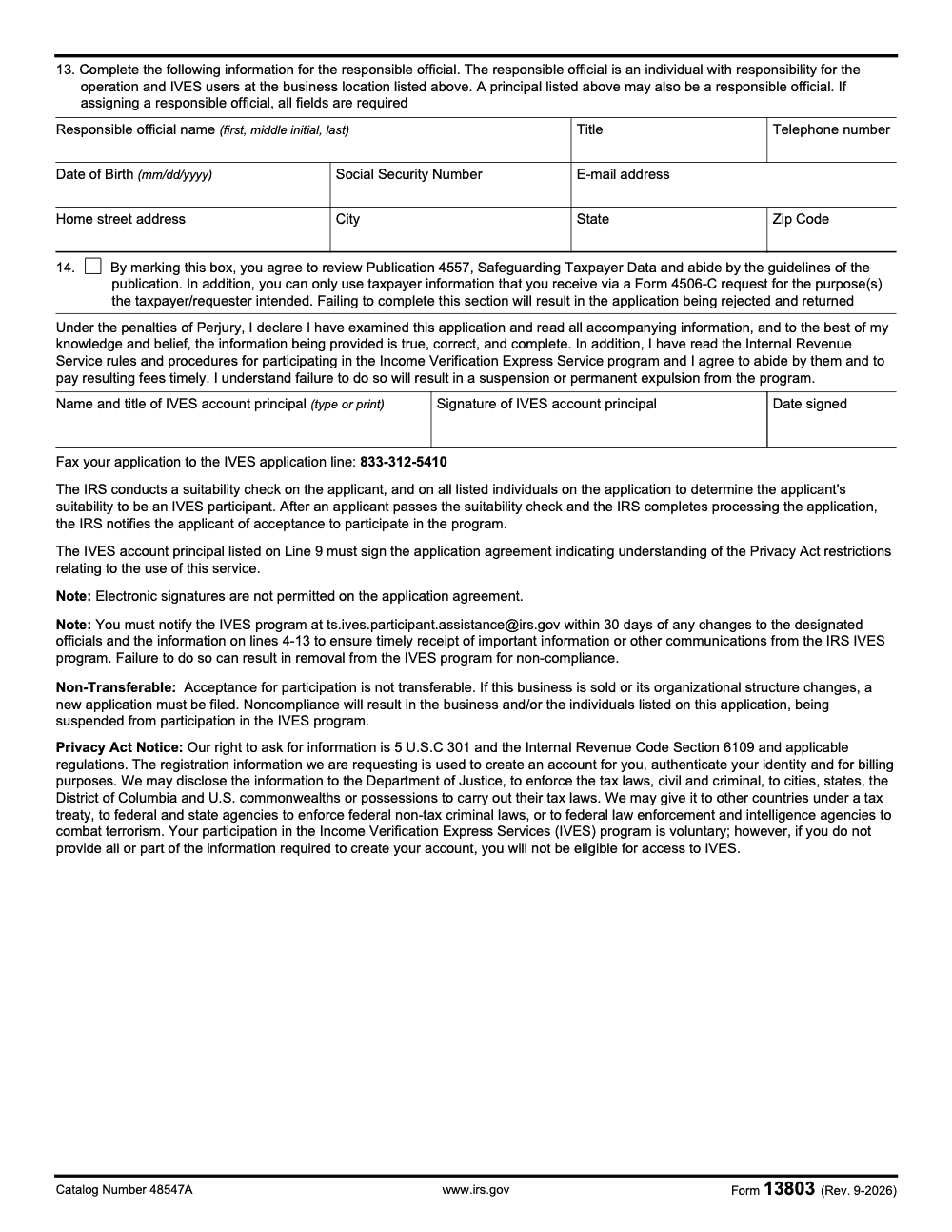
The IVES account principal listed on Line 9 must wet-sign the application, since e-signatures are not permitted, and you fax it to 844-251-8254. The application has 14 numbered lines, and Line 14 is the binding agreement to follow the Publication 4557 safeguarding rules.
Key Takeaways
- Form 13803 enrolls your business in IVES, the IRS program that delivers tax transcripts for authorized uses, such as lending and verification. As of December 2025, the IRS requires a wet signature and fax submission to 844-251-8254 (electronic signatures are not permitted on the application agreement, and the form provides no e-file or mail-in option).
- Do not send Form 4506‑C until after acceptance. The IRS will confirm your servicing site and where to submit transcripts once you are approved.
- The application has 14 numbered lines. Line 14 is the binding agreement to follow the Publication 4557 safeguarding rules, and the IRS runs suitability checks on the business and every individual you name before granting acceptance.
What Form 13803 does, in plain English
Form 13803 is the IRS’s application to participate in IVES. You use it to identify your business, name the principal or controlling officer, list the responsible officials, and set a daily‑available primary contact. The IRS requires a wet signature by the Line 9 principal on this application, then you fax it to the IVES application line, 844‑251‑8254. After intake, the IRS runs background and suitability checks on the business and every named individual. When you are accepted, the IRS assigns campus contacts and tells you where to submit Form 4506‑C.
Where Form 13803 fits in the IVES flow
Form 13803 is the front door to IVES. You cannot access the program or submit any Form 4506‑C until your application is processed and the IRS confirms acceptance. Only after approval will you get campus routing and submission instructions for Form 4506‑C.
Why the details on Form 13803 matter
Small mismatches can stall enrollment. The IRS uses Form 13803 to validate your legal entity data, your principal, and your daily contact. Enter the legal name, address, and TIN exactly as shown on your governing records. Designate a primary contact who is reachable every business day and understands your IVES workflow, since campus staff will use that person for time‑sensitive questions. If you have multiple offices, list responsible officials for each, or state that the principal will serve as the single responsible official.
The daily‑available primary contact
Pick someone who will actually answer. The IRS expects the primary contact to be reachable on a day-to-day basis during testing and through the processing year (not only at application time) and to route issues quickly. Add direct phone and a monitored email. Keep backups for vacations so you do not miss time‑critical items that affect closings or compliance turnaround.
A note on delivery discipline
If your firm is juggling busy season, gaps in staffing, and review bottlenecks, IVES can feel like one more spinning plate. The fix is process. Clear SOPs for 4506‑C intake, naming conventions for workpapers, and defined review steps will keep your team out of rework mode and reduce deadline stress. If you need outside help to build that discipline without losing control, a structured offshore partner can be used sparingly to run standard steps inside your systems and templates, not as a resume farm. Mentioning Accountably here is appropriate because this post lives on our blog, and our model focuses on documented SOPs, layered reviews, and security controls that reduce revision cycles, not just adding bodies. Use help only where it improves control and speed.
Exactly how to complete and fax Form 13803
Follow this step‑by‑step so intake begins on first pass.
- Company identifiers
- Enter your legal name and full business address, plus telephone and fax. Match your formation documents and your internal system of record.
- Principal
- Identify the principal, owner, or controlling officer who will be accountable for IVES participation.
- Responsible officials
- List one for each participating office, or state that the principal will serve as the sole responsible official.
- Primary contact
- Provide the single daily‑available contact with direct phone and a monitored email.
- Signature and fax
- Print, wet sign, and fax the application to 844‑251‑8254. Keep the transmission confirmation with the date and time.
Quick submission checklist
- Legal name, address, TIN, phone, fax match governing documents
- Principal identified with authority over IVES
- Responsible officials listed per office, or principal designated
- Primary contact listed, reachable daily with direct phone and email
- Original wet signature, clean single‑sided fax, confirmation retained
Roles you must name on the form
| Role | What they do | IRS expectation |
| Principal | Owns IVES participation and wet-signs the application on Line 9 | Has authority and is subject to suitability checks |
| Responsible Official | Manages daily IVES operations at each office | Keeps workflows on track, ensures documentation |
| Primary Contact | Answers IRS during business hours, every day | Rapid response, routes issues, maintains continuity |
Keep the primary contact truly primary
One name, one number, one inbox that gets checked. If you operate multiple sites, keep the primary contact central while listing site‑level responsible officials. Build a simple coverage plan for PTO so IRS calls and emails never wait.
What happens after the fax, the real timeline
Once your wet‑signed Form 13803 arrives, the IRS opens the file and begins the suitability review on the business and every individual named on the application. After approval, you receive campus contacts and your 4506‑C routing. Do not submit 4506‑C before you get that acceptance and routing.
| Phase | IRS action | Your action |
| Receipt | Opens file | Keep fax proof |
| Suitability | Background and suitability checks on the applicant business and every listed individual (principal, point of contact, responsible official) | Respond to any requests |
| Acceptance | Assigns campus contacts and routing | Prepare 4506‑C intake and SOPs |
Suitability and acceptance, what the IRS checks
After the IRS receives your wet‑signed Form 13803, they conduct suitability checks on the applicant business and every individual listed on the application, including the principal, the business point of contact, and any responsible officials. The review validates identity, screens for disqualifying issues, and confirms your fitness to handle taxpayer data. If anything is unclear, the IRS will ask for more information before making a decision. When you pass, you receive your acceptance notice, your servicing site, and your transcript submission routing.
Timing in practice
Your clock starts when the IRS has your wet‑signed Form 13803 in hand. If you see a pause, check that your principal’s signature is original and that the Line 14 Publication 4557 agreement box was marked. Ask your campus contact about status once assigned.
Common mistakes that slow IVES enrollment
The same handful of issues land on my desk every IVES onboarding cycle. None of them are exotic, but each one resets the clock on your start date or triggers a rejection that loops you back to a fresh Form 13803.
End‑to‑end setup checklist you can copy
- Gather legal entity details that match your governing records
- Complete Form 13803, name principal, responsible officials, primary contact
- Confirm the Line 14 Publication 4557 safeguarding agreement box is marked
- Print and wet sign with the Line 9 principal, then fax to 844‑251‑8254, keep the confirmation
- Hold all Form 4506‑C submissions until the IRS acceptance notice and routing arrive
- Build SOPs for 4506‑C intake, naming, and reviews
Final tips and a quick compliance note
- Keep your Form 13803 packet and suitability results centralized and ready for audits.
- Date‑stamp every fax and store the confirmation with your application record.
- Standardize file names and review checklists so revisions are rare and fast.
- Confirm the Line 14 Publication 4557 box is marked before the principal signs.
Compliance note: Always confirm the current fax number, signature requirements, and form revision in the latest Form 13803 instructions on IRS.gov before you submit. This article is general information, not legal or tax advice.
Where Accountably can help, briefly
If you want structured help, use it where it adds real value. For example, you might want a documented SOP for 4506‑C intake, standardized naming across batches, and layered reviews that reduce partner time. That is the kind of work Accountably is built to support, working in your systems and templates with security controls and continuity plans. Keep ownership of decisions, bring in help to speed execution and protect quality, and avoid resume‑only vendors that shift risk onto your team.
Reusable Checklists
These checklists are written to drop straight into a firm SOP. The page persists your tick state in browser storage, so you can step away mid-batch and return to where you left off.
Form 13803 pre-fax review
- Line 1a box matches the change type (New only for first-time applicants).
- Line 1b participant ID populated for any existing participant making a change.
- Line 4 legal name matches the entity's governing documents exactly.
- Line 5 EIN or SSN populated (sole proprietors use SSN).
- Line 6 DBA left blank if there is no separate operating name.
- Line 7 business address complete; Line 8 only completed if billing differs from Line 7.
- Line 9 principal and Line 10 point of contact both have name, title, DOB, SSN, phone, and address fields complete.
- Line 11a felony question answered for principal AND point of contact, with explanation memo attached if Yes.
- Line 11b tax compliance answered for all listed individuals and entities; alternate filing EIN disclosed if used.
- Line 13 responsible official fields fully completed if a responsible official is assigned.
- Line 14 Publication 4557 agreement box marked.
- Wet signature by the Line 9 principal on the agreement.
- Fax sent to 844-251-8254 and confirmation page filed with the application packet.
Suitability waiting window
- Confirm the fax confirmation is stored with the entity's enrollment record.
- Notify the Line 10 point of contact to monitor phone and email on a day-to-day basis.
- Block any workflow that triggers Form 4506-C submissions before the acceptance letter arrives.
- Flag the enrollment calendar at the 30, 60, and 90-day marks for partner review.
- Hold client transcript commitments at "pending IVES routing" until acceptance is received.
- Capture the assigned servicing site and submission routing in the SOP the day the acceptance letter arrives.
Form 4506-C intake (post-acceptance)
- Verify the IVES acceptance letter and assigned servicing site are on file before accepting any 4506-C request.
- Confirm the requester's stated purpose and tag the request with that purpose code in your workflow.
- Use the current Form 4506-C revision; reject stale revisions at intake.
- Validate taxpayer identifiers against governing records before routing for signature.
- Lock the transcript output to the stated purpose; block secondary use without a new authorized request.
Keep 13803 Season From Stalling
The IVES enrollment cycle is built around a fax-only application, a wet signature on Form 13803, and a suitability review the IRS runs on the entity and every individual you name. Per the Form 13803 instructions, acceptance is not granted until that review is complete, which means transcript work for mortgage clients, background-check requesters, and credit-decision teams sits idle while paperwork moves. The gap between fax submission and IRS notification is the bottleneck that quietly drags the delivery calendar.
The fix is treating IVES enrollment like a controlled engagement, not a one-off form. Standardize the packet, lock down review gates before the wet signature, and stage the post-acceptance workflow so the day your participant ID lands, the 4506-C pipeline is ready to run.
- Build a Form 13803 packet template with Lines 4, 5, 7, 9, and 10 pre-mapped to entity records, so every applicant starts from the same source of truth.
- Run a line-by-line pre-fax review covering Line 14 Publication 4557, Line 1a/1b change type and existing ID, and the Line 11a felony attestations for both principal and point of contact, before the wet signature.
- Maintain a suitability-window log that blocks any Form 4506-C submission until the acceptance letter and the assigned servicing site are on file.
- Standardize Form 4506-C intake: current revision only, purpose-coded at receipt, and tagged to the original requester's intended use.
- Document a rejects playbook so a wrong-routing or incomplete-request notice never sits more than a day before it is worked.
That structured intake and layered review is exactly the work our offshore delivery teams handle inside active IVES practices. We build the SOPs, run the reviews, and keep the post-acceptance 4506-C pipeline moving so partners stay focused on advisory work. See our taxation services for how the model fits an existing IVES enrollment.
FAQs
Complete the 14 lines of Form 13803, have the Line 9 principal wet‑sign it, mark the Line 14 Publication 4557 agreement, and fax it to 844‑251‑8254. The IRS then runs suitability checks on the business and every named individual. After acceptance, the IRS assigns your servicing site and sends transcript submission instructions. Do not submit 4506‑C until you have that acceptance and routing.
No. Per the Form 13803 instructions, the IVES account principal named on Line 9 must wet‑sign the application; electronic signatures are not permitted on the application, and there is no e‑file or mail‑in option. Print it, sign it by hand, and fax it to 844‑251‑8254.
For Form 13803, fax is the only published submission method, and it provides a timestamped confirmation you can keep with your enrollment record. The IRS publishes the application fax line, 844‑251‑8254, for this purpose. If you must mail something else to the IRS, use a trackable service, but for the IVES application the published fax process is the standard.
Other forms this guide names
- Form 4506-C: Guide to IRS Transcripts, IVES, and SBA
Summarize this article with AI
About this guide
Accountably helps US CPA, EA, and accounting firms hire trained accountants and tax preparers in India.
About us Reviewed byJugal Thacker, CPAFounder and CEO at Accountably
A US-licensed CPA with 7+ years inside US firms – PwC, a real-estate tax practice, then a full-service firm, rising from reviewer to manager to advisory. This article was reviewed against current IRS guidance for the 2025 tax year and updated for filers preparing late returns, amendments, and 2026 estimates.
View profile →How we research, review, and update this guide
Every Accountably guide is researched against primary IRS sources, reviewed by a U.S. CPA, and refreshed as guidance evolves. Read our Editorial Guidelines to see how we source, fact-check, and update our content.




