
Summarize this article with AI
In Brief
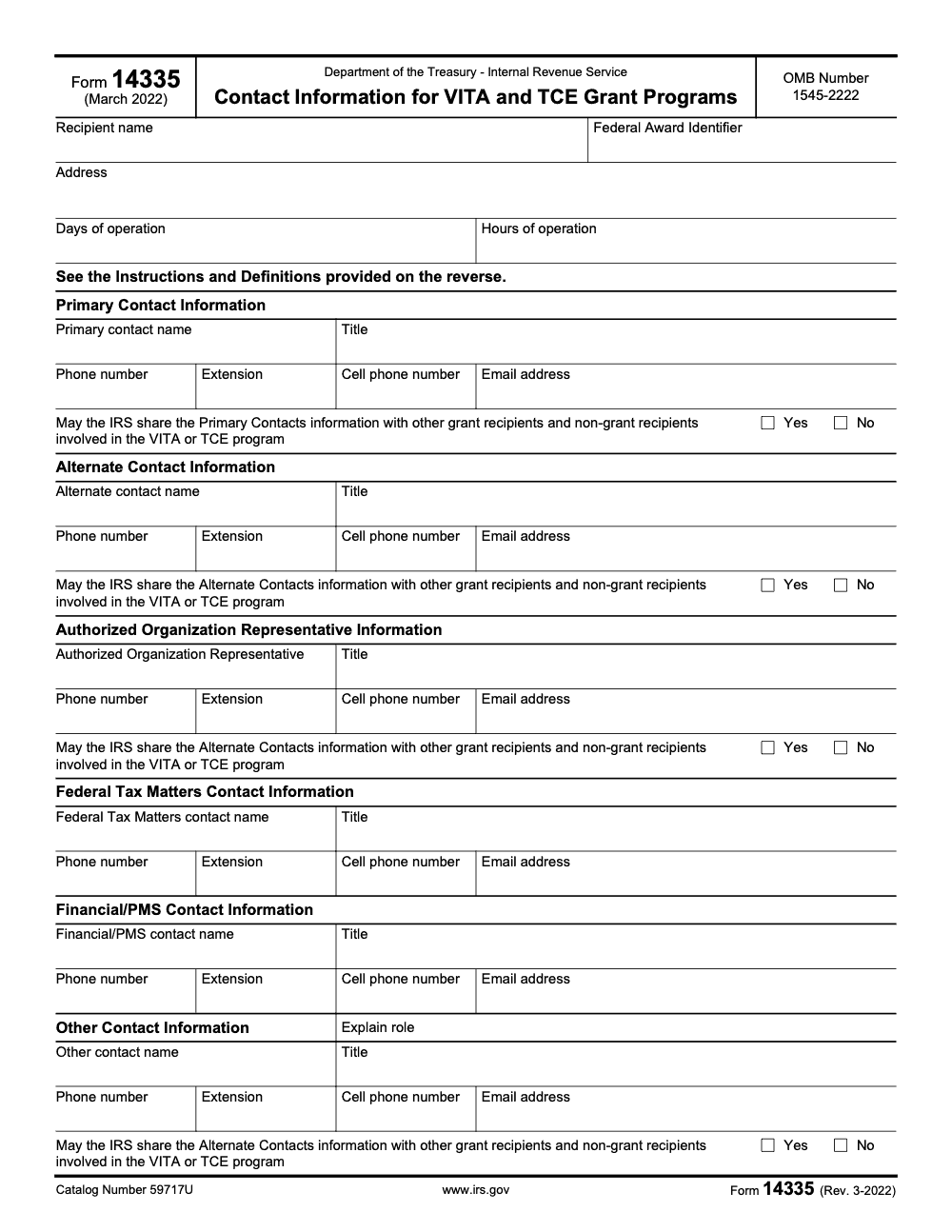
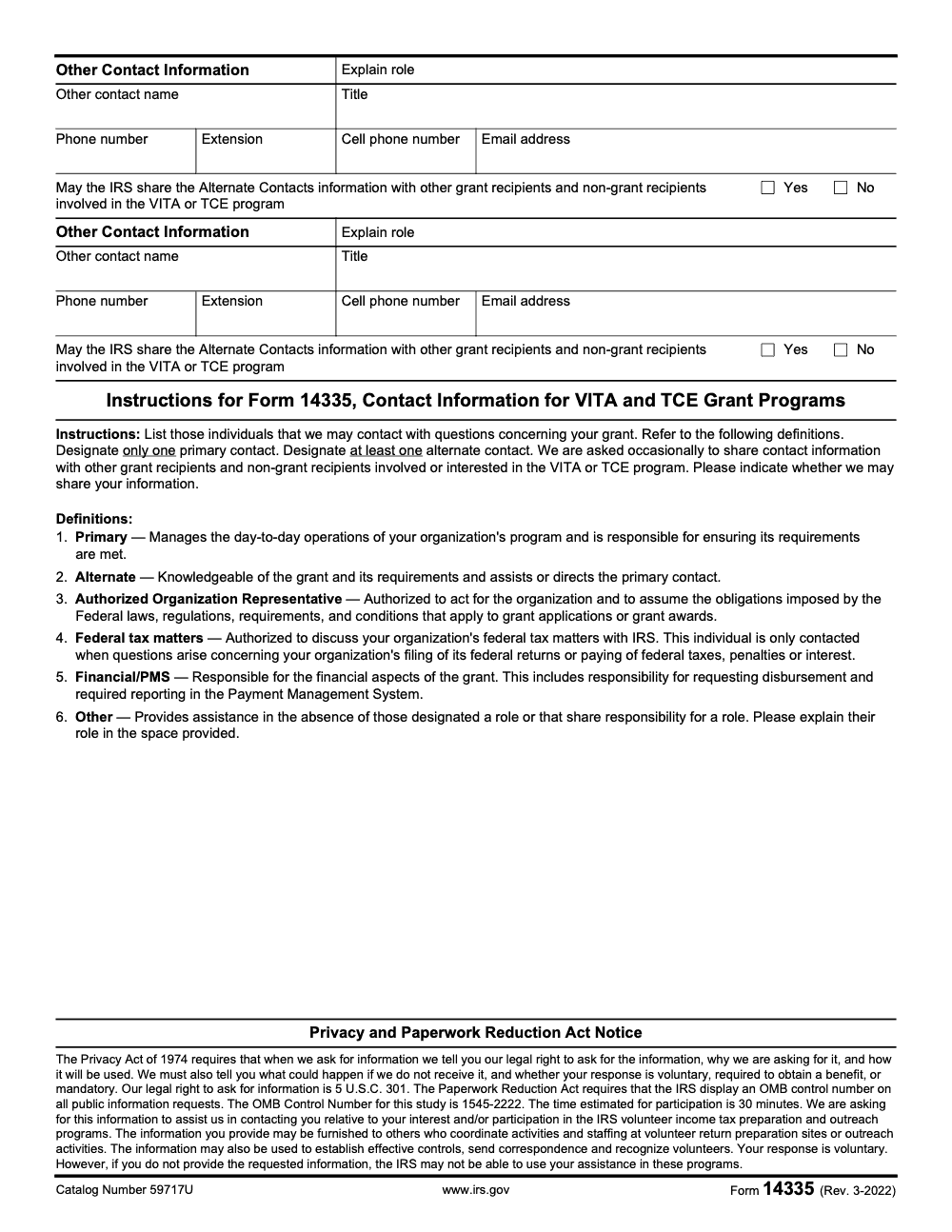
Form 14335 is the IRS contact-information form for VITA and TCE grant recipient organizations, not a tax return (per IRS Form 14335 instructions, Rev. 3-2022). It sits under OMB Control No. 1545-2222, carries Catalog Number 59717U, takes an estimated 30 minutes to complete, and requires exactly one Primary contact plus at least one Alternate across six defined contact roles. Browse our IRS forms library for related grant administration and reporting forms.
A program lead leaves over the summer, nobody updates the grant's contact record, and the IRS's fall training notice lands in a mailbox nobody checks. By the time someone forwards it, the deadline has slipped and the site is scrambling.
Form 14335 is the IRS contact-information form for VITA and TCE grant recipient organizations, not a tax return, and the IRS uses it to know who to reach about your grant. It sits under OMB Control No. 1545-2222 with Catalog Number 59717U, takes an estimated 30 minutes, and requires exactly one Primary contact plus at least one Alternate across six defined contact roles. The current instrument on record is the Rev. 3-2022 edition.
Key Takeaways
- Form 14335 is the IRS contact form for VITA and TCE grant programs, and the IRS explicitly lists it as the form used to notify the agency who to contact about your grant.
- It sits under OMB Control No. 1545-2222 with IC ID 252084, and the current instrument on record is f14335–2022-03-00.pdf, with updated filings recorded on June 30, 2025.
- Submission is required to obtain or retain benefits, and electronic filing is enabled. Treat confirmations like gold, store them with your grant files.
- Expect the IRS to use your entries to administer the program, send time sensitive instructions, and coordinate sites.
- As of December 18, 2025, IRS program pages and OMB filings confirm Form 14335’s role and availability. Always check the latest IRS page before you file.
What is Form 14335, and why it matters
Form 14335, Contact Information for the VITA and TCE Grant Program, is the IRS’s official record of who speaks for your grant. The IRS uses it to know who can answer questions about your award, federal tax matters tied to the grant, and financial information. In plain terms, if this record is wrong, your team can miss key emails, due dates, and even award actions.
The form is part of the umbrella information collection for the VITA and TCE programs under OMB Control No. 1545-2222. On OMB.report, you will see Form 14335 listed with IC ID 252084, the instrument file name f14335–2022-03-00.pdf, and flags showing that it is available and can be submitted electronically.
Bottom line, keep Form 14335 current, and you remove one of the most preventable risks in grant administration, being unreachable when it matters most.
Who must file, and when
If you hold an active VITA or TCE grant, you are expected to keep your contact record up to date. IRS program pages, including VITA recipient, TCE application, and single year or multiyear TCE recipient pages, all reference Form 14335 as part of standard operations for grantees. When leads change or you add sites, update the form promptly.
The collection is tagged “Required to obtain or retain benefits” under OMB 1545-2222. In practice, that means missing or outdated contact entries can slow processing or create avoidable compliance headaches.
IRS program timelines run on a May application window, October 1 performance period start, and September 30 end, with notices flowing throughout the year. Keeping Form 14335 current across that cycle protects you from misrouted communications.
What changed in 2025, and what stayed the same
On June 30, 2025, OMB posted a “Revision of a currently approved collection” for 1545-2222. Federal Register notices during June 2025 also confirm ongoing clearance for the VITA and TCE collection, listing Form 14335 among the covered instruments. These actions signal continued approval and potential refinements, not a wholesale replacement of the form (the Rev. 3-2022 version remains the current usable form for 2025 grant administration – no 2025-dated revision of the form itself has been issued).
You should still expect the same core purpose, identify organization contacts, program leads, and fiscal points of contact, with electronic capability intact. Where you may see tweaks is in clarity of instructions, clean electronic capture, and alignment with UEI requirements. Keep an eye on the IRS VITA and TCE program pages for the latest PDF link and any note about version changes.
Purpose and scope, what the IRS expects from Form 14335
The purpose of Form 14335 is simple and important. You tell the IRS exactly who to contact for your VITA or TCE grant so award notices, compliance questions, and time sensitive instructions reach the right person without delay (this is an administrative contact form, not a tax return – it reports no income, deductions, credits, or tax owed). Think of it as your official caller ID for the grant. When people move roles or you add sites, this record must change with you.
In my experience, most issues tied to missed deadlines are not technical, they are routing problems. The right message never reached the right person. Form 14335 fixes that.
Programs covered, VITA and TCE
You will use the form for both programs the IRS supports in this space.
- VITA focuses on low to moderate income taxpayers, people with disabilities, and limited English speakers.
- TCE serves taxpayers age 60 and older, often through senior centers and community partners.
On the form, align each contact to the right program role. That way the IRS can send program specific guidance without confusion. If you operate both programs, make sure the people listed are able to speak for each program’s day to day work and grant obligations.
Where this sits in federal clearance
Form 14335 is part of a cleared information collection. The umbrella control is OMB 1545-2222. The instrument on record is labeled f14335–2022-03-00.pdf. In 2025, the docket shows an approved revision. Treat that as a signal to verify your version each time you file. As of December 18, 2025, always check the most current IRS or OMB listing before you submit.
Information you need before you start
Gather your details first. A clean packet saves time and reduces rework.
Grant program identifiers
- Select VITA, TCE, or both.
- Use the official form title and number, Form 14335, Contact Information for VITA and TCE Grant Programs.
- Keep identifiers consistent across your entries, including OMB 1545-2222.
- Record the date you prepared the form and who prepared it, so you can answer audit questions later.
Organization contact details
- Legal name as it appears to the IRS.
- Mailing address used for official correspondence.
- Primary contact, name, title, direct phone, and email.
- Secondary contact with the same level of detail, to protect continuity.
- EIN and UEI. Validate formats before you submit.
- Any program level contacts, site coordinators, or fiscal officers the IRS expects to reach.
Practical tip, do a five minute “phone and inbox” test. Call each number and send a short email to confirm that messages route to the intended person. Archive those confirmations with the form copy.
Electronic submission options
Electronic submission mirrors the paper layout. Enter every required field, check the validation rules, and save a PDF copy of the final submission and the on screen confirmation. Store both in your grant records, along with the date, time, and the name of the person who sent it.
Eligibility and timing
If you hold an active VITA or TCE grant, Form 14335 applies. You must keep this contact record current to obtain or retain program benefits. When roles change mid year, update the form right away. Do not wait for the next reporting milestone. A good internal target is to submit updates within 10 business days of any leadership or coordinator change.
Compliance and accountability
Treat Form 14335 like a control point. It supports your internal policy, your award conditions, and your audit readiness.
- Required to obtain or retain benefits, so missing or stale data creates risk.
- Digital availability and electronic submission reduce lag, but only if you keep your own copy and confirmation numbers.
- Tie the form to a named owner on your team, usually the program lead with support from finance.
A quick compliance checklist
- Confirm the instrument version is current as of your filing date.
- Validate EIN, UEI, phone, and email formats.
- Include a secondary contact.
- Save the submission confirmation and any email receipts.
- Log the update in your grant change log.
Step by step, a clean filing workflow you can reuse
Here is a repeatable method you can train across your team. It keeps your records current and cuts review time.
- Prepare a one page intake. Capture legal name, EIN, UEI, address, and the names, titles, phones, and emails for primary and secondary contacts. If you run both VITA and TCE, list the leads for each.
- Pre validate the data.
- Match legal name to your IRS and SAM.gov records.
- Confirm email formats and direct dial extensions.
- Have someone else proof the numbers. A second set of eyes saves you from transposed digits.
- Complete Form 14335. Mirror the fields in the PDF, keep capitalization consistent, and use the same address format you use for banking and award letters.
- Review for completeness.
- Are both a primary and a secondary contact listed with full details
- Do the titles match your org chart
- Does each person understand what they will receive
- Submit electronically. Use the official channel, then capture two things, the on screen confirmation and the email receipt. Save both to your grant folder.
- Recordkeeping.
- Log the submission date, time, and sender.
- Paste the confirmation ID into your change log.
- Store the final PDF copy with a clear file name pattern, for example, Form14335_VITA_OrgName_2025-12-18.pdf.
- Notify stakeholders. Tell leadership and site coordinators that the contact record is updated, especially if the change affects who receives IRS notices.
Common pitfalls and how to avoid them
- Titles without authority. List people who can answer and sign. If your primary cannot approve actions, select someone else.
- Shared inboxes. These are fine for distribution, but assign a person who owns responses.
- Missing secondary contact. The IRS instructions require at least one alternate contact, so this entry is mandatory rather than optional. If your primary is out during filing season, you need a backup in the record.
- Stale UEI or address. Sync with your SAM.gov record and your banking profile.
- No confirmation saved. Screenshots and PDFs are your proof during audits.
What to do when contacts change mid year
Change happens, people move, and sites shift. Handle updates the same day you learn about them.
- Update the internal roster first, then file Form 14335.
- Send a short notice to your grant officer with the effective date and the new contact details.
- Ask for a short confirmation reply. File that with your form copy.
- Update your SAM.gov and any state registrations if the legal name or address changed.
Micro example
A TCE coordinator left on a Friday. The program lead sent a same day note to the grant officer, filed an updated Form 14335 on Monday, and copied the executive sponsor. The team archived the confirmation and the email reply. When a training notice went out that Thursday, it reached the new coordinator without a gap.
Data you must protect, privacy and security
Form 14335 contains personally identifiable information. Treat it with the same care you apply to taxpayer data.
- Restrict access based on role, keep an audit trail of who viewed or edited the file.
- Encrypt at rest and in transit.
- Store confirmations and PDFs in a secure shared space, not on local drives.
- Test your incident response plan. If you ever send contact data to the wrong person, you will want a clear playbook.
Practical safeguards
- Use a dedicated folder for grant forms, with read and write permissions set by role.
- Turn on version history.
- Keep a short data retention policy for drafts and working copies.
- Redact direct dial numbers in public meeting notes.
Recordkeeping that stands up in an audit
A tidy record makes audits routine. Build a light, repeatable structure.
Your change log template
- Date of change
- What changed, for example, new primary contact, updated phone, or new UEI
- Who approved the change
- Who submitted the form
- Confirmation ID and file path
- Notes, include any email thread with your grant officer
Keep this log in the same folder as your current year grant agreement and performance reports. Review it every quarter.
Version control that works in real life
- One final copy per filing, labeled with date.
- Archive superseded copies in an “Old” subfolder.
- Never overwrite the prior final. If you need to fix an error, save a new final with a new date and a short note in the file name.
Accessing the latest Form 14335
When you need the file, pull it from an official listing. Confirm the control number, the instrument label, and the most recent revision date. If your browser shows you a cached copy, refresh, or try a second browser. Before you submit, confirm that the date in your filename matches the date of your filing.
Quick pre filing checks
- Instrument name matches, Form 14335.
- Control number matches, 1545-2222.
- Version looks current for your filing date.
- Your team has reviewed instructions for any changes since the 2022 instrument.
- Your intake sheet matches the fields you see on screen.
How the data supports grant administration
The IRS uses your contact roster to route award notices, training, security reminders, and schedule changes. Up to date entries cut delays and reduce the need for escalations. During emergencies, this list becomes the fast path for urgent instructions. That is why timeliness and accuracy matter as much as completeness.
What happens downstream
- Faster response to questions about drawdowns and budget changes.
- Targeted communications for VITA versus TCE, so your teams do not sift through irrelevant messages.
- Cleaner reporting and fewer email bounces, which saves everyone time.
- Clear authority, since the people listed are the ones the IRS expects to hear from.
Format details that reduce rework
Small details prevent big headaches.
- Use direct dial numbers, not main lines.
- Use named inboxes when possible. If you must use a shared inbox, name a human who owns responses.
- Use the same address format everywhere.
- Keep titles consistent with your org chart.
- Avoid acronyms that are not common outside your organization.
Common form indicator, what it means for you
Form 14335 lives inside a common collection, which means fields and definitions are standardized for both VITA and TCE. You benefit from the uniform structure, because your data maps cleanly to the IRS systems and can be validated faster. The flip side, local tools that do not match these definitions can create hiccups, so adjust your intake template to mirror the form exactly.
Interoperability tips
- Mirror the exact field names in your internal checklist.
- Keep phone numbers in one format, such as 999 999 9999.
- Use a controlled list for titles, for example, Program Director, Site Coordinator, Fiscal Officer.
- If you integrate with a grant system, test the export to be sure fields line up.
Related filings and the 2025 revision
The docket shows a 2025 revision under the same control number. In practice, that means the collection stayed in place, with refinements, not a full reset. Your action item is to confirm the current version each time, follow any updated instructions, and keep your internal templates in sync. If you see a new field, add it to your intake sheet and train your team on the change.
What to expect from electronic updates
- Cleaner validation and fewer blank fields.
- Clearer instructions for who can sign and who should receive notices.
- Better alignment with UEI and other federal identifiers.
- Potential improvements for mobile use and digital signatures.
Where Accountably fits, only if you need help
If you run a busy accounting or community organization, keeping contact records current can slip during peak season. Our team at Accountably focuses on disciplined delivery. We set up simple SOPs, versioned templates, and change logs that help your staff update Form 14335 on time, every time. No fluff, just an operational rhythm that protects your grant communication flow. If you have your own process, great, keep it. If you need a lightweight framework, we can share a checklist you can use as is.
Conclusion, make your contact record a strength
You do not need a long project plan to keep Form 14335 under control. You need a short intake, a clear owner, and a habit of updating the record the moment your contacts change. Use the steps in this guide, keep your confirmations, and review your change log once a quarter. When the IRS needs you, they will reach the right person the first time, and your program will keep moving without a hiccup.
Common Mistakes We See Every Season
Most Form 14335 problems trace back to a handful of recurring patterns. Here are the ones my team flags every year, with the fixes we keep in our grantee playbook.
Reusable Checklists
These checklists are copy-paste ready for your VITA or TCE SOP folder. Drop them into your grant binder, assign owners, and run them on the cadence noted.
Pre-submission packet for Form 14335
- Confirm you are using Rev. 3-2022 of Form 14335, Catalog Number 59717U.
- Verify the umbrella collection is OMB Control No. 1545-2222.
- Capture organization legal name, address, Federal Award Identifier, and days and hours of operation.
- Designate exactly one Primary contact with name, title, direct phone, and email.
- Designate at least one Alternate contact with the same level of detail.
- Name the Authorized Organization Representative who legally binds the organization to grant obligations.
- Name the Federal Tax Matters contact, scoped to the organization's federal tax compliance only.
- Name the Financial/PMS contact with confirmed federal Payment Management System access.
- For each Other contact, fill in the written role explanation in the space provided.
- Mark Yes or No sharing consent separately for each contact on the form.
Mid-year contact change protocol
- Update the internal roster the same day you learn of a personnel change.
- Refile Form 14335 within 10 business days of the effective date.
- Send a short notice to your grant officer with the change date and reason.
- Save the email reply and the IRS confirmation with the form copy.
- Sync SAM.gov if the legal name, address, or AOR has changed.
- Re-confirm federal Payment Management System access if the Financial/PMS contact changed.
- Log the update in your grant change log with date, sender, and confirmation ID.
Annual contact-record audit
- Schedule the review for one month before the October 1 performance period start.
- Verify each named contact is still in role and reachable at the listed number and email.
- Confirm AOR signing authority remains valid under current bylaws or board action.
- Run the "phone and inbox" check, place a call and send a short email to each contact.
- Refresh sharing-consent Yes or No selections to reflect current organizational policy.
- Archive the prior year's confirmation PDF in your audit folder.
- File any updates via Form 14335, then log the review date in your change log.
Keep 14335 Season From Stalling
Grant administration runs on a different clock than tax season. The VITA and TCE cycle opens with a May application window, an October 1 performance period start, and a September 30 close, and IRS communications flow across every month in between. When Form 14335 contacts go stale during that cycle, training notices land in dead inboxes, drawdown questions sit unanswered, and site coordinators end up reading second-hand summaries instead of the source guidance. The IRS estimates only 30 minutes of completion time per filing (per IRS Form 14335 instructions, Rev. 3-2022), but the cost of one missed notice can stretch into weeks of cleanup.
The fix is not more effort, it is a tighter rhythm. Pick a single owner, define the trigger events that force a refile, and standardize the packet so the owner can move in under an hour. The form then keeps pace with the program instead of trailing it.
- Assign one named owner for Form 14335, usually the program lead, with finance review on the Financial/PMS line.
- Define the trigger list, any change to Primary, Alternate, AOR, Federal Tax Matters, Financial/PMS, or an Other contact forces a refile within 10 business days.
- Pre-fill the umbrella identifiers once per year, OMB Control No. 1545-2222 and Catalog Number 59717U, plus the current Federal Award Identifier, so each refile only updates the contact roster.
- Run the per-contact Yes or No sharing-consent decision through your policy review, not as a default click, because consent is asked separately for each person on the form.
- Store the IRS confirmation, the email reply from your grant officer, and the prior PDF version in one grant-records folder, with a quarterly review on the calendar.
Accountably builds these light grant-administration rhythms inside our broader tax and compliance delivery, so the form, the change log, and the confirmation trail stay in sync with the rest of the back office. The result is fewer routing surprises, faster IRS responses, and audit-ready records when the year-end review comes around.
FAQs
Have the program lead complete it. Ask the finance lead to verify identifiers and addresses. Have an executive level designee sign if your policy requires it. Keep delegation letters on file.
File the update immediately. Send a short notice to your grant officer, note the effective date, and save the reply. Update SAM.gov if legal name or address changed. Log the change and store the confirmation.
If attachments are permitted, use clear labels, such as Site Contacts 2025 Quarter 1. Follow any file type and size limits, and avoid sensitive data in attachments unless encrypted.
Expect an on screen confirmation and an email receipt. Save both, paste the confirmation ID into your change log, and store the PDF copy with your standard file name pattern.
Summarize this article with AI
About this guide
Accountably helps US CPA, EA, and accounting firms hire trained accountants and tax preparers in India.
About us Reviewed byJugal Thacker, CPAFounder and CEO at Accountably
A US-licensed CPA with 7+ years inside US firms – PwC, a real-estate tax practice, then a full-service firm, rising from reviewer to manager to advisory. This article was reviewed against current IRS guidance for the 2025 tax year and updated for filers preparing late returns, amendments, and 2026 estimates.
View profile →How we research, review, and update this guide
Every Accountably guide is researched against primary IRS sources, reviewed by a U.S. CPA, and refreshed as guidance evolves. Read our Editorial Guidelines to see how we source, fact-check, and update our content.




