
Summarize this article with AI
In Brief
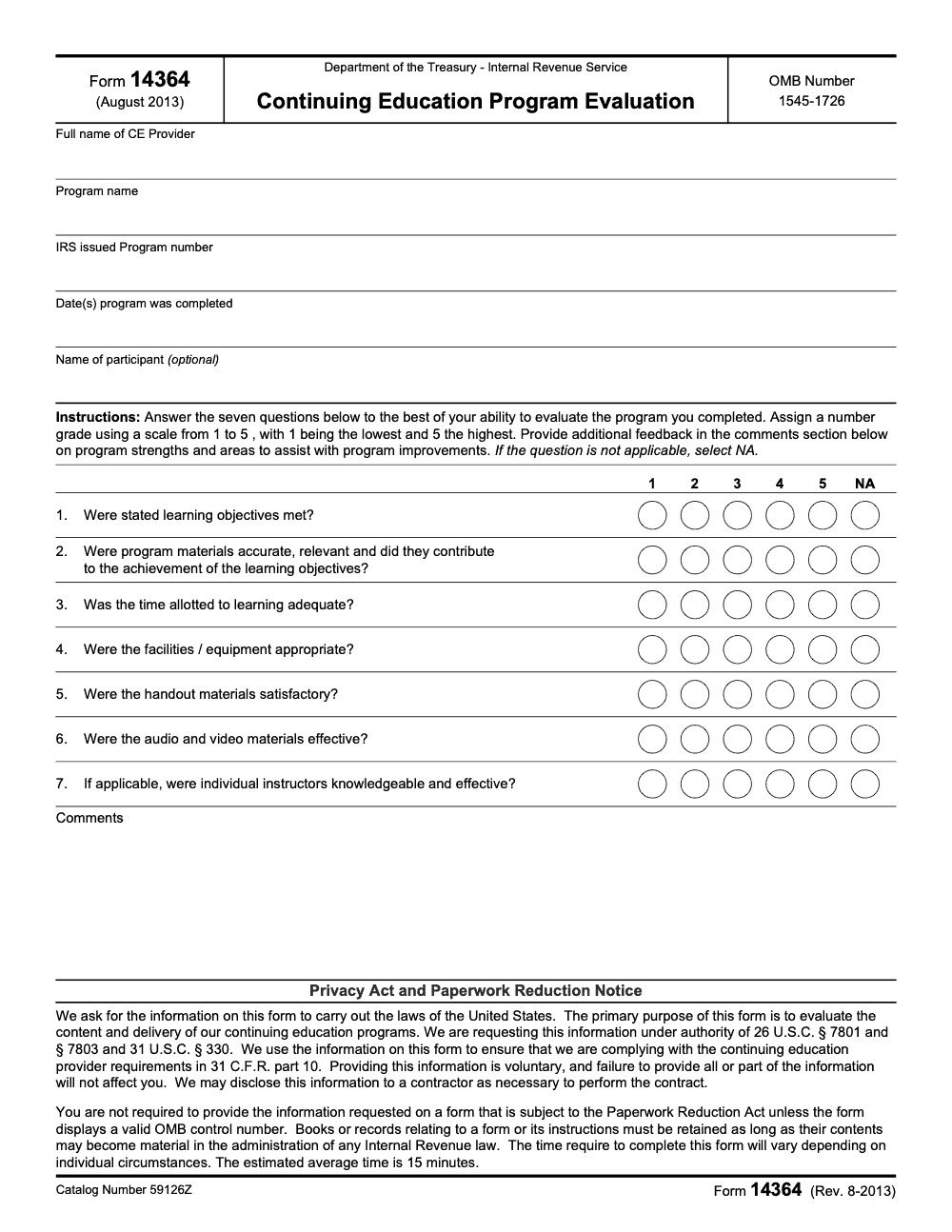
Form 14364 is the IRS Continuing Education Program Evaluation (Rev. August 2013, OMB control 1545-1726, catalog 59126Z) – a voluntary one-page form where participants grade a completed CE program against seven dimensions. The scale runs 1 (lowest) to 5 (highest), with an NA option for items that do not apply and an optional participant-name field. The IRS estimates an average of 15 minutes to complete, per the Paperwork Reduction Act notice on the form. Need help folding CE documentation into firm SOPs? See our taxation services.
The first time one of my preparers brought me a freshly printed Form 14364 after a long CE webinar, she asked whether the IRS would chase her if she skipped the rating boxes. People see IRS in the masthead, assume it is a filing, and freeze.
It is not a filing. Form 14364 is a one-page Continuing Education Program Evaluation, Rev. August 2013, where participants grade a completed CE program against seven dimensions on a scale that runs 1 at the lowest to 5 at the highest, with an NA option for items that do not apply. It goes back to the CE provider as feedback, not into your return packet, and the IRS estimates it takes about 15 minutes.
Key Takeaways
- Form 14364 is a voluntary CE evaluation form, officially titled “Continuing Education Program Evaluation” (Rev. August 2013).
- You don’t file it with the IRS. It’s designed to be shared with the CE provider as participant feedback.
- The IRS requires approved CE providers to offer a voluntary evaluation form to attendees as part of post-approval obligations.
- IRS-approved CE providers must also maintain attendee records for four years and report attendance to the IRS (separate from Form 14364).
- If you treat CE documentation like part of your delivery system (same mindset you use for workpapers), you save yourself stress later.
What Is IRS Form 14364?
IRS Form 14364 is a one-page evaluation form used to rate a continuing education (CE) program you completed (the participant evaluates the provider’s program – it is not the IRS evaluating you). The form is tied to an IRS information collection (OMB control 1545-1726 – the Paperwork Reduction Act marker that authorizes the collection, not a decorative form ID) and is explicitly listed as voluntary.
In plain English, this is a feedback form.
You typically fill it out after a CE course to score things like:
- Program quality
- Content accuracy and usefulness
- Instructor effectiveness
- Materials and delivery
Important reality check (so you don’t overthink it)
You are not “submitting something to the IRS” when you fill this out.
The OMB listing shows it’s available electronically as fillable/printable, but not submitted electronically to the government.
Think of Form 14364 like a standardized course review, not a compliance filing.
What Form 14364 Is For (and What It’s Not)
Let’s draw a clean line, because this is where people get tripped up.
It is for
- Giving structured feedback on a specific CE program
- Helping the provider spot weak spots (pacing, examples, clarity, outdated slides)
- Making your feedback comparable across classes and instructors
It’s not for
- Claiming CE credit with the IRS
- Proving your CE completion by itself
- Replacing the provider’s official attendance reporting
If you’re a CE provider, the IRS lays out separate post-approval obligations, including reporting attendance and maintaining records.
Who Should Use IRS Form 14364?
If you’re a CE participant (EA, CPA, preparer, tax staff)
Use Form 14364 when:
- You want to give feedback that’s more useful than “Great class!”
- The program was excellent and you want it to stay that way
- The program was rough and you want the provider to fix it
- You took multiple CE courses and want a simple repeatable format
It’s especially worth doing when a course impacts your real day-to-day work. For example, a webinar on multi-state nexus rules that was too vague, or an ethics course that spent 45 minutes reading slides out loud.
If you’re a CE provider
The IRS expects approved CE providers to provide a voluntary evaluation form to attendees.
That doesn’t mean every provider must use Form 14364 exactly as-is, but it does mean providers need an evaluation process that meets the expectation.
Where to Get (and Download) Form 14364
If you want a safe starting point, the OMB information collection page references the form as a fillable/printable PDF (labeled “Continuing Education Program Evaluation” and associated with “2013 14364.pdf”).
Practical tip: if you download the form from any third-party forms library, double-check the revision date matches Rev. August 2013 (still the operative version in 2025 – the IRS has not re-issued the form because it is administrative under Circular 230, not tied to annual tax-law changes) and the title matches “Continuing Education Program Evaluation.”
A quick note for accounting firm operators (why this tiny form matters)
On paper, this is just a course evaluation. In reality, it’s another example of something we see inside accounting firms all the time: delivery breaks when documentation breaks.
That’s why Accountably’s broader philosophy, across offshore delivery and operations work, is simple: capacity without structure turns into rework. The same mindset applies here. When your CE documentation is clean, your compliance life is easier later.
How to Fill Out IRS Form 14364 (Step by Step)
This form is one page, but you’ll fill it out faster, and with fewer mistakes, if you do two things first:
- Pull up the course certificate or course confirmation email
- Keep the agenda or course description handy
That way you’re not guessing on titles, dates, or provider names.
Step 1: Enter the program details carefully
Most CE providers offer a dozen courses with similar names. Don’t assume you’ll remember which one this was two weeks from now.
Fill in (based on what the course materials show):
- Program title
- Date(s) completed
- Location or format (live, webinar, self-study, etc.)
- Provider name
Tip: Match the title exactly to the certificate. That’s how providers connect your evaluation to the right program file.
Step 2: Rate the course like you’d want your workpapers reviewed
This is where people either overdo it (“Everything is 5/5!”) or get emotional (“Worst course ever!”) without specifics.
Instead, treat it like a clean review note:
- Pick your rating (the form uses a 1 to 5 scale, with 1 being the lowest and 5 the highest – plus an NA bubble for questions that don’t apply; don’t leave a question blank)
- Add one sentence that explains why
- Include one suggestion the provider can actually use
Good comment examples:
- “Examples were strong, but the SALT section needs a 2025 update and one full case study.”
- “Instructor was knowledgeable, but Q&A was rushed, we only got 8 minutes.”
Step 3: Add participant information only as needed
Some versions of evaluation forms ask for identifying details. On Form 14364 itself, the participant name field is explicitly marked optional, so you can submit the evaluation anonymously if you prefer. Share what the form requests, but keep your privacy hat on.
If you include any personally identifiable information, store your copy securely and avoid sending it through unsecured channels.
Step 4: Sign and date it
It’s a small step, but it signals the evaluation was completed promptly and intentionally.
When to Submit Form 14364 (and who it goes to)
You’ll get the best results if you submit it within 24 to 72 hours of finishing the course, while details are fresh.
Here’s the part that matters most:
- You do not submit Form 14364 to the IRS.
- You give it to the CE provider (the sponsor, host, or training organization).
If the provider has their own internal survey tool, they may prefer that. Still, Form 14364 is a useful backup when you want a consistent paper trail.
If you’re unsure where to send it, send it to the CE admin contact listed on the certificate email or course page.
Recordkeeping: How long should you keep a copy?
There isn’t a universal rule that says every attendee must keep Form 14364 for X years. But keeping a copy is smart, especially if your credentialing body ever questions what you took, and when.
For providers, the IRS is clearer. Approved CE providers must maintain attendee records for four years and report attendance.
A simple retention habit that actually works
Create a “CE” folder and use a naming format like:
- 2026-01 CE Course Name Provider.pdf
- 2026-01 Form 14364 Course Name.pdf
That’s it. You don’t need a fancy system, you just need consistency.
Form 14364 vs. Form 8498 (and other CE paperwork)
This is where people mix things up, especially newer firm admins.
Form 14364 is for participants evaluating a course. Form 8498 is for providers applying for approval and provider/program numbers, or renewing provider status.
Quick comparison table
| Item | Who uses it | What it does | Filed with IRS? |
| Form 14364 | Course attendees | Evaluates a CE program | No |
| Form 8498 | CE providers | Apply/renew IRS CE provider status and request numbers | Yes (provider process) |
Provider fees (verified, not guessed)
The IRS CE provider pages list an annual vendor fee currently $650 for CE providers, and they also explain late fees if you miss the renewal window.
(That fee is for providers, not for attendees filling out Form 14364.)
How CE Providers Use Your Evaluation (what actually happens)
If you’re wondering “Does anyone even read these?”, the answer is yes, when the provider is serious.
The IRS also expects providers to make evaluation available to attendees as part of post-approval obligations.
Providers commonly use evaluations to:
- Fix unclear modules
- Update examples and slides
- Coach instructors who are strong technically but weak at teaching
- Document that they collected feedback
And at a practical level, it helps providers defend their quality if they’re ever questioned about course standards.
Common Form 14364 Mistakes (and how to avoid them)
Even though the form is simple, these mistakes pop up constantly.
Mistake 1: Treating it like an IRS filing
Form 14364 is voluntary and is not an IRS submission. When people treat it like a filing, they either procrastinate or get anxious about “doing it wrong.”
Fix: Fill it out like feedback, then send it to the provider.
Mistake 2: Being vague (“Great class!”)
“Great class” feels nice, but it doesn’t improve anything.
Fix: Add one detail. Mention the module, the pacing, the examples, or what you wish they included.
Mistake 3: Using the wrong course title or date
Providers run lots of programs. If your course details don’t match, your evaluation might not attach to the right course record.
Fix: Copy the title and completion date from your certificate or confirmation email.
Mistake 4: Not keeping a copy
You might never need it. But if you do, you’ll want it quickly.
Fix: Save it to the same folder where you store certificates.
Mistake 5: Sending sensitive info casually
If you include identifying details, don’t toss it into a random email thread with client work.
Fix: Use the provider’s preferred submission method, and store your copy in a secure drive with limited access.
Where to Get Help With IRS Form 14364
If you’re stuck, here are the fastest options:
- Ask the CE provider first. They can tell you where they want evaluations sent and what they do with them.
- Check the IRS CE provider guidance (if you’re a provider). The IRS spells out post-approval obligations, including the requirement to provide a voluntary evaluation form, and recordkeeping expectations.
- If you’re building internal firm processes, treat CE documentation like you treat production work, clear naming, consistent storage, and accountability. That mindset is a big part of how Accountably thinks about operational discipline in accounting firms, because small documentation gaps turn into big review headaches later.
Common Mistakes We See Every Season
Form 14364 is short, but the same mistakes surface across firms and individual preparers every CE cycle. Each one is fixable in under a minute once you build the habit.
Reusable Checklists
These checklists are copy-paste ready for firm SOPs and personal CE workflows. Each item is a single action a preparer or trainer can run through without leaving the document.
Participant fill-in checklist
- Confirm the Rev. 8-2013 edition and OMB control number 1545-1726 are printed on the form.
- Enter the full legal name of the CE provider in the first identification field.
- Enter the program name and the IRS-issued CE program number.
- Enter the date or dates the program was completed.
- Decide on the participant-name field – leave it blank if anonymous feedback matters.
- Score each of the seven questions on the 1 to 5 scale, with 5 as the highest grade.
- Mark NA on any question that does not apply, including question 7 for self-study formats with no individual instructor.
- Write one program strength and one suggestion in the comments section.
- Return the completed form through the CE provider’s preferred submission method.
CE provider intake checklist
- Distribute Form 14364 at the close of the program, not afterwards, so feedback reflects the live session.
- Keep submission voluntary – per the Privacy Act notice on the form, you cannot condition CE credit on submission.
- Aggregate scored responses for each of the seven question topics across participants.
- Flag any question 1 (learning objectives met) or question 2 (program materials) average below 3 for revision.
- Review free-text comments for recurring themes before the next program cycle.
- Note that the Privacy Act notice authorizes routine disclosure of responses to IRS contractors administering CE program operations under 31 C.F.R. part 10.
- Retain records under the Paperwork Reduction Act standard so long as their contents may become material in administering Internal Revenue law.
Firm-level CE documentation checklist
- Keep a copy of every completed Form 14364 in the preparer’s CE folder.
- Pair each Form 14364 copy with the CE certificate of completion for that program.
- Log the IRS-issued program number alongside the certificate for quick retrieval at renewal.
- Tag the storage location with the same naming convention used for production workpapers.
- Restrict access to participant-identifying data to authorized staff only.
- Review CE folders at year-end against each preparer’s required CE hours.
Keep 14364 Season From Stalling
Form 14364 is not a tax-season filing, but CE documentation has its own cycle, and firms with multiple enrolled preparers feel the squeeze every renewal year. The stall point is the documentation pipeline that grows alongside the roster: IRS-issued program numbers, completed evaluations, certificates, and routing rules. Each piece is small. Lose one, and you spend the week before a renewal deadline reconstructing a paper trail instead of doing production work.
The fix is not more CE tracking software. It is treating CE documentation with the same workflow discipline used for production work. The pieces are administrative. The compounding cost of missing one piece across a roster of preparers is not.
- Standardize where the completed Form 14364 lives, in the same folder structure as the CE certificate, indexed by the IRS-issued program number captured on the form.
- Capture the five identification fields (CE provider name, program name, IRS program number, completion dates, participant name when given) in your CE tracker the same day the program ends.
- Build a routing rule: completed evaluations go to the provider through the provider’s preferred channel, copies stay in the preparer’s CE folder, nothing routes to the IRS as a filing.
- Pre-mark question 7 (instructor knowledge and effectiveness) as NA on intake forms when the program format is self-study, so preparers do not score an instructor that did not exist.
- Treat the 15-minute IRS completion estimate as an average, not a cap, and budget the same window in the post-program close so the form does not slip a day.
This is the same delivery discipline we bring to client production work, with documented SOPs, standardized naming, and review checkpoints that catch gaps before they cost anyone time. See how Accountably runs U.S. tax delivery if the firm wants the same structure layered on top of its production workflow.
FAQs
It’s used to evaluate a continuing education program you completed. It captures structured ratings and comments so the CE provider can improve course quality. It’s also listed as a voluntary information collection.
No. Form 14364 is not something you file with the IRS, it’s meant to be shared with the course provider as feedback. The OMB listing also indicates it’s not submitted electronically to the government.
For attendees, it’s optional, but the provider may encourage it as part of their course process. Separately, the IRS expects approved providers to offer a voluntary evaluation form and to meet other obligations like attendance reporting.
Providers report attendance through their IRS CE provider account and must maintain participant records, including PTIN details, for four years.
You apply through the IRS CE provider system or submit Form 8498, and pay an annual vendor fee that the IRS currently lists as $650. If you’re pursuing provider status, confirm the latest process on the IRS CE provider pages before you submit anything.
Other forms this guide names
- Form 8498: IRS CE Provider Application Guide 2025
Summarize this article with AI
About this guide
Accountably helps US CPA, EA, and accounting firms hire trained accountants and tax preparers in India.
About us Reviewed byJugal Thacker, CPAFounder and CEO at Accountably
A US-licensed CPA with 7+ years inside US firms – PwC, a real-estate tax practice, then a full-service firm, rising from reviewer to manager to advisory. This article was reviewed against current IRS guidance for the 2025 tax year and updated for filers preparing late returns, amendments, and 2026 estimates.
View profile →How we research, review, and update this guide
Every Accountably guide is researched against primary IRS sources, reviewed by a U.S. CPA, and refreshed as guidance evolves. Read our Editorial Guidelines to see how we source, fact-check, and update our content.




